Fed up with your Cox Business phone bill, or tired of dealing with their contract terms? You’re not alone.
The best Cox Business phone alternatives match your team’s needs without locking you into a fixed-service contract. To give you the best options, we compared platforms based on reviews, value, and performance. Then we shortlisted the top 10 Cox Business phone alternatives.
Here are the top competitors:
- Quo is the best Cox Business phone alternative for small and growing businesses.
- RingCentral is the best Cox Business phone alternative for teams that still rely on desk phones or use Cox Business Connect.
- Nextiva is the best Cox Business phone alternative for managing customer conversations on text, chat, and social media.
- Dialpad is the best Cox Business phone alternative for teams that want AI-powered sales call coaching tools.
In this article, you can weigh the pros and cons of each Cox Business alternative that made our list. You’ll learn why businesses switch from Cox Business in the first place. Finally, you’ll see what to prioritize when choosing an alternative.
10 Best Cox Business phone alternatives
Many Cox Business phone alternatives offer similar features at lower price points and with higher user ratings.
Below is a chart comparing each provider, plus a detailed comparison of their prices, features, and limitations.
| Tool | Best for | Starting price | G2 rating |
|---|---|---|---|
| Quo | Small and growing businesses wanting unlimited calls, texts, and a full business phone system | $15 per user per month | 4.7/5 with 3,400+ reviews |
| RingCentral | Teams that rely on desk phones, or Cox Business Connect customers wanting to switch to RingCentral directly | $20 per user per month | 4.3/5 with 2,900+ reviews |
| Nextiva | Teams managing customer conversations across voice, SMS, chat, and social channels | $15 per user per month | 4.5/5 with 3,600+ reviews |
| eVoice | Very small businesses that want a simple virtual phone system with an optional live receptionist add-on | $14 per month | Limited G2 data available |
| Grasshopper | Solo operators and very small teams that want multi-digit phone number extensions | $14 per month | 3.9/5 with 160+ reviews |
| 8×8 | Global, high-volume contact centers needing unlimited international calling | Contact for pricing | 4.2/5 with 900+ reviews |
| Dialpad | Teams that want videoconferencing | $15 per user per month | 4.4/5 with 4,200+ reviews |
| Ooma | Businesses that need features like fax and overhead paging | $19.95 per user per month | 4.5/5 with 130+ reviews |
| GoTo Connect | Microsoft 365 users who want drag-and-drop call flows and international calling | Contact for pricing | 4.4/5 with 1,400+ reviews |
| Zoom Phone | Existing Zoom Workplace users who want to add calling without switching platforms | $10.50 per user per month | 4.6/5 with 2,600+ reviews |
Pricing reflects publicly listed rates as of the time of writing. It’s a good idea to confirm current pricing directly with each provider.
1. Quo: Best Cox Business Phone alternative for small and growing businesses

Pros
- Unlimited calling and texting in the US and Canada on every plan
- Shared numbers and inboxes
- AI voice agent Sona answers calls 24/7
- On-demand and automatic call recording with unlimited storage
- Texting productivity features like snippets, auto-replies, and scheduled texts
- Native and third-party integrations
- Support for desktop, browser, and mobile apps
Cons
- Can’t verify accounts through two-factor authentication*
*Nearly all virtual phone numbers share this problem. For safety reasons, companies like Facebook, Uber, and Google rarely let you authenticate accounts through a virtual phone number.
Quo is a business phone system built for small and growing service businesses. Every plan comes with unlimited calling and texting in the US and Canada. Plus, it includes one local US or Canadian or toll-free number per user.
You can also use your own internet with Quo, which can lower your costs. In contrast, if you want to use Cox’s VoIP features, you have to combine it with its internet offering. Prices with Cox may start at $90 a month for a 12-month contract, plus $75 a month for desk phone compatibility.
Don’t want to get locked into multi-year contracts? Quo doesn’t have 12-month minimums. You choose monthly or annual billing based on your needs.
Quo also doesn’t limit US and Canadian businesses to any singular location. If you want to expand to a different country or state, you can, without overhauling your entire setup. Cox, on the other hand, is only supported in 18 states. It offers the most coverage in Rhode Island, Nevada, and Arizona.
While Cox can help with calling and texting, Quo lets you work together as a team and scale your reach without losing the personal touch. For example:
- Your team can split responsibility for incoming calls and texts without a separate collaboration tool. Shared numbers and inboxes are available on every plan.

- Sona, Quo’s AI voice agent, can answer the phone for you 24/7. It captures lead details, answers FAQs, transfers calls to teammates, and texts callers. Cox plans don’t offer this at all.

- You can connect directly with tools you already use, like HubSpot, Jobber, and Pipedrive. This lets you automatically log calls, texts, voicemails, and AI summaries to the right contact record. That way, your team can get context before every follow-up, without manual entry or switching between tools.
One user described Quo as a tool that’s “completely transformed” their customer communication:
“Quo has completely transformed the way we manage communication in our real estate business. The interface is clean, intuitive, and packed with the features we actually need — separate numbers for team members, auto-replies, call routing, and seamless integrations with tools like Slack and HubSpot.” — G2
Quo is rated #1 in customer satisfaction on G2 and trusted by more than 90,000 businesses. We may be biased, but it’s the best Cox alternative for small businesses that want to build better customer relationships.
See for yourself why thousands of growing teams use Quo. Sign up for a seven-day free trial.
Quo pricing
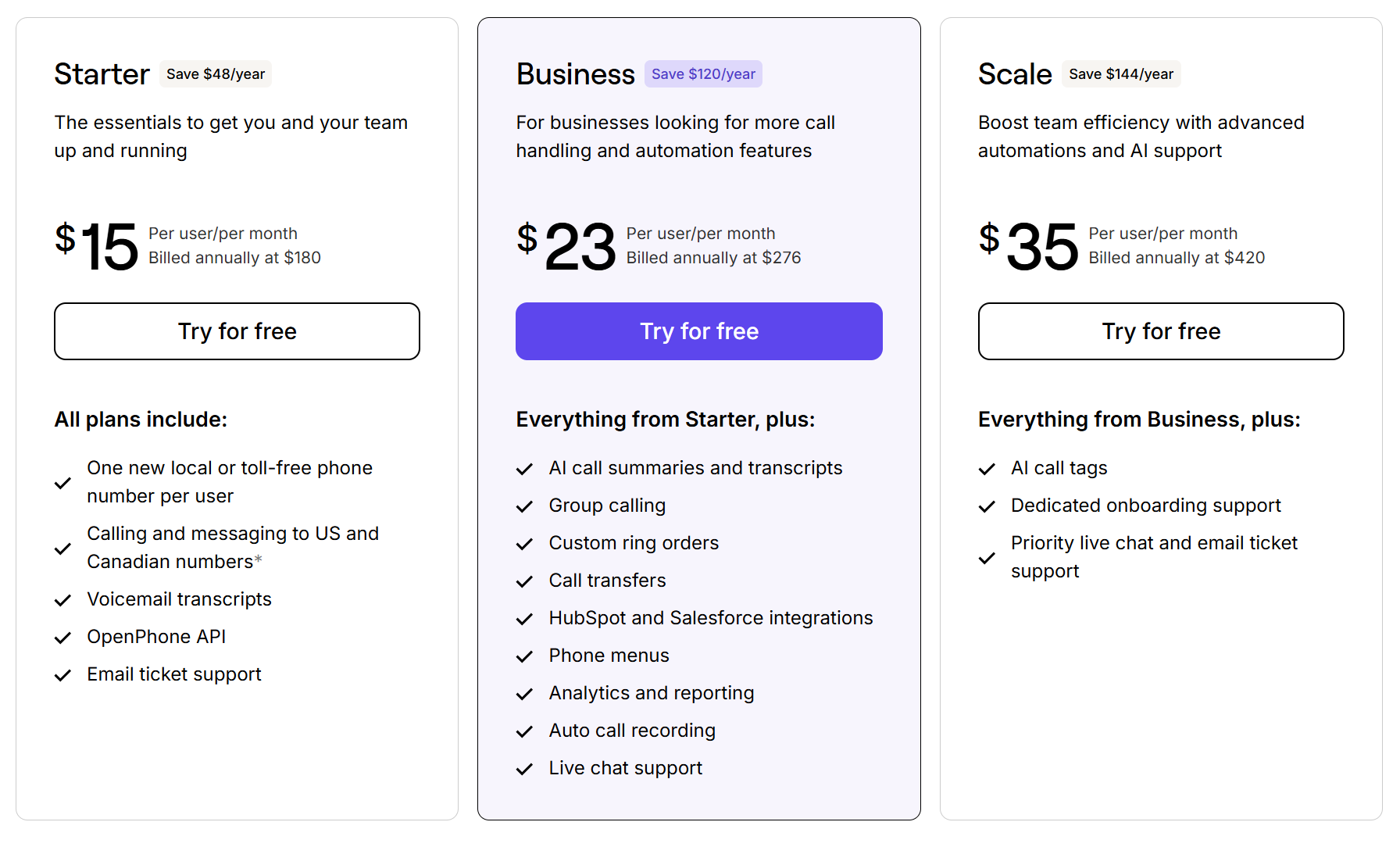
Quo’s three pricing plans are listed on our website, so you’ll always know the price before getting started:
- Starter: $15 per user per month for unlimited calls and texts, voicemail-to-text transcription, on-demand call recording, and more
- Business: $23 per user per month for phone menus, CRM integrations like Salesforce and HubSpot, automatic call recording, call transfers, call analytics, AI summaries and transcripts, and more
- Scale: $35 per user per month for AI call tags, inbound phone support, dedicated onboarding, and priority chat and email support
2. RingCentral: Best for desk phone rentals

Pros
- Desk phone support on every plan
- Toll-free number support
- Unified communication tools, including video conferencing and webinars
Cons
- Desk phone rentals require multi-year contracts
- 25 SMS messages per user per month on the base plan
- Call recordings are deleted after 90 days
- Caps on toll-free minutes
RingCentral is an older business phone system that works on smartphones, computers, and desk phones. This can be useful if you already own physical phone equipment and are still deadset on using it.
RingCentral comes with modern features like video conferencing, webinars, and conversational AI. It’s also partnered with Cox Communications to offer VoIP features. As of 2025, Cox Business Connect is powered by RingCentral’s flagship RingEX™.
RingCentral is a decent option for your team if:
- If you want desk phones and unified communications, but don’t want to commit to Cox’s contract terms
- You already have RingCentral through Cox, but are done with Cox’s contract terms and want to work with RingCentral directly
There are limitations, though:
- You get just 25 messages per user per month on the base plan and only 200 messages on the most expensive plan.
- Want to text customers as a team? Prepare to pay an extra $25 per user per month.
- You can’t keep call recordings longer than 90 days, no matter how much you upgrade.
RingCentral lets you choose from month-to-month or annual plans. But desk phone rentals are only available if you purchase a multi-year contract. Keep in mind these contract minimums also come with early termination fees, RingCentral doesn’t list in its terms of service.
RingCentral pricing

There are technically four tiers of RingCentral’s pricing:
- Core: $20 per user per month for unlimited domestic calling, 25 texts per user, and 100 pooled toll-free minutes
- Advanced: $25 per user per month for auto call recording, app integrations like Salesforce and Zendesk, 100 texts per user, and 1,000 pooled toll-free minutes
- Ultra: $35 per user per month for unlimited file sharing for recordings, HD video whiteboards and messaging, 200 texts per user, and 10,000 pooled toll-free minutes
- Customer Engagement Bundle: Custom pricing for features like shared texting, compliance, and company reply templates
There’s also a Business SMS Booster and a Call Queues Booster add-on that give you some features from the Customer Engagement Bundle. You’ll get shared inboxes, texts, compliance tools, and more for another $25 per month.
3. Nextiva: Best for omnichannel communications

Pros
- Routes voice, chat, SMS, and social channels like WhatsApp into one inbox
- Desktop and mobile apps
Cons
- SMS is capped at 100 messages per user per month on the base plan
- Call recording requires an upgrade
- Toll-free numbers and minutes require an upgrade
Nextiva helps teams handle customer conversations across more than just phone calls and texts. Unlike Cox Business Phone, you can chat, video call, and message customers via apps like WhatsApp and Microsoft Teams.
You can pay month-to-month or annually with Nextiva. Just know the minimum-term agreement you sign may be longer than 12 months to be eligible for their annual pricing.
Another limitation of Nextiva: there’s a cap on texts you can send per month. You only get 100 messages per user per month on the base plan. Anything beyond that will incur overage fees. Even WhatsApp messages have overage fees, at the hefty rate of $0.15 per segment.
Even apart from the SMS limits, Nextiva’s small business plans are pretty lackluster. You’re missing key features like toll-free numbers and call recording. You’ll end up paying more for features that are standard on several other Cox Business Phone alternatives.
Nextiva pricing

Here’s what to expect from Nextiva pricing plans:
- Core: $15 per user per month for voice calls, up to 100 text messages per user, simple IVR, and voicemail transcriptions
- Engage: $25 per user per month for one toll-free number and 2,000 toll-free minutes, 500 text messages per user, Microsoft Teams integration, and video meeting recordings
- Scale: $75 per user per month for unlimited texting, up to 10,000 toll-free minutes, the inbound sales and service call center, priority and skills-based routing, automatic call distribution callback, and access to the supervisor dashboard
4. eVoice: Best for an optional live receptionist add-on

Pros
- Live receptionist is available as an add-on
- Auto attendant and virtual faxing are included
- Simple pricing structure
Cons
- Unlimited messaging in the US and Canada requires an upgrade
- Some users find the interface dated
- Live receptionist only covers business hours
- Call recording and voicemail transcription are add-ons
eVoice is an older virtual phone number app for very small businesses. It offers two plans with the same core features: unlimited calling in the US and Canada, advanced call handling, and extensions. Upgrading unlocks one additional feature — unlimited messaging in the US and Canada.
Contract-wise, eVoice is more flexible than Cox. Both plans are available month-to-month with a 30-day money-back guarantee. There’s also no long-term minimum commitment or early termination fee. But there is an activation fee, which isn’t listed online and is nonrefundable.
Additionally, you can hire a human receptionist with eVoice’s live receptionist add-on. This gives you a receptionist who can answer calls, book appointments, and perform administrative tasks to save you time. But this only covers calls that come in during business hours, so after-hours and weekend calls might still go to voicemail.
Keep in mind this could cost you thousands. Our analysis of 16.7 million missed calls found that 59% to 79% of calls go completely unreturned, with callback rates varying by industry.
Since eVoice’s live receptionist only covers business hours, any after-hours call has a real chance of falling into that gap. An AI voice assistant can pick up around the clock and handle the call in the moment rather than leaving it to a callback that may never come.
eVoice pricing

Choose from one of two eVoice pricing plans:
- Elite: $12 per month for unlimited calls within the US and Canada, toll-free or local numbers, number porting, advanced call handling, and multiple extensions
- Elite Plus: $19 per month for unlimited messaging within the US and Canada
5. Grasshopper: Best for phone number extensions

Pros
- Multi-digit phone extensions
- Unlimited users on higher tiers
- Simple setup for solo operators
Cons
- No third-party integrations
- Limited productivity features
- Call recording requires an upgrade
- High cost to activate international calling
- Hawaii and Alaska count as international locations
Grasshopper is an older virtual phone system built for solo operators and very small teams. Its biggest claim to fame is multi-digit extensions. You get one main number with extensions for individuals or departments, so you don’t need separate numbers for everyone on your team.
You should also know Grasshopper doesn’t tie you to a cable network or dedicated phone hardware like Cox does. It functions on any smart device and with any internet provider.
But what you don’t get with Grasshopper is many third-party integrations. It also has fewer advanced communication features than Cox, like instant responses. But it does give you the flexibility to pay month to month. If you upgrade to the Solo Plus plan, you also get unlimited users. This can help to keep your monthly pricing down.
But while it’s available across the US and Canada, it counts US states like Hawaii and Alaska as international locations. If you have customers there, you’ll need to activate international calling first. To do this, you must:
- Let your account age past 60 days, or at least five days for Hawaii and Alaska.
- Pay a $500 deposit. Grasshopper deducts all international charges from this until it’s depleted or you cancel your account.
Grasshopper pricing

Grasshopper pricing comes in three tiers:
- True Solo: $14 per month for one user, one phone number, and one extension, plus call forwarding, custom greetings, and AI voicemail sentiment
- Solo Plus: $25 per month for unlimited users, one number, and three extensions, plus call recording, IVR, simultaneous call handling, call summaries, and AI call sentiment
- Small Business: $55 per month for unlimited users, four numbers, and unlimited extensions
6. 8×8: Best for global high-volume contact centers

Pros
- Unlimited international calling on some licenses, with coverage ranging from 14 to 48 countries, depending on plan
- Supervisor tools that include call monitoring with whisper and barge
- Large-capacity video meetings
Cons
- No public pricing
- Heavier setup than some tools
- Feature and plan details aren’t clearly outlined online
8×8 is a cloud communications platform built for large international contact centers. It offers unlimited calling across 14+ countries on every plan. You’ll also get supervisor tools like call monitoring with whisper and barge.
Keep in mind 8×8 doesn’t publish pricing, so contract terms require a sales conversation. This could be frustrating if you want pricing and late-fee transparency.
That said, 8×8’s contact center features and multi-country coverage go beyond IP Centrex or VoiceManager. While it’s overkill for a small team, it may be a good fit for a larger organization.
Are you a very small business looking for similar features without the complexity? Learn more about 8×8 alternatives.
8×8 pricing
You won’t find published pricing for 8×8. The only way to get a custom quote and contract terms is to contact the sales team.
7. Dialpad: Best for teams needing video conferencing

Pros
- Live call transcription and real-time analytics
- Real-time AI-powered speech coaching
- Local number support in 50+ countries
Cons
- User minimums on higher-tier plans
- Several integrations require an upgrade
- Toll-free numbers cost $15 to $17 extra per month, depending on whether you’re paying monthly or annually
Dialpad is a cloud phone system that includes video conferencing on every plan, along with AI coaching tools. It’s built for teams that want coaching and analytics baked into their business communications app. Depending on your plan, you’ll get call summaries, sentiment analysis, and real-time transcriptions.
Dialpad offers several features you can’t get with Cox’s voice solutions. VoiceManager and IP Centrex don’t offer video calling or AI tools at all. Even Connect with RingCentral doesn’t offer key features like automatic call recording. Dialpad, on the other hand, offers it on every plan.
Just keep in mind you only get 250 text messages per user per month with Dialpad SMS. After that, you’ll pay $0.008 per outbound SMS and $0.024 per outbound MMS. Want to buy additional numbers? You’ll need the Pro plan at $25 per user per month. For more toll-free numbers, you’ll pay $15 to $17 if you’re paying monthly or annually, respectively. You’ll also pay $0.02 per minute for incoming calls.
Dialpad pricing

There are three Dialpad pricing plans:
- Standard: $15 per user per month for Dialpad SMS, Google Workspace integrations, and AI-powered call and voicemail transcriptions
- Pro: $25 per user per month for international texting, CRM integrations, auto-replies, and the option to have additional numbers, for three users minimum
- Enterprise: Call for a quote to get SSO integrations, live agent support, 100% uptime, and unlimited locations and ring groups, for 100 users minimum
8. Ooma: Best for legacy features like overhead paging and analog fax

Pros
- Unlimited calls in the US, Canada, Mexico, and Puerto Rico
- Ring groups on the base plan
- Analog fax machine support
Cons
- Base plan doesn’t come with texting
- Limited toll-free minutes
- Call recording requires an upgrade
If you want to switch from Cox but still need traditional hardware like fax machines, Ooma is a good alternative. It’s a hosted PBX system for businesses that want to modernize their legacy analog hardware. Its closest match on this list is Cox VoiceManager, with features like hold music and call parking.
💡Learn More: VoIP vs PBX
Ooma offers:
- Virtual fax
- Overhead paging
- IP phone paging
Unfortunately, Ooma doesn’t offer texting on the base plan, similar to RingCentral’s Connect. Even if you upgrade, the most expensive plan limits you to 1,000 messages sent and received per account per month.
What about CRM integrations? Or AI features like transcriptions or insights? You’ll have to upgrade twice. Just keep in mind some features still require add-ons after upgrading, like Ooma’s AI receptionist.
Ooma pricing

Like Cox, Ooma bundles internet services with its phone plans. But you’re not technically required to purchase internet service to unlock its business VoIP service.
Here’s what to expect from Ooma’s phone pricing plans:
- Essentials: $19.95 per user per month for auto-attendants, conference calling, call forwarding, and overhead paging support
- Pro: $24.95 per user per month for call recording, voicemail transcriptions, dynamic caller ID, video conferencing, analytics, SMS, and Ooma’s desktop app with calling features
- Pro Plus: $29.95 per user per month for call queuing, CRM integrations, hot desking, shared voicemail boxes, and advanced call flows
- Enterprise: Custom pricing for SIP trunking, Microsoft Teams integration, advanced analytics, and direct team routing
For additional numbers, you’ll pay $9.95 per number per month.
9. GoTo Connect: Best for Microsoft 365 users

Pros
- Native Microsoft 365 integration
- Unlimited calling to 50+ countries on the Standard plan
- Drag-and-drop call flow builder
Cons
- No public pricing
- SMS caps, depending on the plan
- Team inboxes require an upgrade
GoTo Connect is a cloud-based VoIP phone system. It integrates with platforms like Microsoft Teams and Outlook. That way, you can call and text from inside the tools you already use.
You’ll get more advanced features with GoTo Connect than with traditional Cox plans. They’re fairly comparable to the RingCentral-based plan, though: voice, texting, and video are all available from its base Phone System plan. But you do get better international calling bundles than Cox’s offering.
GoTo Connect is also more flexible than Cox. It allows you to make administrative changes to your system more easily. For example, it has a drag-and-drop call flow builder for custom routing, so you don’t need to contact the IT desk just to change your flow.
The tradeoff? Steep SMS costs. You’ll pay one credit to send an SMS and three for MMS, no matter which plan you choose. It’s not clear how many credits you get on each plan. Also, basic features like third-party integrations and analytics require add-ons on the base plan.
GoTo Connect pricing
GoTo Connect doesn’t currently list its pricing. The only way to get a quote is to contact sales.
10. Zoom Phone: Best for existing Zoom Workplace users

Pros
- Natively connected to Zoom Workplace video meetings
- Call recording is included on every plan
- Bundled discount pricing when paired with Zoom Workplace
Cons
- Unlimited domestic calling requires an upgrade from the base metered plan
- Third-party phone integrations are limited compared to fuller business phone systems
- Limits on shared phone numbers
Zoom Phone is the business phone companion to Zoom’s video platform. Along with meetings, it offers calling, SMS, and voicemail. You also get unlimited SMS to the US and Canada and call recording on every plan.
Zoom Phone bills monthly. It also offers bundled discount pricing when you pay annually or pair it with Zoom Workplace. You won’t have to worry about long-term commitments. Plus, there’s a free trial available with 100 minutes so you can try before you buy.
You’ll also get video meetings with Zoom Phone, so you’re not missing out on features by migrating from Cox Business Connect with RingCentral. That said, it’s not a fit for teams needing unlimited outbound calling from the start. The base plan starts with metered calling, which could add up as your business grows.
Need to share a number with 11+ team members? This isn’t possible with Zoom Phone. You can only share numbers with up to 10 teammates at a time, who can only make and receive four calls at once.
Zoom Phone pricing

You can pick from five Zoom Phone price plans:
- US & Canada Metered: $10.50 per user per month for metered domestic US and Canadian calling, Zoom Workplace Basic, metered international calling, and toll-free numbers
- US & Canada Unlimited: $16 per user per month for Zoom Workplace Pro and unlimited metered domestic US and Canadian calling
- Pro Plus: $20.50 per user per month for Zoom Workplace Pro, 30 hours of meetings, local and 10 GB cloud recording, Zoom AI Companion, and access to Docs, Mail, and Calendar
- Business Plus: $24.50 per user per month for Zoom Workplace Business, 300 participants per meeting, unlimited whiteboards, SSO, and device management
- Global Select: $22 per user per month for one local number in 40+ locations per license and unlimited domestic calling in those locations; discounted to $16.50 for metered calling
Keep in mind there are add-on costs for:
- Additional phone numbers: $5 per number per month
- International calling: $10 per month; only with an unlimited calling plan
- Zoom Phone Power Pack: $25 per license per month for historical insights and enhanced call queue analytics
- Desk phones and headsets: Varies depending on the model
8 Features to look for in Cox Business Phone alternatives
A good Cox Business alternative should have:
- Month-to-month or annual contract terms. Look for providers offering month-to-month or annual billing without required multi-year contracts.
- Scalability. Adding a new user, number, or feature should only take minutes to handle on your own. You shouldn’t need to submit a support ticket or renegotiate your contract.
- Collaboration tools. If more than one person needs to answer the same number, look for shared inboxes or shared numbers. These let your whole team see and respond to the same conversation together. Also look for features like internal notes or the ability to assign a task to a teammate.
- Unlimited calling and texting. Paying per minute for calls and texts can add up fast as your business grows. Look for providers that offer unlimited calling and messaging, with no caps or overage fees.
- Call recording and storage. Some Cox Communications competitors delete old recordings or charge extra fees to keep them longer. Some alternatives store your data indefinitely, so you can keep context in one place until you cancel your account.
- AI features. Call summaries, transcripts, or an AI answering service can cut down on manual note-taking and missed calls. The best providers offer AI features on every plan.
- Integrations. Connecting with the tools you already use helps keep all your systems up to date. Check whether your CRM or other tools connect natively with your phone service or require an add-on.
- Pricing transparency. You should be able to check your costs at any time and upgrade or downgrade your plan whenever needed. But if you need a sales call just to get a quote, you may want to look for another Cox Business alternative.
Why people leave Cox Business phone
Cox Business phone plans could work okay if you’re bundling a phone service with high-speed internet. But as your business grows — and your costs increase — you’ll likely find yourself outgrowing its capabilities.
Here are the biggest reasons why businesses seek out Cox Business alternatives:
Long-term contract lock-ins
Cox Business phone’s promotional contract terms depend on the plan type you want. This includes:
- Cox Business Connect with RingCentral, Cox’s current cloud phone plan, requires a minimum 12-month term agreement. After that, standard rates and early termination fees may apply. This product combines calling, messaging, meetings, and contact center options in one app.
- VoiceManager, Cox’s traditional analog phone offering, starts on a 12-month contract. There are also early termination fees. This solution lets you keep existing analog equipment while adding calling features like toll-free calling.
- IP Centrex Pro, Cox’s older cloud-based phone system that doesn’t require on-site equipment, starts on a 36-month term agreement with early termination fees. This offering uses Cox Business internet and gives you simultaneous calling, voicemail transcripts, and more.
Keep in mind the early termination fee isn’t a flat rate. Under Cox’s General Terms, it’s phrased as:
“Customer shall pay Cox an early termination fee equal to the Monthly Recurring Charge agreed to by the Parties multiplied by the number of months in the Term commitment agreed to by the Parties.”
That means if you’re six months into a 12-month plan at $200 per month, you might owe Cox $1,200 to get out.
Plus, past users say that terminating a plan can be difficult:
“We want to terminate services with Cox Business, but they’re unethical and keep renewing the contract without my knowledge and price increasing before the end of the contract.” — BBB
“Tried to get out of the contract in the first two weeks, and it’s a $2,400 termination fee.” — VoIP Review
Frequent reported price hikes
Past Cox users say that promotional rates expire fast, which can spike your monthly phone and bundle costs.
Some reviewers say these costs appear without warning, which makes it hard to plan for bills.
See for yourself:
“[Cox Communications] said I had a promotional rate of up to 2 years. And this month I received my bill [for] $37 more. I contacted customer service and explained the situation. The customer representative was worse than the actual Cox Rep in the store.” — VoIP Review
“This company is unethical….they raise rates without notice, they forward communications to other countries (phone), and you can’t understand a thing they say.” — BBB
“I had my business internet, security, and phones for years. The pricing just kept going up each year. Started in the $180 range and got over $600. I called to see if they could do anything, and they said no. So I went with AT&T for a lot less.” — Yelp
Frustrating experience with customer service
Past customers report issues contacting Cox customer service, especially when they try to cancel or modify their plans.
One past user recalls the process of attempting to cancel their service:
“I’m relocating and need to cancel my service. I spent over an hour trying to speak to an actual human. When I finally got someone, of course, I had to be transferred. Then transferred again. Put on hold. More music. More waiting. And then — disconnected… And here’s the biggest issue: THERE IS NOWHERE TO CANCEL YOUR SERVICE THROUGH THE ONLINE PORTAL. They make it seem like there is, but the whole process appears designed to get you to transfer your service instead.” — Trustpilot
This reviewer recounts needing to rely on customer support to make even small changes, like resetting voicemail passwords:
“Do you enjoy the idea of giving up control of your system to … Cox? Be prepared to have to call their customer service / repair number to do simple things like resetting users’ voicemail passwords because even though you’re supposed to be able to do it online, it only works half the time.” — Reddit
Another user laments on how long it might take to get support from Cox customer support:
“I have a problem ticket (tier 2), and it has bounced around several teams for 8 weeks with zero resolution. No one contacts me, and many times when I call, no one seems to care. Those who seem to care make promises, saying they will track the ticket and call me back, but they NEVER do. When I called in yesterday, the ticket had been closed even though the issue was never resolved.“ — VoIP Review
Call quality complaints
One of Cox Business phone’s biggest drawbacks is its many call quality issues.
For example, one reviewer states that Cox’s outages are frequent and prone to problems:
“Cox has frequent outages in my area, and even their Business Class voice offering isn’t immune to occasional problems. Their support techs can be…. terrible, having to explain the issue to multiple people and having it take weeks to fix.” — Reddit
This reviewer recounts their experience using specific Cox phone features:
“Conversations are garbled on 60 to 70% of the calls. More than 50% of the calls are disrupted completely when the person on the other end of the line can not hear me when I am speaking. I am forced to return business calls on my cell phone to complete conversations. The message voice recognition feature, which emails transcripts of messages to my Outlook Inbox, is highly inaccurate. The messages are unintelligible. In short, my conversion to Cox VOIP has been a disastrous mistake.” — VoIP Review
Another past user recounts the frustration of Cox troubleshooting individual outages:
“The most frustrating part is that Cox requires customers to call and troubleshoot every single outage individually. They insist on sending technicians, but by the time the technician arrives, the service is often temporarily working again. As a result, they frequently report that they cannot find a problem, even though the outages continue.” — Yelp
Quo: The best Cox Business phone alternative

Cox Business works best when you tie your phone line to a bundled internet contract. But you might get locked into a long-term agreement without the flexibility your growing business needs.
Switching to a cloud VoIP alternative separates your phone system from your internet plan. This gives your team a number that works wherever they do — and not just wherever Cox’s cable runs.
Quo’s business phone service is billed monthly or annually based on your team’s needs. Each plan comes with modern calling and texting features. Plus, it runs on the devices you already own, so you don’t need to purchase new compatible equipment.
Confirm that Quo is the best Cox Business phone alternative by signing up for a seven-day free trial today.
FAQs
You can switch away from Cox Business phone in six steps:
1. Check your service terms, specifically the minimum term length. Remember: Cox may charge fees if you cancel early.
2. Sign up with your new provider and initiate a number port request.
3. Provide your Cox account number, billing address, and required authorizations.
4. Wait for your new provider to confirm the port is complete. With Quo, transferring a US number typically takes 5–7 business days.
5. Contact Cox to confirm there are no remaining charges or equipment return requirements.
6. Cancel your service with Cox.
The most cost-effective business phone is with VoIP. Quo, for example, starts at $15 per user per month for unlimited calls and texts. Other VoIP platforms like iPlum and Grasshopper are also relatively cost-effective. But keep in mind, they come with limitations. For example, you have to upgrade to be able to use certain features as a team.
Cox Business phone works with desk phones from Polycom and Cisco. For Cox Business Connect, you can also use IP phones compatible with RingCentral’s platform. If your desk phones aren’t on the compatible list, they may not work with Cox. Alternatives like Quo run as an app on the devices you already use, which means you can call from phones, computers, and tablets.
VoIP stands for Voice over Internet Protocol. It’s a technology that lets you make calls and send texts over the internet instead of a traditional phone line. Download the app on your computer, tablet, or smartphone, and start making and receiving calls and texts using your business number. You’ll also get access to advanced features like shared numbers, text automations, and AI voice agents.
Not exactly. Cox Business Connect is powered by RingCentral’s RingEX platform. But it’s sold and billed as a Cox product under a Cox contract, not a RingCentral one.
For most small and growing businesses, Quo is the best Cox Business phone alternative. It offers unlimited calling and texting in the US and Canada, shared numbers, and an AI voice agent with no multi-year contracts. For teams that need desk phone support, RingCentral may be worth it. Need help with omnichannel communications? Nextiva could be a fit.
Yes, you can keep your Cox Business number if you port to a new provider. Submit a port request to your new phone service, and they’ll handle the transfer using your Cox account details. Just don’t cancel Cox until the port is complete, or you’ll risk permanently losing your number.
Free alternatives to Cox Business phone include Google Voice and Zoho Voice. That said, they come with major limitations like limited users. They also lack key features like shared numbers — which a paid phone system can offer.