


You’re up on a roof, and your phone’s ringing, and you can’t get to it. By the time you climb down, that homeowner may already be calling the next roofer on the list.
According to our own data, 69% of missed calls go unreturned. When you take too long to respond or don’t follow up, you give your competitors a chance to get the job instead.
That’s where a roofing answering service can help. It picks up when you can’t, whether you’re working a job, driving between sites, or closed for the night. Some use AI, some use live receptionists, and some combine both. Which is the right choice for your business? We looked at what’s out there for roofers and shortlisted the best ones. Here’s what we found:
- The best roofing answering service for small and growing roofing companies is Sona.
- The best roofing answering service for live, human-only coverage is Ruby Receptionist.
- The best roofing answering service for a dedicated roofing answering team is Pink Callers.
- The best roofing answering service for AI answering with live human backup is Smith.ai.
Below, we’ll explain how we ranked these services, break down each option, and compare AI and human answering. We’ll also share the top AI roofing features you should keep an eye on with each tool.
How we ranked the best roofing answering services
We tested and ranked each roofing answering service against five factors that matter for a roofing business:
- Fit for roofing call patterns. Storms can bring a sudden rush of calls, including after-hours calls about leaks and other urgent problems. We looked at how well each service can handle those busy periods.
- AI or human answering. Some services use AI, some use live receptionists, and others offer both. We looked at what each provider offers and how it works.
- Integrations. We checked whether each tool works with roofing business software like ServiceTitan or Jobber. We also looked for connections through Zapier or Make when a direct integration wasn’t available.
- Pricing. We looked at how each service charges you — whether it’s by the minute, by the call, or a flat monthly rate. We ranked services higher when their pricing stays predictable as call volume spikes.
- Bilingual support. If you have a Spanish-speaking customer base, you’ll want an answering service that can handle those calls. We checked whether each provider offers a bilingual answering service and whether it’s built in or costs extra.
Sona is Quo’s AI voice agent. While we’re biased, we tested Sona against every service on this list using the factors above.
Best roofing answering services in 2026
Below is a comparison of the best roofing answering services for small and growing roofing companies. We’ve included AI-first, human-first, and hybrid options, with pricing and features that can vary depending on call volume.
Here’s an overview of the top roofing answering services on the market:
| Tool | Best for | Starting price | Supported languages | Model | Integrations |
|---|---|---|---|---|---|
| Sona by Quo | Small and growing roofing companies | $15 per user per month | English, Spanish, French | AI | Over 9,000 integrations via third-party tools like Zapier and natively, including with FSMs like Jobber |
| Ruby Receptionist | Live, human only coverage | $250 per month | English, Spanish | Human | JobNimbus, FieldPulse, Zapier |
| Rosie | AI answering with website texting | $41 per month | English, Spanish | AI | Zapier, Google Calendar |
| Smith.ai | AI answering with live human backup | Free | English, Spanish | Both | ServiceTitan, Jobber, Housecall Pro |
| Posh | Human receptionists trained in home services | $65 per month | English, Spanish | Both | ServiceTitan, Housecall Pro, Workiz |
| Pink Callers | Dedicated roofing answering team | $32.50 per hour | English, Spanish | Both | ServiceTitan, Housecall Pro, Jobber |
| AnswerForce | Human agents taking calls and orders | Contact sales | English, Spanish | Human | ServiceTitan, Housecall Pro, Jobber |
| Goodcall | AI answering for high volume teams | $66 per month | English, Spanish | AI | Mainly Zapier |
1. Sona by Quo: The best roofing answering service for small and growing roofing companies

Pros
- Sets up in just a few minutes
- Works with your existing business phone system
- Bills per call, with calls under 15 seconds free
- Supports English, Spanish, and French
- Can send texts and transfer callers during a call
- Integrates with Jobber and other field service tools and CRMs
Cons
- Like any answering service, it requires fine-tuning after testing
Sona is Quo’s built-in voice agent and AI answering service for roofing companies. It works inside the same business phone system your roofing team can use to call and text homeowners. You don’t need to forward calls to a separate answering service, giving your team one less tool to manage and a single place to check call history. That way, you save time following up and can focus on growing your business.
Plus, you can filter your call views to see only the calls Sona handled on any device. Quo also gives you the conversation history of each contact in a single thread, including calls, texts, voicemails, and recordings.

You can also use Sona as an automated receptionist to:
- Route calls to Sona only if they aren’t saved contacts using conditional call routing so Sona can qualify leads
- Capture leads when your team can’t pick up, including after hours and during busy periods
- Take messages and get contact information so your team has what they need to call back
- Answer common questions about your business, what you do, your hours, and more
- Record calls and create quick summaries so your team knows why the homeowner called and what they need
- Send texts during calls with booking links, forms, directions, or other information the caller needs
- Remember past conversations so callers don’t have to repeat information they’ve already shared with you
Let’s say a homeowner calls about an active leak after hours. Sona can ask for details like the property address and whether water is coming inside. If a caller needs attention right away, Sona can transfer the caller to your on-call or emergency number instead of just taking a message. You can also use Sona for lead capture to qualify leads over text for contacts that message you for the first time so you can easily prioritize incoming requests.
Connecting Sona to Jobber? You can instruct Sona to automatically create a service request in Jobber from the phone call based on the conversation. Once the call ends, the summary and transcript are added to the customer’s Jobber record, so your team has what they need to follow up.
Using field service management software like ServiceTitan? You can still connect Quo through Zapier or Make to keep your phone system connected to the tools you already use.

When it comes to pricing, Sona is charged per call, not per minute. That means Sona can stay on the line as long as it takes to help a caller without you worrying about a longer call turning into a surprise bill.
Sign up today for Quo’s seven-day free trial. During your trial, you can test Sona in the Quo web or desktop app.
Quo pricing
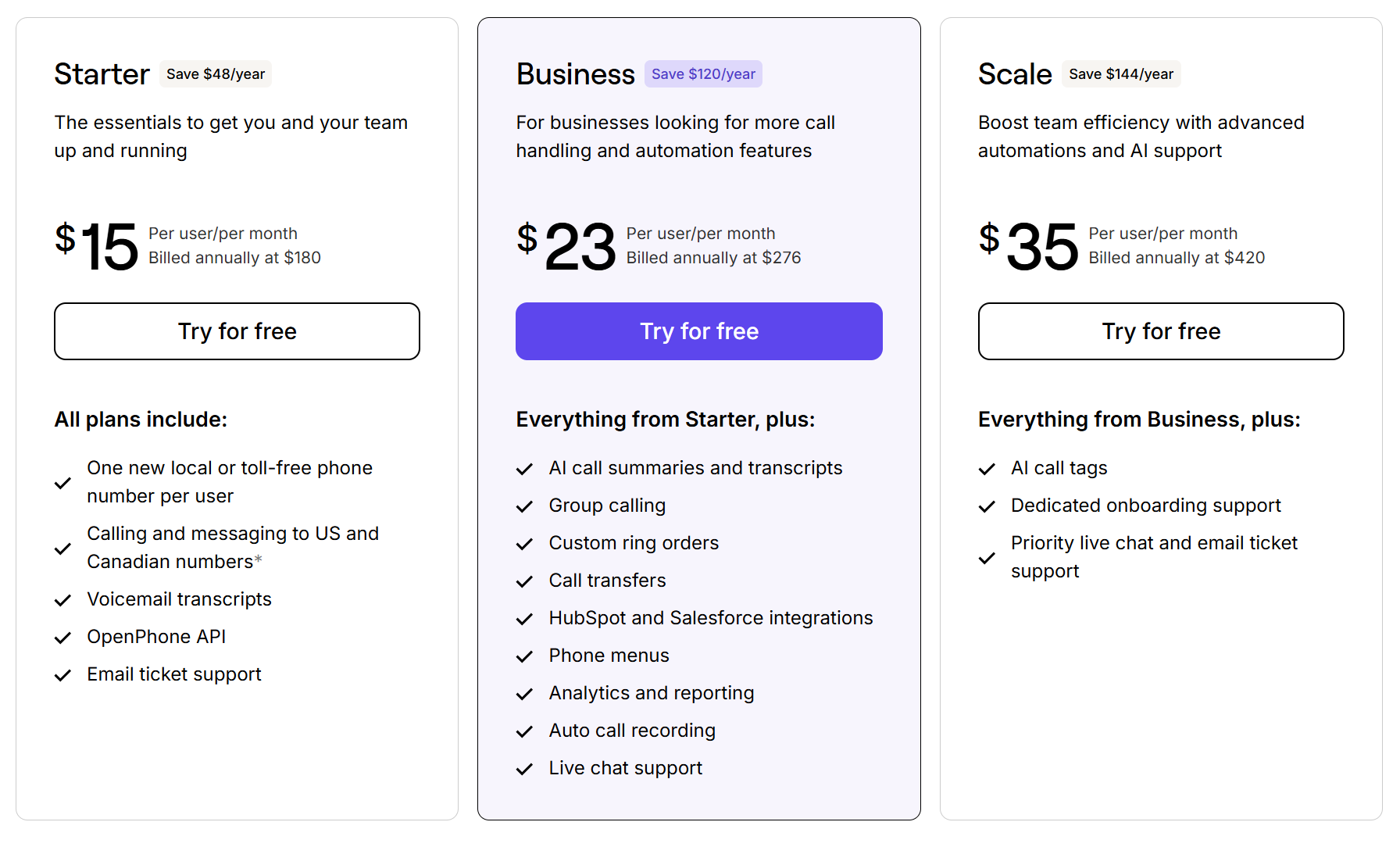
Sona is included with every Quo plan and comes with 10 calls per month at no extra cost. You still need a Quo subscription, which gives you the phone system Sona runs on. Quo offers three plans:
- Starter: $15 per user per month for unlimited calling and messaging to US and Canadian numbers, one local or toll-free number per user, voicemail transcripts, AI message responses, manual call recording, and up to 10 users sharing a number
- Business: $23 per user per month for AI call summaries and transcripts, group calling, custom ring orders, call transfers, phone menus, analytics and reporting, automatic call recording, Jobber and other CRM integrations, and live chat support
- Scale: $35 per user per month for AI call tags, unlimited users sharing a number, dedicated onboarding, inbound phone support, and priority chat and email support
Once you go beyond the 10 included Sona calls, you pay based on how many calls you want Sona to handle each month. That way, you only pay for what you need. Here are the available pricing tiers:
| Tier 1 | Tier 2 | Tier 3 | Tier 4 | Tier 5 | |
|---|---|---|---|---|---|
| Sona tiers | Free | $25 per month | $49 per month | $99 per month | $199 per month |
| Included credits | 1,000 credits/10 calls | 4,000 credits/40 calls | 10,000 credits/100 calls | 25,000 credits/250 calls | 60,000 credits/600 calls |
| Overage rate per call | $1.00 | $0.75 | $0.65 | $0.55 | $0.45 |
Calls under 15 seconds don’t count toward your Sona usage, so quick hang-ups and spam calls won’t count against your monthly allowance. Overage billing is also turned off by default. If you run out of included calls, Sona stops answering and sends new callers to your backup number instead. You can turn on overage billing if you want Sona to keep taking calls.
2. Ruby Receptionist: Best for roofers who want live, human-only coverage

Pros
- 24/7 live, US-based human receptionists on every plan
- Provides support in English and Spanish
Cons
- Per-minute pricing can get expensive
- Call quality can vary between receptionists
- No native integration with roofing FSM tools like Jobber or ServiceTitan
Ruby uses live, US-based receptionists to answer your roofing calls 24/7. They follow the instructions you provide and can collect lead details, book appointments, take messages, or transfer calls to your team. You can have them handle calls in English or Spanish.
But you pay quite a bit for that human coverage. Ruby charges per receptionist minute, starting at $250 for 50 minutes. A 500-minute plan costs $1,725, and additional minutes run from $4.00 to $5.40 each, depending on your plan. If your business starts getting a high call volume, your virtual receptionist cost can climb quickly.
You may also run into some issues during setup, as some customers found it difficult to get the service up and running.
One business owner said:
“The implementation process was not particularly smooth. It required about two to three weeks of trial and error before we were able to get everything up and running as we had hoped.” — G2
Ruby connects directly with JobNimbus, so new leads can go into your CRM without someone entering them again. Jobber and Roofr aren’t listed among its native integrations, though. If you use either one, you can connect it to Ruby through Zapier. Alternatively, look at Ruby receptionist alternatives that connect directly with those platforms.
Ruby Receptionist pricing

Ruby gives you the same core features on every plan, like 24/7 answering and bilingual support. Unlike roofing answering services that charge per call, you pay for a set number of minutes:
- 50 minutes per month: $250 per month
- 100 minutes per month: $395 per month
- 200 minutes per month: $720 per month
- 500 minutes per month: $1,725 per month
3. Rosie: Best roofing answering service with web texting

Pros
- Trains on your website and Google Business Profile
- Spam detection is included on every plan
- English and Spanish support are included
Cons
- Minute caps make monthly billing unpredictable
- Calls must be forwarded from your existing number
- Call transfers and in-call texting require a plan upgrade
Rosie is an AI answering service built primarily for small and solo-run businesses. It learns about your business from your website and Google Business Profile, and you can add FAQs and instructions to teach it how to handle calls. Train it to ask the questions you need to qualify a roofing lead, like where the damage is and whether the homeowner needs a repair or a roof replacement. Rosie uses that information to answer questions and book appointments while you’re on-site. It also takes calls in English and Spanish, using call forwarding so you keep your existing number.
Rosie can manage your website inquiries, too. With a paid add-on, visitors can start a chat right from your site. Rosie then collects their name, phone number, and details about the service they need. The conversation shows up in your dashboard alongside your call history.
But some of the more useful features depend on which plan you choose. Live appointment booking and live call transfers, for example, aren’t available on the entry-level plan.
Custom agent training requires you to upgrade to the $249-a-month Growth plan. This means training your AI agent on your training docs and policies so your AI can perform better. With some Rosie AI alternatives, like Sona, this is standard.
Rosie AI pricing

You can choose from three Rosie AI pricing plans:
- Professional: $41 per month for up to 250 minutes, custom message taking, appointment links by text, and automatic spam detection
- Scale: $124 per month for up to 1,000 minutes, direct appointment booking, warm transfers, and in-call texting
- Growth: $249 per month for up to 2,000 minutes, unlimited custom message taking, backup call transfers, custom agent training, and white-glove onboarding
All plans include English and Spanish support, call summaries, and transcripts.
4. Smith.ai: Best virtual receptionist with live human backup

Pros
- Escalates automatically to live receptionists for complex or high-value calls
- Custom call-handling playbooks for different caller types
- Can send instant call summaries to Slack or Microsoft Teams
Cons
- Expensive for limited call volume
- Call recording and transcription cost extra
- Per-call overage cost is steep
- Requires forwarding calls from an existing number
Smith.ai combines AI call answering with live receptionist support from North America. The AI handles routine calls, captures lead details, qualifies prospects, and schedules appointments. When a caller needs human help, a live receptionist can step in and handle the conversation.
That setup can be useful when call volume jumps after a storm or a homeowner calls about an emergency outside business hours. Both AI and live agents are available 24/7, including weekends and holidays, with no after-hours surcharge. The virtual assistant collects details about the roof leak, damage, roof type, service area, and insurance claim. It can then qualify the lead, schedule an inspection, or transfer the caller to your team.
Smith.ai also connects with ServiceTitan and Housecall Pro. Once the call ends, you can record and transcribe it. Its call intelligence feature can help you track actions like calls transferred and appointments booked.
The AI isn’t perfect, though. See for yourself:
“The AI receptionist was faulty and would repeatedly ask questions that were already answered by the client.” — Trustpilot
The AI plans can also get expensive as your call volume grows. For a roofing company dealing with a storm surge, even the $800 Enterprise plan, which includes 500 calls per month, only works out to roughly 17 calls a day. On the human-only plans, you pay extra for features like bilingual answering and call recording with transcription.
Smith.ai pricing

There are three AI plans to choose from:
- Free: $0 a month for 25 calls, with 24/7 call handling, recording, transcription, summaries, lead qualification, call routing, and native integrations
- Pro: Starts at $150 a month for 75 calls, with dedicated onboarding, live phone, email, and chat support, and custom SMS branding
- Enterprise: Starts at $500 a month for 300 calls, with custom AI prompting, bespoke integrations, multi-location support, and ongoing optimization
You can also upgrade your Enterprise plan to include more calls. For example, the AI can cover 500 calls a month starting at $800 or over 1,000 calls for a custom price. But if you go over the included calls on a paid plan, you’ll pay overage fees between $1.30–$2.00 per call, depending on your plan.
Human plans

If you want a live receptionist answering your calls, Smith.ai offers four pricing plans:
- Starter: $300 a month for 30 calls, plus $11.50 for each extra call
- Basic: $810 a month for 90 calls, plus $10.50 for each extra call
- Pro: $2,100 a month for 300 calls, plus $8.50 for each extra call
- Enterprise: Custom pricing based on call volume
Every human-first plan includes 24/7 live answering, lead screening, and qualification. You can also add more features to your plan for an extra fee, including:
- Appointment booking: $1.50 per call
- Dedicated Spanish line: $1 per call
- Call recording and transcription: $0.25 per call
- Text and email follow-up: $0.50 per call
- Complex call routing: $1.50 per call
5. Posh: Best answering service with human receptionists trained in home services

Pros
- Receptionists trained specifically for home-services and roofing calls
- Lets you call and text from the Posh app
- Users praise its professional receptionists and easy onboarding
Cons
- High overage costs per minute
- Requires forwarding your existing number
- Doesn’t integrate directly with roofing FSM tools
Posh is a roofer answering service with US-based receptionists trained to handle roofing calls. They’re available 24/7 and trained on home services and roofing terminology.
Posh receptionists can handle lead capture, ask qualifying questions, and manage appointment scheduling. When they’re done with a call, they also send you the job details by SMS or email. Plus, they can dispatch urgent requests straight to your on-call technicians. From the Posh app, you can manage your availability, view call details, and call or text customers.
Posh also offers AI receptionists, so you can decide which calls should go to AI and which should go to a person. Its receptionists can also make outbound calls for estimate follow-ups and appointment confirmations.
You’ll want to keep a few things in mind, though. Posh connects with tools like Salesforce and Zoho, but it doesn’t directly integrate with roofing FSM tools like Housecall Pro. Its minute-based pricing can also add up when storm-related call volume spikes.
One business owner had this to say:
“It’s definitely… pricier than I expected, and I felt as if I was taking more phone calls than I expected.” — Trustpilot
Posh pricing

Posh offers seven plans based on how many receptionist minutes you need:
- Chic: $65 a month with no minutes included, $2.30 per minute so you can pay as you go
- Vogue: $130 a month for 50 minutes, then $2.20 per additional minute
- Elegant: $215 a month for 100 minutes, then $2.15 per additional minute
- Luxurious: $420 a month for 200 minutes, then $2.10 per additional minute
- Prestigious: $700 a month for 350 minutes, then $2.00 per additional minute
- Lavish: $975 a month for 500 minutes, then $1.95 per additional minute
- Exclusive: $1,900 a month for 1,000 minutes, then $1.90 per additional minute
Every plan includes 24/7 availability, bilingual service, texting and calling, and call handling. Want to bring in some AI help?

Posh also offers plans that combine AI and live receptionist minutes:
- Vogue AI: $130 per month for 50 mixed minutes, then $2.20 per live minute or $1.10 per AI minute
- Elegant AI: $215 per month for 100 mixed minutes, then $2.15 per live minute or $1.08 per AI minute
- Luxurious AI: $420 per month for 200 mixed minutes, then $2.10 per live minute or $1.05 per AI minute
- Prestigious AI: $700 per month for 350 mixed minutes, then $2.00 per live minute or $1.00 per AI minute
- Lavish AI: $975 per month for 500 mixed minutes, then $1.95 per live minute or $0.98 per AI minute
- Exclusive AI: $1,900 per month for 1,000 mixed minutes, then $1.90 per live minute or $0.95 per AI minute
Both types of minutes come from the same monthly allowance. Once you go over it, Posh charges separately for AI and live receptionist minutes.
6. Pink Callers: Best for businesses wanting a dedicated roofing answering service team

Pros
- Gives you a dedicated rep who learns your business
- Integrates with ServiceTitan and Housecall Pro
- Offers an AI receptionist in addition to human help
Cons
- Charges by the hour instead of by the call
- Core coverage hours are limited, with after-hours handled as a separate add-on
- AI-handled calls are billed separately
Pink Callers gives roofing companies a dedicated customer service representative. The same representative learns your service area, your customers, your scheduling rules, and how you want calls handled.
Your CSR can handle calls about storm damage, insurance claims, emergency repairs, and new estimates. They can also qualify leads, collect insurance information, schedule inspections, and follow up with homeowners. However, ramping up a rep can be challenging. For example, if the rep leaves, you have to train a new rep.
Pink Callers integrates with ServiceTitan, AccuLynx, Jobber, and Housecall Pro. Its CSRs can handle scheduling, customer records, and call notes directly inside those systems.
Need extra coverage during busy periods or after hours? Pink Callers offers pAIge, its AI answering service, as an additional option for incoming calls.
Pink Callers pricing
Pink Callers charges by the hour or week, depending on the support you choose.
Daytime support

- Fractional CSR: $32.50 an hour or $1,300 a week for 40 hours for up to 200 incoming calls or tasks a week with, different Pink Callers reps handling your calls
- Dedicated CSR: $52.50 an hour or $2,100 a week for 40 hours for up to 400 incoming calls or tasks a week, with the same Pink Callers rep handling your calls
After-hours support

- $299 a week for calls from 5 p.m. to 10 p.m. on weekdays and 8 a.m. to 10 p.m. on weekends; each job they book costs an extra $25, and each job they dispatch costs an extra $35
Outbound calls
- Available from 8 a.m. to 8 p.m. with a two-hour minimum for a Pink Callers rep to make around 20 to 25 calls an hour to follow up on estimates or call back new leads
Pink Callers’ pAIge service can also handle outbound calls for $1.99 per minute. New daytime customers get $50 off their first week.
7. AnswerForce: Best for human agents taking over-the-phone orders

Pros
- Integrates natively with tools like ServiceTitan, Workiz, and Jobber
- Offers 24/7 live answering with bilingual Spanish-English support
- Agents can walk a caller through placing an order
Cons
- Doesn’t publish pricing on its website
- Some users report agents not consistently following their scripts
AnswerForce is a human roofer answering service with 24/7 coverage. It helps with bilingual support, lead capture, and appointment scheduling.
Sell physical add-ons like gutter guards, solar attachments, or maintenance plans over the phone? AnswerForce agents can walk a caller through placing that order and log it directly into your sales or CRM software.
The order-taking feature won’t apply to every roofing business, though. A call about an estimate, roof inspection, or roof repair doesn’t count as an order.
Some customers also say the live agents don’t follow instructions consistently. That can be a problem if you rely on a consistent script for emergency or storm-related calls.
Here’s how one business owner described the experience:
“I made multiple requests to update our script, and those changes were not properly carried out. When you hire an answering service, you expect them to follow instructions and represent your business correctly. That did not happen consistently here.” — Trustpilot
AnswerForce pricing
AnswerForce doesn’t show prices on its website, so you need to reach out for a custom quote. Third-party sources estimate that plans start at around $280 a month.
8. Goodcall: Best for call centers

Pros
- Includes unlimited call time per customer
- Bills by unique caller instead of by minute or call
- Enterprise tier automates repetitive call-center tasks like caller authentication
Cons
- Cheapest plan only supports one call flow and one intake form
- Call and customer details are only stored for seven days on the base plan
- Requires Zapier for most CRM integrations
Goodcall uses AI phone agents to handle your inbound calls around the clock. The agent can answer common questions, schedule appointments, and transfer callers to your team when necessary. You can use it on your main business number or bring it in as overflow when your team is busy.
Goodcall also charges per unique customer, not per minute or per call. So if the same person calls you three times in one day, you’re only charged once. This is helpful if you have lower call volume and repeat callers.
That said, some customers have reported being charged even after canceling the service.
One business owner said:
“We canceled this service in October 2025, yet the company continued charging our card month after month. Despite numerous emails with customer service and repeated requests to stop billing, the charges continued until we were forced to block and replace our credit card in February 2026…The service itself provided little value and did not deliver the results we were expecting.” — Trustpilot
Goodcall pricing

Goodcall offers three plans based on how many different customers call you each month:
- Starter: $66 per month per agent for up to 100 unique customers, unlimited minutes and tokens, one logic flow, three team members, three directory contacts, and seven days of call and customer details
- Growth: $108 per month per agent for up to 250 unique customers, unlimited minutes and tokens, three forms, three logic flows, nine team members, 25 directory contacts, and 30 days of call and customer details
- Scale: $208 per month per agent for up to 500 unique customers, unlimited minutes and tokens, 25 logic flows, 50 team members, 500 directory contacts, and unlimited call and customer detailsAll three plans include unlimited call minutes and AI usage. Additional customers cost $0.50 each after you reach your monthly limit.
Goodcall also offers custom Enterprise pricing for businesses that need higher limits, custom integrations, or dedicated support.
AI vs human roofing answering services: Which is right for you?
An AI roofing answering service keeps costs low and works around the clock. A human service costs more but comes with a personal touch and empathy that sensitive situations need. Consider these factors to find the right fit for your business:
- You need to be reachable anytime. Your roofing business can get calls long after the crew has gone home. An AI receptionist keeps you covered 24/7 without adding staff. A human receptionist may only cover standard business hours unless you pay for extended coverage.
- You want to stay in control. Need to change your greeting or call flow before a busy week? With an AI answering service, you can make changes instantly without waiting for someone else to update them. With a human answering service, you’ll need to pass the change along and wait for the team to adjust it.
- You want to grow without friction. When call volume spikes, an AI receptionist scales with you. There’s no onboarding, no training, and no added stress. With human receptionists, handling that extra volume means higher costs and more time spent managing people.
- You value consistency. An AI answering service gives customers a consistent experience every time. A human receptionist can offer a more personal touch, but the tone and service may vary depending on who takes the call.
- You want a solution that fits your small team. If your crew is small and juggling multiple jobs, an AI answering service can help you stay professional without hiring extra help. A human answering service gives you a live person to handle the calls, but that’s one more person to coordinate with.
- You want access to customer conversations. When a homeowner calls about a leak or an estimate, you’ll want the details handy when it’s time to follow up. With tools like Sona, you get transcripts and call summaries inside your business phone system. With a human answering service, call details may be shared separately or logged manually, making it harder to get the full picture.
Learn more about the cost and capability differences of an AI receptionist vs human receptionist.
Quo: Your roofing calls, always answered

The right roofing answering service should match how your phone rings and what you can afford. A small crew handling tear-offs and repairs all day has different needs from a larger company handling commercial roofing projects.
For many small and growing roofing businesses, an AI receptionist makes the most sense. Compared with a live virtual receptionist, it can cost less, take less time to set up, and be available day and night.
That’s what Sona’s built for. As an AI answering service for small businesses, it works inside the same phone system your team already uses to call and text customers. You pay per call instead of per minute. And if a homeowner calls with an urgent leak, Sona can transfer them to your on-call number. And you can set up Sona however suits your business.
Sign up today for Quo’s seven-day free trial. During the trial, try Sona in the Quo web or desktop app.
FAQs
A roofing answering service can cost anywhere from $25 to several hundred dollars per month. The exact price depends on whether you’re charged per call, per minute, or a flat monthly rate. It can also vary depending on whether the answering service is AI or human.
AI options tend to start lower, with per-call plans starting around $25 per month for 40 calls. Human-only services start closer to $250 for 50 receptionist minutes. Flat-rate AI plans can run around $299 per month for typical single-shop call volumes.
An AI answering service handles incoming calls for your roofing business when you or your crew can’t pick up. It can qualify new leads, flag emergencies like active leaks, collect job details, and answer common questions.
A roofing answering service helps you capture more leads while keeping your crew focused on the job. It can:
– Answer calls your team might otherwise miss
– Collect customer and job details
– Answer common questions from callers
– Flag urgent jobs like active leaks
– Improve the customer experience by making sure they always get help
A standalone answering service can be cheaper to start. But you need to have a phone setup already or pay for a new one. Also, your call history lives in two places, making it more time-consuming to interact with customers. You’re also more likely to miss messages and context.
With a built-in option like Sona, your calls, texts, and AI summaries stay in one place. That gives your team the full conversation history when they follow up inside Quo.
Many roofing answering services can connect with your CRM or field service software. For example, Quo can send call summaries and transcripts to Jobber and automatically add new callers as clients. Other services integrate directly with your software or use tools like Zapier or Make to connect with it. Check whether your service can sync the customer and job details your team needs.


