


Maybe you’re already using Ruby Receptionist and looking for an alternative. Or maybe you’re struggling to find a missed call solution and considering your options.
Thinking about switching due to the per-minute billing and overage charges? Here’s how the top Ruby Receptionist alternatives stack up:
- Sona, by Quo, is the best AI Ruby Receptionist alternative for small and growing businesses that want a built-in business phone system.
- Rosie AI is best for solo operators and very small teams that just need basic AI message-taking.
- Smith.ai is best for professional services businesses that want AI and live receptionists.
- Moneypenny is best for businesses that want a dedicated receptionist team rather than a rotating pool of operators.
This guide breaks down these and other Ruby Receptionist alternatives. You can compare their pricing, features, and limitations to find a better fit for your business. We also explain why people leave Ruby so you can make an informed decision.
Best Ruby Receptionist alternatives in 2026
The list below covers both AI-first and live-human receptionist alternatives to Ruby. Pricing and features may vary by call volume. You can compare each base plan in the table below.
| Tool | Type | Best for | Starting price |
|---|---|---|---|
| Sona by Quo | AI | Small and growing businesses that want a built-in phone system with per-call pricing | Free; 10 calls per month included on every Quo plan |
| Rosie AI | AI | Businesses needing a Ruby Receptionist alternative with web texting | $41 per month |
| AnswerConnect | Human | Businesses that need HIPAA compliance | $350 per month |
| Smith.ai | Mixed | Professional services firms that want AI for routine calls and live backup for complex ones | Free for the first 25 AI calls; $300 per month for human-first plans |
| PATLive | Human | Solo practitioners and early-stage firms that want pay-as-you-go pricing | $75 per month |
| Moneypenny | Mixed | Businesses that want a dedicated, consistent receptionist team rather than a rotating pool | $165 per month |
| GoodCall | AI | Low-volume businesses with a loyal, repeat-caller base | $66 per agent per month |
| SkipCalls | AI | Budget-conscious small businesses that want unlimited minutes and flat monthly pricing | $19.99 per month |
| Ringly.io | AI | Ecommerce brands on Shopify needing order lookup, returns, and product support | $349 per month |
| Voicetta | AI | Hospitality operators managing unpredictable call volume spikes | Starting at ~1.6¢ per minute |
Let’s start with the solution ranked #1 for customer satisfaction on G2:
1. Sona by Quo: Best Ruby Receptionist alternative for small and growing businesses

Pros
- Built into your business phone system
- Charges per call, not per minute
- Set up in minutes with interactive demos, compared to weeks with Ruby
- Supports English, Spanish, and French
- Native CRM integrations
- AI call transcripts and summaries for visibility
- Sona can text links or transfer callers during calls
Cons
- Sona isn’t HIPAA compliant
Sona is a built-in AI voice agent. It’s part of Quo, the best business phone system for small and growing businesses. This means you can run your voice AI in the same system you use to make calls and texts — it’s not a separate answering service you forward calls to.
Since Sona lives directly in your phone system, your team doesn’t have to manage two separate tools for tracking call histories. Plus, you can filter call views to see calls handled by Sona on any device. You also get a single thread per contact, with full conversation history for calls, texts, voicemails, and recordings. That way, you can easily save time following up on any conversation.

Each plan comes with 10 free Sona calls per month, so you can get started right away. With Sona, you can start:
- Capturing leads when your team can’t pick up the phone 24/7
- Collecting messages and contact details so your team can follow up
- Answering FAQs so customers don’t have to wait to speak to your team
- Transferring calls to available teammates for escalations or emergencies
- Texting callers important information during live calls, like links to your booking pages
- Referencing previous conversations to prevent asking repeat questions
You can also use Quo’s call flow builder to direct Sona calls to the right place for your team. For example, you might want to use Sona for backup call routing. This means you’d create a call flow that rings your receptionist first, then your staff in a ring group, then Sona as the fallback option.
Quo connects with dozens of third-party tools natively so you can integrate with the systems you already use — like CRMs. For example, you might connect Sona and Clio to log call summaries and transcripts in your contacts field. This helps you keep tabs on callers without manually logging their details.

You can also set up native CRM integrations like Jobber and HubSpot. Or use Zapier and Make to connect with another system in your stack.
This is one of the many reasons why thousands of businesses rely on Quo and Sona to build better customer relationships.
“With Sona, I never worry about missing a call again. It’s like having a smart, reliable assistant who always picks up. It’s professional, friendly, and on it 24/7.” — Chris Sands, CEO, Hannon De Palma.
Finally, Sona charges per call, not per minute. That means Sona can stay on the call as long as it takes to help a caller, without longer calls turning into surprise bills.
Sign up today for Quo’s seven-day free trial. Try Sona in the Quo web or desktop app.
Quo pricing
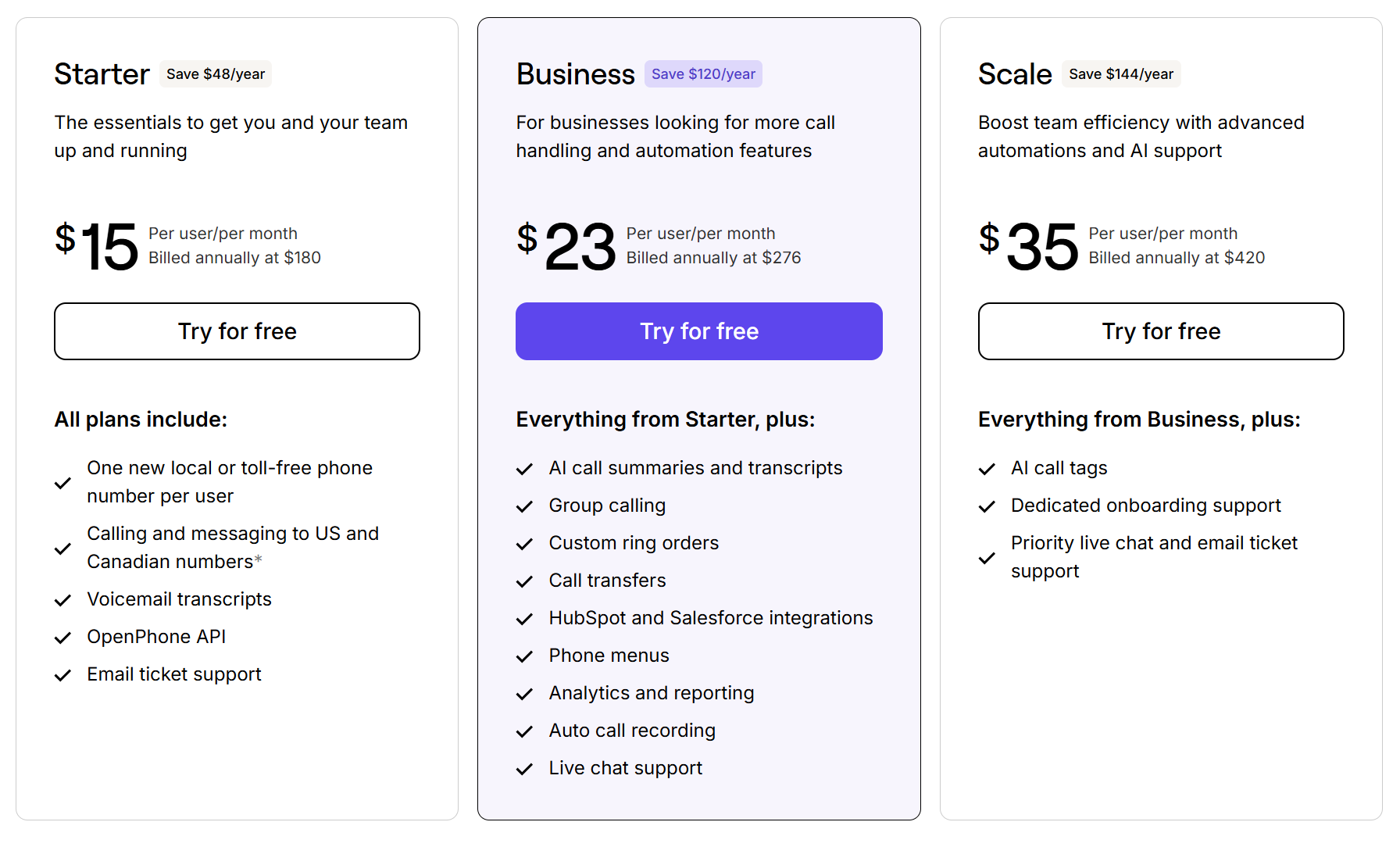
Sona is included on every Quo plan with 10 calls per month at no extra cost. Quo offers three pricing plans:
- Starter: $15 per user per month for unlimited calling and messaging in the US and Canada, on-demand call recording, ChatGPT and Claude integrations, texting automations like snippets and auto-replies, third-party integrations with Make and Zapier, and more
- Business: $23 per user per month for phone menus, AI call transcripts and summaries, automatic call recording, advanced call forwarding, CRM phone integrations, custom ring orders, and more
- Scale: $35 per user per month for AI call tags, dedicated onboarding support, priority live chat and email support, and inbound phone support
After the free calls, you pay based on how many calls you want Sona to handle. This includes:
| Tier 1 | Tier 2 | Tier 3 | Tier 4 | Tier 5 | |
|---|---|---|---|---|---|
| Sona tiers | Free | $25 per month | $49 per month | $99 per month | $199 per month |
| Included credits | 1,000 credits/10 calls | 4,000 credits/40 calls | 10,000 credits/100 calls | 25,000 credits/250 calls | 60,000 credits/600 calls |
| Overage rate per credit | $0.01 | $0.01 | $0.01 | $0.01 | $0.00 |
| Overage rate per call | $1.00 | $0.75 | $0.65 | $0.55 | $0.45 |
* Calls under 15 seconds don’t count toward usage.
2. Rosie AI: Best Ruby Receptionist alternative with web texting

Pros
- Trains on your website and Google Business Profile
- Spam detection is included on every plan
- English and Spanish support
Cons
- Minute caps make monthly billing unpredictable
- Call transfers and in-call texting require upgrades
- Calls must be forwarded from your existing number
Rosie is an AI answering service for small and solo-run businesses. This Ruby competitor is a standalone AI service. That means you need to forward calls to it from your existing phone number and business phone system. It also comes with minute caps on every plan, starting at 250 minutes per month.
Rosie’s standout feature is its website texting add-on. A visitor on your site can start a text conversation instead of calling or filling out a form. Rosie captures their name, number, and what they need so you own the follow-up instead of losing the visitor. Website texting is available as a $50 per month add-on on any plan.
Rosie’s other features scale with the plan you choose. You can send texts to callers on the Scale plan. The Growth plan adds waterfall transfers. This means Rosie tries a list of backup numbers one after another until someone picks up instead of ringing one number and giving up.
But no matter how much you upgrade, Rosie still requires you to forward calls to it. You’ll still need to jump between your phone system and Rosie’s dashboard to get the full context of customer calls.
Want to train your AI agent on internal docs and policies so it can handle calls better? With Rosie, custom agent training requires the most expensive plan, at $249 a month. That’s not the case with some other Rosie AI alternatives, like Sona, where custom agent training comes standard on every plan.
Rosie AI pricing

Here’s what Rosie AI’s costs:
- Professional: $41 per month for 250 minutes, bilingual support, two message-taking scenarios with custom questions, send appointment links via text, and spam detection
- Scale: $124 per month for 1,000 minutes, live call transfers, sending texts during calls, five custom message-taking scenarios, and automatic appointment booking to your calendar via scheduling apps like Google Calendar or Calendly
- Growth: $249 per month for 2,000 minutes, waterfall transfers, custom message-taking with unlimited scenarios, and white-glove onboarding
You can also purchase an add-on for website texting, starting at $50 per month.
3. AnswerConnect: Best Ruby alternative with HIPAA compliance

Pros
- Bilingual live agents are included
- Live chat
- 24/7 human coverage
Cons
- Billed per minute
- Includes a $49.99 setup fee on most plans
- Only offers 200 minutes on the base plan
AnswerConnect is a 24/7 live answering service for companies needing live chat for their websites. You can get bundled live chat solutions on any AnswerConnect plan. Ruby Receptionist, in contrast, doesn’t offer bundled packages for website chat.
Apart from live chat, AnswerConnect offers IVR routing, call transcriptions, and HIPAA compliance. Just note that these require add-ons to use. HIPAA, for example, costs an extra $40 per user per month.
On the base plan, you can check your call history and usage data from the AnswerConnect app. But remember: AnswerConnect is a standalone service. That means your mission-critical caller details will be scattered around different platforms and accounts.
Plus, with AnswerConnect’s base plan, you only get 200 minutes. That’s barely three hours of calls per month. If you exceed that limit, prepare to pay $2.50 extra per minute. With an upgrade, you reduce your overage charge to $1.85 per minute.
AnswerConnect pricing

AnswerConnect makes you fill out a form with your number and email before looking at pricing. Here’s what to expect on each plan:
- Entry: $350 per month plus a $49.99 setup fee for 200 minutes, basic scripting, CRM integrations, and access to the desktop and mobile apps, with $2.50 per additional minute
- Growth: $395 per month plus no setup fee for 300 minutes, customizable scripting, and live chat, with $1.85 per additional minute
- Standard: $575 per month plus a $49.99 setup fee for 400 minutes, with $1.85 per additional minute
4. Smith.ai: Best Ruby Receptionist alternative with live human backup

Pros
- Escalates automatically to live receptionists for complex or high-value calls
- Custom call-handling playbooks for different caller types
- Can send instant call summaries to Slack or Microsoft Teams
Cons
- Expensive for limited call volume
- Call recording and transcription cost extra
- Overage per call is steep
- Requires forwarding calls from an existing number
Smith.ai is a hybrid solution between live receptionists and AI voice agents. Its AI system handles routine calls, then escalates to live reps whenever a call needs human intervention. You decide whether humans or the AI picks up first.
Both plans come with the same basic features. Receptionists can take calls, answer questions, and transfer elsewhere when needed.
For AI-first plans, Smith.ai offers a free tier for your first 25 calls so you can try out the tool. Extra features like custom integrations will require an upgrade to the Pro plan.
For human-first plans, you get CRM integrations, lead qualification, and new client intake forms included for free. But if you want features like Spanish support and call recordings or transcriptions, you’ll need to pay an extra per-call fee. A dedicated Spanish number costs an extra $1 per call, while call recording and transcription cost $0.25 more for each call.
Want Smith AI to take more than 17 calls a day? You’ll need to upgrade to the top tier of their Enterprise plan, which costs over $800 a month. This is on the expensive end compared to other Smith.ai alternatives.
Smith AI pricing

Smith.ai’s pricing depends on the number of calls you want it to handle per day and whether you want to lead with humans or AI.
Here’s a breakdown of its AI-first plans:
| Free | Pro | Enterprise | |
|---|---|---|---|
| Monthly price | $0 | $150 / $270 / $500 | $500 / $800 / Custom |
| Included real calls | 25 | 75 / 150 / 300 | 300 / 500 / 1,000+ |
| Test calls per month | 25 | 75 / 150 / 300 | 300 / 500 / 1,000+ |
| Simulated calls per month | 50 | 150 / 300 / 600 | 600 / 1,000 / 2,000+ |
| Per real call rate | Free | $2.00 / $1.80 / $1.67 | $1.67 / $1.60 / Custom |
| Overage per real call | $3.00 | $2.50 / $2.30 / $2.17 | $2.17 / $2.10 / Custom |
And here’s a breakdown of its human-first plans:
| Starter | Basic | Pro | Enterprise | |
|---|---|---|---|---|
| Monthly price | $300 | $810 | $2,100 | Custom |
| Included calls | 30 | 90 | 300 | Custom |
| Overage per call | $11.50 | $10.50 | $8.50 | Custom |
5. PATLive: Best Ruby alternative for pay-as-you-go pricing

Pros
- Pay-as-you-go plan with no bundled minimum
- Offers outbound calling
- Appointment scheduling is included
Cons
- Billed per minute
- Bilingual support is an add-on
- Multiple receptionist scripts is an add-on
PATLive is a live virtual receptionist tool offering pay-as-you-go pricing for solo practitioners. It’s a good fit for smaller businesses with limited budgets that want an answering service but aren’t ready to commit to a bundled minutes plan.
Each PATLive plan comes with a business phone number and 10 users who can track activity in the dashboard. You’ll get features like appointment scheduling, event registration, and emergency dispatching. Need more than just inbound call handling? PATLive also has plans for outbound calling and live chat.
But PATLive was mostly designed for businesses with very low call volume — costs climb quickly as your business grows. The base plan costs $2.99 per minute to answer calls. That means a 10-minute call with a new lead looking to book could be nearly $30. That doesn’t include add-ons for bilingual support or multiple scripts.
PATLive pricing

PATLive’s pricing depends on whether you’re taking inbound or outbound calls.
Here’s what to expect from its inbound answering service costs:
- Pay as you go: Starting at $49 per month, plus $2.99 per minute
- 50 minutes: Starting at $99 per month, $2.29 per additional minute
- 100 minutes: Starting at $189 per month, $2.09 per additional minute
- 200 minutes: $349 per month, $1.99 per additional minute
- 300 minutes: $479 per month, $1.89 per additional minute
- 500 minutes: $759 per month, $179 per additional minute
They also offer larger plans for higher call volume, starting at 1,000 minutes for $1,499 and $1.69 per additional minute.
6. Moneypenny: Best Ruby Receptionist alternative for a dedicated receptionist team

Pros
- Assigns a dedicated team of receptionists to your account, not a rotating pool
- Bilingual receptionists are included
- Offers human-only and AI-first plans
Cons
- Human-receptionist plans are priced per minute
- High overage cost on the base plan
- Less customizability in AI receptionist flows
Moneypenny is an answering service that assigns businesses a dedicated human receptionist. It serves regulated professional-services industries like legal and healthcare. Unlike Ruby’s model, Moneypenny gives you a dedicated receptionist. This helps them get to know your business and build better customer relationships.
Moneypenny also has an AI answering service to help with screening calls for your receptionist. This can reduce workload on your office staff or dedicated outsourced rep.
That said, Moneypenny is still priced per minute like Ruby. This can make billing unpredictable.You also can’t customize AI-based call answering without your “Solutions Architect” to help. You’ll likely need to contact customer support for help with future changes — not ideal for fast-growing brands.
Moneypenny pricing

Moneypenny has four human pricing tiers to choose from. Each one comes with bilingual support, 24/7 answering services, CRM integrations, and access to the mobile app and dashboard.
Here’s what you’ll pay for each tier:
- 50 minutes: $165 per month plus $2.28 per extra minute
- 100 minutes: $265 per month plus $2.12 per extra minute
- 200 minutes: $422 per month plus $1.91 per extra minute
- 500 minutes: $985 per month plus $1.61 per extra minute

AI receptionist plans start at $69 per month for 25 calls. Here’s what to expect from each tier:
- 25 calls: $69 per month plus $2.49 per extra call, 24/7 service, a reporting dashboard, and human escalation
- 50 calls: $99 per month plus $2.39 per extra call
- 100 calls: $199 per month plus $2.19 per extra call
- 250 calls: $435 per month plus $1.89 per extra call
- 500 calls: $775 per month plus $1.69 per extra call
7. GoodCall: Best Ruby Receptionist alternative for low-volume, repeat-caller businesses

Pros
- Unlimited call duration per customer, so long calls don’t cost more
- Predictable billing for businesses with a loyal, repeat-caller base
- AI agents can book appointments
Cons
- Base plan is limited to one logic flow and one form
- Call and customer details are only stored for seven days on the base plan
- Requires Zapier to integrate with CRMs
GoodCall is an AI-powered phone answering service. Its voice agents can help you greet incoming callers, answer FAQs, and book appointments. But unlike Ruby Receptionist, GoodCall charges by unique customers, not minutes. The same caller can contact you 10 times in a month, but you’re only billed for them once.
Just keep in mind GoodCall comes with major limitations:
- Each AI agent needs a dedicated GoodCall number. These are separate from your existing business numbers. To keep your current number, you’ll need to set up conditional call forwarding. This makes it harder to track conversation histories, since it splits call context across two numbers.
- Only one logic flow on the base plan. A logic flow controls how your AI routes callers based on their answers to questions. But GoodCall’s base plan includes only one logic flow. That means the AI can handle only one type of call scenario. Anything more than that, and you’ll be forced to upgrade.
- The Starter plan only comes with one form. For context, forms are how GoodCall collects information from callers, like their name and the service they need. Since you can only capture one type of lead information on the base plan, the tool may not be useful if you offer multiple services.
- Seven-day storage for call and customer details. GoodCall’s base plan only stores call logs and customer information for one week. The only way to get unlimited retention is to upgrade to the most expensive plan. Not even Ruby Receptionist requires you to do this.
If you’re a very small business with a mostly repeat-caller base, GoodCall might work for you. But it doesn’t scale well as your customer base grows — which could lead you to look for different Ruby Receptionist alternatives.
GoodCall pricing

You can pick from one of three GoodCall pricing plans:
- Starter: $66 per agent per month for three team members, unlimited minutes and tokens, seven days of call and customer details, and 100 unique monthly customers
- Growth: $108 per agent per month for nine team members, 30 days of call and customer details, and 250 unique monthly customers
- Scale: $208 per agent per month for 50 team members, unlimited call and customer details, and 500 unique monthly customers
8. SkipCalls: Best budget AI-first alternative to Ruby

Pros
- Unlimited calling minutes on the small business plans
- Affordable pricing
- AI appointment booking is available from the base plan
Cons
- Growing business plans have limited minutes per month
- Requires forwarding your calls to work
SkipCalls is a low-cost AI voice receptionist for small teams on a budget. Its $19.99 flat monthly price on the Small Business tier covers:
- Unlimited minutes
- 24/7 coverage
- Appointment booking
- Call transcripts
- SMS responses
- CRM integrations
- Bilingual support
Growing Business plans have more advanced features. For example, you can set up AI email receptionists, text receptionists, and voice cloning. But unlike SkipCall’s Small Business tier, these plans limit the number of minutes per month. It’s a catch-22 for businesses that want more advanced features and cost-effective call volume.
Like many other providers on this list, SkipCalls requires you to forward calls to it. This means your call transcripts, summaries, and history will live in SkipCalls rather than your phone system. It may be worth the cost savings to some businesses, but to others, it can be an extra headache.
SkipCalls pricing

SkipCalls offers two different plan sets: Small Business and Growing Business.
Small Business plans come with unlimited minutes for AI call answering. Of course, it’s not truly unlimited and is subject to their fair usage policy, which supports 200 calls per month. They both contain the same features:
- Monthly: $19.99 per month for a dedicated phone number, Spanish and English support, and calendar integration
- Annually: $199 per year

Growing Business plans come with more advanced features on each tier. They include:
- Starter: $17 per month for 200 calls, one AI agent, one phone number, calendar integrations, a Text Receptionist, and voice cloning
- Growth: $42 per month for 180 minutes, three AI agents and phone numbers, API access, the Email Receptionist, and webhooks and CRM integrations
- Business: $83 per month for 450 minutes, 10 AI agents and phone numbers, unlimited knowledge bases, and unlimited campaigns and custom tools
- Enterprise: $249 per month for 1,200 minutes, unlimited AI agents, 15 phone numbers, and a dedicated account manager
9. Ringly.io: Best Ruby Receptionist alternative for ecommerce

Pros
- Native Shopify integration
- 40+ languages are supported
- 14-day free trial on the Pro plan
Cons
- Smaller volume sellers might struggle to justify the price
- Requires a Shopify store
Ringly is an AI phone answering service built for ecommerce brands on Shopify. The AI agent can pull order statuses, process returns and exchanges, and answer product questions from a custom knowledge base.
Ringly can also help business owners automate outbound calls. For example, it can follow up on abandoned carts and encourage shoppers to complete a purchase.
That said, Ringly’s entry price is much higher than most tools on this list. At $349 per month to start, it’s best for stores with high call volume compared to low-volume side businesses. Since there’s no pay-as-you-go plan, paying nearly $350 per month for minutes you don’t need could add up fast. And keep in mind, Ringly only works for Shopify stores. Run an ecommerce website on Magento or WooCommerce? You’ll have to look for a separate platform.
Ringly.io pricing

Here’s what you’ll pay for Ringly’s ecommerce answering service:
- Grow: $349 per month for 1,000 minutes plus $0.29 per minute in overages, product, order, and return call handling, call transfers to your team, call history, and call analytics
- Pro: $799 per month for 2,500 minutes plus $0.19 per minute overages, a 65% resolution guarantee, and assisted onboarding
- Enterprise: Custom pricing for 5,000 or more minutes per month, custom integrations, dedicated onboarding, and a private Slack channel for support
10. Voicetta: Best Ruby Receptionist alternative for hospitality teams

Pros
- Built for hospitality call patterns like front desk surges, reservations, and after-hours spikes
- AI call analytics
- Can qualify leads on calls, SMS, and WhatsApp
Cons
- Requires the Voicetta team to set up the solution for you
- Viewing pricing requires creating an account
- Could be technical and complicated if you don’t take a done-for-you route
Voicetta is a voice AI system built for hospitality operators, like hotels and short-term rentals. You can use Voicetta to answer incoming calls, texts, and WhatsApp messages, which it logs in a history dashboard. It also captures performance metrics through its AI Evaluations tool. This lets you determine if an AI call was successful, like if a guest booked a stay or if the AI couldn’t complete the task.
The catch? You’ll need to work with the Voicetta team to set up the platform. This can get time-consuming and expensive if you’d rather just hit the ground running. There is an option for DIY, but it could be complex and potentially more costly if you don’t already have AI agent experience.
And speaking of price: not all costs are publicly published on Voicetta. You’ll have to create an account to look at all inbound and outbound costs, specific agent pricing, and DIY versus DFY fees.
Voicetta pricing

We created a Voicetta account to explore its pricing firsthand.
First, we found that it charges per-minute pricing for its AI receptionist services. If you want to connect your own AI model, like ChatGPT, through an API, prices start at ~1.6¢ per minute. That comes out to around $0.96 per hour. Want to use Voicetta’s managed AI infrastructure? Here’s what to expect:
- Speechify Agent: 12.4¢ per minute
- Standard Agent: 15.6¢ per minute
- Realtime Agent: 40.6¢ per minute
Keep in mind actual costs depend on your configuration, provider, and usage. For example, Voicetta’s built-in AI services cost $0.39 per minute to use and $0.14 per minute if you mix and match the voice architecture.
To view the full list of costs, you need to create a Voicetta account.
The full price list will be available after you sign in.
What features should you look for in a Ruby Receptionist alternative?
Before comparing tools, you should know what separates a good Ruby alternative from an expensive vanity platform. Look for:
- Predictable pricing. Per-minute billing can turn your busiest months into budget problems. Platforms that offer flat-rate or per-call pricing can protect you from surprise or unexpected costs.
- Third-party integrations. A service that only takes messages just postpones the manual work. Look for CRM sync, call routing logic, and automatic logging.
- 24/7 availability. Your virtual receptionist should answer calls after hours, on weekends, and on holidays. This helps you stay available to new prospects around the clock — including times when your competitors aren’t available.
- Lead qualification. The best Ruby Receptionist alternatives go beyond lead capture by asking questions that qualify leads. That way, you’ll have concrete details about what a prospect needs. Plus, leads won’t have to repeat themselves.
- Multilingual support. Does your caller base speak a language other than English? Be sure to select an AI receptionist tool that can support your customers in their preferred language. Just keep in mind some Ruby Receptionist alternatives charge extra for multilingual support.
Why people look for Ruby Receptionist alternatives
Here’s why Ruby Receptionist isn’t the right fit for most small and growing businesses.
High costs
Ruby has a reputation for being a “premium-priced” service that’s far more expensive than its competitors. Past users complain about how it bills in 30-second increments, rounded up. Ruby also bills for post-call wrap-up time. This means you could get a huge and unexpected monthly bill — not ideal for businesses on a budget.
See for yourself:
“Definitely pricey, especially for overage calls. There should be another batch level between 100 minutes and 200 minutes. 100 minutes is not quite enough, but the jump to the next level is way more [than] a small to mid-size office needs.” — Trustpilot
“After we decided to leave and started shopping around, we found 10+ competitors at half the price with twice the allotted minutes. The majority of the demo calls from the competitors all had one thing in common to say about Ruby: Unbelievably overpriced.” — SoftwareAdvice
Those complaints line up with the numbers. Here’s what Ruby costs each month:
- 50 minutes per month: $250 per month
- 100 minutes per month: $395 per month
- 200 minutes per month: $720 per month
- 500 minutes per month: $1,725 per month
Surprise charges and overage bills
Because Ruby bills by the minute, your costs depend entirely on call volume and length. If you have a busy month or if your calls run long, your bill might spike.
To make matters worse, some reviewers say they were charged unjust fees when reps over-calculated how long their calls took:
“After one light audit, [we] found numerous calls totaling over 30 minutes of agents claiming handling times between 4-7 minutes dispositioned as Wrong Number.” — Capterra
Hoping for usage alerts when you get close to your minute limit? Some past users say they never received one. This reviewer explains how his bill jumped from $660 to $5,100, with no explanation from the Ruby team:
“We were lied to by [a] salesperson…, who told us we would receive an alert if we were approaching our monthly minute limit. There was no alert, and what we expected would be a bill for $660.00 rose to $5,100.00 with no notice to us. It is no surprise that in 2021, Ruby was ordered to pay $12 million in damages as the result of a class action suit for deceptive billing. We cancelled our service after 1 month and asked for a refund, but our request was denied.” — Consumer Affairs
Another reviewer describes how they were billed receptionist minutes for “Dead Air” calls:
“Everything was going fine until I needed some technical support for my account. 15% of my incoming calls were ‘Dead Air,’ and Ruby wouldn’t or couldn’t provide any assistance in solving the issue. These were actual clients trying to call in but getting Dead Air, and then emailing me asking why the phone service wasn’t working. After multiple calls to Ruby, and then discovering I was being charged for every Dead Air call that came in, I terminated the service. I had used 147 minutes and just received a $660 invoice for the poor quality service.” — Capterra
Service quality complaints
Many past users had negative experiences with Ruby Receptionist’s customer service. For example:
“The quality of service has gone dramatically downhill… over the past 10 months, while the price has gone up. We find a lot of messages are billed to us at 5-minutes call-time, but the details passed to the team are scant or incorrect. Calls have become very misdirected, and when we’ve tried to help…, it hasn’t gotten better. This then frustrates clients, who feel like their calls aren’t being taken seriously and then have to repeat themselves or try other ways of reaching us. We recently cancelled our account with Ruby and felt like they didn’t even really care we were leaving.” — G2
“The implementation process was not particularly smooth. It required about two to three weeks of trial and error before we were able to get everything up and running as we had hoped, which was quite frustrating at the time.” — G2
Quo: The best Ruby Receptionist alternative

Ruby Receptionist’s per-minute billing could be unpredictable and hard to budget for as your business grows. That’s the opposite of what a growing team needs from an answering service. The right Ruby alternative gives you more predictable pricing. Plus, you won’t have to give up the after-hours coverage, call recording, and handoffs your growing team needs.
Quo’s Sona is designed to fit into your existing workflows. You can get it up and running in 15 minutes or less. It’s built into your business phone system and costs a fraction of what a human receptionist would. With per-call pricing, you’ll have a better idea of what to expect from your monthly bills. Plus, customizable call routing lets you decide when and how callers should interact with your AI agent.
See why Sona is the best Ruby Receptionist alternative by signing up for a seven-day free trial of Quo. Then, take 10 free calls per month with Sona.
FAQs
For routine phone calls, lead qualification, and capture, AI agents like Sona can handle calls consistently and around the clock. But it’s less “AI vs human receptionist” and more “which one fits this specific call.” It’s a good idea to customize your call flow so your AI receptionist can send callers to humans when needed.
Yes, Ruby Receptionist is legit. However, it was involved in a class-action business lawsuit that was settled out of court over allegations that it charged for time callers were on hold.
No, Ruby Receptionist isn’t AI. It’s a live answering service that trains human receptionists to take your calls. That’s one reason it’s so much more expensive than AI-first alternatives.
The best virtual receptionist for small and growing businesses is Sona. It’s built directly into Quo and not a separate service you forward calls to. That way, it can answer 24/7, qualify leads, transfer calls, text callers, and log summaries directly in your phone system. You’re billed per call rather than per minute, which can save you money as your business grows.
The most cost-effective AI receptionist is Sona, by Quo. The first 10 calls per month are included in your plan. Then, you can upgrade to 40 calls per month starting at $25.
Yes, there are free alternatives to Ruby Receptionists. Sona, for example, includes 10 calls per month on every Quo plan. Smith.ai also offers a free tier for its AI-only plan. Just keep in mind you may need to upgrade as your call volumes and complexities grow.
An answering service takes messages and relays them to your team. A virtual receptionist, on the other hand, can screen callers, answer FAQs, and book appointments. You could recreate the basics of an answering service using voicemail and call forwarding. But without a virtual receptionist, you miss out on the type of call handling you need to build better customer relationships.


