


If you’re a solo operator or small team that receives a low volume of calls, then Zoho Voice may work as a flexible business phone solution. It’s also worth exploring if you’re already using other Zoho apps like its CRM platform or email marketing tool.
But Zoho Voice isn’t a fit for every team. For one thing, it has usage-based pricing, which runs on a potentially confusing credit-based system. It also has limited SMS capabilities and fewer integrations than other Zoho Voice alternatives.
You’re busy, so to save you time, we collected the 10 best free and paid Zoho Voice alternatives to choose from. We compare their pros, cons, and pricing plans below. Then we’ll show you why small businesses opt for Zoho alternatives.
Alternatives roundup
- Quo: Best solution for growing businesses that need calls, texts, and customer context in one AI-powered platform
- Nextiva: Best for mid-sized businesses that need an omnichannel communications solution
- RingCentral: Best solution for enterprises needing legacy communications solutions like desk phones
- Dialpad: Best option for mid- to large companies with lots of international customers
- Vonage: Best alternative for mid- to enterprise-level companies that need video conferencing
- Grasshopper: Best business phone solution for businesses that need a phone menu with multi-digit extensions
- Ooma: Best communications platform for calling North American customers
- Phone.com: Best business phone for teams that need HIPAA-compliant video calling
- Google Voice: Best alternative for companies already working in the Google Workspace ecosystem
- WhatsApp Business App: Best option for small restaurants, retailers, and consultants
Comparing paid and free Zoho alternatives for business calls
Here’s a quick breakdown of the top Zoho Voice alternatives:
| Provider | Starting price | Free calling to US & Canada | Unlimited SMS/MMS to US & Canada | Shared numbers | Additional phone numbers |
|---|---|---|---|---|---|
| Zoho Voice | One license free, additional users $19 per user per month | X | X | Requires upgrade | $1 to $3 per number per month |
| Quo | $15 per user per month | ✅ | ✅ | ✅ | $5 per number per month |
| Nextiva | $15 per user per month | ✅ | 100 SMS per user per month | Shared texting requires upgrade | Undisclosed fee |
| RingCentral | $20 per user per month | ✅ | 25 texts per user per month | ✅ calls only | $4.99 per number per month |
| Dialpad | $15 per user per month | ✅ | For US and Canadian customers only | ✅ | Requires upgrade |
| Vonage | $13.99 per user per month for 1-4 users | ✅ | Local US and Canadian numbers only | Shared line appearances only | Starts at $4.99 per number per month |
| Grasshopper | $14 per month | ✅ | MMS messaging for local numbers only | Requires upgrade | $9 per number per month |
| Ooma | $19.95 per user per month | ✅ | Requires upgrade | ✅ | $9.95 per number per month |
| Phone.com | $15 per user per month | ✅ | Requires upgrade | Ring groups only | $4.99 per number per month |
| Google Voice | $10 per month for individual plan | ✅ | US customers only | Requires upgrade, ring groups only | Requires upgrade |
| WhatsApp Business App | Free download | ✅ | ✅ | One shared number | X |
Keep reading to learn about each alternative in detail:
1. Quo: The top Zoho Voice alternative for growing teams

Pros
- Unlimited calls and messaging to the US and Canada
- Transparent and business-friendly pricing
- On-demand and automatic call recording
- Shared numbers to split responsibility for incoming calls and texts
- Dozens of ways to save time through AI and other automations
- Integrations with Zoho CRM and other CRMs
Cons
- No verification through two-factor authentication*
*Nearly all virtual phone numbers share this problem. Companies like Facebook, Uber, and Google rarely let you authenticate accounts through a virtual phone number.
Quo is a next-generation business phone system that combines calls, messaging, and customer information into one platform. Every plan includes unlimited calling and messaging to the US and Canada.
You can use Quo to seamlessly communicate with your team. For example, shared numbers let you split responsibility for incoming calls and text messages. Inside a shared inbox, you can assign tasks or leave comments. Group texts give you more context around specific interactions. These collaboration tools help you give customers a more consistent experience. Plus, it’s easier for your team to follow up with callers quickly — which can dramatically improve customer relationships.
Team members can also save time by using tools like snippets and scheduled texts. Snippets let you easily save answers to frequently asked questions so you don’t need to type them over and over. Scheduled texts let you queue messages to go out at specific times.
Quo integrates with more than 9,000 third-party tools — including Zoho CRM. We offer native integrations with other CRMs, like Salesforce, Pipedrive, and HubSpot. You can even connect with AI platforms like Claude and ChatGPT. These can help you automate tasks and surface information by asking questions in natural language.
Then there’s Sona, Quo’s AI agent. Sona ensures you never miss a customer call again. Just set up the call flow so Sona picks up when your team is unavailable, or it can act as a receptionist and answer only when the caller isn’t one of your saved contacts. That way, it can greet callers and answer questions when a customer calls.
See for yourself why thousands of businesses trust Quo to build better customer relationships. Sign up today for a seven-day free trial. Sona is available to test during your trial period.
Key features of Quo
- Group messaging
- Call notes
- Shared contacts
- Call recording
- Voicemail transcripts
- Shared phone numbers
- Local, toll-free, and vanity numbers
- Free number porting
- Quo API
- Analytics
- AI call tags
- Integrations with tools like Pipedrive, Slack, and Jira
Quo pricing
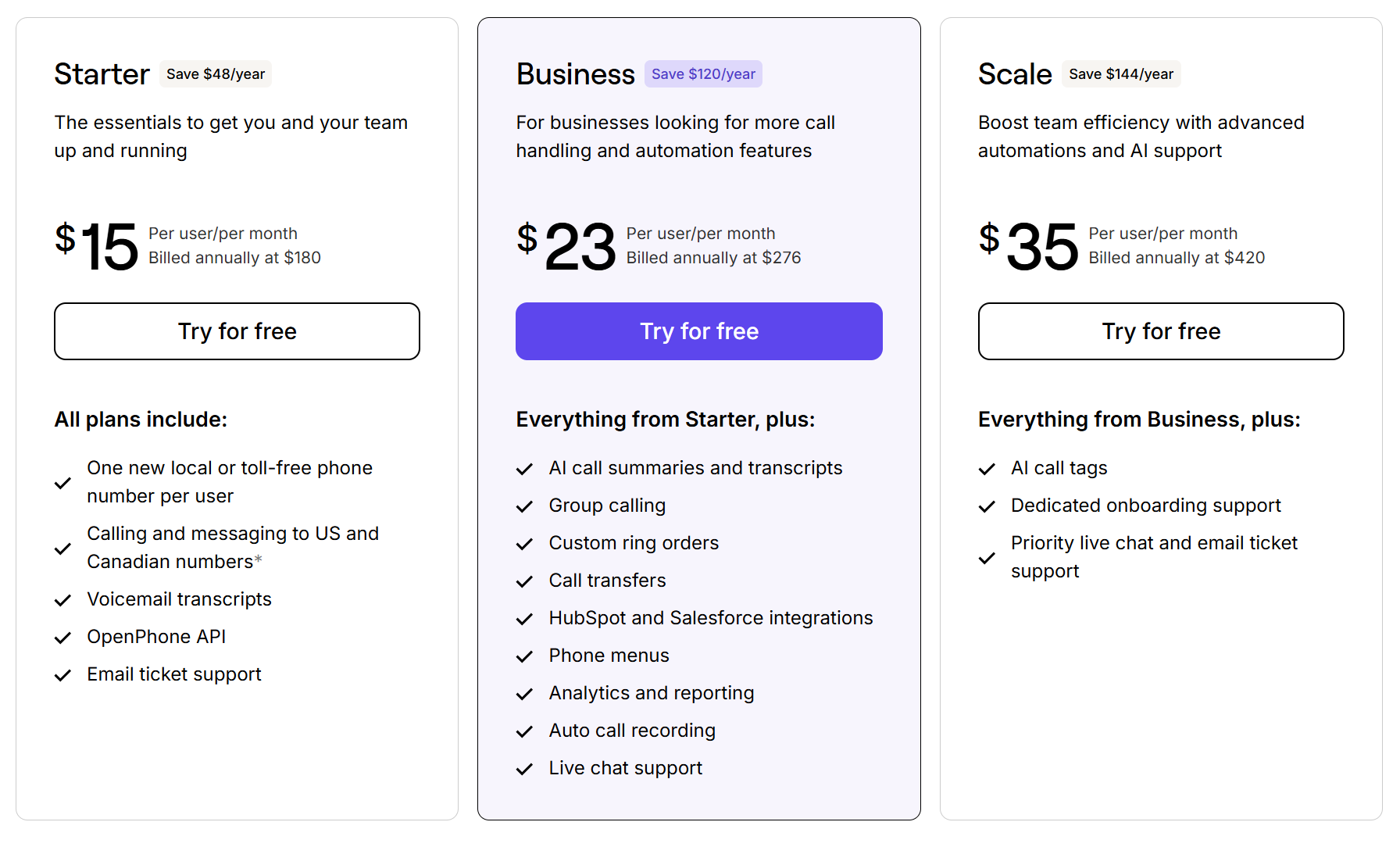
Quo’s pricing is 100% transparent and clearly available on our website. You have three tiers to choose from:
- Starter: $15 per user per month for unlimited calling and messaging to the US and Canada, voicemail, shared contacts, call notes, call recording, group messaging, and more
- Business: $23 per user per month for group calls, call transfers, shared phone numbers, access to the Salesforce and HubSpot integrations, and more
- Scale: $35 per user per month for AI call tags, inbound phone support, priority chat and email support, and dedicated onboarding
2. Nextiva: Best Zoho Voice alternative for omnichannel communications

Pros
- Omnichannel communication
- Inbound and outbound calls in the United States and Canada
Cons
- SMS and MMS are limited to 100 messages per user per month
- Call recording requires an upgrade
- Toll-free number requires an upgrade
- Texting from the same number as a team requires an upgrade
Nextiva is an omnichannel communications platform that goes beyond calling and texting. Unlike Zoho Voice, you can use Nextiva to:
- Make video calls
- Chat online or via webchat
- Chat via messaging apps
- Respond to social media messages
- Send and reply to emails
- Respond to online reviews
Nextiva offers unlimited voice calls in the US, Canada, and Puerto Rico, and up to 100 text messages per user per month in the US and Canada on the Core plan. Other useful features like toll-free numbers, call recording, and AI call notes are locked behind upgrades.
Want to try before you buy? Unfortunately, Nextiva doesn’t offer a free trial. That means you won’t be able to try it before signing up. Your only other option is to sign up for a demo.
Key features of Nextiva
- Unlimited calls and video meetings
- Email messaging
- Team messaging
- Contact management
- Shared inbox
Nextiva pricing

Here’s Nextiva pricing for small businesses:
- Core: $15 per user per month for unlimited calls and 100 messages a month in the US and Canada, social media messaging, and video calls
- Engage: $25 per user per month for 500 free SMS/MMS messages, 2,000 free toll-free calling minutes, and the ability for customers to text your team
- Scale: $75 per user per month for unlimited texting, up to 10,000 toll-free calling minutes, real-time call transcriptions, and AI call notes and summaries
3. RingCentral: Best Zoho Voice alternative for desk phone rentals

Pros
- Desk phone rentals are available on every plan
- Unlimited calling in the US and Canada
- Local and toll-free numbers
Cons
- Phone rentals require a multi-year contract
- Limited toll-free minutes and text messages
- No truly unlimited file storage; 90-day time limit on call recordings
RingCentral is a legacy business phone company that offers desk phones if you want a traditional office setup. These aren’t available on just any contract. Renting the phones requires a 24-month minimum term.
The base plan includes unlimited calls to the US and Canada, 100 toll-free minutes, and 25 messages per user per month. While 25 messages per user can go by very quickly, it still offers more free messages than Zoho Voice’s pay-as-you-go model.
You also get a few key business features on RingCentral’s Core plan. For example, you can tap into voicemail transcriptions, voicemail-to-email, and on-demand call recording. However, you can only store call recordings for 90 days, even if you upgrade. Plus, there’s a limit of 200 on-demand call recordings per voicemail box per user.
Key features of RingCentral
- Free business and toll-free numbers
- Unlimited calling in the US and Canada
- 25 free SMS per user per month
- Whiteboards for video meetings
- Shared phone numbers
- Multi-level auto-attendant and IVR
- Desk and conference phone rentals
RingCentral pricing

Here’s what you’ll pay, according to RingCentral pricing:
- Core: $20 per user per month for unlimited domestic calls, shared phone numbers, 100 toll-free minutes, and 25 SMS/MMS per user
- Advanced: $25 per user per month for 1,000 pooled toll-free minutes, 100 SMS/MMS per user, automatic call recording, advanced call routing, and access to CRM integrations like Freshworks and Odoo
- AI Customer Engagement Bundle with AIR: Contact sales for pricing for 10,000 pooled toll-free minutes, 200 SMS per user, unlimited storage, and historical and real-time insights
- AI Customer Engagement Bundle with AIR and ACE: Contact sales for pricing for AI Conversation Expert, or ACE, coaching and performance analytics, and CRM and productivity integrations
4. Dialpad: Best Zoho Voice alternative for international phone numbers

Pros
- Unlimited calling to US and Canadian numbers
- Supports numbers from 50+ countries
- Desktop and mobile apps are available
Cons
- User minimums on higher-tier plans
- Limit of 250 outbound messages per user per month
- No additional numbers without upgrading
- Unreliable service
Dialpad is a virtual phone system for large teams and enterprises. It supports international numbers from over 50 countries, plus unlimited calling to US and Canadian numbers.
Unlike Zoho Voice, Dialpad’s base plan isn’t free. Connect Standard costs $15 per user per month but allows 250 free outbound messages per person. That’s more than you get with Zoho Voice. You also get access to key features like call recording, message threading, and call and voicemail transcriptions.
But you should know the Standard plan doesn’t let you buy additional numbers — something even Zoho Voice allows. If you need extra numbers, you’ll have to upgrade to a higher-tier plan. The same goes for most integrations, including Microsoft 365 and Teams.
Some customers also find Dialpad difficult to set up, with reviews describing the platform as complex or prone to technical issues. Customer service also seems to be a common problem for Dialpad customers.
Key features of Dialpad
- Unlimited calls to the US and Canada
- 250 free outbound SMS per person per month
- Toll-free numbers
- Call recording
- Call forwarding
- Team messaging
Dialpad pricing

Dialpad pricing has three tiers:
- Standard: $15 per person per month for calls, outbound SMS, call forwarding, call routing, and call and voicemail transcription
- Pro: $25 per person per month for additional numbers, hold queues, CRM integrations, and Open APIs and webhooks; requires a three-seat minimum
- Enterprise: Custom quote for phone number extensions, unlimited ring groups, single sign-on, or SSO, and unlimited office locations; requires a 100-seat minimum
5. Vonage: Best Zoho Voice alternative for video conferencing

Pros
- Video conferencing, with an upgrade
- Unlimited calls to the US and Canada
- Video calling, with an upgrade
Cons
- Team messaging requires an upgrade
- Integrations require the premium plan
- No call transcription
Vonage is a unified communications platform that began in 2001. In addition to its residential service, it has a business platform with calling, texting, and video conferencing options. This is designed to help mid-sized businesses and enterprises design custom communication workflows for their customers.
The Vonage plan most comparable to Zoho Voice’s base plan is the Mobile tier. This has unlimited domestic calling, SMS messaging, voicemail, and a virtual receptionist. Just keep in mind SMS messaging is pay-per-use, no matter which plan you’re on.
Want features like team messaging and on-demand call recording? These are locked behind multiple upgrades, ranging from $20.99 to $27.99. But keep in mind these prices change based on the number of users on your team. The fewer you have, the more you pay per user per month for the same service.
If Vonage’s limitations don’t work for you, Quo offers these features on the base plan, with no pricing changes based on the size of your team.
Key features of Vonage
- Unlimited domestic calling
- SMS and MMS
- Free call porting
- Free voicemail and voicemail-to-email
- Mobile and desktop apps
- Virtual receptionist
Vonage pricing

Vonage pricing plans are divided into three tiers. Because plan costs change depending on the number of users, we’ve listed pricing for teams with four or fewer users:
- Mobile: $13.99 per user per month for unlimited domestic calling, SMS/MMS, basic voicemail, desktop and mobile apps, and free number porting
- Premium: $20.99 per user per month for team messaging, VoIP desk phones, video meetings with up to 200 participants, and access to Vonage’s integration ecosystem with Clio, Surfly, and certain Zoho apps
- Advanced: $27.99 per user per month for access to call groups, visual voicemail, and voicemail transcriptions
6. Grasshopper: Best Zoho Voice alternative for multi-digit extensions

Pros
- Unlimited calling to the US and Canada
- Unlimited messaging
- Unlimited extensions on the highest plan
Cons
- No integrations except Google Voice
- Base plan only supports one user
- Limited group collaboration features
Grasshopper is an older VoIP provider that works best for solo operators or small teams — like Zoho Voice’s Solo Plan. But unlike Zoho Voice, Grasshopper’s True Solo base plan includes unlimited domestic calling and SMS. That makes it the more attractive option for individuals who only need one seat.
You can also use Grasshopper to access multi-digit extensions that callers can use to dial a specific person on your team or multiple teammates. Users on the Solo Plus plan get three extensions, with additional extensions costing $3 each per month. In contrast, Small Business subscribers can have unlimited extensions. Their Small Business plan costs $55 per month.
Keep in mind you’ll also need the Solo Plus plan to have additional users — although you can add as many as you want. However, the Solo Plus plan still only includes one phone number. If you need additional numbers, you’ll have to upgrade or purchase extra numbers.
Key features of Grasshopper
- Unlimited calling and messaging
- Call forwarding
- Custom greetings
- VoIP and WiFi calling
- SMS auto-response for first-time callers only
Grasshopper pricing

Grasshopper pricing has three plans:
- True Solo: $14 per month for one user, one phone number, one extension, and unlimited calling and messaging
- Solo Plus: $25 per month for unlimited users, one phone number, three extensions, call recording, AI summaries, and IVR
- Small Business: $55 per month for unlimited users, unlimited extensions, and four phone numbers
7. Ooma: Best Zoho Voice alternative for calling Mexico and Puerto Rico

Pros
- Unlimited calling in the US, Canada, Mexico, and Puerto Rico
- 500 free minutes of inbound toll-free calls per month for US callers
Cons
- No texting on the base plan
- No call recording on the base plan
- No integrations on the base plan
Ooma is a global digital phone company founded in 2008. Its first product was a “VoIP-in-a-box” designed to help homeowners make cheaper calls. Today, Ooma has expanded its services to small businesses. It offers calling, texting, and video meetings on upgraded plans.
Unlike Zoho Voice, which is pay-as-you-go, Ooma allows companies to make unlimited outbound calls to Puerto Rico and Mexico. You can still make calls to the US and Canada. But you don’t have to pay per minute like with Zoho Voice.
The catch? Ooma’s base plan doesn’t allow messaging. Additionally, it doesn’t include call recording or voicemail transcriptions. There’s a desktop app, but you can’t use it to make calls unless you upgrade. These limitations could force you to upgrade plans.
Key features of Ooma Office
- Unlimited calling in the US, Canada, Mexico, and Puerto Rico
- Voicemail transcription
- Free porting
- Free toll-free number
- Virtual receptionist
Ooma Office pricing

Ooma pricing plans have the following options:
- Ooma Office Essentials: $19.95 per user per month for unlimited calling in the US, Canada, Mexico, and Puerto Rico and a free toll-free number with 500 incoming call minutes
- Ooma Office Pro: $24.95 per user per month for 100 text messages, calling from the desktop app, and call recording
- Ooma Office Pro Plus: $29.95 per user per month for 400 text messages, team chat, one-to-many messages, and CRM integrations
- Ooma Office Enterprise: Get a custom quote for Microsoft Teams integration, advanced analytics, and custom implementations
8. Phone.com: Best Zoho Voice alternative for HIPAA-compliant video calling

Pros
- Unlimited calling for all plans
- Base plan is HIPAA compliant
- 30-day money-back guarantee
Cons
- SMS requires an upgrade
- CRM integrations require an upgrade
- Call recording requires an upgrade
Phone.com is a HIPAA-compliant business phone system. The base plan offers unlimited calling in the US and Canada. It also offers free number porting, so you won’t pay extra when to port an existing number, like if you’re migrating from Zoho Voice.
Other features available with Phone.com include:
- HIPAA-compliant video meetingsScreen sharing
- Meeting recordings
That said, the base plan doesn’t include SMS messaging. This could be a problem for companies that spend a lot of time texting customers. If you upgrade, you’ll get unlimited texts for an extra monthly fee. You also unlock the shared SMS inbox and SMS auto-replies.
Key features of Phone.com
- Unlimited calls in the US and Canada
- SMS with an upgrade
- Custom phone number
- HD video meetings for up to 100 participants
- Mobile app
Phone.com pricing

Phone.com offers three pricing plans:
- Basic: $15 per user per month for unlimited minutes within Canada and the US, video recording, and HIPAA-compliant calls
- Plus: $22.50 per user per month for unlimited SMS, shared SMS inbox, voicemail-to-text, and IP desk phone access
- Pro: $33.33 per user per month for all recording, CRM integration, and data retention for 10 years
9. Google Voice: Best Zoho Voice alternative for Google Workspace users

Pros
- Free personal tier
- Unlimited calling and messaging to the US and Canada
Cons
- No integrations outside of Google apps, like Google Drive or Gmail
- One extension per user; teams can’t share a business number
- No texting automations
- No toll-free numbers
- Limited call management features
Like Zoho Voice, Google Voice is a small part of a larger app ecosystem. They also both offer a free plan for solo users. But that’s where the similarities end.
Google Voice’s free offering has many features that separate it from Zoho Voice. For example, its plans for solopreneurs offer unlimited calling in the US and Canada —except for some places that may cost $0.01 per minute. These specific locations aren’t listed online, so you’ll need to get in touch with sales for more information. You should also know Google Voice’s free plan is only available in the US. That means if you’re located overseas, you’ll have to upgrade to a paid business plan.
But even if you do upgrade, Google Voice’s base plan doesn’t include key call management features. Ring groups, automatic call recording, call queueing, and auto-attendants require multiple upgrades.
A few other things to keep in mind with Google Voice:
- You can’t use toll-free numbers.
- Google Voice offers no way to automate sending text messages.
- It has no integrations beyond Google apps.
Key features of Google Voice
- Unlimited calls to the US and Canada
- Unlimited messages to the US and Canada
Google Voice pricing

Google Voice pricing has three plans made for personal use. These are only available in the US:
- Personal: One free user with two numbers, plus unlimited calling and messaging to the US and Canada
- Starter with Voice: $10 for one user per month, on-demand call recording, and desk phone support
- Voice Standard: $20 for one user per month, AI note-taking, and auto-attendants

- Voice Starter: $10 per user per month for free number porting, Google ecosystem integrations, and availability in 14 countries
- Voice Standard: $20 per user per month plus a Google Workspace subscription* for multi-level auto-attendant, SIP link, and eDiscovery
- Voice Premier: $30 per user per month plus a Google Workspace subscription* for advanced reporting, automatic call recording, and unlimited international locations
*Google Voice’s business plans require a Google Workspace subscription, starting at $7 per user per month.
10. WhatsApp Business App: Best Zoho Voice alternative for micro businesses

Pros
- App is free to download
- Unlimited voice calls and text messaging
- Can add CTA buttons to text conversations
Cons
- Tied to one primary phone and a few linked devices
- Difficult to scale for high volumes of leads
- Limited team collaboration
- No CRM integration
The WhatsApp Business App is a free calling and texting app for small to micro businesses. It’s different from the WhatsApp Business Platform, which is a collection of APIs and integrations.
With the free Business App, you use an existing number, like your regular WhatsApp account, to make unlimited calls and texts as a business. You can also link your primary mobile device with up to 10 other devices assigned to AI or human reps. That way, you can easily ring multiple devices and prevent callers from ending up in voicemail.
The business phone features available on the WhatsApp Business App include:
- Text scheduling
- Message snippets
- Away messages
- Message tagging
- CTA buttons like “Order” or “Book” in text conversations
- A virtual storefront with company branding and a product catalog
WhatsApp Business App doesn’t scale well if you have a high volume of leads because there’s no CRM integration. You also can’t add contact notes beyond labeling messages. That makes it hard to find and share information between team members. Speaking of which, team collaboration is difficult, too; there’s no way to assign a conversation or specific work to someone else.
Key features of WhatsApp Business App
- Unlimited calling
- Unlimited messaging
- CTAs on messages
- Business profile page
- Business catalog
- SMS auto-greeting
WhatsApp Business App pricing
The WhatsApp Business App is free to download and use.
Why businesses are looking for Zoho Voice alternatives

Zoho Voice is one of the 50+ apps that are included with Zoho One and Zoho Workplace. The base tier, Solo, doesn’t cost anything to use. You get support for metered calls in the US and Canada, call recording, and voicemail transcriptions. Plus, you can integrate with other Zoho apps like Zoho Cliq, Zoho Mail, or Zoho Books.
But despite the free plan, many growing businesses get frustrated with Zoho Voice’s limitations. The pay-as-you-go pricing can add up over time. It can also be hard to manage business calls and texts with a team.
Let’s look at these considerations — plus a few others — in greater detail:
Pay-as-you-go pricing
Zoho Voice’s pricing charges by the minute. It has different rates depending on the phone numbers you have and whether the call is inbound or outbound.
Likewise, text messages have different rates depending on whether they’re:
- Inbound or outbound
- SMS or MMS
- Sent from within or outside the US
Keep in mind, you only get free outgoing call minutes after you pay for more users or upgrade to a higher plan.
This works differently from Quo, which offers unlimited calling and messaging in the US and Canada on any plan.
Confusing credit-based system
After signing up for a Zoho Voice plan, you’ll need to buy credit points to use certain features. For example, you’ll need to pay for incoming and outgoing calls on the Solo plan. Features like call monitoring and queue performance cost 10 credits per user per month, or $10 per user per month.
When your credits run out, you’ll have to buy more from Zoho Voice to keep using its platform. This can get expensive fast at $1 per credit.
Limited free trial
Zoho Voice offers a 15-day free trial, but it has limitations. For example, you’re limited to making outbound calls only, not taking inbound calls. This could be frustrating if you want to test real customer calls with your team.
No outbound toll-free calls
Want to make calls via toll-free numbers? This isn’t possible with Zoho Voice. Currently, toll-free numbers can only receive inbound calls. These are also subject to pay-as-you-go rates.
Team collaboration challenges
Zoho Voice’s Solo plan doesn’t have many team-friendly features. For example:
- You can’t share an inbox
- It has no group messaging feature
- You’ll need to upgrade to access call notes
If you need more built-in features to collaborate with your team, consider a team-friendly VoIP platform like Quo.
Try the best Zoho Voice alternative

Zoho Voice works great for small teams that don’t need many calling or messaging tools. But for fast-growing teams, it might be hard to scale. Many small and growing businesses choose Quo as a more scalable alternative.
Each Quo plan has unlimited calling and texting, so you don’t need to worry about saving minutes for the busiest parts of your month. You’ll also get access to workflow automations like auto-replies, scheduled texts, and Zapier to save time on repetitive tasks. Need to delegate work or collaborate on specific conversations? Use team collaboration features like shared inboxes and task management.
Join the 90,000 businesses winning more customers with Quo. Sign up today for our seven-day free trial.
Frequently asked questions about Zoho Voice alternatives
Phone.com, Grasshopper, and Ooma are potential alternatives to Zoho Voice. And we may be biased, but we believe Quo is an ideal alternative to Zoho Voice for growing businesses. We offer unlimited calling and messaging in the US, over 9,000 integrations, and plenty of team collaboration features. We offer a seven-day free trial so you can test the platform. Plans begin at $15 per user per month.
Yes, you can sign up for a Zoho Voice Solo plan at no cost. But calling and messaging are charged on a per-use basis. And business features like texting and IVR require upgrades.
Not immediately. Solo account holders can only send SMS/MMS after adding at least one more person to their account.
Zoho Voice comes with one seat. You can purchase additional seats for $19 per user per month. Or you can upgrade to the Basic plan to add unlimited users and access more features for $34 per user per month.
Zoho Voice users have to purchase credits to:
– Send messages
– Make calls
– Pay for add-ons like the power dialer
You must purchase these credits separately from your monthly subscription. That means you pay twice: once for your plan and once for your monthly credits.
Zoho Voice standalone accounts are limited to:
– The United States
– Europe
– India
– Australia
On its website, Zoho says it plans to set up Zoho Voice in Canada, but this isn’t finalized yet.


