At Quo, we believe your business phone should fit seamlessly into your workflows — not the other way around. 100,000+ businesses agree with us; they’ve sent and received over 1 billion calls and messages.
With our Fall ‘24 release, we’ve introduced four new features that make big strides towards our mission: the Quo API, the new call flow builder, call views, and AI call tags. We recently held a launch event to demonstrate the possibilities that are now available to Quo (formerly OpenPhone) customers with the Quo API.
Watch the event here or read through the highlights below:

Send messages and update your contacts and conversations on autopilot
The Quo API offers three core capabilities that can save your team time and help you grow faster.
1. Automatically send messages
Wish you could always send the right message at the right time? With the Quo SMS API, you now can trigger messages based on custom criteria.
For example, if a new lead submits a sales form, you can use the Quo API to automatically send them a welcome text.
- Key endpoints:
- Send a message
- List messages
- Get a message by ID
- Key webhooks:
- Webhook for messages

2. Sync contacts into Quo (formerly OpenPhone)
Say goodbye to outdated contact information in your Quo workspace. With our API, you can sync your contacts from your CRM or your address books directly into Quo. For every call and message you receive, you’ll get accurate contact information for successful customer interactions.
Easily create, update, delete, and edit contacts, by automatically syncing with your CRM. Map custom fields from external data sources into Quo’s contact structure, so that you can get the contact data you need.
- Key endpoints:
- Get custom contact fields
- Get contact by ID
- Create contact
- Update contact
- Delete contact

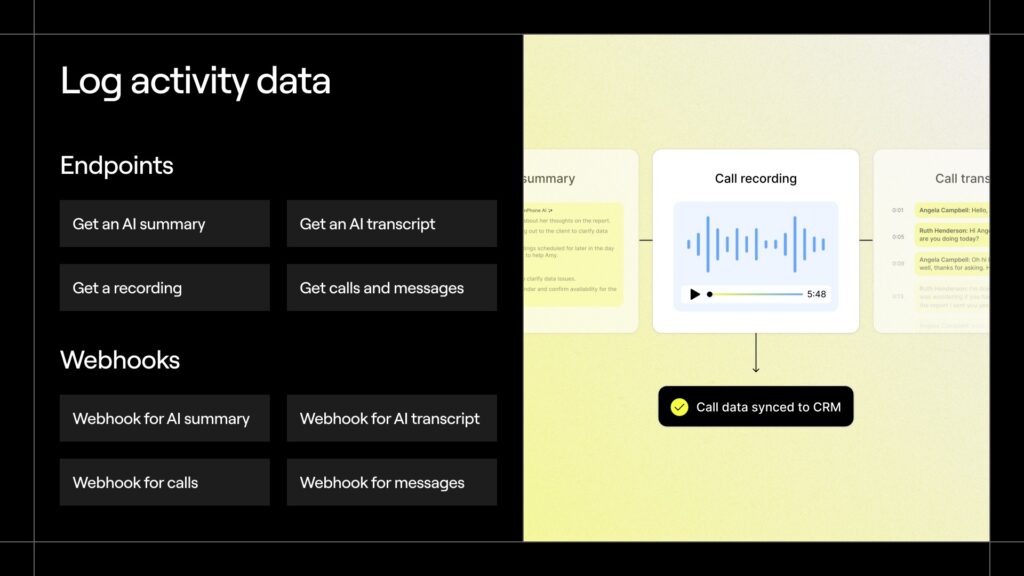
3. Log activity data with your tool stack
Send OpenPhone data — calls, messages, recordings, and summaries — to the tools you use everyday. No need to toggle between Quo and your other tools to build a comprehensive picture of your customer journeys.
- Key endpoints:
- Get an AI summary
- Get an AI transcript
- Get a recording
- Get calls and messages
- Key webhooks:
- Webhook for AI summary
- Webhook for AI transcript
- Webhook for calls
- Webhook for messages
3 practical use cases for the Quo API
With the endpoints and webhooks available in the Quo API, the possibilities are endless. Here are a few practical use cases to inspire your own custom workflows:
1. Automated internal workspace insights
Turn every step of your internal data reporting and analysis into a seamless automated system, from extracting your data to summarizing insights. Deliver real-time information to your team like a daily digest email that lets your team know how many calls and messages were made the previous day, or send your call recordings to ChatGPT to extract common sales objections your team might need to address.
One of the tools we’ve built internally to test this out is a daily Slack digest called ‘Sum of Summaries’. This digest provides a snapshot of our team’s performance. It includes a daily call summary, top three customer insights, emerging trends, and action items for the team. It also tags specific team members responsible for specific action items.
Data from our internal workspace is passed to ChatGPT, which creates a summary of the data based on a structured template. This summary is then automatically delivered to our Slack channel every morning, no manual work required.

2. Process automation
Reduce administrative back-and-forth messaging with automated text workflows. Send reminder texts, available appointment times, or requests for customer feedback, without any manual intervention. Automating these tasks gives your team the freedom to focus on higher value work, while also increasing the number of touchpoints customers have with your business.
One internal example we’ve built to test this out is an appointment scheduler. Customers can message a dedicated inbox and number to schedule their appointments.
- Available times are pulled from the Google Calendar API and are shared with customers using the Quo API in a message.
- Once a customer chooses an available time, we use the ‘Message received’ webhook to trigger the Quo API.
- The confirmation is then passed from the Quo API to the Google Calendar API and scheduled in Google Calendar.

3. Autonomous communication
Give your customers a 24×7 support number to answer their questions over text. With the Quo API, you can integrate with your preferred AI language model to answer customer questions around the clock. Prompt the AI model with your support documents and your brand voice so that it generates responses that sound just like your support team.
We tested exactly that with a fun chat-based game in Quo. The game was powered by webhooks and the Quo API to pass prompts and responses between Quo and ChatGPT. While the team worked on this example for fun, you can use the same workflow to create a chatbot that answers common customer questions about your business hours or refund policies and reduces your support response times.

Two new OpenPhone partner programs
In addition to highlighting the Quo API and showcasing what you can do with it, we also shared updates to Quo’s partner programs: OpenPhone Experts and the Technology Partner Program. These programs will function alongside Quo’s existing Referral Partner Program.

OpenPhone Experts
OpenPhone Experts is a program for agencies and consultants to help customers with tasks like CRM implementation, Quo integrations, and any other custom API builds and automations.
As a Quo Expert, you get access to the following partner benefits:
- Earn a share of the revenue for every customer you refer
- Increase your reach with joint marketing and sales efforts
- Give your clients a custom onboarding experience
Curious whether OpenPhone Experts is for you? One of our pilot partners, Patch, a healthcare marketing consultancy, had this to say:
“Partnering with Quo has been a game-changer…the outstanding support from the team ensures our partnership continually drives value for our mutual customers,” Jeremy Dupont, Founder and CEO at Patch.
If you’re interested in becoming a Quo Expert, email us at [email protected] to get started.
Technology Partner Program
The Technology Partner Program is aimed at building the app and partner ecosystem that powers your phone system. With technology partners, we hope to provide businesses with the option to use Quo wherever they need it.
Our first round of partnerships are already live, with more coming very soon, including:
- Relay.app
- Postcall
- Make (coming soon)
- Fireflies.ai (coming soon)
- Jobber (coming soon)
If you’re interested in building an integration with Quo, check out our docs at quo.com/docs. Want to build a public integration? Get in touch with our Partnerships team at [email protected].
Grow your business with Quo (formerly OpenPhone)
The Quo API is a powerful new tool you can use to automate your communications and customize your Quo workflows. With the help of our OpenPhone Experts and our technology partners, you’ll be able to get up and running with the API quickly.
Learn more about our Fall Launch and get started with the latest Quo features in your workspace.
Not a Quo customer yet? Join the thousands of businesses that use Quo to power their communications today. Sign up for a free seven-day trial.