Between calls, reviews, bookings, and emails, you’re likely generating more customer data than you realize. Only, these conversations happen in different places. And depending on how you work, some conversations may never get recorded.
Without a way to connect the dots, your customer data can become fragmented and unhelpful. This forces you to make decisions based on gut feelings instead of evidence. Now, there’s no easy way to see why your close rate is down or if that specific marketing campaign is working, until it costs you time, effort, or money.
That’s why most growing businesses use a customer intelligence platform. These are tools that pull customer data into one place, analyze it, and look for patterns and trends. They can show you what’s working, what isn’t, and where your next opportunity is.
In this guide, we’ve rounded up 10 of the best options for growing small businesses.
What is a customer intelligence platform?
A customer intelligence platform, or CIP, helps you consolidate and analyze customer data in one place. This makes it easier to determine who your customers are and what they need.
CIP works by:
- Collecting data from multiple sources. These could be your CRM, a business phone platform, or a review site.
- Cleaning and merging the data into a single customer view. This gathers your customer data into one easily accessible spot.
- Analyzing behavioral data to find patterns. The tool uses AI and machine learning tech to analyze trends in your data so you can see how customers interact with your business. This could include their calling patterns, how they navigate your booking page, or when they tend to go quiet before churning.

💡What’s the difference between a customer intelligence platform and a customer data platform?
A customer data platform, or CDP, focuses on collecting data. CIP takes it a step further by analyzing it. Both help businesses create a single source of truth for their data. But if you want a tool to generate insights and recommendations from your data, you should consider a CIP.
10 Best customer intelligence platforms reviewed and ranked
Below are the top customer intelligence platforms for small and growing businesses. First, narrow down your top options based on the use case each platform is made for. Then create a shortlist of your favorite providers based on their pros, cons, features, and pricing. You can use the table below for a quick comparison.
10 Best platforms for customer intelligence compared
We’ve collected a list of customer intelligence platforms you can use now, plus others you can add to your stack as your business grows.
Use this comparison chart to quickly identify which tools match your use case and what each one offers at a glance:
| Tool | Best for | Starting price | Key features |
|---|---|---|---|
| Quo | Phone-based customer intelligence | $15 per user per month | AI call tags, call transcripts and recordings, sentiment detection, analytics dashboard, Claude integration, two-way CRM sync |
| HubSpot Breeze Data Agent | HubSpot users who want CI inside their CRM | $90 per user per month | Breeze Data Agent, conversation intelligence, customer health scores, NPS and CSAT surveys, 1,700+ integrations |
| Google Analytics | Free website behavior intelligence | Free | Audience segmentation, acquisition reporting, engagement and conversion tracking, Google Ads integration |
| Zendesk | Knowledge base and support ticket intelligence | $19 per user per month | Omnichannel customer data, AI sentiment analysis, CSAT surveys, real-time analytics |
| Dovetail | Centralizing customer feedback | Free; 60 days only | AI theme and sentiment detection, transcription in 41 languages, integrations with Slack, Teams, and Zendesk |
| Hotjar | Booking page and quote form optimization | Free | Heatmaps, session recordings, journey analysis, form drop-off tracking |
| Brandwatch | Social listening and online reputation monitoring | Contact for pricing | Social listening across major platforms, AI sentiment analysis, competitor analysis, social media management, with an upgrade |
| Outreach AI | Revenue intelligence for larger sales teams | Contact for pricing | Five AI agents, deal health scoring, pipeline forecasting, sentiment analysis, 90+ integrations |
| SAS Customer Intelligence 360 | Enterprise multichannel marketing intelligence | Contact for pricing | 360-degree customer profiles, online and offline data collection, predictive analytics, identity resolution, GDPR and CCPA compliance |
| Qualtrics XM | Complex voice of customer programs | Contact for pricing | NPS, CSAT, and VoC program management, AI sentiment analysis, predictive analytics, omnichannel survey collection, executive dashboards |
Let’s take a closer look at each platform below.
1. Quo: Best phone customer intelligence platform for growing businesses
Pros
- Gathers call and text data in one organized space
- Shared numbers for visibility across teams
- Two-way CRM integration keeps customer data in sync
- Claude integration turns raw call data into actionable intelligence
- Scheduled AI analysis to deliver insights to tools you already use, like Slack
- AI call tags surface sentiment and themes without manual review
- Detailed call and text analytics
Cons
- Not designed for social, surveys, or web behavior
- Claude integration requires a Claude Pro or Team plan subscription
Conversation analytics is one of the most underused yet valuable sources of CI for service-based businesses. Every inbound call, missed call, voicemail, and text contains information. But if you don’t have a reliable way of collecting it, you can’t track who’s reaching out, how often, what they need, or whether someone’s following up.
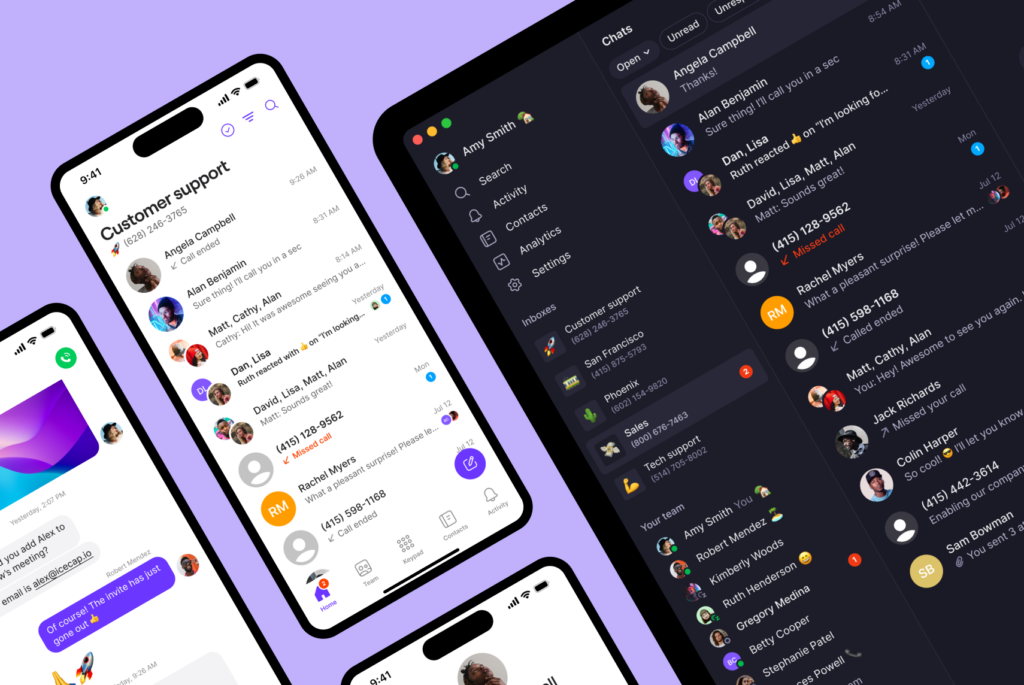
Quo is a business phone system for small and growing teams, with customer intelligence baked in. Quo captures your team and customer communications in one organized space. It helps you extract what matters, like objections, intent, and sentiment. You can then route those insights to various teams and tools that can act on them.
For example, you can use Quo’s call views to get an overview of your inbound and outbound calls. On the Scale plan, you also have AI call tags to automatically flag conversations by sentiment, intent, or topic. That way, you can qualify leads, spot recurring issues, and improve speed to lead.

On the Business plan, you already get automatic AI call recordings and transcripts for every call. These turn conversations into searchable, analyzable data. Instead of relying on memory, you can see what happened during a conversation. From what customers ask about to how well team members communicate.
Once you have your call data down, you can connect Quo to Claude to analyze it and provide you with reports. This Claude integration can help you spot themes, patterns, and the likely causes of problems. It can be helpful when you’re trying to understand why something is happening.
Claude prompt examples
Here are several Claude prompt examples you can try:
- “Pull my last 30 days of inbound calls and tell me the most common reasons leads didn’t move forward with us.”
- “Pull my last 30 call transcripts on [my business phone number]. Flag any calls where the customer had to repeat themselves, the conversation went in circles, or the issue could have been resolved faster. What patterns do you see?”
- “Pull my last 100 messages on [my business phone number]. What are customers complaining about the most? Group the issues by theme and tell me how many times each came up.”
No need to do this manually every time, though. With scheduled Claude tasks, you can run a recurring analysis of your Quo data, like weekly, biweekly, or monthly. Then send the results to another app, like Slack or Notion, for better visibility across the team. For example, you might have Claude share a weekly report on the top sales objections in a sales Slack channel.

Another way to check in with customer conversations is to pull up your call analytics within Quo. This lets you look at call outcomes, like the number of calls answered, received, missed, abandoned, or sent to voicemail. Drill into a specific time range, like the last 30 days, to get a benchmark of what’s going on. Now you can spot areas where you might be leaking revenue.

Sign up today for a seven-day free trial and test Quo’s customer intelligence tools with your team.
Key features of Quo
- AI call tagging and sentiment detection
- Call transcripts and recordings
- Ability to search call transcripts for keywords, moments, and themes
- AI call summaries
- Call analytics dashboard
- Claude integration for conversational data analysis
- Two-way CRM integration
- Integration with over 9,000 tools
- Internal threads and mentions
- In-app task assignment
- Unlimited calls and texts in the US and Canada
- Enterprise-grade privacy, data and communication encryption, access controls, and more
Quo pricing
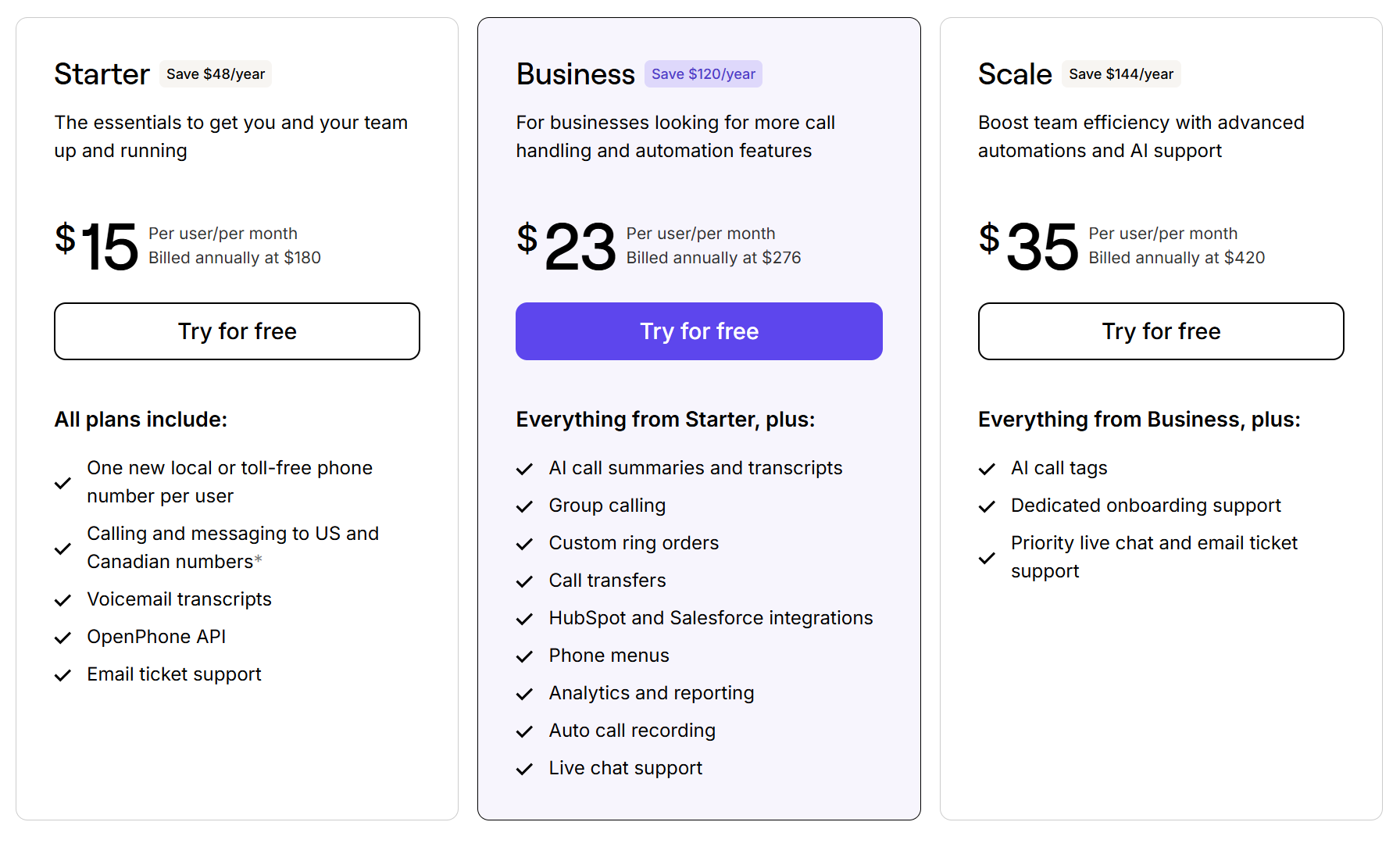
All Quo pricing plans come with a Claude integration, plus AI features designed to grow alongside your brand.
- Starter: $15 per user per month for unlimited calls and texts in the US and Canada, unlimited contacts, shared phone numbers, 10 free calls per month with Quo’s Sona, and more
- Business: $23 per user per month for call transcripts and summaries, call analytics, automatic call recording, phone menus, call transfers, HIPAA compliance, CRM integrations like HubSpot, ring order, and more
- Scale: $35 per user per month for AI call tags, dedicated onboarding, and priority live chat and email support
2. HubSpot Breeze Data Agent: Best for HubSpot users

Pros
- CI data lives inside your CRM
- Can answer questions in plain language
- Can be integrated with phone systems for richer data sources
- Quick setup
Cons
- Isn’t available on lower HubSpot tiers
- Effectiveness depends on how organized your underlying CRM data is
You’re probably familiar with HubSpot as a CRM. But it also offers a collection of features that help you understand your customers more deeply. This includes:
- A centralized space to view customer data from your contact records, support tickets, and more
- Enriched contact and company profiles
- Customer health scores that flag accounts at risk of churning
- Conversation intelligence to analyze calls from your business phone system
HubSpot also offers the Breeze Data Agent. This is one of its CI features designed to automatically answer CI-related questions. Instead of forcing you to dig through records, Breeze pulls data from CRM records, websites, and customer conversations. That way, you can answer questions like:
- “Which of our customers haven’t opened an email in 90 days?”
- “What are the most common topics in our support tickets this month?”
- “Which companies on our contact list have grown headcount recently?”
Our users can also integrate Quo with HubSpot directly. This syncs calls, texts, voicemails, and AI-generated call summaries to the correct record inside HubSpot.With that, you can enrich any customer record in HubSpot with call data in Quo.

Just know that you’ll have to upgrade twice before unlocking any major CI features. Keep this in mind when planning your tools.
Key features of HubSpot
- 2,300+ app marketplace integrations, including Quo
- Customer loyalty surveys
- Breeze Data Agent
- Conversation intelligence
- Customer health scores
HubSpot pricing

HubSpot’s CI tools are available on various suites, like its Service suite. Here’s what you can expect to pay:
- Free: Basic contact and company records, deal pipeline, and interaction history
- Starter: $7 per user per month for ticket routing, basic automations, analytics, a reporting dashboard, and email marketing
- Professional: $90 per user per month for a helpdesk and helpdesk automation, Breeze AI agent, knowledge base, customer portal, customer feedback surveys, and a custom channels API
- Enterprise: $150 per month for more advanced helpdesk automation, skills-based routing, more knowledge bases, a more advanced customer portal, and up to 99 active chats at a time
Keep in mind these prices are just a starting point. After reaching out to sales, we learned that the exact cost depends on your business needs. You’ll have to contact sales to get more personalized pricing.
3. Google Analytics 4: Best free CI tool for website behavior

Pros
- Free
- Shows which marketing channels drive the most high-value leads
- Integrates with Google Ads and most major marketing tools
- Audience segmentation helps you understand your customers better
Cons
- Setup can require some expertise
- No insight into calls, support interactions, or post-sale behavior
- Requires some setup to get meaningful data
Google Analytics 4, or GA4, is a customer journey platform. It collects data from your websites and apps to generate reports that help you make decisions about your business.
First, you add a small tracking code to your website that collects anonymous data about visitor interactions. Then you can look for patterns in the data. It could tell you the problems they’re researching, the services they’re comparing, and the content of yours they like the most.
Some of the top reports you get include:
- Audience reports. Show you who is visiting your site. You can break it down by demographics, location, device type, and whether visitors are returning or new.
- Acquisition reports. Find where your traffic is coming from. This might be organic search, Google Ads, social media, direct visits, or referrals.
- Engagement reports. Discover which pages visitors are spending time on, which features they’re interacting with, and when they leave.

A great way for a local service business to use GA is to track local geographic conversions. You can also monitor which landing pages drive the most inquiries. For example, is “Emergency AC repair” bringing in more customers than “Routine maintenance?” You could also measure form-submission drop-offs in various locations, like a Miami office versus a Richmond office.
That said, keep in mind GA4 doesn’t track phone call conversions. A visitor can land on your “Emergency AC Repair” page and call, but GA won’t track that as a conversion.
To fill that gap, you’ll need a phone intelligence tool like Quo. Assign a dedicated number to track your ad campaigns, so you know which ones drive the most calls.
Key features of Google Analytics
- Traffic and acquisition reporting
- Audience demographics and segmentation
- Engagement and conversion tracking
- Goal and event setup
- Event-based measurement
- Cross-platform tracking across devices like computers and mobile devices
Google Analytics pricing
Google Analytics 4 is free. But there’s a paid plan, with no transparent pricing, you can opt for as you scale:
- Google Analytics 4: Free for standard website and app tracking, event-based data collection, basic audience segmentation, conversion tracking, and integrations with Google Ads
- Google Analytics 360: Custom pricing for higher data limits, unsampled reports, BigQuery exports, SLA guarantees, and advanced audience tools
4. Zendesk: Best for knowledge base customer intelligence

Pros
- AI agents are available on the base plan
- Omnichannel customer intelligence
- 14-day free trial
- 1,000+ integrations, including Quo, CRMs, and other business tools
Cons
- Can get expensive as your team grows
- Steeper onboarding than simpler tools
- Customer intelligence platform
Zendesk is a digital customer service platform. It’s useful to teams whose primary CI source is support tickets and help center behavior. You can use its CI features to improve self-service and rep performance, which can help improve the customer experience.
The base plan mostly lets you gather customer interaction history into a single workspace. This includes touchpoints like email, live chat, and web messaging. Upgrade to the Suite Team, and you’ll unlock Knowledge Base Analytics. This tracks basic search keywords, article views, and deflection metrics in your help center. That way, you can monitor what customers search for the most.
Zendesk also offers a Copilot feature, which is a powerful CI feature. You can get this as an add-on from the Professional plan or higher. It offers CI features like:
- Intelligent Triage. Auto-classify tickets by intent, sentiment, and language.
- The Intelligent Triage dashboard. Spot patterns across customer tickets, like common issues or trends with high negative sentiment.
- Suggested macros and similar tickets. Check relevant responses and previously related cases so agents can resolve active cases faster.
Keep in mind that upgrading to the most expensive plans might be overkill for smaller teams. But even the base plan can help turn tickets into actionable insights and improve CS performance.
Key features of Zendesk
- Omnichannel customer data
- AI-powered sentiment analysis
- Real-time analytics
- CSAT surveys
- Customizable AI agents
Zendesk pricing

Zendesk’s pricing offers more complex CI tools as you grow:
- Support Team: $19 per user per month for the email and ticketing system, conversation histories, integrations, ticket routing, prebuilt analytics dashboards, customer context, and pre-written FAQ responses
- Suite Team: $55 per user per month for customizable AI agents, omnichannel routing, knowledge base, messaging and live chat, and social messaging
- Suite Professional: $115 per user per month for CSAT surveys, customizable ticket forms, real-time analytics, HIPAA compliance, and internal messaging on tickets
- Suite Enterprise + Copilot: Contact sales for pricing for intelligent triage, custom roles, and approval workflows
5. Dovetail: Best for centralizing customer feedback
Pros
- Free plan available for solo business owners
- Can pull feedback from Zendesk, Gong, and more
- AI automatically surfaces themes, sentiment, and patterns across data
Cons
- Free plan lacks security features like access controls
- Free plan is limited to one channel and one project
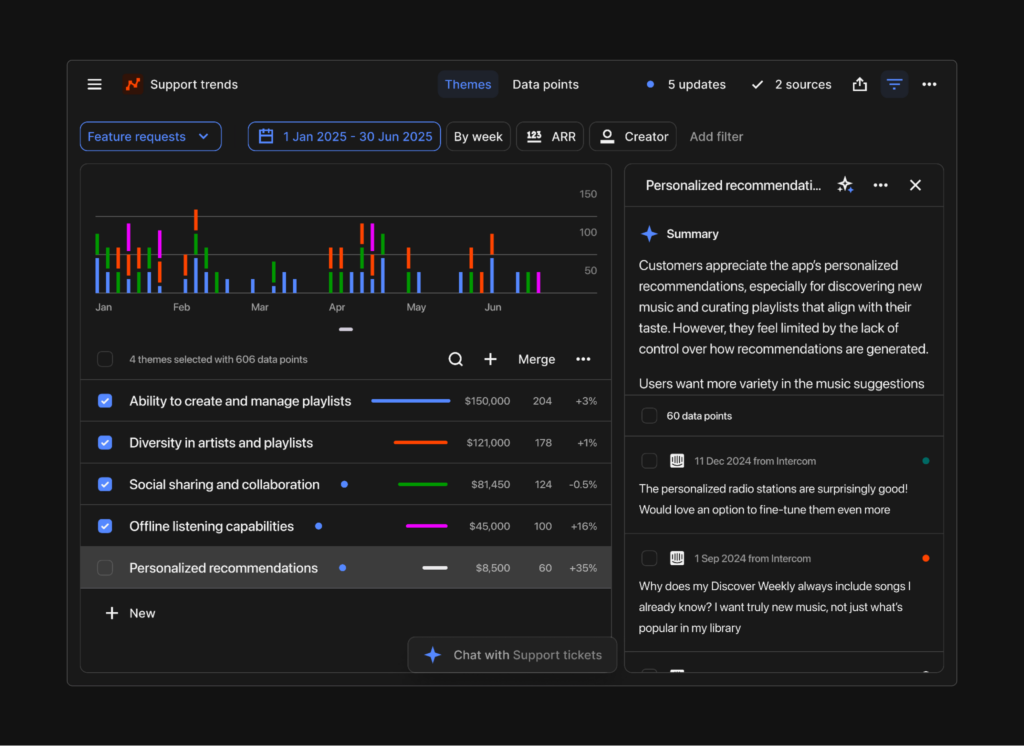
Dovetail is an AI that functions as a CI platform. It centralizes feedback from customer service channels like support tickets, surveys, and sales calls. That way, instead of manually reviewing every customer interaction, you get a single view of what customers are saying and how they feel.
The free plan lets you set up one project with basic AI chat and summarization tools. It also supports transcription in 41 languages. Want to put customer feedback into existing workflows? You can integrate with tools like Slack, Teams, and ChatGPT. Just keep in mind, you’ll have to upgrade for integrations with HubSpot and Salesforce.
Dovetail is a good choice for growing small businesses that want to centralize feedback from one source. But the Free plan only lasts for 60 days. And since it’s limited to one channel, one project, and no access controls, you’ll likely outgrow it fast.
Key features of Dovetail
- Integrations and CRMs require an upgrade
- Calendar sync
- Search
- AI opportunity tracking
- Global tags, with an upgrade
Dovetail pricing

Dovetail only has two plans available: Free and Enterprise. The Enterprise plan requires you to reach out to their sales team for a quote.
The Free plan lasts for 60 days and includes features like:
- One channel to track and analyze voice of customer data
- One project to analyze customer calls, recordings, documents, and surveys
- Chat to ask questions about your data and get AI-powered summaries, for one project only
6. Hotjar, from Contentsquare: Best for booking page and quote form optimization
Pros
- Generous free plan
- Watch real recordings of site visitors’ activity
- Easy to install
- Combined with Contentsquare’s ecosystem of tools
Cons
- May occasionally slow down page load times
- Lacks quantitative analytics like GA4
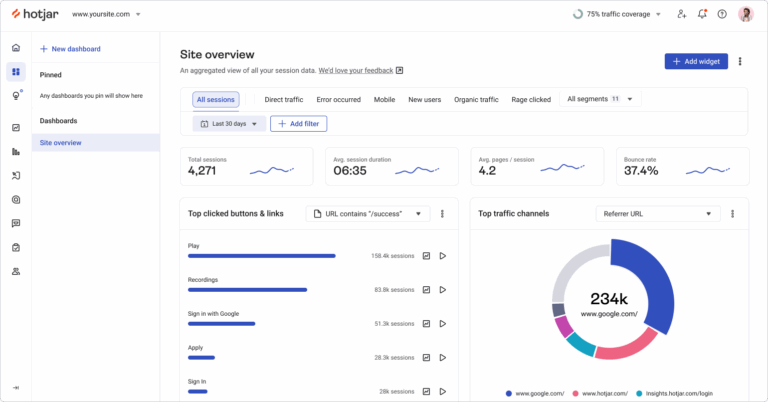
Hotjar is a website behavior analytics tool. All you need to do is add a small tracking snippet to your site, and you can see how visitors interact with your pages. Not just how many visited or where they came from, but what they actually did while they were there.
One way to do this is with heatmaps. These are visual overlays that show where visitors click, how far they scroll, and where they stop engaging. You can see at a glance if visitors engage with or ignore areas, like your pricing table, CTA button, or contact form.
You can also watch real, anonymized recordings of visitors navigating your site. As a service-based business, you might watch people attempt to fill out your booking form or quote request. If you spot a confusing field or broken dropdown, it might clue you into what’s causing users to abandon a form before submitting it.
Consider pairing Hotjar with GA4 for a fuller picture. GA4 tells you how many people visited your booking page, and Hotjar shows you what they did while they were there.
Key features of Hotjar
- Heatmaps
- Session recordings, more than 5% requires an upgrade
- Journey analysis, with an upgrade
- Data feeds
- Multi-session replays, with an upgrade
Hotjar pricing

Here’s what you can expect from Hotjar’s pricing:
- Free: Free for up to 200,000 monthly sessions, heatmaps, and session recordings
- Growth: $39 per month for up to 10 million monthly sessions, journey analysis, and impact quantification
- Pro: Call for pricing for unlimited monthly sessions, multi-session replays, precision filtering, and revenue goals and tracking
- Enterprise: Call for pricing for experience monitoring, error summaries, data feeds, and dedicated support
7. Brandwatch: Best for social listening

Pros
- Simple setup
- Includes social media management features, like post scheduling, with an upgrade
- Search intelligence to browse social media users’ sentiment on almost any topic
Cons
- Price isn’t readily available
- Complex and difficult to use
- Some features must be switched on by a project manager or CSR
Brandwatch is a social media management and social listening tool. It offers a dedicated Consumer Intelligence plan that lets you find market insights in an archived pool of social media insights.
If you want to keep an eye on your specific social media accounts, opt for their Social Media Management module. Use it to run a competitor analysis and see how you match up with other companies or identify gaps you could fill. Getting lots of negative mentions online and feeling overwhelmed? You can also switch on helpful features like crisis management.
Brandwatch currently supports social listening on:
- X
- TikTok
- Bluesky
If you rely heavily on your online reputation, have active review profiles, or have a large social presence, Brandwatch could be a solid choice. But keep in mind it’s quite complex and may require additional support.
See for yourself:
“What I dislike about Brandwatch Consumer Intelligence is that some features can feel slightly complex for first-time users, and the platform can occasionally take time to navigate when working with large amounts of data.” — G2
Key features of Brandwatch
- Customizable dashboards
- Conversational AI customer data analysis
- Search intelligence with GenAI monitoring, with an upgrade
- Social media management features, with an upgrade
- Influencer marketing features, with an upgrade
Brandwatch pricing

Like many other CIPs here, Brandwatch doesn’t list its pricing online.
It does, however, list its modules.
Here’s what to expect from each one:
- Consumer Intelligence: Search for customer opinions on market insights, segment audiences and conversations, and automated reporting and alerts
- Social Media Management: Connect all social media channels to one platform, social CRM, benchmarking dashboards, and access to the social listening tool
- Influencer Marketing: Access a database of social media influencers with 30 million entries, run, measure, and report on multichannel campaigns, and access an influencer CRM
8. Outreach AI: Best for larger sales teams needing revenue intelligence

Pros
- Offers four specialized AI agents for tasks like deal analysis
- Built-in engagement, AI performance, and revenue attribution
- Deep integrations with Salesforce, HubSpot, Snowflake, and 90+ other tools
Cons
- Pricing not available
- Overkill for smaller sales teams
- Some teams may struggle with the learning curve
Outreach is an agentic AI platform for revenue teams. It processes billions of engagement signals from calls, emails, meetings, and CRM data. Then it can help generate information about your customers and team, like deal health, churn risk, and next best actions.
You can also access four unique AI agents that run continuously in the background. On the base plan, you get one agent designed to research accounts, one to analyze deals, and one to forecast your pipeline. Upgrade your plan to access the dedicated Deal Agent, which recommends deal updates and provides custom AI deal summaries.
This makes Outreach AI a useful tool for large sales teams. But for smaller businesses without the infrastructure for AI agents, it’s likely too much. And keep in mind, there’s no public pricing available — although past users say it can be expensive.
“For me, [what I disliked] was primarily the cost. So for a large multinational organization, the cost was okay. But as you move into smaller headcount organizations, it was just too expensive.” — G2
Key features of Outreach AI
- AI Agents for research, revenue, and personalization
- AI credits, scaling according to your plan
- Revenue attribution
- Relationship maps
- Multichannel engagement and sequences
Outreach AI pricing
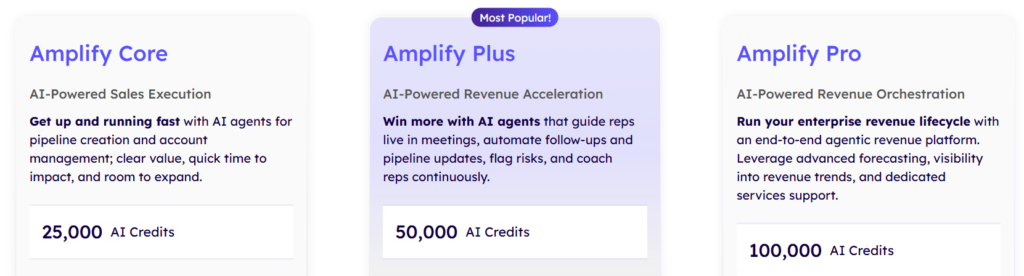
There’s no public pricing available for Outreach AI, although it mentions using a combination of seat-based pricing and consumption-based pricing for AI credits.
You can reach out to sales for a personalized quote.
In the meantime, here’s what you get on each tier:
- Amplify Core: 25,000 AI credits, access to the Research, Revenue, and Personalization AI Agents, AI assistance with accounts, emails, and calls, data enrichment, mobile app, and access to the Slack App integration
- Amplify Plus: 50,000 AI credits, AI coach cards, AI topics, sentiment analysis, deal health, team performance and win/loss outcomes, and integrations with Zoom, Cisco Webex, and Microsoft Teams
- Amplify Pro: 100,000 AI credits, access to all agents and AI tools, forecasting and self-service forecasting, and advanced managed services such as internal support
9. SAS Customer Intelligence 360: Best for enterprise multichannel marketing intelligence

Pros
- Comprehensive 360-degree customer profile combining online and offline data
- Advanced predictive analytics and machine learning for customer behavior
- Strong CRM and MarTech integrations
Cons
- Too heavy duty for small businesses
- Requires technical knowledge to configure and maintain
- Pricing not readily available
SAS is a multichannel marketing hub that can help you build a “360-degree customer profile.” By “360,” it means you can pull in data from both online and offline sources. It allows you to track:
- Online interactions like purchase history, email engagement, and CRM records
- Offline interactions such as in-store transactions or direct mail responses
Once you’ve set up a stream of data to SAS, it can use predictive analytics and AI to determine the next best action for each customer. For example, if a customer’s booking frequency lessens, SAS might flag them as a churn risk. It then triggers a personalized win-back offer via text before they move to cancel.
But as you might imagine, SAS Customer Intelligence 360 has many more applications for medium to large businesses. It might be overkill if you don’t have complex customer journeys or dedicated marketing teams. And considering that there’s no transparent pricing, it may be prohibitively expensive for small and growing brands.
Key features of SAS Customer Intelligence 360
- Online and offline customer data collection
- Customer segmentation
- Identity management and resolution
- Dynamic unified customer profile
- GDPR and CCPA compliance
- Integrations with Adobe and Salesforce
SAS Customer Intelligence 360 pricing
Like many other platforms on this list, SAS doesn’t list public pricing. You’ll have to speak directly with sales to receive a custom quote.
10. Qualtrics XM: Best for building complex voice of customer programs

Pros
- Can collect survey and structured feedback at scale
- Predictive analytics
- Covers customer, employee, product, and brand experience in one platform
- AI-powered sentiment analysis and NPS® and CSAT tracking
- Integrates with Salesforce, Adobe Analytics, Google Analytics, and more
Cons
- No public pricing
- Requires complex implementation
- Some CX teams find the learning curve steep
Qualtrics XM is an experience management platform. It helps you collect feedback across touchpoints like:
- Surveys
- SMS
- Phone calls
- Web
Then, it uses AI to analyze the data for you. This can help uncover trends in customer sentiment, predict behavior, and spot patterns that may be easy to fix.
Qualtrics is best known for its three core programs:
- Net Promoter Score, or NPS, measures how likely customers are to recommend your business.
- Customer Satisfaction Score, or CSAT, tracks how satisfied customers are with specific business interactions.
- Voice of the Customer, or VoC, captures what customers are saying, feeling, and expecting.
VoC in particular can help spot larger trends across touchpoints and locations. For example, say a multi-location business notices dropping NPS scores in three regions. VoC data from calls and web feedback shows that customers are frustrated with response times during peak seasons. This helps inform the company of what changes to make.This could be hiring more staff or setting up an AI voice agent for overflow calls.
Keep in mind that Qualtrics is for larger organizations with dedicated CX teams and formal feedback programs. If you’re a small or growing business, it might be oversized for your needs.
Key features of Qualtrics XM
- Omnichannel survey and feedback collection
- AI sentiment analysis and NLP
- Predictive analytics and behavior forecasting
- NPS, CSAT, and VoC program management
- Executive dashboards and custom reporting
- CRM and analytics integrations
Qualtrics XM pricing
Qualtrics doesn’t currently offer public pricing. The only way to get a quote for its CX, employee experience, or strategy and research use cases is to contact sales.
Benefits of customer intelligence software
Still need to get buy-in from your team?
Here are the benefits of implementing customer intelligence software that you can share with them:
- Know which marketing channel is actually bringing in your best customers. Most small businesses run ads, send emails, or post on social media without a clear way to connect that activity to customer behavior. CI tools make it possible to attribute success to specific platforms. That way, you’re only spending on campaigns that bring in more revenue.
- Build internal buy-in. Call patterns, churn signals, and NPS scores give you something concrete to point to when something needs to change. CI data is a lot more persuasive than gut feeling and makes it easier for team members to move forward with change.
- Make better business decisions. Look at patterns in calls, reviews, and service history rather than guessing how customers will act. This gives you concrete data to act on. Let’s say your call data shows that customers who don’t get a follow-up within two hours rarely convert. Now you can set up a round-robin call sequence to prevent callers from winding up in voicemail.
- Stop making decisions based on what your team remembers from a call. Call recordings and AI transcripts give you a searchable record of every customer conversation. With it, you can check what was promised, what objection came up, and what the customer said they needed. No need to worry about memory gaps at the end of a busy day.
- Prevent churn. CI tools can flag early warning signs in customers, like a drop in engagement or negative sentiment scores. This allows you to step in before they leave. It can also help you make business decisions that help encourage them to stay, like improving customer support response times.
- Monitor your lead’s perception of competitors. When leads mention a competitor on a call, CI tools can capture and tag them. This lets you check what your leads have tried before, what frustrated them, and what they’re comparing you against. That way, you can see how you’re positioned in the market and where your competitors are falling short.
- Reduce tech stack complexity. CI software naturally centralizes customer data across the tools you already use. This means your team will have fewer places to look for context.
How to pick the right customer intelligence software for your team
With so many CI platforms available, how do you choose the right option for your business? Here are some things to consider:
Where does your customer data live?
The first place to start is with the channels you use. A platform that doesn’t cover your primary channels — like phone, email, or text messaging — won’t give you useful intelligence. Map your channels first, then find a tool that goes deep on them.
How much data do you have?
Next, be honest about your data volume. Some CI tools need a significant amount of data before their AI can pick out meaningful patterns. If you’re a smaller team with a moderate call or ticket volume, you should prioritize tools like Quo, designed to work for even the smallest teams.
How easy is it to adopt?
A sophisticated platform your team logs into once a month is likely worse than a simpler one they use every day. The best CI tool is the one that fits naturally into existing workflows rather than requiring you to overhaul existing habits.
How does it distribute its reports and findings?
Will someone have to log into a separate dashboard to find intelligence? Or will it come to them via their phone system, Slack, or their CRM? Tools that require you to go looking for answers may fall out of use faster than tools that automatically deliver insights.
Does it integrate with the tools you already use?
Your CI platform shouldn’t be an island. It needs to connect to your CRM, phone system, helpdesk, and any other tools your team relies on daily. Without those integrations, you’re manually moving data between systems. This creates lag, errors, and extra work.
When evaluating integrations, also check whether the sync is one-way or two-way. One-way sync pushes data in but not out. Two-way sync keeps data updated across all connected platforms simultaneously. So a note logged in your CRM shows up in your phone system, and a call summary from your phone system updates the customer record in your CRM.
How does it handle customer data?
Privacy laws vary by state and are changing fast, especially around AI-driven data processing. Before committing to a platform, confirm it’s:
- Compliant with relevant regulations in your area, such as CCPA and TDPSA
- Offers role-based access controls so not everyone on your team can see everything
- Built around first-party data collection rather than purchased or scraped data
If you’re unsure about your obligations, consult a legal professional.
And now that you know what you need in a platform, let’s take a look at some non-negotiable features.
6 Features to look for in your customer intelligence tool
The features you need depend on your particular requirements and customer channels.
That said, here are the six most useful CI features for small and growing businesses:
- Centralized view of customer intelligence. For example, all your calls, texts, voicemails, and interaction history should live in one place. This ensures they spend less time searching for context and more time helping customers.
- Call recording and transcription. Every customer conversation is a data point — but only if you actually save it. Look for a platform that does this automatically so your data builds up passively over time.
- Scheduled reporting and alerts. You shouldn’t have to manually run reports on mission-critical data. The best CIP platforms let you set up recurring analyses on a weekly or monthly basis.
- AI sentiment analysis. The best CIP software should automatically flag calls, tickets, or reviews by sentiment. They should also be customizable and let you set specific keywords or tags. This helps you spot patterns across hundreds of interactions without needing to manually review each one.
- Analytics dashboard. Look for a platform offering a clean view of information like call outcomes, ticket volume, response rates, and sentiment over time. This provides the baseline you need to spot changes in customer data and uncover places where you’re leaking revenue.
- Security and compliance. As your customer base expands and data volume increases, the stakes around customer data get higher. Look for a platform that offers role-based access controls and end-to-end data encryption. You should also look for relevant compliance regulations in your industry, such as HIPAA.
Quo: The best customer intelligence platform for growing businesses

You’ve been generating customer data for a while. You just haven’t had the right tool to do anything with it. The right CI platform can help you gather these scattered signals. That way, you can make changes that improve customer relationships and grow your business.
Now that you know which tools are available, the next step is learning how to turn conversations into structured insights. This conversation analytics article is a practical next step.
Want to start with your phone system data? Quo’s seven-day free trial shows you what gets logged, tracked, and surfaced every time a customer reaches out.
FAQs
Customer intelligence is the practice of collecting customer data and using it to make decisions for your business. This could mean analyzing your calls to find out why leads aren’t booking. Or you could track review sentiment over time to catch a recurring complaint before it damages your reputation.
If your main goal is tracking where a customer is in the sales process, your CRM is likely enough. But if you want to understand why customers behave the way they do and access customer analytics, a CIP will be more effective.
A CRM manages customer relationships by storing contact information and logging interactions. A CIP analyzes customer behavior by investigating the data stored in platforms like your CRM. This allows it to find patterns, predict outcomes, and recommend actions so you can grow, retain, and better serve your customers.
Some of the most widely used customer data platforms include:
– Tealium AudienceStream. Aggregates and standardizes customer data for customer journey mapping.
– mParticle. Routes customer behavior from apps and devices to other tools for analysis.
– Treasure Data. Unifies large volumes of customer data from online and offline sources.
– BlueConic. Builds unified customer profiles for identity resolution, predictive modeling, and journey analytics.
Business intelligence looks inward. It analyzes your operations, financials, and performance data to help you run the business more efficiently. Customer intelligence looks outward. It focuses on your customers, what they’re saying, how they feel, and what they’re likely to do next. The two complement each other, but CI is specifically about understanding the people you serve.
There are many legal requirements for handling customer data, especially if AI is involved. Some key considerations include:
– Consent management. Obtain explicit, affirmative consent before collecting data, and provide easy opt-out mechanisms.
– Only collect what you’ll use. Don’t ask customers to provide details that don’t matter to your business.
– Be transparent with customers. Roughly 53% percent of consumers are extremely or very concerned about the privacy of their personal information. To help gain trust, explain what you’re collecting and why and how you’ll manage their data responsibly.
– Honor user requests to access, correct, or delete their personal data. Under GDPR, CCPA, and many other guidelines, this is known as the “right to be forgotten.”
– Comply with relevant state and federal regulatory frameworks. In the US, this includes the CCPA, VCDPA, and others.
Keep in mind that privacy laws and expectations vary by location and change over time. This isn’t legal advice. Seek legal counsel to determine additional privacy and compliance considerations for your business.