Are you still running your HVAC business on pen and paper? Pen-and-paper systems may have worked for you at one time — when you were a one-man band fixing air conditioning units. But as you grow, operations are harder to manage without the right tools. Service calls may go unanswered, which means you’re losing out on potential new customers. Plus, customers might get inaccurate estimates since team members keep losing their sticky notes in the truck.
HVAC business software solves all these problems by automating repetitive tasks. From your first intake to your final invoice, they help you and your team manage HVAC jobs smoothly.
In this article, we break down the best HVAC business software tools to consider for your growing small business.
9 Best HVAC business software tools you should know
Below is a full comparison of the top nine HVAC business software tools. Find out what they do, what they cost, and how you can implement them in your business.
9 Best HVAC contractor software tools compared
Here’s an overview of the best HVAC business software tools:
| Provider | Starting price | Standout features | Best for |
|---|---|---|---|
| Quo | $15 per user per month | Unlimited calling and texting to the US and Canada, AI call summaries, transcriptions, call tags, and a 24/7 voice agent | Fast-growing contractors |
| QuickBooks Online | $19 per month | AI-assisted features, live bookkeeping support as needed, and a lightweight CRM | Accounting |
| Jobber | $109 per month | Customer-facing client hub, appointment booking, reminders, and updates, fleet routing, and management | New teams |
| Housecall Pro | $59 per month | Marketing features and third-party integrations with tools like Bluon and Profit Rhino | HVAC software integrations |
| FieldPulse | Contact sales | Smart route optimization, live inventory tracking, and step-by-step process mapping | HVAC field service management |
| FieldCamp | Contact sales | AI dispatching and scheduling, field service route optimization, and chat with AI to get analytics and insights | AI-powered field service management |
| FieldBoss | $50,000 implementation plus per-user rates | Built on Microsoft 365 tools, role-based dashboards, and a two-way live accounting integration | Existing Microsoft Dynamics 365 users |
| FieldEdge | Contact sales | Real-time dispatch board, mobile app support, and customer history | Real-time HVAC dispatch |
| ServiceTitan | Contact sales | Schedule optimization, route planning and modern payment features like Tap to Pay, API available | Large HVAC companies |
Let’s take a closer look at these tools in detail.
1. Quo: Best HVAC business phone software for fast-growing companies

Pros
- Unlimited calling and messaging in the US and Canada
- Local and toll-free numbers
- Shared numbers to split responsibility for incoming calls and messages
- Call recording is available on every plan
- AI-generated call summaries and transcriptions
- 24/7 AI voice agent to answer calls automatically
- 8,000+ integrations, including Jobber, HubSpot, and Salesforce
- Mac, Windows, Android, iOS, and web apps are available
Cons
- Can’t verify accounts through two-factor authentication*
*Nearly all virtual phone numbers share this problem. For safety reasons, companies like Facebook, Uber, and Google rarely let you authenticate accounts through a virtual phone number.
Quo is a VoIP business phone system for home service businesses, including HVAC contractors. VoIP phones use the internet to make calls and send texts instead of traditional phone lines. With Quo, you get unlimited calling to the US and Canada. You can also tell whether an incoming call is work-related or personal with Quo’s call notifications. That way, your technicians can prioritize which calls to take when they’re in the field.
Here’s why dozens of contractors rely on Quo’s HVAC business phone system:
- Shared numbers for distributed call handling. When a homeowner calls about a broken AC unit during a heatwave, any available team member can answer. Someone on your team can pick up whether they’re in the office, at a job site, or between appointments. No more missed emergency calls because your office manager is on lunch break.
- Handle incoming calls 24/7 with an AI voice agent. Quo’s HVAC answering service, Sona, can handle incoming calls during and after business hours. It can handle FAQs, take messages for callbacks, and text callers with links to more information. You can train Sona on your company knowledge in minutes so it provides callers with accurate information. You can also share custom scripts with it based on different caller needs, like customers looking to schedule repairs for their HVAC systems. Test Sona with demo calls in your Quo account and make adjustments to ensure it’s ready to go.
- Send photos and videos to customers. Quo offers both SMS and MMS messaging to communicate with your customers. Use MMS messaging to collect photos, send links, and request manuals or signed PDFs.
- Automatically reply to clients. Can’t immediately respond to a missed call or text? Set up automated texting and SMS auto-replies to respond instantly. This allows you to set expectations with customers. Plus, you can keep customers in the loop so that they don’t go to your competition.
- Collaborate with your team. Quo allows you to leave comments next to customer interactions, known as internal threads. You can ask questions, tag teammates, and delegate tasks to colleagues without leaving the conversation.
- Integrate Quo with field service management tools. Quo connects with thousands of third-party apps so you can integrate the tools you already use. For example, you can connect to your CRM or field service management platform. Then, you can log calls, texts, voicemails, and call summaries and transcripts. Your data stays in sync, and you can keep track of customer needs across all your tools.
For example, here’s how to integrate Quo, SnipeyLead, and Jobber for full visibility:

Sign up with Quo in 15 minutes or less. First, give us a try for a week by signing up for a free trial. Then, when you’re ready, move any existing US, Canadian, or North American toll-free number for free.
Key features of Quo
- HVAC AI, like call tags
- Phone menu, or IVR
- Drag and drop call flow builder — build your own home service call flows
- Group calling
- Custom ring order
- Templated texts, or snippets
- Call routing and forwarding
- Warm transfers
Quo pricing
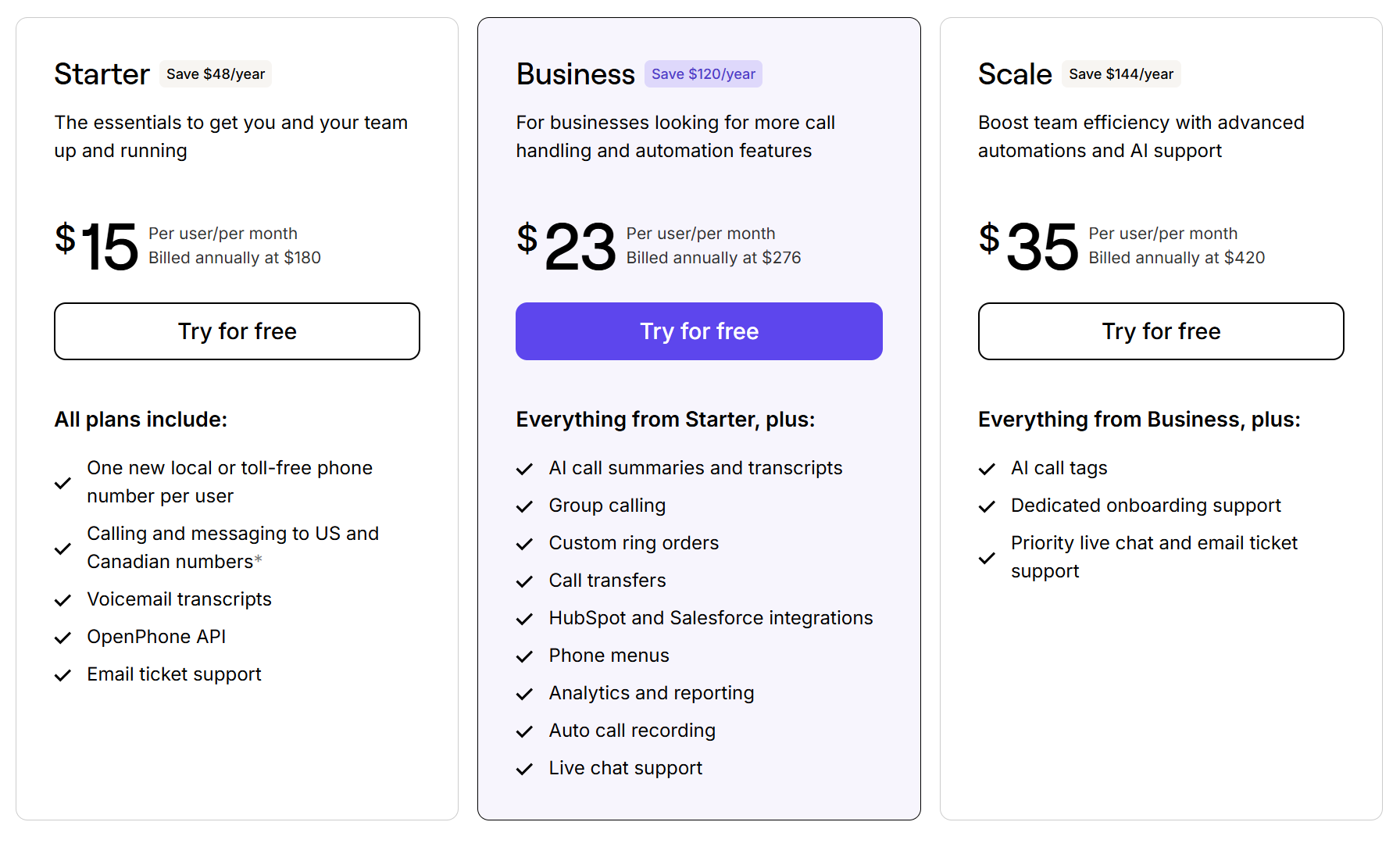
Choose from one of three Quo pricing plans and scale as you grow:
- Starter: $15 per user per month for free calling to US and Canadian numbers, one local or toll-free phone number per new user on your account, unlimited SMS and MMS messaging, access to Sona, voicemail transcripts, and more
- Business: $23 per user per month to access group calling, call transfers, Jobber, HubSpot, and Salesforce phone integrations, AI call summaries and transcripts, and more
- Scale: $35 per user per month for AI call tags, dedicated onboarding, inbound phone support, and priority chat and email support
2. QuickBooks Online: Best HVAC management software for accounting

Pros
- AI-assisted features
- Live bookkeeping support as needed
- Lightweight CRM features
Cons
- AI-powered reconciliation requires an upgrade
- Fixed asset tracking requires an upgrade
- Not a dedicated business management platform
QuickBooks is an accounting software platform for small and medium-sized businesses. You can manage customer invoicing, time tracking, and employee payroll in QuickBooks. Plus, you can connect with over 800 other apps like Square and PayPal to manage every transaction in the same place.
In addition to accounting features, QuickBooks offers some lightweight CRM features. You can access lead management, follow-up reminders, and job proposals on every plan.
QuickBooks can be a good option if you’re just getting started with managing customers for your HVAC business. But don’t expect to be able to scale with it. Multiple HVAC business owners report that it isn’t built for scale. Plus, essential HVAC business features like fleet tracking and job scheduling are missing from the platform.
Key features of QuickBooks
- Invoicing and payment processing
- Expense tracking
- Mileage tracking
- Tax deductions
- Receipt capture and reporting
QuickBooks pricing

There are four different QuickBooks plans:
- Simple Start: $19 per month for smart expense organization, automated bookkeeping, tax deductions, and bill management, for one user max
- Essentials: $37.50 per month for the Accounting Agent, multiple currencies, and time tracking, for three users max
- Plus: $57.50 per month for AI-powered profit and loss insights, anomaly detection and resolution, and budgeting, for five users max
- Advanced: $137.50 per month for custom user management and permissions, revenue recognition, forecasting, and custom dashboards, for 25 users max
3. Jobber: Best HVAC business software for new teams

Pros
- Customer-facing client hub
- Appointment booking, reminders, and updates
- Fleet routing and management
- Quote and invoice templates
- Reporting and analytics dashboards
Cons
- Marketing tools are only available as add-ons
Jobber is an all-around business management solution if you want a one-stop shop for HVAC management tools. It lets you book appointments and schedule reminders, then route your fleet to the next job on your calendar. You can then use quote and invoice templates to automate customer repayments.
Quo integrates directly with Jobber so teams can share call data directly in their Jobber dashboard. It also syncs your texts, voicemails, recordings, and transcripts. You can also click to call inside Jobber using your Quo number. That way, you don’t need to switch between multiple platforms.

Just note that some of Jobber’s features are only available as add-ons. Jobber’s Marketing suite offers features like managing online reviews, referrals, and email campaigns. It’s available for Jobber customers at an additional $79 per month.
Key features of Jobber
- Website builder
- Google My Business management
- Quoting software
- GPS waypoints
- Location timers
Jobber pricing

There are three Jobber plans for teams:
- Connect: $129 per month for job booking and scheduling, automated reminders, quotes, invoices, and time tracking, for up to five users
- Grow: $249 per month for advanced quote customizations, automatic time tracking, job costing, and workflow automations, for up to 10 users
- Plus: $449 per month for access to the marketing suite, premium support, receptionist, and the API walkthrough for custom integrations, for up to 15 users
4. Housecall Pro: Best for HVAC software integrations

Pros
- Marketing features are included in each plan
- Third-party integrations with tools like Bluon and Profit Rhino
Cons
- Additional users require an upgrade
Housecall Pro is an HVAC business automation platform that offers dozens of HVAC-specific integrations. With Housecall Pro’s platform, your technicians can create custom quotes and identify AC repair solutions more quickly. Its integration with Profit Rhino, for example, gives you a prebuilt price book for flat-rate services and materials. And its integration with Bluon can help you get information about AC units in the Housecall Pro app, like:
- Model specs and estimated warranty info
- OEM manuals and wiring diagrams
- Part specifications
- Compatible replacement parts
- OEM art numbers, all known replacements, and part specs
Keep in mind, Housecall Pro gets more expensive the bigger your team grows. If you have more than eight users, you’ll have to pay additional fees per user on Housecall Pro’s Max plan.
Want to automate your texts to customers when they book a new job with you? With Zapier, you can connect Housecall Pro and Quo to send appointment confirmations automatically. Here’s a Zap template that you can use:
Key features of Housecall Pro
- Vehicle GPS
- HVAC industry business financing
- Review management
- Time tracking
- Expense cards
Housecall Pro pricing

Housecall Pro has three plans:
- Basic: $59 per month for scheduling and dispatching, quotes and proposals, review management, and price books, for up to one user
- Essentials: $149 per month for postcards and email marketing, employee GPS tracking, checklists, and premium review management, for up to five users
- MAX: $299 per month for advanced custom reporting, sales proposals, dedicated onboarding support, and escalated phone support, for up to eight users
Housecall Pro also offers additional add-ons for websites, accounting, payroll, and more.
5. FieldPulse: Best for HVAC field service management

Pros
- Smart route optimization
- Live inventory tracking
- Step-by-step process mapping
Cons
- No transparent pricing available
FieldPulse is a specialized field service software provider for residential HVAC teams. It’s a solid option for teams that want control and customizability over their workflows.
With FieldPulse, you can set up smart route optimization that assigns techs to jobs based on their location. Process mapping lets you automate any workflow you want, including dispatch. Plus, live inventory tracking can help you monitor stock levels across multiple locations. No need to send techs on last-minute visits to Lowe’s.
But keep in mind, pricing isn’t transparent for FieldPulse. That means you won’t know how to estimate your software expenses without contacting the FieldPulse team.
Key features of FieldPulse
- Custom forms
- Pricebooks and proposals
- Automated customer notifications
- Scheduling and dispatching
- Customizable workflows
FieldPulse pricing
Like many other platforms on this list, FieldPulse doesn’t offer public pricing. You can’t get an idea of software expenses up-front without contacting the FieldPulse team.
6. FieldCamp: Best AI-powered field service management software

Pros
- AI dispatching and scheduling
- Field service route optimization
- Chat with AI to get analytics and insights
Cons
- Limited third-party integrations
- Limited customer reviews
- No transparent pricing
FieldCamp is AI-powered HVAC business software that helps automate certain field service tasks.
Its core features include AI dispatching, route optimization, and an AI workflow builder. It also offers a conversational online booking assistant. That way, you can provide a professional customer experience, no matter how your customers choose to contact you.
While FieldCamp seems like a good option for teams, it’s relatively new in the HVAC space. It has limited third-party integrations, which can affect your existing operations if you already use other tools.
Key features of FieldCamp
- Job scheduling and dispatch
- Mobile apps for field techs
- Customer management
- Smart route optimization, with an upgrade
- Workflow automation builder, with an upgrade
FieldCamp pricing
Pricing isn’t transparent for FieldCamp. This means there’s no way to estimate your software expenses without contacting the FieldCamp team.
7. FieldBoss: Best for existing Microsoft Dynamics 365 users

Pros
- Built on Microsoft 365 tools
- Role-based dashboards
- Two-way live accounting integration
Cons
- Expensive to implement
FieldBoss is a field service management platform designed for Microsoft Office users. Each plan connects with the Microsoft ecosystem — think Outlook, Excel, Teams, and Azure. It also connects with Microsoft Embedded Copilots. This makes it easy to integrate with the tools you already use.
HVAC contractors can use FieldBoss for work order and project management, as well as estimating. It also offers role-based dashboards, so every team member has the right level of access to your data.
One thing to know about FieldBoss: it’s designed for commercial elevator and HVAC companies. You can tell this right away from its implementation pricing. FieldBoss charges one-time implementation fees alongside per-user pricing, starting at $50,000. So, unless you’re a large commercial HVAC business, FieldBoss may not be for you.
Key features of FieldBoss
- Estimating and quoting
- CRM and sales pipeline
- Job-based purchasing
- Cash flow management
- Team payroll management
FieldBoss pricing

FieldBoss’s pricing depends on whether you want a mobile user license or a back-office license. Mobile licenses cost $90 per month, and back office licenses cost $10 per month, regardless of your plan.
You’ll also need to pay a one-time implementation fee depending on the tier you want. For example:
- FieldBoss Rapid Onboarding: $50,000 plus user licenses for work order management, a visual scheduling board, dispatch and routing, and project management
- FieldBoss Complete Onboarding: $75,000 plus user licenses for IoT device integration, customizable architecture, commissions management, and warehouse management
- FieldBoss Enterprise: $100,000 plus user licenses for white-glove onboarding and multi-entity reporting
8. FieldEdge: Best for real-time HVAC dispatch

Pros
- Real-time dispatch board
Cons
- Poor onboarding resources
- Poor QuickBooks integration and mobile app performance
FieldEdge is a real-time field dispatch tool that lets you automatically assign techs to specific jobs. First, it checks your team member’s schedule and capacity for appointments. Then, it recommends the best tech for the job based on their skills and location. It even optimizes your tech’s route for the day to maximize the work they can accomplish.
FieldEdge has a minimal learning curve for new users, and it integrates with QuickBooks to help you manage your accounting needs.
But unless you’re just getting started, FieldEdge might offer more challenges for your team. If you need help getting set up, it doesn’t have great onboarding resources. Multiple users, like this one, have complained about its invoicing features. If you’re looking for a platform with better customer support and invoicing capabilities, you may want to consider a FieldEdge alternative.
Key features of FieldEdge
- Mobile app support
- Customer history for office staff
- Lead tracking
- Automated alerts
- Customer support on every plan
FieldEdge pricing

There’s no public pricing available for FieldEdge. But its three tiers and their features are posted online:
- Select: Dispatching, booking, and basic agreements and quotes
- Premier: Advanced dispatching, multi-option quotes, advanced service agreements, mobile app notifications, and multi-option quotes
- Elite: Outbound call recording, warehouse inventory management, customer management portal, two-way texting, and unlimited saved reports
9. ServiceTitan: Best for large HVAC companies

Pros
- Used by both residential and commercial teams
- Ad marketing and performance tracking
- Schedule optimization and route planning
- Modern payment features like Tap to Pay
- API available
Cons
- No transparent pricing available
ServiceTitan is a business management solution for larger HVAC teams. It offers everything an enterprise company needs to maintain scale. And since it serves residential and commercial home service businesses, it can easily adapt to your needs.
With ServiceTitan, you’ll get access to optimization tools that keep your HVAC technicians busy. There are also enterprise-grade APIs that connect with the tools you already use. But one of ServiceTitan’s unique features is ad marketing. You can set up Google Ads and track their performance inside ServiceTitan.
Unfortunately, ServiceTitan doesn’t list its pricing online. And keep in mind, past users say it can be very expensive, around $250 per tech. If you’re a smaller business just getting started, ServiceTitan is probably out of your budget. If you’re an enterprise business, it might be right for you.
Want to automate your texts to customers when they book a new job with you? With Zapier, you can connect ServiceTitan and Quo to send appointment confirmations automatically. Here’s a Zap template that you can use:
Key features of ServiceTitan
- Automated checklists
- Price books
- Commission tracking
- Adaptive marketing
- Intuitive dispatching
ServiceTitan pricing
There’s no publicly available pricing for ServiceTitan. If you want a dedicated quote, you’ll need to reach out to the sales team.
But ServiceTitan does list a few features from its three plans:
- Starter: Dispatch scheduling, invoicing, and price book features
- Essentials: Mobile estimates and payroll management features
- The Works: Configurable payroll, advanced reporting, commission tracking, and customizable memberships
5 Ways HVAC software solutions increase revenue and efficiency
Why should you invest in HVAC business software?
Here are a few reasons to consider it for your growing business:
1. Reduce missed calls and lost leads
Missed calls mean missed revenue for your business. HVAC VoIP phone systems help you reduce your missed calls and save potential leads. During business hours, you can use shared numbers to route incoming calls to available team members. After business hours, AI answering services can answer customer questions and take down messages for your team.
You can also set up third-party integrations that save time for your team and automate administrative tasks. Using Quo’s integration with Jobber, for example, your first client intake call can automatically create a project in Jobber. Like this:

2. Optimize field technician schedules and routes
If you’re in charge of multiple jobs, crews, and service areas, scheduling jobs can quickly turn into a game of phone tag. And missed appointments, double booking scheduling, and inefficient routes will cost your business time and fuel.
Field service software dispatches techs more efficiently by centralizing schedules and job details. This allows you to automatically dispatch and route field technicians. Plus, client and project data are stored and shared across your software platform, so no details are missed, and every project step is recorded.

Pro tip: HVAC business software can help you save more time to spend on other tasks. For example, see how Pink’s Windows used Quo to scale to 75+ locations.
3. Provide more accurate project quotes quickly
Manual estimates and project quotes sometimes take hours to put together. Plus, they leave room for costly errors. Inconsistent pricing can lead to underquoting jobs or awkward follow-up conversations with customers.
HVAC business software helps streamline operations by providing more consistent and accurate estimates. One of these solutions comes from virtual pricebooks. Technicians can select services, labor, and materials directly from pre-approved pricing while on site. That way, techs can generate accurate quotes in real time.
Automated quotes mean less guesswork, back-and-forths, and surprise last-minute costs for you. It also paves the way for a smoother experience for your team and customers.
4. Improve your team’s performance with analytics
The bigger your HVAC business gets, the harder it will be to spot the factors slowing your team down. You might notice missed calls or longer job times, but without ways to track ongoing trends, it’s tough to know where to intervene.

HVAC business software with built-in analytics helps you turn everyday activity into insights. Quo, for example, can track metrics like call volume, team performance, and common service requests. This can help you identify when you receive the most incoming calls. You can also get additional insights that can help you deliver a better customer experience.
You can use business software like Jobber Copilot to spot trends you might miss. First, ask Jobber a question like, “How can I increase my business revenue?” Then, let Jobber scan your service history, quote data, and customer conversations. This allows it to analyze trends and offer personalized suggestions, like “Follow up with customers who haven’t paid yet” or “Schedule more HVAC jobs during winter months.”
5. Track your cash flow in real time
Your HVAC business might not have a full-time bookkeeper yet. This could mean late nights sending out invoices and chasing late payments. Not only does this slow your cash flow, but it also creates stress for your team.
Business software like QuickBooks can help you speed up billing by inputting job details, photos, and email chains. That way, you can generate invoices automatically. QuickBooks can also suggest multiple payment methods, like credit cards or direct pay. You can also set up automated reminder messages so customers don’t forget to remit payment.
How to choose HVAC service software tools
Before deciding which HVAC tools make sense for your business, use the following process:
- Identify your business needs: HVAC business software isn’t one-size-fits-all. If you’re just getting started as an HVAC contractor, Jobber may be right for you. But if you’re at enterprise scale, ServiceTitan may be a better fit. Understand what you need from your business software and evaluate accordingly.
- Estimate your budget: How much are you willing to spend on a platform? For customer-facing tools, are you willing to have a larger budget compared to accounting software?
- Evaluate your options: Review different options in each category. List their features, value propositions, and integrations with the rest of your stack.
- Check out reviews and ratings: See what actual customers are saying about each tool you’re evaluating.
- Trial different tools: See how each tool performs for yourself. Be wary of options that don’t offer a free trial.
Power your HVAC company with Quo

HVAC business software can’t manage your business for you. But it can make daily tasks faster and more efficient. With the right tools, you can easily schedule text messages, sync customer information with your CRM, and call clients from any device.
Quo supports HVAC businesses in all those areas. Your team can stay organized, communicate more effectively, and build stronger customer relationships. Tap into user-friendly features like drag-and-drop call flows, AI call tags, and our voice agent, Sona, to never miss a call.
See how HVAC techs make their business operations more efficient by signing up for a seven-day free trial of Quo.
FAQs
HVAC business software refers to any type of cloud-based tool that helps you better manage daily operations for your business. The best HVAC software lets you:
• Send service agreements for customers to sign
• Streamline payment processing with automated texts
• Manage customer communications from anywhere with a WiFi connection
• Perform on-site inventory management with AI
The price of HVAC business management software depends on its type and function. General-purpose business tools are more expensive than dedicated tools like Quo or QuickBooks. For a small team of one to five users, here’s the minimum you should expect to pay in each category:
• HVAC phone software: $15 per user per month
• HVAC accounting software: $19 per month
• HVAC business management software: $29 per month for one user to $129 per month for up to five users
• HVAC field service software: $29 per month for one user to $129 per month for up to five users