You’re on ladders, in trucks, and answering calls whenever you can — all while trying to send out estimates, schedules, and crews. All this becomes 10 times more complex when managing daily tasks across different tools. As your business grows and projects pile up, it gets easier to lose track of details between the spreadsheets, paperwork, and sticky notes.
Roofing business software can help you avoid this by keeping tasks organized and moving jobs along. Below, we break down 10 of the best roofing business software platforms and compare their pricing, features, and reviews.
Comparing the best roofing business software
First, here’s a quick look at the best roofing business software side-by-side:
| Provider | Starting price | Standout features | Best for |
|---|---|---|---|
| Quo | $15 per user per month | AI call summaries, transcriptions, call tags, and a 24/7 voice agent | Communicating with clients |
| Workyard | $6 per user per month | GPS time clock, job costing, payroll and accounting integrations | Time tracking |
| Jobber | $97 per month for five users | AI receptionist, two-way SMS, CRM, Quo integration | Professional proposals |
| JobNimbus | Contact sales | Material ordering, call forwarding and texting with add-on, financing | Material ordering |
| iRoofing | $149 per month | Unlimited self-measurements, digital contracts, appointment scheduling | AI-generated roof visualizations |
| Roofr | $0 per month | CRM, instant estimates, proposals, material ordering | Collecting payments |
| ServiceTitan | Contact sales | Homeowner financing, automated follow-ups, call booking | Large roofing contractors |
| AccuLynx | $250 per month | Job tracking, QuickBooks integration, crew scheduling | QuickBooks users |
| RoofSnap | $13 per measurement report order | AI roof estimating tools, in-app payments, homeowner financing | Solo roofers |
| Housecall Pro | $59 per month | GPS tracking, escalated phone support, job cost tracking, consumer financing | Tracking crew’s vehicles |
Now, here’s an in-depth breakdown of each provider:
1. Quo: Best roofing business software for communicating with clients

Pros
- Unlimited calling and texting in the US and Canada
- Local US, Canadian, and North American toll-free numbers
- Shared numbers so your team can split responsibility for calls and texts
- 24/7 AI voice agent
- 8,000+ integrations with tools like Jobber, HubSpot, DripJobs, and Salesforce
Cons
- Can’t verify accounts using two-factor authentication*
*Nearly every virtual phone number has this problem. For safety reasons, companies like Facebook, Uber, and Google don’t usually let you authenticate accounts through a virtual phone number.
Quo, formerly OpenPhone, is a roofing phone system that lets you call and text through a dedicated business number. You can easily access your number and other numbers in your account using your mobile device or a computer. That way, you’ll quickly recognize when incoming calls are work-related and know when to answer professionally.
Each Quo plan comes with unlimited domestic calling in the US and Canada. You can also create shared phone numbers. These let your roofing team split responsibility for incoming calls and texts.
Up on a ladder or tearing out shingles? You can set up missed call systems in Quo that help ensure you don’t leave money on the table. You can:
- Respond quickly to missed calls, texts, and voicemails with auto-replies. These set expectations for callers and prevent them from getting antsy or calling competitors.
- Plan text messages ahead of time with scheduled texts. This includes messages like appointment reminder texts, estimate follow-ups, and project updates.
- Route calls to a built-in roofing answering service. Quo’s AI voice agent, Sona, can answer calls, capture messages, and respond to common questions 24/7. No need to worry about missing out on potential new clients just because you can’t drop everything and pick up a call.
You can also use Quo to connect with the rest of your tech stack. Quo’s Jobber integration, for example, automatically creates records in Jobber whenever your team makes calls in Quo. It also syncs call summaries and transcriptions to Jobber Requests. This means your team doesn’t have to retype notes or switch between tools.
Use other tools besides Jobber? You can connect them via Zapier. Now, you can use Quo’s Zapier integration to automatically send messages when you add new customers to ServiceTitan.
Do you schedule work on Housecall Pro? You can send confirmation texts via Quo whenever you have new scheduled jobs.
See for yourself how Quo helps roofing businesses avoid the most common reasons home services fail.

Try out Quo for yourself with our seven-day free trial.
Reviews and ratings
G2 rating: 4.7 out of 5 stars across 3,000+ reviews
Capterra rating: 4.2 out of 5 stars across 61 reviews
“We’re so confident in saying, ‘Hey everybody, just get on Quo. Save yourself the time, save yourself the hassle.’” — Carter Smith, Co-Founder of Pink’s Windows
Key features of Quo
- Shared numbers and inboxes
- Auto-replies
- Scheduled messages
- Call routing
- AI roofing receptionist
- CRM integrations
Quo pricing

Quo’s pricing plans were designed to grow alongside your roofing business:
- Starter: $15 per user per month for unlimited domestic calling, voicemail transcripts, Quo API, business hours, internal threads, and more
- Business: $23 per user per month for phone menus, AI call summaries and transcripts, group calling, custom ring orders, CRM integrations, analytics, automatic call recording, live chat support, call transfers, and more
- Scale: $35 per user per month for AI call tags, dedicated onboarding, inbound phone support, and priority live chat and email support
2. Workyard: Best for time tracking

Pros
- Time tracking tools are available on the mobile app
- Job costing by employee and time period
Cons
- Upgrades are required for labor cost reporting
- Past users find it expensive
Workyard is a construction workforce management software that’s built for roofers in the field. It allows you to set up GPS-powered time tracking to log hours. It also offers real-time visibility into your crew’s location.
You can use Workyard for accurate job costing, since you can quickly analyze data with reports. For example, you can group job cost data by employee and time period. This helps you better understand the project’s costs. That way, you can optimize your pricing for future roofing clients.
Just know that labor cost reporting is only available if you upgrade to the Pro plan. This costs $13 per user per month.
Reviews and ratings
G2 rating: 4.8 out of 5 stars across 49 reviews
Capterra rating: 4.7 out of 5 stars across 100 reviews
- “The geofence features are so easy to use, and provide me with great information. Paid version is a bit more expensive than I would prefer, but it’s definitely still a product worth having.” — Capterra
- “Not worth it. SO many features needed for a construction company that they are in no way ready for. No one on WorkYard staff seems to understand prevailing wages and the need for documentation; too cumbersome for employees, so compliance was low.” — Capterra
Key features of Workyard
- GPS time tracking
- Job costing
- Payroll and accounting integrations; accounting requires an upgrade
- Break and overtime compliance
- Customer support
Workyard pricing

There are three separate Workyard pricing plans:
- Starter: $6 per user per month for time tracking and notes, location and mileage tracking, payroll integrations, and field expense tracking
- Pro: $13 per user per month for scheduling, labor cost reporting, verifying clock-in with facial photos, time off management, and accounting integrations
- Enterprise: Custom quote for automated project time tracking, time card sign-offs, ERP integrations, and API access
Keep in mind there’s a $50 monthly base fee added to your total.
3. Jobber: Best for professional proposals

Pros
- Instant proposal tools
- Integrates with Quo’s business phone system
Cons
- Some users find it expensive
- Marketing tools require add-ons
- Limited reporting options
Jobber is a cloud-based field service management solution for roofing businesses. It combines scheduling, quoting, dispatching, and invoicing into one dashboard. You can also create professional proposals that reps can use in their sales process.
With the Jobber mobile app, you can access information from your office or truck to get the job done fast. Jobber’s mobile app is also available in Spanish. This can be helpful if you have anyone on the team who’s non-English speaking.
Jobber’s CRM also integrates with Quo’s business phone system. That way, you can sync texts, voicemails, recordings, and more directly to Jobber.

Want to bring in more leads from happy customers? Jobber’s roofing referral program can help. Just keep in mind you’ll need to pay for an add-on that costs an extra $29 per month. You also need to pay extra for automatic payments — you’ll need to sign up for the Connect plan, which costs $149 per month.
Reviews and ratings
G2 rating: 4.6 out of 5 stars across 479 reviews
Capterra rating: 4.6 out of 5 stars across 1,420 reviews
- “We rely on both Jobber and Quo to keep our operations running smoothly. Having call summaries from Quo automatically show up in Jobber has been a game-changer — our whole team has context without needing to chase down notes. It saves me multiple steps, which gives me time back to be able to focus on our customers.” — Lou Ruiz, General Manager for Pink’s Windows Four Points in Lakeway, TX
- “I think Jobber has improved quite a bit from when we started using it a few years ago. Right now, the next step for Jobber would be to really fine-tune their service and maintenance agreements.” — G2
Key features of Jobber
- Document work on job forms, requires an upgrade
- Two-way texting
- Automate invoice follow-ups
- Track time and expenses, requires an upgrade
- GPS tracking
Jobber pricing
Jobber has three plans for individuals:
- Core: $19 per month for one user, job booking and scheduling, invoices, reporting, websites, and professional quotes
- Connect: $65 per month for one user, job scheduling, quotes and invoices, automated reminders, two-way texting, workflow automations, and job costing
- Grow: $97 per month for one user, advanced quote customizations, lead pipeline tracking, built-in marketing tools, and automatic time tracking
There are also three plans available for roofing teams:

- Connect: $97 per month for up to five users, plus the same features as the Connect individual plan
- Grow: $195 per month for up to 10 users, plus the same features as the Grow individual plan
- Plus: $344 per month for up to 15 users, a dedicated onboarding specialist, premium support, and an AI receptionist for booking leads
4. JobNimbus: Best for material ordering

Pros
- Material ordering
- Quo integration via Zapier
Cons
- No transparent pricing
- No business phone system
- Slow customer support, according to users
JobNimbus is a roofing contractor app that can help you manage employees and customers. With it, you can track the subcontractors you work with in-app and access their schedules on your calendar. It also offers material ordering features. That way, you can order materials for your crew directly from websites such as QXO.
Just know that JobNimbus doesn’t support phone calls. But it does offer call forwarding and SMS messaging with the Engage add-on, which starts around $49 per month. Since there’s no public pricing available for plans, you’ll need to contact sales for a custom quote.
You can use Quo’s Zapier integration to automatically create a new contact in JobNimbus. That means any time you complete an incoming call with a new lead, you’ll instantly add a contact to your JobNimbus CRM.
Reviews and ratings
G2 rating: 4.7 out of 5 stars across 70 reviews
Capterra rating: 4.6 out of 5 stars across 480 reviews
- “There are a few glitches with it, for one, the profit margin sliding scale numbers are always off, and there was nothing that tech support could do to fix it. Second thing is, there was a glitch where it always said “failed uploads” on your photos page even if there was no failed upload.” — Capterra
- “The BEST thing that JobNimbus could do to improve would be to expand their human capital in customer service, training – because 9/10 times I call, I seem to know more about the existing parameters of the software than the customer service person I’m talking to – and development. Amazing concept. SO much potential. Still plenty of good things…. but right now… it’s as much a headache as it is useful.” — G2
Key features of JobNimbus
- APIs
- Material ordering
- Call forwarding and texting, with an add-on
- Mobile app
- Financing
JobNimbus pricing

JobNimbus doesn’t list pricing on its website, so you’ll need to contact sales for specific numbers. But it does provide a breakdown of its plans and features:
- Essentials: Three users, three project boards, 10 automations like sending a reminder text, standard support, and access to the mobile app
- Pro: 10 users, five project boards, and 30 automations
- Premium: 19 users, unlimited project boards, 100 automations, premium support, and SLAs
- Enterprise: 20 or more users, and unlimited automations, locations, and integrations
5. iRoofing: Best for AI-generated roof visualizations

Pros
- AI-generated roof visualizations
- Convert contracts into a signable digital document
Cons
- No calling or texting support
- Support for three users only on each plan
- May be difficult to train and onboard new team members, according to users
iRoofing is an AI contractor tool that creates automatic roof visualizations based on aerial photos. These let you show homeowners how their new roofs will look if they hire you for the job.
Have a customer who wants to move forward? With iRoofing, they can sign contracts via the app. First, upload your contract and turn it into a digital document. Then you can request a signature and retrieve the documents online.
But iRoofing can be expensive if you’re a small team. Prices start at $149 per month on the base plan. Plus, iRoofing doesn’t support calling or texting. You’ll need a separate business phone platform, like Quo, to manage incoming calls or messages.
Reviews and ratings
G2 rating: 4.8 out of 5 stars across three reviews
Capterra rating: 4.5 out of 5 stars across 23 reviews
- “[I like] the fast and easy roof measurement, along with the ability to visualize the new roof to the client. [But] the smartphone application runs slow and crashes on certain occasions” — G2
- “The range of stimulating roofing products needs to increase as per the real market. The availability of products at the current stage is required to ensure in iRoofing software for effective utilization.” — G2
Key features of iRoofing
- Unlimited support access
- Build and edit roof reports
- Multi-proposal tools
- AI-generated roof visualizations
- Appointment scheduling
iRoofing pricing

There are three ways to pay for iRoofing:
- Monthly: $149 per month
- 12 Months: $124 per month
- 24 Months: $107 per month
Keep in mind that each plan only supports three users, and they all come with:
- Unlimited DIY roof measurements and proposals
- AI roof visualizations
- Digital pitchbook,
- Customer database
- Esignatures
- 150 HD imagery credits
- Mobile and desktop access
6. Roofr: Best for collecting payments

Pros
- Accept and process credit cards and bank transfers
- Schedule site visits, estimates, and post-installation check-ins in advance
Cons
- No mobile apps are available from the App Store or the Google Play Store
- Calling and texting require upgrades and add-ons
- Roof measurement report requires an additional fee
Roofr is a software for roofing contractors wanting to manage payments in one place. With it, you can accept and process all major credit card brands. You can also accept ACH/EFT payments — aka bank transfers — to accommodate every customer.
You can tap into Roofr’s construction scheduling tools. The Calendar feature, for example, lets you add events in advance. This automatically adds site visits, installs, and check-ins to your calendar to keep your business organized.
But know that while Roofr’s Essentials plan, which costs $209 per month, unlocks texting — it requires a separate add-on for $45 per month. Plus, Roofr doesn’t offer mobile apps you can download from the App Store or the Google Play Store. You’ll have to add a website link to your phone screen — not ideal for teams that work primarily from mobile phones.
Reviews and ratings
G2 rating: 4.9 out of 5 stars across 40 reviews
Capterra rating: 4.6 out of 5 stars across 101 reviews
- “Sometimes the beta programs have glitches, and we might be down for a day.” — G2
- “I like the simplicity of the system and how it allows for you to create easily accessible templates. I wish it had local market prices available for material line items.” — G2
Key features of Roofr
- CRM
- Instant estimates, requires an add-on
- Proposals
- Material ordering
- Roof measurement reports, requires an additional fee
Roofr pricing

There are three Roofr plans to choose from:
- Starter: $0 per month for one basic job board, five automated actions, 10 trial proposals, invoices, work orders, and $19 measurement reports delivered in 24 hours or less
- Essentials: $209 per month for 10 automated actions, unlimited proposals, invoices, and work orders, SMS texting add-on, the ability to accept credit card and ACH payments, and $13 measurement reports delivered in two hours or less
- Scale: $299 per month for 25 or more automated actions, a performance dashboard and reporting, crew management, and QuickBooks integration
7. ServiceTitan: Best for large roofing contractors

Pros
- Software for larger contractors
- Proposal templates
Cons
- Steep learning curve, according to past users
- Calling and texting support requires an add-on
- No public pricing
ServiceTitan is legacy software designed for roof service visits and construction projects. It offers tools for scheduling, dispatching, invoicing, and marketing, all from the same platform.
You can also use ServiceTitan to create and send proposal templates. These make it easier to present different options to customers, then let them pick the right choice for their needs. ServiceTitan can also help you manage and respond to customer reviews directly in the app. You can even send review requests to customers directly from their job records.
But while ServiceTitan offers a large suite of products, many of them are confusing or difficult to set up. They may also cost you extra per month. Calls and texts, for example, require the ServiceTitan Phones Pro add-on. And since pricing isn’t public, there’s no way to get a firm number without contacting their sales team.
Reviews and ratings
G2 rating: 4.5 out of 5 stars across 353 reviews
Capterra rating: 4.3 out of 5 stars across 325 reviews
- “Service Titan makes my company look great in the eyes of the customer by helping create a painless purchasing experience…[But] getting ST off the ground and going live was NO JOKE. There was a lot of heavy lifting, headaches, and stress trying to get everything working properly.” — G2
- “It is hard to reach a representative right away if you need immediate help. The knowledge base is hard to find what you are looking for. AI is more helpful if you have it.” — Capterra
Key features of ServiceTitan
- Homeowner financing for high-cost roofing work
- Automated follow-ups
- Call booking
- Payroll management, requires an upgrade
- Commission tracking, requires an upgrade
ServiceTitan pricing

ServiceTitan provides three plans, although to get exact pricing, you have to request a demo from the sales team. Here are the features you can expect to get on each plan:
- Starter: Access to dispatching, scheduling, invoicing, and price book features
- Essentials: Access to mobile estimates and payroll management
- The Works: Access to configurable payroll, advanced reporting, commission tracking, and customizable memberships
8. AccuLynx: Best for QuickBooks users

Pros
- QuickBooks Online integration for online payments
- Field mobile app
Cons
- No transparent pricing
- External communication requires an add-on
- Payment processing feature may not be intuitive, according to past users
AccuLynx is a business management platform that helps roofers communicate between the field and the office. With the AccuLynx Field app, your on-the-ground roofers can:
- Complete tasks, such as entering lead details
- Sync job files, such as photos and estimates
- See outstanding balances
You can even set up third-party integrations with tools like QuickBooks. Just know that external communications cost extra. If you want to text customers, for example, you’ll need to pay for an add-on.
Just know that AccuLynx doesn’t offer public pricing. It recently released a new plan called Essential, which starts at $250 per month. But other than that, you need to contact sales for a quote.
Reviews and ratings
G2 rating: 4.2 out of 5 stars across 35 reviews
Capterra rating: 4.5 out of 5 stars across 804 reviews
- “Unhelpful payment processing help. It was very expensive for what we got out of it. No ability to dispatch or see the calendar well for all technicians and sales.” — G2
- “When creating templates for specialty siding and obscure materials I oftentimes have to call in for pricing. The price of the software is on the higher end. Some integration fees are on the higher end as well.” — Capterra
Key features of AccuLynx
- CRM
- Job tracking
- QuickBooks integration
- Crew scheduling
- Field app for iOS and Android
AccuLynx pricing

AccuLynx doesn’t publish pricing online for all its plans. But it does mention that its Essential plan starts at $250 per month. Here’s what you can expect to get on each plan:
- Essential: $250 per user per month for CRM, measurements and material calculations, branded proposals, supplier direct ordering, and document management
- Pro: End-to-end workflow management, robust automation options, financial management, and specialized reporting
- Elite: Multi-location management, advanced production oversight, workflow customization, and insurance restoration equipped
The only way to get a more accurate quote is to contact the sales team.
9. RoofSnap: Best for solo roofers

Pros
- Intuitive and easy to use
- Accurate estimates verified by humans
Cons
- Large price jump for more users and features
- Built for smaller companies
- Past users complain that it may get expensive
RoofSnap is a roofing app and estimating software that was built by a former roofer to help speed up sales. With it, you can use remote aerial imagery to create gutter measurement order reports for your leads — within two to four hours. You can also send estimates and request in-app payments if you’re willing to upgrade your plan. RoofSnap even offers homeowner financing so clients can easily pay for unexpected roof repairs.
Just keep in mind that larger teams pay less per month on RoofSnap. Have a team of 10 or more? You’ll pay $52 per user per month for the annual plan. But if you’re just two to four users, expect to pay $78 per user per month.
The more cost-effective option for solo roofers is pay-as-you-go pricing. But note that it can still get expensive if you start quoting more roofing projects. Plus, you won’t get access to key features on this plan, like branded reports, contracts with your logo, and in-app deposits and payments.
Reviews and ratings
G2 rating: 5 out of 5 stars across 2 reviews
Capterra rating: 4.7 out of 5 stars across 11 reviews
- “The ability to sketch and estimate yourself. Great customer service. [But] no true CRM management. Built for small companies.” — Capterra
- “Long time user and at one time beta tester for this app since 2013. Developer seems to have completely forgotten about updates on this app. The latest and last update is extremely buggy and slow to load. Have spent way too much time trying to get customer support only to be told the same scripted lines every time without any resolution.” — App Store
Key features of RoofSnap
- AI roof estimating tools
- Estimating and material ordering
- In-app payments, requires an upgrade
- Company and sales overhead, requires an upgrade
- Homeowner financing, requires an upgrade
RoofSnap pricing

There are three ways to pay for RoofSnap. Here’s what to expect for a team of 10 or more:
- Pay-As-You-Go: $13 per measurement report order, with reports delivered in four hours and rush reports in as little as 30 minutes
- Monthly Subscription: $105 per user per month for five HD roof images each month, unlimited draw-it-yourself measurements, access to the estimating and material ordering suite, and the ability to collect deposits and payments in-app
- Annual Subscription: $52 per user per month for an additional 240 bonus HD images per user, plus tiered pricing for additional users
10. Housecall Pro: Best roofing business software for tracking crew’s vehicles

Pros
- GPS employee tracking in real time
- Automatic “on my way” customer texts
Cons
- Premium review management requires an upgrade
- Employee GPS tracking requires an upgrade
- Limited invoicing flexibility
Housecall Pro is an employee tracking software solution for home service businesses, like roofers. It lets you install vehicle GPS tools that track and monitor your fleet. That way, you can easily map the most efficient routes to save time and money. You can even send automated alerts to customers, letting them know when your crew is on the way.
You can also use Housecall Pro to help with review management. You can collect all recent reviews in a single dashboard, then sort them by source and rating. This allows you to keep an eye on customer feedback and address negative reviews quickly and professionally.
But keep in mind that both these features require upgrading. You can’t unlock GPS tracking or review management without upgrading to the Essentials plan at $149 per month. Plus, keep in mind the Essentials plan was only designed for five users. You must upgrade to the Max plan to unlock up to eight users, then pay $35 per month for each additional employee.
Reviews and ratings
G2 rating: 4.4 out of 5 stars across 202 reviews
Capterra rating: 4.7 out of 5 stars across 2,736 reviews
- “I had an issue with invoicing on Housecall Pro where sometimes all the invoices wouldn’t show up month to month. But that’s been recently fixed on the application.” — G2
- “Con: How much you pay additionally for extra functionality for price books, crm software, camera usage for photos of job sites.” — Capterra
Key features of Housecall Pro
- Card processing rates as low as 2.59%
- Job cost tracking
- Consumer financing
- Sales proposal tools, requires an add-on
- Escalated phone support, requires an upgrade
Housecall Pro pricing

There are three pricing plans for Housecall Pro:
- Basic: $59 per month for one user, dispatching, scheduling, quotes, review management, invoicing, and job cost tracking
- Essentials: $149 per month for up to five users, employee GPS tracking, QuickBooks integration, and a visual price book
- MAX: $299 per month for up to eight users, a dedicated onboarding specialist, escalated phone support, and advanced reporting
Every Housecall Pro plan includes access to the mobile app, live phone and chat support, and offline viewing. You can also access add-ons like accounting, sales pipeline tracking, and payroll, if you’re willing to pay extra. Keep in mind that pricing varies based on your Housecall Pro plan and setup.
Our scoring system explained
To identify the top 10 roofing business software providers, we first created a scoring system.
Here’s why and how we use this scoring system to rank the best-performing tools:
- Why we used a scoring system. It’s difficult to compare providers in-depth across all categories. This scoring system helps to simplify the process by assigning objective scores to each one.
- Consistent evaluation criteria. We evaluated each roofing business software provider using the same key areas which we discuss in more detail below. This ensures a fair comparison and removes subjectivity from the scores.
- Combined overall score. We calculated an overall score for each platform to better determine which ones should rank among the top 10. This also makes it easier for readers to compare multiple platforms at a glance.
What we evaluated
We looked at the following seven key areas:
- Ease of use: Considered how long the platform takes to set up, as well as the mobile app experience.
- Call management features: Looked for time-based call routing, ring groups, and IVR.
- Scheduling and dispatch: Watched for automations with appointment scheduling, estimates, and follow-ups.
- Integrations: Evaluated connections with tools like accounting software and CRMs.
- Customer support: Looked at support channels, hours, and user feedback.
- Pricing transparency: Considered pricing, hidden fees, add-ons, and upgrade requirements.
- Company reputation: Checked out reviews, trial availability, and subscription tiers.
How scoring works
Each platform received a score from 0 to 10 based on its performance across the seven key areas mentioned above.
Here are the score ranges:
| Score range | Meaning |
|---|---|
| 9–10 | One of the best options available |
| 7.5–8.9 | Very strong performance with minor limitations |
| 6–7.4 | Average performance |
| 3–5.9 | Significant limitations |
| 1–2.9 | Poor performance |
| 0 | Feature not available |
How we calculate overall scores
Some areas matter more than others, since they have a bigger impact on roofing businesses.
Here’s how much each area contributes to the final score:
| Evaluation factor | Weight |
|---|---|
| Ease of use | 20% |
| Call management features | 35% |
| Scheduling | 15% |
| Integrations | 10% |
| Customer support | 10% |
| Pricing transparency | 5% |
| Company reputation | 5% |
We calculate the final score using this formula:
Final score =
(each area’s score out of 10 × its % importance), then add everything together
Quo: The best roofing business software
The roofing business software you choose today will play a big role in how your team runs tomorrow. From scheduling and estimates to payment processing, the right platform can help you stay on top of every job and customer.
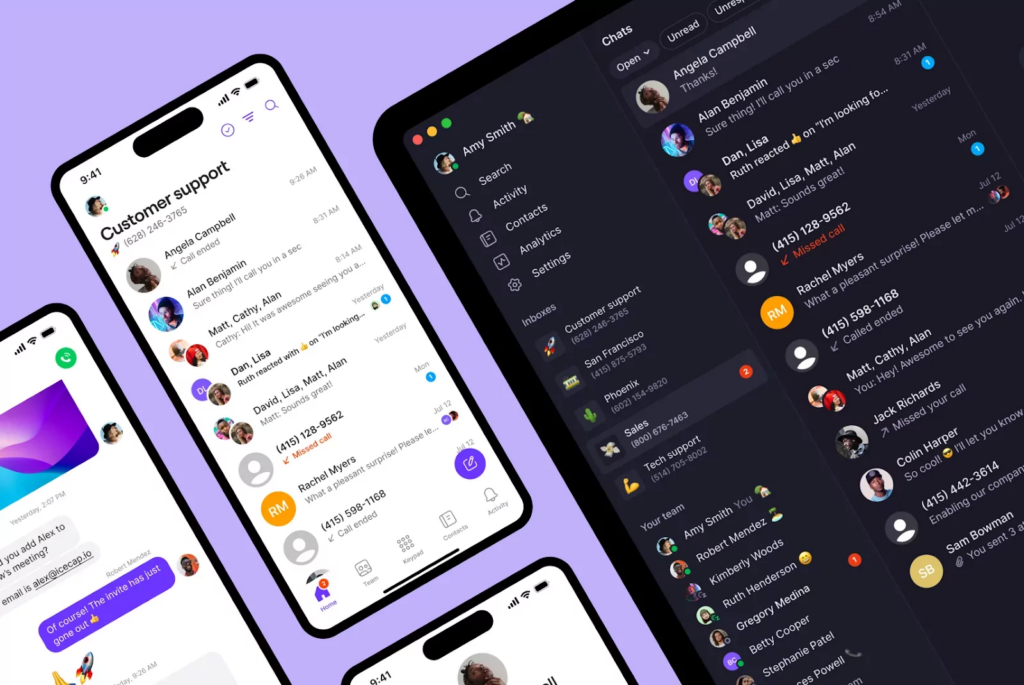
Quo was designed to simplify one of the biggest pain points in roofing: communication. It helps you capture more calls, organize conversations, and respond quickly, from the devices you already own. First, set up a shared number, or port an existing number, to start making calls in 15 minutes or less. You can split responsibility for incoming conversations with your team. Then, set up auto-replies and AI voice agents to respond to customers 24/7 so you never leave money on the table.
Confirm that Quo is the right fit for your roofing business by starting your free seven-day trial.
FAQs
Roofing business software is a tool that helps roofing contractors manage day-to-day operations. It often combines several features into one platform, like project management or answering calls.
Examples of roofing business software include:
– Quo
– QuickBooks Online
– CompanyCam
– Eagleview
Roofing business software can range from $0 to more than $500 per month, depending on the features and the size of your team. Quo, for example, starts at $15 per user per month. You can use our user-friendly app on any device you currently own, then call and text with an internet connection.
Many roofing businesses use tools like Jobber as their roofing CRM. In addition to contact management, each plan comes with tools for scheduling, job management, and invoicing. Jobber also integrates with business phone systems like Quo so you can push data to your CRM and click-to-call inside your dashboard.
Modern roofing software was designed to be simple to set up and use. Quo, for example, can be set up in about 15 minutes. This helps roofing teams start calling right away from devices they already own.
Yes, any growing business in the roofing industry needs software to scale operations, manage more jobs, and stay organized as you grow. The best roofing business software can help you save time and streamline repetitive workflows. That way, you can spend more time finishing jobs and creating happy customers.
Yes, many roofing businesses have adopted AI tools. Some platforms help you create AI roof estimates or generate professional proposals based on job details. There are also AI voice agents, which answer calls, respond to questions, and capture messages 24/7.
Before adopting any roofing contractor software, look for features like:
– Texting automations so your team can save time when sending customer texts
– AI voice agents that answer calls 24/7, helping you avoid missing out on potential new clients
– Calling and texting support in one place so customer communication doesn’t fall through the cracks
– Mobile apps so your crew can work while they’re in the field
– Integrations that let you connect your roofing software to the tools you already use and automate repetitive tasks