It’s time to break up with your old phone number. Maybe you’re trying to keep your personal and business numbers separate. Maybe you’re moving and need a new area code. Or maybe you’re just tired of spam calls and mystery voicemails from your number’s previous owner.
Well, switching your phone number is easier than you think.
This guide explains how to change a phone number on Android and iOS devices. Plus, if you’re a business, we’ll show you why a VoIP app may be the smarter move.
How to change your phone number with your carrier
Most major service providers handle mobile number changes through their app or website, so the exact steps and fees vary by carrier.
Here’s a summary of what you can expect:
| Carrier | Where you change your number | Fee | How long it takes |
|---|---|---|---|
| T-Mobile | T-Life app or T-Mobile.com | Free twice a year, with a limit of one change per month. Otherwise, it costs $15 per change. | Up to four hours. iMessage can take up to 24 hours to update. Logging in to your account at T-mobile.com with the new number can take up to three days. |
| Verizon | My Verizon app or website, or by calling customer service | Free in the app or online. $15 if you call. | Immediately if you choose today. Otherwise, it changes at midnight ET on the date you pick. |
| AT&T | Your online wireless account, an AT&T store, or by contacting AT&T | Free within 30 days of activation. $36 after that. | Not stated on AT&T’s site. |

⚠️Watch out: Before you change your phone number, move two-factor authentication from texts to an authenticator app where possible. Also consider saving voicemails and exporting contacts and important text messages. That way, you don’t lose important information.
How to change a phone number with T-Mobile
If you’re a primary account holder, you can change your T-Mobile number in two ways: through the app or the website. Here’s how:
How to change your phone number through T-Life
In the T-Life app:
- Select the Account tab, then choose the number you want to change.
- Select Change phone number.
- Review the important information T-Mobile shows you, then choose Acknowledge & continue.
- Enter your city and state or ZIP code you want, then select Search.
- Pick an available number from up to five random ones and select Continue.
- Review the details of your number change and click Select.
How to change a phone number through T-Mobile’s site
Sign in to your account on T-Mobile.com. Then:
- Choose the number you want to change, then select Change phone number.
- Review the warnings and important information, then choose Acknowledge & continue.
- Confirm the number and select Continue.
- Enter the city and state or ZIP code you want, then select Search.
- Select one of the available numbers and then select Continue.
- Review the details of the change and then select Submit.
According to T-Mobile’s support page, you can change your number twice a year at no cost, with a limit of one change per month. If you want to change your number more often, T-Mobile charges a $15 fee per change.
The change can take up to four hours, and T-Mobile texts you the new number when it’s done. It also deletes your voicemail messages.
How to change a phone number with Verizon
If you’re an account owner or account manager, you can change a Verizon number in the My Verizon app or on Verizon’s site.
Here’s how:
How to change your phone number in the My Verizon app
Open the My Verizon app and sign in. Then:
- Tap the Mobile tab followed by Manage devices.
- Tap Device Management, then Change mobile number.
- Select the number you want to change, then select Continue and Get a new number.
- Enter the five-digit ZIP code for your new number, then tap the Down Arrow icon to choose the first six digits of your new number.
- Pick the date you want the change to take effect. Your number will change at midnight ET of that day. Choose today to get the new number right away. Then tap Continue.
- Review the details and Submit the change.
How to change a phone number on Verizon’s site
Sign in at Verizon.com. Then:
- Select Account, then My devices.
- Choose Change mobile number and select the number you want to change.
- Choose Get a new number.
- Select your location by ZIP code. You can also choose by state or city.
- Pick the first six digits of your new phone number from the options available.
- Choose when you want the change to take effect, then click Continue.
- Pick the last four digits of your number from the options Verizon gives you. Then click Continue.
- Review the details and Submit the change.
Both of these methods are free. You can also call Verizon customer service to do it for you. However, that costs $15.
On the date you picked for the number change, Verizon suggests turning your device off and back on again. Then wait a few minutes for your phone to update. Once the number exchange is complete, anyone who calls your old number gets a message that it’s no longer in service.
How to change a phone number with AT&T
You can change your AT&T number online, at an AT&T store, or by contacting their team. Here’s how to do it online:
- Go to your wireless account and sign in.
- Select Switch to choose a number.
- Choose Device options, then Change phone number.
- Complete the form and click Search to see the numbers you can choose from.
- Pick the number you want, then follow the on-screen prompts to finish.
With AT&T, you can change your wireless number for free within 30 days of activating it. If you want to exchange your phone number after that period, there’s a $36 change fee. If you don’t see the option to change your number, check that the Wireless Account Lock setting is turned off.
How to change the phone number on your cell phone device
Now let’s look at how to change the phone number on your iOS or Android device:
How to change a phone number on an iPhone
Here’s how to change your phone number on iOS:
1. Under Settings, tap on Cellular.
2. Tap My Number.
3. Type in your new number, including the country code, and tap Save.
4. Restart your phone to apply the changes.
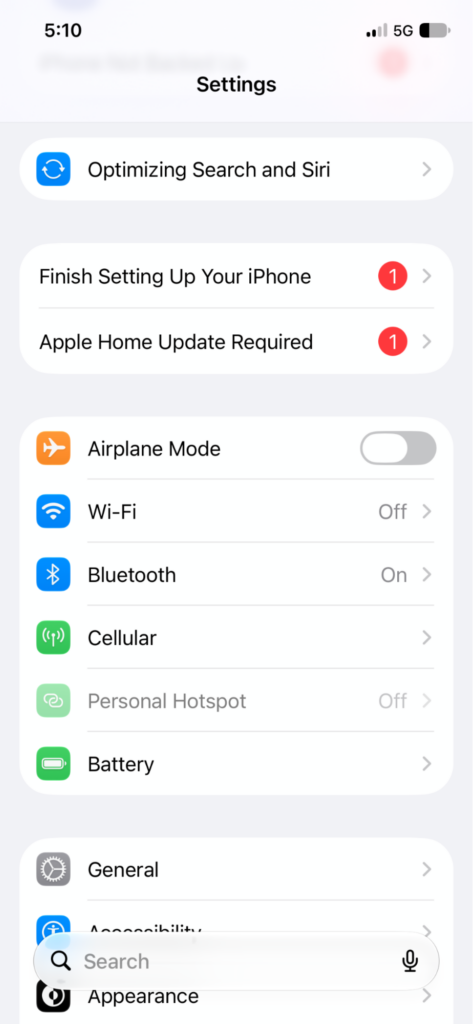
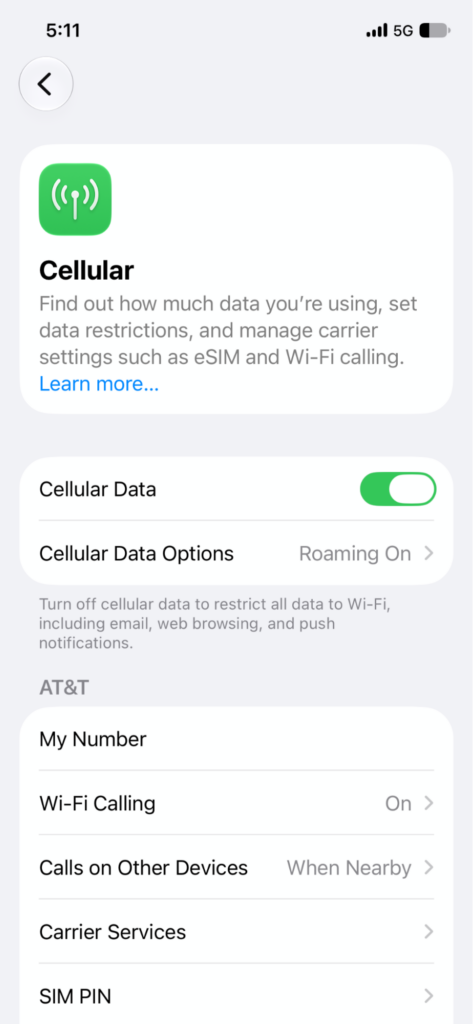
Don’t forget to notify contacts that you’ve recently changed your number. You should also back up your data to iCloud to avoid communication breakdowns.
How to change your number on Android
Here’s how to change the number on an Android phone:
- Under Settings, tap Google or your name/profile.
- Select Manage your Google Account.
- Tap Personal info.
- Tap Phone, then tap on your number.
- Select the Edit, or pencil, icon next to your number. Google may ask you to verify your identity at this step.
- Tap Update number and follow the on-screen instructions to enter your new number.
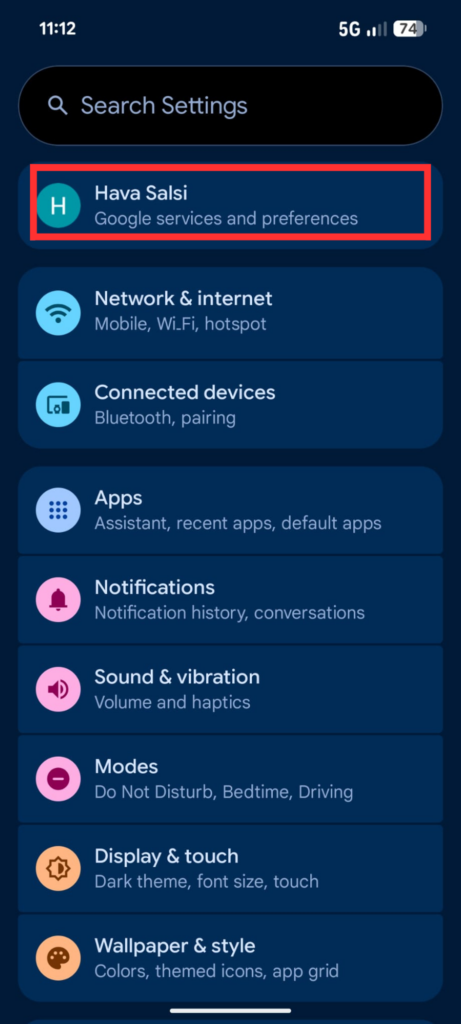
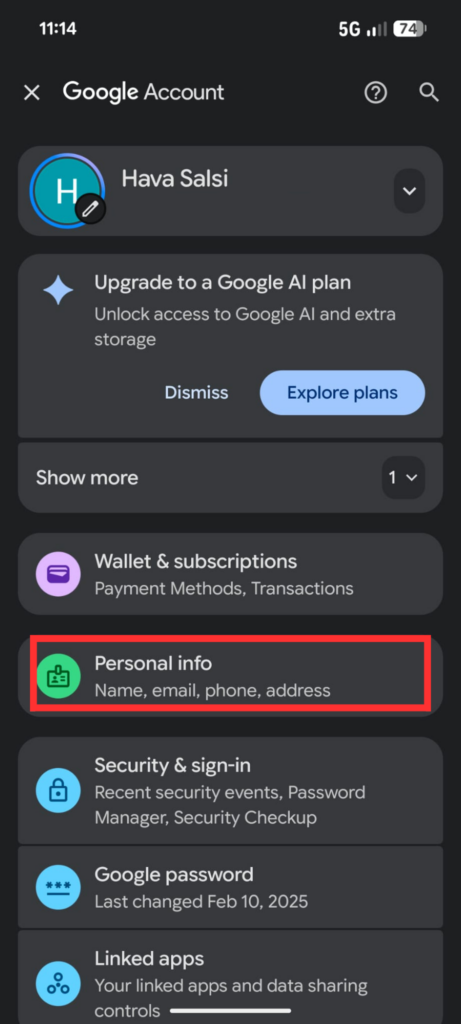
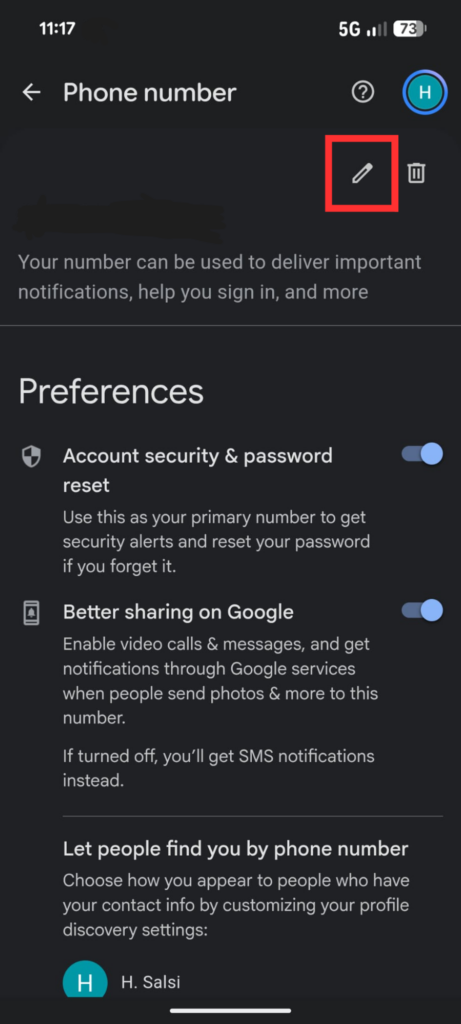
And that’s it — you’ve successfully changed your Android number.
Just make sure your new number is updated across your Google Accounts by refreshing the Personal info screen.
Do you need to change your phone number or get a second number
Get a second phone number in minutes

Do you actually need to replace your existing number? Or do you need a second phone number?
Getting a second number may be more practical than replacing your number if you:
- Want to keep your personal and business lives separate. Instead of replacing your current number, you could get a second phone number to call and text from your computer, tablet, or mobile phone.
- Need to filter spam and robocalls. Getting bombarded by endless spam calls? Instead of switching your number entirely, you could get a second number with a phone menu. This filters out spam and directs real callers to you.
- Want to share a number with your team. With Quo, you can easily set up a shared phone number to use with your team. This way, you can keep your existing mobile number and avoid the hassle of migrating contacts and conversation histories.
Common issues when changing your phone number
Here’s what to consider before switching your SIM card:
Two-factor authentication disruptions
If you use your old number for verification codes, switching to a new phone number could lock you out of important accounts. Avoid the headache of account recovery by migrating your 2FA before switching:
- Remove your old number from each account’s 2FA settings. This includes banks, social media profiles, and subscriptions.
- Add another method, like an authenticator app or backup codes. These are one-time codes you can use to log in if you receive texts. Generate them in each account’s security settings and store them somewhere other than your phone.
- Once your new number is active, add it to your 2FA settings.
*Note: Most virtual numbers like Quo aren’t always accepted for 2FA. We recommend keeping a traditional cell phone number for verification purposes.
Lost voicemails, texts, and call logs
If your old number was with a carrier like T-Mobile or Verizon, switching could wipe out voicemails, text messages, and call records. If those details aren’t backed up, they’ll be gone for good — not ideal for business owners.
Important contacts can’t reach you
If customers don’t recognize your new number, they might not answer — meaning missed opportunities.
You’ve got a few options for keeping them posted:
- Bulk import contacts from your old number to your new number. Then you can call or leave a message letting them know about the change.
- Set up temporary call forwarding to your new number. This will help you avoid missing calls and opportunities during the transition.
- Add your old and new numbers to the same device. That way, you’ll receive calls from both and can sort out any issues without dropping important conversations.
A smarter way to manage your phone numbers
Changing your number with your carrier can be quick. But it isn’t flexible. Carriers limit how often you can do it, and some charge a fee.
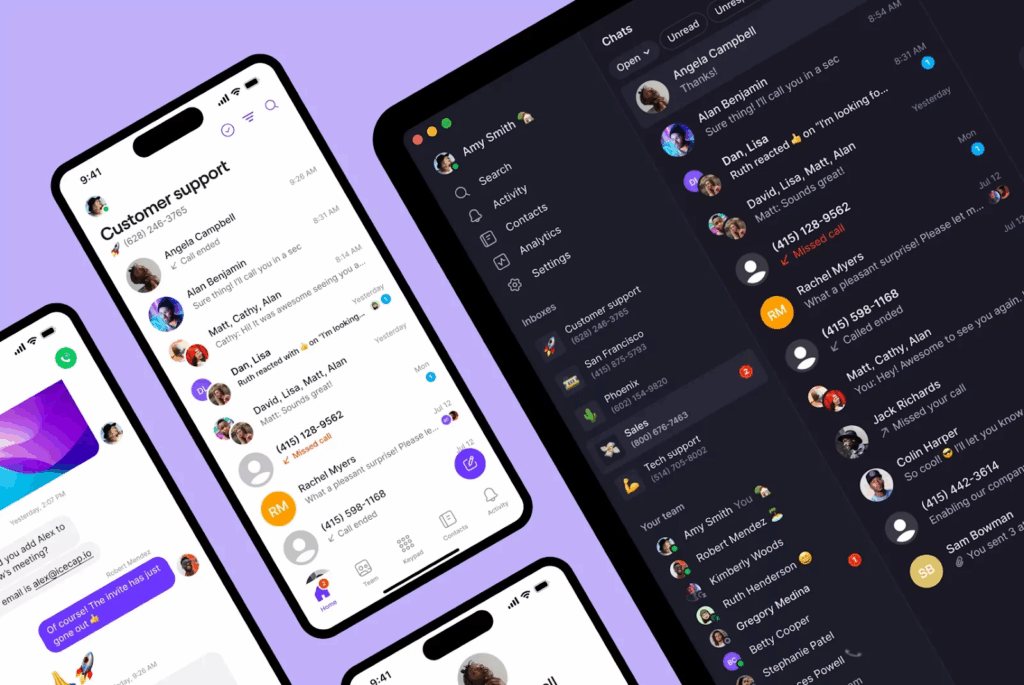
That’s why so many business owners choose Quo. Quo is a business phone app that runs over the internet. You can add a second number in minutes without jumping through carrier hoops.
To get a second number, sign up for Quo. Every plan starts with a seven-day free trial. Quo lets you select a local US, Canadian, or North American toll-free number when you sign up. Once you have an active account, you can also easily move an existing local US, Canadian, or North American toll-free number in-app if needed.
If you already have an account and want to add an additional number, go to Settings, Phone Numbers, and Add a new number. Then pick a number by city or area code. It takes 15 minutes or less.
To change a number, you just go to Phone Numbers, delete the old number, then select a new one. Here are the full steps for managing a number in Quo.
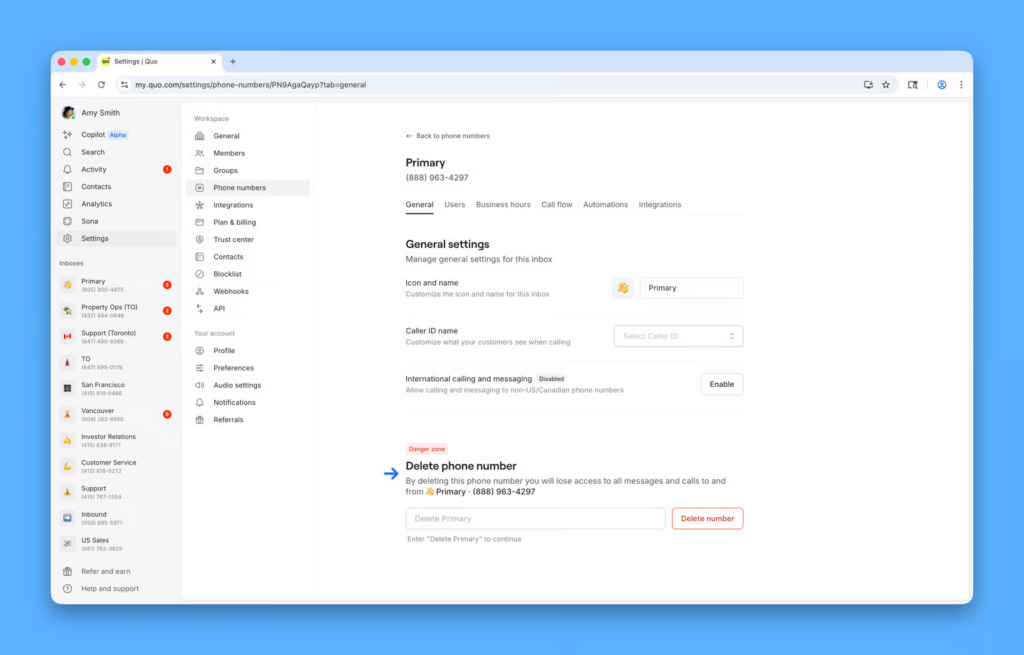
Quo also offers unlimited calling and texting to the US and Canada, shared calling and texting inboxes for teams, and advanced features you won’t find on a standard iPhone or Android. Think call recording, transcripts, auto-replies, and business hours.
Whether you’re changing your number or adding a second one, here’s what makes Quo a great fit for growing businesses:
- Keep your business number when your personal one changes. Port the number customers already know into Quo. Then change your personal number with your carrier without losing the business one. Most ports finish in three to seven business days, and your service stays uninterrupted.
- Easily manage multiple numbers. Assign a dedicated line to each team member and create shared phone numbers for departments. Plus, each user gets a free toll-free or local number with their plan, making it easy to scale as your business grows.
- Block spam callers with an auto-attendant. Robocalls can’t navigate phone menus. With Quo , you can easily set up custom greetings on your business phone number, like “Press one for Sales,” to keep spam calls from cluttering your phone.
Try Quo for free by signing up for a seven-day trial.
Change your number hassle-free with Quo
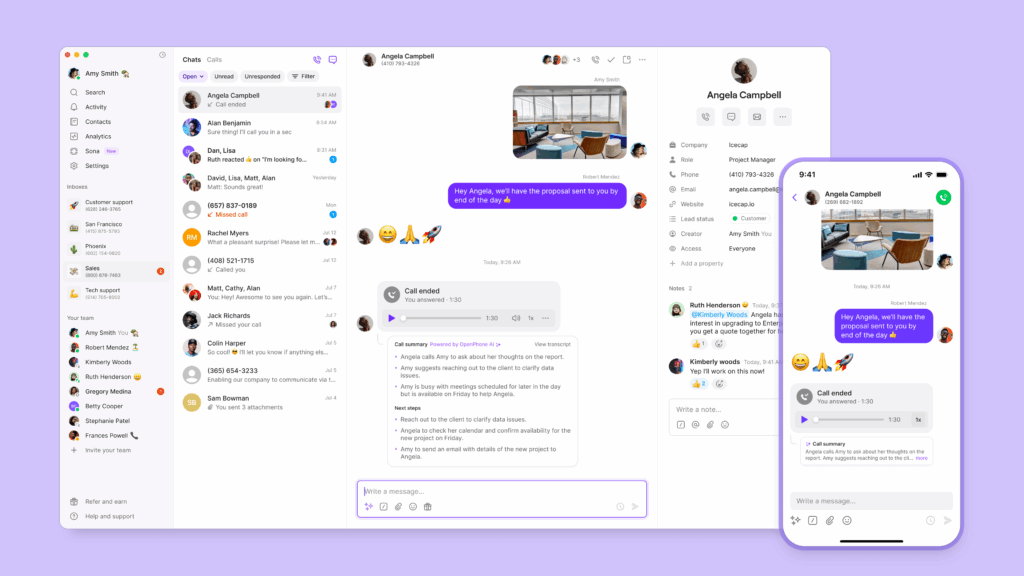
Changing your phone number doesn’t have to be complicated or disruptive to your business. With Quo, small business owners can easily switch numbers and stay accessible to customers.
It takes 15 minutes or less to get a new phone number with Quo, and with our five-minute phone number porting form, you can migrate existing numbers when you need to. When you’re ready, you can tap into features that make managing business calls easy, from phone menus and auto replies to third-party integrations and more.
Sign up today for a seven-day trial and see why Quo is the #1 small business phone system on G2 for customer satisfaction.
FAQs
It depends on your carrier. T-Mobile lets you change your phone number twice a year for free. If you want to change your number more often, T-Mobile charges a $15 fee per change. Changing your number online with Verizon is also free, while calling their customer service to make the change costs $15. With AT&T, changing your number costs $36 if you do it more than 30 days after activation.
Changing your number with Quo is free beyond paying for the plan itself. Our business phone plans start at $15 per user per month.
The information that’s stored on your phone stays. But if it’s tied to your number, voicemails and texting history, for example, will get deleted. On Quo, changing your number permanently removes the old number’s call and message history. So be sure to back up your information before switching numbers.
Under FCC rules, carriers must wait at least 45 days after a number is permanently disconnected before giving it to someone else. After that, a new owner can receive it, so move your accounts off the old number first.
Open Settings, tap Google, then tap your Username. Tap Manage your Google Account, followed by Personal info. Then tap Phone under Contact info, select your number, then tap Edit and Update number.
Open WhatsApp on your phone and tap the vertical … on the top right. Go to Settings, Account, and Change phone number. Enter your old and new numbers, choose whether to notify your contacts, and enter the verification code WhatsApp sends. You can’t do this on WhatsApp Web or Desktop.
Yes. Porting moves your existing number to a new provider, so you can switch carriers without changing it. It’s useful for a business number your customers already know. That’s because you can port that number out and then change your personal number without losing the business line. So how long does porting take? Switching between mobile providers can take minutes to hours, depending on the cell phone carrier. Moving to a virtual phone number provider like Quo typically takes five to seven business days for US numbers, and 10–12 days for Canadian numbers. Quo doesn’t charge for it, though your old carrier might.
To port a number into Quo:
1. Navigate to Settings and Phone numbers, then click Port an existing number. You need to be a workspace owner or admin.
2. Select your current carrier and enter the number you want to port.
3. Upload your billing information and a recent statement, then enter your carrier credentials.
4. Quo submits the request to your carrier and confirms the port date with you.
5. On the port date, the number becomes available in your Quo account. Cancel your old service only after the port is complete.