Thinking about moving your phone number? It’s easier than you might think — no awkward breakup texts required. Just a bit of paperwork and clear communication.
In this guide, we’ll walk you through how to port your number and answer the most common questions about the phone number porting process.
What is number porting?
Phone number porting is the process of transferring a phone number from one provider to another. This is most often done when switching providers.
Some people don’t know they have the right to keep their phone numbers when they change phone companies. This applies to personal and business cell phone numbers, virtual phone numbers, or even a landline.
According to FCC rules, your provider must port your number in a timely manner — typically within a few business days.
Why port your phone number? Benefits and disadvantages of porting
If you’re still on the fence about transferring an existing number, you may want to port your phone number to another service for a variety of reasons:
- Switch to a more affordable mobile carrier without changing your phone number and the customers who know it
- Keep your number when moving abroad by porting your mobile number to a virtual phone service
- Ditch your landline while keeping your phone number
If you’re switching your business phone number to another provider, you can:
- Access a more suitable service that lets you build better relationships with your customers while keeping your phone number(s)
- Ditch carrying two cell phones and port one of those phone numbers to a virtual phone service
- Support call forwarding for multiple phone numbers
- Port your landline to a VoIP phone service so you can send text messages
Keep in mind:
While porting can make managing your calls and messages easier, there are a few things to consider:
- The process can take several days or weeks, depending on your providers — it’s not always instant.
- Some features tied to your original carrier (like voicemail or call forwarding settings) may not carry over.
- Certain providers may charge porting fees — though it’s free with Quo.
Porting your number to Quo is incredibly easy and straightforward. See if Quo is a fit for your business by signing up for a seven-day free trial today.
How to port your number in 5 steps
Phone number porting is a fairly simple process — here’s how it works:
1. Determine if your number is eligible for porting
In most cases, you should be able to port your phone number to another service. If the phone number is under your name, you should be able to start the process yourself. If it’s under a company account, ask the existing admin on the account for help with gathering the information you need to port out the number.
You can find out if your number is eligible for porting on most carriers’ websites.
- For Verizon, visit the Switch to Verizon page
- For AT&T, visit the Transfer Your Number page
- For T-Mobile, visit the Keep Your Number page
According to the FCC, it’s often feasible to transfer your phone number from a traditional landline (also known as a plain old telephone system) to a mobile phone. If you’re considering this switch, consult with your mobile service provider to determine if they support this type of number porting.
When you port your number from a landline to a mobile phone, be aware that your existing long-distance carrier associated with the landline won’t transfer along with the number. Instead, your new mobile service provider will typically handle long-distance calls.
Sometimes, a provider is unable to port a number if they don’t serve the geographic area the number belongs to, as they don’t have the infrastructure to serve those phone numbers. For example, many providers don’t have coverage in Alaska and wouldn’t be able to port a local 907 number.
2. Let your current provider know you’ll be porting out
Contact your provider’s support team to let them know you’re switching providers. We recommend asking them to confirm the information they have on file for you, including your name (and whether it’s under your name vs. a business name), billing address, and port-out PIN.
3. Send the necessary information to your new provider
For legal reasons, your new provider needs the following information:
- Phone bill, account number, or latest invoice. This should include the number you’re porting, your name, and the billing address.
- A port-out/transfer PIN if you have one. A port-out PIN is generally associated with local US numbers and can often be found in the account dashboard with your current carrier. Unsure whether you have a PIN? Contact your current provider.
- A Letter of Authorization (LOA) signed by you that grants permission to the new carrier to do the port.
Other information your new provider will need includes:
- Number of phone numbers you want to port
- Type of number
- Your current provider name
- Whether the account is under your personal name or the business name
4. Submit the port request and wait for the process to finish
Once you submit the porting request, be sure to monitor updates from your new and old providers.
While porting request timelines can vary by provider, it generally takes 5 to 10 business days.
Here’s a closer look at how long it takes to port a number by provider:
| Service provider | Estimated time to port a number |
|---|---|
| Quo | US numbers: 5-7 business days Canadian numbers: 10-12 business days |
| Verizon | Mobile: 4-24 hours Landline: 2-10 business days |
| AT&T | Mobile: Minutes to 5 business days Landline: Minimum 5-7 business days |
| T-Mobile | Mobile: 10 minutes to 3 hours Landline: 3-10 days |
| Google Voice | Calls: Up to 48 hours Texts: Up to 3 business days |
| Vonage | Up to 5-21 business days |
| RingCentral | Mobile: 5-10 business days Landline: 7-15 business days |
| Grasshopper | Up to 2 weeks |
5. Cancel service with your original carrier
When the port is complete, you cancel your service with your original provider.
Note: Canceling service with your old provider before your number has been ported successfully can cause number porting issues, so we recommend waiting until your port is complete to cancel.
How to port your phone number to Quo (formerly OpenPhone)
Tired of your business’s current phone system? Quo (formerly OpenPhone) is the modern business phone system. It works on top of your existing devices via mobile, web, and desktop apps. You can get set up with a new phone number in seconds or port your existing phone numbers within a few days.
Quo has many features that modern businesses need, including:
- Local and toll-free US and Canadian numbers
- Calling and messaging (SMS and MMS)
- Ability to share responsibility for a phone number, like an inbox
- AI features like call summaries, transcriptions, and call tagging
- Auto-attendant and call routing
- Call recording
- Auto-responses for missed calls
- Integrations with 7,000+ third-party apps, including Zapier, Make, and Jobber
To port your existing number to Quo, follow these steps:
- Sign up for a Quo account. Get a local or toll-free new phone number and try the service.
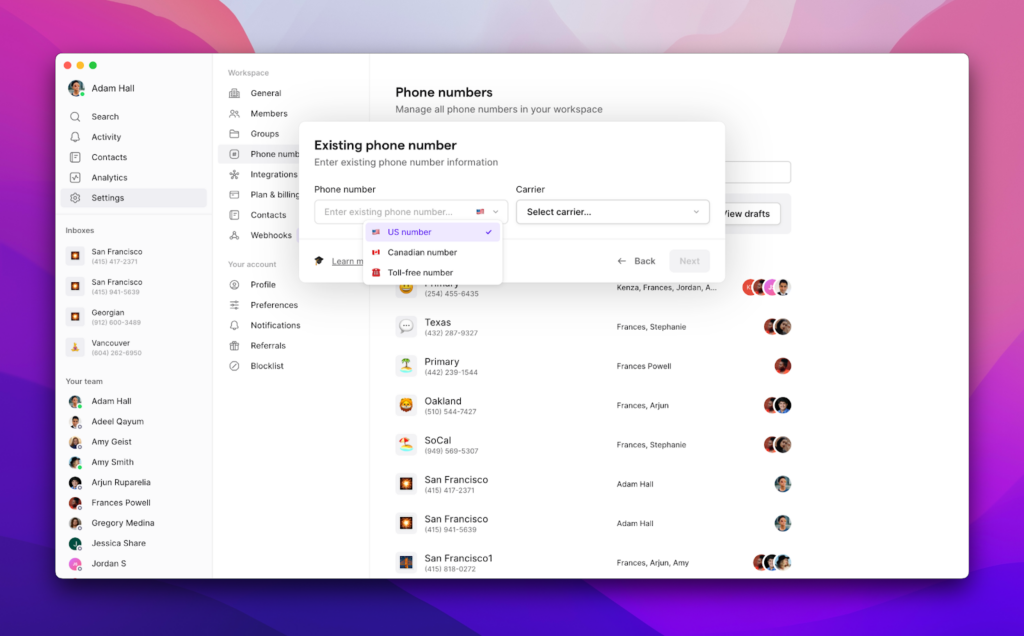
- When you’re ready, you can submit your port request straight from the web or the desktop Quo app.
- While your porting request is underway, you can add business hours, a voicemail greeting, and other customizations to your phone. That way, you’re ready to go once your number is ported over.
FAQs

After porting thousands of numbers to Quo, we’ve come across many questions about the porting process and how it works. Here are some of the common questions about phone number porting:
Most companies don’t have porting fees. This applies to porting numbers in and out. Some companies may have porting fees and early termination fees. The Federal Communications Commission (FCC) mentions that you can ask your current carrier to waive porting fees.
Yes, in most countries and areas, you can port a number online. Just visit your current provider’s number porting page and follow the directions to start the process.
If you plan to text US numbers after porting your number to a provider like Quo, we recommend signing up for an account and completing carrier registration before you start the porting process.
Registrations may remain pending for up to 30 days, but we’re currently receiving some approvals in as little as 5-7 days. In cases where your information is unable to be verified quickly, it may take longer than 30 days. Due to emerging regulations pushed for by the large US cell providers, you aren’t able to message US numbers until registration is approved.
Once your registration is approved, start the porting process two weeks before you’re ready to switch providers. That’s how long it takes to port your number to your new provider. You can continue using your number with your existing provider until the porting process is complete, as long as you keep your account active with them. Then, after your number is ported over, you can cancel.
How long it takes to port a number depends on the type of port.
– Simple ports among wireless service providers take 1 business day or less — for example, if you’re porting 1 phone number and don’t need to switch equipment.
– Ports from a wireline (landline) to wireless service take a bit longer.
– Porting a local US number to a virtual/internet-based phone system takes 5-7 business days. Moving a Canadian number to a virtual phone system can take 7-10 business days.
The good news is that while the port is taking place, you’re still able to use your phone number. Just make sure not to cancel the service with your old provider while the port is in process.
To transfer your number, you need to provide your billing information, account details, and a letter of authorization to your new provider to initiate the porting process. You’ll also need to share who your current provider is, the type of number you’re looking to transfer, and how many phone numbers you want to port.
Yes, you can. During the transfer process, your number will remain active. You’ll be able to use your phone number with your original provider up until the port date. At that point, the number moves to your new carrier.
Depending on the VoIP service, you can use your new number with mobile phones, desktops, and other internet/WiFi-enabled devices.
In most cases, porting your phone number out will cancel your service with your old provider. We recommend confirming that once your number is ported. However, don’t cancel your service while the porting process is happening. That might interrupt the port.
You can port North American toll-free numbers from one carrier to another. You can also port any local US or Canadian number.
After your number is ported, you should be able to call and text using your new provider. If it’s a VoIP provider, you’ll need to download their app (if you haven’t already done so).
Your existing phone and text conversations won’t carry over with most VoIP providers. However, you can upload your existing contacts as a CSV to Quo.
Call forwarding is a business phone system feature that allows you to reroute incoming calls to another phone number. Unlike porting, it involves two phone numbers, one to which the caller has dialed and another to which the call is rerouted.
Porting your number doesn’t involve rerouting. Your number remains the same, but a different provider will provide service once you’ve made the switch.
Each has a different use case. If you’re unhappy with your current provider, you should port your number. If you want to temporarily forward calls to another number, you can use call forwarding.
Yes, you can port your number yourself by notifying your current provider and the new provider that you’ll be switching services. You also need to provide the right paperwork to your new provider.