Thinking about porting a number to Google Voice? Maybe you’re frustrated with your current service provider or looking to cut costs and still deciding on the right VoIP provider.
Either way, you should know porting a number to Google Voice can be an expensive and tedious process. There are also several number porting issues you need to consider, including platform-specific limitations such as no toll-free numbers or texting if you’re outside the US.
This guide explains everything you should know about how to port a number to Google Voice, including how to port from different providers and the pros and cons of using Google Voice.
Should you port your number to Google Voice?
Google Voice has two different plans: personal and business. The personal plan is free, while the business plan requires a monthly subscription.
If your needs are simple, Google Voice’s free personal plan might work — but it wasn’t built for business use, and it shows. For example, the personal plan:
- Isn’t available outside the US
- Won’t let you have multiple numbers
- Doesn’t offer unlimited calls in the US and Canada
- Only supports one user per account
- Costs extra for ported numbers (more on this later)
In contrast, Google Voice for business (also known as Google Voice for Google Workspace) is designed for companies. It comes with more features — like free porting, support for multiple phone numbers, and call management tools — but still has many limitations compared to other modern VoIP systems.
Keep reading to see why that is.
7 key reasons Google Voice isn’t a great fit for businesses
Weighing the pros and cons of Google Voice? Before porting your number to Google Voice, keep these seven drawbacks in mind:
1. Google Voice for personal use has many limitations

Considering the free version of Google Voice? Be prepared for some limitations.
For one thing, you need to have an existing US number to verify your account.
Google Voice also charges a one-time $20 fee to port any mobile number over. Shared access to that number — where you can easily see who on your team has been in touch with your contacts — isn’t available on Google’s free plan.
Perhaps most frustratingly, Google Voice’s free version syncs your personal and business contacts in the Google Contacts app. This means you won’t get notifications distinguishing work calls from personal calls, making your work-life balance more difficult to maintain.
2. No desktop app
Google Voice is only available on web and mobile devices, whether you’re using the free plan or Google Workspace. You also can’t use click-to-call from your computer, making it harder to streamline inbound sales or speed up outbound conversations.
3. No toll-free numbers
Managing international calls with Google Voice can be challenging. Toll-free numbers in Google Voice aren’t supported at all. It won’t be easy (or cheap) for international customers to reach you, especially as your business expands into new markets.
4. More time-consuming to use
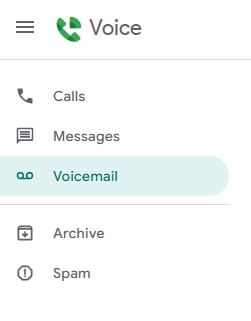
With Google Voice, calls, texts, and voice messages are stored in separate folders. There’s no unified inbox where you can view your entire conversation history — you’ll have to sift through each folder separately to piece together the bigger picture.
These separate inboxes make reviewing and following up on conversations much more time-consuming. You can’t even collaborate with team members inside Google Voice because it lacks an internal messaging feature like Quo’s internal threads.
5. Texting limits
Google Voice’s texting limits can be a problem on its free and paid plans.
For example:
- Texts longer than 160 characters are split into separate messages when sent to any non-Google Voice number.
- You can only forward text messages to the email address associated with your Google Voice account, which makes it difficult to involve different reps in conversations with customers.
- Group texts are limited to eight members at one time.
- You can’t send Word documents, PDFs, music, or video files through Google Voice — only basic image attachments are supported.
- There’s no support for international text messaging.
- You can’t set up texting automations to speed up your workflow.
6. No automations

Want to save time by automating repetitive tasks? Google Voice makes that difficult.
For example, none of the Google Voice plans offer third-party integrations. Other than Google Workspace tools like Calendar and Gmail, you can’t connect it with the tools you already use (like Slack, Zapier, or Salesforce).
You also miss out on time-saving features like auto-replies and text message templates (snippets). And since you can’t schedule text messages for specific dates or times, you risk interrupting customers outside normal business hours.
7. Porting your number to Google Voice gets complicated quickly
With Google Voice, porting is a complicated process that involves multiple steps and detailed documentation. Some customers report that Google Voice doesn’t work when submitting their porting forms. Others have lost their numbers entirely — with no way to get them back or recover lost contacts.
If you’ve weighed the pros and cons and still want to port your number to Google Voice — or explore a better alternative — keep reading.
How to port your number to Google Voice
You can use the following steps to get started with your port.
Porting your number to the personal version of Google Voice
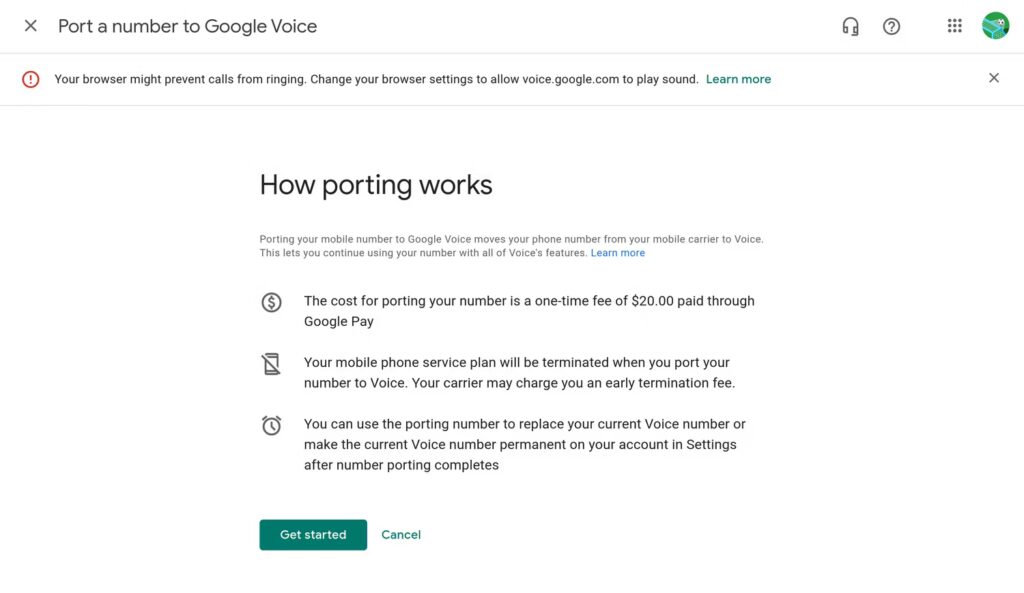
There are a few things to remember when number porting on Google Voice’s free plan.
First, you can only port a US number to Google Voice. Second, you must be based in the US to use Google Voice’s free version. Finally, porting to a personal Google Voice account costs $20 if you have a Verizon, Google Fi, or AT&T number, so have a credit card handy before you begin.
- Open or set up your Google Voice account. You’ll get a free number when you sign up, but the ported number will replace the free number once your port request is complete.
- Navigate to Settings and Account.
- Click Port a number.
- Select Get Started.
- Enter the phone number you wish to port.
- Request to receive a 6-digit verification code by call or SMS and enter it.
- If your number is eligible for porting, Google Voice will ask for current carrier account information (account number, PIN, billing ZIP).
- Pay the $20 porting fee via Google Pay.
- You’ll receive an email confirmation and receipt.
How long it takes to port your number largely depends on your carrier. Your number should port within 48 hours, but text messages might take up to three business days to migrate to your Google Voice account.
To track your porting status, go to Settings, Account, and Track your progress. If you don’t see the “Track your progress” option, your request may not have gone through — try resubmitting your porting request.
Porting your number to Google Voice for business
Here are the steps you need to follow to port numbers to a Google for business account:
- Sign in to the Google Admin console using an administrator account.
- Navigate to Apps, Google Workspace, and Google Voice.
- Click on Number porting, then select Create port order.
- Enter a Port name (anything you want) and select the Country of service, then click Continue.
- Under Identify your primary contact, provide the details of the person who should answer questions about your porting request.
- Use a recent billing statement from your current service provider to Enter port details.
Note: The fields in the port details section may vary depending on your region. If you’re in the EU and using a reseller-provided number, select the underlying service provider (and contact the reseller for information). If your current provider isn’t listed, porting to Google Voice may not be possible.
- Check the box to authorize Google Voice, then click Continue.
- List the phone numbers you wish to port. You can port up to 1,000 numbers at a time (or 50 in Canada).
- Select the date you wish to activate the Google Voice phone number. It can’t be on a weekend, a local holiday, or more than 60 days after the port order.
- Review all the entered information, then click Continue.
- Click Create Port Request to submit the porting order.
- Depending on your region, you may be required to submit a Letter of Authorization (LOA). You have seven days after creating a port order to upload this required documentation.
Here’s how to do it:
- Under Number porting, select your port request.
- Under Required documentation, download the LOA template.
- Print, fill in, and sign the LOA.
- Click Upload Signed Document to upload the letter.
- Select Submit for Review.
At this point, your ported numbers should appear as pending in your account. You can now assign Google Voice numbers to users, add auto attendants, or set up ring groups before the porting process is complete.
Porting numbers from specific providers to Google Voice
Porting your mobile number to the Google Voice VoIP phone system comes with a few additional caveats. The process differs slightly depending on your current service provider, and each carrier may have a slightly different porting-out process:
- Verizon users may be asked to provide a four-digit account PIN, a six-digit transfer PIN, and your Verizon account number (usually a 10 or 14-digit number).
- T-Mobile has a different porting process for prepaid and postpaid users. Postpaid users have a separate account number, and prepaid users have the same account number and phone number.
- AT&T users may need to provide a Number Transfer PIN, which will expire four days after you request it. You’ll also need to check if your device is eligible to unlock and port your number. According to Google Voice, you’ll also need to provide your AT&T wireless account number along with the account PIN.
A word of caution: If your number is located in a rate center or local telephone exchange that Google’s carrier can’t access, Google Voice can’t port your number. Unfortunately, porting to another carrier first doesn’t work either.
How much does it cost to port to Google Voice?
Here are the costs to consider when you port a number to Google Voice:
- Setup fee for Google Voice’s free version: Google Voice charges a one-time setup fee of $20 if you port a US number to a personal (free) Google Voice account. With modern business phone systems like Quo, you don’t need to pay any porting fees — port in as many phone numbers as your team needs.
- Early termination fee (ETF): You might have to pay your current cell phone service provider a termination fee if you’re in the middle of a contract. Service providers like AT&T share some basic ETF information on their websites. If you have questions about incurring an ETF, contact your VoIP provider or mobile carrier’s customer support.
- Google Workspace: Google Voice for business is only available to Google Workspace users. If you don’t have an existing subscription, you’ll need to pay a minimum of $7 per user per month for Google Workspace in addition to a Google Voice plan (starting at $10 per user per month). If you want call forwarding in Google Voice along with voicemail transcriptions, be prepared to pay at least $17 per user per month.
Features like multi-level auto-attendant and ring groups require an upgrade to a higher-tier plan that costs $20 per user per month. To access automatic call recordings and advanced reporting, you’ll need to pay $30 per user per month.
Common porting issues with Google Voice
If you’re trying to port a number type that Google Voice doesn’t support, your porting request might not go through — or worse, your number could get stuck in limbo.
As mentioned earlier, Google Voice for personal use wasn’t built for businesses, which is why it’s so much harder to port a number compared to Google Voice alternatives. If you’re porting an old number into the Google Voice ecosystem, be prepared to babysit this process so nothing falls through the cracks.
Here are some tips to avoid common porting issues:
- Remove special features: Since Google Voice doesn’t offer features like hunt groups, you’ll have to disable them on your number before creating a porting request.
- Ensure the numbers in a request belong to the same carrier: You can port multiple numbers to your Google Voice account if you’re on a paid plan, but you should only include numbers from the same carrier in a single request. Create separate port requests if you have numbers from multiple carriers.
- Check eligibility first: Google Voice doesn’t support all area codes and carriers. Before you begin the porting process, check your number’s eligibility using Google’s porting eligibility tool.
Keep in mind that Google Voice doesn’t support all types of numbers or numbers from specific countries or locations.
You won’t be able to port any of the following to a Google Workspace account:
- Toll-free numbers
- Non-geographical (nomadic) numbers in the EU
- Mobile numbers in the EU
- Numbers associated with Gmail consumer accounts
- Numbers from unmanaged accounts to managed Voice for Google Workspace accounts
- Numbers in different Google Workspace domains
If your port request fails, you may not receive a clear explanation from Google. You’ll need to manually resubmit the request — and in some cases, reach out to your current provider and Google Voice support to troubleshoot.
How do you port your number out of Google Voice?
If you’re currently on Google Voice’s free plan and looking to port your number out of Google Voice, here’s how:
- Under Settings, tap Unlock under the number you wish to port.
- You’ll see a pop-up message asking you to confirm.
- Pay the $3 port-out fee.
When you’re done, you can port the unlocked number to another provider.
The process is slightly longer if you have Google Voice for business:
- Sign in to the Google Admin console.
- Go to Apps, Google Workspace, Google Voice, and Number porting.
- Click Port-out info and Copy the code to give to your new provider.
Once you have your port-out code, you should check the port-in process on the new carrier’s website.
If your head is spinning with all this complexity, don’t worry — Quo’s port-in process is far simpler compared to Google Voice.
The best Google Voice alternative: Quo (formerly OpenPhone)
Porting a number to Quo is as easy as filling out a form. It only takes a few steps to get started, and we’ll take care of the rest.
In addition to easy porting, you get a range of VoIP features for seamless business communication. Unlike Google Voice, you can:
- Get as many toll-free and local (US and Canadian) numbers as your team needs.
- Port in your existing numbers for free.
- Work with your team from shared numbers and use internal threads to collaborate.
- Save time building relationships with your clients using texting.
- Send automatic texts so customers can get a response at any time of day.
- Schedule texts in advance to reach customers at appropriate hours.
- Save go-to messages as snippets (message templates).
- Access customer support (which Google Voice doesn’t offer).
- Never miss a call using Quo’s AI voice agent, Sona.
- Connect with 7,000+ third-party apps, including HubSpot, Salesforce, Zapier, Make, Jobber, and Slack.
- Quickly review conversations with AI call summaries and transcripts.
How to easily port your number to Quo (formerly OpenPhone)

It only takes four steps to port your existing number to Quo:
- Sign up for a Quo account.
- Get a local US or Canadian number or a North American toll-free phone number and try the service.
- Once you’ve confirmed Quo is a good fit during a free seven-day trial, you can submit your port request straight from the web or desktop Quo app. This includes entering your existing number with your current carrier.
- We’ll let you know as soon as it’s complete.
So, is porting to Google Voice worth it?
Porting your number to Google Voice? Confusing. Porting your number to Quo? Anything but. It only takes minutes to submit your request — no extra fees or hand-holding required.
While Google Voice might work for some individuals, it lacks the support, features, and flexibility most growing businesses need.
Once you’ve ported your number to Quo, you can use our intuitive interface to build better relationships with your customers. It’s easy to create self-service phone menus, build automations with 7,000+ third-party tools, and set up shared numbers to keep everyone on the same page.
Sign up for your free trial of Quo — you’ll get a temporary phone number and can port in your existing number when you’re ready to make the switch.
FAQs
If you change your mind about porting your number to Google Voice, you can port the number back to your previous or a new carrier. You’ll need to follow the port-out process discussed above, but you can return to your preferred carrier if you decide you no longer want to continue with Google Voice.
Yes, you can keep your existing number while porting away from Google Voice. Keep in mind this costs $23 on the personal plan — $20 to port in and $3 to port out.
It takes roughly 48 hours to port a number to Google Voice. Text messages can take up to three business days. The speed largely depends on the carrier you’re porting from and the accuracy of your porting submission documents.
Once you sign up for a Google Voice account, you can submit a port submission request under your Settings tab. You may have to submit a six-digit confirmation code, fix compatibility issues between numbers, and pay a $20 porting fee (if you’re on the personal plan).
If your Google Voice port request doesn’t submit successfully, you could spend days or even weeks resolving the issue with Google Support. This could lead to disruptions in service, lengthy discussions via email, and potentially the loss of your phone number altogether.
Yes, you can forward calls to your Google Voice number from other phone numbers by adjusting call forwarding settings with your existing carrier.
Google Voice offers a free number for personal use in the US, but business features require a paid Google Voice account, which starts at $10 per user per month, plus a $7 per user per month Workspace subscription.