There are countless VoIP apps on the market. The question is, which one is right for your small business?
After testing and reviewing over a dozen, we rounded up the 11 best VoIP services. We compared them based on G2 ratings, prices, reliability, features, and limitations.
We also cover everything you should know about VoIP systems. This includes how they work, why they’re worth it, and how to choose the perfect platform.
11 best VoIP services for businesses of 2026
There’s no shortage of business VoIP solutions online, but the best ones offer more than basic inbound and outbound calling features.
Here’s a quick breakdown of the best VoIP services of 2026:
| Provider | Starting Price | Unlimited calling to US & Canada | SMS/MMS to US & Canada | Shared phone numbers | Additional phone numbers | Average G2 rating |
|---|---|---|---|---|---|---|
| Quo | $15 per user per month | ✓ | ✓ | ✓ | $5 per number per month | 4.7 out of 5 |
| RingCentral | $20 per user per month | ✓ | 25 messages per user per month | Calls only | $4.99 per number per month | 4.1 out of 5 |
| Ooma | $19.95 per user per month | ✓ | Requires upgrade | ✓ | $9.95 per number per month | 4.6 out of 5 |
| Nextiva | $15 per user per month | ✓ | 100 texts per user per month | Requires upgrade | Contact for a quote | 4.5 out of 5 |
| Grasshopper | $14 per month | ✓ | MMS messaging for local numbers only | Requires upgrade | $9 per number per month | 3.9 out of 5 |
| Dialpad | $15 per user per month | ✓ | For US & Canadian customers only | ✓ | Requires upgrade | 4.4 out of 5 |
| 8×8 | Contact for a quote | ✓ | ✓ | ✓ | Contact for a quote | 4.1 out of 5 |
| Vonage | $13.99 per user per month for up to four users | ✓ | Local US and Canadian numbers only | Requires upgrade | Cost varies | 4.3 out of 5 |
| Aircall | $30 per user per month, three-user minimum | ✓ | ✓ | ✓ | $6 per number per month | 4.4 out of 5 |
| Zoom Phone | $10 per user per month | Requires upgrade | US, Canadian, and Australian numbers only | Calls only | Starts at $5 per number per month | 4.6 out of 5 |
| Microsoft Teams Phone | $10 per user per month, along with a calling plan | X | MMS not supported | Calls only | Contact for a quote | 4.4 out of 5 |
Let’s dive into the must-know details about each of these VoIP services.
1. Quo: Best for small businesses
Pros
- Unlimited calls to the US and Canada
- One new local or toll-free number per user
- Browser, desktop, iOS, and Android VoIP apps
- Shared phone numbers for teams and departments
- Manual and automatic call recording
- AI-powered call summaries and transcriptions
- Supports over 8,000 third-party integrations
Cons
- No verification through two-factor authentication*
*Nearly all virtual phone numbers share this problem. For safety reasons, companies like Facebook, Uber, and Google rarely let you authenticate accounts through a virtual phone number.
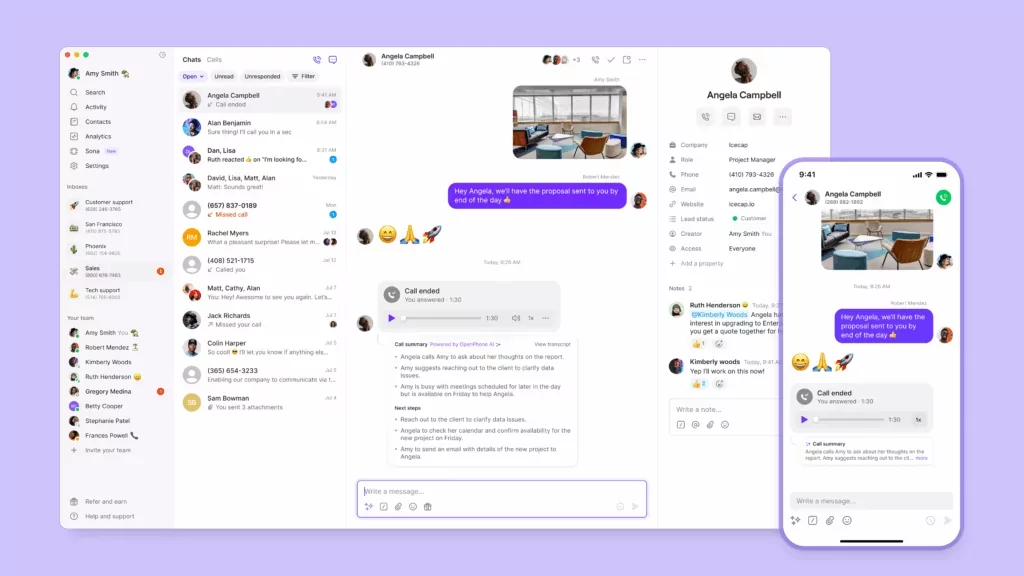
Quo is a small business VoIP service designed to grow as your team grows. Whether you’re in the office or working remotely, our VoIP app helps you stay flexible and communicate more efficiently.
For example, you can use our shared phone numbers to build better relationships with your customers. By letting your team members split responsibility for incoming calls, you can avoid redundant work and respond faster. Plus, you’ll be able to store every call, text, and voicemail in a single-view inbox — no more letting conversations slip through the cracks. You can even tag teammates to collaborate on replies.

Compared to other business phone providers, with Quo, formerly OpenPhone, you can easily anticipate how much you’ll pay. We list all our pricing directly on the website, along with international rates for calling and texting so you don’t have to guess your monthly bills.
We also make it easy to scale as your team grows. Every new member on your account comes with one free local or toll-free number. If you need more than that, additional numbers cost $5 per number per month. Moving an existing US, Canadian, or North American toll-free number is 100% free.
As call volume picks up, AI call tags automatically label calls by topic, so your team can quickly surface trends. You can also use Sona, our AI voice agent, to answer calls when no one is available. It can take messages and send texts during live calls. That way missed calls don’t turn into lost revenue.
Quo is also packed with automation features, including auto-reply texts and IVR. Auto-replies send an instant response when customers text your business, so they know what happens next. IVR allows for automatic VoIP call routing when clients dial your number.
You can also connect Quo with the apps you already use to save your team time, including Slack, Gmail, Zapier, and HubSpot.
Here’s what one user had to say about Quo’s call quality:
“I make multiple calls and texts a day, and have had no issues with the quality of the call. Whether using their iphone app or web app, I find everything easy to navigate and all features quickly searchable.” — G2
Sign up for a seven-day free trial and see why Quo is the #1 rated phone system for small businesses.
Key features of Quo
- Free calling and texting in the US and Canada
- Text message automations, including scheduled messaging, snippets, and auto-replies
- Business app integrations, including Slack, Zapier, and Jobber
- IVR, or auto-attendant
- Shared phone numbers
- Voicemail transcriptions
- Call recording
Quo pricing

Quo has three pricing plans you can choose from:
- Starter: $15 per user per month for unlimited calls in the US and Canada, Quo API, shared phone numbers, manual call recording, auto-replies, AI message responses, and more
- Business: $23 per user per month for CRM integrations, AI call transcriptions, phone menus, automatic call recording, and more
- Scale: $35 per user per month for AI call tags, dedicated onboarding support, and priority chat and email ticket support
How to get a business VoIP number with Quo
Getting a new VoIP phone number from almost anywhere in the world is a simple process when you choose Quo as your VoIP phone number provider. Follow these three steps:
- Create an account with Quo. When you sign up, you get a free seven-day trial.
- During signup, choose your city or area code in the US to select your preferred phone number.
- Once the signup process is complete, you’re all set to use your new virtual phone number.
During the signup process, you’ll be asked for a credit card. This helps keep bad actors off the platform, but you can try calling from your computer for free to confirm it’s a great fit. And when your trial is set to expire, we’ll email you a heads-up to the email address you used to sign up.
If you run into any issues during the signup process, fill out this form to reach our support team.
2. RingCentral: Best for desk phone rentals

Pros
- Desk phone rentals
- Unlimited domestic calling
Cons
- SMS limits
- Storage limits
- Toll-free number limits
RingCentral is an older VoIP provider that paved the way for modern, cloud-based phone systems. It offers desk phone rentals if you still want to use landlines. Their basic plan doesn’t offer much more than voicemail transcriptions, SMS, and unlimited calls in the US and Canada.
There are a few other caveats to keep in mind. On the base plan, for example, you can only send up to 25 text messages per user per month. After that, RingCentral charges you extra — or you can upgrade and pay more per month. Additionally, RingCentral SMS only stores up to 5,000 text messages per user, making it an unreliable way to store all your conversations.
Toll-free numbers also come with significant limits. The base plan starts with 100 pooled minutes, which means they’re shared by every user and every number on your account. You’ll have to upgrade to the Advanced plan for 1,000 pooled minutes per month and again to the Ultra plan for 10,000 pooled minutes per month.
RingCentral does pretty well in the integrations department. But you’ll need the Advanced plan to connect to platforms like Salesforce and Zendesk. The Advanced plan costs $25 per user per month. You also won’t have limited storage for call recordings and other media unless you upgrade to the Ultra plan. And that plan is $35 per user per month.
Key features of RingCentral
- Free unlimited calling in the US and Canada
- Video conferencing
- Allotted toll-free minutes
- CRM app integrations, requires an upgrade
RingCentral pricing

RingCentral’s pricing lets you choose from three different plans:
- Core: $20 per user per month for IVR, visual voicemail, and access to the API
- Advanced: $25 per user per month for unlimited internet fax, call monitoring, and automatic call recording
- Ultra: $35 per user per month for unlimited storage and device analytics
3. Ooma: Best for overhead paging

Pros
- Support for desk phones
- Helpful features for legacy PBX systems
Cons
- Requires an upgrade for the desktop app
- Restrictive SMS limits
- CRM integrations are only available on the highest plan
Ooma is a VoIP service provider offering a small business phone system with desk phone call management. They provide an overhead paging feature to help office staff keep in touch. Plus, ring groups send incoming calls to multiple phone lines until a representative answers.
With every Ooma plan, you can get unlimited calling in the US, Canada, Mexico, and Puerto Rico. However, the base plan only allows you to make and receive calls with compatible desk phones or Ooma’s Android or iPhone app. This means you have to upgrade if you want the convenience of calling on the desktop app.
Upgrading can also unlock key features like voicemail transcriptions and call recording. You even have to upgrade for SMS support — although you’re limited to just 250 messages per month unless you upgrade again.
Compared to other VoIP tools on this list, Ooma will create more work for your team as your business grows. Ooma Office doesn’t offer any AI features at all. No AI call summaries, no call transcripts, and no AI call tags — meaning no ways to save time following up.
Key features of Ooma
- Free unlimited calling in the US, Canada, Mexico, and Puerto Rico
- Text messaging, requires an upgrade
- Voicemail transcriptions, requires an upgrade
- Call recording, requires an upgrade
Ooma pricing

Ooma’s pricing lets you pick from three different plans:
- Essentials: $19.95 per user per month for call park, the desktop app without calling enabled, overhead paging, and music on hold
- Pro: $24.95 per user per month for up to 250 text messages, call recording, and the desktop app with calling enabled
- Pro Plus: $29.95 per user per month for up to 1,000 text messages, team chat, hot desking, and CRM integrations
4. Nextiva: Best for enterprise teams

Pros
- Enterprise integrations are available, such as Bullhorn and ServiceNow
- Video calling on every plan
Cons
- Toll-free phone numbers require an upgrade
- Limited toll-free minutes
- Shared SMS inbox requires an upgrade
Nextiva is a popular business VoIP provider among large-scale enterprises. When you sign up for Nextiva, you can make and receive phone calls, video calls, and team chat messages from a single app on your computer or mobile device.
Nextiva offers a handful of helpful integrations, like HubSpot and Zendesk, but they don’t come out of the box. You must request access, and even then, they’re only free if your account meets certain criteria, like a minimum call volume. Since its pricing isn’t public, you’ll need to contact Nextiva to confirm whether you qualify — and what you’ll pay.
Although Nextiva can be effective for voice and video calls, it isn’t the best VoIP phone for companies that frequently text clients. With the base plan, you only get 100 VoIP text messages. Even with an upgrade, you’re still capped at 500 messages per user per month. This is a limit your sales and support reps may quickly reach if they’re helping clients throughout the day.
Toll-free minutes fall into a similar category. The base plan doesn’t offer any at all. If your customers like to call you for free, this could be an issue for your business.
You’ll also have to worry about limited AI tools. Even if you upgrade, Nextiva’s AI call summaries are still usage-based. This means you have to keep an eye on limits as your team grows. Other VoIP services, like Quo, offer unlimited AI call summaries for $23 per user per month, so your team can use them without worrying about caps.
Key features of Nextiva
- Free unlimited calling in the US and Canada
- Video meetings
- Internet fax, requires an upgrade
- CRM integrations, like HubSpot, requires an upgrade
Nextiva pricing

Nextiva’s pricing provides three different plans:
- Core: $15 per user per month for voicemail with AI transcription, phone calls, and integrations with Outlook and Google Contacts
- Engage: $25 per user per month for 2,000 toll-free minutes, Microsoft Teams integration, and video meeting recording
- Power Suite CX: $75 per user per month for web chat with the option to transfer to a live rep and customizable intelligent and skills-based routing
5. Grasshopper: Best for phone number extensions

Pros
- Unlimited phone number extensions, with an upgrade
- No user minimums
Cons
- Additional numbers are expensive
- No access to integrations
Grasshopper is a VoIP solution designed for solopreneurs and microbusinesses. It offers basic phone features on every pricing plan, including extensions that let you forward incoming calls to other numbers.
Grasshopper may seem cost-effective at first, but it’ll spiral out of control as your business grows. For example, you’ll pay $9 per month extra for each additional phone number, which is almost double the cost of additional numbers with Quo.
Plus, the base plan is limited to just one user and one extension. If you want to buy additional extensions, you need to upgrade to the Solo Plus plan and pay $25 per month to get three extensions. If you need more extensions, you’ll pay a minimum of $55 per month.
Even when upgrading, Grasshopper doesn’t offer nearly as many features as other providers. The Grasshopper app lacks integrations and automations, making it harder to work more efficiently. You also won’t get access to features like AI call tags that help identify recurring issues to improve your team.
Grasshopper may be one of the better small business VoIP services, but your business’s needs will quickly outgrow what it can offer.
Key features of Grasshopper
- Free unlimited calling and texting in the US and Canada
- Voicemail transcriptions
- Instant response texts
- Call transfers, requires an upgrade
Grasshopper pricing

Grasshopper’s pricing lets you choose from three different plans:
- True Solo: $14 per month for one user, one number, and one extension
- Solo Plus: $25 per month for unlimited users, one number, and three extensions
- Small Business: $55 per month for unlimited users, four numbers, and unlimited extensions
6. Dialpad: Best for call centers

Pros
- Unlimited domestic calling
- Google Workspace integration
Cons
- Upgraded plan comes with a three-user minimum
- International texting requires an upgrade
Dialpad is a business VoIP provider that offers unlimited video meetings, as well as unlimited VoIP calling and texting in the US and Canada. It also offers AI features for call centers. This includes real-time call transcriptions and real-time analytics, which can help you make more informed decisions.
However, Dialpad has less-than-ideal phone number options for users. You need to pay $17 per month for each toll-free number. Also, you can only port in one number for free.
Plus, there’s not much you can do with the starter Dialpad plan. You can’t purchase additional numbers or connect with Zapier. Even if you do upgrade, be prepared. The Pro plan requires a three-user minimum, which is a $75 minimum fee per month.
This isn’t ideal for growing businesses with tighter or more limited budgets.
Key features of Dialpad
- Free unlimited calling and texting in the US and Canada
- Unlimited video meetings
- AI-powered voice transcriptions
- Real-time analytics
Dialpad pricing

Dialpad’s pricing offers three different plans:
- Standard: $15 per user per month for unlimited AI meetings, SMS and MMS, and team messaging
- Pro: $25 per user per month with a three-user minimum for CRM integrations, multi-level auto attendant, and additional numbers
- Enterprise: Contact for pricing for a 100-user minimum for dial-by-extension, 99.9% uptime, and unlimited ring groups
7. 8×8: Best for UCaaS

Pros
- Call, text, and video support
- International calls in over 100 countries
Cons
- No public pricing
- Users report the app is hard to set up
- 30 days of storage for call and video recordings
8×8 is a contact center solution that supports unlimited calling in the US and Canada. You’ll also be able to make international calls to over 100 countries.
8×8 was once a small business solution, but it’s recently pivoted to enterprise support. Users have also reported that there’s a steep learning curve and the platform is hard to set up. Plus, there’s no public pricing — you’ll have to contact their sales team for a quote.
Do you record a lot of phone and video calls? You won’t have much storage with 8×8. It only comes with 30 days. If you’re willing to pay an extra $2.50 per month, you can unlock 1 year of cold media storage.
Key features of 8×8
- Free unlimited domestic calling
- Multi-level auto-attendants
- Team messaging
- SMS, MMS, and team chat
- Voicemail transcriptions
- Supervisor analytics
8×8 pricing

8×8’s pricing isn’t publicly listed. However, here are the features you can get with each plan:
- Contact center: Omnichannel routing, high-volume messaging, workforce engagement management, and secure payment processing
- CX Beyond the Contact Center: Advanced queue management, team lead analytics,, and Microsoft Dynamics 365 integration
- Communications APIs: High-volume SMS, voice, video, and authentication and fraud
- Unified Communications: Receptionist console and system analytics
8. Vonage: Best for API connections

Pros
- Customizable API
- Team messaging, requires an upgrade
Cons
- On-demand call recording requires the most expensive plan
- Expensive add-ons for essential features, including automatic call recording
- Visual voicemail requires the most expensive plan
Vonage is a unified communications platform that brings voice calls, video calls, and messaging to one cell phone or desktop app. They also offer several APIs so you can customize their solution to your specific business needs. Unfortunately, Vonage doesn’t offer a lot of built-in features. To access must-have tools like call groups and on-demand call recording, you’ll need to pay for an upgraded plan. Want more essential features like automatic call recording? Be prepared to pay an extra $49.99 per month for just 500 hours of storage.
Vonage does offer AI speech analytics that lets you analyze tone and sentiment, which can help your coaches provide better guidance to reps. But it’s only available as a paid add-on. Pricing isn’t listed publicly, so you’ll need to contact Vonage to request a demo and get a quote.
Perhaps Vonage’s biggest limitation is its contract requirements. You’ll have to sign up for a one-year minimum agreement to open a new account. This could lock you into a VoIP platform that isn’t a good fit for your team.
Key features of Vonage
- Free unlimited calling in the US and Canada
- Auto-attendants
- CRM integrations, requires an upgrade
- 15 hours of on-demand call recording, requires an upgrade
Vonage pricing

Vonage’s price depends on the number of users on your account. Here’s what you’ll pay for teams of one to four users:
- Mobile: Starts at $13.99 per number per month for desktop and mobile apps, voicemail, and SMS support
- Premium: Starts at $20.99 per number per month for access to third-party integrations, team messaging, and single sign-on
- Advanced: Starts at $27.99 per number per month for 15 hours of on-demand call recording, call groups, and visual voicemail
9. Aircall: Best for international numbers

Pros
- Unlimited worldwide calling, requires an upgrade
- 100+ international numbers
Cons
- Pricey plans and user minimums
- Limited number of SMS messages per month
- No MMS outside the US, Australia, and Canada
Aircall offers many features that large-scale contact centers need. For example, you’ll be able to buy international phone numbers and make unlimited international calls. If you’re willing to upgrade to Analytics+, managers can also monitor calls and get more in-depth analytics.
However, you should know Aircall charges heftier subscription fees than most VoIP providers. Plus, each plan comes with a user minimum — which means their base plan actually costs $90 per month. Not the most cost-effective for small businesses.
Their SMS and MMS features also leave much to be desired. You’ll only have access to 250 outbound SMS messages per user per month. And you can’t send MMS messages outside the US, Australia, and Canada.
The bottom line with Aircall? Companies that don’t need a full-blown call center may end up paying a premium for features and user licenses they don’t need.
Key features of Aircall
- Unlimited calling in the US and Canada
- International numbers in more than 100 countries
- Call recording
- Integrations and API
- Call monitoring, requires an upgrade
- AI call summaries, requires a paid add-on
Aircall pricing

Aircall plans require a three-user minimum. Here’s how they break down:
- Essentials: $30 per user per month with a three-user minimum for unlimited calls in the US and Canada, SMS and MMS support, IVR, click-to-dial, and softphone for desktop
- Professional: $50 per user per month with a three-user minimum for mandatory call tagging, Salesforce integration, and queue callback
- Custom: Contact for pricing with a 25-user minimum for unlimited international calls and custom onboarding
10. Zoom Phone: Best for video conferencing

Pros
- Video conferencing
- Digital fax
Cons
- Metered calling on the base plan
- Shared inboxes require an add-on
- Users report complex setup
If your business already relies on Zoom for video meetings, adding Zoom Phone can make sense. It keeps calls and video together, which means you may juggle fewer tools.
Pricing is where you’ll want to pay closer attention. Unlimited domestic calling is only available on higher plans. On the base plan, those calls are metered, so costs can add up if your team makes or receives a lot of them.
Add-ons are another issue to consider. For example, its shared inboxes aren’t included by default. To access them, you’ll have to pay for the Zoom Phone Power Pack, which increases your monthly cost by $25 per user per month.
Even Zoom’s setup can be a hurdle. One G2 reviewer reported that:
“The initial setup and configuration can feel a bit complex, especially for new users or smaller teams without dedicated IT support.” — G2
Key features of Zoom Phone
- Unlimited domestic calling, requires upgrade
- Shared SMS inbox, requires upgrade
- Call recording
- SMS and MMS
Zoom Phone pricing

Zoom Phone’s prices are one of the most confusing on the list. Here’s what you can expect to get on each plan:
- US & Canada Metered: $10 per user per month for metered domestic and international calling, domestic online fax, and post-call summaries
- US & Canada Unlimited: $15 per user per month for phone extension numbers, unlimited domestic calling, and domestic SMS and MMS
- Pro Plus: $18.33 per user per month for cloud storage and unlimited docs
- Global Select: $20 per user per month for domestic calling in 40 selected countries and direct dial numbers
- Business Plus: $22.49 per user per month for multi-region storage, unlimited whiteboard, and media controls
11. Microsoft Teams Phone: Best for companies already using Microsoft Teams

Pros
- AI call summaries
- Integrates with Microsoft Teams
Cons
- Metered calling on the base plan
- Texting is limited
- Has a learning curve
Microsoft Teams Phone is a cloud phone system. It’s an add-on to Microsoft Teams that lets you call other reps without leaving the app. But if you want to make VoIP calls to customers or anyone outside of Teams, you’ll need to pay for a calling plan. That’s at least an extra $3 per user per month and only gives you access to pay-as-you-go calling.
But texting isn’t a strong point. Microsoft Teams Phone doesn’t offer unlimited SMS messages. Instead, messages are usage-based, and you’ll pay roughly $0.00750 per message.
There are some helpful AI features, like AI call summaries. These let your team quickly see what was discussed without listening to the full call recording. That said, if you’re not already using Microsoft Teams or don’t want to learn a new ecosystem, a VoIP service like Quo can be an easier place to start.
Key features of Microsoft Teams Phone
- Auto attendant, requires upgrade
- Call queues, requires upgrade
- Call insights, requires upgrade
- AI-generated summaries, requires upgrade
Microsoft Teams Phone pricing

Here’s what you can expect to get on each plan:
- Teams Phone Standard: $10 per user per month for internal calling in Teams, call transfer between devices, call forwarding, voicemail, and 99.999% uptime SLA
- Teams Phone with pay-as-you-go calling: $13 per user per month, for a phone number, and metered outbound calling
- Teams Phone with Calling Plan: $17 per user per month for 3,000 outbound domestic calling minutes for the US and the UK
- Teams Phone with domestic and international calling: $34 per user per month for 600 included outbound international calling minutes for the US, the UK, and Canada
How we ranked the best VoIP services
We used a three-step process to determine the best VoIP services. First, we trialed multiple platforms to see which ones worked best for small business owners. Then we used reviews from sites like TrustPilot and G2 to back up our research with user experiences. Next, we organized this information to narrow down the top 11 VoIP providers.
We ranked them in order based on these five criteria:
- Pricing: What will this actually cost each month? Price isn’t everything for a VoIP platform, but it’s still a major consideration for small businesses with leaner budgets. We looked beyond listed prices to uncover hidden fees and understand true monthly costs.
- User interface: Can your team use it without training? You shouldn’t have to struggle to use your VoIP platform. We only included intuitive systems so you can avoid steep learning curves and unnecessary downtime.
- Features: Which tools will your team use every day? Just because a plan comes with ‘features’ doesn’t mean they’re useful for small business owners. We looked for VoIP services that offer practical features to help your business grow.
- Reach: Will it still work as your business grows? Your small business won’t stay small forever, and you’ll need a VoIP service that can help you reach new markets. Our list includes VoIP apps with international reach, meaning they let you call and text long-distance customers.
- Integrations: Does it reduce manual work or create more of it? We chose VoIP services offering third-party integrations with popular tools for small businesses. This includes communication platforms like Gmail and Slack, as well as popular CRMs like Salesforce and HubSpot.
- Reliability: Can you count on the platform during busy hours? Dropped calls and outages aren’t just frustrating — they can cost you customers. We prioritized the best VoIP services with clear call quality and dependable performance.
How to choose a VoIP service
A lot of different VoIP providers are on the market, and finding the right one can seem overwhelming.
Need some help whittling down your shortlist? Try asking these nine questions when choosing a VoIP provider:
1. What type of numbers do you need?
Different types of numbers set distinct expectations for customers.
A local number, for example, has a familiar area code that encourages recipients to pick up. It’s a great way to enter new markets or areas, even if you don’t have a physical presence there.
Toll-free numbers, in contrast, can appeal to a broader customer base. Customers in North American regions can call you for free, so they encourage higher call volumes for sales or customer support teams.
Can’t choose between a local or toll-free number? With Quo as your provider, you can get as many local and toll-free numbers as you need.
2. What integrations do they offer?
The best VoIP services offer multiple ways to connect your business phone number to the rest of your tech stack. You can save time logging conversations in your CRM and communicate faster with tools like Slack. Plus, you can connect with workflow tools like Zapier and Make to build automations of your own.
Remember: VoIP platforms without integrations are eerily similar to analog phone carriers. If you’re going to invest in a business phone service, you should focus on solutions that’ll withstand the test of time.
3. How user-friendly is their app?
The last thing you need is a confusing tool. And if you manage a growing team, you probably don’t have time for extensive training.
This is why you should strive to choose an intuitive phone system — it’ll save you time and money in the long run, and spare you plenty of headaches.
The best way to gauge this is with a free trial. If the platform doesn’t offer one, try requesting a demo instead.
4. How can you access the app?
Work isn’t confined to a cubicle anymore, and your VoIP provider should reflect this. The best ones make it easy to access your business phone numbers on your mobile phone, laptop, desktop, or tablet.
VoIP platforms like Quo can help you get work done from anywhere with a WiFi connection. Whether you’re working from your smartphone or computer, you can stay connected to your customers.
5. What time-saving features do they offer?
A good VoIP system can help your team make calls and texts. A great VoIP system can help you reduce repetitive phone-related tasks. That way, you can spend less time handling busy work and more time building relationships with your customers.
You should look for these key features in your VoIP:
- Voicemail to email: It takes about two minutes to listen to 260 words. It takes less than a minute to read the same words in a voicemail transcript.
- Interactive voice response: Customers route themselves to the right person, team, or department. There’s no need to hire a receptionist or spend precious time routing them yourself.
- Call and text analytics: How many texts do you get in a day? How long do your customers spend on the phone? You can use analytics to make better decisions about call volumes, top performers, handle times, and more.
- AI voice agent: Automatically answers calls when your team can’t pick up. That means callers still get help instead of being sent to voicemail, and your team can follow up when they’re available.

6. What team collaboration features do they offer?
What’s the secret to making your small business look bigger? Team collaboration — starting with calls and texts. The best VoIP platforms make it easy to stay connected and let your team split responsibility for incoming messages.
With Quo, you can create shared phone numbers for specific teams or departments, so your reps can work side-by-side. All calls, texts, and voicemails stay in a single view so your team can get immediate context and delegate tasks with ease.

7. How scalable is their offering?
Some VoIP apps work great for solopreneurs, but they can’t help you scale when the time comes to grow. This could lead to significant growing pains, which turn your VoIP platform into an obstacle rather than an advantage.
The good news is this is the exception rather than the rule. The best VoIPs are designed specifically for small businesses and can help you scale when the time comes. Whether you’re adding new team members or upgrading for new features, you should feel in control of your business’s growth plan.
8. Do their plans fit your budget?
Compared to larger enterprise brands, growing businesses tend to work with more limited funds. You can’t afford to pay high prices for a limited, unscalable plan. You also don’t want to pay for unhelpful features your team will never use.
Sneaky budget-killers include:
- User minimums
- Paid minutes
- Texting credits
- International call ‘bundles’
9. What level of support can you expect?
Even the best-rated VoIP solutions need occasional troubleshooting. If you’re dealing with a user error or a software bug, you need to know where and how quickly you can get in touch with customer support.
Most VoIP platforms offer help docs and FAQs to help you deal with less critical issues on your own. However, you should seek out a platform that lets you contact a support rep if you run into issues.
How does VoIP technology work?

When you make a call on a VoIP phone, your VoIP service converts your voice messages into digital data. This data is broken up into smaller pieces called packets. These are then sent over the internet and pieced back together upon reaching their destination, the call recipient.
Unlike traditional landline calls, VoIP calls don’t depend on physical wiring or circuits. As long as you have a strong internet connection, you can make crystal-clear calls without depending on a specific piece of hardware.
Are VoIP services worth it for a small business?
VoIP services are well worth the cost for small businesses. You’ll typically get features like integrations and automations that traditional phones don’t offer at all. You also don’t have to purchase brand-new hardware every time you need a system update.
Plus, you can easily access more advanced features or bring new team members on board. VoIP technology can also enable your team to work remotely, as these systems are accessible via an internet connection.
VoIP services handle the technical side of managing a business phone system. If your small business doesn’t have an IT team or the bandwidth for troubleshooting, a VoIP service takes care of technical issues on your behalf.
Get the best VoIP service with Quo

If you want more advanced phone features to save time, money, and effort, you need a reliable VoIP solution that supports your business needs. That means unlimited calls and texts, automated call routing, and integrations with the apps you already use. Plus, choosing a business phone that connects to the internet is one of the smartest moves you can make.
Quo is the best VoIP service for modern businesses, offering plenty of integrations and automations. Companies that want to work smarter will have access to tools like call recording and voicemail transcriptions. Plus, when you sign up, you can test the platform for free using a US, Canadian, or toll-free number.
Start your free seven-day trial of Quo.
FAQs
VoIP services typically cost between $14 and $40 per user per month. Pricing plans on the higher end tend to offer more customizable solutions that are fit for bigger teams.
Depending on your provider, VoIP subscription costs don’t always include the cost of minutes, extensions, and other add-ons.
VoIP services can be highly secure if you choose a provider that takes precautions to keep your data safe. For example, Quo encrypts data and backs it up daily to keep your communications private and secure. Account changes are also logged in case of discrepancies.
Unlike traditional phone systems, VoIP services aren’t exposed to physical risks like wiretapping or line cutting.
Yes, you can still set up caller ID for local phone numbers when you switch to a VoIP service. However, keep in mind that caller ID isn’t available for toll-free numbers, no matter what type of phone system you have.
Additionally, some Canadian carriers may not display your caller ID, as there is no national caller ID database in Canada.
As for pros, phone systems using Voice over Internet Protocol technology make it easy to reach customers from anywhere with a WiFi connection. That means you can contact local and international customers from the devices you already own. You’ll also be able to send and receive texts, images, and documents. Plus, unlock modern phone features like auto-replies, third-party workflows, and AI tools.
As far as downsides go, VoIP apps don’t support verifying accounts with two-factor authentication. This is a safety feature designed to reduce spam.
Quo offers the best international calling rates for small businesses expanding overseas. Unlike other VoIP phone services, we post our rates directly on our website. We don’t rely on calling packages or minute minimums — which means no billing surprises at the end of the month.
Many people choose Google Voice as a cost-effective VoIP service. However, the free version of Google Voice was built for personal use only. The Google Workspace version — starting at $10 per user per month — lacks critical features that can help businesses grow. You won’t have access to toll-free numbers, third-party integrations, or auto-replies.
Quo is a better fit for growing small businesses. We offer shared numbers — and toll-free numbers — starting on our base plan. Plus, you’ll get a free local or toll-free number with every new member on your account. It’s quicker and more flexible to use our dedicated phone system for your growing team.
A VoIP phone system lets you make and receive calls over the internet instead of a traditional landline. It also lets you use the devices you already own, like your phone, by simply downloading an app. You can also handle calls, texts, and voicemails in one place, without needing extra tools.
The best mobile VoIP provider is one that works just as well on your phone as it does on your computer. If your team is often on the go, you’ll want a mobile app that makes calling, texting, and managing conversations easy from anywhere. A provider like Quo is designed with that in mind. It can help your team scale while keeping communication personal — even when work happens away from a desk.
The best business VoIP services now include AI features like call summaries and transcriptions. These make it easier for your business to scale since you don’t have to listen to full calls just to remember what was said. Some providers go beyond basic AI tools. Quo, for example, offers an AI voice agent that automatically answers the phone when you can’t pick up. This ensures your callers always get the help they need instead of losing potential customers.
Setting up a VoIP phone system is usually quick and straightforward. You choose a provider, pick a number, invite your team, and adjust phone settings like business hours. With the right provider, you can be up and running in under 20 minutes beyond needing to register to text.
Start with the basics: calling, texting, voicemail, and mobile apps. Beyond that, you can look for shared numbers, call routing, and integrations with the tools you already use. While pricing matters, flexibility and ease of use are more important.
Softphones are apps that let you make calls without a physical desk phone. You place and receive calls from software on your phone or computer instead. That way, you can work from anywhere, as long as you have an internet connection.