CallRail’s Lead Center has reached the end of the line.
On January 27, 2026, CallRail will sunset its VoIP calling solution, also known as its Lead Center. That means your tracking numbers can forward calls, but they can’t make or answer them anymore.
If you currently rely on Lead Center to handle phone calls but want to keep CallRail’s call tracking solution, you’re going to need a separate phone system.
Below, we cover the nine best CallRail alternatives — including their pros, features, and pricing — so you can pick the right option for your business.
Comparing the best 9 CallRail alternatives
Looking for an integration? Or want to replace CallRail entirely? Either way, here are nine of the best CallRail alternatives that may better suit your business needs.
| Provider | Starting price | Unlimited calling to US & Canada | SMS/MMS to US & Canada | Shared phone numbers | Additional phone numbers |
|---|---|---|---|---|---|
| CallRail | $45 per month | X | X | X | $3 per number per month |
| Quo | $15 per user per month | ✅ | ✅ | ✅ | $5 per number per month |
| Nimbata | $35 per month | X | Requires fees | X | $4.60 per local number per month |
| CallTrackingMetrics | $65 per month | X | Requires fees | X | $2 per local number per month |
| Invoca | Contact for a quote | X | X | X | Contact for a quote |
| Ringba | $127 per month | X | Not supported | Ring groups only | $3 per local number per month |
| WhatConverts | $30 per month | X | Requires fees | Ring groups only | $2.50 per local number per month |
| RingCentral | $20 per user per month | Limited toll-free minutes | 25 messages per user per month | Calls only | $4.99 per number per month |
| CallScaler | $49 per month | X | Requires fees | Ring groups only | $0.50 per local number per month |
| Ringover | $21 per user per month | ✅ | Requires fees | ✅ | $5 per number per month |
Keep reading for a thorough breakdown of each alternative.
1. Quo: Best for small businesses and growing teams

Pros
- Unlimited calling and messaging in the US and Canada
- Call tags, transcripts, and summaries for instant context
- Shared phone numbers
- 24/7 AI voice agent, Sona
- 8,000+ integrations via Zapier and Make
Cons
- No verification through two-factor authentication*
*Nearly all virtual phone numbers share this problem. For safety reasons, companies like Facebook, Uber, and Google rarely let you authenticate accounts through a virtual phone number.
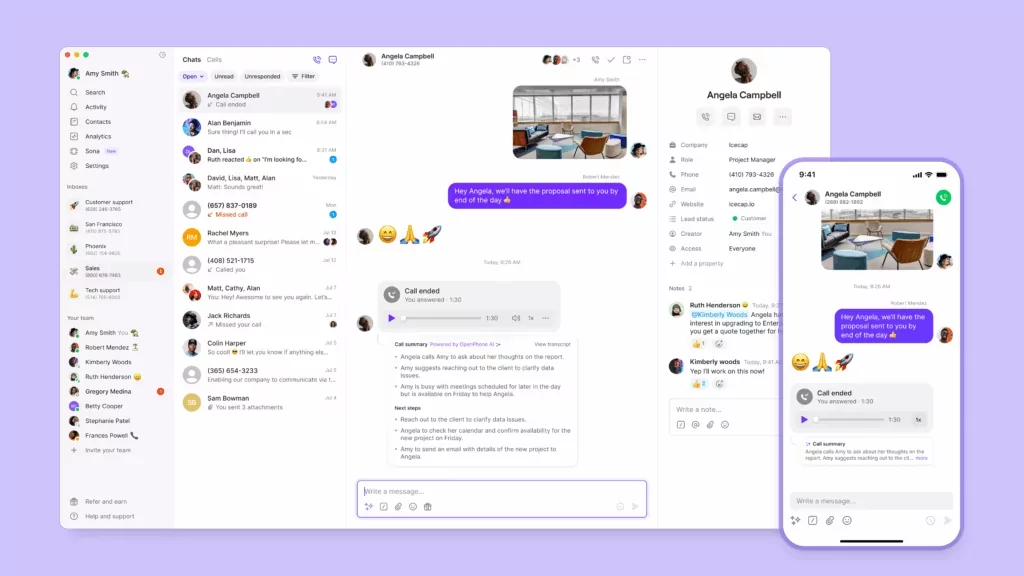
Quo, formerly OpenPhone, is a modern business phone system that brings calling, texting, call tracking, and phone numbers into one workspace. We’re trusted by more than 90,000 businesses to help handle customer conversations, close more deals, and build relationships.
Every plan comes with unlimited calling and texting in the US and Canada. That way, you don’t need to worry about CallRail’s per-minute and per-message charges. You can also respond to customers faster by turning any number into a shared inbox. Everyone on your team can make and receive calls from the same place. Plus, you can handle every call and text from within a single, cloud-based communications platform.
You can also use Quo to track incoming calls and qualify leads, just like CallRail. First, assign a dedicated Quo phone number to your Google Ads account. Then if you wish to field calls 24/7, route your inbound calls to Sona, Quo’s AI voice agent, after hours or when your team is unavailable. Sona can answer the call, collect detailed information, and generate AI summaries for your team to review. That way, your team can quickly qualify leads and schedule callbacks for the ones most likely to convert.
Quo also makes it easier for your team to identify call drivers. If you’re on the Scale plan, Quo automatically applies AI call tags to every conversation. This makes it easier to spot patterns and trends like new inquiries or billing questions.
You can also review the on-demand or automatic call recordings. Plus, AI transcripts and summaries give you instant context without listening back to entire calls.
Keep in mind that Quo integrates with 8,000+ third-party tools via Zapier and Make. It also offers direct integrations with apps like HubSpot, Salesforce, and Jobber. This helps teams sync contacts, automate follow-ups, and log call activity without manual data entry.
You can also use Quo as a separate phone system from CallRail. Or you can connect Quo to CallRail if you’re not yet ready to move on.
Either way, you can test Quo yourself by signing up today for a seven-day free trial.
Key features of Quo
- Access to over 10 native integrations, including Attio
- AI-powered call transcripts and summaries
- Advanced call routing
- Custom ring order
- Support for SMS and MMS
- Access to the Quo API
- Visual call flow builder
Quo pricing

There are three Quo pricing plans designed to grow alongside your team:
- Starter: $15 per user per month for unlimited calling and texting in Canada and the US, voicemail-to-text, on-demand call recording, call hold, basic call forwarding, Zapier and Make integrations, and more
- Business: $23 per user per month for phone menus, automatic call recording, analytics, call transfers, ring order, advanced call forwarding, CRM integrations such as HubSpot, and more
- Scale: $35 per user per month for priority live chat and email support, inbound phone support, dedicated onboarding, and AI call tags
2. Nimbata: Best for companies with a multi-lingual customer base

Pros
- Transcriptions in 100+ languages, require an upgrade
- Direct integrations with Google Analytics, require an upgrade
- “Free” plan is available
Cons
- Answered calls are metered
- Must pay extra for SMS and transcriptions
Nimbata is a call tracking and conversational intelligence platform founded in 2013. Its biggest claim to fame is offering call transcriptions in 100+ languages..
The biggest difference between CallRail and Nimbata comes down to pricing. While CallRail starts at $45 per month, Nimbata offers a free plan. Just keep in mind you get what you pay for. Nimbata’s free plan only includes a limited set of features, like call blocking and basic reports. And you’ll still need to pay for phone numbers and answered calls. On the free plan, prices start at:
- $4.60 per number per month
- $0.10 per answered call
If you upgrade your plan to Agency, Marketing, or Pro, you’ll unlock features that require additional fees. It costs $0.02 per message for outbound SMS, which is only available on Agency and Marketing plans. Plus, it costs $0.02 per message for call transcriptions, available on Agency, Marketing, and Pro plans.
Upgrading your plan lets you pay less per number and per answered call, but never zero. “Answered calls” are metered at:
- $0.03 per minute on the Agency plan
- $0.04 per minute on the Marketing plan
- $0.06 per minute on the Pro plan
And remember: other CallRail alternatives provide unlimited domestic calls and texts with every plan. It’s easy to see that Nimbata’s pricing adds up fast.
Key features of Nimbata
- Form tracking, requires an upgrade
- Dynamic Number Insertion, or DNI, requires an upgrade
- Integrates with Microsoft Ads, requires an upgrade
- Salesforce Integration, requires an upgrade
- Zoho CRM, requires an upgrade
Nimbata pricing

There are four Nimbata pricing plans to choose from:
- Entry: $0 per month for offline and online call tracking, pre-built marketing reports, and spam filtering
- Pro: $35 per month for call recordings and greetings, call flows, integration with Google Analytics, and email notifications
- Marketing: $80 per month for form tracking, Pipedrive integration, voicemail, and call surveys
- Agency: $120 per month for unlimited projects, advanced call flows, geo routing, Salesforce integration, and access to API
3. CallTrackingMetrics: Best for companies that use Snapchat

Pros
- Unlimited users on the base plan
- Snapchat Ads integration, requires an upgrade
- Activity reporting
Cons
- Unlocking VoIP phone features requires multiple upgrades
- Usage-based-only pricing on the base plan
CallTrackingMetrics is a conversation analytics software that lets you track and attribute every call, form, text, and chat. It’s also one of the only providers on this list that integrates with Snapchat Ads, if your customers use the platform.
But like CallRail, CallTrackingMetrics’ fees can stack up fast. US calls are billed per minute.How much you’ll have to pay isn’t publicly listed.
Plus, texting in the US and Canada costs $0.014 per SMS and $0.05 per MMS. You also have to pay extra for call transcriptions unless you upgrade, to the tune of $0.02 per minute.
You should also know CallTrackingMetrics is an intelligence platform first and foremost. That means unlocking in-app calling requires multiple upgrades. Its softphone requires the Sales Engage plan, which starts at $274 per month. And compared to business phone systems like Quo, it’s nearly 18 times more per month.
Key features of CallTrackingMetrics
- AI chatbot support is available with an upgrade
- Transcriptions and summaries, require upgrade
- Scoring
- Access to the VoIP solution, requires an upgrade
- Multi-touch attribution
CallTrackingMetrics pricing

CallTrackingMetrics has four plans to choose from:
- Marketing Lite: $65 per month for unlimited users, call and text attribution, and call tagging and scoring
- Marketing Pro: $149 per month for 3,000 transcription minutes, 5,000 form submissions, and live phone and chat support
- Sales Engage: $274 per month for access to the softphone, 7,500 form submissions per month, live team performance tracking, and Salesforce and Slack integrations
- Enterprise: $1,999 per month for dedicated account management, flexible invoicing, 10,000 form submissions per month, and indefinite history access and data restoration
4. Invoca: Best for contact centers

Pros
- Transcribes and redacts sensitive information, requires an add-on
- Real-time tracking for customer journeys
- Sentiment analysis, requires an add-on
Cons
- No public pricing is available
- Limited minutes per number per year
- QM and call scorecards require an add-on
Invoca is a CallRail alternative that positions itself as a revenue execution platform. Its call tracking software lets contact center teams attribute phone calls to specific campaigns.
Wish you could delegate texting completely? Invoca offers a two-way SMS AI messaging agent that handles text messages autonomously. You can train its AI agent on conversations handled by your highest-performing reps to convert leads 24/7. But it won’t let team members text customers directly. If you want two-way messaging for the people on your team, you’ll need to connect a separate provider.
You can also purchase Invoca’s Signal AI add-on to activate advanced call tracking features. These include call transcripts and AI call summaries. Plus, you’ll be able to automatically remove financial data or protected health information from your transcripts. That way, your team can get caller context faster while keeping sensitive information hidden. But keep in mind pricing isn’t publicly available. The only way to get a quote is to reach out to the sales team.
Key features of Invoca
- Call recording
- AI messaging agent for SMS, requires an add-on
- Transcriptions, requires an add-on
- Redacted info, requires an add-on
- Call summaries, requires an add-on
Invoca pricing

Invoca offers three different pricing plans.. But the platform doesn’t list public pricing for any of these. The only way to get a quote is to contact the sales team. Here are the features you can expect to get with each:
- Pro: Tracking inbound calls with dynamic numbers, call recording, IVR, importing offline conversions and revenue, and APIs
- Enterprise: Capture landing page data, Search Ads 360 integration, TikTok integration, and advanced reports
- Elite: Intelligent data-driven call routing and SIP trunking
5. Ringba: Best for companies that have a global customer base

Pros
- Call flows on the base plan
- Technical support is available, requires an upgrade
Cons
- No SMS support Additional fees for call summaries
- Additional fees for call summaries
Ringba is an inbound call tracking and analytics platform built for global brands. It lets you purchase local phone numbers in over 60 countries. With these numbers, you can optimize lead generation by consolidating all calls from your local ad campaigns into the same platform.
You can also build call flows to automate how callers move through your marketing campaigns. You don’t need to do this alone. Ringba’s engineers can help your team set up workflows in the app.
Just keep in mind Ringba’s technical support is only available on the most expensive plan. So if you’re not willing to upgrade, you’ll need to set up these integrations yourself. You’ll also need to pay fairly steep per-minute pricing to use its features. On the base plan, this includes:
- Tracking calls from a local number. These are billed at $0.055 per minute.
- Tracking calls from a toll-free number. This costs $0.06 per minute.
- Call recording. Metered at $0.01 per minute.
- Transcribing calls. Starts at $0.04 per minute. This doesn’t include excess costs for features like call summaries and sentiment analysis.
Notice there’s no pricing for SMS listed here. That’s because Ringba doesn’t support text messaging.
Ringba alternatives, like Quo, offer unlimited local and toll-free minutes on the base plan. You don’t need to pay per minute for call recording, call transcriptions, summaries, or sentiment analysis via call tagging. Plus, you get SMS and MMS support on every plan.
Key features of Ringba
- Call tracking
- Pixels and webhooks
- Call flows
- Instant caller profiles and popups
- Tech support, requires an upgrade
Ringba pricing

Here’s what it costs for Ringba when paid annually:
- Business: $127 per month for call tracking, pixels and webhooks, call flows, and instant caller profiles
- Professional: $197 per month for ring trees, predictive routing, and revenue recovery tools
- Enterprise: Custom pricing per month for real-time bidding, ping/post call trading, a dedicated CSM, and a dedicated technical contact
6. WhatConverts: Best for marketing agencies

Pros
- 1,000+ integrations
- Ecommerce tracking, requires an upgrade
- Bing Ads integration, requires an upgrade
Cons
- Call flows require multiple upgrades
- High per-minute pricing fees
WhatConverts is a lead tracking and reporting platform specifically designed for marketing agencies. You can track calls, forms, web chats, and ecommerce activity to make more data-driven decisions.
WhatConverts offers more than 1,000 integrations with tools like Google Ads. This lets you send your conversions from phone calls, for example, to Google Analytics so no lead data gets missed.
But this platform charges steep fees for tracking customer interactions. That means the more you grow, the more you’d have to pay.Let’s take a look at the numbers:
- $0.045 per local minute in the US
- $0.065 per toll-free minute in the US and Canada
- $0.03 per SMS message, with no built-in bundles available
You’ll also need to upgrade to the Pro account if you want to customize your call flows. That means it costs more than $100 per month to control how calls are routed on top of your WhatConverts tracking fees.
Key features of WhatConverts
- Call and text tracking
- Dynamic Number Insertion
- Call recording
- Lead reporting
- API
WhatConverts pricing

There are two sides to WhatConverts: plans for small businesses and plans for agencies. Here are the prices for its small business plans, paid annually:
- Call Tracking: $30 per month for tracking calls and texts, call recording, lead management and reporting, real-time reports, and Dynamic Number Insertion
- Plus: $60 per month for the ability to track calls, forms, and chat messages, campaign and keyword reporting, and integrations with Bing and Google Ads
- Pro: $100 per month for call flows, the report builder, scheduled reports, and HIPAA compliance
- Elite: $160 per month for customer journey tracking, multi-click marketing attribution, pages visited tracking, and lead intelligence
7. RingCentral: Best for hosting virtual events

Pros
- Voice, video, and messaging
- Virtual event hosting
- Mobile app
Cons
- Limited toll-free minutes
- Limited SMS messages
- No access to unlimited storage
RingCentral is a cloud communication platform that combines voice, video, messaging, and call tracking into one system. It’s also CallRail’s preferred VoIP integration if you want a full phone system rather than a dedicated call tracking tool. With it, you can tap into call monitoring features like whisper, barge, and monitor to help coach your team. You can also set up vanity phone numbers to better track campaigns, although they require an extra $30 one-time setup fee.
You’ll notice that extra fees are a pattern when using RingCentral’s VoIP service. If you want more than 100 toll-free minutes and 25 text messages per user per month, you’ll need to upgrade your plan. Many of its best features require multiple upgrades, like device analytics and alerts.
So if you want to use RingCentral in addition to CallRail, prepare to pay extra for:
- RingCentral Webinars, which costs $40 per organizer per month
- Unlimited storage, which costs $35 per user per month on the Unlimited plan
- Company reply templates, which cost $25 per user per month for the Business SMS Booster add-on
Key features of RingCentral
- Unlimited calls in the US and Canada
- Hot desking, requires an upgrade
- Call queues
- IVR
- Call recording
RingCentral pricing

You can sign up for any of RingCentral’s pricing plans to integrate with CallRail:
- Core: $20 per user per month for unlimited domestic calling, 100 toll-free minutes, 25 texts , limited storage, and Slack integration
- Advanced: $25 per user per month for call whispering, 1,000 toll-free minutes, 100 texts , automatic call recording, and Zendesk integration
- Ultra: $35 per user per month for unlimited storage, 10,000 toll-free minutes per month, 200 SMS, and device alerts and analytics
- Customer Engagement Bundle: Custom pricing for access to the Business SMS Booster and the Call Queues Booster
8. CallScaler: Best for client login portals

Pros
- Call tree menu
- Client login portal, requires an upgrade
- Round-robin on the base plan
Cons
- Most expensive platform on this list
- Usage-based pricing for call recording, transcriptions, and advanced caller ID
CallScaler is a call tracking platform designed for agencies and in-house marketing teams. The platform lets you set up custom call tracking to help you figure out which ad campaign performs the best.
You’ll get access to features like a call tree menu that lets you filter out robocalls to help teams save time. CallScaler also lets you set up round-robin call routing to distribute calls in batches across your team.
If you’re an agency that manages clients, CallScaler offers client portal logins. They let your clients log in to your white-label dashboard at any time to review their tracked calls and listen to recordings.
Just keep in mind, CallScaler isn’t cheap. Prices start at $49 per month, not including fees for:
- AI call transcriptions: $0.008 per 15 seconds
- Call recording: $0.005 per minute
- SMS: $0.03 per message
- Google Sheets integration: $10 per month
- Additional users: $6 per user per month
Keep in mind, if you’re an agency or marketing team, you probably won’t stay on the base plan for long. The client login portals require upgrading to the Client Pro plan at $79 per month.
Key features of CallScaler
- Call tree menu
- Google Sheets integration, requires an add-on
- Client login portals, requires an upgrade
- Round-robin calling
- Call recording, requires an add-on
CallScaler pricing

CallScaler lets you choose from three different pricing plans:
- Business: $49 per month for one user, inbound call and text tracking, call tracking numbers, call flows, with call recording, routing, and transcriptions costing extra
- Client Pro: $79 per month for 10 users, client login portals, and access to the pay-per-call billing suite
- Unlimited: $399 per month for unlimited users, customizable contracts, usage discounts for committed use, and the highest priority support
9. Ringover: Best for outbound sales teams

Pros
- Power Dialer is available
- AI for customer sentiment, requires an add-on
- Outbound calls to 110 destinations
Cons
- Integrations require an upgrade, with a max of three
- SMS usage-based pricing
The Ringover VoIP system can help you chat with customers across all your existing channels. For example, it offers an omnichannel messaging add-on. This feature lets your sales team connect with customers on social media, SMS messages, Google Reviews, and more. But keep in mind this will cost you an extra $29 per license per month.
The base plan also lets you make unlimited calls to more than 110 locations. Then, you can use the Power Dialer to automatically dial numbers in a contact list.
Want to send your callers surveys at the end of a call? This is possible, but you’ll need to upgrade to the Business plan.
Not all calls and messages are free with Ringover. Some call destinations charge per-minute pricing, and every text message requires you to pay per text. Plus, you don’t have access to any integrations on the base plan, only its API. That means if you want to integrate Ringover with CallRail, you’ll need to pay $44 per user per month.
Key features of Ringover
- Unlimited calls to 110 destinations
- Transcriptions and summaries
- Call coaching, requires an upgrade
- Power Dialer, requires an upgrade
- Call recording
Ringover pricing

Ringover offers three “sets” of plans — one for one to two users, one for up to 300 users, and one for 300+ enterprises. Here’s what you’ll pay for Ringover’s mid-tier plans:
- Smart: $21 per user per month for local numbers from 43 countries, unlimited calling to 110 locations, IVR, call forwarding, click-to-call, and call recording
- Business: $44 per user per month for up to two integrations, advanced call analytics, call coaching, advanced IVR, webhooks, and local numbers from 65 countries
- Advanced: Custom pricing per user per month for call campaigns, Power Dialer, call scripts, voicemail drop, Local Presence Dialing, and up to three integrations
What you need to know about CallRail alternatives

CallRail is a tracking and analytics software that lets you track customer calls, texts, and form submissions. It shows where each lead comes from, like Google Ads or social media posts. That way, you can measure the effectiveness of your marketing campaigns. It lets you know whether to double down on high-performing campaigns, pivot to more effective marketing efforts, and so on.
Keep in mind, CallRail is only available in the US, Canada, the UK, and Australia.
As mentioned, CallRail’s tracking numbers will no longer handle calls directly — they’ll only forward them to an external number. So you’ll need to pay for and manage two services if you want calling, texting, and tracking features.
CallRail has given existing Lead Center customers the option to migrate to RingCentral. They also recommend that future customers sign up for RingCentral to access VoIP features.
Unfortunately, RingCentral comes with many limitations. For example:
- Want your team to use a shared SMS inbox? It costs $25 extra per user per month for the Business SMS Booster add-on.
- SMS on the base plan is limited to 25 messages per user per month. It’s also only available in the United States and Canada.
- Need to send a large number of text messages? High Volume SMS is a paid add-on, starting at $0.01 per message.
- Toll-free minutes on the Core plan are capped at 100 pooled minutes per account. The only way to get more is to upgrade your plan.
- Both on-demand and automatic call recordings are stored for just 90 days. If you need records for training or compliance purposes, RingCentral’s call recording limitations may be too steep.
The good news is that you’re not stuck with RingCentral’s limitations. It’s possible to integrate CallRail with other business phone systems, including Quo, to avoid them.
But this is just the tip of the iceberg of potential issues you can run into.
You have to pay per minute to track calls

CallRail includes only 250 minutes to track calls on every plan. That’s a little over four hours for your entire team.
Once you use those up, you’ll pay $0.05 per minute for every tracked local call. Toll-free minutes cost more at $0.08 per minute. If your business relies heavily on inbound calls, CallRail’s pricing can add up fast.
But keep in mind that your call activity will still be divided between CallRail and your phone system. That means your team will have to switch apps to access details and recordings. That is, unless you find a CallRail alternative that replaces its phone system and tracking features. Like Quo, for example.
You have to pay for call transcriptions
You have to upgrade to the Call Tracking + Conversation Intelligence plan to access call transcriptions. It’ll cost you $90 per month, and you’ll still have to pay $0.02 per minute.
This could get expensive fast if you rely heavily on transcripts to review past calls.
Salesforce integration is expensive
Most VoIP systems don’t require you to pay extra for third-party integrations. But CallRail isn’t technically a VoIP provider. If you want to integrate CallRail with Salesforce, you’ll have to pay an extra $80 per month on top of your plan. That means your starting price is $125 per month, not including other third-party integrations.
It doesn’t help that CallRail is already a pretty expensive platform.
Let’s take a closer look in the section below.
CallRail pricing

CallRail offers four different plans:
- Call Tracking: $45 per month for five local numbers, 250 local minutes, call and text tracking and attribution, call recording, and call routing
- Call Tracking + Conversation Intelligence®: $90 per month for call transcripts and keyword analysis
- Call Tracking + Form Tracking: $90 per month for form tracking and access to the custom form builder, but you lose access to the included call transcription minutes
- Call Tracking Complete: $175 per month for call transcripts, keyword analysis, call summaries, and sentiment analysis
Top features to look for in call tracking software
Now that you’ve narrowed down a shortlist of providers, use this short checklist to pick the perfect CallRail alternative:
- Accurate call attribution. You need a call tracking tool that shows where your calls are coming from. With Quo, you can buy different phone numbers for each marketing campaign, like a dedicated number for your Google Ads. When you connect that number to Sona, Quo’s AI voice agent, it can answer calls, collect details, and automatically log the conversation. That way, you always know which campaign brought in the lead.
- Clear insight into caller intent. Choose a platform that shows you why callers reached out in the first place. Quo’s AI call summaries and transcripts, for example, give you context from every conversation. Plus, AI call tags can help identify call drivers by automatically surfacing the reason behind each conversation.
- Integrations that keep your systems in sync. It should be easy to push your call data to the tools your team already uses. That way, you can track leads and assign follow-ups on platforms like Slack and Salesforce.
- Reporting that’s easy to understand. Look for simple reporting that helps you spot patterns like peak call times or repeated questions. This lets you see how your marketing campaigns drive call volume throughout the week.
- Support that helps you get value fast. No matter what your tracking tool looks like, choose a provider that offers reliable support. This includes real-time troubleshooting and help documentation.
Quo: The best CallRail alternative for modern marketing teams
With CallRail’s Lead Center pulling into its final station, now is the perfect time to reevaluate what you need from a phone system. Maybe that’s integrating CallRail with a new business phone system. Or maybe that’s switching to a more capable provider entirely — like Quo.
With Quo, you get a reliable business phone system that offers AI-powered call support on every plan. You can record incoming calls, track callers from different ad campaigns, and qualify leads without human support. Plus, you’ll have unlimited calls in the US and Canada, so you don’t have to worry about domestic overage fees.
See for yourself what makes Quo the #1 business phone solution on G2 by signing up for a seven-day free trial.
FAQs
You can keep your existing CallRail number by porting it to another phone service.
You can choose the right VoIP provider for your business by:
– Shortlisting must-have features for your team
– Evaluate providers based on pricing, features, integrations, and customer reviews
– Assess each provider’s security and uptime
– Trialing tools and testing features