No single business is best for everyone. Any honest brand can admit it. We believe Quo, formerly OpenPhone, is a strong Voice over Internet Protocol service for businesses.
But we also know some Quo alternatives have unique features of their own, like video conferencing, physical desk phone rentals, or local numbers outside the US and Canada.
But if you don’t need any of those specific features, we can make the case that Quo is the best phone system for small and growing businesses. We’ve tested and compared it against the top VoIP providers in the market. In fact, thousands of businesses have switched to Quo because of our unique platform experience.
This is a comprehensive overview of available Quo alternatives. If you don’t have time to read, here are three reasons why Quo is the superior business phone option:
- Built for teams. Quo is designed to help teams manage customer communications at scale. With shared phone numbers, inboxes, and internal threads, you can manage your call and text volume with your colleagues.
- AI-powered automations. With Sona, AI call summaries and transcriptions, and AI call tags, Quo’s AI features can save time on repetitive tasks, allowing you to focus on more meaningful work that moves the needle. Plus, you can connect Quo to your Claude and ChatGPT accounts to get call insights instantly.
- Scalability. As you grow, Quo grows with you. Integrate with your tech stack using one of our 9,000+ app integrations.
We’ll cover why businesses may search for Quo alternatives. Then we’ll compare each of them and see where they excel and where they fall short.
Why choose Quo?
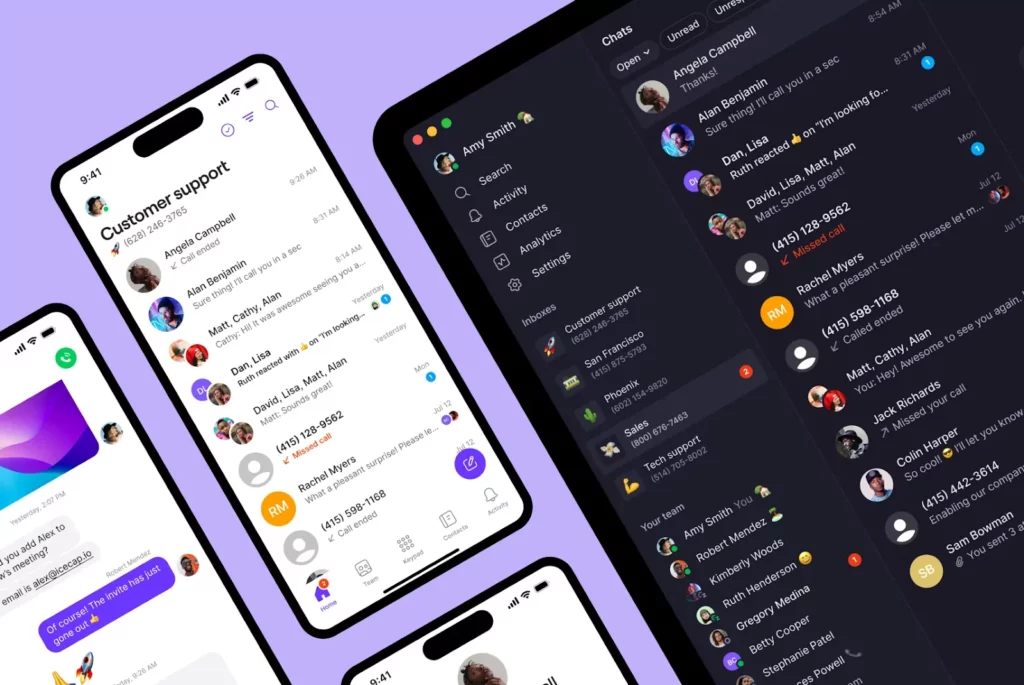
Quo is a modern VoIP phone service that offers mobile, desktop, and web apps. No matter what device you’re on, you can use our convenient business phone system to keep clients happy and stay in the loop with your team.
Here are some of our customers’ favorite Quo features.
Seamless collaboration with shared phone numbers

When you want to create the best customer experience, it makes sense to have a central phone number for your business. You may also want a main number for specific teams, like sales or customer service. However, some VoIP services limit each phone number to one user.
Quo allows you to share phone numbers and see when your team members are typing text messages or on a call. You can also use internal threads for behind-the-scenes notes and warm call transfers. This allows you to collaborate better on client communication. Also, with Tasks, you can assign follow-up action items to your team after a call ends. That way, you can stay on top of your after-call work and ensure nothing slips through the cracks.

Scalability and integrations
Quo grows with your business and keeps your tech stack in sync. You can add teammates and upgrade features in seconds. If you expand to new markets, you can instantly add a local number for just $5 a month.
Quo offers integrations with essential business tools like email, Slack, HubSpot, and Jobber. You can even automate your text messages by connecting with Zapier.
Plus, Quo is the only business phone with direct integrations to Claude and ChatGPT. You have a 24/7 AI assistant to analyze your calls and texts as you grow. Use your preferred AI tool to:
- Analyze your call transcripts and provide call coaching recommendations
- Send batch follow-up texts to your contacts
- Update contact information in your address book automatically
No need to use any complicated data analytics software to get valuable call insights. Just talk to Claude or ChatGPT. Get started with these 20+ Claude prompt examples.
Unlimited calls and texts
No matter what plan you have, Quo plans include unlimited calling and text messaging in Canada and the United States. You can easily work with clients and team members in both countries. You can even get toll-free numbers to give your business a larger presence.
We also make it easy to register your numbers for A2P 10DLC, or US carrier registration, which improves message deliverability.
Need to communicate with stakeholders abroad? Quo also supports international calls at affordable rates.
AI-powered automations
Quo helps you work smarter with AI and flexible workflows. Here’s how:
- 24/7 AI voice agent. With Sona, you can avoid missed calls during busy times or after business hours to prevent leaving money on the table. Train Sona on your company documentation so it always provides accurate responses. You can also instruct it to qualify leads, send appointment booking links, and transfer calls when needed.
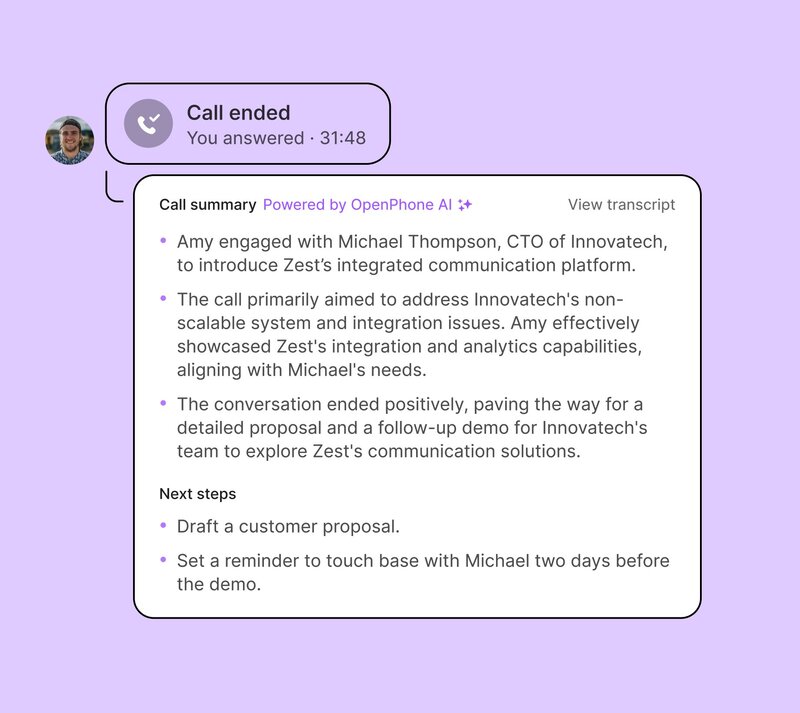
- Call summaries and transcripts. Struggling to remember what customers shared on your calls? With automatic call recording and AI call transcripts, you can quickly pull up your call notes. And with call summaries, you can gather context when you miss a past call.
- AI call tags. Surface recurring issues and opportunities across your calls with call tags. Create custom labels that track what matters to you, like “New lead” or “Churn risk.” Quo automatically reviews your call transcripts and labels them with the relevant tag.
Business-friendly pricing

When you’re running a startup or small business, your budget is far from unlimited. Many VoIP subscriptions can make it feel like your revenue is flying away. But Quo offers some of the most affordable rates in the industry, with plans starting at just $15 per user per month — no hidden fees.
Reliable customer support
Our customer support team is always ready to help via email or chat. If you need help with porting your phone number, setting up an IVR phone menu, and more, we have your back.
Our team also welcomes and actively adapts based on feedback. So if you’d love to use Quo instead of the alternatives but really need an extra feature before you make the switch, feel free to suggest it! We’re constantly developing new features with both our current and potential clients in mind.
Why do businesses search for Quo alternatives?
Quo is a collaborative phone system designed for teams looking to scale their customer communications. But our platform isn’t built for everyone. Here are a few reasons why businesses may look for Quo alternatives:
- Video conferencing. Quo doesn’t have video calls in its platform. You can make voice calls and send SMS and MMS messages. If you want a platform that has both voice and video calls, you’ll have to choose a Quo alternative.
- Desk phone rentals. If you work out of an office, your team may want physical desk phones. If that’s important, you’ll need a Quo alternative.
One thing to note: Quo offers desktop and mobile apps your team can install on their existing devices. Instead of relying on fixed landlines that limit their mobility, your team can take their business phones with them wherever they go. They can take calls at a customer job site, at home, or on the go. Our approach is designed for hybrid, remote, and field service teams. - Local numbers outside the US and Canada. Quo offers local numbers in the US and Canada, but it doesn’t offer local international numbers. If you’re looking to add local international numbers, you’ll need a different option.
- Enterprise sales and support features. Quo doesn’t offer dedicated sales features like real-time sales playbooks. We also don’t have contact center features like AI CSAT or rep scorecards. These features are designed for enterprise businesses that need to manage rep performance at scale. If these are necessary for your team’s growth, you should look at a Quo alternative.
11 Best Quo alternatives compared
Before we dive into the details, here’s how each virtual phone system stacks up:
| Providers | Annual price | Unlimited calls US/CA | SMS and MMS | Shared phone numbers | Additional phone numbers |
|---|---|---|---|---|---|
| Quo | 15 per user per month | ✔ | ✔ | ✔ | $5 per number per month |
| RingCentral | $20 per user per month | ✔ | 25 messages per user per month | Calls only | $4.99 per number per month |
| Dialpad | $15 per user per month | ✔ | US & Canadian customers only | ✔ | Requires upgrade, then $5–$15 per month |
| GoTo Connect | No public pricing | ✔ | US & Canadian customers only | Shared inbox only | Varies by country |
| Ooma Office | $19.95 per user per month | ✔ | Requires upgrade | ✔ | $9.95 per number per month |
| Nextiva | $15 per user per month | ✔ | 100 SMS per user per month | Requires upgrade | Contact sales |
| MightyCall | $20 per user per month, three-user minimum | ✔ | ✔ | Calls only | $5 per number per month |
| JustCall | $29 per user per month; two-user minimum | ✔ | 500 segments per user per month | ✔ | Cost varies |
| 8x8 | Contact for a quote | ✔ | ✔ | ✔ | Contact for a quote |
1. Vonage: Best alternative with an API offering

Pros
- Unlimited domestic calls in the US and Canada
- API add-ons for building a custom solution
Cons
- Call recording, voicemail transcripts, and toll-free numbers are paid add-ons
- No AI features like call summaries or message responses
- Pricing isn’t fully transparent, with extra fees for support, recording, and transcripts
Vonage offers unlimited domestic calling on Android, iOS, and desktop. There are two built-in phone plans for you to use, as well as API add-ons if you want to build your own solution.
While Vonage offers many of the features Quo has, most of them are paid add-ons. You have to pay extra for toll-free numbers, voicemail transcriptions, and on-demand call recording. Vonage also lacks AI features like call summaries and call tags that Quo uses to optimize your team’s communication workflows.
Vonage’s pricing isn’t fully transparent, either. Plus, you need to pay a lot of extra fees for basic features like customer support, call recording, and voicemail transcripts. Its starting price is higher than Quo’s, at $19.99 per number per month for smaller teams. It uses a sliding scale to charge businesses. The fewer team members you have, the more you pay for each person.
If you’re a growing business, Quo is still the most cost-effective VoIP solution for the price.
Key features of Vonage
- SMS and MMS
- Auto-attendant
- Simultaneous ring
- Call forwarding
- Call hold
Vonage pricing

As mentioned earlier, Vonage’s pricing depends on how many people are on your plan. If you sign up between one and four users, here’s how their plans break down:
- Mobile: $13.99 per number per month to access unlimited domestic calling, SMS and MMS, and support for desktop and mobile apps
- Premium: $20.99 per number per month to access unlimited video meetings with up to 200 participants, virtual receptionist, integrations with business apps, analytics and reporting, and support for VoIP desk phones
- Advanced: $27.99 per number per month to access single sign-on, 15 hours of on-demand call recording per month, voicemail transcription, and call groups
You can get a full comparison of Quo vs Vonage.
2. RingCentral: Best alternative with desk phone rental options

Pros
- Unlimited calls to the US and Canada
- Videoconferencing is available
- Desk phone rentals
Cons
- Only 25 texts per user per month on the base plan, with per-message overage charges
- Call recordings and files expire after 90 days
- Clunky, complicated user experience
- Slow or unresponsive customer support, especially during outages
RingCentral is a legacy platform that offers calls, texts, and video conferencing. You can also rent physical desk phones if you work out of a traditional office and are still willing to pay for ongoing landline maintenance.
With RingCentral, you can get some of the features available in Quo, with significantly more limitations. The base plan only provides 100 toll-free minutes, 25 text messages, and limited storage per user per month. Even the most expensive plan only allows for 200 messages per user per month. Quo provides unlimited text messaging in the US and Canada with each plan, so you can scale your business without paying extra.
RingCentral users consistently complain about their user experience. . One G2 reviewer describes “…a confusing interface for adding new phones and users.” Quo offers a user-friendly interface with shared inboxes for voicemail, texts, and calls. RingCentral support can also be slow to reach. According to another G2 reviewer, “…customer service response is slow or non-existent” during outages. Quo offers highly responsive customer support via live chat and email.
No matter how much you upgrade, you’re also subject to storage retention policies that delete most of your data. That includes call recordings and call logs. Recordings and other files expire after 90 days, which adds difficulties for your team if you have long sales cycles. Quo doesn’t put a limit on your file storage, and you never have to upgrade to unlock more space.
Key features of RingCentral
- One free US, Canadian, or toll-free number per user
- Voicemail transcriptions with an upgrade
- Call recordings with an upgrade
- Integrations with Slack, Microsoft 365, Salesforce, Zendesk, and other CRMs with an upgrade
RingCentral pricing

Here’s how RingCentral pricing plans break down:
- Core: $20 per user per month to access unlimited domestic calling, SMS and MMS, and IVR
- Advanced: $25 per user per month to access auto call recording, advanced call monitoring and handling, and multi-site management
- Ultra: $35 per user per month to access unlimited enterprise-grade HD video, whiteboards, messaging, customizable business insights, and unlimited file-sharing with storage for files and recordings
3. Dialpad: Best alternative for managing call centers

Pros
- Free calling in the US and Canada
- Voicemail transcriptions
- Videoconferencing features
- AI coaching features on higher-tier plans
Cons
- Toll-free numbers cost $15 per month
- Basic integrations like Slack and Zapier are locked behind upgrades
- Auto-replies, international texts, and additional numbers require upgrades
- Bloated with features that fast-growing teams may not need
Dialpad is a business communications system that offers call center software to larger businesses. The base plan starts at $15 per user per month. It includes features like voicemail transcriptions and custom call routing.
But Dialpad is bloated with features that may be better suited to call centers than to fast-growing businesses. You may not need video calling or whiteboarding with Miro, but that’s what you get when you pay for a Dialpad plan. Some of Dialpad’s most basic features are also locked behind more expensive plans. You can’t set up auto-replies, send international texts, or get additional numbers unless you pay for the Pro plan, which costs $25 per user per month.
Here are a few other things to keep in mind:
- Expensive toll-free numbers. Dialpad charges $15 per month for toll-free numbers. With Quo, you can get toll-free numbers in your plan and additional ones for just $5 per month.
- Integrations are locked away. Dialpad has several unique integrations, but even basic ones like Slack and Zapier are locked behind upgrades. You only get Google Workspace with a basic plan. Quo sets you up with Slack, Zapier, and email integrations on all plans.
- Inconsistent pricing system. Dialpad’s pricing isn’t unified like its platform. If you need more than one phone number or the option to text internationally, you have to upgrade to their Pro plan. Quo offers three simple pricing tiers so you’re not paying twice for the essentials.
Setup can be a hurdle, too. One G2 reviewer notes that “Setting up the IVR was not intuitive at all,” adding that support wasn’t much help when issues came up.
Brandon Neff, Lead Technician at Quality Exterminators, switched for that reason: “Quo has simplified our workflow since switching from Dialpad and MightyCall.”
Key features of Dialpad
- Call recording
- Desktop and mobile apps and a Chrome extension
- Shared phone numbers
- Auto-attendant with IVR
- Integrations with business apps like Slack, Zapier, and HubSpot, with an upgrade
Dialpad pricing

Dialpad pricing plans for their business phone solution are:
- Standard: $15 per user per month to access unlimited calling, unlimited AI Meetings for up to 150 participants, and SMS, MMS, and team messaging
- Pro: $25 per user per month to access 24/7 live agent support, CRM integrations like Salesforce, Zendesk, HubSpot, Zoho, and the Microsoft Teams integration
- Enterprise: Contact for pricing to access 100% uptime, unlimited office locations, and unlimited departments/ring groups
4. GoTo Connect: Best alternative with a conference bridge

Pros
- Integrations with Google Workspace and Microsoft Outlook
- Free international calling to 50+ countries
Cons
- Costly toll-free minutes capped at 1,000 per month, then billed per minute
- No public pricing, so you have to talk to sales for a quote
- Tricky to configure
- Shared inboxes and SMS campaigns require upgrades, with no unlimited texting
GoTo Connect is a cloud-based platform that supports calls, texts, and video meetings. Even its most basic plan comes with video, and its highest-tier plan offers real-time video call quality reports.
But GoTo Connect can be tricky to configure. As some reviewers put it, some technical aspects of the system can be too complicated to troubleshoot.
The extra limitations may be too much for some businesses. Shared inboxes aren’t available on the base plan, and you won’t have access to SMS campaigns to send bulk messages. If you upgrade to unlock more of these, you still have to pay extra for toll-free calls. Once you use up your pool of 1,000 minutes, you have to pay an additional per-minute fee. You also have to spend extra on SMS credits to text customers from your business number.
GoTo Connect no longer offers public pricing. Instead, you have to talk to their sales team to get a quote. Quo offers transparent pricing so you can make an informed decision.
Key features of GoTo Connect
- SMS and MMS messaging is available to US and Canadian customers only
- Unlimited extensions
- Conference calling
- Integrations with Zoho, Zendesk, and Salesforce with an upgrade
GoTo Connect pricing
GoTo Connect’s pricing isn’t publicly available, but you can still see its tiers and features on the website:
- Phone System: Video meetings, team chat, SMS and MMS, Microsoft Teams integration, and free calls to 50 countries
- Connect CX: Social media integrations, shared inboxes, and AI-powered call summaries
- Contact Center: Auto-queue callback, intelligent call routing, and rep monitoring tools
5. Ooma: Best alternative with legacy features

Pros
- Free calling in the US, Canada, and Mexico
- Auto-attendant is available
Cons
- Calling on the desktop app requires an Ooma Office Pro upgrade
- No browser-based calls or shared phone numbers
- Desk phones cost $50 to $600 each on top of the plan
- Legacy hardware and limited international calling
Ooma is a Quo alternative that sells its own line of VoIP phones, including a few wireless options. They also offer instant product recommendations so you can find a deal without having to get on a sales call.
But Ooma is still a legacy platform. This means it uses older telephony to connect your calls to customers. One Trustpilot reviewer described ported business lines arriving with phones that “…sound like speaking in a barrel.” Ooma’s plans also come with features most businesses don’t need, like intercom calling and analog fax support. Unless your business has a large physical location, you don’t really need them. Support for international calls can be limited, too.
On the base plan, you can only use the mobile app to manage calls. To call on the desktop app, you need to upgrade to Ooma Office Pro. If you want to rent desk phones, they range from $50 to $600 each on top of the VoIP plan. Quo offers Android, iOS, desktop, and web apps to all users, so you can simply log in to whatever device is most convenient.
Shayne Jasper, President of Suplay Wrestling Co., summed up his switch. “Ooma was costly, antiquated, and gave me zero visibility into my business. Quo is 1/5th the cost of Ooma for us.”
Key features of Ooma
- Texting in the US and Canada with an upgrade
- Voicemail transcriptions with an upgrade
- Ring groups
- Call recording with an upgrade
Ooma pricing

Ooma’s pricing plans for their business phone system are:
- Essentials: $19.95 per user per month to access 50+ standard features, unlimited calling in the US, Canada, Mexico, and Puerto Rico, and virtual receptionist
- Pro: $24.95 per user per month to access everything in Essentials, calling on desktop app, text messaging, and videoconferencing with up to 25 participants
- Pro Plus: $29.95 per user per month to access everything in Pro, CRM Integration, videoconferencing with up to 100 participants, and hot desking
6. Nextiva: Best alternative with video calling

Pros
- Free calling and video calling in the US and Canada
- Social media channel management
- Digital reviews management
Cons
- Pricing isn’t small-business-friendly; the base plan excludes integrations and call recording
- SMS capped at 100 messages per user per month
- Toll-free minutes aren’t included on the base plan
- No free trial without talking to sales first
Nextiva is a Quo alternative focused on omnichannel communication. It offers conference calling hardware, advanced features for video calling, and video conference recording. It also offers unlimited calling in the US and Canada.
The biggest problem with Nextiva: its plans aren’t friendly to small businesses. SMS is limited to 100 messages sent and received per user per month before you’re charged extra. Nextiva offers toll-free numbers but doesn’t include toll-free minutes on the base plan. Even if you upgrade to the Engage plan, you’re limited to 2,000 toll-free minutes and 500 texts per user per month. You also can’t try Nextiva for free without talking to their sales team first.
Here are a few other drawbacks you should know about:
- Call recording isn’t available in its base plan, and requires you to upgrade.
- Nextiva only offers integrations with CRMs like Salesforce and HubSpot when you upgrade.
Nextiva is also extremely confusing for users. Mike Schoen, Owner of Scenthound DMV, switched to Quo after struggling with the platform: “Nextiva was extremely confusing to use for us. Nothing was intuitive; even contacting customer support was challenging.”
Key features of Nextiva
- Free calling and video calling in the US and Canada
- Mobile text messaging
- Desktop, web, and mobile apps
- Voicemail transcriptions
- Auto-attendant with IVR
- Business app integrations with Outlook and Google Contacts on base plan
Nextiva pricing

You can choose from three different Nextiva pricing plans:
- Core: $15 per user per month to access inbound and outbound voice calls, SMS/MMS up to 100 messages per user per month, voicemail transcriptions, and simple IVR
- Engage: $25 per user per month to access unlimited call recording, toll-free numbers and 2,000 toll-free minutes, unlimited video meetings, and Microsoft Teams integration
- Scale: $75 per user per month for omnichannel engagement, blended inbound and outbound calling, smart call routing, and automatic call distribution (ACD) callback
7. CallRail: Best for tracking marketing campaigns

Pros
- Marketing campaign tracking
- Google Ads and Microsoft Ads integrations
Cons
- Requires an additional business phone platform
- Unpredictable costs every month
CallRail is a tracking and analytics software that lets you track customer calls, texts, and form submissions. It shows where each lead comes from, like Google Ads or social media posts. That way, you can measure the effectiveness of your marketing campaigns. It lets you know whether to double down on high-performing campaigns, pivot to more effective marketing efforts, and so on.
Keep in mind, CallRail is only available in the US, Canada, the UK, and Australia.
CallRail doesn’t handle incoming calls and texts with its numbers. You need another business phone solution that you can connect to CallRail. It also charges on a per-minute and per-message basis. You can pay for bundles in advance, but as your call volume scales, the cost grows. For small teams, their monthly CallRail bill can add up quickly.
When you’re just getting started with your marketing efforts, it’s fairly easy to track your spend and conversions in a spreadsheet. With Quo, you get a business phone platform that offers unlimited calls and texts on every plan. You can also see how your team is performing on a weekly and monthly basis with our analytics.
Key features of CallRail
- Dynamic number insertion for website visitors
- Keyword and source-level call attribution
- Call recording with routing rules
- Custom form builder on form-tracking plans
- Multi-account and white-label management for agencies
CallRail pricing

You can choose from four different CallRail pricing plans:
- Lead Tracking: $50 per month to access call and text tracking and attribution, call recording and routing, call transcription and analysis, automation rules, and five local numbers with 250 included minutes
- Lead Tracking Complete: $95 per month for form tracking and attribution, a custom form builder, and multi-touch CPL reporting
- Lead Conversion: $150 per month for Premium Conversation Intelligence with call summaries and sentiment analysis, conversation trend reports, automatic conversion tagging, and coaching and conversion tools
- Lead Conversion Complete: $195 per month for Call Tracking, Form Tracking, and Premium Conversation Intelligence to track and analyze complete customer journeys
8. Grasshopper: Best alternative for multi-digit extensions

Pros
- Unlimited calling to the US and Canada
- Auto-attendant phone menu with extensions
- Voicemail transcriptions
Cons
- Unlimited users require an upgrade
- No third-party integrations
- No AI-powered features
Grasshopper is a well-known phone system for small businesses. All its features are standard with every plan, so you don’t need to shop for the best tier. Unlike Quo, Grasshopper’s cost is based on how many phone numbers and extensions you want.
This isn’t necessarily cheaper, however. Grasshopper’s least expensive plan starts at $14 per month, but you have to upgrade if you want more than one userEven if you do, additional numbers are priced at $9 per number per month. This means you have to pay $34 per month for two users and two business numbers. With Quo, that same scenario would cost just $30 per month. Additional numbers on Quo cost $5 per number per month.
Even if you pay extra for Grasshopper, it may not have the features many growing teams want. All plans come with the same basics, like calling, texting, and voicemail. But no matter how much you pay, you can’t get AI call summaries. Using Quo, you can get instant AI-powered call summaries with our Business plan. Grasshopper also doesn’t integrate with any third-party platforms, which means your phone system has to live in a silo. Quo connects to dozens of other tools to tie your tech stack together.
Key features of Grasshopper
- Free calling and texting in Canada and the continental US, not including Alaska or Hawaii
- Desktop and mobile apps
- Voicemail transcriptions
- Custom greetings
- Virtual fax
Grasshopper pricing

Grasshopper’s pricing plans for small businesses include:
- True Solo: $14 per month for one user, one phone number, and one extension
- Solo Plus: $25 per month for unlimited users, one phone number, and three extensions
- Small Business: $55 per month for unlimited users, four phone numbers, and unlimited extensions
9. MightyCall: Best alternative if you don’t need advanced SMS features

Pros
- Unlimited call and text support in the US and Canada
- Mobile app and webphone support
Cons
- No unified inbox: calls, voicemails, and texts land in separate inboxes
- Basic SMS, with no auto-replies, snippets, or AI message responses
- Three-user minimum on plans
MightyCall is an alternative to Quo offering call management software for customer support teams. Each plan comes with unlimited call and text support in the US and Canada, as well as a mobile app and web phone support so you can take calls on the go.
But MightyCall could make it difficult for your team to get the context it needs. Every phone call, voice message, and text message with a customer goes into a separate inbox, which isn’t ideal for getting context quickly. MightyCall doesn’t have a unified inbox where users can tag each other in conversations and collaborate. With Quo, you can create shared numbers with intuitive inboxes that collect all calls, texts, and voicemails in the same thread.
MightyCall only offers bare-bones messaging features. You can’t automate texts, set up auto-replies, or use snippets to save time. If you’re fine with basic SMS, MightyCall may be a good fit. But if you want features like scheduled messages and snippets, you can use Quo to get these advanced features on the Starter plan.
Key features of MightyCall
- International numbers
- Customer support
- Custom greetings
- Conference calling
- Call recording
MightyCall pricing

You can choose from four different MightyCall pricing plans:
- Core: $20 per user per month for unlimited calling and messaging, three business phone numbers, multi-level IVR, call routing, voicemail transcription, and API access
- Pro: $38 per user per month for live call monitoring, call recording, real-time analytics, and AI call summaries
- Power: $54 per user per month for preview and progressive auto dialers, AI answering machine detection, and a dedicated account manager
- Enterprise: $65 per user per month for a predictive dialer, SIP trunking support, and custom integrations
10. Aircall: Best alternative for global call centers

Pros
- Power Dialer makes calls in rapid succession
- Automatically add calls from any webpage
Cons
- No texting outside the US and Canada
- User minimums on every plan
- AI call transcriptions and summaries require an add-on
Aircall is one of the few VoIP services to offer unlimited international calls. It’s a good alternative for businesses wanting to set up a global call center.
But Aircall’s rates aren’t super transparent or easy to understand. There are user limits on every plan. The Essentials plan requires a minimum of three users, which means their listed $30 per-user price is actually a $90 per-month minimum. Their highest-tier plan also requires a minimum of 25 users. If you’re a team of one or two, you’ll end up paying for more seats than you need. Quo is designed for small and growing businesses, so you can just add or remove users as you need. Aircall charges you extra for AI call summaries and transcriptions. Quo includes these features in our Business plan.
Aircall falls short for text messaging. If you have a US number, it’s not possible to text outside the US or Canada. If you use a phone menu on a number, you can’t send texts at all. Quo offers free SMS and MMS in the US and Canada with every plan. You can also send international texts and messages on numbers with a phone menu.
The bottom line? Unless you make a lot of international calls every month, you’re better off with Quo.
Key features of Aircall
- Call routing
- Auto-attendant with IVR
- SMS
- Toll-free numbers
- Call recording
- CRM phone integrations
Aircall pricing

Aircall’s pricing plans include:
- Essentials: $30 per user with a minimum of three users, unlimited calls within the US and Canada, essential telephony features, including IVR, call recording and click-to-dial, and SMS
- Professional: $50 per user with a minimum of three users, access to the Salesforce integration, mandatory call tagging, and advanced analytics and call monitoring
- Custom: Custom quote for a minimum of 25 users, unlimited calls worldwide, custom analytics, and custom onboarding
11. Zoom Phone: Best alternatives for teams using Zoom meetings

Pros
- Integrations with Zoom apps
Cons
- Outbound calls are billed by the minute on the base plan
- Reporting and analytics require the $25 Power Pack add-on
- Additional cloud storage requires higher-tier plans
Zoom Phone is a good choice if you’re already using Zoom for video meetings, since it works well with the platform’s other tools. Zoom includes standard VoIP features, like auto-attendants, ring groups, and call recording, even on the base plan. However, advanced analytics dashboards and the AI assistant require upgrades.
Zoom Phone’s starting price may seem affordable on the surface, but it can quickly become expensive for small teams. While internal calls between teammates are free, you’ll pay by the minute for any outbound calls on the base plan. That’s a significant drawback for scaling teams. Quo includes unlimited calling and texting in all of its plans.
Reporting and analytics aren’t included in any plan, either. Need call queue analytics or historical insights? That’ll cost an extra $25 per user per month with the Zoom Phone Power Pack add-on. Quo includes shared texting and analytics in its $15 base plan, with no add-ons required.
Key features of Zoom Phone
- Inbound calls, texts, and video meetings
- Auto-attendants, ring groups, and call recording on the base plan
- Integrations with Zoom Workplace, Scheduler, Rooms, and Events & Webinars
- Team SMS summaries with an add-on
Zoom Phone pricing

- You can choose from five different Zoom Phone pricing plans:
- US & Canada Metered: $10.50 per user per month for metered domestic calling, SMS and MMS in the US and Canada, auto-attendant, and Zoom meetings
- US & Canada Unlimited: $16 per user per month for unlimited outbound calls in the US and Canada, metered international calling, and AI call summaries
- Pro Plus: $$20.50 per user per month for access to Zoom Workplace Pro, plus everything in the Unlimited plan
- Global Select: $22 per user per month for unlimited calling in 40+ countries, a direct dial number, and everything in US & Canada Unlimited
- Business Plus: $24.50 per user per month for access to Zoom Workspace, Business, visitor management tools, real-time reporting dashboards, and access to international calling add-ons
How to evaluate Quo alternatives
If you’re searching for a Quo alternative, you should evaluate your options based on where Quo falls short. Here is a list of specific criteria you should use to evaluate a Quo alternative:
- Integrations. Without integrations, you’ll lose valuable time on manual data entry and miss key insights. Review providers based on their available integrations. Do they have thousands of connections through Zapier and Make? Do they have an API you can use to create custom integrations? If you use Claude or ChatGPT, can you integrate your business phone with these tools? Quo ticks all these boxes; an alternative should offer at least the same, if not more.
- Value for money. Some phone systems continuously improve their product. Others remain in ‘beta-mode.’ Look for one with frequent product updates so you get the most out of your subscription.
- Scalability. It should be easy to add phone numbers, users, and features when you need them. Avoid phone systems that make you contact sales or jump through hoops when you want to change your plan. Plus, look for a provider that includes toll-free numbers in its plans and doesn’t charge extra for toll-free minutes.
- Reliability. The last thing you want is to lose customers because of missed or dropped calls. Look for a phone provider with uptime reliability and call quality you can count on.
- AI features. Manually taking notes and categorizing calls wastes hours you could spend with customers. AI call transcripts, summaries, and call tags help you save important details and stay organized without lifting a finger. Prioritize providers that include these features in their plans instead of forcing you to buy an add-on.
- 24/7 call coverage. Your business phone should help you answer incoming calls during and after business hours. Quo helps you do that with Sona and shared numbers. Choose a Quo alternative that has a 24/7 AI agent to help you reduce your missed calls, qualify leads, and send scheduling links. Several providers don’t have an AI assistant, and those that do only offer it as an expensive add-on.
Is a Quo alternative right for you?

Few VoIP services offer starting prices as close to Quo’s. And even at competitors’ higher rates, you don’t always get more features.
That said, no two businesses have the same needs. If you’re looking for features like video conferencing, Quo alternatives may be better suited to you.
But if those features aren’t your non-negotiable priorities, we invite you to start a free, seven-day trial of Quo.
FAQs
Nextiva, Zoom Phone, and Dialpad are a few popular alternatives to Quo. We’re admittedly biased, but we believe Quo is the best option for most growing teams.
We offer team collaboration with shared numbers, automation capabilities, and 9,000+ integrations. Quo also supports texting outside the US and includes features like auto-replies to save time texting. You can get a free seven-day trial to test the platform, after which plans begin at $15 per user per month.
Quo is a good choice for small businesses since it’s easy to use, scalable, and affordable, with plans starting at $15 per user per month. We have features like IVRs, call routing, and CRM integrations at a lower cost than traditional carriers.
You can keep your number from Quo if you decide to change providers. The process for porting out your number from Quo is free and easy.
Business owners who’ve switched from Grasshopper to Quo have told us that Quo is a much more modern phone solution. The platforms are similar price-wise, but on Quo you get many more features. For example, shared numbers, SMS templates, scheduled messages, 9,000+ integrations, and more.
You can get a free seven-day trial to test the platform, then plans begin at $15 per user per month.
No, Quo doesn’t allow cold calling in our platform. We aren’t designed for high-volume outbound sales teams. Using Quo for cold calling is a violation of our Fair Use Policy.
Yes, it’s easy to port out of Quo if you wish to switch to an alternative. Check out our support guide to ensure a smooth transition.
Quo was formerly called OpenPhone. The name is our commitment to the mission we’ve had from the very beginning. We never set out to be just another phone system. Our goal has always been to create something that redefines how businesses connect with customers.
If you just want a second phone number for personal use, the cheapest alternative to Quo is Google Voice. You can sign up for their free plan, but you can’t share it with a team. It also doesn’t have any business phone features that ensure smooth customer communication.
If you’re looking for a more affordable business phone alternative, you could go with Zoom Phone. Its base plan is $10.50 per user per month. However, this plan charges you for outbound calls. Quo’s base plan, on the other hand, includes unlimited calls to US and Canadian numbers.
The only free Quo alternative is Google Voice. Its personal plan is free for individuals. If you want a powerful business phone platform to scale your customer conversations, you’ll have to choose a paid option.