When your team was just one or two people, you knew what happened on every call. But as you hire more sales reps, you lose that direct line of sight.
The easiest way to get that visibility back is with sales call analysis software. It uses AI to analyze phone calls at scale, so you can quickly understand what was said and where deals start to fall through.
But with so many options on the market, it can be hard to know which one fits your sales process. This guide walks you through the top sales call analysis tools. We compare their key features, pricing, and limitations to help you find the right fit for your team.
Comparing the best sales call analysis software
No single tool may necessarily cover all of your team’s needs. That’s why the list below features options that can help you manage different parts of the sales process, from recording calls to tracking rep performance.
Here’s a full list of the top sales call analysis tools:
| Provider | Starting price | Standout features | Best for |
|---|---|---|---|
| Quo | $15 per user per month | Unlimited calls and texts in the US and Canada, AI call transcriptions and summaries, AI call tags, on-demand and automatic call recording, and Claude connector | Phone system with call analysis options |
| CallAnalyzer.AI | $10 per hour of analyzed calls | Pre-trained AI models, playbook adherence monitoring, and A/B script testing | Teams that use Google Meet |
| Aloware | $30 per user per month, with a 10-user minimum | AI voice analytics, call recording, and sentiment analysis | Outbound sales teams |
| Gong | Contact for pricing | Sales forecasting tools like deal predictability, automatic call recording, and keyword trackers | Forecasting |
| JustCall | $29 per user per month, with a two-user minimum | Call tracking, call recording, local phone numbers in over 70 countries, and AI call scoring | International phone numbers |
| Dialpad | $15 per user per month | Call transcription, Salesforce integration, and call recording | Contact centers |
| Kixie | Contact for pricing | Keyword detection, power dialer, and local presence dialing | Cold calling |
| RingCentral | $20 per user per month | CRM integrations, customer sentiment analysis, and desk phone support | Desk phones |
| Leexi | $12 per user per month | Transcription in 100+ languages, AI summaries, and automated keyword alerts | Microsoft Teams users |
| Fireflies.ai | Free plan | Multi-language transcription, real-time notetaking in meetings, and talk-time analytics | Multilingual call analysis |
1. Quo: Best phone system with sales call analysis options

Pros
- Unlimited calls and texts to the US and Canada on any plan
- AI call transcripts and summaries for reviewing sales conversations
- On-demand and automatic call recording
- CRM integrations with Salesforce, HubSpot, and more
- Claude connector for deeper sales call analysis
Cons
- Two-factor authentication not supported*
*Nearly all virtual numbers share this limitation. For safety reasons, companies like Facebook, Uber, and Google rarely let you authenticate accounts through them.
Quo is a business phone system that offers sales call analysis software for small and growing businesses. Every plan comes with unlimited calls and texts in the US and Canada. You can also download Quo on your phone, tablet, and computer. That way,your team can contact customers from anywhere using mobile data or WiFi.
With Quo, you can record every sales call, so managers can listen back to customer conversations to improve your team’s closing rates. You can also access AI call transcripts and a summary of every call after it ends. Instead of listening to full recordings, you can scan the text and search for specific keywords to spot coaching opportunities in a fraction of the time.
Your best calls can also double as training material. Save top discovery calls and share them with new hires so they can listen to real examples and learn what effective, conversations sound like.

Your team will also have access to a shared inbox that keeps all customer interactions in one place. This makes it easy to get the full context of previous conversations when analyzing calls and following up with a prospect.

If you want to go deeper, Quo’s Claude connector lets you pull transcripts and call data into Claude. That way, you can run your own sales call analysis by typing questions like, “Which reps struggle most with pricing objections?” or “Which calls failed to close?” and retrieve real quotes from your transcripts.
See how Daryna Kulya, Quo’s Co-founder, uses Claude Connector to speed up her sales call analysis every week:

Here’s what one Quo customer said:
“Quo already makes it possible to keep up with the higher volume of customer interactions that comes with growth, and is now delivering invaluable insights in seconds, complete with real quotes from actual customer conversations. That is gold.” — Jacques Bastien, Co-Founder of Chery Maids
With Quo, you can also use AI call tags to label conversations by topic and sentiment right after a rep hangs up. Tags like “pricing objection,” “positive sentiment,” and “competitor mention” help your sales team prioritize conversations where prospects raised objections or showed buying intent.

Quo Analytics also makes it easier to analyze your sales calls. For example, you can see how every call ended, including whether it was answered, missed, forwarded, sent to voicemail, or abandoned.
This helps you see why prospects aren’t reaching reps and where your team may need support.

See how Quo can give you better visibility into every sales conversation your team has. Start your seven-day free trial today.
Key features of Quo
- Automatic call recording
- AI call transcripts and summaries
- Shared SMS inbox
- AI call tags for spotting pricing objections and sentiment
- Quo Analytics for tracking call volume and rep performance
- Group calls
- CRM integrations
Quo pricing
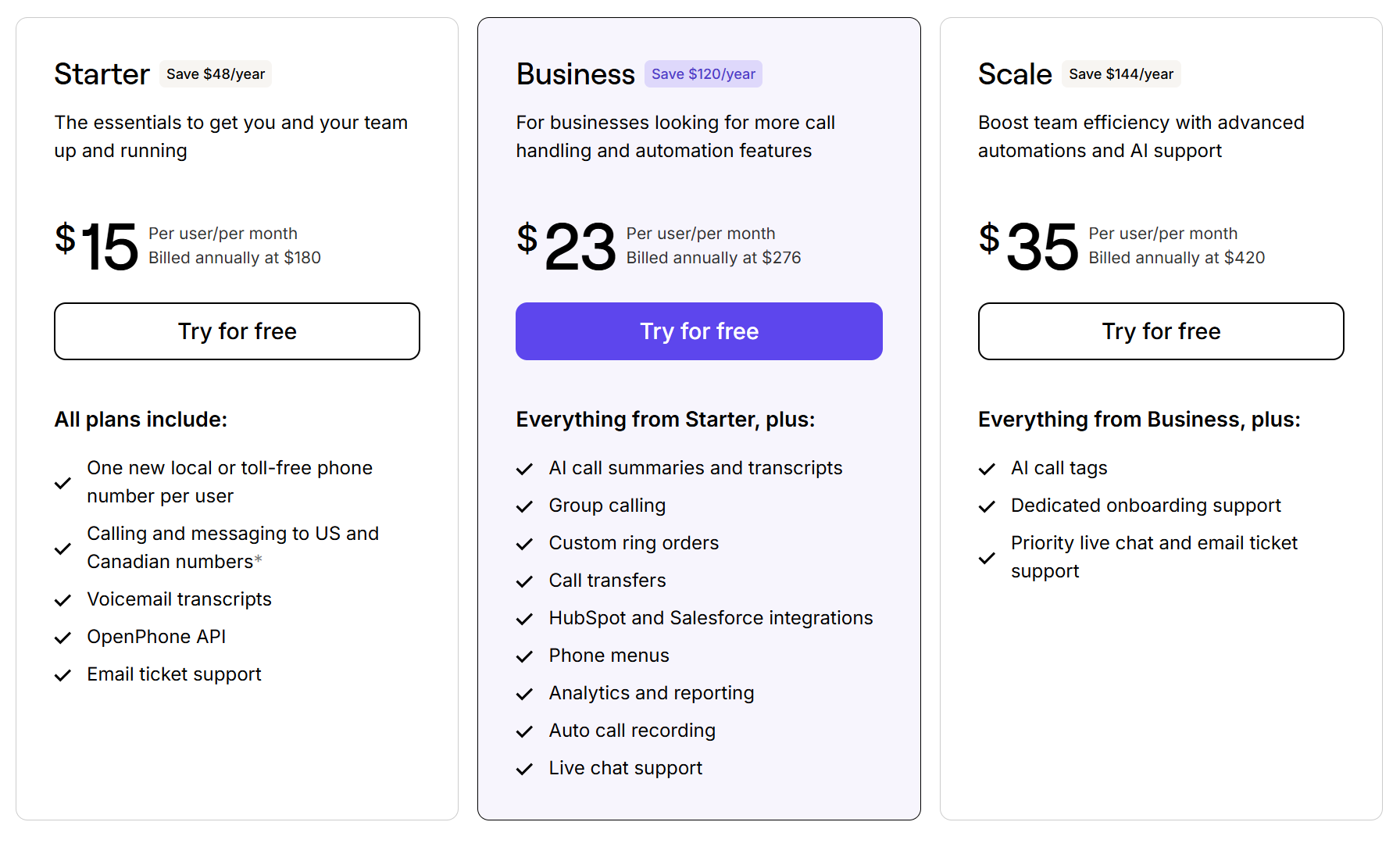
Take a look at what’s included in Quo’s pricing:
- Starter: $15 per user per month for unlimited domestic calling, voicemail transcripts, on-demand call recording, Quo API, business hours, internal threads, and more
- Business: $23 per user per month for phone menus, AI call summaries and transcripts, group calling, custom ring orders, CRM integrations, analytics, automatic call recording, live chat support, and call transfers
- Scale: $35 per user per month for AI call tags, dedicated onboarding support, inbound phone support, and priority live chat and email support
2. CallAnalyzer.AI: Best for teams that use Google Meet

Pros
- Manual upload support for Google Meet video files
- Automated 100% call evaluation and playbook analysis
Cons
- Higher pricing tiers for small teams
- Playbook editing functions require admin seats
- No live-in-call or real-time coaching alerts
CallAnalyzer.AI is a sales call analysis software designed to help small teams analyze calls and coach their reps. It integrates with Google Meet, which is handy for sales teams that use the app to speak with prospects and want to analyze their calls.
Once CallAnalyzer.AI reviews your calls, it generates actionable insights with 95% accuracy. To access this feature, you’ll need to upgrade to the Professional plan that requires at least 100 hours of calls per month.
CallAnalyzer.AI offers pay-as-you-go and monthly plans. The base plan charges $10 per hour of analyzed calls. But this can get expensive if your team is trying to scale.
Key features of CallAnalyzer.AI
- Pre-trained AI models that review calls right away
- Playbook adherence monitoring
- A/B testing for separate sales scripts
- Gamified leaderboard showing individual rep rankings
- 500-hour call capacity, requires the Professional plan
CallAnalyzer.AI pricing

CallAnalyzer.AI lets you pick from three plans:
- Beginner: $10 per hour of analyzed calls for unlimited users, 100 hours of analyzed calls per month, pre-trained AI models, 60+ analysis criteria per playbook, and playbook adherence monitoring
- Professional: $7.50 per hour of analyzed calls for unlimited users, 500 hours of analyzed calls per month, actionable training insights, playbook A/B experimentation, and a gamified leaderboard
- Teams: Custom pricing for unlimited user seats and roles and dedicated customer support
3. Aloware: Best for outbound sales teams

Pros
- Unlimited data storage on the base plan
- Unlimited inbound and outbound calling to the US and Canada
Cons
- User minimums on every plan
- Toll-free calling costs extra
- Power dialer, with an upgrade
Aloware is a cloud-based contact center built for your outbound sales and customer support teams. It gives your team access to a power dialer that automatically calls your CRM contact list. This helps ensure your reps spend less time manually dialing numbers and more time talking to customers.
Its real-time analytics track your talk-to-listen ratio on the base plan. You can see if your reps are actively listening rather than giving a monologue. You also get sentiment analysis tools to check call tone, such as whether it’s positive or negative. This helps you spot recurring problems across conversations and identify coaching opportunities for your reps.
But all of this real-time analytics data comes with unexpected pricing.
Aloware’s base plan has a 10-user minimum, so you’ll spend at least $300 per month just to get started. If your team receives inbound calls from a toll-free number, you’ll also pay $0.06 per minute on that tier.
Key features of Aloware
- AI voice analytics that tracks rep talk time
- Call recording
- AI call transcriptions, with an upgrade
- AI sentiment analysis for spotting call tone, with an upgrade
- AI keyword detection, with an upgrade
Aloware pricing

Aloware offers three plans for sales teams. Here’s what you can expect to get on each:
- iPro + AI: $30 per user per month for a minimum of 10 users, call recording, AI voice analytics, and Zapier integration
- uPro + AI: $60 per user per month for a minimum of five users, AI call transcriptions, AI summaries, AI sentiment analysis, and call coaching
- xPro + AI: $85 per user per month for a minimum of five users, Salesforce integration, AI keyword detection, and AI agent monitoring
4. Gong: Best for forecasting

Pros
- Revenue forecasts based on call and CRM data
- Quo integration
Cons
- Pricing requires a custom quote
- Users report Gong’s interface can feel overwhelming to navigate
- Unscheduled calls may not get recorded
Gong is a revenue intelligence platform built to help sales teams convert customer conversations into revenue. It provides sales call analysis software, such as its AI Call Reviewer that automatically scores calls based on your set criteria. That way, the review process is faster and more consistent.
Quo’s Gong integration syncs your call recordings directly to the platform. This lets you study the questions your top performers ask during calls so you can improve your discovery call template and better qualify leads.

Gong also provides sales forecasting tools. For example, it uses data from Gong and your CRM to forecast whether a deal is likely to close. That way, your team can set realistic revenue and sales targets.
However, Gong doesn’t list its pricing publicly. This makes it harder to compare options because you must contact their sales team for a custom quote.
One Gong user said:
“What’s most helpful about Gong is the visibility it brings to customer conversations. Having calls automatically recorded, transcribed, and analyzed makes it much easier to capture key insights, track follow-ups, and never miss important details. One downside of Gong is that it can feel a bit overwhelming at times.” — G2
Key features of Gong
- AI transcriptions in 30+ languages
- Keyword trackers to identify specific words or phrases in conversations
- AI call scorecards for evaluating rep conversations
- Sales forecasting tools, like deal predictability
Gong pricing
Gong uses custom pricing based on your team size and integration needs. To get an exact quote, you’ll need to reach out to them directly.
5. JustCall: Best for using international phone numbers

Pros
- Local phone numbers in 70+ countries
- Multi-channel tracking across calls, chat, email, and social media apps
Cons
- AI call scoring requires an upgrade
- All plans have a user minimum
- Connection quality can be inconsistent
JustCall is a business communications platform built to handle global sales and support teams
With JustCall, your team can get local phone numbers in over 70 countries to help track regional sales trends. You can also monitor customer conversations across multiple channels. JustCall tracks phone calls, SMS, and social media apps like WhatsApp in one place.
However, JustCall has a few limitations that might cause you to look elsewhere:
- Call scoring. Evaluate conversations against your own predefined criteria, such as whether reps asked the correct qualifying questions. However, this feature requires the Pro Plus plan, which has a two-user minimum and costs at least $178 per month.
- Transcription search. Search call transcripts for phrases like “too expensive,” “need approval,” or “already using another vendor” to spot common objections and see how different reps respond. This feature requires a paid add-on or upgrading to the Pro Plus plan.
Key features of JustCall
- Call tracking and recording
- AI call transcriptions for reviewing sales conversations
- Live call monitoring, with an upgrade
- AI-powered objection handling, with an upgrade
- AI call scoring, with an upgrade
JustCall pricing

Here’s how JustCall’s pricing plans break down:
- Team: $29 per user per month for call tracking and recording, unlimited AI transcription minutes, call analytics, team analytics, and local numbers in 70+ countries with a two-user minimum
- Pro: $49 per user per month for Salesforce integration, advanced analytics and reporting, live call monitoring, and a power dialer with a two-user minimum
- Pro Plus: $89 per user per month for AI call summaries, sentiment analysis, call tags, AI call scoring, AI-powered objection handling, coaching comments, and custom AI scorecards with a two-user minimum
- Business: Custom pricing for unlimited calling and SMS, enterprise-grade SLA, and dedicated phone support with a 10-user minimum
6. Dialpad: Best for contact centers

Pros
- Real-time transcription during live calls
- Call routing
Cons
- AI scorecards, with Dialpad Sell or Dialpad Support
- Additional phone numbers require an upgrade
Dialpad is a business communications platform founded in 2011. It offers three services for different team needs: Dialpad Connect, Dialpad Sell, and Dialpad Support.
Dialpad Connect is a base business phone system with basic sales call analysis tools to help you track and analyze rep conversations. It works across desktops, laptops, smartphones, tablets, and desk phones. This means your sales reps can make calls on the devices they already use, whether they’re in the office or working remotely.
You can also create an omnichannel contact center for your sales department. This lets your team handle web chat, Messenger, email, Instagram, and WhatsApp messages from a single place.

You should know that Dialpad’s AI scorecards require the Dialpad Sell or Support service, plus an extra $20 per user per month for the add-on. As your sales team grows, these additional costs can make it harder to scale.
Keep in mind, even if you decide to pay more to access these features, you may run into unexpected issues. Here’s what one Dialpad user had to say about the service:
“Just one thing I noticed is that sometimes the transcription or summary is not fully exact, so I still need to check things manually.” — G2
Key features of Dialpad
- Call recording and real-time transcription
- Silent monitoring, whisper coaching, and barge-in, requires Dialpad Sell or Dialpad Support
- AI Live Coach for objection handling, requires Dialpad Sell or Dialpad Support
- AI scorecards, requires Dialpad Sell or Dialpad Support
- Voicemail transcription
Dialpad pricing

Dialpad Connect offers three pricing plans for you to pick from. Here are the features included in each:
- Standard: $15 per user per month for call recording, call transcription, call routing, and Google Workspace integration
- Pro: $25 per user per month for Salesforce and HubSpot integrations, additional phone numbers, and hold queues with a three-user minimum
- Enterprise: Custom pricing for user access controls and Okta, Azure, and OneLogin integrations with a 100-user minimum

💡Want a closer look at Dialpad’s pricing? See our complete breakdown of Dialpad Connect, Dialpad Sell, and Dialpad Support pricing plans.
7. Kixie: Best for cold calling

Pros
- Unlimited calls in the US and Canada
- Conversational sales reports for tracking rep performance
Cons
- Users report inconsistent call quality
- Advanced call analysis requires a paid add-on
Kixie is a communications platform designed for high-volume cold calling. It provides a power dialer that lets you automate the dialing process so sales reps can reach more leads in less time. To get more prospects to pick up, Kixie can also offer local presence dialing. This lets you call the same prospect multiple times with different local numbers.
You can track specific keywords during live calls to monitor script adherence. The software detects if a rep uses inappropriate language or makes an unapproved promise. Kixie also gives you analytics dashboards to track metrics like close rates so you can see how many conversations are turning into deals.
Kixie has a few limitations that might be dealbreakers for you. Keyword detection and other call analysis features require the Conversation Intelligence add-on. Pricing for this isn’t listed publicly. You may also notice call quality dropping due to sudden connection issues or static. One user reported:
“Occasionally, the call quality can be inconsistent, which can impact longer conversations.” — G2
Key features of Kixie
- Call recording for reviewing sales conversations
- Live call coaching
- Bi-directional CRM integration
- Power dialer for outbound calling, with an upgrade
- Conversation Intelligence add-on for AI-powered call analysis
Kixie pricing

Kixie offers three different plans for sales teams of different sizes:
- Professional: CRM integration, live sales call coaching, voicemail drop, and unlimited minutes in the US and Canada
- Single-Line PowerDialer: Single-line power dialer and calling session management
- Multi-Line PowerDialer: Power dialer with up to 10 lines and AI human voice detection with an add-on
Pricing for all three plans isn’t listed publicly. Contact Kixie’s sales team directly for a quote.
8. RingCentral: Best for desk phones

Pros
- Automatic CRM sync for transcripts and summaries
- Supports calls, video, and analytics
Cons
- Call recordings are deleted after 90 days
- Can be complex to set up and occasionally lags
- Sentiment analysis requires an add-on
Launched in 1999, RingCentral is a legacy VoIP provider that offers sales call analysis software. The platform also supports desk phones if your team prefers physical office phones over desktop and mobile apps.
To get AI-driven tracking and coaching insights that help you close more deals, you have to pay for an add-on called Conversational Intelligence. It’ll cost you an extra $60 per user per month on top of your existing plan.

Storage is one thing that can quickly become an issue with RingCentral. Its platform deletes call recordings after 90 days, no matter how much you upgrade. This means you have less historical call data to track how sales conversations improve over time.
You also need to look closely at RingCentral SMS limitations if your reps text prospects. For example, on the base plan, you’re capped at 25 messages per user per month. After that, you’ll pay $0.0119 per outgoing message.
Plus, if you want your sales team to collaborate on customer text conversations, you’ll need to pay an additional $25 per user per month for a shared SMS inbox. Otherwise, customer texts can get stuck on one person’s phone, and your team loses visibility into conversations.
Key features of RingCentral
- On-demand call recording
- AI call transcription and summaries
- Automatic call recording, requires a paid plan
- Salesforce and Zendesk integrations, with an upgrade
- Conversation Intelligence, with an add-on
RingCentral pricing

RingCentral offers four plans. Here’s what you can expect to get on each:
- Core: $20 per user per month for on-demand call recording, call transcription, AI call summaries, call log reports, and real-time analytics
- Advanced: $25 per user per month for automatic call recording, CRM integrations with Salesforce and Zendesk, and call monitoring with whisper and barge-in
- Ultra: $35 per user per month for unlimited call recording storage with retention periods, historical and real-time call insights, and device analytics
- Customer Engagement Bundle: Custom pricing for access to everything in Ultra and the Business SMS Booster and Call Queues Booster add-ons
9. Leexi: Best for Microsoft Teams users

Pros
- Mobile app
- Transcription in 100+ languages
Cons
- G2 users report some features aren’t intuitive to use
- Call scoring requires the Enterprise plan
Leexi is an AI notetaking app that also offers sales call analysis features. If your team runs on Microsoft 365, Leexi connects to your Outlook calendar and automatically joins your Microsoft Teams meetings. This eliminates the need for your reps to take notes during calls.
The software also tracks conversation details like speaking time, pauses, and recurring topics. You can use these insights to spot patterns and help your reps improve their sales pitches over time.
Keep in mind that some of Leexi’s best sales analysis features are locked behind the Enterprise plan. Topic analytics and automated keyword alerts both require an upgrade.
Key features of Leexi
- Transcription in 100+ languages
- AI meeting summaries with follow-up tasks
- CRM integration with auto-completion of fields, with an upgrade
- Automatic call scoring, with an upgrade
Leexi pricing

Leexi offers four plans to get your team started:
- Starter: $12 per user per month for transcription in 100+ languages, AI summaries with follow-up tasks, integrations with Google Meet, Teams, and Zoom, and six months of storage
- AI-Meeting: $23 per user per month for task tracking board, Notion and Zapier integrations, and storage for up to two years
- Business: $39 per user per month for CRM integrations and priority customer support
- Enterprise: Custom pricing for topic analytics, automated alerts, and automatic scoring
10. Fireflies.ai: Best for multilingual call analysis

Pros
- Syncs call data to Salesforce and HubSpot
- Tracks sales frameworks like BANT and MEDDIC during calls
Cons
- Advanced call analysis requires an upgrade
- Automated follow-up tasks requires an upgrade
Fireflies.ai is an AI meeting assistant built for global sales teams. It records and transcribes your calls across Zoom, Google Meet, and Microsoft Teams so your reps never have to take manual notes.
The platform transcribes conversations in over 100 languages for multilingual sales calls. You get built-in speaker identification to see who said what during meetings. The tool also logs meeting notes, transcriptions, and action items to the correct contact in your CRM. This frees up your sales reps to focus on building customer relationships rather than admin work.
But Fireflies’ decision to lock its best analysis features behind paid plans might give you pause. To access automated follow-up tasks like “John will send the proposal by Friday,” you’ll need to upgrade. Tracking team performance to enable managers to spot coaching opportunities also requires the same upgrade.
Key features of Fireflies.ai
- Transcription in 100+ languages
- Real-time notes and live transcriptions
- Talk-time analytics
- Conversation intelligence to access actionable insights for your meetings, with an upgrade
- Team analytics for monitoring rep performance, with an upgrade
Fireflies.ai pricing

Fireflies.ai offers one free plan and four paid plans:
- Free: $0 for unlimited transcription, unlimited AI summaries, 400 minutes of storage, transcription in 100+ languages, and real-time notetaking
- Pro: $10 per seat per month for 8,000 minutes of storage, talk-time analytics, download call summaries and transcripts, and unlimited integrations
- Business: $19 per seat per month for unlimited storage, multi-language mode, and team analytics for admins
- Enterprise: $39 per seat per month for HIPAA compliance, custom data retention, and a dedicated account manager
What to look for in sales call analysis software
The list below highlights features that can help you manage different parts of the sales call analysis process, making it easier to compare options when shopping around:
- Automatic call recordings that help managers review sales calls. Look for a tool that automatically records every call. This lets you listen to entire conversations and understand the moment a sales call went sideways. Did the rep talk too much? Skip next steps before hanging up? Having access to a call recording will provide the answers you need.
- AI transcripts that make sales calls easier to review. Don’t have time to sit through an entire recording? AI transcripts convert the audio into text so you can quickly search through the conversation.
- Full conversation histories that give teams more context. Checking on a deal shouldn’t mean hunting for information across different apps. Make sure the software you choose pulls every recording, transcript, call, and text into one contact thread.
- Group calls that help managers analyze live sales calls. You can use call monitoring software to join calls with your microphone muted to see how sales reps handle objections in real time.
- Claude integration that provides a deeper analysis. Most sales leaders only get to review a small fraction of their team’s calls each week. A Claude integration lets you search across all of your transcripts at once.
- CRM integrations that keep sales conversations organized across tools. Manually logging data after every call eats into your reps’ time. Look for a platform that syncs calls, texts, voicemails, and AI-generated summaries into your CRM such as Salesforce or HubSpot.
Get started analyzing your sales phone calls
Every tool on this list gives you a different way to review what happens on your team’s sales calls. Some focus on forecasting, while others are built to support traditional offices. But if you’re a growing business that needs access to features that help you scale, Quo is the best option.
It gives you call recordings and AI transcripts, makes it easy to identify call drivers with AI call tags, and more, all in one platform. Your managers will also be able to use call listening tools to coach reps in real time..
You’ll get access to unlimited calls and texts in the US and Canada. Plus, every user you add to your account gets one local US, Canadian, or North American toll-free number. Quo also provides more sales AI features that help your team review conversations faster, such as AI call summaries.
Start your seven-day free trial and see how Quo gives your team better visibility into every sales conversation.
FAQs
Sales call analysis software uses call intelligence to record, transcribe, and analyze your team’s conversations. This gives your team access to the information they need to coach more reps at once, spot deals at risk, and discover what your best reps do to close more sales.
Using sales call analysis software shows you what happens during customer interactions. Here are the advantages:
– Faster sales coaching without reviewing every call. AI transcripts let you quickly review conversations without listening to entire recordings.
– Better visibility into why reps aren’t closing deals. Easily identify pricing objections and customer complaints with voice call sentiment analysis tools. Having these insights helps you see why deals fall through and makes it easier to coach your sales reps.
– More consistent sales conversations across reps. Create a shared library of your top sales calls that your team can access. That way, new hires can listen to real examples and learn how to position your company’s offer effectively on sales calls.
– Better insight into rep performance over time. A central dashboard tracks metrics like volume of calls and call duration to help you spot performance trends. You can see which reps are improving as your team grows and focus your coaching where it counts.
No, you don’t need special hardware to use sales call analysis software. Although some legacy providers support desk phones, Quo is a modern cloud-based phone system. You can analyze sales calls right away using the desktop, mobile, and web apps on the devices your team already owns.
Quo uses AI call tags to track customer sentiment and understand prospects’ emotions and attitudes during conversations. Your sales teams can use these insights to see which interactions trigger positive reactions and which ones make a buyer lose interest.
Sales call analysis software like Quo offers direct integrations with CRMs like Salesforce and HubSpote. It syncs calls, texts, voicemails, and call summaries to the correct contact. That way, your sales team has a single source of truth.