Looking to switch from Dialpad? Maybe you’re considering a new business phone system and want to explore your options. Or maybe you’ve used Dialpad and decided it’s not all it’s cracked up to be.
We reviewed eight of the most popular Dialpad alternatives so you don’t have to.. We looked at features, pros and cons, and real user feedback to help you compare options quickly. Plus, we pulled insights from places like Reddit and G2 and included tools for different needs — from solo operators to growing teams.
Here’s what we found:
- The best Dialpad alternative for small and fast-growing businesses is Quo, formerly OpenPhone. It’s the platform that’s easiest to use, has advanced messaging features, and is built for team collaboration. Don’t just take our word for it — Quo is a Top 100 highest satisfaction platform on G2.
- The best Dialpad alternative for managing omnichannel customer communications is Nextiva. You can connect your social media accounts and messaging channels like WhatsApp to your Nextiva workspace.
- The best Dialpad alternative for teams in a physical office setup is RingCentral. It offers desk phone rentals along with its business phone plans.
- The best Dialpad alternative for solo business operators is Google Voice or Grasshopper. They’re both solid options if you need a second phone number and don’t have to share it with a team.
Read on to see our comparison of the best eight Dialpad alternatives. Find out why Quo is the best option for fast-growing small businesses.
Why do businesses move on to Dialpad alternatives?
Dialpad works for some, but many businesses outgrow it or run into limitations that force a change. Here are some of those limitations.
1. Unreliable service
Your business phone system has one core job: to connect you with your customers. Dialpad often fails at this basic requirement. Many Dialpad customers complain that it frequently crashes and service is spotty.


2. Difficult to set up and navigate

With Dialpad, you might assume a feature would work by default. But you likely have to enable it first. For example:
- Only company admins can add a phone menu to a phone number.
- Team members can hide their caller ID and appear as unknown by default.
- To answer forwarded calls, you have to enable a forwarding prompt. This prevents incoming voice messages from going to the default voicemail app on your phone.
“[It] requires quite a bit of a learning curve for the Admin to take in to become fully proficient with everything. It also takes some time to work with and train the users … One of the key user preferences to receive notifications appears to be hidden deep in the app’s UI. That made it difficult to diagnose an issue that one of our users was having.” — G2
Even users that like using Dialpad acknowledge that they have a difficult time navigating the platform:

Small businesses already face dozens of challenges as they grow. Using your phone system shouldn’t have to be one of them.
3. Dialpad pricing can get expensive quickly

Dialpad has user minimums on its higher tiers. This means you may end up paying for seats you don’t actually need. Several basic features are also locked behind more expensive plans. For example:
- The ability to buy additional numbers
- Add more than three ring groups
- Use any integrations beyond Google Workspace
On top of that, some features, like meeting transcripts, are add-ons with no easy way to find out how much they cost. This can make it harder to budget accurately.
Let’s break down Dialpad’s pricing:
- Standard: $15 per user per month for unlimited calls to the US and Canada, voicemail transcriptions, and one local number per account
- Pro: $25 per user per month with a three-user minimum for up to 25 ring groups, the ability to purchase additional numbers, international SMS, and integrations with Zapier, HubSpot, Slack, Salesforce, and Zendesk
- Enterprise: Must contact for pricing, has a 100-user minimum, extensions, unlimited ring groups, and integrations with Azure, Okta, and OneLogin
“[Dialpad has] lots of configuration options on how to set up your lines, but it’s pretty complex and expensive for a small business.” — G2
Want to learn more about where Dialpad falls short? Check out our article on Dialpad pros and cons.
How we picked the best Dialpad competitors
To build this list, we compared each provider’s real-world performance, user feedback, and overall value. Here are the criteria we used:
- Features: We looked for essentials like calling, texting, IVR, call routing, and AI tools. We also checked for team features like shared numbers and integrations.
- Ease of use: How simple it is to set up, switch numbers over, train a team, and use the app day-to-day.
- Security and compliance: Encryption, data protection, and whether the provider follows industry standards.
- Call quality and reliability: Real user experiences helped us test dropped calls, latency, and the app’s reliability.
- User feedback: We checked hundreds of reviews from Reddit, G2, and other communities. The goal was to see the issues that came up repeatedly and where each provider excels.
- Scalability: How easily the system lets you add new features, users, and numbers to accommodate growth.
- Customer support: How quickly users get help and the quality of troubleshooting.
- Pricing and total value: We compared plan tiers, per-user pricing, add-on fees, and what you actually get for the cost.
8 best Dialpad providers you should consider
Want a business phone system that offers reliable service, easy navigation, and is cost-effective? Consider a Dialpad alternative.
Here’s a high-level comparison of our shortlisted alternatives, followed by a deep dive into each option:
8 Best Dialpad alternatives compared
| Provider | Starting price | Unlimited calling to US & Canada | SMS/MMS to US & Canada | Shared phone numbers | Additional phone numbers |
|---|---|---|---|---|---|
| Dialpad | $15 per user per month | ✓ | For US and Canadian customers only | ✓ | Requires upgrade |
| Quo | $15 per user per month | ✓ | ✓ | ✓ | $5 per number per month |
| Grasshopper | $14 per month | ✓ | MMS messaging for local numbers only | ✅ | $9 per number per month |
| Vonage | $13.99 per user per month, might require a one-year contract | ✓ | Local US and Canadian numbers only | ✓ | Starts at $4.99 per local number per month; toll-free numbers start at $39.99 per month |
| RingCentral | $20 per user per month | Limited toll-free minutes | 25 messages per user per month | Calls only, texting requires add-on | $4.99 per number per month |
| Nextiva | $15 per user per month | ✓ | 100 texts per user per month | Calls only, texting requires upgrade | Toll-free number requires a plan upgrade |
| Google Voice | $10 per user per month | ✓ | US customers only | Requires upgrade, ring groups only | X |
| Zoom Phone | $10 per user per month | Requires upgrade | ✅ | Requires add-on | $5 per number per month |
| Aircall | $30 per user per month, three-user minimum | ✓ | ✓ | ✓ | $6 per number per month |
1. Quo: Best for fast-growing small businesses

Pros
- Free calling, SMS, and MMS messages in the US and Canada
- International calls and texts at affordable rates
- Shared inboxes and internal threads
- Voicemail transcriptions
- On-demand and automatic call recording
- AI-powered features — call summaries, transcripts, and an AI agent
Cons
- No verification through two-factor authentication*
*Nearly all virtual phone numbers share this problem. For safety reasons, companies like Facebook, Uber, and Google rarely let you authenticate accounts through a virtual phone number.
Quo is a modern VoIP phone system built for small teams and growing businesses. We help you close more sales, support customers, and grow your business.
With shared phone numbers, you can assign multiple team members to the same number and share responsibility for calls and texts. Once you sign up, every team member gets one free US, Canadian, or toll-free number. But don’t feel limited to one number per user. No matter what plan you have, you can add additional numbers for $5 per number per month at any time.
You can also leave internal notes for your teammates for seamless real-time communication. Anyone with access to your shared number can make and receive calls or texts — no extensions or call routing needed.

Compared to Dialpad, Quo makes texting far more convenient. You won’t have to upgrade to a higher tier just for the option to buy more numbers or text with an international number. Your team can even save time texting with scheduled messages and templated texts, or snippets.
You can set up SMS auto-replies when your team is busy, so customers always receive a response when they call.
Another reason to use Quo vs Dialpad: call quality metrics. Instead of struggling with Dialpad’s call quality, you can see exactly how your calls are handled in Quo.

You can also tap into AI features like:
- Summaries and transcripts. Summarize the highlights of recent calls. These can help your team get context for a conversation and collaborate more easily, even if they didn’t take the call.
- Call tags. Automatically label your calls based on the criteria that are important to you. This helps you identify ongoing trends and gain insights into your customer behavior.
- Sona, Quo’s AI agent. Sona answers calls 24/7, handles common questions, and captures key details. It’s like having an always-on virtual receptionist — so you can focus on growing your business.
If you’re tired of phone systems that are more trouble than they’re worth, Quo helps take the hassle out of communication. Then you’re free to focus on what really matters — your customers.
See for yourself. Try out Quo for free for seven days. If our platform is a good fit, you can port over any existing local US, Canadian, or North American toll-free number from Dialpad and continue using it in Quo.
Key features of Quo
- Free calls and texts in the US and Canada
- Text from your computer, smartphone, or tablet
- HIPAA compliance with a Business Associate Agreement, available for Business and Scale plan users
- Affordable international calls
- Shared phone numbers
- Call recording
- Voicemail transcriptions
- Auto-attendant with IVR
- Integrations with business apps like Jobber, Zapier, and HubSpot CRM; connect other tools through Make and the Quo API
Quo pricing

Quo offers three pricing plans:
- Starter: $15 per user per month for unlimited calls and texts, shared numbers, Zapier integration, and more
- Business: $23 per user per month to access phone menus with IVR, call transfers, analytics, CRM integrations, and more
- Scale: $35 per user per month for AI call tags, dedicated onboarding, inbound phone support, and priority chat and email support
2. Grasshopper: Best choice for multi-digit extensions

Pros
- Unlimited calling to the US and Canada
- Local and toll-free phone numbers are available
- Mobile and desktop apps are available
Cons
- Only one number per account unless you upgrade to the most expensive plan
- Limited productivity features
- Call recording requires an upgrade
- No third-party integrations besides Google Voice
If you’re looking for a platform that supports solopreneurs, Grasshopper may be a solid option. You won’t have to pay for additional users once you upgrade to the Solo Plus plan, which costs $25 per month. You also get unlimited calling and texting on all plans.
The caveat: Grasshopper lags behind other business phone options as a team collaboration platform. For example, it doesn’t offer shared phone numbers, call transcripts, or integrations aside from Google Voice. If you want to share your business phone with your team, you’ll have to look elsewhere.
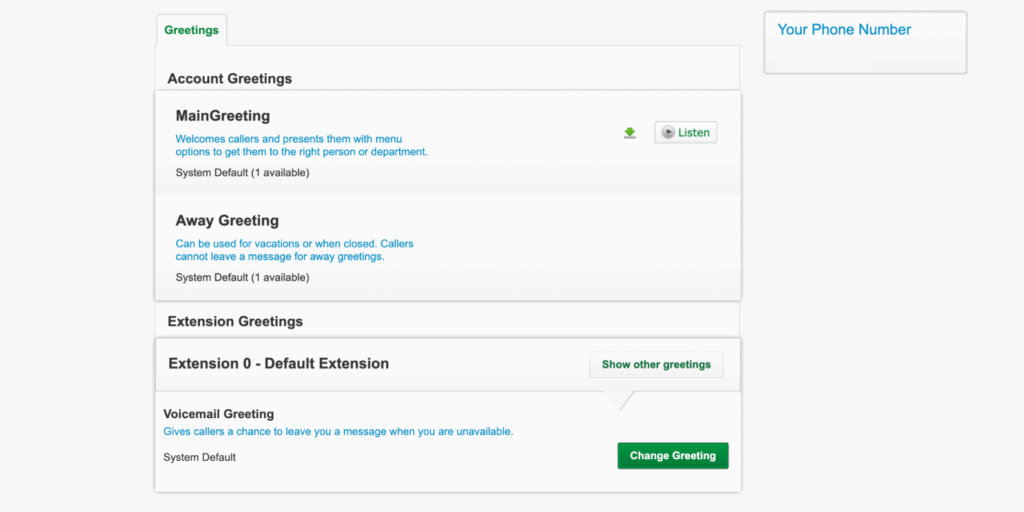
Want to dive deeper into what sets Dialpad and Grasshopper apart? Check out our guide on Dialpad vs Grasshopper.
Key features of Grasshopper
- Voicemail transcriptions
- Call forwarding
- Virtual fax
- Call blasting with an upgrade
- Auto-replies, only to first-time callers
- Local and toll-free numbers, with additional numbers for $9 per month each
- Phone number extensions, with additional extensions for $3 per month each, and require an upgrade
- Call transfers with an upgrade
Grasshopper pricing

Grasshopper offers three plans — True Solo, Solo Plus, and Small Business. Here’s how much each plan costs:
- True Solo: $14 per month for one user, one phone number, and one extension
- Solo Plus: $25 per month for unlimited users, call recordings, one phone number, and three extensions
- Small Business: $55 per month for unlimited users, four phone numbers, and unlimited extensions
3. Vonage: Best for video conferencing

Pros
- Unified communications on every plan
- Unlimited phone calls in the US, Canada, Puerto Rico and Mexico
- Offers APIs to automate texting
Cons
- A lot of hidden fees
- Critical business features like call recording and toll-free numbers are add-ons
- Limited SMS and MMS
Vonage offers voice, video, and messaging on mobile and desktop apps. If you need to build custom workflows, like automating reminder texts, its APIs give you that flexibility. While its starter features aren’t super robust, it does offer virtual receptionists on the basic plan.
That said, Vonage’s pricing structure is confusing, with add-ons for features like call recordings. The prices for these add-ons aren’t clearly advertised, so you’ll have to reach out to sales. Some CRM integrations also have undisclosed monthly fees in addition to the base subscription.
These fees add up:
“I was drawn to Vonage because they advertise that prices start at $13.99 for a single line… But when I called to get set up, I was told that with taxes and fees, the monthly total would be between $26 and $30 — more than double the advertised rate. I understand that taxes and fees exist, but this level of markup feels deceptive.” — Trustpilot
Key features of Vonage
- Unlimited domestic calling
- SMS support
- Texting API
- Video meetings with an upgrade
- On-demand call recording with an upgrade
- Desk phone support with an upgrade
- Team messaging with an upgrade
Vonage pricing

Vonage offers three pricing plans based on the number of users you have. Here’s how much you’ll pay if you have a team of four or fewer users:
- Mobile: $13.99 per number per month for unlimited domestic calling, SMS and MMS, voicemail, virtual receptionists, and desktop and mobile apps
- Premium: $20.99 per number per month to access team messaging, video meetings, desk phone support, CRM integrations, and single sign-on
- Advanced: $27.99 per number per month to access on-demand call recording, visual voicemail with transcriptions, and simultaneous ring
4. RingCentral: Best for desk phone rentals

Pros
- Voice, video, and text message capabilities
- Desk phone support
- Integrates with third-party apps
Cons
- Limited text messages
- Limited toll-free minutes
- Storage limits, even with an upgrade
RingCentral is a legacy call center software platform that offers video meetings, calls, and limited texting. It also lets you rent desk phones for your office, which is great if you manage team members who work at physical desks.
Unlike Dialpad, you can get additional phone numbers for $4.99 on any plan. That said, RingCentral comes with several significant drawbacks:
- Texting features are basic. There’s no way to schedule text messages unless you use RingCentral’s add-on bulk texting features or a third-party app.
- The base plan comes with just 100 toll-free minutes shared among every member of your team.
- You only get 25 text messages per user per month on the basic plan. Upgrading to the most expensive plan caps you at just 200 messages per user per month, which might not be enough as you grow.
- Call recordings are deleted after 90 days unless you upgrade to a more expensive plan. Even then, it doesn’t eliminate size-based deletion policies. You can only store 200 manual call recordings per voicemail box per user and 10,000 automatic call recordings per account.
Want to know more about the differences between Dialpad and RingCentral? Check out our Dialpad vs RingCentral guide.
Key features of RingCentral
- Unlimited calling in the US and Canada
- Video calls
- Android and iOS mobile apps
- Voicemail transcriptions
- Team messaging
- Call recordings
- IVR
- AI call summaries and transcripts
- AI receptionist as an add-on
RingCentral pricing

You can choose from three business phone RingCentral pricing tiers:
- Core: $20 per user per month for unlimited calls in the US and Canada, 25 text messages, on-demand call recording, and up to 100 video meeting participants
- Advanced: $25 per user per month for 100 text messages, automatic call recording, and advanced call monitoring functions like call whispering and call barging
- Ultra: $35 per user per month for 200 text messages, device analytics and alerts, and “unlimited” storage with time-based limits
5. Nextiva: Best alternative for omnichannel communication

Pros
- Inbound and outbound calls in the US and Canada
- Social media and WhatsApp connections are available
Cons
- SMS and MMS have a capped message limit
- Shared SMS inboxes require an upgrade
- Limited toll-free minutes
- Call recording requires an upgrade
- Most integrations require an add-on fee
Nextiva is a customer experience platform for enterprises. But they also have a simple offering for small and mid-sized teams. You can use Nextiva for calls and texts inside the US and Canada. You also get video calling on the base plan.

Nextiva sets itself apart by offering omnichannel customer communications. You can connect channels like WhatsApp, Facebook, and Instagram. You can manage all your customer communications in one place.
That said, Nextiva’s business phone features are lackluster without upgrades:
- The basic plan only offers 100 SMS messages per user per month.
- Shared SMS inboxes are only available in higher-tier plans.
- You have to upgrade to the mid-tier plan for video and voice call recordings.
- Nextiva doesn’t offer any CRM integrations in its plans. You have to pay for add-ons to connect your Nextiva workspace with your CRM.
Key features of Nextiva
- Free unlimited video calls and voice calls in the US and Canada
- Limited texting
- Virtual fax
- Smart call routing with an upgrade
- Team chat
- Microsoft Teams integration with an add-on or upgrade
- Integrations with email, social media, web forms, and other business apps
Nextiva pricing

There are three tiers of Nextiva pricing:
- Core: $15 per user per month for voice calls, 100 text messages, team chat, voicemail transcriptions, and access to the mobile app
- Engage: $25 per user per month for the Microsoft Teams integration, 500 text messages, digital fax, voice analytics, 2,000 toll-free minutes, and call recording
- Power Suite: $75 per user per month for up to 100 agents for skills-based routing, IVR, call transcriptions and summaries, and API integrations
6. Google Voice: Best for Google Workspace users on a budget

Pros
- Unlimited calls in the US and Canada
Cons
- No shared phone numbers
- No toll-free numbers
- No third-party integrations outside the Google ecosystem
Google Voice is a popular virtual phone number provider for businesses that already use Google. It offers unlimited calls to US numbers and unlimited US texting. You also get voicemail transcriptions and integrations with Google apps like Google Docs, Calendar, and Meet .
But when we tested Google Voice, we noticed that managing communications was quite time-consuming. That’s because calls, texts, and voice messages are in separate folders.

Google Voice also lacks advanced texting features like:
- Auto-replies
- Scheduled texting
- Automated text workflows
It isn’t designed for team collaboration, forcing your team to work in silos and juggle multiple apps. And it doesn’t have third-party integrations, which silos your call and text data further and limits your team’s productivity.
Evaluate Google Voice further with our Dialpad vs Google Voice guide.
Key features of Google Voice
- Call routing
- Custom greetings
- Voicemail transcription
- Integration with Google Workspace
- Multi-level auto attendants and ring groups
Google Voice pricing

Google Voice for personal use is free, but it’s not intended for business purposes. Google Voice for Business offers four plans:
- Starter with Voice only: $10 per user per month for one user for unlimited calling in the US, unlimited domestic texting, voicemail transcription, three-way calling, call transfers, and call recording
- Starter: $10 per user per month for voicemail transcripts, unlimited text messaging in the US, and calls to the US from any Google Voice number
- Standard: $20 per user per month to unlock on-demand call recordings, ring groups, and phone menus
- Premier: $30 per user per month to unlock automatic call recordings and advanced reporting
Apart from the Starter with Voice only plan, every other Google Voice plan requires a subscription to Google Workspace. This adds an additional $7 per user per month to every plan.
7. Zoom Phone: Best choice for existing Zoom users

Pros
- Integration with Zoom Meetings
- Supports call queues, call routing, and CRM integrations
Cons
- Limit of four calls on a shared number at once
- Confusing pricing plans
- Pay per minute for outbound calls unless you upgrade
Zoom Phone is a virtual phone system built separately from Zoom’s video conferencing tool. You can choose from three standalone Zoom Phone plans or two bundles that combine Zoom Phone with Zoom Workplace at a discounted rate.
Zoom Phone also only lets up to 10 team members share a phone number on a single plan, and shared numbers can only handle up to four calls at a time. That can be a deal-breaker for many companies growing a customer base.
Additionally, the base plan only includes metered outbound calling. This means you’ll pay per minute unless you upgrade.
Key features of Zoom Phone
- Shared numbers for texting require a paid add-on
- CRM integrations
- Advanced analytics, available with an add-on
- Desk phone compatibility
Zoom Phone pricing

Zoom Phone’s pricing includes three plans:
- Metered: $10 per user per month for metered outbound calling, toll-free numbers, auto-attendants, SMS and MMS, and voicemail transcriptions
- Regional unlimited: $15 per user per month for everything in Metered, plus unlimited outbound calling
- Global Select: $20 per user per month for everything in Regional Unlimited, plus local and toll-free telephony services across 49+ countries
You can also bundle Zoom Phone with Zoom Workplace at a discounted rate:
- Pro Plus: $18.33 per user per month for Zoom Phone US & Canada unlimited, video meetings for up to 100 participants, Zoom Docs, and the AI companion
- Business Plus: $22.49 per user per month for everything in Pro Plus, 15GB cloud storage, hybrid integration with legacy PBXs, 24/7 live chat and phone support, real-time reporting and quality dashboards, and bring your own carrier support
8. Aircall: Best for teams needing a power dialer

Pros
- International numbers in 100+ countries
- Unlimited calls to the US and Canada
- On-call AI coaching with an add-on
Cons
- No unlimited SMS and MMS
- User minimums on every plan
- Costly add-ons for analytics and AI features
Aircall is an international business phone system that offers local numbers in over 100 countries. You can use ring groups and advanced call routing to better distribute calls to your global team. Then, tap into the power dialer to speed up cold calling for your sales team.
That said, Aircall is more expensive than the other systems on this list. The basic plan costs $30 per user per month and has a three-user minimum. So really, it costs at least $90 per month.
You also don’t get free or unlimited texting and outbound calls with Aircall. You have to reach out to sales for the rates.
For enterprise businesses with a larger budget, Aircall may have a lot to offer. But the high monthly prices and user minimums could be an expensive turn-off for small businesses and growing teams.
Key features of Aircall
- IVR
- Limited conditional call routing
- Queue callback with an upgrade
- Call queuing
- Call routing
- Shared call inbox
- Call recording
Aircall pricing

Here’s how the Aircall pricing plans break down:
- Essentials: $30 per user per month with a three-user minimum for local, toll-free, or international numbers, IVR, call recording, and click-to-call
- Professional: $50 per user per month with a three-user minimum for the Power Dialer, mandatory call tagging, and the Salesforce integration
- Custom: Personalized quote with a 25-user minimum for custom onboarding, API developer support, and unlimited calls worldwide
How do you pick the right Dialpad alternative?
With so many Dialpad alternatives to choose from, it can feel challenging to determine which one is right for you. Here’s how you can pick the right Dialpad alternative:
1. Understand where Dialpad is falling short for you
Ask your team where Dialpad falls short for them. Collect a list of drawbacks to evaluate alternatives against. You should do this so you have concrete data for how Dialpad is slowing your team down.
2. Evaluate providers against a tailored selection checklist
Once you understand where Dialpad falls short for your team, you can evaluate alternatives to find the right replacement.
Use the following checklist to evaluate the right Dialpad alternative:
- Shared numbers: Can multiple people on your team answer calls and texts from the same business number? Can you see who on your team has already responded to a message? Without those, “shared” doesn’t mean much.
- Pricing: Calculate the monthly price for your team. Identify which tier you want to sign up for, multiply by your team size, and add any texting or add-on fees.
- AI capabilities: What happens to a call at 7 p.m. on a Tuesday when no one’s available? Some platforms transcribe voicemails. Others have an AI agent that picks up, captures the caller’s info, and texts you a summary. Know which type of AI service you need.
- Key integrations: List the 2–3 integrations that matter to your team. For example, CRM integrations let you share your calls and texts with the right CRM records.
- G2 score: Filter reviews by your team size. Enterprise reviews won’t reflect your experience. Pay more attention to ‘Ease of Use’ and ‘Quality of Support’ than the overall score. Skim the 2- and 3-star reviews to find recurring complaints.
- Compliance: If you’re in healthcare, legal, or finance, confirm the platform meets requirements like HIPAA and SOC 2. If you’re not in a regulated industry, basic data encryption is usually enough.
- Free trial length: Make sure the trial is long enough to actually test with your team on real calls and texts.
- Biggest trade-off: Every platform has one. Identify it upfront so you’re choosing with eyes open, not discovering it three months in.
Comparison Template
Use this template to compare your top 2–3 options side by side. Here’s a Google Doc version you can copy for your own evaluation.
| Criteria | Option A | Option B | Option C |
|---|---|---|---|
| Starting price per month | |||
| Shared numbers | |||
| AI capabilities | |||
| Key integrations | |||
| G2 score | |||
| Compliance | |||
| Free trial length | |||
| Biggest trade-off | |||
Try out the best alternative to Dialpad for free
If your business handles a large volume of calls — and you want call center software — Dialpad has potential. Otherwise, Dialpad’s focus on enterprise-grade call centers may leave you feeling left out.
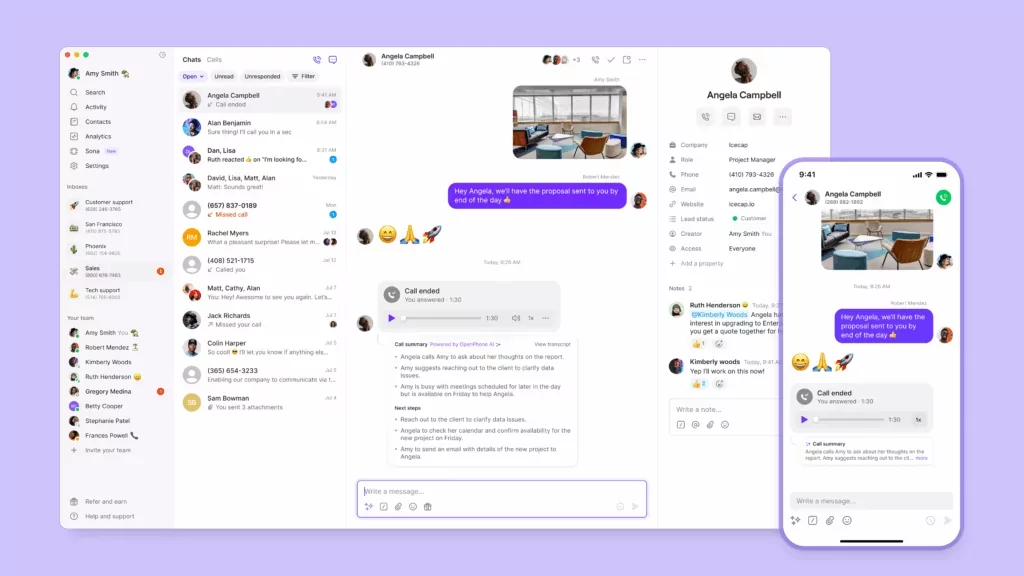
Quo gets business phones right. You get essential features, automations, and shared phone numbers without add-ons or hours spent on setup. Our platform is built for collaboration, with shared numbers and inboxes to split responsibility for calls and texts. Plus, there are no user minimums to drive up costs.
Ready to use an intuitive business phone system? Start your free Quo trial today to experience the top alternative to Dialpad.
FAQs
Dialpad comes with a steep learning curve. Other disadvantages include:
• Texting limits: 250 outbound messages per user per month in the US.
• No advanced texting features: Limited SMS auto-replies and no scheduled messages or texting snippets.
• Limited numbers in the base plan: Dialpad doesn’t let you access multiple numbers and text to international numbers in its base plan.
• User minimums can drive up costs: Dialpad’s Pro plan requires a minimum of three users, and its Enterprise plan requires a minimum of 100 users.
Quo is the best Dialpad alternative for small and growing business owners. We offer complete scalability in our features, plans, and prices so you can pick the tier that’s right for you. Then, only upgrade when you’re ready. You can get started today with a seven-day free trial.
Yes, several Dialpad alternatives offer an integration with Microsoft Teams. For example, Nextiva offers a native integration on the Engage plan, which costs $25 per user per month.
You can also use tools like Zapier to automate workflows between Teams and your business phone. For example, you can set up a Zap in Quo that automatically sends a message in Teams whenever you get an incoming call. You can also directly integrate with Teams with the Quo API for more control over the data you share with your Teams workspace.
More cost-effective alternatives to Dialpad include Grasshopper and Zoom Phone’s metered plan. But these solutions aren’t made for growing businesses.
Quo is the #1 business phone system as rated on G2 by thousands of startups and growing businesses. Although it costs the same as Dialpad, you don’t have to worry about upgrading before you’re ready. We offer:
– Auto-replies
– International SMS
– Softphone, or phone app
– Web, mobile, and desktop apps, including iOS and Android
– Access to additional phone numbers on every plan
Dialpad offers free video meetings that can last up to 45 minutes with up to 10 participants, along with unlimited audio recording. But this free option doesn’t include a business number or features for managing calls and texts.
You can set up a VoIP phone at home by signing up with a VoIP provider, choosing a number, and installing their app on your computer or phone. Then plug the phone into your router with an Ethernet cable and enter the login details from your VoIP provider.
Beyond its listed pricing, Dialpad has several hidden fees to watch out for:
• Number porting fees: Dialpad charges to port international numbers, like $58 per number for Peru.
• Administrative cost recovery fee: A yearly per-user fee for compliance and reporting — some customers report paying more than $47 per year.
• SMS overage charges: Each user gets 250 messages per month. Beyond that, you’ll pay $0.008 per SMS and $0.024 per MMS.
• Per-minute call pricing: Support and Sell plan users pay $0.01 per min for inbound calls and $0.02 per min for outbound calls.
• Global Unlimited Calling add-on: Covers 65+ countries with 1,500 minutes per month per office, but pricing isn’t public, unused minutes don’t roll over, and overages are billed via calling credits.
Dialpad offers HIPAA compliance with a signed Business Associate Agreement. This is similar to how Quo offers HIPAA compliance to Business plan users as well.
To migrate out of Dialpad, you’ll need company and office admin access. Here’s what to do:
1. Generate a port-out PIN at dialpad.com/portout.
2. Collect your account number. This is a 10–16 digit number. Contact Dialpad support to confirm the correct format.
3. Verify your billing address matches Dialpad’s records exactly.
4. Download a recent bill as a PDF or screenshot for verification.
5. Submit a port request through your new provider with the info above.
Keep your Dialpad account active until the port completes. The process typically takes 1–2 weeks if all details match. If anything is off, especially the billing address or account number, expect delays.