Have you ever been at dinner when a call comes through? You want to answer it, but you also want to be present with your family after working hours.
It’s a common dilemma for small business owners. They often juggle personal and work calls on the same number. This makes it harder to set boundaries and answer customer calls with the right greeting.
The solution: get a second phone number. But you might be wondering: is it legal to call your customers with a different number?
How to call from a different number with a VoIP provider
You can get a second phone number for your business with Quo in three simple steps. Here’s how:
- Sign up for a Quo account. When you sign up, you can try Quo free for seven days.
- Choose your new phone number. Select your city or area code in the US or Canada to pick your phone number, or choose a North American toll-free number.
- Verify your account. Confirm your account with an existing cell phone number and a credit card.
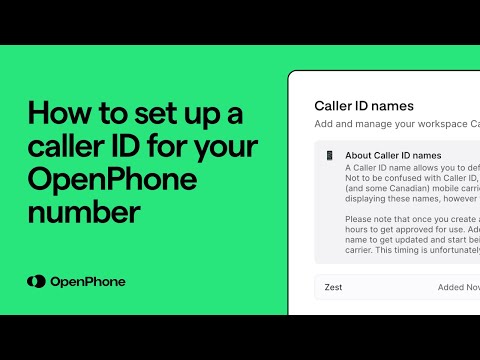
- Customize your outbound caller ID. Go to your phone number settings in Quo and add a caller ID name.
Want to sign up with another VoIP provider? The process is similar. Keep in mind that Quo lets you start texting from a virtual number in 1 to 3 days. Other providers can take weeks and sometimes months to approve your virtual number for business texting.
Get a second phone number in minutes

How to call from a different number with a second SIM
Dual-SIM phones allow you to use two phone numbers by holding two different SIM cards. This option is good for keeping work and personal calls separate on the same device. However, if your cell phone doesn’t support the use of two SIM cards, you’ll need to swap them whenever you want to use your second number. This can be inconvenient, especially when managing calls on the go.
Alternatively, you can use an eSIM, which lets you add a business line to your cell phone without a physical SIM card. All you need is a phone like the iPhone XS or newer, along with a carrier that supports eSIM Carrier Activation. Most Android phones sold in the past few years come with a dual SIM slot. Android manufacturers have also made it easy to add eSIMs.
The drawback with dual SIM and eSIM second numbers? You can’t share them with a team. They also lack business-friendly features like CRM integrations, automated texting, or AI-powered automations. They operate just like your personal number, which isn’t ideal for business teams that want to scale quickly.
Virtual numbers vs a second SIM: Which is better?
Don’t know whether to go with a virtual phone number or an eSIM for your second phone number? Here’s a quick comparison table to help you decide:
| Feature | Virtual phone apps | eSIM |
|---|---|---|
| Setup time | Five minutes | Can take hours if you need an eSIM-compatible device |
| Cost | $15–$50 per month for unlimited calls and texts | $25–$50+ per month for unlimited calls, texts, and data |
| Share calls and texts with a team | ✅ | ❌ |
| Works on multiple devices simultaneously | ✅ | ❌, limited to a single device at a time |
| Automatic call recording | ✅ | ❌ |
| AI call summaries and transcriptions | ✅ | ❌, requires a separate app |
If your primary goal for a second phone number is verification, an eSIM is a more reliable choice. Banks, rideshare apps, and some social platforms check whether a phone number is registered to a mobile carrier as a fraud prevention measure. Virtual numbers are easy to acquire and are more vulnerable to scammers.
The top 4 virtual phone number apps
To help you decide which provider fits your needs best, let’s take a closer look at how some of the top options compare.
| Provider | Starting price | Unlimited calling to US & Canada | SMS/MMS to US & Canada | Shared phone numbers | Additional phone numbers |
|---|---|---|---|---|---|
| Quo | $15 per user per month | ✓ | ✓ | ✓ | $5 per number per month |
| Google Voice | Free for a single user, $17 per user per month for teams | Unlimited calls to Canada from the US only | US customers only | Requires upgrade, ring groups only | X |
| 2Number | $14.99 per month | X | ✓ | X | Price varies |
| Burner | $4.99 per month | ✓ | X | X | Prices start from $4.99 per number per month |
Now that you’ve seen how the top providers compare, let’s look at each in more detail — starting with Quo, the best choice for growing and small businesses.
1. Quo, formerly OpenPhone: Best for growing and small businesses

Pros
- Available on Windows, Mac, iOS, Android, and the web
- Shared phone numbers for sharing calls and text messages
- Texting automations like auto-replies, scheduled texts, and snippets
- 9,000+ integrations, including Zapier, HubSpot, and Slack
- SMS and MMS support
Cons
- No verification through two-factor authentication*
*Nearly all virtual phone numbers share this problem. For safety reasons, companies like Facebook, Uber, and Google rarely let you authenticate accounts through a virtual phone number.
Quo is a business phone solution that lets small and growing teams collaborate together to build strong customer relationships. With Quo, you can make free calls and texts with local US or Canadian numbers and North American toll-free numbers.
With Quo’s shared numbers, your team can make and receive calls and texts together so that you can communicate with multiple customers simultaneously. All your calls, texts, voicemails, and call recordings live in one unified view for your team so you have a clear picture of what’s going on with each customer.
Quo’s AI-powered call summaries and transcriptions save your team from scribbling notes during phone calls, helping you focus entirely on your customers.
More than that, think about how much time you could save with texting automation features like auto-replies for missed calls, pre-written snippets to respond to FAQs, or scheduling texts to follow up at just the right time. Combine this with professional phone menus that help callers route themselves to the right department or rep, and you have a system that keeps your business running smoothly, no matter how busy things get.
Thousands of businesses love using Quo. We’re the #1 rated business phone by customer satisfaction:
“Quo has been absolutely spectacular. I am running phone numbers for several businesses through one easy-to-use app.” — Heston Williams, Founder, Flybox.io
Key features of Quo
- Salesforce integration
- AI contact suggestions
- AI call summaries and transcriptions
- Automatic call recording
- Auto attendant
- One free local US, Canadian, or North American toll-free number per user
- Call routing
Quo pricing
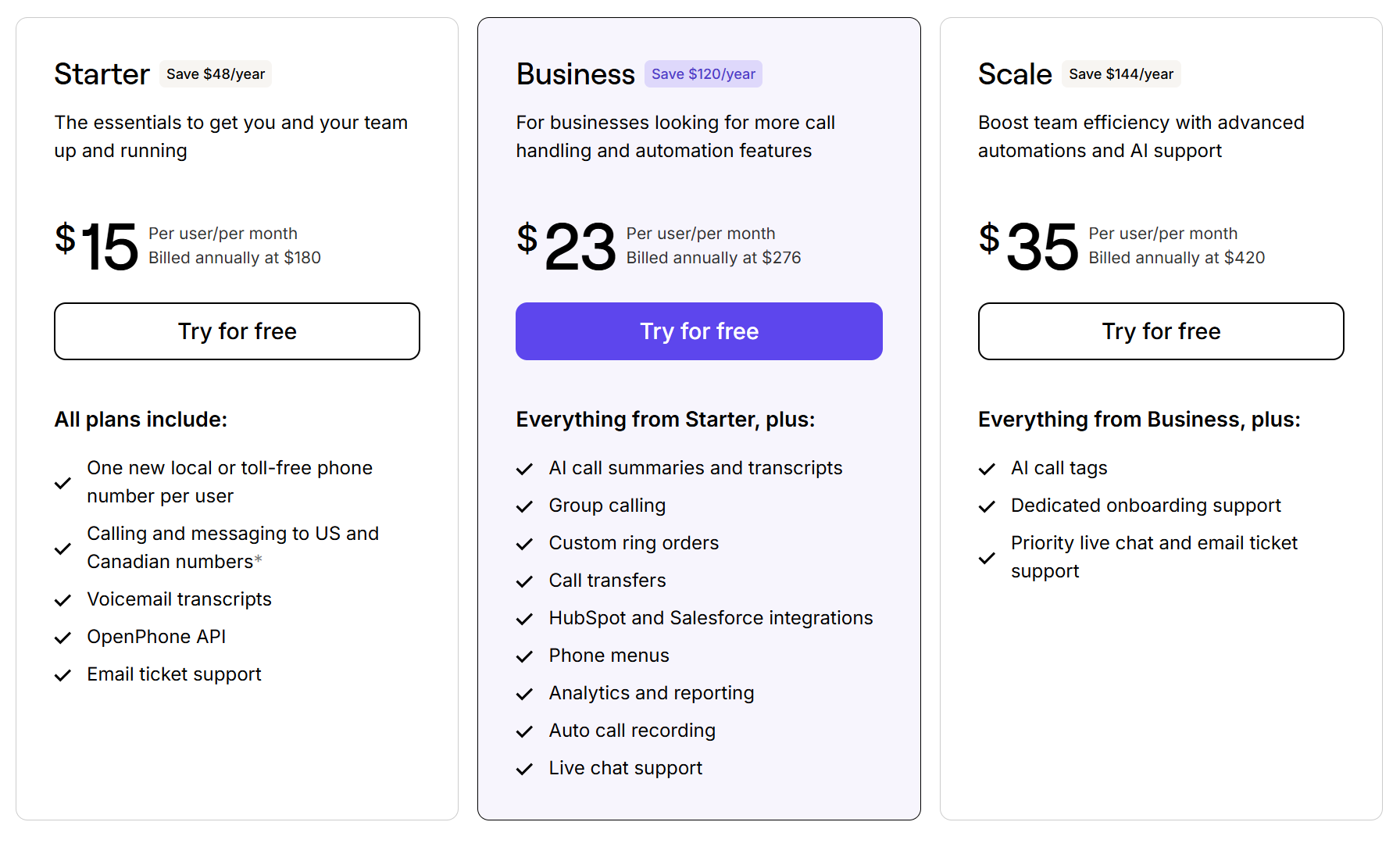
Quo’s transparent pricing is designed with small businesses in mind and offers three plans for you to choose from.
- Starter: $15 per user per month for free calls and texts in the US and Canada, shared phone numbers, snippets, scheduled texts, auto-replies, basic call forwarding, email integration to forward calls and texts, Slack and Zapier integrations, and more
- Business: $23 per user per month for CRM integrations, advanced call forwarding, automatic call recording, AI call summaries, phone menus, custom ring orders, analytics, live chat support, and more
- Scale: $35 per user per month for AI call tags, inbound phone support, dedicated onboarding, and priority chat and email support
2. Google Voice: Best for Google Workspace users

Pros
- Free plan is available for personal use
- Seamless integration with Google Workspace
Cons
- No automation features like auto-replies or scheduled texts
- Limited availability in some countries
- No toll-free numbers
At first glance, Google Voice might seem like a straightforward option, especially if you already use Google Workspace. It offers two different plans for you to choose from:
- A free plan designed for personal use that only includes basic calling and texting features with a maximum of one user. Google Voice’s free version is only available in the US.
- A paid option for businesses that offers features like ring groups and auto-attendants with unlimited users.
But as you start to dig deeper, there are limitations to consider. If your business relies on automated features like scheduled texts, pre-written message templates , or auto-replies, Google Voice won’t have your back. Everything needs to be handled manually, which can quickly eat into your time.
Another hiccup? Country restrictions. Depending on where you’re located, Google Voice may not work in your area.
Even something as simple as porting your number to or from Google Voice can be challenging. Users have reported issues with delays and extra steps, which can make switching providers a frustrating experience.
Key features of Google Voice
- Integration with Google apps like Google Calendar and Google Meet
- Voicemail transcriptions
- Unlimited calls to the US and to Canada from the US
- Multi-level auto attendant, requires an upgrade
- Ring groups, requires an upgrade
Google Voice pricing
Google Voice offers three pricing plans for individuals and three pricing plans for teams. Personal plans are only available to US customers, while team pricing is available in 14 countries, including Belgium, Italy and Spain.

Here are the Google Voice pricing plans for individuals:
- Basic: Free, limited to one user, with unlimited domestic calling and texting.
- Starter: $10 per month to access three-way calling, seamless call transfers, and easy call recording.
- Standard: Introductory price of $10 per month for the first six months, after which it is $20 per month. Access AI note-taking with Gemini and auto-attendants in this plan.

Here are the Google Voice pricing plans for teams:
- Starter: $10 per user per month, with a 10-user maximum, for calls and texts in the US, call forwarding, and SLAs
- Standard: $20 per user per month to access on-demand call recordings, ring groups, and phone menus
- Premier: $30 per user per month to access automatic call recordings and advanced reporting
Google Voice team plans also require a Google Workspace subscription, which starts at $7 per user per month.
3. 2Number: Best for international calls

Pros
- Make calls to over 100 countries
- MMS support for US and Canadian numbers
Cons
- No integrations with third-party apps
- No shared numbers for team collaboration
- Call recording requires an upgrade
The 2Number mobile app is a simple solution for individuals who need another number for calls and texts. The app supports MMS texting in the US and Canada, which means you can send pictures or documents from your second number, making it easier to provide visual support. It also lets you record calls, store them, and share them.
One unique feature of 2Number: it offers virtual numbers you can use for verification codes. It provides specific numbers to verify codes from apps like Instagram and Viber. For other apps and services, it provides Canadian numbers you can use to accept verification codes. But if you’re in the US, that’s not a viable solution.

Other features include international calling capabilities to over 100 countries and Do Not Disturb for US numbers.
However, the app’s simplicity comes with trade-offs. It doesn’t have shared numbers, which limits your team’s ability to make and receive multiple calls simultaneously. It also lacks phone menus, meaning callers can’t route themselves to the appropriate person or department. It also doesn’t support integrations with third-party apps, which can slow your team’s productivity.
Key features of 2Number
- Text message history
- Calls to over 100 countries
- Call recording
- Do Not Disturb mode
- MMS support for US and Canadian numbers
2Number pricing
You can expect to pay $7.99 per week or $69.99 per year, which gives you access to all the app’s features. A subscription provides monthly credits you use to make calls, and the amount of credits you’ll need varies by country.

The FCC guides against caller ID spoofing, and businesses that do it risk legal action if consumers report them. For this reason, we don’t recommend that Quo businesses create phone numbers just to hide their identity when calling contacts
4. Burner: Best for temporary or disposable personal numbers

Pros
- Choose any US or Canadian area code
- Customize ringer and SMS notifications for each number
Cons
- Lacks advanced business features like phone menus, auto-replies, and integrations
- Can’t make international calls
Burner is a second phone number app for Android and iOS designed to protect your privacy. It’s targeted at individuals who want to protect their personal number.. The app also lets you name each number, so whether it’s for a side hustle, a temporary project, or a personal need, you can keep track of what each number is for.
You can customize SMS and ringer notifications, so you’re in control of how and when you’re notified. Plus, the app integrates with your address book, allowing you to quickly access and manage contacts without juggling multiple tools.
Similar to 2Number, Burner falls short for business use. You can’t share Burner numbers with a team. They also lack business-friendly features like CRM integrations, automated texting, or AI-powered tools.
Key features of Burner
- Temporary numbers with any US or Canadian area code
- Custom notifications for each number
- Access to your address book from the Burner app
- Block phone numbers
- Do Not Disturb mode
Burner pricing

Burner’s pricing plans depend on where you purchase them:
- Web Standard: $3.99 per month for one number purchased on the web, billed annually
- Web Premium: $5.83 per month for one number, video messaging, AI voicemail transcription, VPN, and reverse number lookup, billed annually
- Play Store: $4.99 per month for one number purchased from the Android app, billed annually
- App Store: $4.99 per month for one number purchased from the iPhone app, billed annually
Is it really legal to call from a different number?
Yes, a second number that your business owns is legal to use. Businesses purchase multiple numbers for different teams to communicate with their customers. Getting a second number from a provider and using it for work calls is no different from having a desk phone.
Manipulating your phone number and your outbound caller ID isn’t legal. According to the FCC: “Spoofing is when a caller deliberately falsifies the information transmitted to your caller ID display to disguise their identity.”
VoIP phone providers like Quo are legitimate entities that issue a real, registered phone number. Spoofing tools let you enter an arbitrary number you do not control. The tell is whether the service issues you a number or lets you type one in.
Pro Tip: Want to hide your personal caller ID when you call a business?
If you want to hide your caller ID when you call a business from your personal cell number, you can also dial *67 before your phone number. This withholds your caller ID rather than replacing it.
However, this approach doesn’t work for businesses. Most people decline calls that don’t show a caller ID. You’re better off getting a different number and customizing your caller ID instead of masking your caller ID entirely.
Start making calls from a different number today

Now that you know how easy it is to get a second phone number, get one so that you can get peace of mind after business hours.
If you want calls to show a number that is genuinely yours, get a second business number through an app like Quo and set it as your outbound caller ID. That is the legal and durable version of using a different number to make calls.
Try Quo for free. Start today by signing up for our seven-day free trial.
FAQs
VoIP providers let you toggle between your virtual phone numbers and make calls from each of them. You can also customize their individual caller IDs. Keep in mind your outbound caller ID should be the exact same name you use for your business texting registration. That way, your caller ID name gets approved quicker because you’re coming across as a legitimate business entity.
A dedicated business number isn’t just about separating work from personal calls — it’s also about making your communication more professional and efficient.
Here are four more reasons why calling from a different number makes sense for your business:
1. Keep your personal number private. Using your personal phone for work can quickly blur the line between your work and personal life. Calling from a different phone number protects your privacy while ensuring clients can get in touch with you and avoids having to change your number.
2. Differentiate between business vs personal calls. When you have a specific number for your business, it’s easy to tell if an incoming call is work-related. This means you can prepare for the conversation, answer professionally, and leave a better impression on customers.
3. Never miss a call with shared phone numbers. With Quo, you can add team members to the same phone number so everyone can make and receive calls from it. You can also set up Quo’s simultaneous ring feature to ensure every team member’s device rings at the same time, boosting the chances of someone picking up.
4. Automate your texting game. Calling isn’t the only way to reach your customers. With Quo’s texting features, you can text from a different number, send automated texts, schedule texts, or use pre-written snippets to save time while delivering a personal touch. For example, you could send an automatic “Thanks for calling!” message if you miss someone’s call.
Changing the number you’re calling from depends on the method you’re using:
– VoIP providers: Sign in to the app, tap your account icon, select the number you want to call from under Your numbers, and place the call.
– Dual-SIM phones: Go to your phone’s settings and select the SIM card or phone number you want to use for outgoing calls.
For businesses, VoIP providers like Quo make this process easy while offering additional tools like voicemail transcriptions and automations to speed up your workflow.
Google Voice offers a free plan to individuals. However, it’s limited to users based in the US. Plus, you can’t t use business features like call recording or three-way calling.
Quo lets you make unlimited calls to US and Canadian phone numbers in every plan. All you need to do is sign up for an account and choose a new local or toll-free phone number to get started.
To send messages from your virtual phone number, see our guide on how to text from a different number.
Many traditional carriers don’t let you customize the number you display when making outgoing calls. However, with a VoIP provider like Quo, you can easily change your caller ID in three simple steps.
1. Go to your Quo app and click Settings.
2. Below Workspace, select General.
3. Tap the three dots … and choose Update name to type your new caller ID.
That’s it!