Trying to find the right second phone number app for Android for your needs, but not sure where to start?
This guide walks through the 11 best second phone number apps for Android phones. Once you read through their features, limitations, and prices, you can download the app immediately if you like what you see.
Not sure what to look for? We also provide a list of five key features every business needs for their second number.
Have an iPhone? Check out our guide on how to get a second phone number for iPhone instead!
The best second phone number apps for Android compared

Here’s a side-by-side comparison of the best second phone number apps for Android:
| Provider | Price | Unlimited calling to US & Canada | Unlimited SMS, MMS to US & Canada | Shared phone numbers | Additional phone numbers |
|---|---|---|---|---|---|
| OpenPhone | Starts at $15 per user per month | ✓ | ✓ | ✓ | $5 per number per month |
| Line2 | Starts at $13.75 per month | ✓ | ✓ | x | x |
| Google Voice | Starts at $16 per month per user (including Google Workspace) | Unlimited calls to Canada from US only | Available in US only | Requires upgrade | x |
| 2ndline | Starts at $0 per month | ✓ | ✓ | x | x |
| Hushed | Starts at $1.99 for bundled minutes | Requires upgrade | Requires upgrade | x | ✓ |
| Sideline | Starts at $9.99 per month (one user per account) | ✓ | No MMS to Canada | Requires upgrade | $9.99 per month |
| TextFree | Starts at $0 per month | Requires upgrade | No MMS to Canada | x | x |
| Burner | Stars at $4.99 per month | Mobile app only | Supports pictures only; doesn't support other file types | x | Pricing varies |
| Grasshopper | Starts at $28 per month | ✓ | US numbers only | X | $10 per number per month |
| Ooma | Starts at $19.95 per user per month | ✓ | ✓ | ✓ | $9.95 per number per month |
| iPlum | Starts at $8.99 per user per month | Requires upgrade | Requires upgrade | ✓ | $8.99 per month per number |
Breaking down the top second phone number apps available on Android
If you’ve already tried one app and ready to switch, you know not every second phone number app is created equal. The worst ones keep you from working efficiently, while the best ones can help you build better relationships with your customers.
Here are the 11 best second phone number apps available on Android, starting with the #1 business phone platform on G2.
1. Quo (formerly OpenPhone)
Pros
- Easy to add numbers and teammates as your business grows
- Intuitive user experience
- Cost-effective for growing teams
- Call recordings are stored in context
Cons
- Does not support mass texting
- Receiving two-factor authorization texts can’t be guaranteed*
* Keep in mind this is a limitation with all second number apps. In many cases, two-factor authentication services don’t allow virtual phone numbers to be used during the registration or verification step.

Quo is a virtual phone system built to help you build meaningful relationships with your customers effortlessly. Your team can use Quo from any Android cell phone, as well as iOS devices (iPhone and iPad), laptops, and computers.
Quo can easily scale with you as your team grows. Each user on your plan comes with one free local US, Canadian, or North American toll-free number. If you need more phone numbers than users on your plan, additional phone numbers are $5 per number per month.
How to get a second number with Quo
/

Getting a new phone number from almost anywhere in the world is a simple process when you choose Quo as your virtual phone number provider. Follow these three steps:
- Create an account with Quo, when you sign up, you get a free, seven-day trial.
- During signup, choose your city or area code in the US to select your preferred phone number.
- Once the signup process is complete, you’re all set to use your new virtual phone number!
You can assign each of your teammates their own Quo number. Plus, you have the option to also add multiple team members to a single shared number, which lets everyone on your team share responsibility for incoming calls. Whenever someone calls a shared number, everyone on your team who’s available can receive notifications until someone picks up. This means customers always have someone available at the other end of the line — and your team never misses an important call.
Compared to other second number apps for Android, Quo lets you easily build a professional phone presence for your business. You can:
- Set up self-service phone menus to help customers reach the right member of your team
- Build custom voicemail greetings to set expectations when you’re away from your desk or closed for the day
- Add business hours to your phone number so you don’t get notifications while off the clock
- Easily record any phone call and playback recordings later in context with the rest of the conversation
- Host three-way calls from your Android phone (or other devices) for collaborating with your team and handing off callers to your others
Quo can also help you save time you’d otherwise spend on repetitive tasks. You can use auto-reply texts on your Android device to automatically message contacts if you miss their calls or save templated text message snippets to instantly reply to frequently asked questions. You can even connect the apps you already use to Quo, including Slack, HubSpot, and Google Contacts to automate specific workflows.
Curious to learn more? You can use Quo to get a second number for your Android device in 10 minutes or less. Just sign up here for our seven-day free trial and then download the mobile app.
Quo key features
- Comes with one local or toll-free phone number per user
- Accessible on computers, tablets, and mobile devices
- Auto-attendants (IVR)
- Call recording (on-demand and automatic call recording options)
- Voicemail to text
- Shared phone numbers
Quo pricing
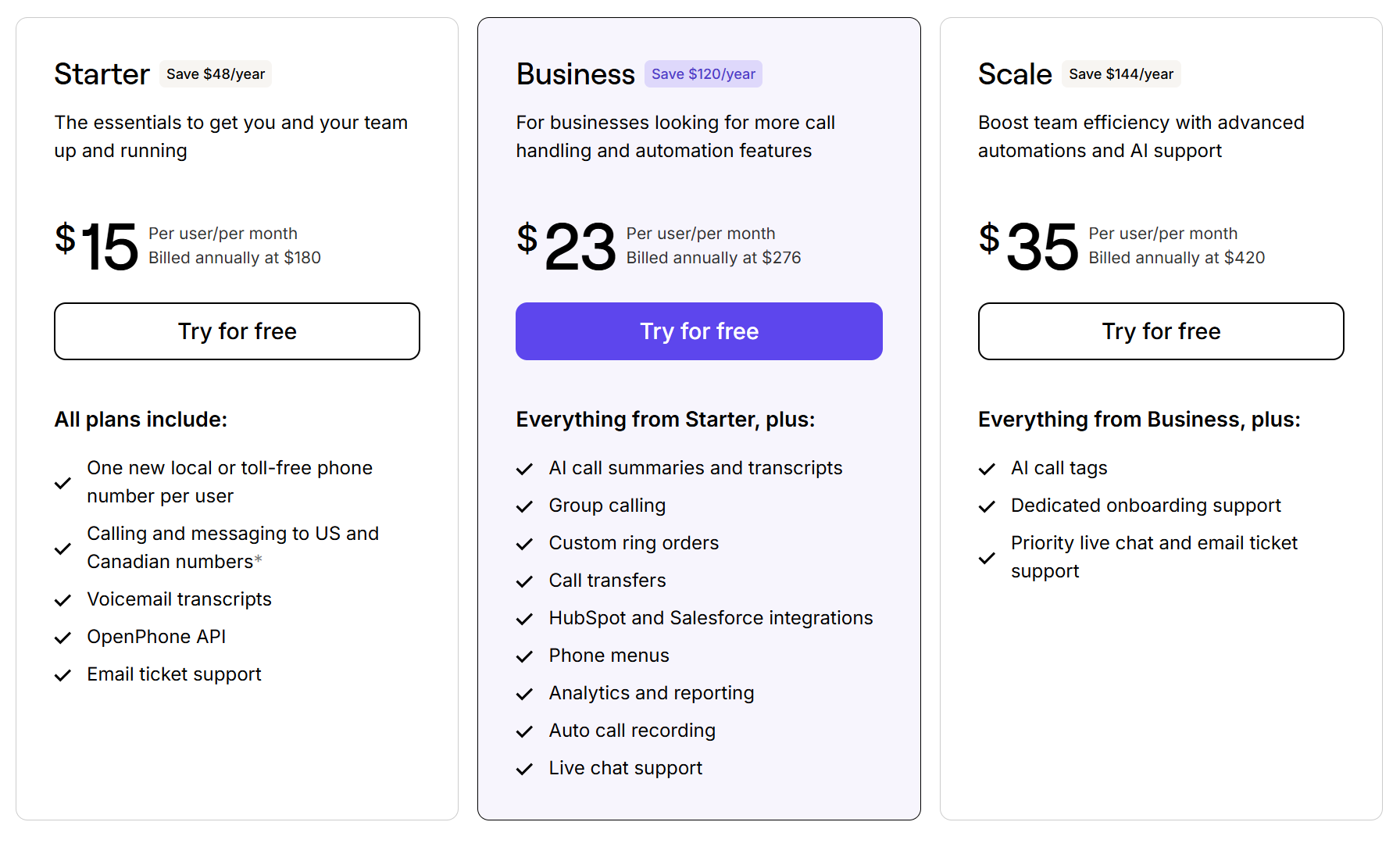
- Starter: $15 per user per month for unlimited calls and texts, voicemail transcriptions, and call recordings
- Business: $23 per user per month for call transfers, phone menus (IVR), and integrations with HubSpot and Salesforce
- Scale: $35 per user per month for AI call tags, dedicated onboarding, and priority chat and email support
Download Quo for Android
2. Line2
Pros
- Can make unlimited calls and texts in the US
- Unlimited text messages
Cons
- The Android version may be buggy (according to user reviews)
- The cost of additional numbers ($14.99 per number) is much higher than other Android apps
- Not built for team use
- No ability to purchase additional phone numbers

Line2 is a second phone number app that primarily catered to small business owners but pivoted to personal usage. You can either port an existing number to the platform or buy a brand-new number with a local area code.
But the features you get with a Line2 plan are relatively bare-bones. You can’t make international calls at all, and there’s no way to share a single phone number with the rest of your team.
Plus, Line2’s prices come with many additional fees, including:
- Administrative and compliance cost-recovery fee
- Federal universal service recovery fee
The biggest limitation of Line2’s platform is poor reliability. Many past users say the Android app is buggy and difficult to use. For example, you may not be able to end phone calls without force-stopping the app:
“The worst problem is that the Android app won’t “release” after hang up. The phone still thinks the call is ongoing and I have to force-stop the app so my phone can receive calls, play music, etc. They don’t warn people about this nor have they published a work-around. For that reason, I wouldn’t recommend this app.” – Google Play
Line2 key features
- Unlimited calls in the US and Canada
- Unlimited SMS and MMS in North America
- Voicemail transcriptions
- Call forwarding
- Caller ID
Line2 pricing

- Monthly: $15.99 per month
- Annual: $13.75 per month
Download Line2 for Android
3. Google Voice
Pros
- Free version available (for personal users only in the US)
- Unlimited calls in the US and Canada
Cons
- Texting is not available to customers outside the US
- Google Voice for Google Workspace is only available in select countries
- Google Voice’s free version is not equipped for business use

Google Voice is a VoIP phone service with plans for personal users and business owners. You can sign up to get a free second phone number for personal use if you’re based in the US. However, if you need more business-specific features or located outside of the States, you can sign up for Google Voice for Google Workspace. Business plans start at $16 per month per user (including the cost of Google Workspace).
The free plan of Google Voice is significantly limited. For example, you can’t access call recordings (without a separate call recording app for Android) or integrations at all. You also can’t separate your contact lists, which means you won’t be able to tell if a call is work-related or not. Porting an existing number costs $20, plus an extra $3 to port the number out. And keep in mind you can only have one number at a time.
Google Voice for Google Workspace comes with its own set of limitations. You can only have up to 10 users on the basic plan, and essential business features like auto-attendants and ring groups aren’t available unless you upgrade.
With any version of Google Voice, you run into these issues:
- Google Voice separates voice calls, text messages, and voicemails into different folders, which could make it hard to review past conversations
- You can’t have a toll-free number with Google Voice, even if you upgrade
- There are no automations available for your business number, so you can’t automate routine tasks or save time while texting
Google Voice key features
- Unlimited calls in the US and Canada
- SMS and MMS support
- Integrations with Google Calendar and Google Meet
- Automatic call recordings (requires upgraded paid plan)
- International number support (requires paid plan)
Google Voice pricing

- Starter: $10 per month per user for voicemail transcriptions, texts in the US, and integrations with the G-Suite (10-user max)
- Standard: $20 per month per user for ring groups, multilevel auto-attendants, and on-demand call recording
- Premier: $30 per month per user for automatic call recording and advanced reporting through BigQuery
Download Google Voice for Android
4. 2ndLine
Pros
- International calling available
- Mobile phone and tablet support
Cons
- Banner ads run in the free version of the app
- Only available for Android (you can’t use it on other devices)
- No features specifically for business use

2ndLine is a VoIP app for Android developed by TextNow. Once installed, you can add an alternate number to any Android tablet or mobile phone. As long as you’re connected to WiFi, you can call or text contacts anywhere in the US.
Unfortunately, the free version of 2ndLine comes with in-app ads. Many users mention they may affect the quality of your calls. Just check out this recent review:
“This app can be sluggish and unresponsive, which seems to happen when the ads are pouring in. Also, the aforementioned ads can be frequent and intrusive. They may appear during a conversation, and will occasionally disconnect your call.” – Google Play
You need to constantly make phone calls from your 2ndLine number to keep it from getting recycled — in other words, removed from your account and given to someone else. You need to make at least one phone call a day to prevent your account from becoming inactive.
2ndLine is only available from app stores in the US and Canada. If you’re outside either country, you need to look for a 2ndLine alternative.
2ndLine key features
- Unlimited free calls in the US and Canada
- Supports group messaging
- Call forwarding
- Voicemail recordings
- ‘Picture messaging’ (MMS) supported
2ndLine pricing
2ndLine can be downloaded for free. However, you do have to pay to remove ads and access additional calling features.
Here are their paid options through in-app purchase:
- International calling credits: $5 per bundle (minute amounts undisclosed)
- Premium phone numbers (determined by 2ndLine): $4.99 per year
- Remove ads for limited time: $0.03 per 30 minutes
- Ad Free+ (removes ads permanently): $9.99 per month (+ tax)
- Call forwarding: Requires Ad Free+ ($9.99 per month + tax)
- Lock in your phone number (prevents losing your number to inactivity): Requires Ad Free+ ($9.99 per month + tax)
Since 2ndLine doesn’t have an up-front pricing page, you won’t know what you have to pay before downloading the app. You have to download the app, make an account, and verify your information before buying upgrades.
Download 2ndLine for Android
5. Hushed
Pros
- Flexible pricing plans
- Third-party integrations
Cons
- Reports of bugs and glitches
- Requires upgrade for unlimited minutes
- Missing

Hushed allows you to put multiple phone numbers on one Android device. It’s also one of the few second phone number apps that integrate with Dropbox if that’s a must for your business.
However, Hushed doesn’t offer the basic features provided by most other second phone line apps. For example, you can’t access call recordings or auto-attendants at all. Plus, there’s no unlimited talk and text unless you pay for an Unlimited Subscription. If you spend lots of time on the phone with your customers, Hushed can get expensive fast. And if you want to reach customers outside the US and Canada, keep in mind you have to buy separate bundles for international calls.
Like a few other apps on this list, Hushed is rife with bugs and glitches. Many users mention that notifications don’t pop up at the right time, which can be a dealbreaker to small business owners who need to communicate with customers quickly.
Here’s a recent review:
“I use this for my business (I like to keep my personal number private) and I’ve lost out on a few clients due to Hushed never sending me notifications that I’ve gotten a text. I even periodically check the app, and no new texts will show. But hours, sometimes DAYS later they pop up with the date it was supposed to send. This has happened three times now, at this point I’m looking for another app.” – Google Play
Hushed key features
- Voicemail greetings
- Call forwarding
- Auto-replies
- Call routing
- Integrations with Dropbox and Slack only
Hushed pricing

Hushed doesn’t offer pricing tiers like traditional second phone number apps. Instead, you have to pay for the amount of minutes you want. You also have to pay extra if you want to make calls outside the US and Canada.
There are three levels:
- Prepaid Plans: Starts at $1.99 for pay-as-you-go bundled minutes and SMS credits
- Unlimited Subscriptions: $3.99 per month for unlimited talk, SMS and MMS in the US and Canada, and the option to have one to three numbers for your phone
- Pay-As-You-Go International Plans: Starts at $4.99 to make international calls and texts
Download Hushed for Android
6. Sideline
Pros
- Unlimited calls and texts in the US and Canada
- Automatically detects spam calls
Cons
- Calls and texts could burn through carrier minutes
- Does not support mass messaging
- Group messaging is limited to 10 users max
- Can’t get all features on one plan

Sideline is a second phone number app designed for Android and iOS. Once you download the app and pay for a plan, Sideline defaults to making calls and texts through your existing carrier plan. If you’re using pre-paid minutes or a limited plan, you need to disable this feature in-app so you don’t wind up paying overage fees.
You can use Sideline to access some modernized features, including auto-replies. Unfortunately, that’s about where its functionality ends. For example, you can’t integrate with tools you’re already using, or record incoming calls for legal purposes. There’s also no way to purchase toll-free numbers at all.
The biggest limitation of Sideline’s system? You can’t get all the same features on the same plan. For example, you can upgrade to a Team Number to share a line with your coworkers, but you lose this feature when upgrading to Enterprise. You also can’t make international calls on the Standard or Team Number plans. Instead, you’re forced to upgrade to Enterprise — which just gives you the option of buying the international call add-on ($14.99 per month).
Sideline key features
- Auto-replies
- Voicemail to text
- Group messaging
- Free calls and texts in the US and Canada
- Separate caller ID
Sideline pricing

Sideline offers three plans to choose from:
- Standard: $9.99 per month for one user and one number per account
- Team Number: $9.99 per month for shared numbers
- Enterprise: $9.99 per line per month to unlock international calling and auto-attendants (you still have to pay for these add-ons separately)
Keep in mind that upgrading to the Enterprise plan doesn’t come with international calls and auto-attendants — it just unlocks your ability to purchase the add-ons for your team.
International calling on Sideline costs $14.99 per month. Auto-attendants require you to pay for a second line ($9.99 per month).
Download Sideline for Android
7. TextFree
Pros
- ‘Free’ texts
- Local phone number
Cons
- Can get deactivated if you don’t use your number at least once in a 30-day period
- Requires upgrades or ‘earning’ free minutes to make phone calls
- Ads are present in the calling interface until you upgrade
- Can’t get more than one phone number per account

TextFree is a second phone number app for Android designed by Pinger, the company behind Sideline. You can select a phone number from a list of available area codes. Then start sending texts at any time.
What makes TextFree ‘free’ is their use of in-app ads. Many users say the ads are borderline intolerable and difficult to work around when trying to place calls. Plus, calling minutes are only free to earn, not free to use. You can purchase calling minutes outright for an undisclosed amount or earn credits by watching videos, downloading apps, or performing sponsored tasks (like getting a pre-paid Visa Card).
If you want to make calls without ads or earned minutes, you can upgrade to a TextFree Plus Subscription ($9.99 per month). However, this doesn’t provide you with any additional calling features, like recording calls on your Android device or auto-attendants.
Like 2ndLine, TextFree requires you to constantly use your number or risk losing it to other users. You have to make at least one phone call or text message in a 30-day period to prevent your number from getting recycled. Otherwise, you can upgrade to the TextFree Plus Subscription to keep your phone number.
TextFree key features
- Local phone number
- Unlimited free texting
- WiFi calling
- Custom voicemail greetings
- Call blocking
TextFree pricing

TextFree only has one price plan for Android users:
- TextFree Plus Subscription: $9.99 per month to remove ads, get unlimited minutes, and permanently prevent the recycling of your number
iOS users can pay for six-month packages ($39.99) or 12-month packages ($69.99), both of which are cheaper than TextFree’s month-to-month rates. However, these bundles aren’t currently available to Android users.
Download TextFree for Android
8. Burner
Pros
- Buy and manage up to 200 phone numbers at once
- Easy to delete phone numbers after use
Cons
- Not built for business use
- No integrations
- No call recordings
- No auto-attendants
- Not always reliable or user-friendly

As the name implies, Burner offers secondary phone numbers you can use and eventually ‘burn’ (aka discard). Burner is currently available on iPhone and Android devices, although only phones are supported — there’s no desktop app available.
Most users rely on Burner to call and text anonymously, then delete numbers when they’re done to protect their privacy. However, this doesn’t benefit business owners looking to build relationships with their customers. You won’t have access to integrations at all, and you can’t get business phone features like call recordings and auto-attendants. There’s also no way to collaborate with your team since you can’t create shared numbers.
And according to recent user reviews, the Android app doesn’t always work as intended:
“The new layout sucks. The color schemes are terrible and hard to see. It’s buggy as heck. Voicemails don’t play sometimes. You can’t send videos. Pictures won’t save. Even scrolling through conversations is annoying. Every time you get to the top and it loads older messages, it sends you right back to the beginning of the conversation. And why can’t I be logged in the same account on 2 different phones at the same time?” – Google Play
Burner key features
- Unlimited calls in the US and Canada
- SMS and picture support (no videos or other files)
- Auto-replies
- Call blocking features
- Spam filters
Burner pricing

Burner subscription prices start at $4.99 per month. On Android, you can only access one number or three numbers per month (two-line plans aren’t supported). This means you either have to pay for numbers you don’t use or have to use fewer numbers than you actually want. iOS users have much more variety, ranging from one-line plans to 100-line plans.
Download Burner for Android
9. Grasshopper
Pros
- Pay per number, not per user
- Buy or port local and toll-free numbers
Cons
- Additional numbers are more expensive than other providers
- No international text messaging
- No integrations with third-party apps
- No call recording options

Grasshopper provides multiple phone numbers to solopreneurs and small business owners. The Solo plan ($28 per user per month) comes with one toll-free or local phone number, as well as three extensions so you can forward calls to other devices.
But Grasshopper’s pricing for additional numbers is much higher than other providers. For example, additional phone numbers from Quo are just $5 per number per month. Grasshopper’s prices are double that amount at $10 per number per month.
Plus, Grasshopper doesn’t make collaboration a major part of its platform. Apart from not having any shared numbers, you can’t message internally, share the same contact inbox, or record your calls for future context.
If you want a business phone system with better collaboration features, you’re better off looking for a Grasshopper alternative.
Grasshopper key features
- Unlimited calls to the US and Canada
- Unlimited business texting
- Multiple phone numbers and extensions
- Call transfers
- Auto-replies (only for first-time callers not in your contact list)
Grasshopper pricing

Grasshopper doesn’t have you pay for the number of users on your plan with their second number for Android app — just for the amount of phone numbers and extensions you want. Each of their three plans comes with the same basic features:
- Solo: $28 per month for one phone number and three extensions
- Partner: $46 per month for three phone numbers and six extensions
- Small Business: $80 per month for five phone numbers and unlimited extensions
If you want more numbers and extensions beyond what the base plan provides, you have to pay an additional $10 per number per month.
Download Grasshopper for Android
10. Ooma
Pros
- You can make unlimited calls within North America
- Option to play music while your caller is on hold
Cons
- Reports of poor call quality
- Features focused on physical businesses
- Expensive compared to other providers

Ooma is an older VoIP provider designed to serve both home and business owners. Apart from their landlines and home security devices, they also sell small business phones and a VoIP platform.
Most of Ooma’s features were designed for physical businesses. For example, overhead paging and intercom support doesn’t make sense for distributed teams. Plus, you have to upgrade to the second most expensive plan ($24.95 per user per month) just to access basic features like texting and call recording.
Unfortunately, Ooma’s second phone number for Android app doesn’t receive regular updates. Many users complain about poor call quality and say it’s difficult to get in touch with customer support. See for yourself in these recent reviews:
“The static while using the app makes it hard for people to hear me. They hang up because they can’t hear me, which results in multiple callbacks.” — Google Play
“Calls frequently don’t come through. I get a missed call without it ringing. I’ll all of a sudden get a notification for a voicemail and then see I have a missed call. The call quality isn’t the greatest either. Tried reinstalling the app. On with tech support again. They don’t know what the problem is either.” — Google Play
“This app is just not great. It’s happened often that I just can’t hear people. They can hear me, but I can’t hear them, and it’s happened across phones (I recently switched to another phone). This is not good as I use this for business! And I’ve had several notifications of multiple missed calls well after they happened.” — Google Play
Ooma key features
- Unlimited calls to the US, Canada, and Mexico
- Auto-attendants
- Local and toll-free numbers
- Music on hold
- Digital faxing
Ooma pricing

Business owners have three plans to choose from:
- Office Essentials: $19.95 per user per month for virtual receptionists, simultaneous ring, and music on hold
- Office Pro: $24.95 per user per month for the desktop app, text messaging, and call recording
- Office Pro Plus: $29.95 per user per month for call queuing, Find Me Follow Me (ringing calls separately on landlines and mobile phones until you pick up), and a Salesforce integration
Download Ooma for Android
11. iPlum
Pros
- Compatible with Android phones, tablets, and Chromebooks
- HIPAA compliant
Cons
- Essential business features like voicemail to email and call recordings cost extra
- Requires you to upgrade for unlimited calls and texts

iPlum is a mobile VoIP service built for healthcare companies. You can use their HIPAA-compliant system to buy a number to use on your own or set up a team account that everyone can work from together.
While iPlum offers more features than free second phone number apps, it can still be restrictive as your business grows. The cheapest plans come with metered minutes only, meaning you have to upgrade if you want more than 200 minutes per month (aka three hours and 20 minutes).
Plus, even though shared numbers are available, there aren’t any other built-in collaboration features available for your team. And since iPlum doesn’t integrate with third-party apps, you can’t push data to other platforms to keep everyone in the loop.
iPlum key features
- Set business hours
- Call transfers
- SMS and MMS support
- Auto-replies
- Shared phone numbers
iPlum pricing

iPlum’s prices depend on two factors: the type of number you want and the amount of minutes you want to use. All three plans come with the same standard features:
US Number
- Unlimited calls and texts: $8.99 per user per month paid annually (or $11.99 per user per month on a month-to-month plan)
- Measured calls and texts: $5.99 per user per month
Canadian Number
- Unlimited calls and texts: $11.99 per user per month paid annually (or $14.99 per user per month on a month-to-month plan)
- Measured calls and texts: $6.99 per user per month
Toll-Free Number
- Unlimited calls and texts: $14.99 per user per month paid annually (or $19.99 per user per month on a month-to-month plan)
- Measured calls and texts: $9.99 per user per month
You also have to pay for add-ons depending on what you need. iPlum offers two:
- Voicemail to Email Transcriptions: $4.99 per number
- Call Recording: $4.99 per number
Download iPlum for Android
5 features to seek out with a second phone number app for Android
Feeling overwhelmed by all your options? We can help you narrow down the list.
Here are five critical features to consider before downloading a second number app:
1. Ability to tell when incoming calls are meant for your second number
A second phone number should help you maintain a strong boundary between personal life and work. The app you choose should use a different call screen for your business contacts so you can immediately tell which number your incoming calls are intended for.

Platforms like Quo make this easy to do. If you have multiple numbers in your Quo workspace, you can see the emoji associated with a specific number so you always know how to respond appropriately. Plus, you can set business hours that send after-hours calls straight to voicemail. That way, you don’t have to stay glued to your phone at all hours of the day.
2. Flexible call recording options

Need the ability to record phone calls for both legal and practical purposes? Great second phone number apps let you record specific calls or automatically record all calls depending on what you want.
With Quo, you can use on-demand call recording at any time during a call. And for Business plan users, you can have automatic call recording for any numbers on your account.
3. Shared numbers

Shared numbers help everyone on your team make calls, send texts, and manage customer expectations together. You all have access to the same contact list and can even message internally when you need to delegate tasks.
Quo helps you do even more with shared numbers by connecting to third-party integrations. You can push missed calls to Slack, send voicemails through email, and sync data with your CRM so everyone stays in the loop.
If you manage a team, you can easily jump into that inbox with Quo to see who on your team has been in touch with specific contacts. Plus, easily listen back to call recordings or review the full conversation history to coach your team.
4. Calls, texts, and voice messages in a single view

Everyone on your team should be able to review and follow up on past conversations with customers. The best second phone number apps keep all calls, texts, and voice messages in a single, easy-to-navigate view instead of having to jump between separate folders.
Being able to see all the conversation history like this in Quo is available on every plan. They’re easily searchable, too — just use the in-app search bar to hunt down texts or voicemails and get the context you’re looking for.
5. Setting availability
You can’t be around to pick up the phone all day — and frankly, you shouldn’t have to be. Your second phone number app for Android should set expectations for all customers and callers around when you’re available. You can do this in three different ways:
- Setting permanent business hours for your entire number
- Temporarily turning off notifications with do not disturb
- Setting up auto-replies to send a text when someone attempts to dial you when you’re not able to take their call
In Quo, your teammates can even set specific shifts in which they’re available to take calls from any number they have access to.
Quo is the best second phone number app for Android

A second phone number app can help you manage your business without compromising your personal number. That way your (or your team’s) cell number stays private. VoIP systems like Quo give you everything you need to build better relationships with customers — and without blurring the lines between your personal life and professional career.
See for yourself why thousands of businesses chose Quo as the best phone system for growing teams. Try us out today with a seven-day free trial.