In today’s remote-first work culture, boundaries between personal and professional life can easily blur. For example, guess how many employees use their personal phones for business communications? According to a report from Zippia, 75% of US employees use their personal cell phones for work. It may not seem like a big deal, but it can become a major issue if your team collects business contacts and you can’t access them.
The solution to this problem? Alternate phone numbers.
An alternate phone number is a second number you use alongside your main number on the same phone. “Alternate” is a general term, not a technical one. It refers to a number provided by a virtual phone provider instead of a carrier; it doesn’t require an extra SIM or a second phone. People use one to keep a personal number private, to separate work calls from personal ones, or use it as a business phone number. You can get an alternate phone number by choosing a provider, picking an area code, and downloading their app. It typically takes a few minutes. Costs range from $0 for free apps aimed at personal use and $15-$50+ per user per month for business use.
In this article, we’ll show you how setting up an alternate phone number is a better approach for business phone calls. We’ll also share six phone providers to help you find the best fit for you.
Alternate, virtual, secondary, burner: What each of these terms means
Depending on the type of phone number you’re looking for, you might have looked up “alternate phone number,” “virtual number,” or “burner number.” These terms refer to the same idea: a second phone number that lives side by side in your phone.
Alternate and secondary phone numbers are broad terms for this type of number. You can get an alternate or secondary number from virtual and cellular phone providers.
Virtual phone numbers refer to phone numbers that aren’t tied to a SIM card or physical device. These numbers are only available virtually and operate on Voice over Internet Protocol, or VoIP, infrastructure. They’re the most common type of number for business use because you can share them with a team.
Burner phone numbers refer to virtual phone numbers designed for personal use. You can choose, use, and discard a phone number for a specific use case. Then you can get another temporary number for another use case. It’s a convenient option when you want to hide your personal number, like when you’re buying used items on Facebook Marketplace. You can’t share burner numbers with anyone else; they’re designed for personal use only.
You can get alternate phone numbers through free and paid options. Free apps only provide secondary phone numbers for personal use. You can’t share them with anyone. You have to view ads to use them, and your alternate number can expire if you don’t use it regularly. Paid apps provide virtual phone numbers for personal and business use. If you want an alternate phone number to share with your team, you should opt for a paid app. They can scale with you as your business grows.
The 6 best alternate phone number providers to consider
Whether you need an alternate phone number for personal use or your business, you have plenty of options. The right alternate phone number solution depends on your needs.
Here are the six best alternate phone number providers to consider.
Alternate phone number provider cheat sheet
1. Quo (formerly OpenPhone): The best alternate phone number for small businesses
Pros
- Unlimited calling and texting in the US and Canada
- Shared numbers to split responsibility for incoming calls and texts
- AI features for call transcriptions, summaries, and action items
- Single view inbox lets you catch up on conversations faster
- Integrations with 9,000+ third-party apps, including HubSpot, Salesforce, and Claude
Cons
- No verification through two-factor authentication*
*Nearly all virtual phone numbers share this problem. For safety reasons, companies like Facebook, Uber, and Google rarely let you authenticate accounts through a virtual phone number.
Quo is an ideal business phone solution for small and fast-growing businesses. As a virtual phone service, we’ve designed our product for teams that need a reliable, collaborative, and easy-to-manage phone system. With Quo, your team can save hours, shorten response times, and focus on building better relationships with customers.

With shared phone numbers, your team can split responsibility for incoming calls and texts. When a call comes in, every available team member on your shared number receives it, so you can reduce your missed calls. Everyone also has access to your text conversations in a shared inbox, so they have context and can reply to customers faster.
Quo also makes it easier for your team to scale your customer communications. For example, text message auto-replies set expectations with customers when your team isn’t available. You can also schedule messages to reach customers in different time zones.
On our Business plans, you’ll get even more control over incoming calls with advanced call-handling features like group calling, warm transfer, and ring order. You can easily catch up on conversations or coach your team with automatic call recordings, AI-powered call summaries, and transcripts. Plus, you can set up an automated phone menu that lets clients route their own calls.
When your team is really busy or is unavailable after business hours, Quo has a 24/7 AI receptionist that can handle your customer conversations. Sona is an AI voice agent that can answer calls, take down messages, and help you book appointments. It can even help you qualify leads over text.
Quo also integrates with tools like Slack, HubSpot, Salesforce, and Zapier, so all your business apps can work together. Plus, with our Claude and ChatGPT integrations, you can analyze your call history in seconds.
Quo pricing
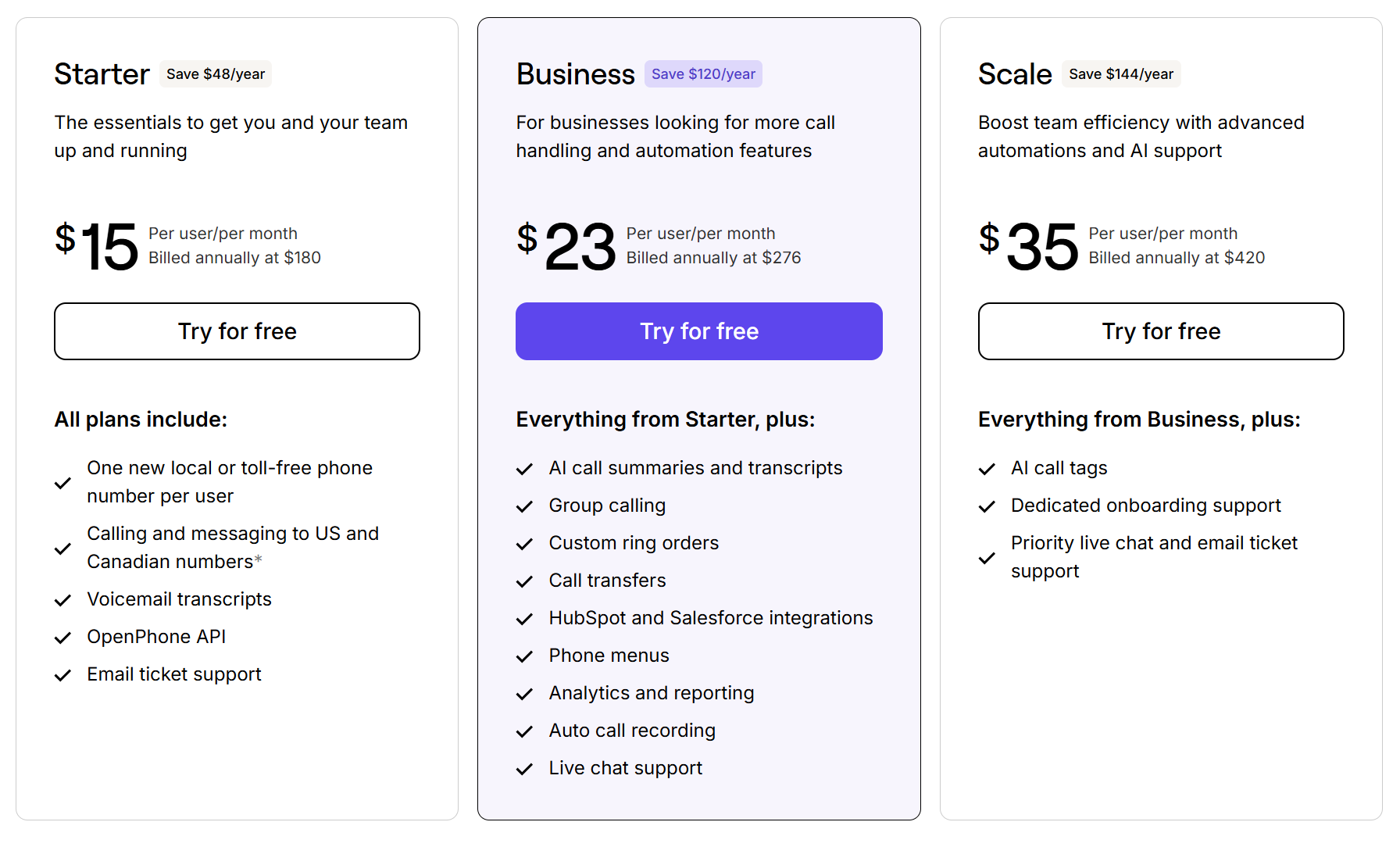
Quo has three affordable pricing options:
- Starter: $15 per user per month for shared phone numbers, internal threads, contact notes, voicemail transcriptions, scheduled messages, auto-replies, manual call recording, and more
- Business: $23 per user per month for automatic call recording, group calling, AI call summaries and transcripts, phone integrations with HubSpot and Salesforce, and more
- Scale: $35 per user per month for AI call tags, dedicated onboarding, inbound phone support, and priority chat and email support

How to get an alternate phone number with Quo
You can get an alternate phone number with Quo in three simple steps. Here’s how to get started:
- Create a Quo account with our free seven-day trial.
- Select a local US, Canadian, or North American toll-free number with your choice of area code.
- Import your contacts and invite your teammates.
That’s it! After that, you can start using your alternate phone number. You can also easily set up a phone menu, voicemail greeting, and other custom phone settings to deliver a professional presence.
Note: If you already have a second phone number and want to switch to Quo, we can help you with business phone porting.
2. Google Voice: Best for Google Workspace users
Pros
- Free calls to phone numbers in the US
- Integrates with other Google Workspace apps
- Share responsibility for incoming calls, requires an upgrade
Cons
- Texting is available in the US only
- Costs more than other business phone system providers
- No toll-free numbers
- No desktop app is available
- No auto-replies
- No integrations outside Google Workspace
Google Voice is a VoIP service with plans for both individuals and businesses. It offers a free personal plan, but the service is limited to people with US phone numbers.

The Google Voice app does have paid plan options under Google Voice for Google Workspace, with additional features like ring groups. All calls, text messages, and voicemail messages are also in separate folders using Google Voice, making following up with others more time-consuming.
Google Voice might work for solopreneurs on a tight budget. However, if you work with a team, this app has many limitations. For instance, you can’t easily message your teammates. You have to switch to another app like Google Chat for that. Calls, text messages, and voicemail messages live in separate sections in their app, making it tricky to catch up on conversations.
Google Voice for Google Workspace also has no advanced business features like call routing and group calling. Additionally, since Google Voice has no integrations outside of Google Workspace, it won’t work with any other tools your business may be using.
Google Voice pricing
Google Voice offers three pricing plans for individuals and three pricing plans for teams. Personal plans are only available to US customers, while team pricing is available in 14 countries, including Belgium, Italy and Spain.

Here are the Google Voice pricing plans for individuals:
- Basic: Free, limited to one user, with unlimited domestic calling and texting.
- Starter: $10 per month to access three-way calling, seamless call transfers, and easy call recording.
- Standard: Introductory price of $10 per month for the first six months, after which it is $20 per month. Access AI note-taking with Gemini and auto-attendants in this plan.

Here are the Google Voice pricing plans for teams:
- Starter: $10 per user per month, with a 10-user maximum, for calls and texts in the US, call forwarding, and SLAs
- Standard: $20 per user per month to access on-demand call recordings, ring groups, and phone menus
- Premier: $30 per user per month to access automatic call recordings and advanced reporting
Google Voice team plans also require a Google Workspace subscription, which starts at $7 per user per month.
3. Burner: Best for multiple personal numbers
Pros
- Purchase up to 200 phone numbers at once
- Easy to delete phone numbers after use
Cons
- Not designed for business use
- No integrations
- No call recordings
- No auto-attendants
- Not always reliable or user-friendly
Burner allows users to create temporary phone numbers for various purposes. For example, users might use Burner to avoid spam calls or when they need a phone number to make an online purchase.

However, Burner falls far short of business use cases. It has no features that allow users to share responsibilities in answering calls or have a phone menu — let alone any more advanced business phone features.
Burner pricing

Burner’s pricing plans depend on where you purchase them:
- Web Standard: $3.99 per month for one number purchased on the web, billed annually
- Web Premium: $5.83 per month for one number, video messaging, AI voicemail transcription, VPN, and reverse number lookup, billed annually
- App Store: $4.99 per month for one number purchased from the iPhone app, billed annually
- Play Store: $4.99 per month for one number purchased from the Android app, billed annually
4. TextNow: Best for alternate numbers with high-speed data
Pros
- Free phone number
- International calling and texting
Cons
- Ad-free requires upgrade
- Voicemail transcripts require upgrade
- Not designed for businesses
- Only available in the US and Canada
TextNow offers multiple high-speed data plans, making it a great option for personal use. Users have access to free calling and unlimited texting over WiFi and can access mobile data with a SIM card. Unlike many traditional carriers, TextNow has no contracts.

TextNow seems like a great deal for individuals. However, you have to be comfortable with viewing ads while you manage your calls and texts. And if you don’t use your TextNow number for 30 days, you can lose access to it. For example, this Reddit user traveled for a month and came back to find their TextNow number missing.
Like Burner, TextNow is designed for personal use. You won’t be able to use it with a team to manage customer communications, share customer phone numbers, or integrate with a CRM. Incoming calls can’t simultaneously ring multiple team members. TextNow also doesn’t have any features like auto-replies, call summaries, or transcripts.
TextNow pricing
TextNow is free to use with ads. To make calls without WiFi, you first need to purchase a SIM card for $3.99. TextNow’s paid plans include:
- Day Pass: $2.99 for 24 hours of unlimited talk and text, plus 2GB of data
- Weekly Unlimited: $8.99 for a week of unlimited calls and texts, plus 5GB of data
- Unlimited Plan: $35.99 for one month of unlimited talk and text, plus 20GB of data
5. RingCentral: Best for desk phone rentals
Pros
- Low-cost desk phone rentals
Cons
- Limits on SMS
- Limits on toll-free numbers
- No true unlimited storage option
For businesses that need physical phones for an office, RingCentral offers VoIP calling, texting, video communications, and desk phone rentals in a single platform. However, it limits texting, toll-free minutes, and storage, which can be problematic for some businesses.

On its base plan, RingCentral only offers 100 toll-free minutes, which means you’d have to upgrade if you want more. Businesses on the base plan only get access to 25 texts per user per month. Even on the most expensive plan, you’re still limited to 200 messages per user per month. After that, you have to purchase additional texting credits.
If you rely on call recordings, RingCentral stores recordings on its servers for 90 days. This can be challenging if you have longer sales cycles or need to review older support calls. Even if you upgrade to RingCentral’s Ultra pricing plan, you still won’t have unlimited storage. Time-based deletion policies take effect after 90 to 180 days. Even though RingCentral is a solid alternate phone number option, these limits keep it from being the best choice.
RingCentral pricing
RingCentral has three pricing plans:
- Core: $20 per user per month for unlimited domestic calling, SMS and MMS, and visual voicemail
- Advanced: $25 per user per month for unlimited internet fax, automatic call recording, and CRM integrations
- Ultra: $35 per user per month for unlimited storage, unlimited AI video meetings, and custom analytics and alerts

6. Sideline: Best if you only need one alternate number
Pros
- SMS and MMS messaging
- Auto-replies available
Cons
- No call recording
- Auto-attendant is available only on the Enterprise plan
- International calling is available only on the Enterprise plan
- No Slack, Zapier, or CRM integrations
For businesses just getting started that don’t need a lot of features, Sideline is a lean alternate phone number solution. Sideline provides a second number to users with iOS and Android apps. It offers unlimited calling, SMS texting, and group messaging within the US. It also provides standard business phone system options such as group messaging, voicemail, and auto-replies.

The downside is Sideline doesn’t work well for teams. It doesn’t have shared numbers, call recording, or third-party integrations, which are all essential to managing team communications. Features like auto attendant and international calling are also only available on its Enterprise plan, which makes it more expensive than other alternatives.
Sideline pricing
One challenge you may run into with Sideline is getting all the features you need. There is only one Sideline pricing plan for individual users. It includes free calls and texts in the US with carrier minutes, group messaging, and auto-replies. Sideline’s three pricing options are:
- Monthly: $14.49 per month
- Half-yearly: $69.99 per month
- Yearly: $129.99 per month
3 Reasons you should get an alternate phone number
You might be wondering — do I really need to get a second number? Can’t I use my personal phone number for business purposes?
Here are a few key advantages to having an alternate number for your work communications:
- Keep your personal number private. Having a designated business number allows you to keep your personal phone number secure while providing potential customers with a simple and easy way to reach you.
- Set clear work-life boundaries. Alternate phone number apps allow you to set up business hours, auto-replies, and custom voicemail greetings to create clear expectations about when you’re available.
- Share responsibility for incoming calls and texts: Shared numbers distribute responsibility for customer communications within a team. Overall, your business will have fewer missed calls and unanswered messages.
How to choose an alternate phone number provider
As you evaluate your options for an alternate phone number provider, consider the following criteria:
- Features. Prioritize different features for your alternate number based on your use case. For personal use, prioritize call forwarding, unlimited calling and texting, and spam blocking. For business phone number apps,look for shared numbers, third-party integrations, call recordings, auto-replies, and custom voicemail options.
- Usability. Think about how many people will be using the second number. Not all providers allow multiple users to call and text from the same number.
- Pricing. Most providers charge a monthly fee for alternate numbers, and some charge additional fees for add-on features. Before signing up, make sure you understand which features are included with your preferred small business phone plan and which cost extra.
- Reviews. Check third-party review platforms like G2 and Capterra to see what real customers are saying about your preferred alternate number provider.
- Reliability. You don’t want to risk frequent dropped calls or other call quality issues. Check a provider’s performance and uptime by heading to their Status page. If the provider doesn’t have one, ask for a report to verify that the company is as reliable as it claims to be.
As you consider alternate phone number options, consider what you need the number for. If you need a second phone number to communicate with customers and collaborate with your team, choose a reliable business phone provider. If you need a temporary phone number to protect your personal number, go with an app like Burner. But if cost matters, go with a free app instead.
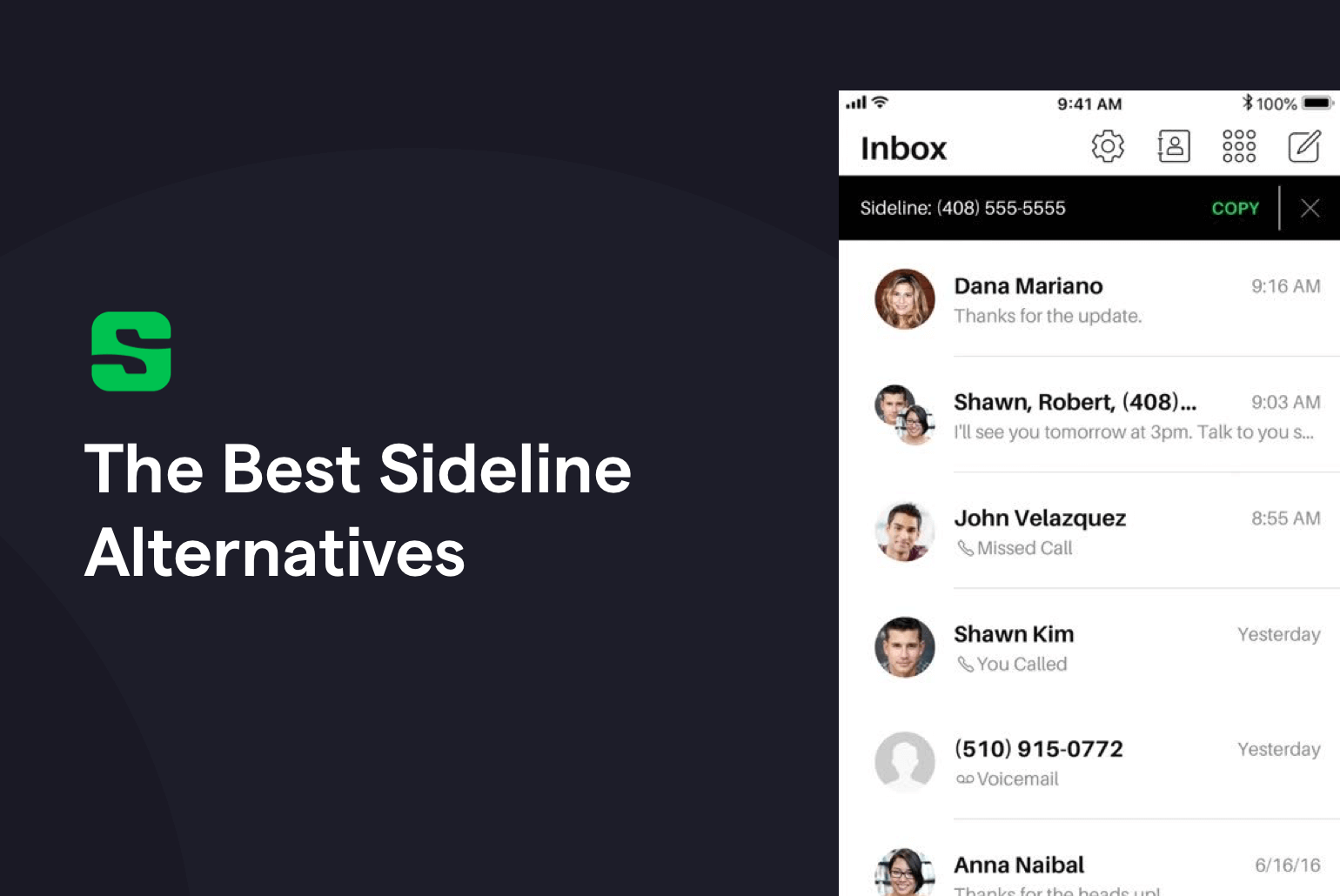
If you decide you need a business phone provider, consider Quo. Thousands of businesses choose Quo as their business phone provider. We’re rated #1 on G2 for customer satisfaction.
Don’t just take our word for it. See what actual customers have to say about our platform:
“Quo not only has reliable coverage, a simple and intuitive app, and [a] super easy number porting process, it also has, hands-down, the friendliest customer service I have ever experienced from a web-based service provider.” — Desirée Alarie, Realtor, Powell Property Group
Want to check out Quo’s business phone number features? You can sign up to try Quo for free for seven days.
FAQs
You can get an alternate number by signing up with an alternate phone number provider. Once you’ve signed up, you’ll choose a number and verify your identity. We follow this simple sign-up process at Quo. Try it for yourself here.
You can’t make an alternate phone number on your own. However, you can choose an alternate number based on your preferred area code from an alternate number provider.
Burner offers multiple alternate numbers you can use simultaneously. It’s an ideal option for someone looking for a temporary phone number for personal use.
If you need an alternate phone number to accept verification codes, you should avoid using virtual phone numbers. Entities like banks, ride-hailing apps, and government agencies check whether users have carrier-provided phone numbers when they send verification codes. It’s a fraud prevention measure that filters out scammers and bots.
Most business phone providers offer phone number porting so that you can bring in your existing number to their service. However, free app and temporary number providers don’t let you port in your existing phone numbers to their platform.
A second number hides your personal number from the call recipient. It doesn’t hide anything from the provider. Whoever issues the number can see who called, when, and for how long. Business phones like Quo don’t sell your data and offer data privacy in its platform. Free app providers offer no such promises, so be careful how much of your communication you choose to have with them.
The easiest route for businesses to add a second number is to use a virtual phone app provider. These providers typically provide iPhone and Android apps and don’t require any interaction with your carrier.. A second carrier phone number is another option, but they require phones with eSIM or dual SIM support. You also can’t share a carrier second phone number with your team, which makes them less suited for business use.. Whichever you choose, the new number lives right on the phone you already carry.