Looking for Google Voice alternatives? While you can use Google Voice for calling and texting customers, it has significant limitations for business use. These include separate inboxes for calls and texts, no toll-free numbers, and limited integrations.
After testing dozens of business phone systems, we’ve identified the top 11 alternatives to Google Voice. We’ve based our contenders on features, reliability, and cost-to-value ratios.
Need deeper integrations, more automation, or better collaboration? By the end of this guide, you’ll find a Google Voice alternative that’s right for you.
How we tested Google Voice alternatives
We tested over 15 business phone systems to find the best Google Voice alternatives. Our evaluation focused on:
- Call quality and reliability: We made test calls and reviewed user reports. We looked at audio clarity, dropped calls, and service uptime across different providers.
- Setup and onboarding: We assessed how easy it was to create an account, port numbers, and get teams up and running. We ruled out options with a lengthy onboarding process.
- Mobile and desktop experience: Calling and texting across devices are table stakes for VoIP solutions. We tested out how providers’ apps worked across iOS, Android, Windows, and Mac.
- Advanced features: We compared capabilities like integrations, call routing, and voicemail transcription. We also looked at whether tools had AI voice agents or AI call summaries and transcriptions.
- Team collaboration tools: We evaluated whether alternatives had collaboration features, like shared numbers, call routing to multiple people, and CRM syncing.
- Cost-to-value ratio: We looked at pricing tiers, per-user costs, and add-ons to see which providers offer the best value.
- Reviews from real users: We analyzed customer feedback across review platforms. Plus, synthesized reviews to identify common strengths, recurring issues, and overall satisfaction.
The best alternatives include both paid and free options that address Google Voice’s key limitations.
11 powerful Google Voice alternatives compared
Here’s a quick breakdown of the top Google Voice alternatives:
| Provider | Starting price | Best for | SMS/MMS to US & Canada | Shared phone numbers | Average G2 rating | Free trial |
|---|---|---|---|---|---|---|
| Google Voice | $10 per month for an individual plan | Teams with an existing Workspace subscription | US customers only | Requires upgrade, ring groups only | 4.1 out of 5 | X |
| Quo, formerly OpenPhone | $15 per user per month | Growing teams that need collaboration and automation tools | ✅ | ✅ | 4.7 out of 5 | 7-day free trial |
| RingCentral | $20 per user per month | Teams needing desk phone rental options | 25 texts per user per month | ✅, calls only | 4.2 out of 5 | 14-day free trial |
| Grasshopper | $14 per month | Teams that need multi-digit extensions | MMS messaging for local numbers only | Requires upgrade | 3.9 out of 5 | 7-day free trial |
| Ooma | $19.95 per user per month | Teams that need legacy features like overhead paging | Requires upgrade | ✅ | 4.6 out of 5 | 30-day free trial |
| Nextiva | $15 per user per month | Teams that use Microsoft products | 100 texts per user per month | ✅ | 4.5 out of 5 | X |
| Dialpad | $15 per user per month | Contact centers needing call monitoring features | US and Canadian customers only | ✅ | 4.4 out of 5 | 14-day free trial |
| Zoom Phone | $10 per user per month | Teams that make a high volume of international calls | US, Canadian, and Australian numbers only | ✅, calls only | 4.6 out of 5 | Only for the US & CA Unlimited plan |
| MightyCall | $20 per user per month | Companies that do high-volume calling campaigns | ✅ | Calls only | 4.4 out of 5 | 7-day free trial |
| WhatsApp for Business | Free | Micro-businesses that need a free VoIP solution | ✅ | X | 4.6 out of 5 | X |
| Facebook Messenger | Free | Facebook users that need a free way to message customers | ✅ | X | N/A | X |
| TextNow | Free | Solopreneurs that want plans with high-speed data | ✅ | X | N/A | X |
Keep reading below to learn about each Google Voice alternative in detail:
1. Quo: Best Google Voice alternative for growing teams

Pros
- Unlimited calls and texts to the US and Canada
- Local, toll-free, and vanity numbers are available
- Shared numbers to split responsibility for incoming calls and texts
- Integrations with 8,000+ third-party apps, including HubSpot and Salesforce
- AI features for call transcriptions, summaries, and action items
- HIPAA-compliant conversations
Cons
- No verification through two-factor authentication*
*Nearly all virtual phone numbers share this problem. Companies like Facebook, Uber, and Google rarely let you authenticate accounts through a virtual phone number.
If you’re tired of Google Voice’s quirks, Quo, formerly OpenPhone, lets you work together as a team and save time on repetitive communication tasks. With Quo, multiple team members can handle calls and texts on a shared business phone number. Plus, collaborate on conversations with internal threads. This means everyone on your team can see customer conversations and jump in as needed.

Instead of copying and pasting clients’ phone numbers and information into your CRM, Quo lets you sync data automatically with integrations. Your calls, texts, voicemails, and call recordings sync directly to HubSpot, Salesforce, Pipedrive, Zoho, Jobber, and more. Rather than sending reminder and follow-up texts manually, you can use the Quo API, Zapier, or Make integration to send them on autopilot.
Plus, you can add local numbers and additional team members right in the app without needing to change your plan.
Here are a few other key benefits of using Quo over Google Voice:
- Offer a nationwide presence to customers with toll-free numbers
- Save time texting with your customers using scheduled texts, auto-replies, and automated texts via Zapier or Make
- Review conversations faster with AI call summaries and transcripts
- Handle all your incoming calls 24/7 with Sona, our AI voice agent
- Set up a BAA to call and text in a HIPAA-compliant way if you run a healthcare business
- Work from your existing computer, smartphone, or tablet
Here’s what one Quo customer had to say:
“I first signed up for Quo to get off of Google Voice for their poor call quality and buggy app. I was instantly happy with my decision back then because Quo just worked. Fast forward to today; I could not be happier with my decision to move to Quo. Reliability has remained exceptional, but more importantly, the feature set available to my business now far outweighs that of Google Voice.” — Nicholas Bentley, Founder and CEO at Merus
Try out the best Google Voice alternative

Learn more about Quo vs Google Voice and how they compare. You can try Quo for free with a seven-day trial. Then when you’re ready, easily port any existing US, Canadian, or toll-free number over.
Quo pricing

Quo offers transparent pricing and some of the best rates in the industry for must-have business phone features.
- Starter: $15 per user per month for shared phone numbers, voicemail transcriptions, free calls and texts in the US and Canada, and dozens of ways to streamline your business’s phone communication
- Business: $23 per user per month for IVR auto-attendant, call transferring, CRM integrations, analytics, and more advanced features
- Scale: $35 per user per month for AI call tags, dedicated onboarding, and priority chat and email support
2. RingCentral: Best alternative for desk phone rental options

Pros
- Unlimited calling to the US and Canada
- Desk phone rentals are available
Cons
- Texting limits on the base plan
- Call recordings are deleted after 90 days
- Toll-free minute limits on every plan
RingCentral is an older business phone solution for unified communications. It’s accessible through web and mobile apps and with compatible desk phones.
All RingCentral plans include essential features like:
- Basic call management
- Unlimited calls within the US and Canada
- Voicemail-to-text
- Team messaging
- Document sharing

RingCentral offers more advanced call management features compared to Google Voice. You can set up call queues, access toll-free numbers, and work as a team with shared lines for calling. In contrast, Google Voice only offers basic ring groups and auto-attendants.
But you should read the fine print to avoid hidden fees. Their base plan, for example, only lets you send 25 text messages per user per month to anyone in the US or Canada. Anything more than that, and you’re paying extra.
Here’s what one user said:
“At times, the system can feel a bit complex, especially when navigating between different tools or settings. Occasionally, call quality can fluctuate depending on network conditions, and updates sometimes change the layout in ways that take time to get used to.” — Shannon V. on G2
RingCentral also has limitations around storing conversations. For example:
- Call recordings are deleted after 90 days
- Only 200 on-demand call recordings can be stored per user
- Users are limited to storing up to 5,000 messages
Even if you upgrade to its most expensive plan, RingCentral’s storage policies will still limit you.
Get the full breakdown of Google Voice vs RingCentral.
RingCentral pricing

RingCentral’s pricing has three tiers:
- Core: $20 per user per month for unlimited domestic calling, 25 texts per user per month, and 100 pooled toll-free minutes
- Advanced: $25 per user per month includes auto call recording, app integrations like Salesforce and Zendesk, 100 texts per user per month, and 1,000 pooled toll-free minutes
- Ultra: $35 per user per month includes unlimited file sharing for recordings, HD video whiteboards and messaging, 200 texts per user per month, and 10,000 pooled toll-free minutes
If you want to access features like shared texting, compliance, and company reply templates, you’ll need to purchase their Business SMS Booster at $25 per month. You can also access these features in its Customer Engagement Bundle. If you’re looking for a solution that offers all these features, you might feel confused. The reason: there are five other service options outside of RingCentral’s business phone plans.
3. Grasshopper: Best alternative to Google Voice with multi-digit extensions

Pros
- Unlimited calling to the US and Canada
- Auto-attendant with multi-digit extensions
Cons
- No call transcripts
- No shared phone numbers without upgrading
- No Slack, Zapier, or CRM integrations
Grasshopper is a popular VoIP service offering an easy-to-use interface and local and toll-free numbers. You can also add unlimited users to two of the plans, which makes it more cost-effective than Google Voice.
Grasshopper gives businesses more flexibility than Google Voice. It offers virtual extensions, shared texting, auto-reply texts for missed calls. However, like Google Voice, it doesn’t have integrations with CRMs or tools like Zapier and Make. It also doesn’t have collaboration features for working with your team.
Grasshopper also has major texting limitations you should know about. You can’t text international numbers, you can’t send MMS or group messages from toll-free numbers, and you can’t schedule messages.
We also found Grasshopper’s workspace to be clunky and dated while testing.
One Grasshopper review says: “Over the few years I used it, they never made any upgrades. The iOS app functioned well enough for basic things, but seemed to be forever just a beta product. The website’s settings were hard to navigate, and setting up the incoming call workflow was too cumbersome.” — Elliott T. on Capterra
Plus, pricing can be confusing. Their base plan only allows for a single number and one extension, while the second tier includes one number and three extensions. You’ll need to pay for the highest tier to access unlimited extensions and four phone numbers.
Grasshopper pricing

Here are Grasshopper’s pricing plans:
- True Solo: $14 per month for one user, one phone number, and one extension
- Solo Plus: $25 per month for unlimited users, one number, and three extensions
- Small Business: $55 per month for unlimited users, four numbers, and unlimited extensions
*Additional numbers cost $9 per month.
4. Ooma: Best alternative for teams that need overhead paging
Pros
- Unlimited calling in the US, Canada, Mexico, and Puerto Rico
- Local and toll-free numbers are available
Cons
- Texting is only available on higher tiers
- Limited toll-free minutes
- Call recording is only available on higher tiers
- Unnecessary features like intercom calling and analog fax machine support
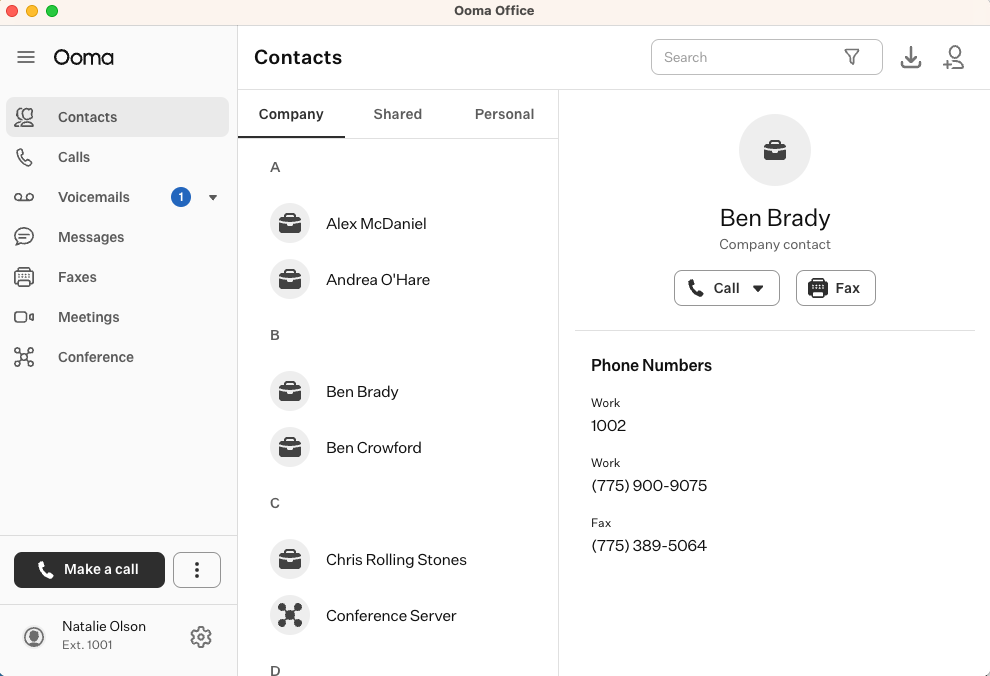
Ooma is a business phone with virtual receptionists, overhead paging, and unlimited domestic calls. You can access their mobile app and desk phone service on the base plan.
Like other alternatives to Google Voice, Ooma offers multiple features that make it a better option. You can sync your call and text data with your CRM, including Salesforce, Zoho, and HubSpot. You can also access video conferencing, virtual fax, call blocking, and overhead paging.
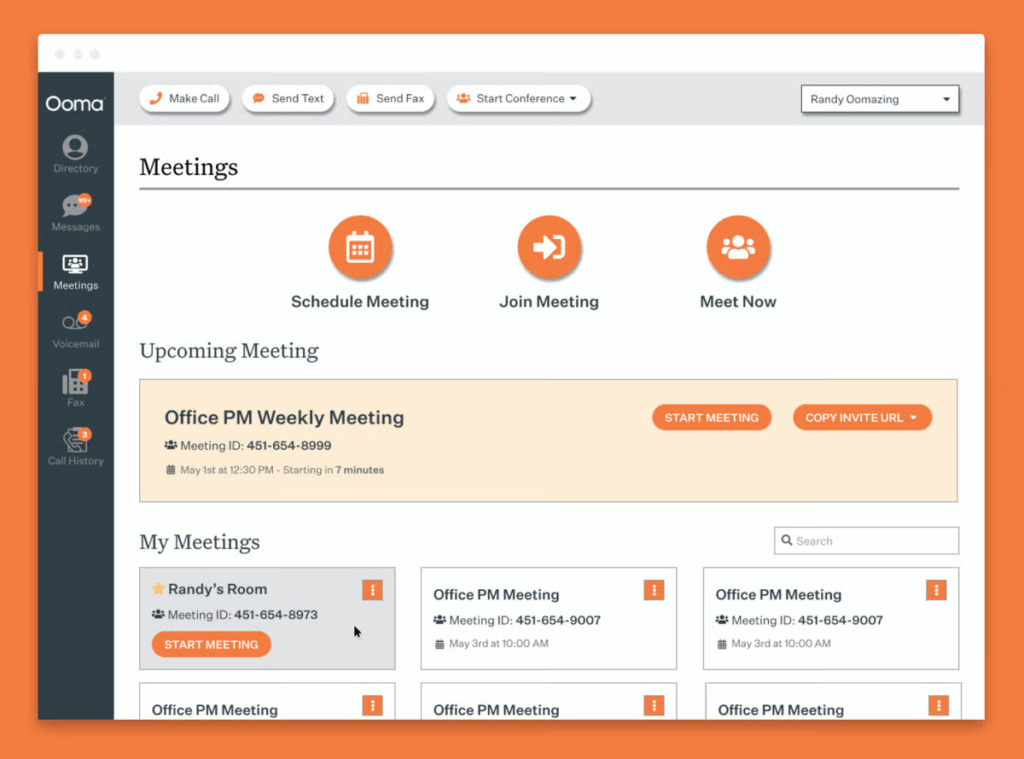
What holds Ooma back is a lot of these features are only available when you upgrade to more expensive plans. You need to upgrade to access texting, and even after you upgrade, you’re limited to 250 free messages per user per month. You also need to upgrade to use voicemail transcriptions and make calls with Ooma’s desktop app.
Here’s what one customer said:
“When it works, it does the job. But when it doesn’t, there is a major disruption to business, and the perception of our clients is hurt. Wouldn’t really recommend this product unless you have a full-time IT person to manage it.” — Diane R. on Capterra
Perhaps you already use desk phones and think overhead paging would be useful to your business. Otherwise, Ooma probably won’t make much sense for your business communication stack.
Ooma pricing

There are three different pricing plans for Ooma.
- Essentials: $19.95 per user per month for auto-attendants, call forwarding, and overhead paging support
- Pro: $24.95 per user per month for call recording, voicemail transcriptions, video conferencing, analytics, SMS, and access to Ooma’s desktop app with calling
- Pro Plus: $29.95 per user per month for call queuing, CRM integrations, hot desking, shared voicemail boxes, and advanced call flows
Additional numbers cost $9.95 per number per month with Ooma.
5. Nextiva: Best alternative for teams that use Microsoft products

Pros
- Review management
- Video calling features
- Works on smartphones, computers, and compatible desk phones
Cons
- SMS and MMS have a capped message limit
- Video call recording is only available on the higher-tier plans
- Most integrations require an add-on fee
Nextiva is a VoIP phone service that supports calls in the US and Canada. It’s a good fit for businesses that run on Oracle Sales Cloud or Microsoft Dynamics since Nextiva offers integrations with both.
You can find several business phone features on Nextiva that aren’t available on Google Voice, like video calling and omnichannel support. However, Nextiva’s feature limitations on each plan mean it can quickly get expensive for small businesses and startups.

Take a look at this review:
“Unreliable phone service, calls not going through, and poor customer service when reporting issues.” — Verified user on G2
SMS is limited to 100 messages sent and received per user per month before you’re charged extra. Nextiva only includes toll-free minutes if you upgrade your plan. It also only offers integrations with CRMs like Salesforce and Zendesk as an add-on in every plan, which further drives up your costs.
Nextiva pricing

You can choose from three different Nextiva pricing plans:
- Core: $15 per user per month to access inbound and outbound voice calls, SMS/MMS up to 100 messages per user per month, voicemail transcriptions, and a simple IVR
- Engage: $25 per user per month to access call recording, a toll-free number and 2,000 toll-free minutes, 500 SMS/MMS per user per month, video meeting recording, and Microsoft Teams integration
- Scale: $75 per user per month for the inbound sales and service call center, priority and skills-based routing, supervisor dashboard, unlimited texting, up to 10,000 toll-free minutes, and automatic call distribution callback
6. Dialpad: Best alternative for contact centers

Pros
- Unlimited calling to the US and Canada
- Real-time AI-powered coaching on higher plans
- Compatible with computers, mobile phones, and some desk phones
Cons
- Additional numbers require an upgrade
- Slack, Zapier, and CRM integrations are only available on higher tiers
- No international texting on the base plan
Dialpad is a cloud communications platform primarily geared toward call centers. They highlight AI features like live speech coaching and call and voicemail transcriptions.
But like other alternatives to Google Voice, Dialpad’s Standard plan lacks some essential features. To access additional phone numbers and separate your teams, you’ll have to upgrade to a Pro plan. The same is true if you require integrations beyond Google Workspace or want to text internationally. You should also know that Dialpad’s Pro plan requires a minimum of three users, which increases your costs.
When you compare Dialpad vs Google Voice, you’ll find a lot of AI support features in Dialpad that are missing from Google Voice. But when you actually look at how much you might spend on Dialpad’s plans, you might go with a different Google Voice alternative.

During the trial, we noticed it was time-consuming and unintuitive to set up the workspace. Plus, their customer support leaves a lot to be desired.
One user shared this experience:
“Terrible customer support who make you go through their clunky chat app to accomplish anything, and even then do not help you. I requested cancellation and was shocked to find they didn’t process it. Upon contacting them and requesting a refund, they claimed to not have a record of the request and refused.” — Isaac J. on Capterra
Dialpad pricing

You can choose from three different Dialpad pricing plans:
- Standard: $15 per user per month for AI-powered call and voicemail transcriptions, Dialpad SMS, and Google Workspace integrations
- Pro: $25 per user per month for the option to have additional numbers, international texting, auto-replies, and CRM integrations with a required minimum of three users
- Enterprise: Call for a quote and get 100% uptime, unlimited locations and ring groups, SSO integrations, and live agent support with a required minimum of 100 users
7. Zoom Phone: Best alternative for international calling

Pros
- Make and receive calls, texts, and video meetings
- Integrates with other Zoom Services — Zoom Workplace, Scheduler, Rooms, and Events & Webinars
- Works on laptops, cell phones, and compatible desk phones
Cons
- Outbound calling costs extra
- Limited integrations
- Team SMS summaries require an add-on
Zoom Phone integrates seamlessly with Zoom’s other communication tools. This makes it an easy option to recommend if you’re already using it for your video meetings. It offers a range of VoIP phone features, including auto-attendants,analytics, and an AI assistant.
Zoom Phone offers more features in its base plan compared to Google Voice. It comes with ring groups and auto-attendants on its base plan, while Google Voice requires you to upgrade to access those features. With Zoom Phone’s real-time reporting and quality dashboards, you can keep a close watch on your team’s efficiency and overall performance.
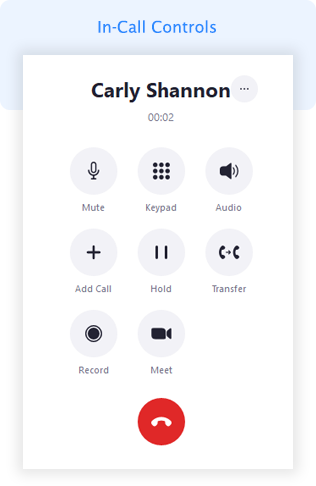
The drawback with Zoom Phone is that its tiered pricing can quickly get expensive for small teams. Unlimited outbound calling and additional cloud storage isn’t available by default. It requires businesses to upgrade to its higher-tier plans.
Here’s a look at one review:
“Many soft-phone features aren’t very strong, such as adjusting notification settings, ease of switching to do-not-disturb. Had several issues with SMS history not loading and international calling restrictions.” — Justin G. on Capterra
Zoom Phone pricing
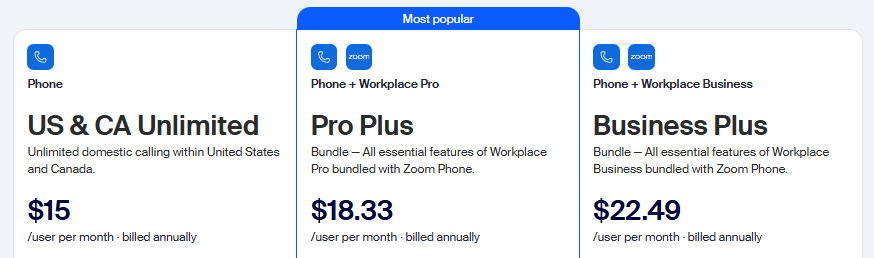
Adding a phone plan to your Zoom subscription could save some time and effort, but it might not save you money. There are five Zoom Phone price plans to choose from. Let’s take a look at the first two:
- US & Canada Metered: $10 per user per month for metered domestic US and Canadian calling, metered international calling, and toll-free numbers
- US & Canada Unlimited: $15 per user per month for unlimited metered domestic US and Canadian calling.
The next two plans bundle the Zoom Phone US & Canada Unlimited plan with Zoom Workplace:
- Pro Plus: $18.33 per user per month to access 30 hours of meetings, local and 10 GB cloud recording, Zoom AI Companion, and access to Docs, Mail, and Calendar
- Business Plus: $22.49 per user per month to access 300 participants per meeting, unlimited whiteboards, SSO, and device management
If you’re expanding globally and looking for a plan that offers local numbers in different territories, Zoom Phone has a plan for that:
- Global Select. It’s priced at $20 per user per month for unlimited domestic calling in 40+ countries and territories and a local number for those territories with each license.
There are also a few add-ons to consider:
- Additional phone numbers: $5 per number per month for toll-free, local, or international premium numbers
- International calling: $10 per month to make unlimited international calls to more than 15 countries and regions. It can only be purchased with an unlimited calling plan.
- Zoom Phone Power Pack: $25 per month per license for enhanced call queue analytics and historical insights for call center teams
- Desk phones and headsets: Zoom Phone offers multiple desk phone and headset models for purchase, but they’re not available for rental
8. MightyCall: Best alternative for high-volume calling campaigns
Pros
- Unlimited calls and texts on every plan
- API is available
Cons
- Phone number limits
- Dialer and analytics features require an upgrade
- Three-user minimum on every plan
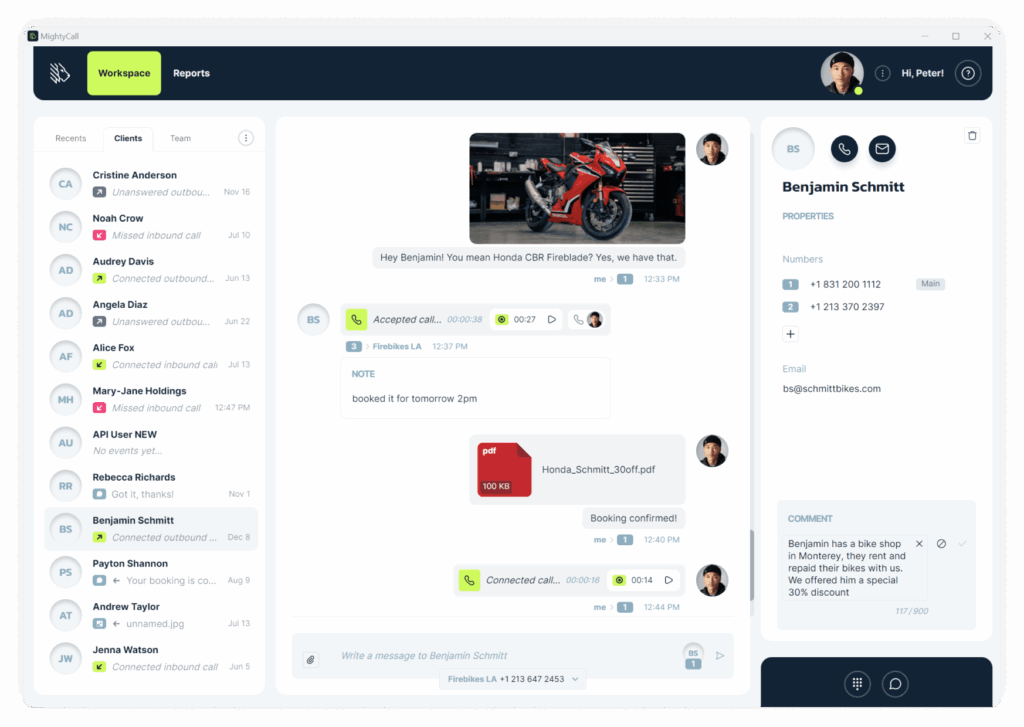
MightyCall is a Google Voice alternative designed for high-volume sales and support teams. For example, you can schedule outbound call campaigns when you have a promotion. MightyCall ensures your managers are always aware of how their teams are performing. It has features like preview and progressive dialers, live call monitoring, and real-time analytics.

Similar to other alternatives to Google Voice, MightyCall offers several features for teams, like IVR menus and HIPAA compliance.
But there are some shortcomings with MightyCall you should keep in mind:
- Limited numbers in each account: You only get access to three phone numbers in your account, after which you have to pay $5 per additional number.
- Limited one-year storage for call recordings.
- No advanced SMS features like auto-replies, scheduled messages, or text templates, which can affect your team’s efficiency over time.
Plus, users have reported connection issues:
“There are times when we have connection issues, especially with transferring calls. However, uninstalling and reinstalling the app typically fixes that.” — Matt R. on G2
MightyCall pricing

MightyCall offers four plans to choose from:
- Core: $20 per user per month with a three-user minimum to access unlimited calling, unlimited messaging, and three business phone numbers
- Pro: $38 per user per month with a three-user minimum to unlock supervisor workspace, live call monitoring, and analytics and reporting
- Power: Contact sales for a quote to access Preview dialer, Progressive dialer, and a dedicated account manager
- Enterprise: Contact sales for a quote to access Predictive dialer, SIP trunking support, and custom integrations
Best free Google Voice alternatives
Most free alternatives to Google Voice aren’t built for business. These include apps like WhatsApp Business, Facebook Messenger, and TextNow. They offer free messaging and calls, but they often lack essential business phone features like:
- Professional phone numbers — no shared numbers and no toll-free numbers
- Team collaboration — can’t share access or work together on calls
- Business integrations — no third-party integrations to share call and text data
- Call management — no routing, recording, or analytics
- Reliability guarantees — no uptime promises or business support
With that in mind, here are three popular options worth considering:
9. WhatsApp for Business: Best free alternative for micro-businesses
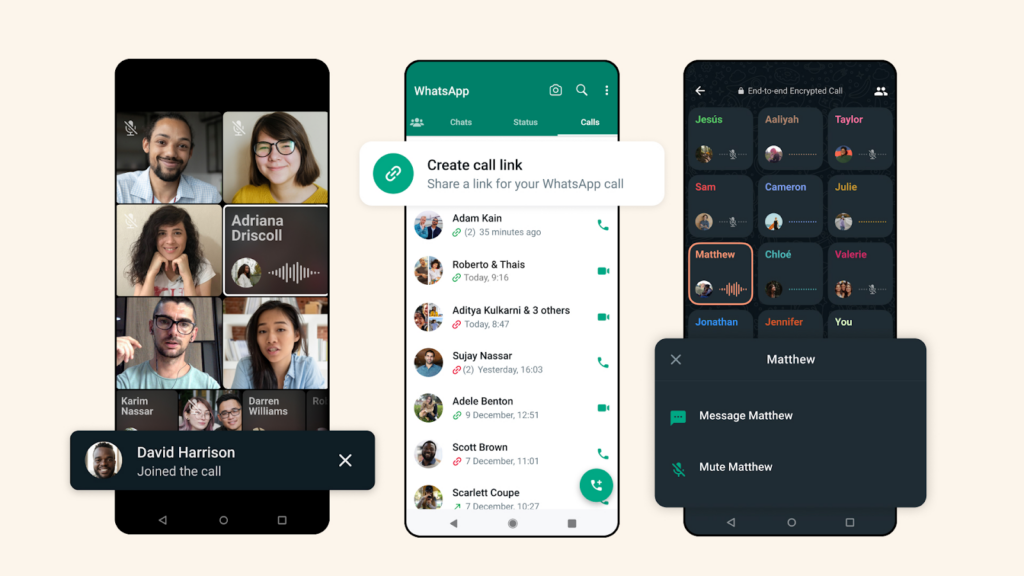
WhatsApp for Business is great for international messaging and voice calls. However, it doesn’t support features like auto-attendants or call recording. You can link multiple devices to the same WhatsApp account to communicate with your customers. You can also share your products and services with customers in a mobile-friendly catalog.
While you can do more through the WhatsApp Business API, it requires technical setup. This isn’t ideal if you need easy conversation tracking or workflow automation out of the box.
10. Facebook Messenger: Best free alternative for Facebook users

Facebook Messenger makes chatting with customers easy and supports basic auto-replies. However, it doesn’t offer a dedicated business number. It also doesn’t offer call management features like call routing, recording, or team collaboration tools.
The Messenger API allows for custom automations and integrations. But it requires technical expertise to set up. Like most free tools, it doesn’t offer time-saving features like message scheduling out of the box.
11. TextNow: Best free alternative with high-speed data

TextNow is a Canadian second phone number alternative to Google Voice. It offers unlimited free calling and texting in the US and Canada. Since it works on a PC, iPhone, Android, and iPad, you can switch between devices while working on the go. You can use your existing SIM card with their plans or get a free SIM card if you sign up for their data plans. Their monthly plan costs $35.99 per month for 20 GB of high-speed data, then unlimited 2G speeds.
While TextNow may be free, it’s not built for small business owners. You won’t be able to share your TextNow number with your team, manage your customer relationships with a CRM, or build call flows that suit your business.
How to switch from Google Voice to another provider in 5 steps
It only takes a few minutes to port your number from Google Voice to another VoIP provider. Keep in mind that if you’re using the free version of Google Voice, Google charges a one-time $3 fee to transfer your number anywhere else.
Follow these steps to port your number out of Google Voice:
- Visit google.com/voice/unlock and sign in to your Google account.
- Click Unlock my number below the Google Voice number you want to port. If you have multiple numbers, select the correct one from the dropdown menu first.
- Pay the $3 unlock fee. After payment, the Number Porting status should show “Unlocked”.
- Once your number is unlocked, contact your new provider to initiate the port. You’ll need to provide your Google Voice number and account information.
- Complete your new provider’s porting process. Port completion typically takes 3-5 business days.
When you switch to Quo, you’ll get a seven-day free trial and dedicated support to complete your port.For a full breakdown of porting, read our guide: How to port your number from Google Voice.
Frequently asked questions about Google Voice alternatives
Microsoft Teams Phone, JustCall, and Aircall are a few additional alternatives to Google Voice.
We’re admittedly biased, but we believe Quo is a solid alternative to Google Voice. We offer team collaboration with shared numbers and internal threads, automation capabilities, and 8,000+ integrations. Unlike Google Voice, Quo supports texting outside the US and includes features like auto-replies to save time texting.
Quo offers a free seven-day trial to test the platform, after which plans begin at $15 per user per month.
Quo is available for both iOS and Android. Our real-time sync capabilities mean that your conversations on one platform are automatically synced in all our apps.
No, Google Voice doesn’t offer toll-free numbers. Quo is an affordable alternative to Google Voice offering local, toll-free, and vanity numbers.
As long as your account remains active, your number should remain available.
Keep in mind that you need to make one call or text within a rolling 90-day period to keep your number active, or Google may reclaim it.
Like most VoIP providers, Google Voice works via an internet connection, either through WiFi or a data plan, to make phone calls and send text messages. No desk phones or landlines are required.
As long as you have an internet connection and an internet-enabled device, you can use Google Voice.
Google Voice allows you to make free calls by signing up with a Gmail address. It can be used for personal and professional reasons — though it’s built specifically for personal communications. Having more than one Google Voice number is also not possible with their free plan.
While the free version of Google Voice isn’t available in Canada, the paid business version is. As long as you’re a Google Workspace customer, you can sign up for Google Voice and assign Canadian numbers to your Google Voice users.
If you need an alternative to Google Voice in Canada, Quo supports Canadian calling and local or toll-free Canadian phone numbers. Quo also offers a wide range of local US numbers if your company wants to have a local presence in both countries.
You can use the free version of Google Voice without Workspace for personal use in the US. If you want to use Google Voice on your own, you can sign up for a Voice plan without Workspace at $10 per month.
However, if you want to use Voice with your team, you’ll have to upgrade to a paid Google Voice plan with Workspace.
Google Voice offers paid plans that start at $10 per user per month. You also need to get a Google Workspace subscription to access a paid Google Voice plan, which starts at $7 per user per month. Check out a full comparison of Google Voice personal vs business.
Yes, you can get a free Google Voice number, but only for personal use. You’ll need a Google account and an existing phone number to verify your identity. Once set up, you can make free calls within the US and Canada and send free texts to US numbers.
Google Voice secures text messages, calls, and voicemail data through encryption. As with any online account, you should still follow best practices like creating a unique password and using two-factor authentication or 2FA.
Yes, you can keep your existing phone number when switching from Google Voice to another phone system through number porting. The process typically takes 3-5 business days to complete. You’ll need to provide information like your account number and PIN from Google Voice to initiate the transfer.
Google Voice was designed for personal use and light business needs, while dedicated business phone systems are built for how teams communicate with customers. Business phone systems offer features that Google Voice lacks — like advanced call routing, shared team inboxes, CRM integrations, and detailed analytics.
For most small businesses, CRM integration matters most. Connecting your phone system to your CRM, like HubSpot, Salesforce, or Pipedrive, automatically logs every call and text. This gives you complete context on customer interactions so you can avoid manual data entry.
VoIP Google Voice alternatives like Quo can be set up in a matter of minutes. Simply create an account, choose a phone number, invite your team, and that’s it! You can start making calls to your contacts immediately.
Setting up your SMS messaging may take a little more time due to A2P 10DLC compliance regulations. However, you can immediately make calls with Quo after creating an account.