Here’s the thing about texting in HubSpot: It’s like treating yourself to a fancy lunch every day — worth it for the convenience, but it can add up fast.
That’s where HubSpot SMS integrations come in. They connect HubSpot with SMS providers, allowing you to message directly in HubSpot. You’ll also be able to send texts from another app while automatically logging and tracking them in HubSpot.
In this article, we’ll compare the top 15 SMS tools that integrate with HubSpot. Plus, we’ll show you how to automate workflows and share tips to turn texting into your secret weapon for better customer relationships.
Best 15 HubSpot SMS integrations
At Quo, we understand what businesses need from a texting platform. After all, we built one that’s rated #1 in customer satisfaction on G2. Our team regularly researches and tests messaging tools to stay up to date on what’s available. To create this list, we analyzed the highest-rated SMS integrations on the HubSpot App Marketplace. We reviewed each product’s features, pricing, user reviews, and other factors.
Here’s a side-by-side comparison of the top HubSpot SMS integrations for texting:
| Quo | Aircall | Sakari SMS | Salesmsg | Sinch SMS & MMS | Kixie PowerCall & SMS | YetiText | Emitrr | TrueDialog | JustCall | Heymarket | TextUs | Textline | CRM Messaging | EZ Texting | |
|---|---|---|---|---|---|---|---|---|---|---|---|---|---|---|---|
| Starting price | $23 per user per month | $30 per user per month, three-user minimum | $25 per month | $25 per month | $49 per month | Not publicly listed | Free | Not publicly listed | $425 per month | $29 per month, minimum two licenses | $20 per user per month | $299 per month | Not publicly listed | $59.99 per month | $20 per month |
| Unlimited calling to US & Canada | ️✅ | ️️✅ | ❌ | ❌ | Calling capability doesn’t integrate with HubSpot | ❌ | $0.05 per minute | Not publicly listed | ❌ | For local numbers | ❌ | ❌ | ❌ | ❌ | ❌ |
| Unlimited SMS & MMS to US and Canada | ️️✅ | ❌ | 823 message segments | 500 segments | 1,000 SMS messages | $0.011 per message | $0.06 per message | Not publicly listed | 5,000 base messages | 500 SMS segments | $0.03 per message | 1,000 per month | 600 per month | 1,000 per month | 6,000 per year |
| Auto-log calls | ️️✅ | ️️✅ | ❌ | ️️✅ | ❌ | ️️✅ | ❌ | ️️✅ | ❌ | ️️✅ | ❌ | ❌ | ❌ | ❌ | ❌ |
| Auto-log texts | ️️✅ | ️️✅ | ️️✅ | ️️✅ | ️️✅ | ️️✅ | ️️✅ | ️️✅ | ️️✅ | ️️✅ | ✅ | ✅ | ✅ | ✅ | ✅ |
| Shared phone numbers | ️️✅ | ❌ | ✅ | ️️✅ | ️️✅ | ️️✅ | ❌ | ️️✅ | ️️✅ | ️✅️ | ✅ | ✅ | Requires upgrade | ✅ | ✅ |
| Additional phone numbers | $5 per number per month | $6 per number per month | $4 per number per month | $5 per number per month | Requires custom quote | $5 per number per month | $5 per number per month | Not publicly listed | $9.99 per number per month | Pricing varies | Pricing isn’t public | Pricing isn’t public | $15 per number per month | Pricing isn’t public | Pricing isn’t public |
1. Quo: Best for taking work off your team’s plate

Quo, formerly OpenPhone, is a small business phone system that offers unlimited texting and calling through local, toll-free, and vanity numbers. With our HubSpot Certified platform, you can send messages to HubSpot contacts in the US and Canada from anywhere with a WiFi connection.
The Quo HubSpot integration lets you automatically log calls and texts in your CRM. That way, you can easily sync conversation data and log call transcripts and summaries in HubSpot. You’ll also be able to quickly review voicemails and call recordings in your CRM. You can also automatically sync HubSpot contacts to Quo.
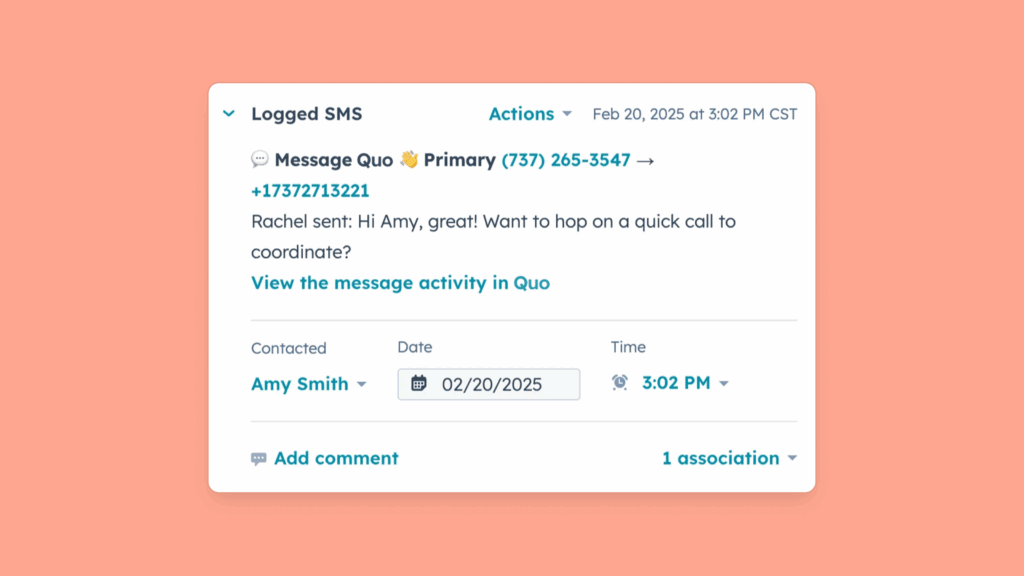
Worried a missed call in your phone menu could mean a lost lead or frustrated customer? Quo’s HubSpot integration logs those too, so nothing slips through the cracks.
When Sona, Quo’s AI agent, answers a call, it’s logged just like any other call. You’ll see a “Handled by Sona” label and a summary of the conversation so your team knows how the call was handled and what was discussed.
Each log includes a direct link back to Quo, making it easy to review the full context or follow up.
Want to save even more time texting? With Quo, you can:
- Respond to FAQs in seconds. With snippets, you can create and save message templates to answer frequently asked questions. Customers won’t have to wait for a response, and you can take a break from typing and re-typing similar messages.
- Queue up texts in the customer’s time zone. No need to wait for the perfect moment to press send. With scheduled texts, you can send texts to customers within their region’s business hours. That way, you don’t have to worry about violating TCPA requirements.
- Set expectations even while you’re off the clock. If customers send texts outside business hours, you can send auto-replies with a templated message. This lets them know what your business hours are and how soon they can expect a response from your team.
- Send custom messages based on customer type. For example, you can connect Zapier, HubSpot, and Quo to send specific texts based on deal stage changes.
- Send texts automatically with Sona, Quo’s AI agent. During live calls, Sona can send messages with links that allow your callers to book appointments. It can also share your business address to help callers find you easily.
It’s easy to see why over 90,000 customers use Quo to build better relationships with their customers. But we’ll let our customers do the talking:
“Quo’s UI is incredibly simple and easy to navigate. We can quickly spin up the numbers we need, trust they won’t be marked as spam, and manage access effectively in the dashboard. The HubSpot integration allows all calls/texts with existing HubSpot contacts [to] flow into HubSpot in real time, including recordings and transcripts. We’ve tried a few other calling solutions and always come back to Quo.” — HubSpot Ecosystem
“I have a real estate business of Joint Venture Partners on Vacant Tax Deed Land. I don’t need to be answering every call that comes in. Quo AI tools give all the information my true clients need so they can leave a message if they are interested. It stops all the 19 out of 20 scam calls from wasting my time. I love that!” — HubSpot Ecosystem
Curious to see how Quo makes it easier to collaborate with your team?
Learn more about removing communication silos with Quo and HubSpot.
Quo pricing

Quo’s pricing has three tiers, but you’ll need to be on the Business or Scale plan to use the HubSpot integration:
- Business: $23 per user per month for HubSpot and Salesforce integrations, group calling, phone menus, live chat support, and more
- Scale: $35 per user per month for AI call tags, dedicated onboarding, and priority chat and email support
2. Aircall: Best for HubSpot HelpDesk

Aircall is a cloud-based VoIP system that connects to any HubSpot tool, such as its Marketing Hub and Service Hub. It’s also one of the few third-party phone apps that connects to HubSpot HelpDesk within the Service Hub. This lets you create and manage tickets and collect AI coaching scorecards for reps. Plus, you’ll be able to run customer sentiment analysis reports on interactions.
But while Aircall advertises plans starting at $30 per user per month, there’s a three-user minimum required for the first two tiers. This means you’re spending a minimum of $90 per month on the base plan — more than the cost of HubSpot’s SMS add-on.
Another drawback to consider: limited call recording and analytics storage. You only get more than six months of analytics data if you upgrade to the Custom plan. And you’ll only get one year of call recordings unless you pay for the Professional plan, which costs a minimum of $150 per month.
Additionally, advanced analytics requires a separate paid add-on, which costs $15 per user per month. This tacks on even more expense, which isn’t ideal for growing brands.
This reviewer sums it up well:
“There are often delays and issues with pushing data from Aircall to HubSpot. There is limited flexibility in the integration. All data comes into one log and is therefore hard to use, rather than allowing for dedicated fields for specific data points.” — HubSpot Ecosystem
Aircall pricing

Aircall’s pricing lets you choose from three different plans.
- Essentials: $30 per user per month with a three-user minimum for SMS and MMS, unlimited calls in the US and Canada, syncing call and text data in HubSpot, and basic analytics
- Professional: $50 per user per month with a three-user minimum for smart routing, queue callback, and live call listening
- Custom: Custom price with a 25-user minimum for advanced analytics, unlimited outbound calls to international countries, and unlimited call recording and analytics data
3. Sakari SMS: Best for international numbers

Sakari integrates with HubSpot, enabling users to send and receive SMS messages from their HubSpot account. This integration supports features like automated workflows and personalized messaging. For example, you can automatically route replies to team members based on campaign type, such as quote requests to your sales team.
Sakari’s biggest claim to fame is its international numbers: you can purchase a number in 20+ countries, including the US, Canada, France, and the UK. You can use these numbers to send message reminders, alerts, follow-ups, and other notifications.
Unfortunately, Sakari’s pricing is confusing. It varies depending on where your business is located, how often you make calls, and whether you choose a monthly or annual plan.
Pricing may not be an issue if you don’t make many calls or send many texts, but it can add up quickly if you do.
This reviewer summarizes it nicely:
“Set up has not been easy. Talking to someone at Sakari to help has been difficult. Weeks in, and we are not set up. :-(.” — HubSpot Ecosystem
Sakari SMS pricing
As mentioned, Sakari’s SMS pricing depends on three factors:
- Your location
- The desired number of text segments
- Whether you’re paying monthly or annually
Its cheapest plan in the US starts at $25 per user per month for:
- 823 message segments
- $0.0304 per additional segment
- $0.008 per minute for call forwarding. Voice calling is currently disabled in Sakari
- $0.02 premium added for MMS. This means you’ll pay $0.0504 per MMS message on the $25 plan
4. Salesmsg: Best for video/audio texting

Salesmsg integrates with HubSpot by embedding texting and calling directly into the platform. This lets users send and receive SMS or MMS messages without switching between applications. It only takes 30 seconds to connect your accounts — then you can get real-time updates based on your existing contact records.
You can also use Salesmsg to collaborate with your team: it’s possible to record audio and video in the app. That way, you can send voice memos to coworkers and record videos for customers. You’ll also be able to capture last-minute ideas without needing to switch tabs.
But while Salesmsg is constantly developing new features for HubSpot, they’re not necessarily easy to use or glitch-free. Some users report dealing with bugs and glitches, and it can take days for customer support to respond. In addition, the pricing can add up fast for small businesses.
We’ll let this reviewer explain:
“Thus far, this has been a negative experience. Over 10% of our testing interactions failed to log to HubSpot; this seems like an issue [that] should have been caught long before selling this as a working integration. We reported it, and 3 days later, [we] were told they would fix it in their next two-week sprint.” — HubSpot Ecosystem
Salesmsg pricing

Salesmsg’s price depends on the number of text segments you want. You get the same features on every plan, including unlimited contacts, SMS and MMS, mass texting, and calling from local or toll-free numbers.
There are five tiers to choose from:
- $25 per month for 500 segments* and $0.04 per additional segment
- $49 per month for 1,000 segments* and $0.035 per additional segment
- $99 per month for 2,500 segments* and $0.0325 per additional segment
- $179 per month for 5,000 segments* and $0.0315 per additional segment
- $249 per month for 7,500 segments* and $0.030 per additional segment
- Custom price for 10,000+ segments, a dedicated account manager, and premium phone support
*Keep in mind it costs one segment per SMS and two per MMS message.
Salesmsg also charges $10 per month for each additional user seat. This fee applies to each user you add to your account beyond the initial seat included in your subscription.
5. Sinch SMS and MMS: Best for RCS

Sinch’s HubSpot SMS integration enables two-way SMS and MMS messaging. This allows businesses to send and receive messages directly from HubSpot. It also supports automation workflows, enabling businesses to set up SMS and MMS triggers within HubSpot.
Sinch provides rich communication service, also known as RCS messages. These allow you to add read receipts and sender IDs to your texts instead of a generic phone number.
You can also automatically add messages to your contact activity dashboard. Plus, you can easily track delivery rates, open rates, and meetings booked on specific campaigns.
Just keep in mind that Sinch only supports SMS and MMS on HubSpot, which means there’s no way to log both texts and calls. This may make it less ideal for businesses that need a more comprehensive communication platform. It also has integration and technical issues, and contacting support may not be easy.
Take a look at this recent review:
“We are currently having issues with visibility on text messages sent out through the Sinch system. They are unable to troubleshoot this for us, and we have been waiting for over two weeks.” — HubSpot Ecosystem
Sinch SMS & MMS pricing

Sinch has five pricing plans to choose from:
- Basics: $49 per month for 1,000 SMS messages, three automation workflows, and bulk SMS with one user max
- Conversations: $99 per month for 3,000 SMS messages, 30 automation workflows, and engagement tracking links with two users max
- Pro: $249 per month for 10,000 SMS messages, one subaccount for storing messages separately, and unlimited automations with three users max
- Pro Plus: $450 per month for 20,000 SMS messages, two sub accounts, access to experts for building HubSpot workflows and campaigns with three users max
- Advanced: $799 per month for 40,000 SMS messages, three sub accounts with three users max
Keep in mind that additional user seats cost an extra $20 per user per month.
6. Kixie PowerCall and SMS: Best for outbound sales teams

Kixie is a calling and texting platform built for outbound sales reps who want to move faster. Its power dialer lets you call up to 10 leads at once with no delay between calls, helping you get through outreach lists without dialing by hand.
Plus, Kixie’s HubSpot integration shows contact and deal details inside the dialer, so you’ll have context before each call. You can also send templated text messages with dynamic input fields from HubSpot, like a customer’s name, without having to type them out.
Kixie’s pricing isn’t publicly listed, so you’ll need to contact sales to get a quote. All plans include its HubSpot SMS integration, but using the power dialer requires an upgrade.
Unlimited texting isn’t included, either. You’ll need to pay $0.01 to $0.03 per message, which adds up quickly.
This reviewer sums it up well:
“Our experience with Kixie over the past 1-2 years has been overwhelmingly negative due to persistent issues and a lack of meaningful resolutions.” — HubSpot Ecosystem
Kixie PowerCall and SMS pricing

Kixie’s pricing isn’t publicly listed, so you’ll need to contact their sales team for a quote. The good news? Every Kixie plan includes access to its HubSpot SMS integration. Here’s what each plan offers:
- Professional: Call recording, team SMS, click-to-call, and ring groups
- Single-Line PowerDialer: Calling session management, live call coaching, and access to its PowerDialer
- Multi-Line PowerDialer: Multi-line PowerDialer and access to its AI Human Detection add-on that bypasses calls answered by IVR or voicemail greeting
7. YetiText: Best for basic texting

YetiText is a basic texting app that also supports calling through VoIP technology. It’s built for teams that want a simple way to manage messages and calls in one place. It comes with a HubSpot SMS integration that lets you schedule and send messages from your CRM. This means you won’t need to switch tabs or copy and paste numbers.
Plus, you can text your HubSpot contacts from YetiText’s desktop or mobile app and get their replies in real time without switching tools. You can also send MMS messages, making it easy to share quick updates, photos, or links with customers.
But even with those features, YetiText can get expensive. While there’s a free plan, you’ll still pay $0.06 for every SMS and $0.08 for every MMS message. You’re also limited to just 200 outbound messages per day, which may not work if your team sends a high volume of texts. If you need more phone numbers, you’ll have to upgrade to the Standard plan, which costs $100 per month. Calls aren’t covered in the free plan, either — both incoming and outgoing cost $0.05 per minute.
One reviewer summed up their experience with YetiText’s SMS features:
“I wish that SMS had more powerful AI capabilities…” — G2
If you’re looking for a budget-friendly option that scales with your team, YetiText’s HubSpot SMS integration may not be the best fit.
YetiText pricing

Here are the four YetiText pricing plans you can choose from:
- Starter: $0 per user per month for HubSpot SMS integration, one free phone number, 200 outbound messages per day, $0.06 per SMS, $0.08 per MMS, and $0.05 per minute for voice calls
- Standard: $100 per user per month for 1,000 SMS credits, $0.03 per SMS, $0.05 per MMS, five users, $0.03 per minute for outbound calls, $0.04 per minute for inbound calls
- Pro: $300 per user per month for 10,000 SMS credits, two local phone numbers, $0.04 per MMS, and $0.02 per minute for outbound calls
- Enterprise: Custom pricing for a minimum of 50,000 messages
8. Emitrr: Best for texting from a landline

Emitrr is a communication solution that launched in 2019. It lets you text-enable your landline, which means you’ll be able to send and receive messages from your landline phone number.
Plus, you’ll be able to adequately process and store Protected Health Information, or PHI, since it’s HIPAA-compliant. It also supports phone calls, so your team can call and text patients.
If you use HubSpot, you can integrate Emitrr into your workflows. For example, when someone fills out a form and becomes a Marketing Qualified Lead, Emitrr can automatically send a follow-up text. You can also track SMS activity like opt-outs, clicks, and replies — all logged under the right contact in HubSpot.
While Emitrr checks the boxes for HIPAA compliance, it falls short in a few other areas. Pricing isn’t listed on the main site. You’ll need to dig into the HubSpot Marketplace to find that the Starter plan costs $27.50 per user per month and only includes 500 SMS credits. It does charge extra once you pass that limit, but the per-message rate isn’t publicly available. And if you work with international contacts, you’re out of luck — the HubSpot integration only works in the US and Canada.
One reviewer talked about issues it experienced with its reliability:
“Sometimes when you send a message, it doesn’t go through and completely deletes it, and I am having to re-type the whole message again” — GetApp
Emitrr may catch the attention of some healthcare teams in the US. But its limits on usage and region can make it hard for growing businesses to rely on this HubSpot SMS integration.
Emitrr pricing

Emitrr doesn’t list pricing on its website, but on its HubSpot Ecosystem page, last updated in 2025, it shares the following information:
- Starter: $27.50 per month for 500 SMS credits, unlimited contacts, and access to features like segmentation, templates, and scheduled texts
- Standard: $44.92 per month for 1,000 SMS credits and access to all features
For the most up-to-date pricing, you’ll need to contact Emitrr directly.
9. TrueDialog: Best for bulk messaging

TrueDialog is a texting platform built for teams that send large volumes of messages. Its HubSpot SMS integration lets you send individual and mass texts to your contacts from HubSpot — no need to switch tools or upload lists. You can also choose between short code numbers for sending mass messages or long code numbers for one-on-one conversations.
TrueDialog’s reporting tools let you track how your texts perform in real time.
Even though it’s built for sending high volumes of messages, costs can start to add up quickly. The $119 base plan includes 5,000 messages, then charges $0.024 per message after that. Plus, TrueDialog’s HubSpot SMS integration isn’t included in the base plan. This means you’ll need to upgrade to the Business Pro plan to access it, which costs $425 per month. The Custom plan starts at $999 per month and still caps you at 100,000 messages. If your team needs to send more, there’s no option to upgrade to unlimited texting.
One reviewer said:
“A few areas could be better. The interface feels a bit outdated, and reporting options are limited. Sometimes messages get delayed, which can be frustrating for time-sensitive outreach. A more intuitive dashboard and better analytics would make a big difference.” — G2
TrueDialog pricing

TrueDialog’s pricing lets you choose from four plans:
- Small Business: $119 per month for 5,000 base messages, $0.024 per message, unlimited users, automated 10DLC registration, reporting, and text-enabled landline
- Business Pro: $425 per month for 25,000 base messages, $0.018 per message, CRM integrations, and a dedicated account rep
- Enterprise: $900 per month for 60,000 base messages, $0.015 per message, and an AI assistant
- Custom: $999+ per month for 100,000 base messages, $0.012 per message, product development input, and future development updates
10. JustCall: Best for large contact centers

JustCall is a communication platform built to help large contact centers scale their outreach. It offers local phone numbers in over 70 countries. Plus, it includes tools for running bulk SMS campaigns, live monitoring, and coaching reps in real time.
JustCall also integrates with HubSpot. It lets your team manage voice calls, text messages, and WhatsApp chats directly inside the HubSpot CRM. You can also run automated SMS campaigns in HubSpot, which means there’s no need to switch between tools to follow up with leads. Plus, you can use JustCall’s Power, Dynamic, and Predictive Dialers inside the HubSpot app. It lets you automatically call through HubSpot contact lists — helping your team connect with more leads in less time.
Keep in mind that JustCall’s base plan costs $29 per user per month and doesn’t let you send bulk SMS campaigns. You’re also capped at only 500 SMS segments per user. After that, you can buy an SMS bundle add-on for 1,500 segments that costs an extra $29 per month.
One reviewer flagged how unreliable the platform can be:
“I randomly will stop receiving calls in the middle of my working day. I will have to restart the desktop dialer to begin receiving calls again. Also, there are occasions where calls or SMS will not integrate correctly.” — G2
JustCall pricing

Here’s a breakdown of the JustCall pricing plans:
- Team: $29 per user per month for 500 SMS segments, HubSpot SMS integration, local numbers in 70+ countries, messaging suite, team performance analytics, and reporting
- Pro: $49 per user per month for 1,000 SMS segments, power dialer, bulk SMS campaigns, and queue callback
- Pro Plus: $89 per user per month for the multi-channel AI notetaker, SMS Co-pilot, coaching comments, and real-time agent assist
- Business: Contact sales for pricing for unlimited calling and SMS, enterprise-grade compliance like HIPAA and GDPR, personalized onboarding, and a dedicated phone support line
11. Heymarket: Best for omnichannel messaging

Heymarket is a business texting platform that helps companies build customer relationships. It lets you receive and send messages from shared inboxes so your team can collaborate on conversations.
Heymarket also lets you set up a single inbox to route messages from SMS, email, and even social apps like Instagram into one place. That means you don’t have to jump between apps to check messages — everything shows up in one organized view.
The platform’s base plan comes with a HubSpot integration for $20 per user per month, with a two-user minimum. It lets you sync custom properties between HubSpot and Heymarket, so your team can always have access to up-to-date information.
You can also send bulk text messages to HubSpot lists directly from Heymarket. For example, you can text everyone registered for an event or remind your VIP customers about an upcoming promotion.
Keep in mind that its text messages are sold in tiers, which can get pricey fast. On the base plan, you only get 1,000 segments. Once you hit that limit, you’re automatically bumped to the next tier — whether you expect to or not.
Here’s what one user had to say about Heymarket:
“It is working well, but [the] initial set up/support was more than lacking. After a few weeks of begging for support, we were given the kind of support we should have received from the beginning.” — HubSpot Ecosystem
Heymarket pricing

Heymarket provides four different pricing plans you can choose from. Here’s what you can expect to pay for each:
- Standard: $20 per user per month for two-way messaging, shared inbox, and HubSpot text messaging integration
- Plus: $41 per user per month for lists and campaigns, automations, advanced reporting and analytics, and Microsoft Teams integration
- Pro: $62 per user per month for API access, advanced administration and security, and the Salesforce add-on available that costs $7.50 per user
- Enterprise: Custom pricing for custom feature configuration, white-glove onboarding, priority support services, and higher-volume messaging
Keep in mind that all of Heymarket’s plans require a two-user minimum.
12. TextUs: Best for short-code phone numbers

TextUs is a text messaging service that lets businesses send large batches of texts at the same time. This means instead of messaging people one by one, you can reach your entire customer base in just a few clicks. It helps your team save time and reach more customers faster.
Its HubSpot integration lets you send and receive texts inside HubSpot, so you can contact leads or clients without leaving your CRM. You can also help your team stay on the same page since all text conversations are automatically logged in HubSpot.
While TextUs lets you buy short-code phone numbers, they’re only available on the Plus plan. Pricing starts at $299 per month, which is expensive for small teams. Here’s what that works out to per seat on each plan:
- Essential plan: $49.83 per user per month, six seats included
- Plus plan: $74.75 per user per month, four seats included
Here’s what one user had to say about the platform’s pricing:
“Pricing is something that can be improved. They are positioned to solve enterprises, [but] SMBS take a brunt.” — G2
TextUs pricing

TextUs pricing has two pricing plans to choose from:
- Essential: $299 per month for six seats, one 10-digit texting number, unlimited contacts and users, shared inboxes, and analytics and reporting
- Plus: $299 per month for four seats, unlimited keywords, unlimited automated sequences, integrations, and API access
13. Textline: Best for logistics teams

Textline is an SMS platform that helps logistics teams stay connected across multiple locations. For example, you can let customers reschedule deliveries or get updates from drivers in real time while they’re on the road. You can also send short surveys to gather feedback after deliveries.
Its HubSpot integration makes team communication even smoother. You can text contacts right from HubSpot using the Textline widget — no need to switch tabs or open another app. It also syncs HubSpot contact details, so both of your systems are always up to date.
That said, Textline doesn’t support voice calls on its phone numbers. While you can set up call forwarding if needed, you’ll have to pay for another platform to handle those calls. There’s also a cap on how many messages you can send each month. Once your credits run out, you’ll need to buy more in advance at $0.03 per message.
Here’s what one user had to say about their experience with Textline:
“It doesn’t automatically show you new messages, but you have to refresh the web page or the app in order to see new messages.” — G2
Textline pricing

Textline’s pricing isn’t public. Here are the features you can expect to get with each plan.
- Essentials: Three seats, 600 message credits, three-year conversation history, and integrations
- Pro: Five seats, 2,000 message credits, custom user roles, Salesforce integration, and custom surveys
- Enterprise: Negotiable pricing and reps for flexible implementation, personalized account plans, and advanced security features
14. CRM Messaging: Best for large enterprises

CRM Messaging is a text messaging service that launched in 2022. It’s built for large enterprises that have a complex tool stack, providing over 6,000 integrations on its base plan.
You should know that CRM Messaging doesn’t offer unlimited texting, no matter how much you upgrade. On the base plan, which costs $27.99 per month, you only get 1,000 message credits. Once you hit that limit, you’ll pay $0.018 per additional SMS message in the US. That pricing can add up fast for companies that send a lot of customer texts.
You’ll need to upgrade to the Conversations plan to access the HubSpot integration. That plan costs $59.99 per month and only includes up to five users. Each additional user after that costs $10 per month.
Its HubSpot integration lets you log all incoming and outgoing text messages in real time on each contact’s profile. It also includes a conversation view that lets you access chat history inside HubSpot. Instead of switching between tools, you can view every past interaction in one place and respond directly from your CRM.
Where CRM Messaging starts to fall short is cost. While its Advanced plan removes user limits, it comes at a steep $359.99 per month. For growing businesses, that kind of pricing might make it hard to justify, especially when other platforms include similar integrations and features at a lower price.
Here’s what one user shared about CRM Messaging:
“Dishonest, will ignore you and not reply to emails, poor customer service, messaging service doesn’t work well, error messages, auto-top up doesn’t work, no proper instructions on how to perform functions, can’t manage the app from HubSpot, takes money when it is not due and won’t return it…” — HubSpot Ecosystem
CRM Messaging pricing

CRM Messaging lets you choose from four different plans:
- Starter: $27.99 per month for 1,000 SMS credits, one user, 6,000 integrations, and bulk SMS campaigns
- Conversations: $59.99 per month for 3,000 SMS credits, five users, 10 automation workflows, and HubSpot integration
Advanced: $359.99 per month for 20,000 SMS credits, unlimited users, unlimited automations, and custom reporting - Custom: Custom pricing for a dedicated account manager and access to 24/7 Zoom support
15. EZ Texting: Best for political campaigns

EZ Texting is one of the more established platforms in text message marketing, first launched in 2012. It’s often used by teams that run political campaigns, offering tools to help manage fundraising.
For example, EZ Texting includes a Text-to-Give feature that helps campaigns collect donations. It works by sending supporters a text with a direct link to a donation page where they can give.
EZ Texting’s HubSpot integration also offers an automated nightly sync that adds new contacts and updates existing ones. This helps ensure your contact information matches in EZ Texting and HubSpot.
That said, there are a few drawbacks to consider. Signing up for the Enterprise plan can take anywhere from four to 12 weeks, which might delay your launch if you’re running a political campaign. You’ll also never get unlimited messaging, no matter how much you upgrade.
Here’s how one user described using EZ Texting:
“I don’t like that lately most of my messages are held for review. This is a bit frustrating.” — Trustpilot
EZ Texting pricing

EZ Texting offers four different pricing plans:
- Launch: $20 per month for a local textable number, 6,000 yearly credits, and overage credits at $0.04 each
- Boost: $60 per month for a local high-volume number, 6,000 yearly credits, waived telecom fee, and overage credits at $0.035 each
- Scale: $100 per month for a local high-volume and high-speed number, 6,000 yearly credits, an onboarding specialist, and overage credits at $0.03 each
- Enterprise: $3,000 per month for a dedicated short code, 200,000 monthly credits, and overage credits at $0.01 each
What to look for in a HubSpot SMS integration
When you’re choosing a HubSpot SMS integration, not all tools offer the same value. Here are the features to look for:
- Two-way messaging: Your team should be able to reply to contacts directly, not just send one-off messages. Look for tools that support real conversations and ongoing threads.
- Automation and workflows: The best HubSpot SMS integrations let you send texts based on HubSpot activity, like form submissions or deal stage changes. This saves your team from having to follow up manually.
- MMS support: If you need to send photos, documents, or links, make sure the platform supports MMS. Otherwise, you’ll be stuck with plain text even when the message needs more.
- CRM syncing: Messages should automatically log to the right HubSpot contact. This keeps your records accurate and gives you full context without having to search past conversations.
- Shared inboxes: If multiple team members send messages, shared inboxes help everyone stay aligned. You can see who replied, who’s still waiting on a response, and who needs to step in.
- Mobile support: Whether your team works remotely or needs to stay responsive on the go, mobile access is key. Look for HubSpot SMS integrations that work as well on phones as they do on desktops.
- Transparent pricing: Choose an integration with clear and predictable pricing. Avoid tools that charge per message or limit the number of users, since costs can rise quickly as your team grows.
Automating SMS workflows in HubSpot
One-on-one messaging is critical to business texting — and as your business grows, you’ll need automations to keep up. You’ll be able to streamline repetitive tasks to save time. You can also create workflows that help you prioritize important conversations.
For example, you can use SMS workflow automations in HubSpot to:
- Send automated appointment reminder texts or follow-ups. With Zapier plus a HubSpot SMS integration, you can instantly send a reminder message before meeting with a customer.
- Set expectations after hours. Integrating with VoIP systems like Quo can automatically send replies to missed calls or texts. This lets customers know you’re out but will get back to them soon.
- Update contacts with new sales, deals, or coupons. You can set up automated messages for special offers, ensuring your customers stay in the loop. Just be sure to get SMS consent first.
- Send a welcome text message when a new contact is added. You can create a workflow that automatically sends a text whenever a contact is added or updated in HubSpot. This makes it easy to welcome new leads or confirm next steps.
HubSpot’s SMS add-on allows you to build workflows for these tasks. But if you want to connect your systems and keep costs low, you might consider an integration like Quo. You’ll also get auto-syncing for calls and texts and AI-powered features for productivity. Plus, Quo offers shared phone numbers to make team collaboration easier.
Get started more easily calling and texting with your contacts
Texting your HubSpot contacts may seem expensive at first glance — but it doesn’t have to be. With the right SMS integration for your team, you can easily build better relationships with your customers via text.
Of course, not all SMS texting apps are built alike, and not all offer the same value for your dollar. If you’re looking to keep all texts, calls, and customer information in one place, your best bet is to connect HubSpot with Quo.
No need to take our word for it, though. Sign up for a free seven-day trial today.
FAQs
SMS for marketers is an add-on tool for HubSpot’s Marketing Hub that allows you to send text messages to your contacts. You can send bulk SMS, create marketing campaigns, and route 1:1 messages to your sales or customer support teams.
To create this add-on, HubSpot partnered with Twilio, which is a legacy VoIP platform for SMS marketing campaigns. Keep in mind that you’ll have to complete carrier registration to send SMS messages, which is standard for any business doing A2P 10DLC texting.
You can only add HubSpot SMS to two Marketing Hub plans: the Professional plan and the Enterprise plan.
Of course, neither of these plans is particularly cheap — and neither is the HubSpot SMS add-on.
No matter how you look at it, HubSpot SMS is pricey. It costs $75 per month for 1,000 message segments per month, and it’s only available for Professional or Enterprise customers in the US. Both your incoming and outgoing SMS messages count against your message segment limit. Incoming MMS messages count as five message segments each. Plus, the Professional plan costs $800 per month for only three seats. And the Enterprise plan costs $3,600 per month for only five seats.
Want a more convenient way to send SMS through HubSpot? Use third-party HubSpot SMS integrations.
All you need is a HubSpot plan and the two-way SMS app available in their app ecosystem.
Start by figuring out what you want your integration to do. If your goal is to automate outreach or keep customer details up to date across your systems, look for one that automatically logs activity. It’s also worth checking how it scales as your business grows. A good integration should simplify your work, not add extra steps.
HubSpot’s native SMS is fine for sending simple messages like promotions, meeting reminders, or product launch updates. But once your business grows, it can get expensive to keep using. Third-party integrations can offer more flexible pricing, letting you pay based on how many messages you send or how many people use the tool. For many small businesses, that makes everyday texting easier to manage.
HubSpot SMS marketing helps you:
– Engage contacts with targeted messages. You can send personalized offers or updates based on each contact’s activity on HubSpot.
– Reach contacts instantly on mobile. Texts are often seen faster than emails, helping you get in front of your audience at the right time.
– Drive decisions with timely outreach. Whether it’s a reminder or a promotion, you can schedule messages for when they’ll likely have the most impact.
Quo is a stronger alternative to HubSpot’s SMS tools. It gives you unlimited texting in the US and Canada and shared phone numbers that make solving customer problems easier. AI features like call tags and voice agents help your team save time. Plus, its HubSpot integration logs all calls and texts into your CRM, keeping customer information accurate across all your systems.
Yes, you can send SMS with HubSpot. You can pay for the HubSpot SMS add-on or integrate with a third-party platform like Quo.
With SMS marketing, you can send 1:1 messages, automate coupons or discount codes, ask for customer reviews, and more. SMS also has a high response rate compared to email, making it a powerful channel for building customer relationships.
There are two ways to integrate SMS in HubSpot: paying for its SMS add-on or connecting with a business phone system like Quo. Since Quo offers a native HubSpot texting integration, you can connect your business phone to your HubSpot account in 15 minutes or less.