At Quo, we are constantly exploring ways to enhance the communication experience for our users. One of our most ambitious projects to date has been building Sona — a real-time AI voice agent that can understand and respond to callers in natural language, while maintaining the reliability and responsiveness our customers expect.
Sona is designed to handle live phone calls, answer questions, and assist callers just like a human would. But building such a system is no small feat. Real-time voice interactions demand low latency, high reliability, and seamless orchestration between multiple services — especially when AI is involved.
To meet these challenges, we turned to Temporal, a workflow orchestration engine, as the backbone of our solution.
In this post, we’ll share how we architected and implemented Sona using Temporal workflows, diving into the technical details, challenges, and lessons learned along the way.
Why Temporal
Traditional telephony and conversational AI systems often rely on stateless APIs or ad-hoc state machines, which can be brittle and hard to scale. We needed a system that could:
- Maintain the state of a conversation across many asynchronous events (user speech, AI responses, tool calls, interruptions) at scale.
- Handle long-running sessions (calls can last from seconds, minutes, and sometimes hours!).
- Recover gracefully from failures, restarts, or network issues.
- Provide observability into every step of the conversation.
Temporal gives us all of this out of the box. Each call is a workflow, and every event (user message, AI response, tool invocation) is a step in that workflow. If a process crashes, Temporal will replay the workflow history and resume from the last event.
The Temporal UI provides a real-time window into the heart of our system:
- We can see every active and completed call, with a full event history for each conversation.
- If something goes wrong, we can drill down into the exact sequence of events, inputs, and outputs — no more guessing or sifting through scattered logs.
- Searching, filtering, and replaying workflows is as simple as a few clicks.

System architecture overview
Our system is composed of several loosely coupled services, each responsible for a specific part of the real-time AI voice experience.
- Twilio: Handles telephony, call routing, and media streaming.
- Agent WebSocket: Receives audio streams from Twilio, manages WebSocket connections, and bridges to the Agent backend.
- Agent Service: Orchestrates the conversation using Temporal workflows, manages agent definitions (more on that soon), and coordinates large language models (LLM), tool, and resource usage.
- External Providers: Services that provide speech-to-text (STT), text-to-speech (TTS), and LLMs.

Agent definitions: The blueprint for AI behavior
A core innovation in our architecture is the use of agent definitions — structured, versioned blueprints that describe how each AI agent should behave. Rather than hard-coding logic or conversational flows, we use these definitions to specify an agent’s capabilities, resources, and runtime configuration.
What is an Agent Definition?
An agent definition is a configuration object that answers questions like:
- What tools can this agent use?
- What resources (knowledge, documents, data) does it have access to?
- What jobs or tasks can it perform?
- How should it prompt the language model?
- How should it handle events, timeouts, or interruptions?
This approach allows us to:
- Abstract away implementation details so that business logic can be described in domain terms.
- Version and validate agent behaviors, ensuring changes are safe and auditable.
- Empower non-engineers to configure and train agents without code changes.

How definitions drive orchestration
At runtime, when a new call (or “thread”) is started, the system loads the relevant agent definition and uses it to orchestrate the entire workflow:
- Initialization: The workflow reads the agent definition to determine which tools, resources, and jobs are available.
- Event Handling: As user events (like speech or messages) arrive, the workflow consults the definition to decide how to respond — whether to call the LLM, or emit a notification.
- Dynamic Behavior: Override configurations in the definition can adjust prompt templates, model settings, idle timeouts, and more, allowing for highly customized agent behavior.
- Validation: Every action is validated against the definition, ensuring that only permitted tools/resources/jobs are used, and that all configuration is type-safe and consistent.
Definitions offer three key benefits to the system architecture:
- Safety: Immutable, versioned definitions prevent accidental breakage and enable easy rollback.
- Flexibility: New agent behaviors can be rolled out by updating definitions, not code.
- Observability: Every conversation is traceable to a specific agent definition and version, aiding debugging and compliance.
Example
Suppose you want to create a ”Sales Agent” that can answer product questions, schedule demos, and access a knowledge base. You would define:
- Tools: answer_question, schedule_demo
- Resources: product_docs, faq
- Jobs: follow_up_email
- Prompts: Custom greeting and fallback messages
- Timeouts: How long to wait before prompting the user again
At runtime, the workflow consults this definition at every step, ensuring the agent behaves exactly as specified.
Temporal workflows in action
When someone calls Sona, a lot happens behind the scenes to make the conversation feel natural and reliable. At the heart of it all is a Temporal workflow — a kind of long-running, stateful process that acts as the orchestrator for each call.
Every call is its own workflow.
Think of it as spinning up a dedicated “conversation manager” for every caller. This manager keeps track of everything: what the user says, how the agent responds, which tools or resources are used, and even how long the call has been going.
Why do we need this orchestration? Real-time voice is unpredictable. People pause, interrupt, or change topics. Sometimes, calls last a few seconds; other times, they stretch on for much longer. We needed a way to handle all these twists and turns — without losing track of the conversation or dropping the ball if something goes wrong.
Temporal makes this possible by:
- Letting us model the entire conversation as a series of events and decisions.
- Automatically resuming the workflow if a server crashes or restarts.
- Giving us hooks to handle things like timeouts, interruptions, and external signals in a clean, reliable way.
The conversation loop
At a high level, here’s how a typical call unfolds:
- A new call arrives: We start a workflow for this conversation, loading the agent’s definition (its “playbook”) and setting up the initial state.
- Listening and responding: The workflow waits for user input — maybe a question, a request, or just a greeting. When something comes in, it decides what to do next: call the language model, trigger a tool, or fetch some information.
- Handling the unexpected: If the user interrupts, goes silent, or hangs up, the workflow adapts. It might send a gentle prompt (“Are you still there?”), or wrap up the call if needed.
- Wrapping up: When the conversation ends — either naturally or because of a timeout — the workflow summarizes what happened, logs analytics, sends off events to external systems (for example billing), and cleans up.
Here’s a simplified view of the conversation loop:
while (callIsActive) {
  const event = await waitForEventOrTimeout()
  switch (event.type) {
    case 'user':
      const response = await callLLM(event, agentDefinition)
      events.push(response)
      break

    case 'idle':
      handleIdlePrompt()
      break

    // ... handle other event types
  }
}
What does this buy us?
- Flexibility: We can add new features (like tools or prompts) without rewriting the whole system.
- Visibility: Every step is tracked, so we can debug, analyze, and improve the experience.
Temporal lets us treat every call as a living, evolving process — one that can handle the messiness of real-world conversations, and deliver a smooth experience for every user.
Real-time interaction and observability with Temporal Signals, Updates, and Queries
A key advantage of Temporal is its support for real-time, bidirectional communication with running workflows. This is made possible through three primitives: Signals, Updates, and Queries.
Signals: asynchronous event delivery
One of the best parts of Temporal is how interactive it is. Our workflows can receive new messages, respond to commands, and share their current state — all in real time. This means we can update conversations on the fly, monitor what is happening, and keep everything running smoothly, even as thousands of calls happen at once.
- Deliver new user input to the conversation workflow, like speech transcriptions, Dual-Tone Multi-Frequency (DTMF), or chat messages.
- Interrupt or end a conversation (if the user hangs up or an error occurs).
- Inject system events, such as tool results or resource updates.
Under the hood — Handling interruptions with Signals
When a user interrupts Sona (for example, by speaking over the agent), we use Temporal’s signal mechanism to inject that event directly into the running workflow. The workflow immediately pauses whatever it was doing, processes the new input, and adapts the conversation flow. This real-time responsiveness is one of the reasons we chose Temporal — it lets us build conversational logic that feels natural, even when things get unpredictable.
// in the workflow
workflow.setHandler('userEventSignal', async (event) => {
  events.push(event)
})

// from outside the workflow (agent websocket)
await workflowClient.signal('userEventSignal', { text: 'Hello, agent!' })
Updates: Synchronous, Interactive Commands
Updates (at the time of writing, a newer Temporal feature) allow for synchronous, interactive commands that can return a result. This is useful for:
- Performing actions that require immediate feedback (requesting the agent to perform a specific job and waiting for confirmation).
- Implementing “command and control” patterns where the caller needs to know the outcome.
// in the workflow
workflow.setUpdateHandler('performJobUpdate', async (jobRequest) => {
  // perform the job, then return the result
  const result = await performJob(jobRequest)
  return result
})

// from outside the workflow
const result = await workflowClient.update('performJobUpdate', { job: 'lookupOrder' })
Queries: observing workflow state
Queries allow external systems to read the current state of a workflow without modifying it. This is essential for:
- Monitoring the progress of a conversation (retrieving the current thread state, event history, or analytics).
- Building dashboards or debugging tools.
- Providing real-time feedback to users or operators.
// in the workflow
workflow.setQueryHandler('getThreadStateQuery', () => {
  return threadState
})

// from outside the workflow
const state = await workflowClient.query('getThreadStateQuery')
By combining signals, updates, and queries, our system achieves:
- Real-time responsiveness: User input and system events are delivered instantly to the workflow.
- Interactive control: Admins or services can issue commands and receive results in real time.
- Full observability: Any part of the system can inspect the state of a conversation at any time, without risk of interference.
Listening efficiently: How Sona waits for the next move
A great conversation is all about timing — knowing when to listen, when to respond, and when to gently nudge things along. Sona is no different. But unlike a human, Sona needs to do this at scale, for thousands of calls at once, without wasting resources.
To make Sona both attentive and efficient, we rely on Temporal’s built-in tools for waiting: sleep and condition. These let Sona “pause” and “listen” without burning CPU cycles or holding up the system, with three important benefits:
- Better responsiveness: Sona can react instantly when a caller says something new.
- More efficient: If the line goes quiet, Sona does not sit there spinning — she waits patiently, using almost no resources.
- Improved user experience: If a caller is silent for too long, Sona can gently prompt them (“Are you still there?”) or end the call gracefully.
How it works
Whenever Sona is waiting for the next user input, the workflow uses a condition to pause until either:
- A new event (like speech) arrives, or
- A certain amount of time passes (the “idle timeout”).
If the timeout is reached and there is still no input, Sona can send a prompt or wrap up the call. Sometimes, after sending a prompt, Sona will sleep for a short period before listening again — just like a human would pause after asking a question.

Keeping conversations on track: enforcing maximum call length
When you are running thousands of real-time voice conversations, it is important to make sure that no single call runs forever,whether due to a technical glitch, a user who forgets to hang up, or even someone trying to abuse the system. Left unchecked, these “runaway” calls could tie up resources and impact the experience for everyone else.
That is why every Sona conversation has a built-in time limit.
Think of it like a gentle chime at the end of a meeting: if a call goes on too long, Sona wraps things up gracefully, thanks the caller, and closes the session.
How it works
Temporal makes this easy. For each call, we set a maximum allowed duration (for example, 30 minutes). If the conversation is still going when the timer runs out, Temporal automatically cancels the workflow’s main loop. This triggers our cleanup logic, which ends the call politely and frees up resources for the next user.
What does this mean in practice?
- No more “zombie” calls eating up system capacity.
- Protection against accidental or malicious attempts to keep a call open indefinitely.
- Every caller gets a consistent, predictable experience.
- Our team can sleep at night, knowing the system is self-managing.
We use Temporal’s CancellationScope to enforce this limit. The main event loop for each call runs inside a scope with a timeout. If the timeout is reached, Temporal cancels the scope, which in turn cancels any in-progress activities (like waiting for user input or calling an external service). Our workflow catches this cancellation, sends a final message to the caller, and logs the session for analytics.
import { CancellationScope } from '@temporalio/workflow'

// set the maximum thread duration (30 minutes)
const MAX_THREAD_DURATION_MS = 30 * 60 * 1000

// run the main event loop within a cancellation scope
await CancellationScope.withTimeout(MAX_THREAD_DURATION_MS, async () => {
  while (callIsActive) {
    // ... handle events, call LLM, etc.
  }
})

// if the scope times out, perform cleanup
if (callIsActive) {
  // end the thread gracefully (send a "goodbye" message)
  await endThread('Thread timed out')
}
Results and impact
Since launching Sona, we have seen firsthand how the right architecture can transform both the user experience and our engineering velocity.
- For our users: Sona delivers fast, natural conversations — no awkward delays, no dropped calls, and no “robotic” handoffs. Whether a caller needs help at 2 PM or 2 AM, Sona is always available, always attentive, and always able to wrap up a call gracefully.
- For our team: We spend less time firefighting and more time building. Temporal’s reliability means we do not worry about lost calls or stuck workflows. Our configuration-driven agent definitions let us roll out new features, tools, and behaviors with confidence — no risky code changes required.
- For the business: We can scale up to handle spikes in call volume, onboard new customers, and experiment with new AI models — all without re-architecting our system. Sona’s observability and analytics give us deep insight into every conversation, helping us continuously improve.
Sona is now a core part of the Quo experience, and we are just getting started.
See Sona in action — or help us build what’s next
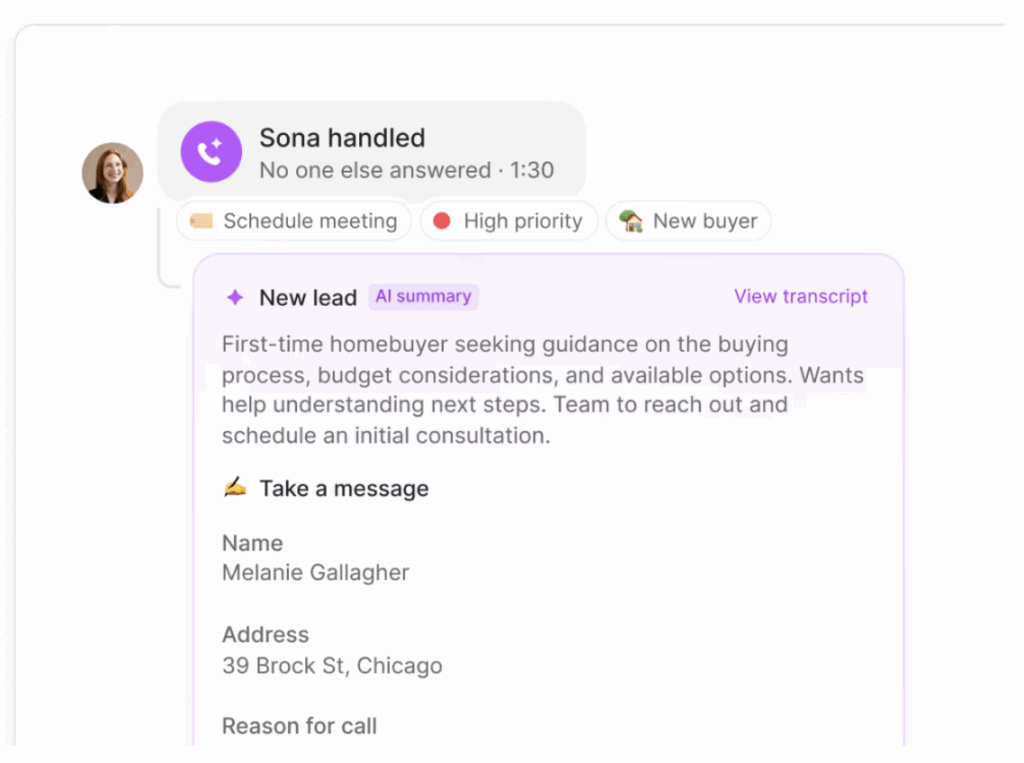
If you are curious to see this technology in action, try Sona today and experience real-time AI voice for yourself. And if building systems like this excites you, we are always looking for talented engineers to join us at Quo — check out our Careers page or reach out to connect!