Integrations

Connect to the tools your team already uses

Integrate with your existing tech stack to sync contacts, automate workflows, and turn communication data into actionable insights.
Illustration of eight diverse profile photos arranged in a circle around a syncing icon with the text 'Syncing CRM contacts...' below and a notification stating '8 new contacts added to Quo'.
User interface showing a missed call notification from Tolu Palmer with a trigger button, an automated message apology, and tasks for creating, updating status, and assigning a manager labeled with their completion statuses.
Dashboard showing top customer concerns: Pricing with 12 calls and Implementation timeline with 23 calls; conversation trends in November with 47% of prospects wanting a free trial; and pipeline bar chart with open deals, best case, and most likely values from Nov 19 to Nov 26.
Sound professional
Custom greetings, call recording, advanced routing, and an always-on AI answering agent show your customers that you value their time.
Gain clarity
Maintain your work-life balance by easily distinguishing between personal calls and business calls to your Quo numbers.
Find balance
Smart routing and do-not-disturb settings protect your personal time, while AI helps your customers when you’re unavailable.
Ready to make a call?
Start your free trial today

Apps

Constant app-switching means lost info, delays, and unhappy customers

Never miss a lead again
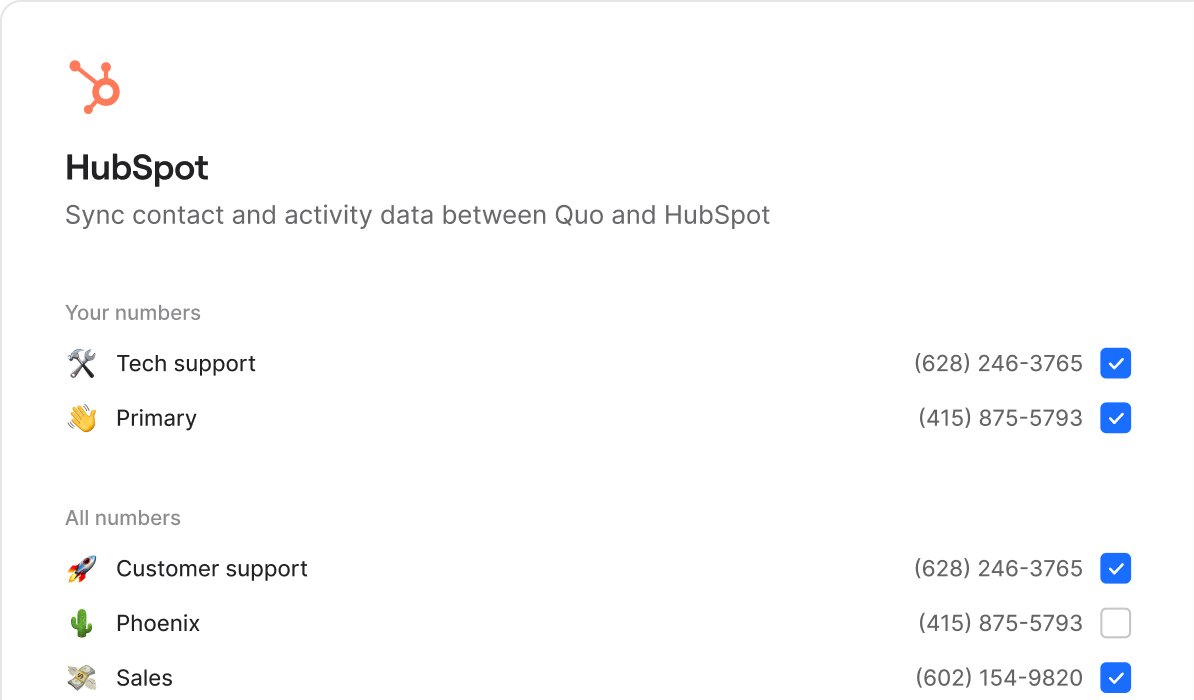
Every call syncs to HubSpot with full context. No losing track of leads, no manual logging, no guessing about follow-ups. Just seamless CRM integration that keeps your pipeline moving.
Hubspot integration dashboard showing sync contact and activity data with selected phone numbers for Tech support, Primary, Customer support, Phoenix, and Sales.A screen shot of a computer screen with a description of the data being displayed.
Contact card for Kathryn Smith, Facilities Coordinator at Brightwell Property Group, with phone, email, website, lead status Prospect, deal size Large, and industry Property management.
Keep your team in sync without switching apps
Eliminate the hassle of juggling tools. When customers call, their details automatically flow into your system so your team can see who called, update records, and keep jobs moving—all in one place.
Three buttons labeled 'Customer voicemail' with phone icon on purple background, 'New contact created' with user icon on white background, and 'Notify team on Slack' with lightning icon on black background.
Look responsive even when you're swamped
Auto-replies and scheduled messages keep customers informed while you handle other or are off-hours, so they feel heard without you being glued to your phone.
2x
Smoother workflows

Quo is by far the best business phone solution I've used. Besides the simple UI, it seamlessly integrates with other tools that my business uses (Zapier, HubSpot etc.) and lets the entire team have visibility into conversations with contacts.

Portrait of a smiling middle-aged man with short gray hair against a purple background.
David Fay
Managing Director @ Technitrad
Grid of popular software and app icons including Notion, Slack, Shopify, Zapier, Mailchimp, Google Sheets, Salesforce, Dropbox, Google, and Zendesk on a gradient orange to purple background.
Zapier logo

7,000+ integrations

Connect Quo to Zapier and get access to 7,000+ apps with pre-existing and customizable integrations so you can connect the tools you use today.
Learn more →

Tailor Quo to your needs with webhooks

Send real-time notifications of events occurring in your Quo workspace to any app with webhooks.
Learn more →
User interface screen titled Create a webhook with options to select call and message event types including call.completed and call.recording.completed checked.
Layered 3D schematic showing a gear icon above transparent layers with arrows, a purple square frame, a white block, and a black circuit board at the bottom.

Quo API

Adapt Quo to your business. Build custom workflows, connect your tech stack, and bring it all together—seamlessly. Explore our APIs and documentation to get started.
Four-piece puzzle with one piece lifted above, depicted in white and purple edges.
Have a request?
Request an integration and we’ll add it to our list of apps to consider
Compare

Ready to switch?
Why teams choose Quo

No training required
Dialpad's enterprise dashboards can be hard to learn and navigate
Always on, 24/7 AI assistance
Dialpad's AI requires expensive upgrades and coaching to use
All-inclusive plans staring at $15 per user
Dialpad's base price jumps to $45+ for a similar level of features
Shared inbox and full-thread visibility for complete context
Dialpad has siloed conversations and admin-heavy workflows. ⁠
Built to help you give a personal touch at scale
With Dialpad you have to dig through call center metrics
Transparent with predictable costs
Dialpad has toll-free fees and per-minute international charges
All-inclusive plans starting at $15/user
RingCentral has custom pricing with add-ons
Easy to get started
RingCentral takes more time to configure and set up
Included Sona AI answers calls 24/7
RingCentral spreads AI features across several expensive tiers
SMS approved fast with Quo
RingCentral's lengthy waits for approvals lose customers
Created to build customer relationships
RingCentral has complex internal collaboration dashboards
Calls, texts, and customer context in one thread
RingCentral spreads conversations across separate apps and dashboards
All-inclusive plans starting at $15/user
Nextiva's entry level plan has no phone service
Unified calls, texts, and easy CRM from day one
Nextiva is $30-36/user just for basic calling and nothing else
Sona for handling first responses is included
Nextiva requires a $40-75/user tier for any AI assistance
Unlimited business texting included
Nextiva has 100-250 SMS per-month caps that lose you customers
Streamlined for simple relationship building
Nextiva has limited features paired with complexity
No hidden fees, transparent pricing
Nextiva has add-on pricing to access to basic features
Starting at $15/user with no minimums
Aircall requires a 3-license minimum purchase for $30-50/license
Unlimited toll-free with Sona AI included
Aircall has hidden fees and $9/user AI add-on
Unlimited texting with no caps
Aircall limits you to 4,000 messages and charges extra for each additional text
Advanced analytics included
Aircall requires a $50/user Professional plan for reporting
All-inclusive plans with no surprises so you can scale
Aircall has a complex per-license model that requires purchasing unnecessary licenses so they can scale
Shared inbox and full customer history for every teammate
Aircall’s call-centric workflows make it harder to keep texts, voicemails, and notes in one thread
Complete platform starting at $15/user
Google Voice has a $50 Google Workspace subscription required
Shared numbers and team inboxes
Google Voice allows only single user lines
24/7, always-on responses from Sona
Google Voice just has extremely basic voicemail and transcription
CRM integrations and phone menus built in
Google Voice just has consumer calling features
Unlimited texting without restrictions
Google Voice has limits and restrictions
Make calls globally on day one
Google Voice has a US-only limitation on their Starter plan
Unlimited calling starting at $15/user
Zoom's entry plan charges for every outbound minute
Sona handles routine calls and texts 24/7
Zoom Phone has basic transcription focused solely on meetings
All-inclusive plans starting at $15/user
Zoom requires $18-22/user bundles for the basics
Designed for customer conversations
Zoom Phone was created as a way to make a little extra money from video conferencing
Real CRM and business integrations
Zoom's has a limited phone system ecosystem
Calls, texts, customer info unified
On Zoom Phone they are scattered across meeting and phone apps
Ready to make a call?
Start your free trial today

Ready to get started? Explore features, learn more, or choose from thousands of numbers.