Today’s business phones don’t have to be tied to a desk. That’s because VoIP lets you make calls and texts from any device with an internet connection. VoIP texting is more convenient for you and your customers. Over 50% of consumers prefer text messages for appointment reminders, delivery confirmations, and account security, according to a 2025 Consumer Texting Behavior Report.
In this guide, I’ll break down how VoIP texting works and why it could be the best solution for your team’s communication needs.
What is VoIP texting?

VoIP texting lets you send text messages using a Voice over Internet Protocol service instead of a traditional cellular network. It works over the internet, which lowers cost and lets you work on devices like mobile phones, tablets, and computers.
All you need to get started is an internet connection and a VoIP provider that supports SMS and MMS messages. Once you sign up, you’ll get access to advanced features like shared numbers, AI-powered agents, integrations with other tools, and more.
How VoIP texting works
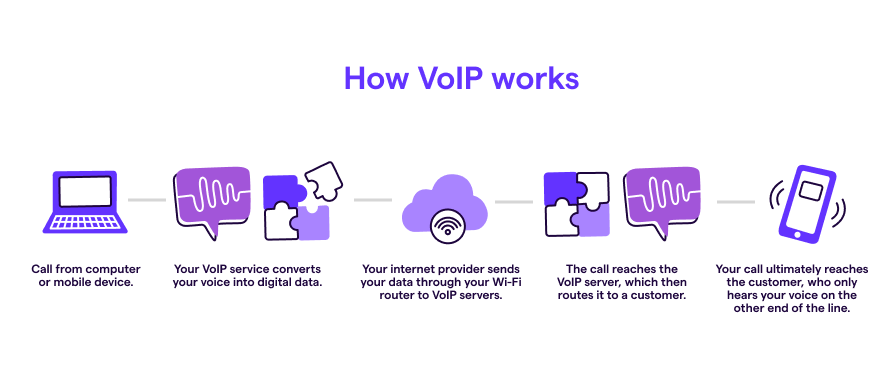
VoIP texting works in the same way that VoIP calls do:
- You send an SMS message from a phone, laptop, desktop, or tablet.
- Your VoIP texting service converts this information into digital data.
- The data routes through your internet connection to the company’s VoIP servers.
- The VoIP server routes your text data to the recipient’s mobile device.
- The text finally reaches your customer, who can now read your message.
Benefits of VoIP texting vs sending SMS from a cell number
VoIP numbers offer significantly more texting perks than the average cell phone:
| Feature | VoIP texting | Traditional cell phone SMS |
|---|---|---|
| Plan costs | $15-$25+ per user per month | $50-$80+ per line per month |
| International texting costs | $0.01-$0.30 per message | $.20-$.50 per message |
| Device flexibility | Use on any internet-connected device | Single device per number |
| Team collaboration | Shared numbers and inboxes | Limited to individual phones |
| Automation | Built-in auto-replies, scheduled messages, workflows | Minimal to none |
| Integrations | CRM, email, automation tools | Limited |
| Scalability | Add users and numbers instantly | Requires new phones/plans |
Here are seven more reasons you should use a VoIP system for business text messaging:
- Use text templates for common responses: Want to speed up your responses? With canned responses — we call them snippets — you can create text message templates for frequent conversations and FAQs. That way, you don’t have to retype the same message each time.
- Draft replies faster with AI suggestions: Tired of typing every response from scratch? AI-powered text reply suggestions can read the conversation context and draft 2-3 relevant responses for you to send or tweak.
- Send auto-replies and scheduled messages: Auto-replies let you automatically respond to missed phone calls and voicemails outside business hours. Scheduled messages show up in your customers’ inboxes at the right time. You can also use third-party integrations like Zapier to send automated texts, which gives your team time to focus on more complex tasks.
- Get 24/7 coverage with an AI agent: When you can’t pick up the phone, an AI receptionist can answer the call, capture key details from the caller, and log everything to your inbox so you can follow up with context. It can also escalate complex calls to a human and send texts with booking links or application forms.
- Build automated message workflows: VoIP texting numbers let you create automated text workflows. For example, send pre-written texts to remind customers about appointments and schedule sales meetings after a web form submission.
- Get voicemail transcriptions over text: Some VoIP phone systems automatically send voicemail transcriptions as a text so you know what’s urgent and what can wait. You can also forward text messages or send voicemails to your email inbox so you never forget to call clients back.
- Collaborate on messages with your colleagues: If you have a dedicated phone line for clients, you’ll likely need more than one person to take on incoming texts. VoIP lets you share phone numbers. This lets you get the same notifications, work on conversations, and add custom properties so you can work faster.
How businesses use VoIP texting
VoIP text messaging has better open rates and higher client satisfaction scores than other business communication methods like email. A 2025 State of Business Texting Report found 59% of businesses say texting is the most effective channel for getting a response. Compare that to 22% for phone calls and 11% for email.
You can use VoIP texting to complement many different use cases, which will keep your business running smoothly.
Close more deals and boost sales
Whether you’re looking for a fresh way to reach out to sales-qualified leads or save yourself time, here are a few ways sales teams use texting:
- Confirm meetings if you experience a lot of no-shows
- Provide sales quotes to customers who request them on your site
- Follow up with leads as an alternative to emails
- Automatic logging through a Salesforce SMS integration or another CRM
- Send automated text messages for missed calls
- Automate appointment scheduling by sending reminders after a trigger, like when someone fills out a form on your website

Speed up responses for customer support
You can provide a better customer experience by taking a multi-channel approach to support.
Here’s how you can use VoIP texting in your customer support team:
- Answer questions from customers promptly and encourage them to text you by adding an SMS link to your website
- Send automated appointment reminders to clients one week before their service
- Offer walkthroughs to customers who are struggling to use a product feature
- Collect screenshots and videos from customers so you can fix bugs with your team members
- Follow up after a customer service call with a text containing more information
Here’s what one Quo, formerly OpenPhone, customer said:
“The advanced auto-reply features make me look like a hero. I can auto-reply for contact beyond normal work hours. I can set a text auto-reply even for missed phone calls. My customers think that I’m always on top of things, even when I am offline for the night.” — Roland Mansilla, Founder at Safely Deposit
Reduce no-shows for appointment-based businesses
As most small business owners know, missed appointments cost time and revenue. This is especially true for service-based businesses when every slot matters.
Here’s how appointment-based businesses use VoIP texting:
- Send automated reminders the day before each appointment with instructions to confirm or reschedule
- Confirm bookings the moment they’re scheduled, with all the details the customer needs
- Send follow-up texts after appointments to request reviews, share aftercare instructions, or schedule the next visit
- Notify customers about cancellations, schedule changes, or last-minute openings
- Trigger reminder texts automatically through a Zapier or Make integration with your scheduling software
Streamline hiring for recruiters
Texting job candidates can save recruiters hours and get better responses from candidates. Plus, VoIP texting keeps your personal number private while texting applicants. That way, you don’t need to worry about getting texts in the middle of the night.
Here’s how VoIP texting can compound your recruiting efforts:
- Reach out to candidates about new opportunities
- Send interview reminders a week before a scheduled meeting
- Get feedback from candidates about their interview experience
- Use appointment reminder software to ensure candidates show up in the right place at the right time
Deliver a better customer experience in the field
Whether you specialize in HVAC repairs or property maintenance, you can use a VoIP app to send real-time updates. This makes it easy to meet customer expectations while sprinkling in delight and maintaining a good rapport.
You can:
- Notify customers when a service rep is on their way
- Share updates with customers during a service visit
- Send photos and videos to customers as proof of service
- Automatically reply outside of business hours so customers know when to expect a response from you

Keep customers informed with order and delivery updates
For e-commerce businesses, retailers, and any company that fulfills orders, as you know, customers expect proactive updates. Not silence followed by a package on the doorstep. VoIP texting makes it easy to keep customers in the loop at every step.
Here’s how:
- Confirm orders the moment they’re placed, with order numbers and estimated delivery dates
- Send shipping notifications when packages leave the warehouse, with tracking links
- Notify customers of delivery delays before they reach out asking
- Send day-of-delivery alerts so customers know when to expect their package
- Handle delivery questions over text so customers don’t have to call or wait on hold
Limitations of using VoIP SMS
VoIP texting offers many advantages for businesses, but you should also be aware of its limitations. Here are some key considerations to keep in mind:
| VoIP SMS | Traditional SMS | |
|---|---|---|
| Carrier filtering | Higher likelihood to be filtered; requires compliance with A2P 10DLC regulations in the US | Lower likelihood to be filtered; easier compliance |
| Emergency support | Not supported | Supported |
| Reliance on the internet | Required | Not required; relies on cellular data |
| Message delivery | Potential issues with certain carriers or international numbers | Generally reliable |
- Carrier filtering: VoIP SMS is more likely than traditional SMS to be flagged or blocked by mobile carriers, especially for high-volume or promotional content. Businesses must also stay compliant with regulations like A2P 10DLC in the US to ensure message deliverability. Choose a provider with a reputable carrier registration process like Quo.
- Limited emergency support: VoIP SMS does not support sending or receiving messages to emergency numbers like 911. This can be a critical limitation in some industries. It’s a good idea to keep traditional phone access for emergencies.
- Reliance on an internet connection: A stable internet connection is a must for VoIP SMS. Poor connectivity can result in delayed or failed message delivery. Look for providers with reliable uptime.
- Message delivery issues: Some VoIP SMS platforms may have difficulty reaching recipients on specific carriers or international numbers.
While it’s important to consider these limitations, the right VoIP provider can help you overcome many of these challenges and get the most out of VoIP texting.
How to start VoIP texting with your business phone
Want to start VoIP texting but don’t know where to begin? Here’s an easy step-by-step process to set up your VoIP number for texting:

1. Choose a VoIP provider
VoIP texting has grown in popularity in the past decade, especially with the rise of remote work, so you have plenty of VoIP providers to choose from.
Here are some criteria to look for when you’re choosing a VoIP provider:
- Features: Does the VoIP solution have advanced messaging features like auto-replies and scheduled messages? Prioritize options based on their calling and messaging features, team collaboration features like shared numbers, and third-party integrations.
- Pricing: Look at how providers organize their plans and how they charge for their messaging features. Some providers require user minimums in their more expensive plans. This increases their overall cost. Other providers charge extra for each message. Avoid a per-message pricing model and opt for unlimited texting instead.
- Reviews: See what customers are saying about the providers you’re considering. Pay close attention to the quality of customer support and level of reliability.
2. Select a phone number
VoIP providers offer local and toll-free numbers so you can choose the number(s) that make sense for your business. You can also port existing numbers to your new VoIP provider, often for free once you subscribe.
The best providers let you try their product during a free trial so you can confirm they’re a great fit. For example, Quo offers a free seven-day trial.
Make sure you don’t cancel your existing provider before your porting is complete so your customers can still reach you.
Want to go deeper on porting? Check out our VoIP number porting guide.
3. Complete carrier registration

After you get your new VoIP number or finish porting your existing one, you can start using it to make voice calls. But due to US cell carrier regulations, you can’t send VoIP texts to US numbers until you complete A2P 10DLC registration.
You can complete your 10DLC registration in your VoIP provider’s platform. Quo has a 10DLC registration form you can complete in-app. We guide our customers each step of the way so you can start texting customers soon after registering.
During registration, you’ll be asked to describe how customers will opt in to receive text messages. This doesn’t require that you’re already texting customers — only that you have a clear, compliant plan for obtaining SMS consent. For example, via a website form, keyword opt-in, or verbal consent.
Get more from VoIP texting with Quo
Many modern VoIP providers support texting, but not all are created equal.
Here are some VoIP texting limitations from a few popular providers:
- Grasshopper doesn’t support text messaging from toll-free numbers to Canadian phone numbers.
- Nextiva doesn’t include unlimited texting on its lower-tier plans.
- Google Voice only offers texting to US customers.
- RingCentral doesn’t offer any plan with unlimited texts, and it caps storage at 5,000 SMS/MMS per user.
VoIP providers like Quo offer unlimited SMS and MMS in the US and Canada with all pricing plans. Quo also provides essential business features like auto-replies, scheduled messages, and Zapier and Make integrations so your team can increase productivity and stay efficient. Plus, you can text from desktop, web, and mobile apps starting at $15 per user per month.
Start your free trial of Quo to begin text messaging with ease and efficiency.
Frequently asked questions about VoIP texting
You can absolutely send text messages to VoIP numbers — as long as their VoIP service provider supports SMS. If you send multimedia messages, which include pictures and group texts, your recipient’s provider needs to support MMS as well.
Similarly, you’ll need a provider that supports SMS and MMS to receive all the texts your clients send you.
Yes, you can send and receive texts from a toll-free number just as you would with a 10DLC number. Keep in mind you’ll need to complete some form of registration due to emerging regulations. Quo customers with a toll-free number can complete toll-free number verification.
VoIP texts look identical to normal SMS messages. Your recipients won’t know whether you used a VoIP or non-VoIP phone number to text them.
Also, VoIP providers can trace VoIP calls and texts to ensure your business complies with their terms of service.
Yes, most VoIP providers use encryption and other security measures to keep your messages and data safe. However, it’s still important to choose a trusted provider and follow best practices.
You can get a 10DLC virtual phone number from a VoIP provider like Quo. Just register your business and campaign in the online portal, then we’ll handle the process with carriers to ensure compliance and better deliverability.
You’ll need to follow carrier guidelines like getting customer opt-in, clearly identifying your business in messages, and avoiding spammy or misleading content.
Texting from a VoIP number is cost-effective and flexible. VoIP providers offer small-business-friendly pricing plans and texting rates that are lower than those offered by traditional phone carriers.
For many providers, international texting is also available at a low per-message rate based on the destination. You can also work more efficiently by texting from your computer.
It depends on your provider and the destination country. Most VoIP providers support outbound SMS to international numbers at a per-message rate. However, two-way texting where the recipient can reply varies by country and local carrier regulations.
Quo includes unlimited calling and messaging to US and Canadian numbers on every plan, with per-message rates for other countries.
VoIP texting and SMS marketing solve different problems. VoIP texting is built for two-way business conversations. These include customer support, appointment scheduling, sales follow-ups, and team collaboration on a shared number.
SMS marketing platforms are built for bulk, one-way marketing campaigns sent to large opted-in subscriber lists.
Quo is a VoIP texting platform, which means it’s designed for conversational, relationship-building messages rather than mass marketing blasts. If you need to send campaigns to thousands of subscribers at once, a business SMS marketing tool will be a better fit.