Compare

/

RingCentral vs Ooma

RingCentral vs Ooma

Ooma Office starts at $19.95 per user per month and RingCentral starts at $20, which makes them look like the same purchase at the same price. 

But the math isn’t the same between RingCentral and Ooma.

RingCentral's $20 per-user price is an annual-commitment rate. If you choose to pay monthly, then it becomes $30 per user per month. Ooma charges $19.95 either way because it has no annual discount to offer. 

Texting works the same way in reverse: RingCentral gives every user 25 messages a month on the base plan. Ooma’s mid-tier plan gives the entire account 250 regardless of headcount. What separates these two are texting limits. And those scale very differently with team size. 

Last updated: November 2026

When to choose RingCentral vs Ooma?

Choose RingCentral if:

  • You’re a team of six or more with light to moderate texting needs.
  • You need call recording and API access at the entry tier, which Ooma withholds until Pro at $24.95.
  • You need AI features at the entry price, which Ooma only offers on the Pro Plus plan, or as add-ons.    

You should choose Ooma if:

  • You’re a team of under 20 with heavy texting needs. Ooma Pro Plus pools 1,000 texts across the account.
  • You need a shared texting inbox for better collaboration. RingCentral only offers a shared texting inbox as an add-on costing an extra $25 per month. 
  • You want to pay month to month without a commitment. Ooma’s $19.95 is the same rate either way while RingCentral's $20 requires an annual contract and costs $30 monthly
  • You’re a one to five person office that doesn’t text and wants the lower real cost.

RingCentral vs Ooma cost by team size

RingCentral entry price

Its base plan, Core, is $20 per user per month on annual billing, or $30 billed monthly. There is no activation fee.

Ooma entry price

Its base plan, Office Essentials, is $19.95 per user per month, billed monthly. Ooma publishes no annual discount on any tier. You also have to pay a one-time $29.95 activation fee.

These two plans seem to have similar prices. However, when you look at their monthly billing, Ooma is cheaper by $10.05 per user. That saves $120.60 per user during your first year of use even after you pay its activation fee.

Texting is what really splits these two plans, so the seat counts below are built around it. Ooma shares 250 texts across the whole account, RingCentral gives each user 25, and the two match at ten seats. RingCentral prices below are based on annual billing. Ooma bills monthly only.  

Team size

RingCentral

Ooma

Note

One user

Core, $20 per month paid annually — 25 texts per user per month

Essentials, $19.95 per month

Prices are within five cents on annual billing. Ooma Essentials includes no SMS at all. For texting, compare Core to Ooma Pro at $24.95 per user per month.

Five users

Core, $100 per month paid annually — 125 texts

Pro, $124.75 per month — 250 texts

Ooma costs $24.75 more a month but gives you twice the texts. Below ten seats, pooling wins.

Ten users

Core, $200 per month paid annually — 250 texts

Pro, $249.50 per month — 250 texts

The text limits are equal at 250. RingCentral costs $49.50 less a month.

25 users

Core, $500 per month paid annually — 625 texts

Pro, $623.75 per month — 250 texts

RingCentral is cheaper and gives 2.5x the messages. Ooma Pro Plus at $748.75 buys 1,000 pooled texts, more than RingCentral’s 625, but costs $248.75 more.

Monitoring

100% in Quo

Custom solution or daily email summary

Beyond price, the billing models also make a difference in what you’ll end up paying: RingCentral’s pricing discounts every tier for an annual commitment and charges a third more without one. Ooma’s pricing has no contract and no discount.

RingCentral vs Ooma base plans at a glance

This table compares the cheapest paid plan from each provider: RingCentral Core and Ooma Office Essentials. Essentials has no texting, so wherever a row says it requires Pro, the cost comparison in the next section uses Ooma Pro at $24.95 per user instead. 

Features

RingCentral Core

Ooma Essentials

Annual price

$20 per user per month

$19.95 per user per month

Monthly price

$30 per user per month

$19.95 per user per month

SMS allowance

25 texts per user per month

None — requires upgrade to Pro at $24.95 per user per month

Shared SMS inbox

Requires add-on at $25 per month

Requires upgrade to Pro

Call recording

On-demand, included

Requires upgrade to Pro, 25 participants

Video conferencing

Up to 100 participants

Requires upgrade to Pro, 25 participants

Third-party integrations

Microsoft Teams, Office 365, Slack. No CRM until Advanced at $25 per user per month

NexHealth and Google Chrome Extension at Pro, other integrations require Pro Plus

API access

Yes No

AI features

Yes

Require upgrading to Pro Plus, AI receptionist and answering service are available on all plans as add-ons

Desktop app calling

Yes

Requires upgrade to Pro

Contract

Annual commitment for the $20 rate

None — monthly only

Free trial

14 days, max 5 users

30 days, requires activation fee payment

G2 rating

4.2, ~1490 reviews

4.5, ~130 reviews

RingCentral

What RingCentral pricing includes
RingCentral pricing
Type image caption here (optional)

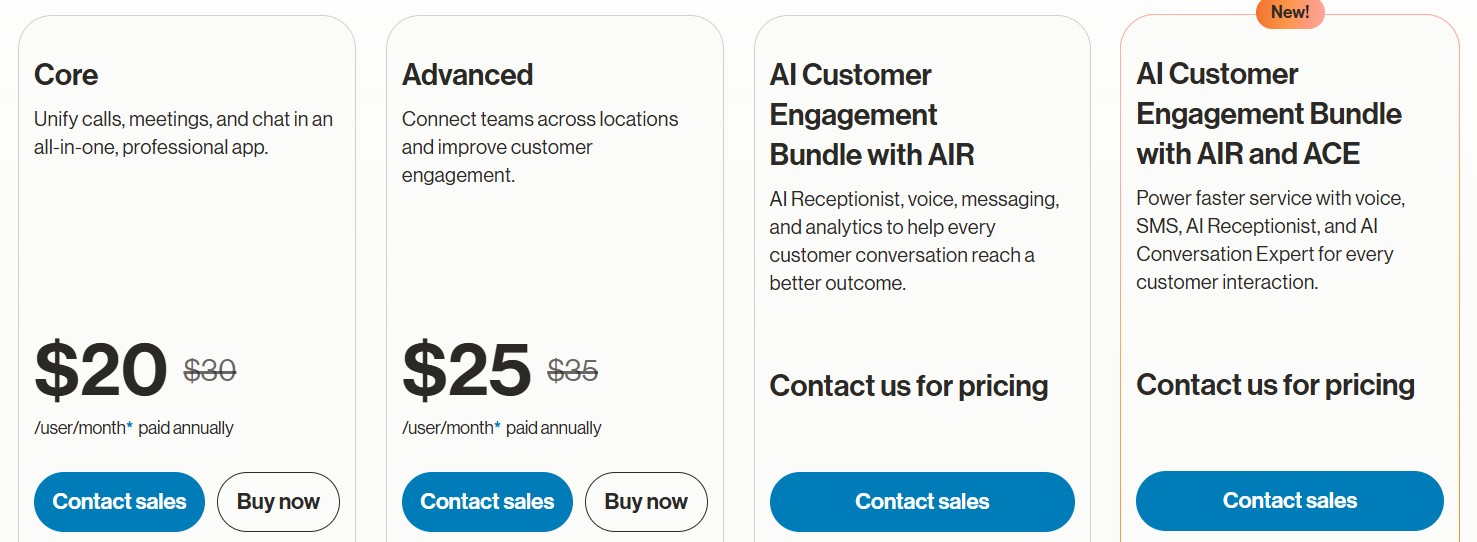
Four published tiers, all discounted for annual billing:

  • Core: $20 per user per month for unlimited domestic calling, 25 texts per user, 100 pooled toll-free minutes, on-demand call recording, API access, and AI features
  • Advanced: $25 per user per month for auto call recording, app integrations like Salesforce and Zendesk, 100 texts per user, video meetings up to 100 participants, and 1,000 pooled toll-free minutes
  • AI Customer Engagement Bundle with AIR: Contact sales for pricing for 10,000 pooled toll-free minutes, 200 SMS per user, unlimited storage, and historical and real-time insights
  • AI Customer Engagement Bundle with AIR and ACE: Contact sales for pricing for AI Conversation Expert (ACE), coaching and performance analytics, and CRM and productivity integrations

There’s also a Business SMS Booster and a Call Queues Booster add-on that gives you some features from the Customer Engagement Bundle. You’ll get shared inboxes, texts, compliance tools, and more for another $25 per month.

Ooma Office

What Ooma Office pricing includes

Ooma Office Pricing
Type image caption here (optional)

Four tiers, three published, one quote-only. No annual discount on any of them.

  • Essentials: $19.95 per user per month for unlimited calling to the US, Canada, Mexico and Puerto Rico, a virtual receptionist, mobile app,  and overhead paging support.
  • Pro: $24.95 per user per month for call recording, desktop app,  250 text messages per account,  and video conferencing for up to 25 participants.
  • Pro Plus: $29.95 per user per month for CRM integration, hot desking and call queuing, 1,000 text messages per account, video conferencing up to 100 participants, AI transcripts, and AI insights.
  • Enterprise: Custom pricing for SIP trunking, Microsoft Teams integration and direct routing, advanced CX and call center features, advanced analytics, and custom implementation.
RingCentral

Hidden costs of RingCentral

RingCentral Core’s price covers the basics, but some features cost extra or have limits worth knowing about before you buy. 

  • Entry-tier texting is capped at 25 messages per user per month. Once you cross that limit,  you’ll need to buy SMS bundles or upgrade to the next tier. A team that uses texting as a main channel with customers will hit the cap quickly. 
  • A shared SMS inbox is an add-on, not a plan feature. Shared messaging inboxes and company text templates cost $25 per month on top of any RingEX tier. Without a shared inbox, texts stay with one person instead of the team. Handoffs drop and customers wait longer for a reply. 
  • Toll-free minutes are pooled per account, not per user. Core includes 100 pooled minutes regardless of headcount, with per-minute overage of 3.9¢ after that.  This can quickly run up your bill and make costs unpredictable, especially during busy months.
  • Some AI features are priced separately. AI Receptionist is $39 per month as a RingEX add-on or $59 per month on its own. AI Conversation Intelligence is $60 per user per month. These can cost nearly as much as the plan itself. For a five-person team on Core, AI Receptionist and Conversation Intelligence together come to $99 a month, against $100 for the seats 
  • Call recordings are deleted after 90 days, even on “unlimited storage.” Teams that need recordings for training, disputes, or compliance have to export them before the window closes. Faxes are also deleted after 30 days and call logs after 12 months. You can also only store 5,000 SMS/MMS per user. Voicemails are overwritten after 200 unheard.
Ooma

Hidden costs of Ooma

Ooma’s plan prices are low, on the surface, but a few fees and limits sit outside them. Here’s what to budget for, and what each means for a team. 

  • A one-time $29.95 activation fee applies to every plan, regardless of tier.
  • SMS requires the Pro plan and is capped account-wide, not per user. Pro gives 250 messages for the entire account plus $0.0095 per message over; Pro Plus raises it to 1,000. A 3,000-message bundle costs $20. Each person gets fewer texts as you scale. And the bigger the team, the sooner you’re paying per message or buying a bundle. 
  • The desktop app requires upgrading to  Pro. This means the $19.95 Essentials tier is effectively mobile and desk phone only. Anyone who works at a computer can’t take calls there without paying more. 
  • Only 500 toll-free minutes are included. You pay an additional $0.039 for every minute after that. Otherwise, you can buy a  separate $15 per month bundle for 1,500 extra minutes, plus $0.029 per minute over that. That’s an added unpredictability you can’t easily budget for.
  • Additional numbers are billed monthly after the first. Porting is free and the first number per user is free, but each additional local number is $9.95 per month and each additional toll-free number is $9.95 per month, up to 20 per account. Teams with separate numbers for locations, departments, or campaigns will have higher costs.
  • Hardware is a purchase, not a rental. IP desk phones start at $59.99 one-time, with no rental option, and extended warranty is $39.99 per year. Equipping a team means a high upfront investment.

What do RingCentral and Ooma users actually say?

RingCentral's complaints cluster around contract exit and the quality of support. Ooma users also struggle with customer service, and report a gap between the plan price and invoice.

Theme 1: Ooma’s complaints are about pricing

The top complaint for Ooma on G2 and similar review sites is about the difference between its advertised price and its actual price.

"The hidden costs are high. It adds almost $10 to the price quoted in the ad." — G2

“Cost is slightly higher than some of the no frills services.” — G2

“The straw that broke the camel's back was regarding a tax on my monthly bill that was increasing over time. I let it go for a while, but as a non-profit tax-exempt organization, we do not pay tax. I inquired several times to have it removed and finally, 6 months later, the Ooma legal team responded that they would not remove it.” — G2

Theme 2:  RingCentral biggest complaints are about canceling and contracts 

RingCentral users struggle with cancelling their subscriptions and even adjusting their plans. They describe contracts that renew automatically with no way to cancel online. They also complain about getting charged long after their account has been closed. 

“I cancelled my RingCentral subscription in writing…before my trial period ended. RingCentral acknowledged my cancellation but subsequently charged my account approximately $250.

Despite repeated emails, refund demands, and confirmation that my electronically signed agreement was voided, I have still not received a refund.

Instead of resolving the issue, I've been passed between departments, repeatedly contacted by phone despite requesting written communication, and asked to complete additional verification just to have my refund request reviewed.” — Trustpilot review from October 2026

“The price was the reason I looked to make a switch, and I found that other well known services cost half. They lacked morals when I tried to cancel. During cancellation, support repeatedly told us we could not cancel or even reduce licenses because of a contract they could not produce. After reviewing our own agreement, we found no minimum seat requirement. Once we pointed this out, support suddenly agreed to reduce the account to a single line. The issue was eventually resolved, but only after significant back-and-forth.” — G2

Theme 3: Ooma doesn’t have strong integration or reporting features

Ooma’s reviewers generally rate the tool highly, but then describe outgrowing it. The recurring limit is reporting and connection: no real-time dashboard, and difficulty linking it to other software, which tracks with CRM integrations arriving only at Pro Plus.

“It was lacking realtime dashboard analytics features that we need for our day to day operations… We were not able to easily integrate it with our other software. ” — G2

“We would appreciate it if it had more APIs in other systems that we can link into for smoother transition between calls.” — G2

Theme 4: Support draws complaints on both, for different reasons

Neither product wins on support. RingCentral reviewers report that paying for an advanced support tier doesn’t reliably improve the outcome. Ooma reviewers report slow response, repeated explanations, and no warning when something breaks.

Here’s what users say about RingCentral:

“You may get a working number, but when you actually need customer service or help resolving an issue, good luck… Every time I call, I’m either disconnected or left on hold for 20+ minutes, only to finally reach someone who gives me an entirely different explanation than the person before them.” — Trustpilot 

“Support tends to be not the best, even though we have advanced support, which makes it a little bit easier. Historically, RingCentral's out-of-country support is less than desirable.” — G2

When it comes to Ooma, users complain about slow and frustrating support.

See for yourself:

“Customer service was unhelpful and inconsistent. Instead of resolving the issue, I was transferred between representatives who provided different explanations, with no clear ownership or resolution. There doesn't appear to be a transparent or standardized process for handling referral incentives.” — Trustpilot

“It sure is not easy to fix the issues I have experienced. Not all staff are knowledgeable to guide me the way.” — TrustPilot

Where RingCentral and Ooma both fall short

RingCentral and Ooma’s shared gaps are usually what cost small and growing teams the most. Here are some areas where they both fall short:

  • Texting limits. Neither gives you much room. RingCentral caps Core at 25 texts per user, and Ooma Pro pools 250 across the whole account. Teams that text customers daily will end up paying for bundles or upgrading.
  • Shared inbox. Neither includes one on its entry plan. RingCentral charges $25 a month for its Business SMS Booster add-on, which includes shared inboxes. Ooma requires an upgrade to Pro at $24.95 per user. Without a shared inbox, your texts are siloed and you risk slowing down response times.
  • Toll-free minutes. Both pool minutes across the account, so the toll-free minute allowance doesn’t grow with your team. RingCentral Core includes 100 and Ooma includes 500. After that you pay per minute. Hiring more people doesn’t add minutes, so costs climb with call volume and are hard to budget for.
  • Support. Reviewers on both platforms complain about long waits and not feeling supported when it matters the most.

Where Quo comes out ahead

Quo (formerly OpenPhone) apps

RingCentral and Ooma’s shared gaps are usually what cost small and growing teams the most. Here are some areas where they both fall short:Neither product includes a shared SMS inbox on their base plan. RingCentral requires a $25 per user per month add-on that no RingEX tier bundles. Ooma requires an upgrade to the Pro plan at $24.95 per user per month. Without one, a customer’s text goes to one person’s number, and the rest of the team can’t see it. 

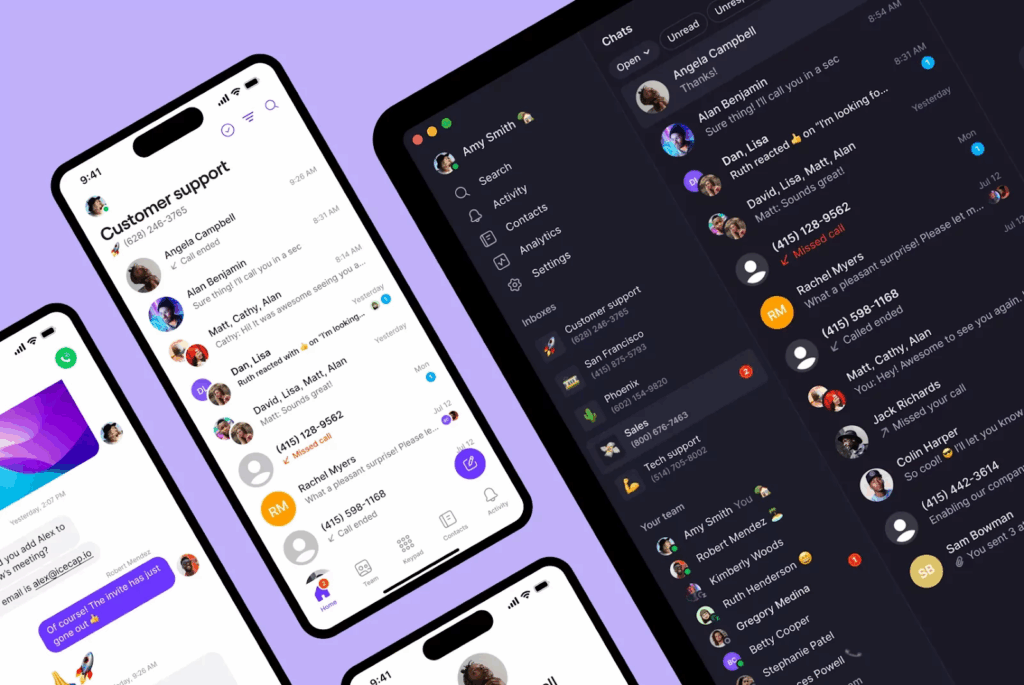
Quo handles this differently. A shared number comes with the base plan, so the whole team can see every conversation from day one. 

Quo starts at $15 per user per month on annual billing and includes a shared phone number with internal threads at that tier, along with unlimited texting in the US and Canada rather than a per-user cap or an account-wide pool. There is no seat minimum, no activation fee, and free number porting.

Teammates can tag each other in internal threads to hand off a call or text without the customer seeing it. SMS/MMS templates, auto-replies, and automated texts speed up replies. Plus, calls, texts, contacts, and more sync to apps you already use, like your CRM, through 9,000+ integrations. And with integrations with AI tools like Claude and ChatGPT and Quo’s own chatbot, Quo Agent, you can analyze your conversation history in seconds. 

10 free calls with Quo's Sona AI agent is included on every plan, where both RingCentral and Ooma only offer an AI receptionist as an add-on. RingCentral prices AI Receptionist at $39 per month and Ooma requires you to get in touch with sales for pricing.

Try Quo for free for seven days

FAQs

Can’t find the answer here? Check out our Resource Center.

Is Ooma still a good option, or is it outdated compared to newer VoIP?

Ooma Office is current and actively sold; the question is scope rather than age. It publishes four tiers topping out at $29.95 with no API and limited AI, and gates call recording, desktop calling and video above its entry tier. Businesses that need integrations and more texting capabilities outgrow it.

Does RingCentral require an annual contract?

Not to use the service, but the advertised $20 per user rate does. Month-to-month billing is $30 per user, a third more. Ooma bills monthly at $19.95 with no annual rate and no commitment.

Which is better for remote teams, RingCentral or Ooma?

RingCentral, on the entry tier specifically. Ooma Essentials cannot place calls from the desktop app at all, which for a distributed team means every user needs the mobile app or a physical desk phone. Ooma Pro removes that restriction at $24.95.

How easy is it to set up Ooma Office?

Users don’t cite onboarding issues frequently. Ooma ships pre-configured hardware and sets up a virtual receptionist automatically when the account is created. A one-time $29.95 activation fee applies. Number porting is free for US and Canada numbers, including toll-free.

How do RingCentral and Ooma integrate with a CRM?

Neither at entry level. RingCentral requires the Advanced tier at $25 per user per month; Core offers  integrations with popular LLMs, Microsoft Teams, Office 365 and Slack. Ooma’s CRM integrations require Pro Plus, its highest published tier, at $29.95.

Which is better for a 10-person company?

Ten seats is the exact crossover on texting: RingCentral Core gives 250 messages total at $200 a month, Ooma Pro gives 250 total at $249.50. Same allowance, RingCentral $49.50 cheaper. Below ten Ooma's pooling is more generous per person; above ten it falls behind quickly.

Are RingCentral and Ooma HIPAA compliant?

Yes, both solutions offered signed BAAs which make your account HIPAA-compliant. On Ooma, you need to be on the Pro plan at $24.95 per user per month.

Ready to get started? Explore features, learn more, or choose from thousands of numbers.

Have more questions?

Request an AI summary of Quo and ask anything