
Manage rising call volumes effectively with Quo’s ACD phone system. Easily customize your ring order, phone menu, and business hours with our visual drag-and-drop call flow builder. Plus, answer every incoming call with our AI voice agent, Sona.
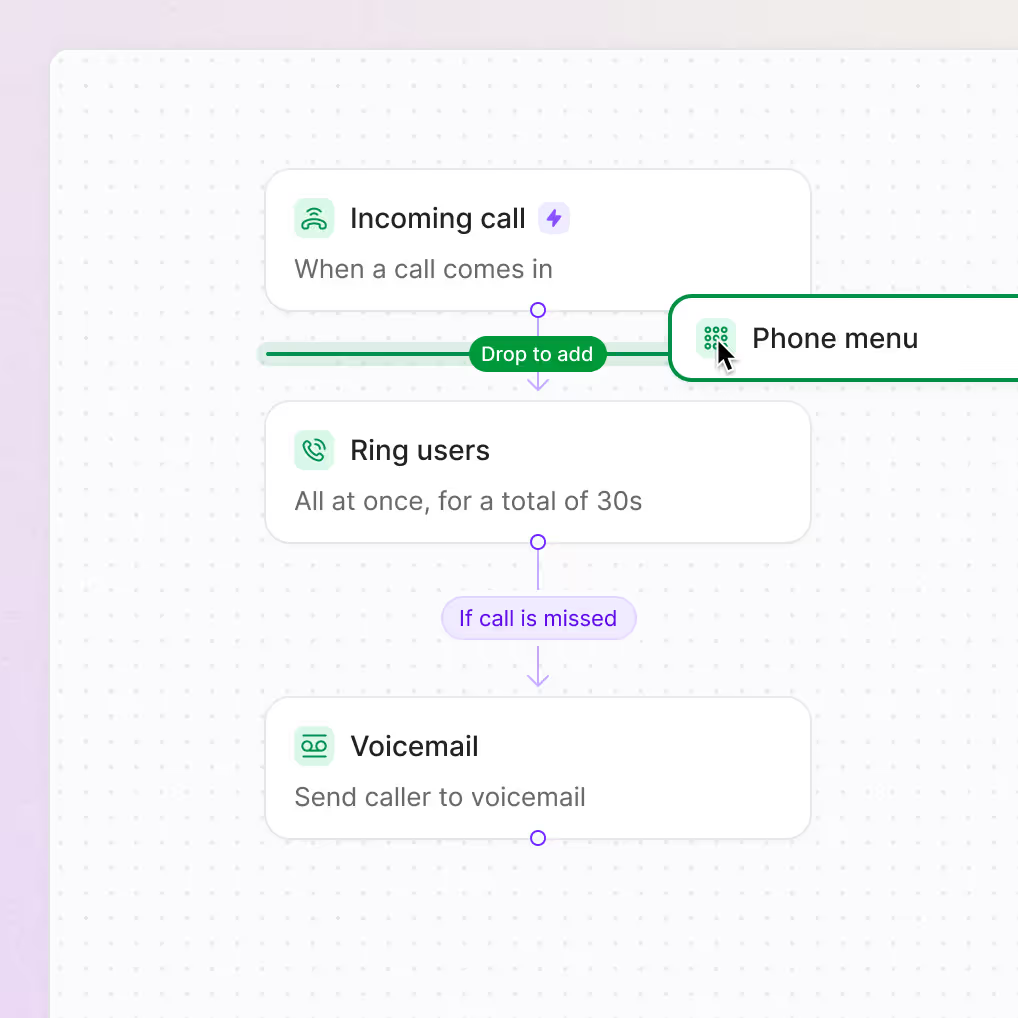







Automatic call distribution, also known as ACD, is a business phone system feature that routes incoming calls to the right person on a team. Here are a few reasons ACD software is useful to small businesses:
You can set up a basic ACD system by setting up a phone menu and a custom ring order. Give callers the ability to navigate to their preferred department with a phone menu. Automatically distribute calls to your team in your preferred order with a custom ring order. Both these features consistently match callers with the right team members.
Looking for an advanced ACD option? Modern cloud-based phone systems like Quo provide advanced ACD with AI voice agents. Our AI voice agent, Sona, automatically understands what a caller is looking for. It can answer questions without having to route calls. If it does have to transfer a caller, Sona routes the call to the right person or inbox for your team.

As teams learn about ACD in their business phone systems, they often confuse it with IVR. Here’s how they’re different:
Interactive voice response, or IVR, helps customers navigate to different departments. IVR systems are the same as phone menus and auto-attendants. The ‘IVR’ term refers to a phone menu’s ability to respond to voice commands and to the actual menu itself.
Automatic call distributors learn what a caller is looking for and route them to the right team member. They can get this information from an IVR based on a caller’s chosen menu option. They can also get this information from an AI voice agent based on what a caller shares in a conversation.
.avif)
.webp)
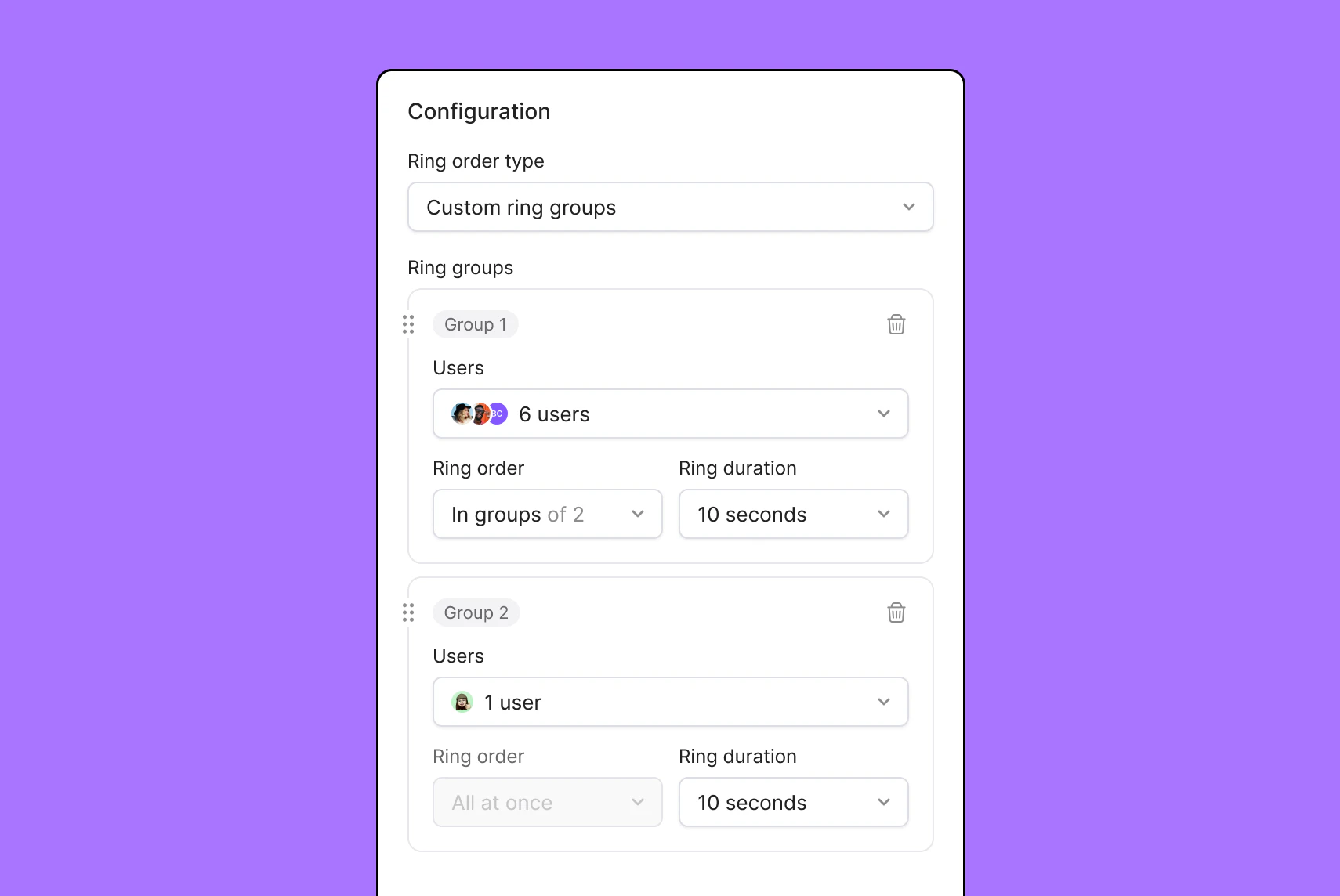
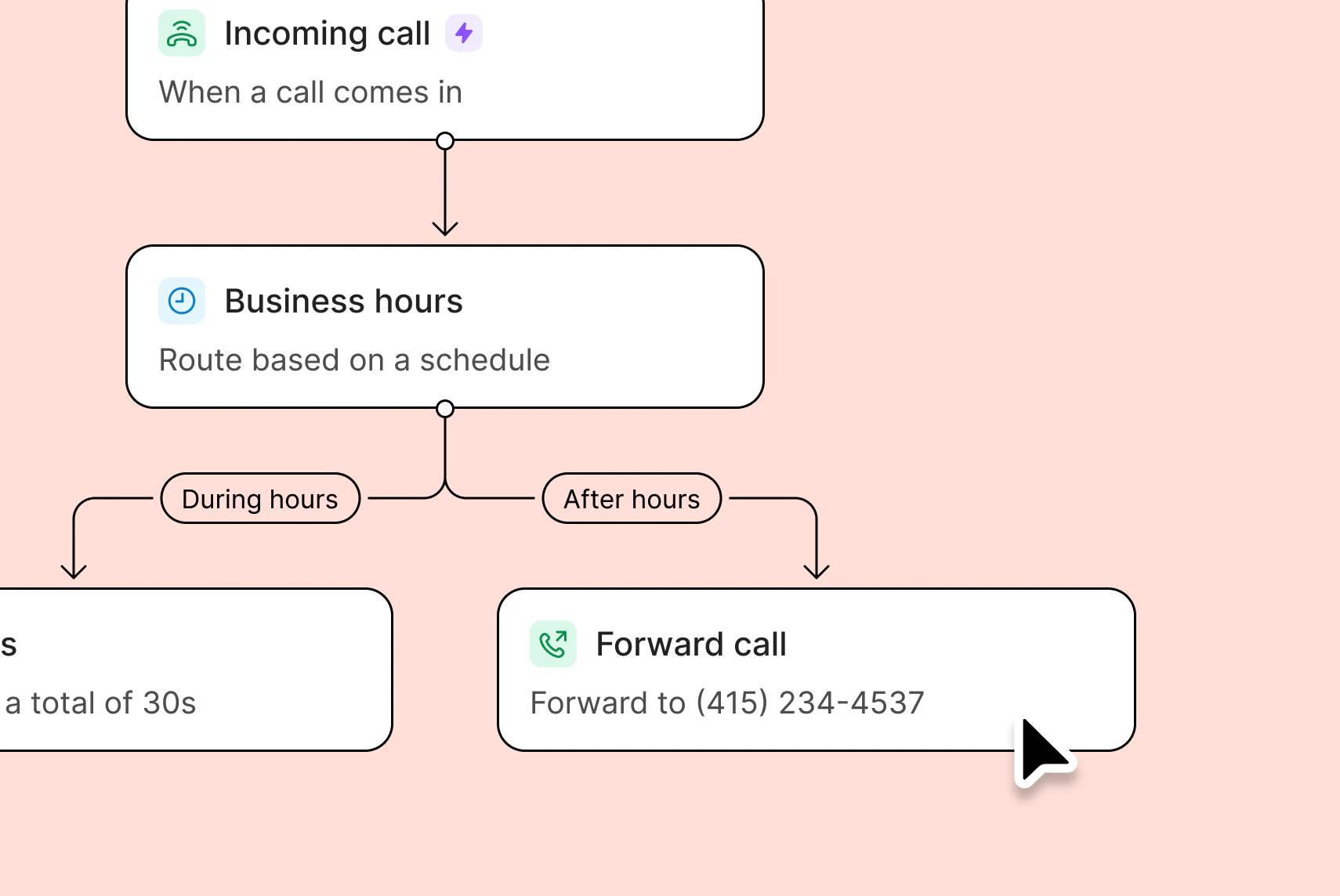
Set up an automated call routing method that works for your team. Choose from six different ACD distribution methods in Quo.
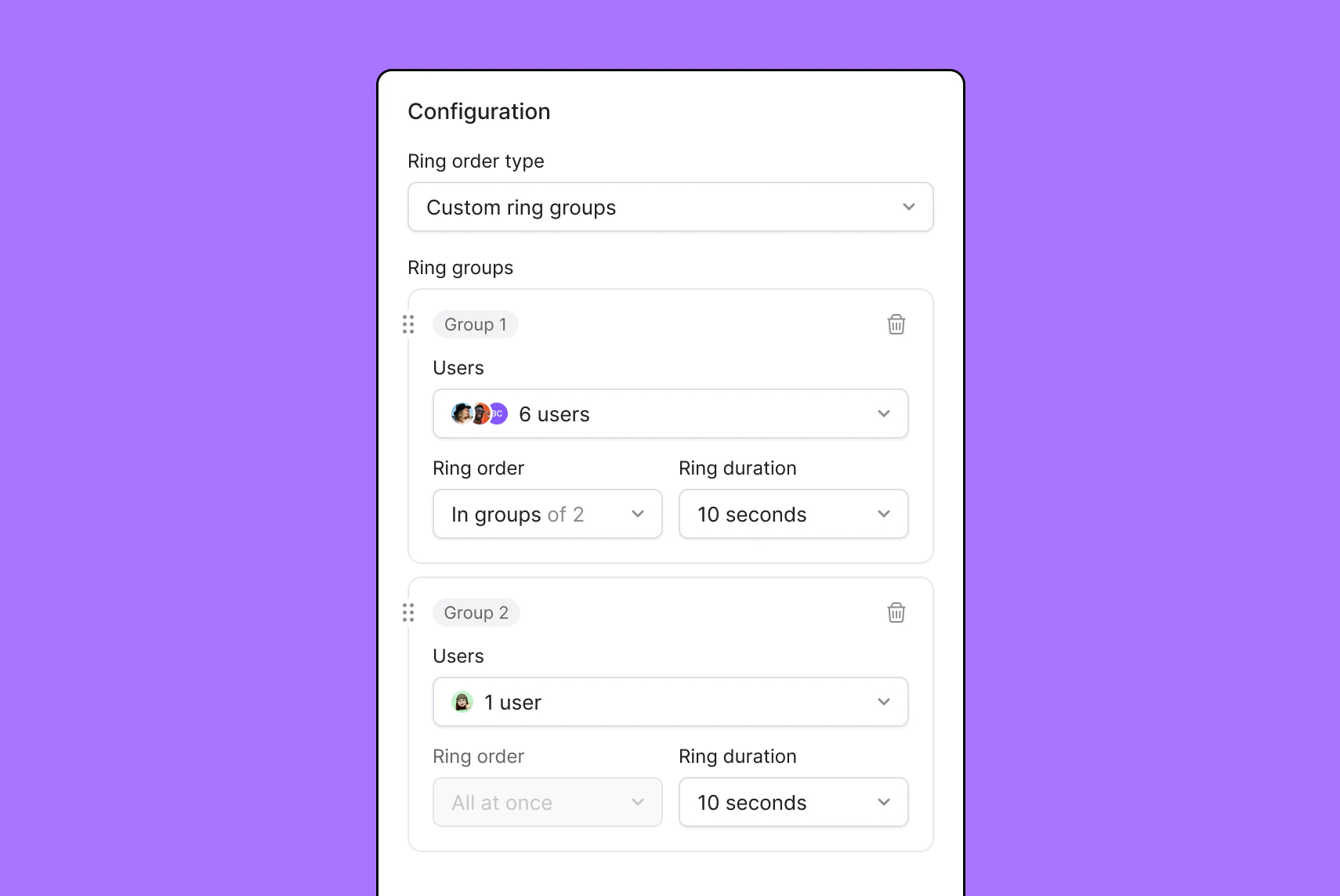
Ring available teammates on a shared phone number simultaneously with simultaneous ring.
Ring teammates in predetermined batches with sequential ring. If one batch isn’t available, the call proceeds to the next batch in the sequence.
Give everyone on your team a chance to speak to your customers. Set up round-robin call routing by rotating individuals in your ring groups every week.
Ring available teammates based on their shift times. Team members can set up their shifts in Quo with work schedules.
Customize call distribution based on your business hours with time-of-day routing. Offer different call routing options during business hours vs after hours.
Answer incoming calls 24/7 with our AI voice agent, Sona. Provide custom instructions to Sona so that it can answer questions, take messages, and transfer calls to your team.
%20(1).jpg)
Get all the numbers your team needs with Quo. Sign up for local US and Canadian phone numbers with your preferred area codes. Build trust and familiarity with customers in every region you operate.
If you want to cater to customers nationwide, consider adding a North American toll-free number. It’s a great option to provide toll-free customer support. With vanity numbers, you can also stand out from the competition. Get a custom phone number like 1-800-FLOWERS or 1-877-FIXMYCAR. You can instantly make your brand memorable to customers.
Every Quo user gets their own dedicated phone number when they join your workspace. You can also share numbers for specific departments. Need additional unique numbers? Get more numbers for $5 per number per month.
Make call handling a breeze with Quo. No need to manually set up access codes to forward calls or remember to set up multiple extensions. You don’t have to rely on traditional phone systems powered by private branch exchange, or PBX, anymore.
Create custom call flows for your team with our drag-and-drop call flow builder. You don’t need any technical expertise or coding knowledge to use the builder. Reuse call flow steps with the Go to step. You don’t need to create multiple versions of the same call flow step.
Quo also provides call routing features for live calls. Transfer calls to your colleagues with the right amount of context using warm transfers. Bring multiple stakeholders together into a single conversation with group calling.
Meet your customers wherever they are. With Quo’s omnichannel communication, you can talk to customers on calls and texts.
Send SMS and MMS messages with Quo. Share more context with customers by sending photos, videos, documents, and even GIFs.
Automate how you send texts so you can send more messages in less time. With our automated text messaging features, you can respond to customers at any time of day. Automatically respond to customers when they leave a missed call with auto-replies. Schedule texts based on your customers’ time zones. Answer routine questions in seconds with pre-written text templates, or snippets.
You can also set up automated text workflows to provide a personalized experience for every customer. Use our Make and Zapier integrations to connect Quo to your tech stack. Automatically send booking confirmations, appointment reminders, pre-meeting checklists, payment requests, and more.
Get more work done as a team. Boost your team’s productivity with Quo’s collaboration features.
Handle inbound calls and texts together with shared numbers. Split responsibility for incoming calls. Get visibility into customer interactions with shared inboxes.
Work through real-time issues and assign follow-up tasks with internal threads. Loop your customers right next to a call recording or a text thread so that they have context. Find out whether a teammate has reviewed a conversation with inbox viewers.
Give back time to your team so they can focus on the work that matters. Put your repetitive work on autopilot.
Automatically log your calls and texts in your CRM. Use our third-party integrations with HubSpot, Salesforce, or Jobber. You can also set up custom integrations with any other CRM using our Make and Zapier integrations. Get more control over your CRM integrations by using the Quo API.
Manage your team’s performance with Quo. View your team’s performance in real time with call views. Get a look at historical performance with our analytics dashboard. Filter your team’s metrics on a weekly, monthly, and quarterly basis.
Provide live coaching to your team with three-way calling. Conduct call reviews together by highlighting sections of a call transcript or playing back a past recording.
Call and text customers from anywhere in the world
As a cloud-based phone provider, Quo travels with your team wherever they go. All you need is a compatible device and an internet connection.
Download Quo for Mac, Windows, iOS, and Android devices. You can also access your Quo workspace directly in your browser. Sign up today for free with our seven-day trial.
Find out how much you’re investing in your business phone solution upfront on our pricing page.
Feature
ACD
Traditional routing
Setup time
< 30 minutes
1-2 weeks
Intelligent routing


Scalability
Highly scalable
Limited scalability
Cost
Starts at $15 per user per month
$2000+ for a five-person team
Remote work support
Customer experience
24/7 call coverage + short wait times
Limited call coverage + long wait times
Can’t find the answer here? Check out our Resource Center.

ACD isn’t limited to just call centers. Small businesses can benefit from having ACD features in their business phones. It can reduce manual workloads and callbacks for small teams.
ACD software is included in many virtual phone solutions. Prices range between $15 and $50 per user per month.
Call queues aren’t necessary for ACD systems. In fact, call queues often deliver a poor experience to callers. Teams that rely on call queues often contend with long hold times and abandoned calls. A better alternative is to use a callback service. Callers can speak with teams without waiting on the phone. Teams can call back customers when it’s convenient for them.
Here’s how you can manage callbacks in Quo:
Here are a few implementation challenges to keep in mind with ACD systems:
An auto-dialer is an outbound cold calling tool for large sales and support teams. It automatically dials numbers in a predetermined list to help teams have more conversations.
ACD solutions are inbound call routing tools for teams of all sizes. They automatically route calls to team members based on call routing conditions, including their skill sets.
Set conditional call forwarding in your ACD solution if all your reps are busy. You can route calls to a backup routing option like our AI agent Sona. Callers can ask questions, leave messages, or request a callback. It’s a smarter way to reduce your missed calls.
Quo’s ACD software is cloud-based. It allows your team to access Quo remotely. You don’t need to install any custom hardware or equipment, either. That way, your team can use a computer, smartphone, or tablet to use Quo.


