


If you’re on the hunt for the right small business phone system, you know there are dozens of options. It can be incredibly challenging to sort through the possibilities to find the perfect fit for your business.
Good news — we’ve done the hard work for you! After testing dozens of phone systems and evaluating them for ease of use, scalability, features, and integrations, we’ve narrowed it down to the best. This guide covers the top ten small business phone systems in depth\.
Quick look at findings:
- Quo, formerly OpenPhone: Best overall for small and growing teams that want unlimited US & Canada calling and texting, shared numbers, and a built-in AI voice agent.
- Google Voice: Best for solo users and teams already using Google Workspace who only need basic US calling and texting, and don’t mind the Workspace requirement.
- Dialpad: Best for teams that want AI transcription and live call coaching built into every call.
- Vonage: Best for teams that want to build custom workflows on top of a phone system via APIs, and don’t mind paying à la carte for add-ons.
- Grasshopper: Best for solopreneurs and very small teams that want simple call forwarding and extensions on one or two numbers, with no need for AI or integrations.
- Nextiva: Best for teams that want voice, video, and social channels in one place and already use Microsoft products.
- 8×8: Best for businesses that need international calling across many countries on a single plan.
- GoTo Connect: Best for teams that want a conference-bridge and meeting setup bundled with their phone system.
- Zoom Phone: Best for teams already using Zoom for meetings that want a phone layered on top.
- RingCentral: Best for larger teams that want desk-phone rentals and an enterprise UCaaS suite, and can absorb the higher per-user cost.
Methodology: How we evaluated the top small business phone systems
We ranked the best small business phone systems after our market intel team signed up for free trials, contacted sales and support teams, and tested call reliability firsthand. Here’s what we weighed:
- Price: We evaluated what each plan actually costs, and checked for any hidden fees. Budget matters, but so does what you get for it. We looked for platforms that offer the most value at each price point.
- Features: We looked for providers with base plans that include everything you need to get started, without expensive add-ons. We prioritized platforms that pack the most useful features into their entry-level plans.
- Support: We tested how quickly and effectively each provider’s support team responded to real questions. Reliable help matters most when something goes wrong, so we prioritized platforms with responsive, accessible support across multiple channels.
- Call quality: We evaluated call reliability and uptime through firsthand testing on each platform. A poor call experience reflects on your business, so we only recommend providers that consistently deliver clear, stable connections.
- Scalability: We looked at whether plans cap minutes or messages, and whether essential features like call recording or shared numbers are locked behind upgrades. We favored platforms that can grow with your team without forcing costly plan jumps.
Top 10 phone systems for small businesses compared
Here’s a quick look at how each provider stacks up:
| Providers | Annual price | Unlimited calls US/CA | Free texting US/CA | G2 rating | Desk phone support | Free trial |
|---|---|---|---|---|---|---|
| Quo | $15 | ✔ | ✔ | 4.7 (~3390 reviews) | ✗ | ✔ |
| Google Voice | $10 | US and Canadian numbers only | US customers only | 4.1 (~160 reviews) | Yes (Poly/ATA only) | ✗ |
| Dialpad | $15 | ✔ | 250 messages per user per month | 4.4 (~4190 reviews) | ✔ | ✔ |
| Vonage | $13.99 | ✔ | Local US and Canadian numbers only | 4.3 (~490 reviews) | ✔ | ✗ |
| Grasshopper | $14 | ✔ | SMS on local & toll-free; MMS local numbers only | 3.9 (~150 reviews) | ✗ | ✔ |
| Nextiva | $15 | ✔ | 100 texts per user per month | 4.5 (~3480 reviews) | ✔ | ✗ |
| 8x8 | Contact sales | ✔ | ✔ | 4.2 (~810 reviews) | ✔ | ✔ |
| GoTo Connect | Contact sales | ✗ | US and Canada only | 4.4 (~1390 reviews) | ✔ | ✔ |
| Zoom Phone | $10.50 | Unlimited inbound with upgrade | US, Canadian, and Australian numbers only | 4.6 (~2640 reviews) | ✔ | ✗ |
| RingCentral | $20 | ✓ Limited toll-free minutes | 25 texts per user per month | 4.2 (~1310 reviews) | ✔ | ✔ |
Breaking down the best small business phone systems
Investing in a business phone system is essential for building strong customer relationships, providing excellent customer support, and growing your business. Here are ten of the best small business phone systems to consider:
1. Quo: The best business phone system for small business
Quo, formerly OpenPhone, is a VoIP system with modern features that can scale with your business. Quo works on your existing computer, smartphone, or tablet.
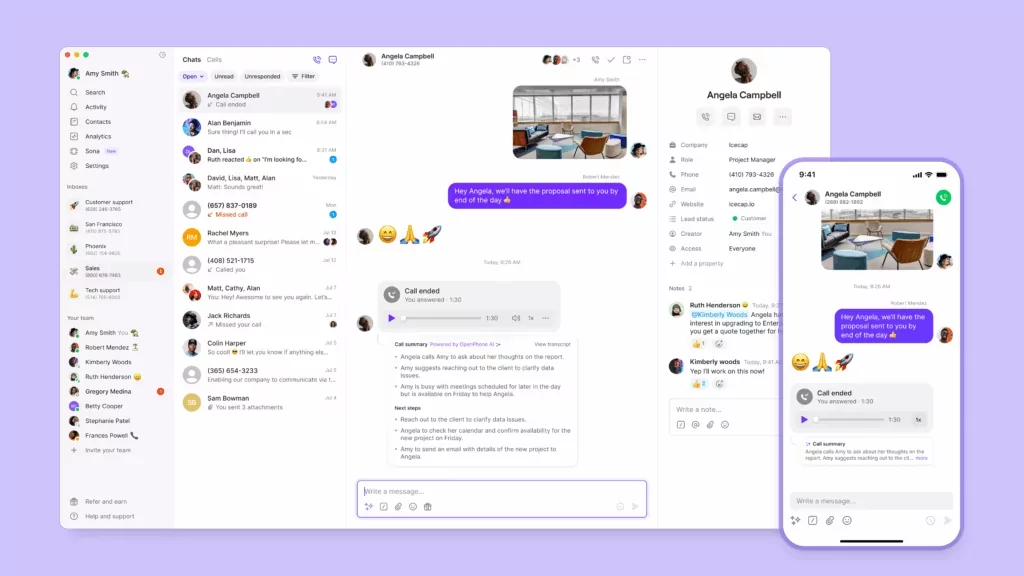
Here’s what sets it apart:
- Automate your communications. Quo’s IVR phone menus, texting auto-replies, and integrations help you work more efficiently.
- Easy to scale as your team grows. You can add users anytime, give each their own US, Canadian, or toll-free number, and share existing numbers so teammates can field calls and texts together.
What we like about Quo
- AI on the base plan: Sona, Quo’s AI voice agent, comes built in, not as a premium add-on.
- Built for collaboration: Shared numbers, shared inboxes, internal threads, and contact notes let a team cover calls and texts together instead of in silos.
- Unlimited US & Canada calling and texting: Quo also has affordable international rates.
- Top-rated support and ease of use: Quo is rated #1 in customer satisfaction for VoIP providers on G2 and is consistently praised for fast onboarding.
- 8,000+ integrations: Connect with Slack, HubSpot, Salesforce, Google Contacts, Jobber, Zapier, Make, and more.
What we don’t like about Quo
- Can’t verify accounts via 2FA: Like nearly all virtual numbers, you generally can’t use a Quo number to authenticate accounts with companies like Google or Uber.
- North America focused: Local numbers are available in the US and Canada only.
Don’t worry about sitting on hold or visiting a store to activate your business phone system. With Quo, you can sign up online and get up and running in under 15 minutes. Try out Quo for seven days by signing up for our free trial.
Quo pricing

- Starter: $15 per user per month for unlimited calling and messaging to the US and Canada, voicemail transcripts, and 10 free calls with Sona AI agent
- Business: $23 per user per month to access group calling, call transfers, HubSpot and Salesforce integrations, AI call transcripts, and more
- Scale: $35 per user per month for AI call tags, dedicated onboarding, inbound phone support, and priority chat and email support
Demo

2. Google Voice: Best phone service for small business using Google tools
Google Voice for Business is a popular small business phone system for businesses that already use products like Gmail and Google Docs. You can call and text with Google Voice on your existing computer, smartphone, tablet, or compatible desk phone.

What stands out:
- Native fit with Google Workspace: Calendar, Meet, Gmail, and Contacts all connect without extra setup.
- An affordable, familiar entry point: Paid plans start at $10 per user per month and it’s free for personal use.
What we like about Google Voice
- Easy to set up: The interface is familiar to Google users, with a large online community for support.
- Unlimited US calling and texting: You get unlimited calls and texts in the US, and calls to Canada from the US.
- Native Workspace integration: Google Voice connects directly with Calendar, Meet, and Contacts.
What we don’t like about Google Voice
- Requires Google Workspace: If you want more than one person on an account, you’ll need a Workspace subscription on top of your Voice plan.
- US-only texting: Texting works in the US only, and there are no toll-free numbers.
- No business-hours settings: There’s no way to route calls differently after hours.
- Locked to Google: There are no integrations outside Google Workspace, no desktop app, and no auto-replies.
- Limited AI: Its AI covers spam blocking and voicemail transcription only. See more Google Voice limitations.
Google Voice pricing

There are four Google Voice plans to choose from. If you have more than one person on your team, you’ll need to have a Google Workspace subscription starting at $7 per user per month in addition to paid plan:
- Starter with voice only: $10 per user per month for one user, free calls in the US and Canada, and access to mobile and web apps
- Starter: $10 per user per month for calls to the US and Canada, voicemail transcriptions, and integrations with Google Workspace
- Standard: $20 per user per month to unlock on-demand call recordings, ring groups, and phone menus
- Premier: $30 per user per month to unlock automatic call recordings and advanced reporting
3. Dialpad: Best small business phone system for call monitoring
Dialpad is an AI-powered business phone solution best known for real-time transcription and live coaching. It works on your computer, smartphone, tablet, or compatible desk phone.

Two things define it:
- AI is the core product: Live transcription and real-time analytics are included rather than bolted on.
- International local numbers are available in over 50 countries.
What we like about Dialpad
- Unlimited calling: Calls to the US and Canada are unlimited on the base plan.
- Video and integrations: Dialpad includes unlimited video conferencing and broad native integrations.
What we don’t like about Dialpad
- Features gated behind higher tiers: Additional numbers, international SMS, and CRM integrations require an upgrade.
- Support and setup friction: We noticed slow support and a steep learning curve during testing, and admin setup takes longer than competitors.
- Not ideal for very small teams: Dialpad is better suited to teams of ~10 or more.
Dialpad pricing

Here’s how Dialpad pricing plans currently breakdown:
- Standard: $15 per user per month for free calling in the US and Canada, team messaging, and up to 250 outbound text messages
- Pro: $25 per user per month for additional local or international numbers, international SMS, and access to the open API and webhooks
- Enterprise: Get a custom quote for unlimited ring groups, unlimited office locations, and 100% uptime
4. Vonage: Best small business phone solution with an API offering
Vonage is a legacy business VoIP service provider. It’s well-known but fairly out-of-date compared to modern options like Quo and Dialpad. It offers desk-phone compatibility plus desktop, web, and mobile apps.

What stands out is its API offering for teams that want to build custom communication workflows.
What we like about Vonage
- Unlimited calling: All plans include unlimited calling.
- Free number porting: You can bring your existing numbers over at no cost.
What we don’t like about Vonage
- Requires upgrades for today’s essentials: Features like auto-attendants and voicemail transcriptions come standard on most other providers’ plans.
- Add-on fees stack up fast: Call recording runs ~$49.99 per month and toll-free numbers ~$39.99 per month extra.
- Limited auto-replies: Auto-reply capabilities are minimal compared to other remote phone systems.
- Pricing penalizes small teams: The fewer users you have, the more you pay per line.
Vonage pricing

Vonage’s pricing for their base plans depends on the size of your team, with smaller teams paying more per user. Here’s how much teams of 1-4 users can expect to pay:
- Mobile: $13.99 per line per month for unlimited team messaging, access to the mobile and desktop apps, and the Vonage App Center with 20 integrations
- Premium: $20.99 per line per month for unlimited video meetings with up to 100 participants, multilevel auto-attendants, and integrations with IP desk phones, including Cisco and similar brands
- Advanced: $27.99 per line per month for visual voicemail, call groups, and 15 hours on-demand call recording
Learn more about how Quo and Vonage compare.
5. Grasshopper: Best small business phone service for multi-digit extensions
Grasshopper offers the basics like business phone numbers and extensions. You can call and text with Grasshopper on your existing computer, cell phone, or tablet.

The defining traits:
- Prices by phone number rather than by user, which can be cheaper for a team sharing one number.
- A basics-only feature set with phone numbers, extensions, voicemail — no AI or integrations.
What we like about Grasshopper
- Unlimited US & Canada calling: Calls and texts to the US and Canada are included.
- Voicemail transcription: Plans include voicemail transcription and a phone menu with extensions.
What we don’t like about Grasshopper
- Feels dated: We tested out Grasshopper’s admin portal and found it to be limited and hard to customize.
- No real integrations: There are no CRM, Slack, or Zapier integrations and no call summaries.
- Hidden costs: Calls to Alaska and Hawaii are treated as “offshore.” They require international calling and a $500 deposit.
- Support complaints: Slow, unhelpful support is a common theme across review sites.
Grasshopper pricing

Grasshopper’s plans are different from most other small business phone systems. Instead of charging by the user, you pay based on how many phone numbers you need:
- True Solo: $14 per month for one phone number, one user, and one extension
- Solo Plus: $25 per month for one phone number, unlimited users, three extensions, call recording, IVR, and simultaneous ring
- Small Business: $55 per month for four phone numbers, unlimited users, unlimited extensions, and everything in Solo Plus
*Additional numbers cost $9 per month.
6. Nextiva: Best phone system for small business using Microsoft products
Nextiva is a popular VoIP service provider that many well-known enterprises use. You can use Nextiva on your existing laptop, smartphone, tablet, or a compatible desk phone.

What makes it distinct is the communication channels. It goes beyond voice and text to unify video, social, and messaging channels like WhatsApp and Instagram in one place.
What we like about Nextiva
- Strong collaboration and analytics: Detailed reporting helps you keep tabs on team activity.
- Responsive support: Reviewers consistently praise Nextiva’s support team.
- Unlimited calling: Calls to the US and Canada are unlimited.
What we don’t like about Nextiva
- Capped texting: The base plan includes only 100 SMS per user per month.
- Add-ons add up: Call recording and several integrations require an upgrade or add-on fee.
- No free trial: Nextiva doesn’t offer a free trial.
These limitations lead many small businesses to Nextiva alternatives.
Nextiva pricing

Here’s how Nextiva’s pricing per user breaks down:
- Core: $15 per user per month for voice calls, 100 text messages, team chat, voicemail transcriptions, and access to the mobile app
- Engage: $25 per user per month for the Microsoft Teams integration, 500 text messages, digital fax, voice analytics, 2,000 toll-free minutes, and call recording
- Scale: $75 per user per month for up to 100 agents for skills-based routing, IVR, call transcriptions and summaries, and API integrations
7. 8×8: Best solution for global calling
8×8 is a communications platform that offers small business plans, though you can also access an enterprise-level contact center solution.

What stands out is it’s built around reach. International calling and large-scale conferencing are the reasons most teams land on it. You can use 8×8 on your existing computer, smartphone, tablet, or compatible desk phones.
What we like about 8×8
- Large-scale conferencing: Video and audio conferencing supports up to 500 people.
- Broad international calling: Unlimited calling to 14 countries makes it strong for international teams.
What we don’t like about 8×8
- Unintuitive interface: The platform is harder to navigate than competitors.
- Limited recording storage: Starter plans keep recordings for only ~30 days without an upgrade.
- US & Canada-only SMS: Texting is limited to the US and Canada, and group texting to US & Canadian numbers.
8×8 pricing
8×8’s pricing isn’t listed online. You’ll have to contact their sales team and request a quote.
8. GoTo Connect: Best small business phone software with conference bridge
GoTo Connect consolidates businesses’ internal and external communication on a single platform. It offers customers a VoIP phone, virtual meeting system, ring groups, and integrations with Zoho and Zendesk. It runs on a computer, smartphone, tablet, or compatible desk phone.

What we like about GoTo Connect
- Free international calls: The base offering includes free calls to 50 countries.
- Office-suite integrations: GoTo Connect integrates with Google Workspace and Microsoft Outlook.
- Bundled meetings: Meetings and conferencing come alongside the phone system.
What we don’t like about GoTo Connect
- Shared inbox is gated: It isn’t available on the base plan.
- Capped toll-free minutes: Minutes are pooled and capped at 1,000 across plans, and overages get pricey.
- Limited texting: SMS and MMS is restricted to the US and Canada.
GoTo Connect pricing
GoTo Connect’s pricing isn’t publicly available, but you can still see its tiers and features on the website:
- Phone System: Video meetings, team chat, SMS and MMS, Microsoft Teams integration, and free calls to 50 countries
- Connect CX: Social media integrations, shared inboxes, and AI-powered call summaries
- Contact Center: Auto-queue callback, advanced call routing, and call monitoring tools
9. Zoom Phone: Best small business phone system for large industry events
Zoom might be better known for its online meeting platform, but in 2019, the company broke into the VoIP phone space. Most teams pick it for its tight integration with Zoom Meetings. You can transfer from a call straight into a Zoom meeting.

What we like about Zoom Phone
- Core features included: Voicemail transcription, shared numbers, and call recording all come standard.
- Coaching tools: Call listening and whispering support live coaching.
- Industry events capability: You can host meetings with 100-300+ participants, depending on your plan.
What we don’t like about Zoom Phone
- Metered base plan: Outbound calls are metered on the entry plan.
- Limited texting: Repeat or automated texts require API work.
- Heavy admin setup: Getting a team up and running takes a lot of time, which is overkill for very small teams.
- No free trial: Zoom Phone has no trial, and advanced analytics cost extra.
Zoom Phone pricing

Zoom plans have the most complicated pricing. In addition to a half dozen potential add-on fees, you can choose between these plans for a Zoom Phone:
- Metered: $10.50 per user per month for metered domestic calling, SMS and MMS in the US and Canada, auto-attendant, and Zoom meetings
- Regional unlimited: $16 per user per month for unlimited outbound calls in the US and Canada, metered international calling, and AI call summaries
- Global Select: $25 per user per month for unlimited calling in 40+ countries, a direct dial number, and everything in US & Canada Unlimited
You can also bundle Zoom Phone with Zoom Workplace at a discounted rate:
- Pro Plus: $20.50 per user per month for access to Zoom Workplace Pro, plus everything in the Unlimited plan
- Business Plus: $24.50 per user per month for access to Zoom Workspace, Business, visitor management tools, real-time reporting dashboards, and access to international calling add-ons
10. RingCentral: Best small business phone service with desk phone rental options
RingCentral has been around since 1999. Its RingEx product provides companies with business and toll-free numbers. It runs on your existing computer, mobile device, tablet, or a compatible desk phone.

Most teams choose it because it offers a full enterprise UCaaS suite with integrations and desk phone rental options.
What we like about RingCentral
- Unlimited calling: Calls to the US and Canada are unlimited.
- Local and toll-free numbers: RingCentral provides both.
- Deep integrations: It connects with Slack, Microsoft 365, Salesforce, and Zendesk — with an upgrade.
What we don’t like about RingCentral
- Major texting limits: The base plan includes only 25 texts per user per month.
- Call recording limits: Automatic call recordings are available only after upgrading
- Message storage cap: A ~5,000-text-per-user cap can be a problem for record-keeping or disputes.
- Support gaps: Reviewers report poor support.
RingCentral pricing

Here’s how RingCentral pricing plans break down:
- Core: $20 per user per month to access unlimited domestic calling, SMS and MMS, and IVR
- Advanced: $25 per user per month to access auto call recording, advanced call monitoring and handling, and multi-site management
- Ultra: $35 per user per month to access unlimited enterprise-grade HD video, whiteboards, messaging, customizable business insights, and unlimited file-sharing with storage for files and recordings
3 key reasons to use a VoIP phone system for small businesses
While some of these small business phone systems can connect to desk phones, they’re all virtual phone systems. Here are the reasons thousands of businesses go with this solution.
1. Works from anywhere on any device
Since a small business virtual phone service only requires an internet connection, you and your team can work from almost anywhere. Whether you’re a solopreneur who frequently travels, a business with team members in the Philippines, or a company that’s opening up new locations, your virtual business phone system can travel with you.
Shared numbers also allow you to share a single number with team members internationally. This means that a virtual assistant can call and text clients from your number — even while across the globe. Your distributed team can all share responsibility for a single phone number.
2. Scales with your team as you grow
The best virtual phone systems charge companies by the user. This gives you the flexibility to add and remove members from the platform as your team scales. Need new direct numbers for new teammates? Or expanding to another city and need a local number to support your expansion? You can get as many phone numbers as you need.
As your team evolves, your business phone provider should also. Quo continually releases new updates and features to help small businesses communicate efficiently and build meaningful customer relationships.
3. Easy to get started
While landlines require hardware and can be more complicated to install, virtual phone systems work on devices your team already owns.
This means that you can skip store visits, installation appointments, and waiting on hold for hours to get your phone system activated. Instead, you can be up and running in a matter of minutes.
10 phone features every small business needs

There are a lot of vendors in the business phone system space, from legacy providers to relative newcomers, each providing a range of features at different price points. Some vendors charge a premium for advanced features that others consider standard, while some vendors don’t offer them at all.
Here’s a list of features offered by the best small business phone systems. Use it as a checklist as you evaluate service providers.
1. Option to have multiple phone numbers
Local area codes matter to customers. When customers see a local number pop up, they are much more likely to pick up the phone or read your messages.
At Quo, companies like Billdr and Hubbard Realty Group rely on having multiple business phone numbers with local area codes. That way, they can provide customers with a relevant number they can reach out to in multiple cities.
2. Call routing
With call routing, your customers get attention even when you’re unavailable to take their call.
If you’re busy, you can forward calls to another team member’s number, send an auto-reply to let a customer know you’ll call back, or share responsibility for incoming calls through simultaneous ring.
These options are all great ways to keep your customers engaged during high call volumes — rather than leaving them with unending rings and never being able to get ahold of you.
3. AI call management features

Efficient call management powered by AI saves your entire team’s time. The best small business phone systems offer auto-attendant or IVR that can route to an AI voice agent or human.
These virtual phone menus automate call routing by allowing callers to choose where they need to go. AI agents can answer basic requests and escalate to a rep when needed. This means you and your employees can stay on task instead of fielding inbound calls.
Call forwarding, call transfer, and call tagging capabilities are also ideal for team collaboration.
4. Call recording and call summaries
Call recording is an essential feature of a small business phone system. It helps with coaching sales and support teams effectively. By reviewing recorded calls, supervisors can provide specific, actionable feedback to staff. This will help them improve their communication skills and problem-solving capabilities.
Additionally, call recordings are a valuable resource in understanding a customer’s history and interactions with your business. With this information, your team members can offer a more personalized and contextually-aware customer service experience.
Call summaries are a related feature to call recording that can make your recordings even more powerful. AI call summaries help you review your recordings at a glance. You can get the context you need to plan your next steps with a customer or a prospect without manual work.
5. Caller ID
Build trust by setting up a caller ID that displays your business name, even if your call recipient doesn’t have you in their address book. Caller ID usually isn’t available for toll-free or Canadian numbers, but it should be available for local numbers in the US.
6. Voicemail transcriptions
Having voicemails automatically transcribed may seem like something you would get out of the box with most solutions. However, some small business phone systems require you to upgrade for this feature.
Voicemail transcriptions come standard with every Quo plan. You can even push voicemail to an email inbox or Slack channel when you miss a call. Even if you can’t listen to a message right away, you can get a notification to see how urgently you need to call back.
7. SMS, MMS, and automated texting
You don’t always need to have real-time phone conversations to conduct business. Wouldn’t it be awesome if you could send texts, pictures, and videos or have group messaging conversations? SMS and MMS are essential services in a world where consumers send over 2.2 trillion text messages each year. If you want to have a unified communications strategy for your customer relationships, you should prioritize SMS and MMS features in your business phone service.
To speed up your texting lead response time, choose a small business phone system that offers automated texting features like text message templates and auto-replies.
8. Integrations and APIs
Leveraging the small business tools you already use, like Slack, HubSpot, Salesforce, and Zapier by selecting a phone system with CRM and workflow integrations. These integrations can help you save time on repetitive tasks and give you more context to easily follow up on conversations.
Platforms with APIs let you get creative in connecting tools and creating useful workflows.
9. Shared numbers and inboxes

Make sure a team member’s got your back when you’re away. Shared phone numbers, like a shared email inbox, ensure incoming calls and texts from customers and prospects are always taken care of.
10. Free phone number porting
Switch providers without losing the numbers your clients have saved on their phones. Opt for a VoIP provider that will port your business phone numbers for free — whether you have a local number or a toll-free number — like Quo.

Now that you know which features you should be looking for, we’ll show you how you can compare different business phone providers and pick the best one for your needs.
How to choose the right business phone system for your small business

For some businesses, expensive international calling is a dealbreaker, while for others, seamless texting is the number one priority. So, based on your own unique needs, how can you decide which provider will be right for you?
Here are the different factors that influence what business phone system a team chooses:
- Key features: What are the must-have features you need from your business phone system? Is it call recording, voicemail-to-email, an AI receptionist, or an auto-attendant to route calls?
- Number of users: How big is your team? If your team is growing, you’ll need a business phone system that can scale with you.
- Remote or in-office: Is your team distributed or mostly working from one location? This can determine the type of business phone system you end up choosing.
We recommend using this process of elimination:
- Shortlist a few potential options based on the features highlighted in this guide and on each provider’s website.
- Check out review sites like G2 to get a sense of existing and former customers’ experiences with each provider. If the reviews are red flags based on your needs, strike the provider off your list.
- Verify how responsive the providers are by reaching out to their customer support. Ask them any initial questions you might still have about their services after checking out their website. Keep an eye on how responsive and transparent they are when answering.
- Trial the providers that remain on your shortlist. Hands-on experience will help you understand just how intuitive the system is, how easy it is to onboard, and how well the system will integrate into your existing tech stack and processes.
By the time you wrap up the final step above, you should have your winning business phone system selected. Congrats!
If you have an existing number you wish to use on your new phone system after you’ve done a trial with a temporary number, you can port that over.
How to set up a small business phone system
Setting up a cloud-based phone solution can be done in one business day for larger organizations, and in minutes for smaller teams. All you need is an internet connection and a compatible device.
Here’s how to get started with Quo:
- Sign up online and choose your number. Select a US, Canadian, toll-free, or number, or port your existing number for free.
- Invite your team. Send email invites so teammates can collaborate on calls and texts from any device.
- Configure your business caller ID. Set your CNAM so clients recognize your number on outbound calls.
- Import contacts. Upload a CSV or turn on AI contact suggestions to automatically surface relevant contacts from call transcripts.
- Set your business hours. Configure away voicemail greetings and auto-replies so customers always know when to expect a response.
- Customize calling settings. Use Quo’s visual drag-and-drop call flow builder to add interactive voice menus, forward calls to teammates, or let Sona, Quo’s AI agent, handle calls after hours.
- Enable integrations. Connect to HubSpot, Salesforce, Slack, Zapier, and 8,000+ other tools to keep your workflows in sync.
▶️ Want a more in-depth guide? Read this next: How to set up a small business phone system
Get started with the best small business phone system
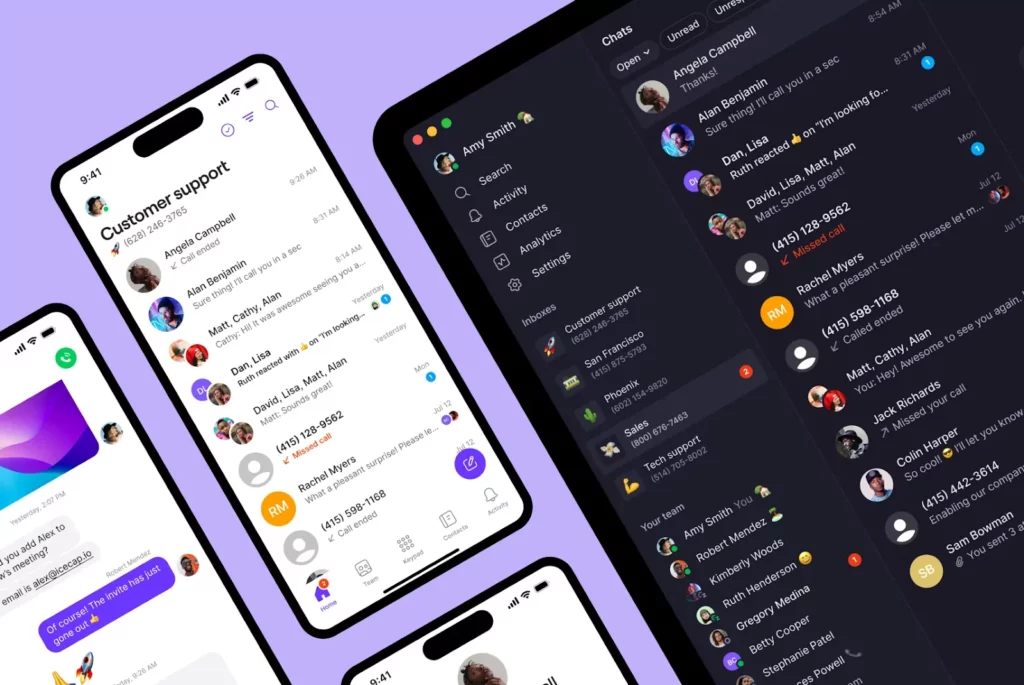
You know the litany of features we listed above? Well, those are all Quo features. Many are add-ons with the other guys, and nearly all of them come standard with Quo for only $15 per user per month.
We might be a bit biased, but you don’t have to take our word for it. Thousands of happy customers and growing businesses can’t be wrong. When you use Quo, you’ll be saying things like “Solid, Streamlined, Seductive, Superpowered” and “Quo is the greatest.”
Our virtual phone system will transform the way you do business. And because we’re constantly finding new ways to delight our customers with enhanced features and functionality, we’re gonna keep redefining greatness.
Check out Quo with a free trial and see how you can be up and running with your business phone in about a minute!
Frequently asked questions about small business phone systems
If you still have questions about small business phone systems as you consider making a switch, check out our answers to these frequently asked questions.
A small business phone system lets you manage your business communications over calls and texts whether you’re a solopreneur or a growing team. The best systems act similarly to email inboxes. This makes it easy for you to review a conversation’s history and focus on building relationships with your customers.
Small business phone system costs vary depending on the service you select, the type of business phone system you use, and how many users you have.
A starting plan for VoIP phone systems costs $15 to $25 per user per month. Mid-range softphone systems cost $25 to $50 per user per month.
If you opt for an on-premises PBX system, it will cost between $500 to $1,000 per user. And an analog PBX phone system will cost $1000 to $2,000 for a five-person team.
Truly free small business phone systems don’t really exist. Most free options, like Google Voice for personal use or TextNow, are designed for individual use and lack core business features like call routing, CRM integrations, and workflow automations. They tend to work fine for solo freelancers but most growing businesses will outgrow them quickly.
If you want to test a real business phone system before committing, Quo offers a free seven-day trial.
Traditional business phone systems, like landlines, require hardware to be installed and the help of IT professionals. However, VoIP makes this easier. To set up a small business phone system, you can just sign up online and invite your team members through email. It only takes a few minutes!
No, you can use Quo’s virtual phone numbers on your existing smartphone, tablet, laptop, or desktop computer.
Cloud phone systems offer advanced calling features and business app integrations that are only possible with an internet connection. And they come at a far lower price than traditional phones. Plus, with easy upgrades and no need for brand new devices, scaling your small business is simple.
A PBX or private branch exchange is a phone system that lets businesses manage calls between employees and route incoming and outgoing calls through shared lines — rather than giving every employee their own separate phone line.
PBX solutions can either manage calls through the PSTN network, or they can use VoIP technology to manage calls over the internet. This is called IP-PBX. These systems require expensive hardware, proprietary office phones, and on-site expertise to maintain, but they can provide advanced calling features.
Mostly no. While traditional analog landlines were once the standard, most businesses have moved to modern phone solutions that offer better features. Though landlines were reliable and produced great call quality, these phone systems were costly to set up and maintain.
Analog systems are still used in some large institutions and areas without reliable internet access, where they’re managed through key service units, or KSUs.
Yes, you can port your local or toll-free number over to Quo for free. Once you sign up for a seven-day free trial, you can port any existing numbers using our step-by-step porting guide.
A virtual VoIP phone system is one of the most cost-effective ways to get a business phone when you’re equipping just yourself or a team of 50. Being able to access unlimited business lines at under $23 per user means you can keep costs extremely low when your team is smaller, then scale up as your business expands.
Many virtual business phone systems give you access to advanced features, such as analytics, call recordings, virtual receptionists, and integrations. That way, you don’t have to worry about outgrowing your business phone system in the future as your business evolves.
Many small business owners start off by using their personal cell phone numbers for business — but you should avoid that. Using your personal phone for work can make it hard to balance your work and personal life. It can also make it hard to manage customer relationships well.
Adding a virtual business number to your personal phone, however, sidesteps many of those problems:
– It keeps your personal number private.
– It allows you to add business hours to your line so that you can maintain a healthy work-life balance.
– It keeps customer communication centralized and separated from your personal communication, making it easier to manage.
You can easily tell when incoming calls are from your work or personal contacts.
You can still use Quo’s small business phone system on your cell phone, just with a second number for business.
If you’re considering a virtual business number, you may be wondering if there’s any downside to not having a separate business phone — whether a separate cell phone or a landline.
One downside that VoIP services have is that they generally don’t support emergency services like authentication codes via text. Most VoIP platforms share this problem. For fraud prevention reasons, companies like Facebook, Uber, and Google rarely let you use a VoIP number to authenticate accounts through them.


