


3 Month Drip
Re-engage your leads in minutes with this 3-month drip skill
Overview
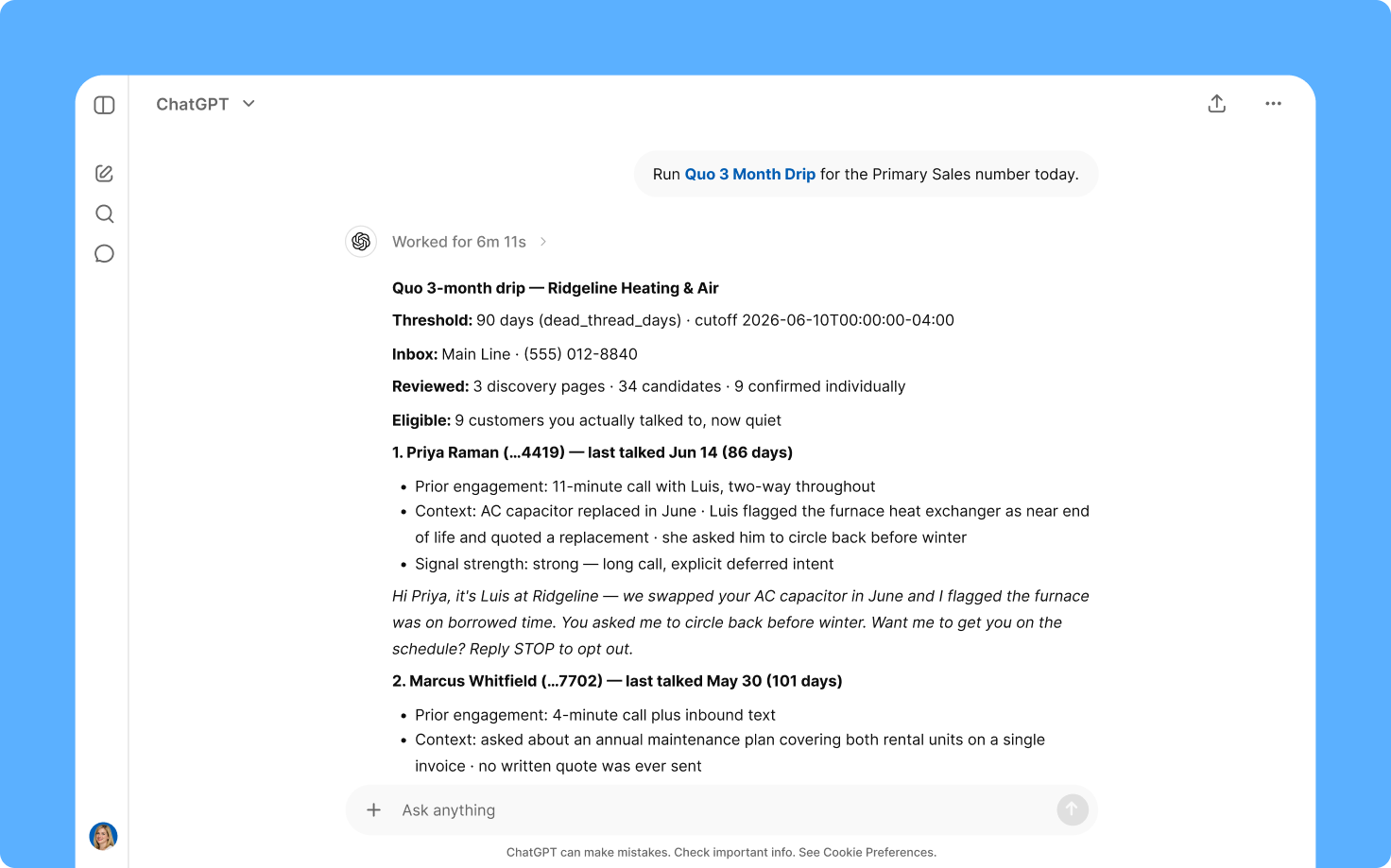
Use this 3-month drip skill to re-engage with your leads. Identify which leads haven’t spoken to you in three months and send a text message to them.
This skill helps your team re-engage new leads and generate additional revenue from existing customers. If you run a seasonal business or you offer special services during different times of the year, this skill could prove useful for you. It uses your call history and call transcripts to identify which leads last spoke to you. Make sure to enable automatic call recording and AI call transcripts and summaries in your Quo workspace.
Here’s how this skill works:
- Reviews your call and text history
- Identifies leads who haven’t had a call or text conversation with you in the past 90 days
- Automatically drafts an outreach message based on your last conversation and time of the year for the outreach
- Presents draft message for approval, then sends it to your contacts
Note: This template doesn’t cover every single call handled in your workspace, simply the ones worth surfacing for follow-up. That way, your team isn’t overwhelmed with reviewing spam calls or internal updates. If you still want to analyze your entire call history, export your calls from the Quo
Analytics dashboard.
What are skills? Skills are a set of preset custom instructions for AI chatbots like Claude and ChatGPT. Skills help you save time delegating tasks to your AI tools because you don’t have to come up with a custom prompt for each task. Since these tools have access to your Quo data, they can operate autonomously and deliver results to you when you need it.
How to use with Claude
First, add this Claude skill to your account:
- Connect Quo and Claude.
- Click the Download template file button.
- Go to Customize > Skills > Add > Upload skill in your Claude account.
Next, run the skill in Claude:
- Start a new Claude chat.
- Type Run /quo-3-month-drip using my Quo number [ENTER NUMBER].
That’s it! Claude will search your Quo inbox and create your outreach messages. You can review them and send them to your contacts.
Bonus: Once you add this skill and test it out for yourself, you can tweak it to your needs. Simply tell Claude what changes you’d like to make to the skill and it'll save them for you.
How to use with ChatGPT
- Connect Quo and ChatGPT.
- Click the Download template file button.
- Start a new chat with ChatGPT Work and do the following:
- Add the template file to the chat.
- Run the prompt: Run /quo-3-month-drip using my Quo number [ENTER NUMBER].
That’s it! ChatGPT will do the rest for you.
Bonus: Once you start using this skill, you can adjust it to fit your needs. List the changes you need to ChatGPT for the skill and it'll save them for you.
.svg)
.svg)
.svg)


