


Daily report template
Daily report template: stay on top of every task
Overview
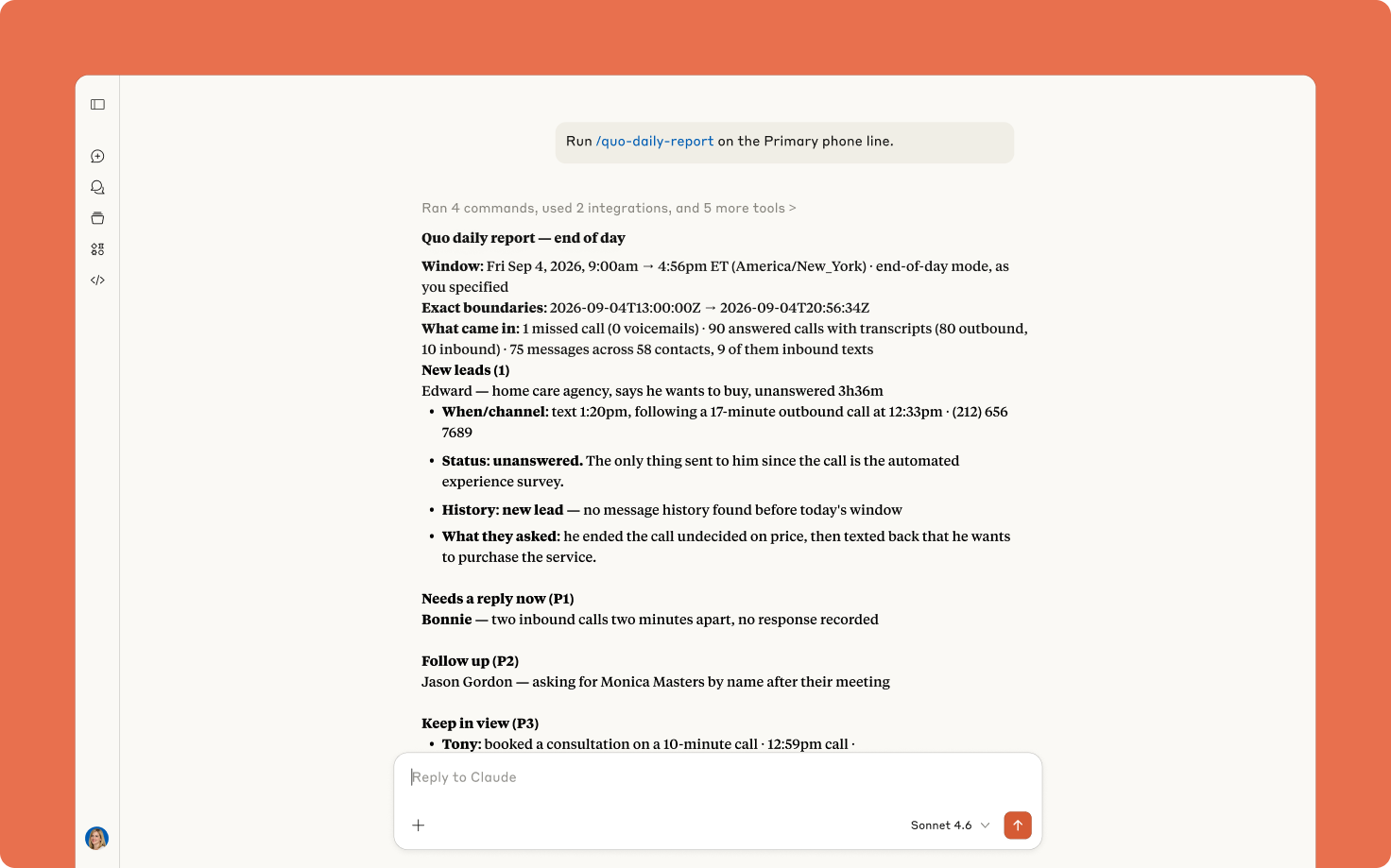
Use this daily report template to stay on top of new leads, unanswered messages, and follow-up action items. See exactly what needs to get done without having to search through your call history.
This template helps your team stay on top of your important tasks every single day. It runs when you start work each morning and before you log out at the end of the day. It uses your call transcripts to understand your action items, so make sure to enable automatic call recording and AI call transcripts and summaries in your Quo workspace.
Here’s how:
- Reviews your call and text history
- Identifies new leads and follow-up tasks based on your call transcripts
- Prioritizes what needs to get done by urgency and importance:
- P1 - act now
- P2 - follow up
- P3 - keep in view
- Focuses on customer requests, risks, opportunities, commitments, recurring friction, and useful relationship context.
Note: This template doesn’t cover every single call handled in your workspace, simply the ones worth surfacing for follow-up. That way, your team isn’t overwhelmed with reviewing spam calls or internal updates. If you still want to analyze your entire call history, export your calls from the Analytics dashboard.
This daily report template uses Quo and your preferred AI tool, Claude or ChatGPT, working together. Claude creates this template by executing a series of preset custom instructions known as skills. It uses your Quo data to automatically generate the report.
How to use with Claude
First, add this Claude skill to your account:
- Connect Quo and Claude.
- Click the Download template file button.
- Go to Customize > Skills > Add > Upload skill in your Claude account.
Finally, schedule the skill in your Claude account:
- Go to Scheduled in the left sidebar.
- Select New task > Set up manually
- Enter the following task information for your morning run:
- Name: Daily report - Morning
- Description: Review my call and text history on [NUMBER] and tell me what needs to get done.
- Instructions: Run the Quo daily report in morning mode for [ENTER YOUR QUO NUMBER].
- Frequency: Every day at 08:40am
- Permissions: Automatically approve
- Hit Save.
- Create a separate scheduled task for your evening run:
- Name: Daily report - Evening
- Description: Review my call and text history on [NUMBER] and tell me what needs to get done.
- Instructions: Run the Quo daily report in end of day mode for [ENTER YOUR QUO NUMBER].
- Frequency: Every day at 05:00pm
- Permissions: Automatically approve
- Hit Save.
Bonus: Once you add this skill and test it out for yourself, you can tweak it to your needs. Simply tell Claude what changes you’d like to make to the skill and it will save them for you.
How to use with ChatGPT
- Connect Quo and ChatGPT.
- Click the Download template file button.
- Start a new chat with ChatGPT Work and do the following:
- Add the template file to the chat.
- Run the prompt: Create a new skill called Quo Daily Report with these files. Schedule it to run Mon-Fri at 9am and 5pm each day. Use the Quo [ENTER NUMBER HERE] as the phone number to analyze.
That’s it! ChatGPT will do the rest for you.
Bonus: Once you start using this skill, you can adjust it to fit your needs. List the changes you need to ChatGPT for the skill and and it will save them for you.
.svg)
.svg)
.svg)


