


Voicemail triage
Reply to leads and customers faster with this voicemail triage skill
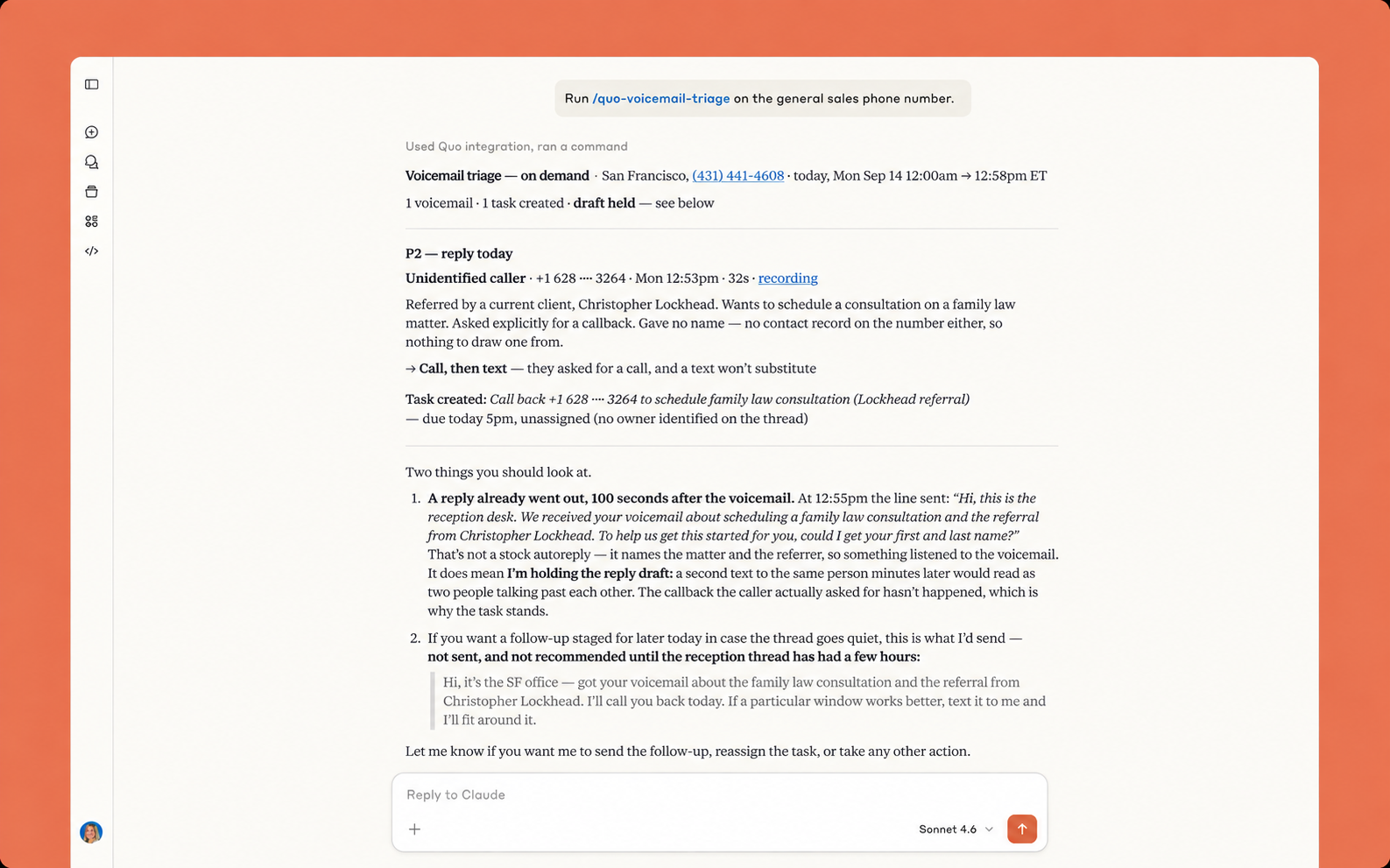
Overview
Use this voicemail triage skill to review your voicemail inbox and draft responses to customers. You can also automatically assign tasks based on action items to help your team stay on top of what needs to get done.
This skill helps your team follow up with your customers in a timely manner. Speed to lead can be the difference between a new customer and a lost lead, especially for small teams. This skill helps you increase your speed to lead so that you can respond to leads faster. It uses your voicemail transcripts to find out what leads are looking for. Then, it drafts a personalized response and can create a task in your inbox if needed. Make sure to enable automatic call recording and AI call transcripts and summaries in your Quo workspace.
Here’s how this skill works:
- Reviews your voicemails from leads and customers that haven’t received a response yet
- Automatically drafts an outreach message based on their voicemail and your conversation history
- Presents draft message for approval, then sends it
- Simultaneously creates a task in your Quo inbox if there’s a follow-up action item
Note: This template doesn’t cover every single call handled in your workspace, simply the ones worth surfacing for follow-up. That way, your team isn’t overwhelmed with reviewing spam calls or internal updates. If you still want to analyze your entire call history, export your calls from the Quo Analytics dashboard.
What are skills? Skills are a set of preset custom instructions for AI chatbots like Claude and ChatGPT. Skills help you save time delegating tasks to your AI tools because you don’t have to come up with a custom prompt for each task. Since these tools have access to your Quo data, they can operate autonomously and deliver results to you when you need it.
How to use with Claude
First, add this Claude skill to your account:
- Connect Quo and Claude.
- Click the Download template file button.
- Go to Customize > Skills > Add > Upload skill in your Claude account.
Next, run the skill in Claude:
- Start a new Claude chat.
- Type Run /quo-voicemail-triage using my Quo number [ENTER NUMBER].
That’s it! Claude will set up this task to run at scheduled times twice a day. It will review voicemails you receive outside of business hours as well as the ones that come in during the day that you haven’t reviewed yet.
Bonus: Once you add this skill and test it out for yourself, you can tweak it to your needs. Simply tell Claude what changes you’d like to make to the skill and it'll save them for you.
How to use with ChatGPT
- Connect Quo and ChatGPT.
- Click the Download template file button.
- Start a new chat with ChatGPT Work and do the following:
- Add the template file to the chat.
- Run the prompt: Run /quo-voicemail-triage using my Quo number [ENTER NUMBER].
That’s it! ChatGPT will set up this task to run at scheduled times twice a day. When you start your day, it’ll deliver a report of the voicemails that came in outside your business hours. And when you finish your day, you’ll get a report of voicemails that came in during business hours that you haven’t reviewed yet.
Bonus: Once you start using this skill, you can adjust it to fit your needs. List the changes you need to ChatGPT for the skill and it'll save them for you.
.svg)
.svg)
.svg)


