No one wants to hear the six dreaded words of the standard medical office voicemail greeting: “We’re sorry we missed your call.” Not a great first impression for your medical practice to make on a new patient, and not exactly what anyone wants to hear when they’re seeking medical attention.
But what happens when your team is busy, or your office is closed? You still need a voicemail greeting that connects patients to the right solution.
No need to start from scratch, though. We’ve done the heavy lifting with these 26 ready-to-use medical office voicemail greeting examples. We also include best practices for when you’re ready to start recording.
Disclaimer: This article provides general information about HIPAA compliance and voicemail greetings as of the date above. The content on our website is not intended to provide and should not be relied on for legal or compliance advice. You should consult with your own legal or compliance official to determine how this general information may apply to your specific circumstances and to ensure your specific voicemail practices meet all applicable HIPAA requirements.
When you need separate voicemail greetings
Scenario-specific greetings assure callers that your team takes patient care seriously. More specifically, they explain why your team is away and let callers know when you’ll get back to them. They also guide callers to take a concrete step toward solving their problem.
Here are some examples of separate voicemail greetings that apply to most medical offices:
- Main office hours greeting. This plays when staff are busy with other patients or temporarily away from their desks during normal business hours.
- After-hours greeting. Use this when your practice is closed for the day, on weekends, or otherwise outside regular operating hours.
- Holiday or emergency closure greeting. You can use this during planned time off for holidays or unplanned closures due to weather emergencies or facility issues.
- Department-specific greetings. You can create separate recordings for departments like billing or scheduling. This helps patients know they’ve reached the right team.
What to include in your medical office voicemail greeting
Here are some essential details to include in your voicemail greeting:
| Element | Why it matters | Example |
|---|---|---|
| Practice name and/or doctor’s name | Confirms the caller reached the right place. State your practice name slowly and clearly. | “You’ve reached the office of [practice name/doctor’s name].” |
| Brief acknowledgment | Shows courtesy and sets a more welcoming tone from the start. | “We appreciate your call,“ or “Your call is important to us.” |
| Emergency instructions | Patients calling with urgent medical issues who need immediate direction. This prioritizes patient safety and limits liability. | “If this is a medical emergency, please hang up and dial 911. For urgent concerns, press [number] to page our on-call medical staff.” |
| Office hours | Sets expectations for opening hours and callback timing. | Our office is open Monday through Friday, 8 AM to 5 PM, and Saturday from 9 AM to 2 PM.” |
| What information to leave | You’ll need a name and phone number to call patients back. You’ll also want a reason for calling so you can determine the urgency of their need. | “Please leave your name, phone number, and a brief reason for calling.” |
| Response timeframe | Lets patients know when they can expect to hear from your office. | “Our team will get back to you within 48 hours.” |
| Alternative options | Directs patients to faster solutions for common requests like prescription refills, appointment scheduling, or billing questions. Reduces voicemail volume and gets patients help sooner. | “For prescription refills, please contact your pharmacy directly or visit our patient portal at [website URL]. To schedule an appointment, visit our website at [URL]. For after-hours urgent matters, call our nurse number at [number].” |
| Professional but warm closing | Reassures patients that their care is your team’s top concern. | “Thank you for your patience, and we look forward to assisting you soon.” |
26 Professional voicemail greeting scripts for medical offices
A good voicemail greeting connects patients with solutions when your team can’t answer. Here are examples you can apply to a diverse range of scenarios.
⚠️Important: To stay compliant, never ask for personal medical details or other sensitive information in your voicemail. Only include what’s necessary to understand why a patient is calling and how to contact them.
Also, make sure you use a medical office phone system like Quo, formerly OpenPhone. Organizations who have signed a Business Associate Agreement, or BAA, can use Quo to communicate with patients. That keeps your practice in line with HIPAA’s Privacy and Security Rules. Quo also offers HIPAA-compliant features like encrypted storage, audit logging, and access controls. Learn more about Quo security.
General medical office voicemail scripts
These HIPAA-compliant voicemail greetings work for most medical offices during regular hours of operation.
During office hours greeting
Try one of these voicemail messages when your office is open, but staff can’t answer immediately.
Play this to guide patients to a prescription refill number.
Thank you for calling [practice name]. Our office is currently assisting other patients. If this is a medical emergency, please hang up and dial 911. Otherwise, please leave your name, phone number, date of birth, and a brief message, and we’ll return your call within one business day. For prescription refills, you can contact your pharmacy directly or visit our patient portal at [website]. Thank you.
You can play this to prompt callers to include a good callback time.
Hello, and thank you for calling [practice name]. We appreciate you reaching out. Our staff are currently helping other patients. If you’re experiencing a medical emergency, hang up and dial 911. Otherwise, please leave a message and include your name, phone number, the reason for your call, and the best time to reach you. We return all calls by [timeframe]. Thank you for calling.
After-hours voicemail greeting script
Play this greeting when your office is closed. It should clearly state your office hours and provide guidance for urgent matters.
Try this greeting if you have on-call staff or an alternate number for patients to call.
Thank you for calling [practice name]. Our office is currently closed. If this is a medical emergency, please hang up and dial 911. For urgent concerns, you can reach our on-call staff at [number]. To make an appointment, please leave your name, phone number, and a brief message. We’ll return your call within [timeframe]. For prescription refills, you can contact your pharmacy directly or access your patient portal at [URL]. Thank you for your patience, and we look forward to assisting you soon.
You can also play this greeting to route calls directly to your on-call team.
You’ve reached the office of [practice name]. Our office is currently closed, but know that we appreciate your call. If this is a medical emergency, please hang up and dial 911. For urgent issues, you can dial [number] to reach our on-call team. If you’d like to make an appointment, please leave your name and a brief message, and we’ll return your call within [timeframe]. You can also make appointments at [URL]. Thank you for your patience, and we look forward to assisting you soon.
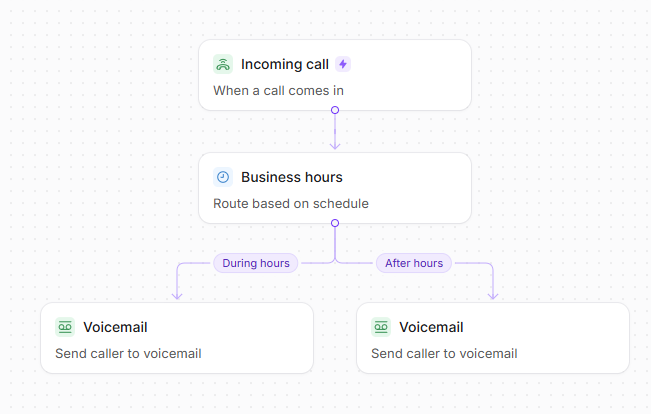
💡Pro tip: With Quo’s business hours routing, you can set different voicemails for during and after hours. You don’t have to manually switch between them. Just put your business hours in your settings, and Quo will automatically switch voicemail greetings based on your schedule.
Voicemail greeting for lunch hours
If your office closes briefly for lunch, you can play this greeting.
Thank you for calling [practice name]. Our team is currently at lunch until [time]. If you’re experiencing a medical emergency, please hang up and dial 911. To make an appointment, please leave your name, phone number, date of birth, and a brief message, and we’ll return your call within [timeframe]. For prescription refills, you can contact your pharmacy directly. Thank you for your patience, and we look forward to assisting you soon.
Medical office voicemail greetings by practice type
These scripts let you customize your voicemail greeting based on your practice.
Small practice or solo practitioner voicemail script
Professionals who run small practices or work alone should record a message that conveys how their practice handles taking calls.
Independent doctors without a receptionist can play a greeting like this.
Hello, you’ve reached [doctor name] at [practice name]. I’m currently with a patient and unable to take your call. If you’re experiencing a medical emergency, please hang up and dial 911. For all other matters, please leave your name, phone number, the best time to reach you, and a brief message about your concern. I personally return all calls within [timeframe]. For appointment scheduling or to learn more about our practice, please visit [website]. Thank you for calling.
If you have a single receptionist or a small admin team, you can try a script like this.
Thank you for calling [practice name]. We’re currently away from the desk or handling in-person appointments. If you’re experiencing a medical emergency, please hang up and dial 911. For all other matters, please leave your name and phone number, and we’ll get back to you within [timeframe]. You can also schedule an appointment at [website]. Thank you for your patience, and we look forward to helping you soon.
Multi-provider or group practice voicemail script
Use these scripts if you need callers to indicate where they want their calls directed.
Use this script to guide callers to specific departments.
Thank you for calling [practice name]. Our providers are Drs.[doctor name], [doctor name], and [doctor name]. We’re currently unable to take your call. If this is a medical emergency, please hang up and dial 911. Otherwise, please leave your name, phone number, the provider or department you’re trying to reach, and a brief message. If you’re a new patient or unsure who to contact, let us know the reason for your call, and we’ll direct you to the right person. We’ll return your call within [timeframe]. Thank you.
This script prompts callers to indicate which provider they’re looking for.
Hello, you’ve reached [practice name] with Drs. [doctor name], [doctor name], and [doctor name]. We’re currently with patients and unable to answer. If this is a medical emergency, hang up and dial 911. For all other matters, please leave a detailed message with your name, callback number, the provider you’re calling for, and the reason for your visit. We’ll return your call by [timeframe]. New patients can find our practice information and schedule online at [URL]. Thank you for your patience, and have a great day.
💡Pro tip: With Quo’s phone menu or IVR feature, you can route callers to different voicemail boxes for each doctor or department. You can also give each provider their own personalized voicemail greeting. Check out our free, pre-written phone tree templates to save time designing your flow.

Appointment and patient service voicemail scripts
Recording unique greetings for different departments within larger practices lets callers know they’ve reached the right team.
New patient inquiries
Use this greeting to welcome prospective patients and guide them through your intake process.
Hello, you’ve reached [practice or clinic name]. Our team is currently busy. For medical emergencies, please hang up and dial 911. If you’re a new patient, the easiest way to get started is to schedule online at [website URL] or complete our new patient forms at [portal URL]. You can also leave your name, phone number, and the best time to reach you, and we’ll call you back within [timeframe]. Thank you for your patience, and we look forward to assisting you soon.
Appointment scheduling and cancellation voicemail script
If you have a dedicated scheduling number, this greeting can guide patients to take the right action.
Play this greeting to let patients know they’ve reached your scheduling desk.
We’re glad you want to schedule an appointment with [practice or clinic name]. Our team is currently busy handling other calls. Please leave your name and number, and we’ll get back to you within [timeframe]. You can also schedule an appointment online at [website URL]. Thank you, and we look forward to assisting you soon.
Use a greeting like this to clarify your cancellation policy.
You’ve reached the scheduling department at [practice name]. Our team is currently away from the desk. To make an appointment, please leave your name, phone number, and reason for calling, and we’ll get back to you within [timeframe]. You can also make an appointment online at [website URL]. If you’re calling to reschedule or cancel your appointment with less than 24 hours’ notice, please note that there’s a [percentage or amount] cancellation fee. You can find our cancellation policy on our website. Thank you for your patience, and we look forward to assisting you soon.
Prescription refill and lab results voicemail script
You can include a dedicated menu option for these common requests to streamline your workflow.
You’ve reached the pharmacy and lab team at [clinic name]. We’re currently away from the desk. If you require immediate assistance, please hang up and dial 911. To refill your prescription or receive lab results, please leave your name, date of birth, and preferred pharmacy, and we’ll call you back within [timeframe]. You can also refill prescriptions and view lab results online at [website URL]. Thank you for your patience, and have a great day.
Post-procedure follow-up voicemail script
Use this greeting if you have a specific process for patients calling after a procedure.
Thanks for calling [practice name]. Our team is currently handling other calls. If you’re calling to schedule an appointment, please leave your name and number, and we’ll call back within [timeframe]. If you have questions about a recent procedure, please leave your name and number, and [doctor name] will be in touch within [timeframe]. Thank you, and have a great day.
Missed appointment follow-up voicemail script
When leaving messages for patients who missed an appointment, you can use a voicemail script like this.
Hello, this is [name] from [clinic name]. We missed you at your appointment on [time and date]. Please call us back as soon as you can to reschedule. We want to make sure you get the care you need. Thank you!
Dental office voicemail scripts
You can use these dental office-specific scripts to address both non-urgent and emergency calls..
Dental office voicemail greeting script
Use this dental answering service greeting to give patients specific instructions in case of an emergency.
Thank you for calling [dental practice name]. Our team is currently away from the desk or assisting other patients. If you’re experiencing a dental emergency, such as severe pain, injury, or facial swelling, please hang up and call our emergency number at [number]. If you need to make or reschedule an appointment, please leave your name and the reason for the appointment, and we’ll call you back within one business day. We appreciate your patience and hope you have a great day.
Dental emergency voicemail script
If you have a dedicated emergency number, make the instructions clear so patients know what steps to take, like this:
You’ve reached the emergency number for [dental practice name]. If you are experiencing a dental emergency such as severe pain, a knocked-out tooth, injury, or facial swelling, please leave your name, phone number, and a detailed description of your emergency. [Doctor name] will return your call within [timeframe]. If you’re experiencing difficulty breathing, uncontrolled bleeding, or other life-threatening symptoms, hang up and dial 911. Thank you.
Specialty practice voicemail scripts
Certain medical practices may need to share specific information in their greetings. Here are examples for common specialties.
Pediatric office voicemail greeting
Use this voicemail script if your pediatric office team is away or busy handling other calls.
Thank you for calling [practice name]. We’re sorry we missed your call. If your child is experiencing a medical emergency, please hang up and dial 911. For urgent concerns, you can reach our on-call pediatrician at [number]. To make or reschedule an appointment, please leave your number, your child’s name, and your child’s date of birth, and we’ll get back to you within [timeframe]. You can also make an appointment online at [website URL]. We look forward to assisting you soon. Thank you.
Therapy practice voicemail greeting
This therapist voicemail script makes sense for solo therapeutic practitioners or small offices, but it can be adapted for larger practices.
Hi, you’ve reached [doctor name or practice name]. Thank you for calling. I’m unable to take your call right now. If you’re experiencing a mental health emergency or are having thoughts of harming yourself, please hang up and dial 911 or the Suicide and Crisis Lifeline at 988. For all other matters, please leave your name and phone number, and I’ll call you back within [timeframe]. You can visit my website at [URL] to book a consultation or learn more about my practice. I look forward to connecting with you soon. Thank you again for reaching out.
Seasonal and closure voicemail scripts
Update your greetings for holidays, vacations, or unexpected closures to keep patients informed.
Holiday or extended absence voicemail script
Make sure patients know when they can expect a callback after a holiday or any closure.
Use this holiday closure script to let patients know when you’ll reopen.
You’ve reached [practice name]. Our office is currently closed for the holidays until [date]. If this is an emergency, please hang up and dial 911. For urgent medical matters during our closure, please contact [covering provider name] at [phone number] or visit [urgent care center name]. For non-urgent matters, please leave a message with your name and the reason for calling, and we’ll return your call when we reopen. Thank you, and happy holidays.
Use this template if you’ve had to close the office unexpectedly.
Thank you for calling [practice name]. Our office is currently closed due to [issue] and will be closed until [date]. For urgent medical matters, please contact [covering provider name] at [phone number] or visit [urgent care center name]. For all other matters, please call us back when we reopen, or leave a message, and we’ll return your call as soon as possible. Thank you for your understanding. We appreciate your patience. Have a great day.
💡Pro tip: Quo users can set different call flows for different situations. For instance, set one for when you’re on holiday and another as the default flow. Easily switch between pre-made call flows in your settings.

Modified hours voicemail script
Let callers know if you’ve changed your office hours.
You can use these scripts when your office has updated its hours.
You’ve reached [practice name]. Our office is currently closed due to [reason, like modified summer hours]. Our office is open on [days]from [time] to [time] and on [days] from [time] to [time]. If you have a medical emergency, please hang up and dial 911. For all other matters, please leave your name and a brief reason for calling. We’ll return your call within [timeframe]. Thank you, and have a nice day.
Use this script for last-minute hours modifications due to severe weather or a personal emergency.
Hello, you’ve reached [practice name]. Due to [issue], our office will close early today at [time]. Please check our website at [website URL] or follow us on [social media platform] for updates on when we’ll reopen. If this is a medical emergency, hang up and dial 911. If you need medical care while we’re closed, call [covering provider name] at [phone number]. For routine matters like prescription refills or appointment scheduling, please call back once we’ve reopened or visit our patient portal at [website URL]. Stay safe.
Health advisory voicemail script
Use this script when you want to alert callers about the flu or other seasonal illness peaks.
Hello, you’ve reached [practice name]. Our team is currently busy assisting patients. If you leave a name, number, and reason for calling, we’ll get back to you within [timeframe]. With flu on the rise, we strongly encourage all patients to schedule flu shots early. If you’d like to schedule a flu shot appointment, please visit [website URL]. Thank you, and we look forward to assisting you soon.
Department-specific voicemail scripts
Larger practices can use these greetings to route calls to specific departments.
Nurse or triage number voicemail script
Route clinical questions to nursing staff with this greeting. This keeps your front desk free and prevents the unauthorized sharing of personal health information.
You’ve reached the nurse line at [practice name]. If this is a medical emergency, hang up and dial 911. For urgent medical questions, please leave your name, phone number, and a description of your concern. A nurse will return your call within [timeframe]. For non-urgent questions or prescription refills, please call our main office at [number]. Thank you.
Billing department voicemail script
Separate your billing inquiries from medical questions to help staff manage calls more efficiently.
You’ve reached the billing department at [clinic name]. Our office hours are [day] to [day] from [start time] to [end time]. If this is a medical emergency, please hang up and dial 911. For billing-related concerns, please leave your name and a brief reason for your call. We’ll get back to you within [timeframe]. If you’d like to pay a bill, you can pay by phone at [number] or online at [URL]. We appreciate your call. Have a great day.
How to record a greeting for a medical office on Quo
Once you’ve chosen a voicemail script from our list of templates, you’re ready to record your greeting. The voicemail recording process depends on your business phone number provider. With Quo’s cloud phone system for healthcare, you can record a professional voicemail in seconds. Here’s how:
Record a voicemail greeting in Quo’s web or desktop app
To record a voicemail greeting with Quo’s web or desktop app:
- Go to Settings on the left-hand menu.
- Under Workspace, click Phone numbers.
- Choose the phone number you want to record a voicemail for.
- Under Business hours, toggle on Enable business hours. Note: Quo currently only supports one consecutive time period per day. You’re not able to add multiple time periods for one day.
- Set your time zone and your — or your team’s — daily availability under Schedule. If no one is available on weekends, click Every day and set your schedule to Weekdays. If you have different hours for different days, select Custom. Then add your business hours.
- Go to the Call flow builder and click Edit call flow.
- Drag the Business hours step after the Incoming call trigger.
- After you add a business hours block, the canvas will automatically create two paths: During hours and After hours. If needed, add routing steps to direct callers to different departments, locations, or providers.
- The Voicemail step will automatically be added after the After hours step. You can also add a Voicemail step after the Ring users step for missed calls.
- Select the Voicemail step in the right panel of the builder to edit your settings. Then, select Change greeting and upload, record, or select text-to-speech to set your new greeting. You can also toggle on Transcribe voicemail for automatic transcription and enable the Profanity filter to remove offensive words from voicemails.

Record a voicemail greeting in Quo’s mobile app
If you want to set up voicemail with the Quo mobile app:
- Go to your Account menu in the top left corner. Select Settings.
- Go to Phone numbers and tap the number you want to set the voicemail for. Then choose Voicemail greeting.
- Tap the Plus icon at the bottom right corner.
- Tap the red record button to record your voicemail.
- Save your voicemail and select the new greeting in the menu. Your active greeting will be indicated by a purple checkmark.
Note: Text-to-speech is only available on Quo’s web and desktop apps.
9 best practices for making a business voicemail greeting
- Use a clear, friendly tone. Speak slowly in a confident yet professional tone. Try not to sound rushed or robotic.
- Script ahead. Write out your greeting before you record to make sure it’s concise. If you’re using a script, adapt it to your practice and policies.
- Practice first. Read through your script a few times to make sure you sound natural. This also prevents you from re-recording too many times.
- Provide key information. Include important details like your name, practice name, and alternative contact methods. Don’t forget to offer resources or alternative numbers for emergency situations.
- Record in a quiet environment. Limit background noise so callers can hear your message. Avoid using earbuds or recording in public places so you don’t sound muffled.
- Enunciate. Speak slowly and pause between phone numbers, URLs, and practice details. This gives callers in crisis time to process what they hear.
- Set specific but realistic callback expectations. Be clear about response times, such as within one business day or 48 hours. This lets patients know when they’ll hear back from you so they don’t feel ignored or forgotten.
- Play it back and review. Once you’ve recorded your voicemail message, play it back a few times. Make sure it includes important details and correct information.
- Update when necessary. Remember to change your voicemail when you go on vacation or will be away from the office for an extended period.
Improve patient care and satisfaction when you use Quo for voicemails
Your medical office voicemail system is your first opportunity to provide great patient care. That’s why each voicemail greeting should set clear callback expectations and guide callers to appropriate resources.
And that’s why a HIPAA-compliant phone system like Quo exists.
Quo makes it easy for healthcare providers to record voicemails for different situations. In minutes, Quo lets you set different greetings for during and after-hours calls and create custom call flows to route patients to other healthcare professionals.
With Quo, you can also:
- Share phone numbers across your team of medical staff and receptionists
- Get HIPAA-compliant call recordings to reference in the event of a dispute
- Get automatic voicemail transcriptions to save time following up
- Set up SMS auto-replies for missed calls and texts
- Add business hours and away voicemail greetings so you can set expectations
- Create SMS templates or snippets to save time sending repetitive messages
Ready to see what Quo can do for you? Get started for free with our seven-day trial.
FAQs
A professional voicemail greeting for healthcare is a pre-recorded message that medical practices play when they’re unavailable to answer calls. You should use separate voicemail greetings for:
-Main office hours calls that occur when your team is busy with other calls
-After-hours calls
-Vacation and holidays
-Sharing department-specific information
A medical office voicemail greeting allows you to:
-Provide alternate ways to contact your team, like texting or online. This is useful if you want to move conversations away from phone calls
-Confirm that the caller has reached the right office or practitioner
-Provide relevant steps and resources, including for emergencies
-Be clear about response times, including during extended absences
-Build trust with potential patients who took the step to reach out
A voicemail greeting should be about 20 seconds. This gives you enough time to share important information and prevents callers from waiting too long in case of an emergency.
When taking live phone messages, always collect:
-Patient name
-Date of birth
-Callback number
-Reason for call
-Preferred callback time
To protect patient privacy, always use a HIPAA-compliant system like Quo to document messages securely.
pends. A standard landline voicemail isn’t HIPAA-compliant because messages aren’t encrypted, putting patient privacy at risk.
However, using a HIPAA-compliant VoIP system like Quo ensures:
-End-to-end voicemail message encryption of
-Secure information storage with access controls
-Audit logs that track who accessed messages
-A Business Associate Agreement, or BAA, is in place
-Technical safeguards that support compliance with the HIPAA Privacy Rule and Security Rule
Never ask patients to leave detailed medical information in any voicemail. Only request name, callback number, and a brief reason for calling.
Your healthcare office’s voicemail system should include security features like:
-Phone call and voicemail encryptions
-Audit logs
-User access controls
-Secure storage
-Data redundancy and backups
-Automatic logoff and session timeouts