


Healthcare providers handle hundreds of calls, texts, and voicemails with protected health information. Their communications solutions have to handle PHI under federal privacy laws, especially HIPAA.
The Health Insurance Portability and Accountability Act, known as HIPAA, is the standard healthcare privacy law in the US. Since 1996, it has acted as a tool to protect healthcare patient information. That includes both protected health information, or PHI, and personally identifiable information, or PII.
But not every healthcare phone system handles PHI in compliance with HIPAA, which could expose you to HIPAA violations. According to the 2025 Healthcare Data Breach Report, over 61 million patients had their PHI exposed. And by “violations,” we mean fines ranging from $100 to $50,000+.
A HIPAA-compliant VoIP can help protect healthcare data while making patient communications easier. After evaluating the best HIPAA-compliant VoIP phone systems, we found:
- The best HIPAA-compliant VoIP system for growing healthcare providers is Quo.
- The best HIPAA-compliant VoIP system with video meetings is Dialpad.
This article explains how HIPAA-compliant VoIP solutions work. It introduces six compliant cloud-based providers to choose from. It also explains how to choose the right system, with a feature checklist and comparison chart.
What is a HIPAA-compliant VoIP phone system?
Voice over Internet Protocol, or VoIP, phone systems enable communication over the internet. Traditional phone systems transmit calls over physical phone lines. VoIP phone systems convert voice signals into digital packets. Then they send them to recipients via an internet connection.
A HIPAA-compliant VoIP phone system keeps patient information safe when you communicate with them. It meets HIPAA’s technical and administrative requirements for data transmission and storage. That way, it can be lawfully used in healthcare settings.
A compliant provider signs a Business Associate Agreement, or BAA, to document these obligations. This enables healthcare teams to safeguard their patients’ PHI and ePHI.
You need a HIPAA-compliant healthcare communication platform if you’re a covered entity, like:
- A health plan
- A healthcare provider
- A healthcare clearinghouse
- Any other organization that handles patient health information
A compliant phone system must follow HIPAA regulations for communication channels, like:
- Calls
- Call recordings
- Voicemail
- Call transcripts
- Fax
- Video
- SMS and MMS
For a VoIP system to be HIPAA compliant, it must primarily comply with the three rules below. Of course, these aren’t the only requirements. Always consult the US Department of Health and Human Services, or HHS, and a legal professional for more specific advice.
1. The Privacy Rule
The Privacy Rule sets the standards for how organizations use and share PHI. It defines who is allowed to access PHI, under what circumstances, and what rights patients have over their own information.
The Privacy Rule states that:
- Patients have the right to access their health information. They can request access to their records, ask for corrections, and control some forms of sharing.
- You must follow the “minimum necessary” standard. Only the minimum amount of PHI should be used or disclosed for a given task.
- You must sign a BAA with any partner that handles PHI. This contract outlines what PHI the business associate may use, how they must protect it, and what will happen if they breach it. Keep reading to learn more about BAAs.
- PHI can only be used for treatment, payment, and healthcare operations. For any other use, the patient must give written permission.
2. The Security Rule
The HIPAA Security Rule focuses on electronic protected health information, or ePHI. It requires organizations to put physical, administrative, and technical safeguards in place. That way, you can prevent unauthorized access, tampering, or loss of ePHI.
Here are the technical protections a cloud phone system for healthcare needs to provide:
- Encryption for ePHI in transit and at rest. Encryption ensures ePHI is converted into secure, unreadable data during transmission and storage. This prevents unauthorized access even if the information is intercepted or exposed.
- Role-based access controls. Only authorized staff can view or use ePHI, based on their job roles and responsibilities.
- Unique user IDs and authentication. Every person accessing ePHI must have a unique login. This helps improve traceability in the case of a data breach.
- Audit logs and activity monitoring. Systems must record who accessed ePHI, what changes were made, and when. That way, account owners can detect improper access or suspicious behavior.
- Secure data storage and transmission. There must be secure configuration standards for servers, platforms, and networks handling ePHI. This helps prevent unauthorized access.
- Automatic logoff and session timeouts. This reduces the risk of unauthorized viewing when a device is left unattended.
- Contingency planning and backups. Disaster recovery plans and regular data backups help prevent losses during outages. This ensures you can quickly restore normal operations.
3. The Breach Notification Rule
The Breach Notification Rule explains what you and your phone system must do if PHI is accessed, exposed, or stolen.
Here’s what the Breach Notification Rule requires:
- Must notify affected individuals within 60 days. Patients must receive details about what happened, what information was exposed, and what steps they can take.
- Notify the US Department of Health and Human Services. You can submit “small breaches” of fewer than 500 people annually. “Large breaches” of 500+ affected individuals must be reported within 60 days.
- Notify major media outlets for incidents involving 500+ individuals in a single state or region. This ensures widespread public awareness for large-scale exposures.
- Business phone systems must notify the healthcare organization of a breach. That organization is then responsible for official reporting unless otherwise agreed in the BAA.
4. A Business Associate Agreement or BAA
A BAA ensures that both you and your VoIP vendor are accountable in the event of a PHI breach. It outlines how the vendor will protect patient data and what safeguards they must follow under HIPAA. It also defines your responsibilities as the business owner and sets security expectations.
Without a signed BAA, a vendor can’t legally handle PHI.
Under HIPAA, a healthcare provider, health plan, or clearinghouse is considered a Covered Entity. That’s because they create or manage patient records. A Business Associate is any third-party service that works with a Covered Entity and has access to PHI in the process. For example, this could be a phone system provider that stores calls, voicemails, or recordings with patient details.
There are 10 provisions of a BAA your VoIP provider must follow:
- Only use patient information as permitted by the contract.
- Never use or release PHI to anyone outside of the Covered Entity.
- Prevent unauthorized access to PHI. This includes appropriate safety measures like encryption.
- Report all data breaches of unsecured PHI.
- Give patients their PHI when requested.
- Follow their expectations for HIPAA Privacy Rules. The contract explains which HIPAA privacy rules your vendor must follow versus what the business owner must follow.
- Keep accurate records for auditing purposes.
- Delete or return PHI to the Covered Entity when the contract ends.
- Ensure subcontractors sign a BAA, if applicable. This is only for subcontractors with access to PHI.
- Allow the Covered Entity to cancel the agreement if the VoIP vendor violates the terms.
HIPAA-compliant messaging: What you should know
Texting is convenient, but standard SMS isn’t HIPAA compliant on its own. It lacks the technical safeguards the HIPAA Security Rule requires. Once a message leaves your phone, you have no control over where it goes or how it’s stored.
The main security gaps in standard SMS include:
- No encryption in transit. SMS travels through carriers in plain text. Anyone could intercept the message during delivery.
- No control over storage. You can’t manage how a patient’s phone or carrier stores messages, who accesses them, or whether it’s deleted securely.
- No access controls. Anyone who picks up either device can read, screenshot, or forward the message.
- No audit trails. HIPAA requires audit logs of access and activity, but standard SMS has no built-in tracking or reporting.
The good news: your team can still use SMS and MMS in a manner consistent with HIPAA, without a separate secure messaging app. To do it safely, you need to:
- Get written patient authorization. Patients should provide written consent for SMS communication through a digital or paper form. You should also always give them the ability to withdraw consent.
- Document your SMS policy. Record how your organization uses SMS, how it manages the risks, and how staff should handle exceptions.
- Inform patients of the risks. Make it clear that SMS is less secure than other channels before sending anything.
- Follow the minimum necessary standard. Section 164.502(b) of the HIPAA Privacy Rule requires limiting ePHI in messages to only what’s needed. If a portal link works, send the link instead of the underlying details.
Here’s the rule of thumb in practice:
✅ Ok to send: “Your test results are ready. View them at [portal link].”
❌ Not ok to send: “Your cholesterol is 240. Please schedule a follow-up.”
You can also send messages without consent restrictions if they contain no PHI at all. General office hours, holiday closures, and appointment reminders that don’t reference a patient are all fair game.
One more thing: if a patient asks to receive texts, HIPAA actually requires you to accommodate reasonable requests. Verify their identity first, warn them about the security risks, get their consent, and log it in their medical records. From that point forward, texting that patient is allowed under HIPAA.
Can any VoIP phone be HIPAA compliant?
No, a VoIP phone system isn’t automatically HIPAA-compliant. That’s because VoIP technology itself isn’t inherently compliant or non-compliant.
HIPAA compliance in a phone system depends on three main factors:
- Offer HIPAA-required technical safeguards. This includes a VoIP phone solution providing phone call encryption and access controls.
- Configure safeguards to ensure compliance. For example, your organization needs to set up access controls so that only certain healthcare professionals can access PHI.
- Assign legal responsibility for protecting PHI and ePHI with the healthcare provider. HIPAA governs the relationships between healthcare practices and patients. While VoIP providers provide the tools required for patient communications, they don’t control usage. HIPAA compliance depends on how healthcare teams protect PHI in their VoIP systems. .
For example, Quo, formerly OpenPhone, provides HIPAA-supporting features once you’ve signed a BAA. How you use these features must comply with HIPAA requirements and your organization’s internal policies.
While not all VoIP phones are HIPAA compliant, we’ve rounded up six providers that are.
6 Best HIPAA-compliant VoIP providers
Here are the six best HIPAA-compliant VoIP providers to explore based on your business needs:
Comparing the six best HIPAA-compliant VoIP providers
| Provider | Starting price | Best For | Unlimited calls to US & Canada | SMS/MMS to US & Canada | Shared phone numbers | Additional phone numbers |
|---|---|---|---|---|---|---|
| Quo | $15 per user per month | Growing businesses | ✔️ | ✔️ | ✔️ | $5 per number per month |
| Dialpad | $15 per user per month | Larger organizations that need HIPAA-compliant video calls | ✔️ | International SMS requires upgrade | ✔️ | Requires upgrade |
| Nextiva | Not disclosed | Enterprise organizations that need advanced call center tools | ✔️ | 100 messages per user per month | ✔️ | Contact sales for pricing |
| RingCentral | $20 per user per month | Desk phone rentals | ✔️ | 25 messages per user per month | ✔️ | $4.99 per number per month |
| Google Voice | $17 per user per month, with a Google Workspace subscription | Businesses with a Google Workspace subscription | ✔️ | US customers only | Only offers ring groups with an upgrade | Not disclosed |
| Vonage | $13.99 per user per month | Organizations building custom healthcare applications | ✔️ | Local US and Canadian numbers only | Requires upgrade | Starts at $4.99 per local number per month; toll-free numbers start at $39.99 per month |
We’ll start with the #1 small business phone system chosen by more than 90,000+ businesses:
1. Quo: The best HIPAA-compliant provider for growing businesses

Pros
- Unlimited calls and texts in the US and Canada
- Secure call recordings
- Call recording notifications
- Team collaboration features like internal threads and shared numbers
- Auto-attendant functions or IVR for inbound calls
- Granular user access and permission controls
Cons
- Can’t verify accounts through two-factor authentication*
*Nearly all virtual phone numbers share this problem. For safety reasons, companies like Facebook, Uber, and Google rarely let you authenticate accounts through a virtual phone number.
Quo helps small and growing businesses reliably build customer relationships without sacrificing patient privacy.
You can use Quo in a HIPAA-compliant way with Business Associate Agreements available upon request. Here are the HIPAA-compliant features you have access to:
- Secure PHI storage and transmission across calls, recordings, and voicemails.
- Access controls to manage which team members have full administrative control vs only calling and texting access.
- Automatic call recording notifications to provide patient consent for recordings.
- Automatic session logouts after 15 days of inactivity. Your team can set shorter timeouts using their device-level security settings.
Quo’s security features are also SOC 2 compliant. This is an independent audit ensuring continuous monitoring of our security standards. Plus, we encrypt data in transit with TLS 1.2+, and data at rest with AES-256 — the same encryption standards used by financial institutions.
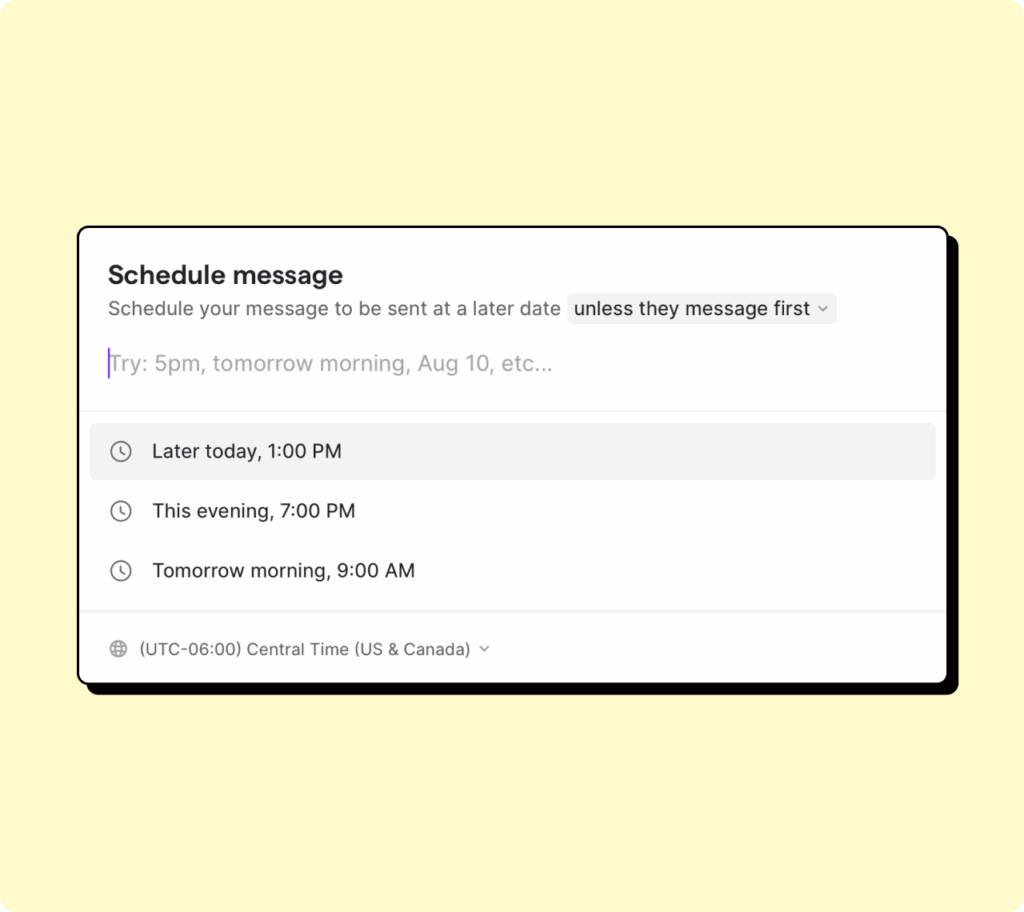
Each Quo plan comes with shared inboxes and customizable call routing. You can also use texting automations to save time on repetitive tasks.
For example: schedule texts and create third-party automations to automate appointment reminder messages. Or set up workflows for no-show recovery messages and appointment confirmations.
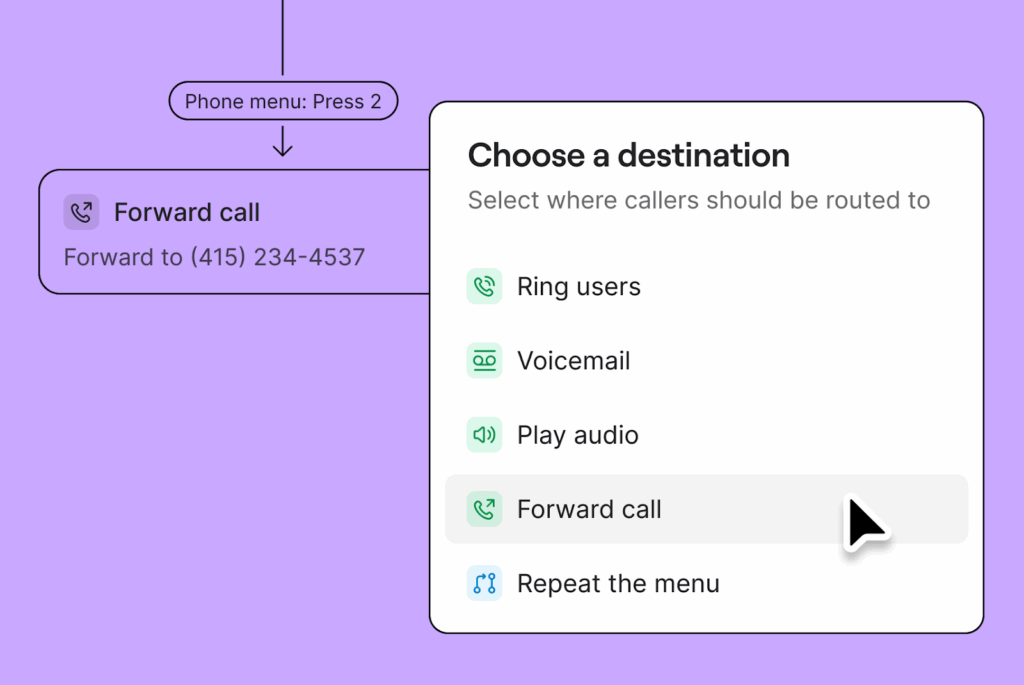
Want to manage incoming calls even better? First, use our drag-and-drop call flow builder to set up a phone menu. Then decide how you route calls and to whom. Simple inquiries could be routed to reception, while health questions could be routed to nurses. This cuts down wait times and protects PHI by limiting who hears what.
The best part is you get all of this without enterprise pricing. Quo offers BAAs on our Business and Scale plans at no extra cost. There are no hidden compliance fees or enterprise-only contracts.
Don’t just take our word for it. See what actual healthcare professionals like Owen Wible, Sr. Director of Operations at Cornerstone Caregiving, say about Quo:
“Quo ensures visibility across everyone in the office, making sure there are no gaps in our communication. Their commitment to innovation makes sure that automation and AI work alongside our team without getting in the way, even across our 300+ locations. Quo has become a real partner in helping us grow our entire team and business.”
To access Quo’s HIPAA-compliant VoIP system, sign up for a free seven-day trial. Then use a temporary phone number to test the platform, including seeing how easy it is to set up call routing. When you’re ready, port any US, Canadian, or North American toll-free number over. Once you have an active account, you can request a BAA in 15 seconds or less.
Key features of Quo
- Free calls and texts in the US and Canada
- Text from your computer, smartphone, or tablet
- Shared numbers
- Business hours
- Call routing
- Phone menus, or IVR
- On-demand and automatic call recording
- Voicemail transcription
- Direct team messaging, internal threads, and other collaborative elements
- Auto-replies
- Snippets or templated messages
Quo pricing

There are three Quo pricing plans, depending on your business needs. Keep in mind that HIPAA compliance is available on Quo’s Business and Scale plans:
- Starter: $15 per user per month for unlimited calls in Canada and the US, on-demand call recording, voicemail transcriptions, text message automations, access to our AI voice agent, Sona, and more
- Business: $23 per user per month for HIPAA compliance, phone menus, call transfers, custom ring groups, analytics and reporting, and more
- Scale: $35 per user per month for AI call tags, dedicated onboarding, priority chat and email support, and inbound phone support
2. Dialpad: Best for larger organizations needing HIPAA-compliant video calls
Pros
- Unlimited calls in your country, the US, and Canada
- Video conferencing is available
- AI-powered meeting transcriptions
Cons
- Additional numbers require an upgrade
- Slack and CRM integrations are only available for higher tiers
- Time-consuming to set up as an admin
- No unlimited SMS/MMS
- User minimums for upgraded plans can drive up costs
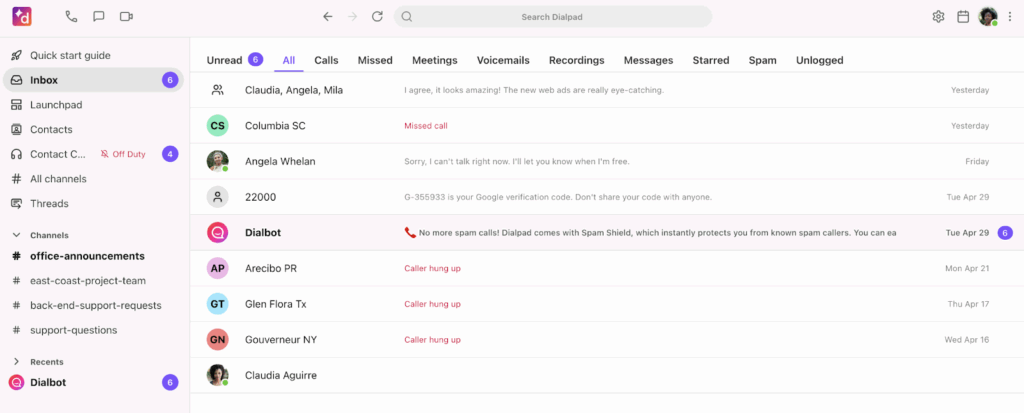
Dialpad gives you unlimited calling and video conferencing on every plan. You can also capture and store video meeting transcriptions so your team can review past patient interactions. To make Dialpad HIPAA compliant, you must first sign a BAA in the mobile app. This is available on all paid Dialpad accounts. But keep in mind you must be the Company Admin to do so.
But just because “any” paid Dialpad plan can be HIPAA compliant doesn’t mean they’re equally useful. For one thing, you can’t purchase additional numbers on the base plan. But when you do upgrade, you’ll face user-minimums. For example, you need to pay for at least three people on the mid-tier plan. And no matter how much you upgrade, you’ll never have access to unlimited texting. Most Dialpad alternatives, like Quo, offer unlimited messaging in the US and Canada at no extra cost.
Dialpad pricing

There are three Dialpad pricing plans to pick from:
- Standard: $15 per user per month for unlimited domestic calling, multi-level phone menus, support for toll-free numbers, call recording, and call and voicemail transcription
- Pro: $25 per user per month for additional phone numbers, third-party integrations, 25 ring groups, and international texting support, for three seats minimum
- Enterprise: Custom quote for unlimited ring groups, SSO, number extensions, more integrations, and a 100% uptime guarantee
3. Nextiva: Best for enterprise organizations that need advanced call center tools

Pros
- Unlimited calling in the US and Canada
- Priority and skills-based routing with an add-on
- Integrates with Salesforce, Zendesk, HubSpot, and more, with an add-on
Cons
- Must contact sales for HIPAA-specific pricing
- Voicemail can’t be played through the portal
- SMS and MMS have a capped message limit
- Limited toll-free minutes
- Call recording requires an upgrade
- Most integrations require an upgrade or add-on fee
Nextiva gives you a medical office phone system that handles high call volume with secure communications. You can set up HIPAA-compliant video calls and schedule patient meetings directly on your calendar. To set up HIPAA-compliant workflows like these, you first need to sign a BAA. You’ll also have to choose from one of Nextiva’s HIPAA business communication plans. These offer separate features from Nextiva’s Small Business and Enterprise tiers.
Keep in mind that Nextiva’s HIPAA-compliant plans will eliminate certain features from your phone system. They claim, “accounts do not provide additional security but instead… disable certain functionality.”
For example, you can’t:
- Play voicemails through the Nextiva Voice portal
- Use voicemail transcription services
- Send or receive faxes via email
- Download or forward faxes via email from the vFAX portal
The cherry on top? There’s no transparent pricing. You’ll need to reach out to Nextiva’s sales team for a custom quote.
Nextiva pricing
Nextiva’s pricing for HIPAA compliance isn’t available online. To receive a custom quote, reach out to sales.
4. RingCentral: Best for desk phone rentals
Pros
- Unlimited calls to the US and Canada
- Provides local or toll-free phone numbers
- Desk phone rentals are available on every plan
Cons
- Major texting limits
- Storage limits
- Automatic call recordings are available only after upgrading
- Only includes 100 toll-free minutes per month on the base plan
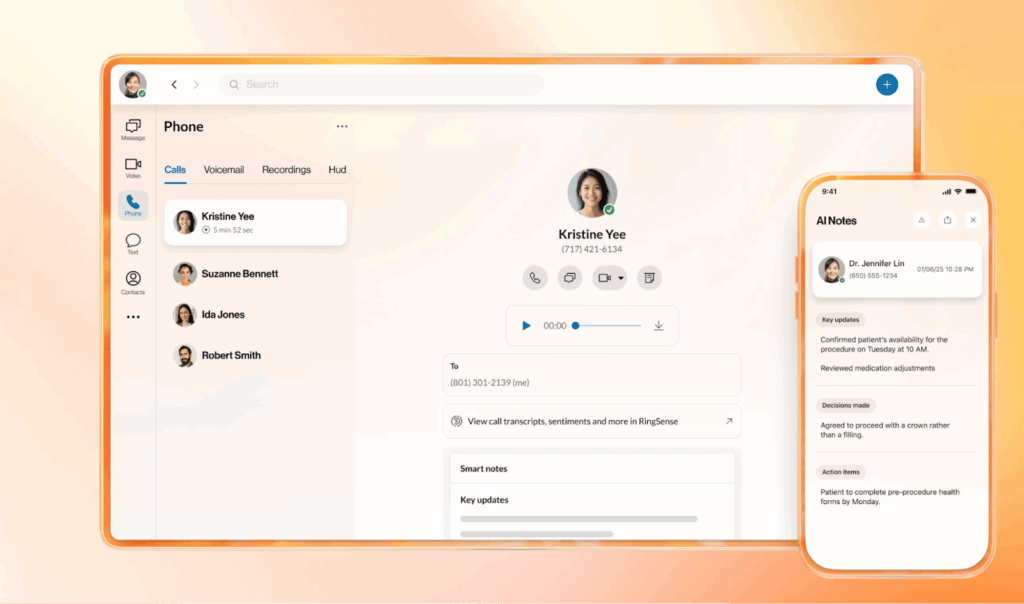
If you’re still using desk phones and aren’t ready to get rid of them yet, RingCentral provides multiple rental options. It also offers local and toll-free numbers, with unlimited calling in the US and Canada. To set up HIPAA compliance, you must request the RingCentral BAA from your RingCentral representative.
But keep in mind you can’t get “unlimited” storage without upgrading to the most expensive plan. Even if you do, your data is subject to time-based deletion policies. This could cause problems if you need to retain data longer for clinical or legal reasons.
Also, you only get 25 text messages per user per month on the basic plan. Upgrading to the most expensive plan still caps you at just 200 messages per user per month, which might not be enough as you grow.
RingCentral pricing
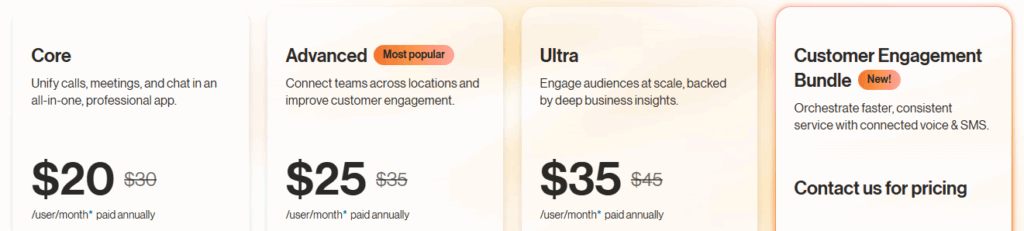
There are four tiers of RingCentral pricing:
- Core: $20 per user per month for on-demand call recording, 100 video meeting participants, 100 toll-free minutes, and 25 texts
- Advanced: $25 per user per month for automatic call recording, 100 texts, 1,000 toll-free minutes, and advanced call monitoring functions such as call barging and call whispering
- Ultra: $35 per user per month for device analytics and alerts, “unlimited” storage with time-based limits, 200 texts, and 10,000 toll-free minutes
- Customer Engagement Bundle: Contact for pricing for SMS compliance management, access to the Business SMS Booster, and access to the call queues booster
5. Google Voice: Best for businesses with a Google Workspace subscription

Pros
- Integrates with other Google Workspace apps
- Free unlimited calling to the US from anywhere — and to Canada from the US
Cons
- Texting is available in the US only
- No desktop app is available
- No toll-free numbers
- No integrations outside Google Workspace
- HIPAA requires a Google Workspace subscription
Google Voice lets you connect with other Google Workspace apps — perfect for businesses in the Google ecosystem. With it, you get unlimited calls in the US and Canada. You also get unlimited text messaging if you’re located within the US. Want to set up Google Voice HIPAA compliance? First, purchase a Google Voice and Google Workspace subscription. Then, sign your BAA agreement. Though it’s unclear how long this process takes from public-facing documentation.
While Google Voice also offers a Voice-only Starter plan that you can get without a Workspace subscription, it doesn’t include a BAA. You need to buy both services together to use Google Voice for HIPAA compliance, adding to your monthly costs.
Keep in mind there’s no Google Voice desktop app. You can only call and text from your phone or browser. Plus, you can’t integrate with apps outside of the Google environment. This means you can’t connect your phone system to the practice management systems you already use.
Google Voice pricing

There are three different levels of Google Voice pricing for HIPAA compliance:
- Voice-Only Starter: $10 per month for one user, basic calling and texting features; not available for HIPAA compliance
- Starter: $10 per user per month for 10 users max, US and Canadian calling, unlimited text messaging in the US, custom SLA agreements, Google Calendar and Meet integrations, and voicemail transcriptions
- Standard: $20 per user per month for unlimited users, multi-level auto attendants, on-demand call recording, SIP Link, and eDiscovery
- Premier: $30 per user per month for unlimited international locations, automatic call recording, and access to BigQuery
Keep in mind you’ll also need a Google Workspace subscription along with Google Voice to activate HIPAA compliance. Prices start at $7 per month per user. That means the lowest you’ll pay for any HIPAA-compliant Google Voice plan is $17 per user per month.
6. Vonage: Best for organizations building custom healthcare applications

Pros
- Unlimited domestic calling
- Offers video meetings with limited storage
- Communication APIs to build custom communication workflows
Cons
- On-demand call recording requires multiple upgrades
- Limited SMS and MMS
- Add-on is required for shared inboxes
- APIs require technical expertise to set up
- Basic features, like visual voicemail, require an upgrade
Vonage offers HIPAA-compliant APIs for video, voice, and messaging. For example, you can use the Vonage Video API to host branded telehealth calls within your website or app. Or you can use other Vonage APIs for auditing and reports, data redaction, and identity and access management.
The biggest limitation with Vonage is how difficult these APIs can be to set up. Unless you have technical resources or a background in code, it may take weeks or even months to set up your system.
You must speak with your account manager to sign a BAA first. Just keep in mind this may require an additional fee — you’ll need to contact sales for a quote. There are also several built-in feature limitations. For example, you’ll need to upgrade for features like visual voicemail. Want shared inboxes? You’ll need to purchase an add-on.
Vonage pricing

Vonage’s pricing for API HIPAA compliance isn’t clearly stated on the website. You’ll have to reach out to sales for an exact quote based on your needs.
If you choose a Vonage phone plan, the base price depends on the size of your team. Here’s what you’ll pay for a team of four or fewer:
- Mobile: $13.99 per number per month for virtual receptionists, voicemail, desktop and mobile apps, unlimited domestic calling, and SMS and MMS support
- Premium: $20.99 per number per month for video meetings, team messaging, desk phone support, and CRM integrations
- Advanced: $27.99 per number per month for visual voicemail with transcriptions, simultaneous ring, and on-demand call recording
What are the risks of non-compliance with HIPAA?
Not complying with HIPAA guidelines could result in serious consequences. Here are a few non-compliance risks you should look out for and protect against:
Financial consequences
HIPAA violations fall into one of four tiers. The higher the tier, the higher the fine.
At the highest tier, you’ll pay $50,000 or more per violation. If the law decides you’re personally culpable for a breach, you may be criminally charged. These carry fines of up to $250,000 and a maximum 10-year prison sentence.
Here’s a current breakdown of the penalty tiers for HIPAA violations:
| Penalty tier | Level of culpability | Minimum penalty per violation | Maximum penalty per violation | Annual penalty limit |
|---|---|---|---|---|
| Tier 1 | Reasonable efforts | $145 | $73,011 | $2,190,294 |
| Tier 2 | Lack of oversight | $1,461 | $73,011 | $2,190,294 |
| Tier 3 | Neglect – Rectified within 30 days | $14,602 | $73,011 | $2,190,294 |
| Tier 4 | Neglect – Not rectified within 30 days | $73,011 | $2,190,294 | $2,190,294 |
Source: The HIPAA Journal
Reputational consequences
Patients may feel uncomfortable with communication tools they don’t view as safe. It also makes it harder to ensure the best possible health outcomes for patients.
Once people find out you violated HIPAA, it can be hard to regain their trust. One dental management company lost 40%-50% of its patients and eventually filed for bankruptcy due to a privacy breach.
Operational disruptions
Violating HIPAA doesn’t just affect you financially or reputationally. It also brings your operations to a halt.
First, you have to hire a third-party forensics team and legal counsel to identify data exposure. You also have to hire a communications team to notify your patients. If the breach happened in your systems, you have to fix it, which may cause downtime and prevent you from serving new patients.
After the initial phase of managing the violation, you have to follow a corrective action plan administered by the Office of Civil Rights, or OCR. The OCR is the government department responsible for enforcing HIPAA. When you’re on such a plan, you have to monitor your operations for multiple years. You also have to conduct third-party assessments and send reports to the Department of Health and Human Services.
Doing all this work costs money and takes time and effort away from delivering patient care.
How to use a HIPAA-compliant VoIP in your operations
Responsibility for maintaining HIPAA compliance falls on covered entities. You should train your team to use your VoIP system to avoid violating HIPAA regulations. Here are a few best practices to follow to maintain compliance in your workplace:
- Train new team members on the three rules. During onboarding, walk team members through the Privacy, Security, and Breach Notification Rules. Use role-specific exercises so different departments know what applies to them. Make sure you document your training, as required by HIPAA.
- Set caller verification protocols. Identify callers so you’re not sharing PHI or PII with someone other than the patient. Use two factors, like full name and date of birth, or offer a callback to the number on file.
- Set rules for sending voicemails and messages. Collect patient consent before sending SMS messages for security reasons. Keep PHI out of voicemails and texts by default. Limit voice messages to a name, callback number, and request to return the call.
- Establish clear workspace and device policies. Maintain strict discretion around PHI and PII information in your workplace. Here are a few ways you can do this:
- Require headphones in shared workspaces to prevent call audio from being overheard.
- Make sure your teams don’t leave PHI information on their desks and computer screens when they don’t need to refer to it.
- Mandate device PIN locks, automatic screen timeouts, and encryption on every phone, tablet, and laptop used for work calls.
- Provide role-based access to your VoIP system. Issue unique logins to your team. Turn on multifactor authentication for every account that touches PHI.
- Follow a “minimum necessary standard” process: Train staff to access, use, or disclose only the smallest amount of PHI needed for the task.
How to choose a HIPAA-compliant VoIP system: A checklist
Many different communications platforms offer secure VoIP services. But how do you ensure a system is HIPAA compliant?
Here are several criteria to keep in mind:
✅ BAA offered. If a provider claims to be HIPAA compliant but doesn’t have you sign a BAA, it isn’t following the Privacy Rule, and you’ll get into trouble.
✅ Efficient setup. You shouldn’t have to reach out to sales or hire dedicated IT or compliance staff just to get up and running. Plus, you shouldn’t have to wait for weeks or months for full implementation.
✅ Third-party audits and certifications. You’ll want confirmation that your VoIP system follows other security standards in addition to HIPAA. For example, you should check for SOC 2 Type II certification.
✅ Scalability and integrations. You should be able to connect with the healthcare management tools you’re already using. Then, when you’re ready, easily add new features, users, and numbers.
✅ Transparent pricing. With Quo, you’ll get full HIPAA compliance on the Business and Scale plans. Our pricing is clearly listed online, and it’s easy to get started.
What features to look for in a HIPAA-compliant VoIP service
Not all HIPAA-compliant VoIP systems offer the features growing small businesses need. Here’s a quick list of features to help narrow down your options:
- Encryption in transit and at rest. Ensure ePHI can only be decrypted by your intended device or recipient.
- Secure voicemail storage. Ensure that messages containing patient details are only accessible to authorized staff.
- HIPAA-secure call recordings and transcriptions. Keep records of every conversation for training, record-keeping, and compliance purposes.
- User access controls. Assign roles and permissions, then set up multifactor authentication. With controls in place, only authorized users can access sensitive data.
- Shared numbers. Allow multiple team members to handle calls from a single phone number. This way, patients can always reach someone. Plus, you don’t expose personal staff phone numbers or create confusion about which number to call.
- Easily configured call routing. Direct patients to the right department or staff member based on their needs. For example, billing inquiries to your billing team, appointment requests to reception. This reduces wait times and helps ensure only authorized personnel hear PHI.
- Data redundancy and backups. Protect mission-critical call logs and recordings in multiple secure locations for your team.
Quo: The best HIPAA-compliant phone service for growing businesses
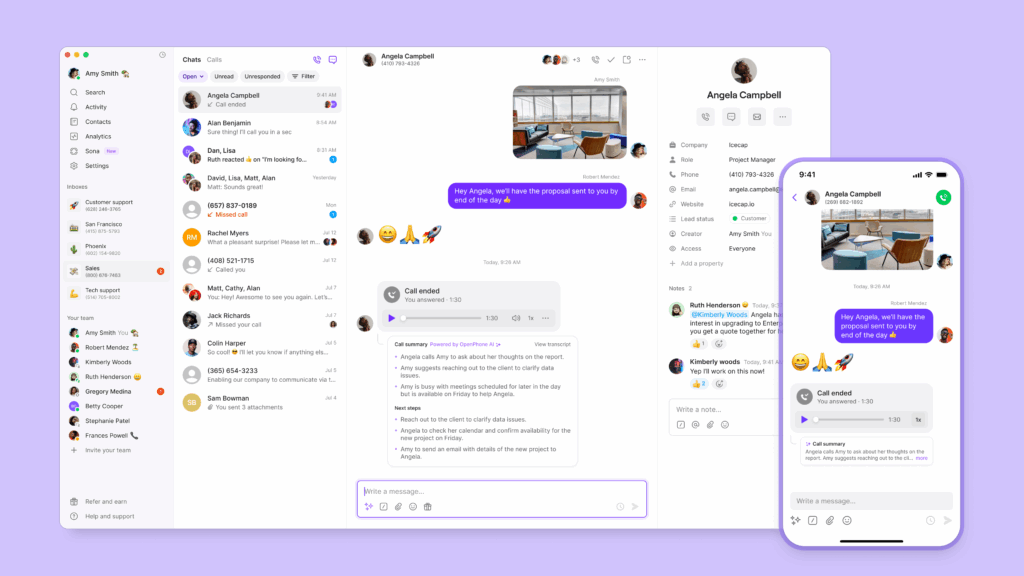
HIPAA-compliant VoIP services protect healthcare providers from costly violations. They also help enable modern communication features, like shared numbers and automations.
With Quo, you can safely use VoIP services to improve customer relationships and serve patients more effectively. Beyond building patient trust, Quo helps teams get more done in a day. Automate appointment reminders, set up detailed phone menus, and pick up the phone 24/7 with our AI agent, Sona.
Hundreds of healthcare organizations rely on Quo to relay sensitive messages securely. See how it can fit your growing business with a free seven-day trial.
FAQs
Using VoIP in the healthcare industry can help businesses:
– Boost operational efficiency
– Improve patient communication
– Enable telehealth programs
– Reduce communication costs
– Support multiple locations
HIPAA applies to any VoIP communication involving PHI, including:
– Voice calls discussing patient conditions, treatments, medical history, or other sensitive information.
– Voicemails containing patient information, appointment reminders, or test results.
– Call recordings and transcriptions of conversations involving PHI, including automatic translations.
– Video consultations for telehealth or meetings where PHI is discussed.
– Text messages, when information in SMS/MMS includes PHI.
The “best” option depends on your business and needs. We’re admittedly biased. But for most healthcare providers and growing businesses, Quo is the best HIPAA-compliant phone service.
No, there are no free HIPAA-compliant VoIP providers to choose from.
HIPAA-compliant VoIP providers are required to build technical safeguards to protect PHI and PII on their platforms. They also need to provide legal guardrails with a BAA to manage legal responsibility for compliance purposes. Both requirements mean that there are a lot of costs involved in building and maintaining a HIPAA-compliant phone system.
Providers like Quo offer a cost-effective phone system accessible to businesses of all sizes. Try Quo for free with our seven-day trial.
Yes, you can use existing phone numbers with HIPAA-compliant VoIP services. Depending on the provider, they may charge port-in fees. Quo lets you port in a local US, Canadian, or North American toll-free number for free.
Yes. Since responsibility for maintaining HIPAA compliance falls on covered entities and healthcare institutions, you should train your team to use your VoIP system in a compliant manner.
You can make Zoom VoIP HIPAA-compliant by signing a BAA. Small providers can start using Zoom in a manner compliant with HIPAA for $13.33 per user per month. But you don’t get calls or texts, only Zoom meetings, docs, and team chat. Larger organizations can use the Business, Business Plus, and Enterprise plans. You must contact sales for pricing.
No, Grasshopper’s VoIP isn’t HIPAA compliant. But if you have an existing Grasshopper number you can port it to a HIPAA-compliant VoIP system like Quo.
Setting up a HIPAA-compliant VoIP system like Quo only takes a few minutes:
1. Sign up for Quo’s Business plan.
2. Choose your business phone number or port your existing one to Quo’s platform.
3. Configure your call and text settings.
4. Once you have an active account, you can request a BAA in 15 seconds or less.
You can make calls to your patients immediately after signing a BAA, but you’ll have to wait for another 5-7 days to be able to text them. Texting US phone numbers requires an additional registration step called A2P 10DLC. Major US carriers pushed for these texting regulations to reduce spam texting. You can easily file for A2P 10DLC in your Quo account using our step-by-step application process.


