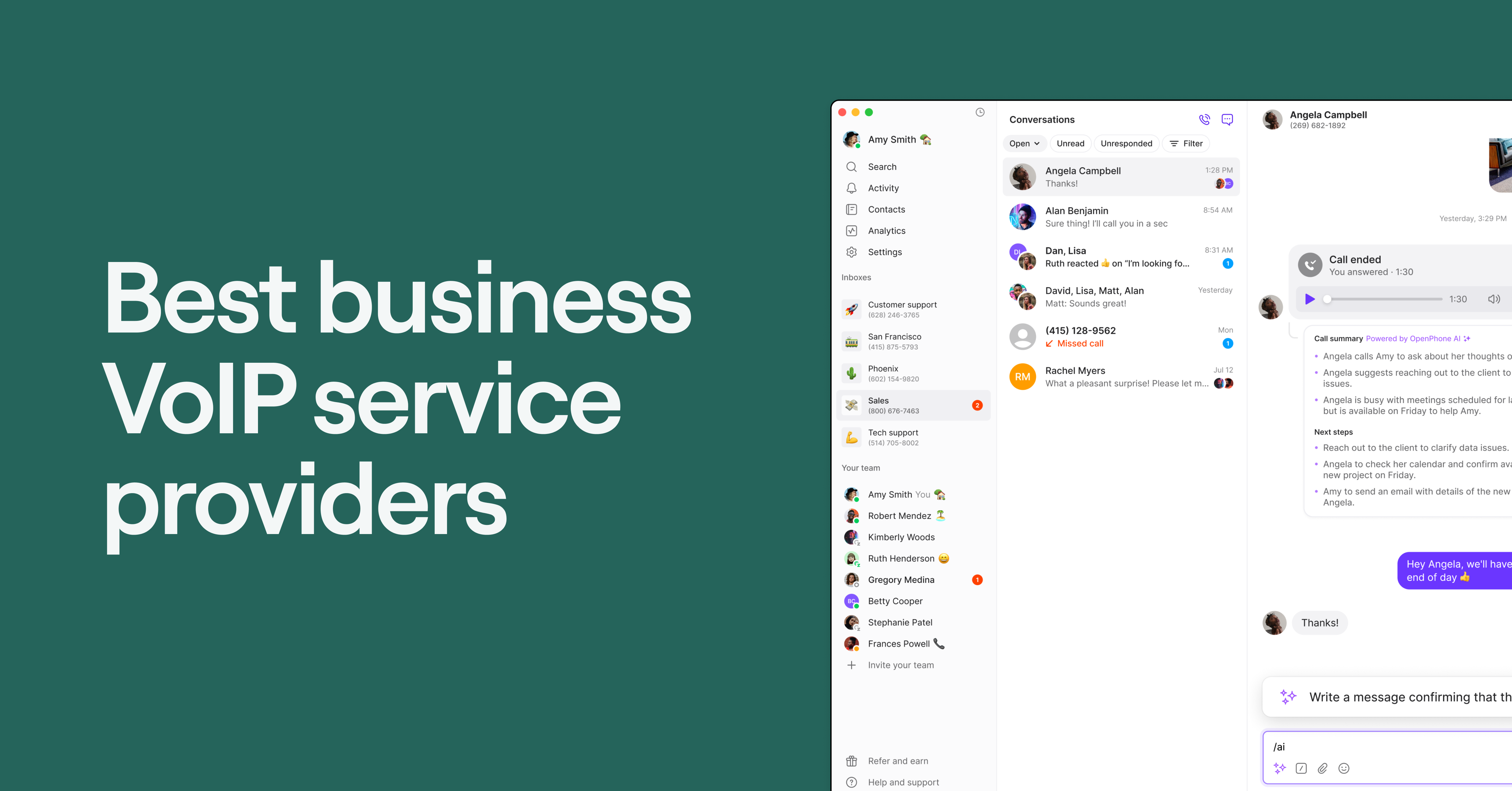
Need a US number but based outside the States? Or need to share your business number with your team easily? Whatever the situation, you’re looking for a US virtual phone number.
That’s the right move. A US virtual phone number unlocks your team’s ability to develop customer relationships over the phone, avoid long-distance fees, and be more productive. A desk landline or your personal cell number can’t cut it when you’re growing fast.
The best US virtual phone number provider depends on your specific needs as a business:
- Best overall virtual phone number provider: Quo
- Best for using a second phone number: Google Voice
- Best for enterprise-level features: Dialpad
- Best for desk phone rentals: RingCentral
We tested several top alternative phone number providers and narrowed it down to 12 options. We also looked at hundreds of reviews from real users, pricing, reliability, and the features that matter for day-to-day business use. Here are the best US VoIP phone number providers to consider.
What is a US virtual phone number?
A US virtual phone number is a number that isn’t tied to a SIM card or a cellular network. Unlike cell phones and landlines, virtual numbers aren’t connected to a specific device. This enables virtual phone users to use their numbers on multiple devices simultaneously.
Virtual numbers use Voice over Internet Protocol, or VoIP, to make and receive calls. VoIP technology transmits call and text data over the internet. It converts analog voice signals into digital packets, sends them over the internet to a VoIP server, and then transmits them to the call recipient. It then converts those digital packets back into voice signals that your recipients can hear.

Comparing the 12 best US virtual phone number providers
There are many providers for virtual numbers, also known as VoIP numbers, with US area codes, but choosing one with the features you need will help you get the most out of your new number and phone system.
Here’s how they stack up:
| Providers | Starting price | Unlimited calling to US & Canada | SMS/MMS to US & Canada | Shared phone numbers | Additional phone numbers |
|---|---|---|---|---|---|
| Quo | $15 per user per month | ✔ | ✔ | ✔ | $5 per number per month |
| Google Voice | Free for personal use, $10 per user per month, plus a Google Workspace plan for teams | Unlimited domestic calling | US only | Requires upgrade, ring groups only | One number per user |
| Phone.com | $15 per user per month | ✔ | Requires upgrade | Shared SMS inbox requires upgrade | $4.99 per number per month |
| Grasshopper | $14 per month | ✔ | Local numbers only | ✗ | $9 per number per month |
| Ooma Office | $19.95 per user per month | ✓, plus Mexico and Puerto Rico | Requires upgrade, capped at 250 per month | Ring groups only | $9.99 per number per month |
| Nextiva | $15 per user per month | ✔ | 100 per user per month on base plan | Team texting is an add-on on base plan | Not listed on pricing page |
| RingCentral | $20 per user per month | ✓, limited toll-free minutes | 25 per user per month on base plan | Calls only, shared texting is a $25 add-on | $4.99 per number per month |
| Zoom Phone | $16 per user per month | ✔ | Billed per message | Calls only, team texting is a $25 add-on | $5 per number per month |
| CallHippo | $19 per user per month | ✓, excludes toll-free and premium numbers | 100 per user per month on base plan | ✔ | $0 to $15 per month, varies by area code |
| 8x8 | Contact for a quote | Unmetered calling zones by licence | Contact for a quote | Contact for a quote | Contact for a quote |
| Dialpad | $15 per user per month | ✔ | Billed per message | Ring groups, capped at 3 on base plan | Requires upgrade |
| CloudTalk | $25 per user per month | ✔ | ✔ | Ring groups and call queues | Starts at $6 per number per month |
Keep reading as we break down each of these services in more detail below, including costs and top features.
1. Quo: Best for small businesses and startups

Pros
- Unlimited calls and texts to the US and Canada
- Internal threads, task management, and direct messaging for team collaboration
- Auto-attendant with IVR for inbound calls
- Messaging automation, including auto-replies, snippets, and scheduled texts
- 24/7 AI voice agent
- AI call summaries and transcriptions
- Integrations with 9,000+ apps, including Slack, HubSpot, and Claude
Cons
- No desk phone rentals
- No video calling
- Can’t verify accounts through two-factor authentication*
*Nearly all virtual phone numbers share this problem. For safety reasons, companies like Facebook, Uber, and Google rarely let you authenticate accounts through a virtual phone number.
Quo is a business phone system that offers toll-free numbers and local phone numbers with US and Canadian area codes. Every user gets one free phone number, and team members can also share phone numbers to collaborate on calls and texts. Tag your teammates in internal threads to keep them in the loop. Plus, assign action items with our task management tools.
Quo is designed to help you build customer relationships at scale. Create custom call flows to route incoming calls based on your team’s needs. Manage calls with features like ring groups, phone menus, and business hours. Send automated text messages to reach your customers when they’re most likely to pay attention. Automate your messaging with scheduled texts, pre-written text templates, and our Zapier and Make integrations.
Quo’s platform is also built to save your team time. With AI call summaries and transcriptions, you can capture every customer detail in your calls. And with our Claude and ChatGPT integrations, you can quickly surface trends across your customer conversations.
If your team is busy, Quo can handle calls for you. Our 24/7 AI voice agent Sona can take calls, record messages, and answer questions for your team. It can help with appointment booking and can even capture leads over text.
Thousands of businesses choose Quo as their virtual phone system. We’re the #1 business phone on G2 by customer satisfaction. Don’t just take our word for it — here’s an actual customer sharing their experience with using Quo:
“Running a Dog Training Elite franchise means I’m often working on the road, and Quo makes sure I never miss a call, whether I’m in the office or not! The app and web application are easy for my entire team to use, and the option to have multiple lines allows us to provide an even higher level of service to our clients. ” — Whitley Cheatham, Owner/Training Director, Dog Training Elite San Antonio
Try out Quo and see how it will scale your customer relationships. Sign up for a free trial of Quo for seven days.
Key features of Quo
- Free calling and texting to US and Canadian numbers
- Local US and Canadian phone numbers
- North American toll-free numbers
- Desktop, browser, iOS, and Android apps
- Shared phone numbers
- Business hours
- Auto-attendant
- Auto-replies, snippets, and scheduled text messages
- Voicemail transcriptions and business call recordings
- Quo API and integrations with Slack, Zapier, HubSpot, Salesforce, and Gong
- AI-generated call summaries, transcripts, and text responses
- Call views for centralized call management
Quo pricing
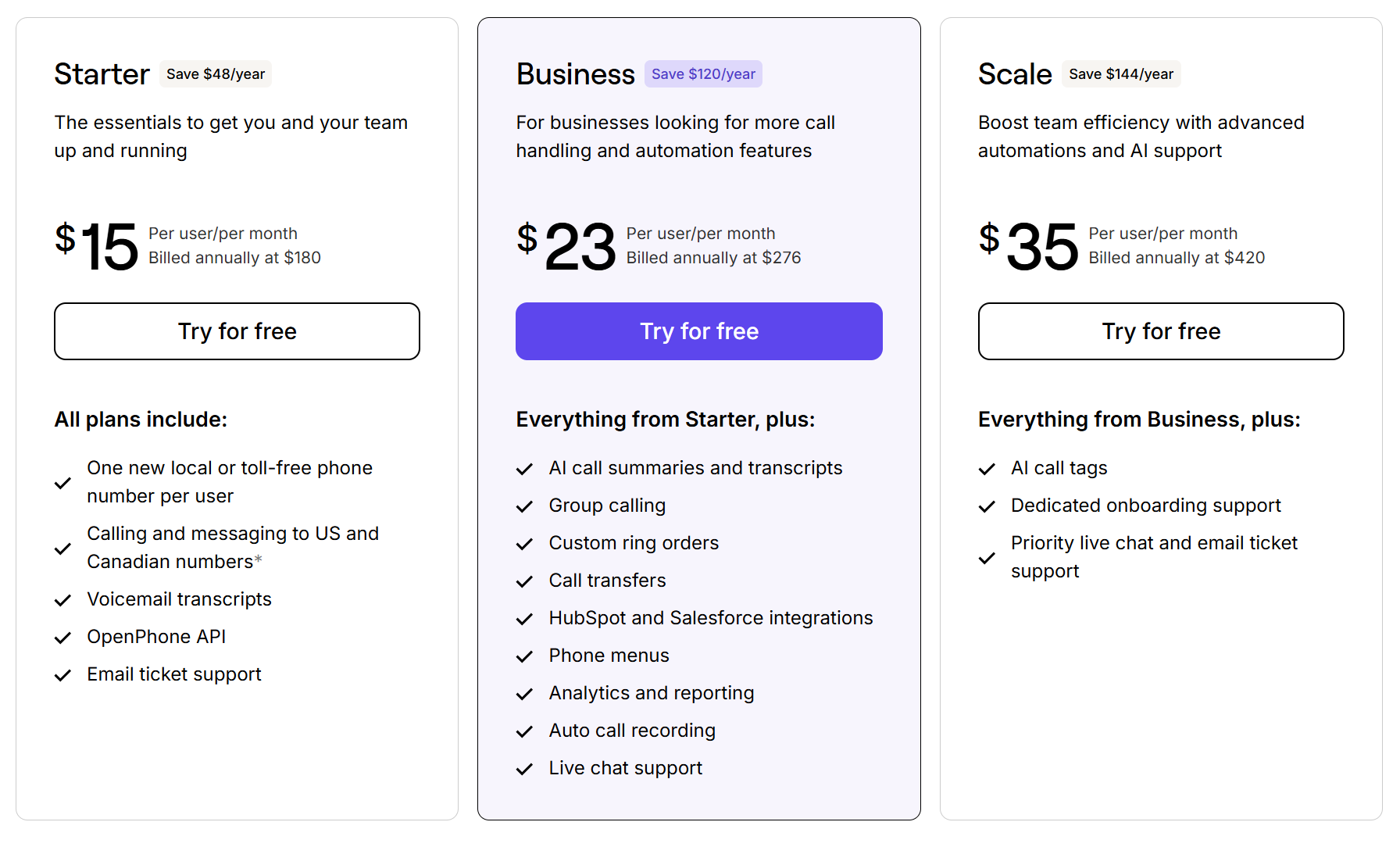
- Starter: $15 per user per month for unlimited voice calls and text messages in the US and Canada, voicemail transcriptions, shared numbers, and more
- Business: $23 per user per month to unlock phone menus, group calls, analytics and reporting, automatic call recording, and more
- Scale: $35 per user per month for AI call tags, inbound phone support, dedicated onboarding, and priority chat and email support
Sign up for a free trial of Quo for seven days.
2. Google Voice: Best for Google Workspace users

Pros
- Free calls to the US and Canada
- Free limited plan for personal users
Cons
- No third-party app integrations
- Texting is available in the US only
- No toll-free numbers
- No desktop app
Using Google Voice for business communication might feel like a natural choice for any company already using the Google suite. With a Google Voice for Google Workspace account, each user can get a VoIP number in the USA. However, if you’re located outside of the US, you won’t be able to use the free version of Google Voice to get a virtual phone number in America. Google requires you to verify your account with an existing US phone number.
Google Voice supports unlimited calls to the US from any Google Voice number, but plenty of other features are limited to US-based users. For example, texting is only available to US customers. Plus, you won’t get unlimited calls to Canada if you live outside Canada or the US. Google Voice doesn’t support helpful features like third-party app integrations or text message automations either.
If you’re running your business on your own, Google Voice offers a free personal plan. It’s a good option to get a second phone number, but it falls short when you’re trying to scale your business. The biggest reason is you can’t share your free number with your team. Like Google Voice’s paid plans, no integrations outside of other Google apps are available. But even if you choose this option, your call quality might suffer.One Redditor noted, “I’ve noticed that when using Google Voice the voice quality on calls is significantly inferior to when I’m using my normal number.”
Find out more reasons why your phone keeps dropping calls on Google Voice or another provider.
Key features of Google Voice
- Unlimited calling to the US
- Unlimited texting in the US (US customers only)
- Voicemail transcriptions
- Integrates with Google Calendar and Google Meet
- Auto attendants (require upgrade)
Google Voice pricing
Google Voice offers three pricing plans for individuals and three pricing plans for teams. Personal plans are only available to US customers, while team pricing is available in 14 countries, including Belgium, Italy, and Spain.
Here are the Google Voice pricing plans for individuals:

- Standard: Introductory price of $10 per month for the first six months, then $20 per month for AI note-taking with Gemini and auto-attendants
- Basic: Free, limited to one user, with unlimited domestic calling and texting
- Starter: $10 per month to access three-way calling, seamless call transfers, and easy call recording
Here are the Google Voice pricing plans for teams:

- Starter: $10 per user per month, with a 10-user maximum, for calls and texts in the US, call forwarding, and SLAs
- Standard: $20 per user per month to access on-demand call recordings, ring groups, and phone menus
- Premier: $30 per user per month to access automatic call recordings and advanced reporting
Google Voice team plans also require a Google Workspace subscription, which starts at $7 per user per month.
3. Phone.com: Best option for HIPAA-compliant video conferencing

Pros
- HIPAA-compliant voice is available
- Video meetings are included in all plans
Cons
- Texting requires an upgrade
- Call recording is only available as an add-on in most plans
- Voicemail transcription requires an upgrade
Phone.com is a VoIP business phone service built for small teams. Every plan includes unlimited calling to the US and Canada and video meetings for up to 100 people. Phone.com is also HIPAA- and SOC 2 Type 2-compliant if you run a medical practice or a law firm and need your call records covered. The additional benefit: its video calls are also HIPAA compliant, giving you even more security for your conversations. You can bring your existing number over for free and choose from local, toll-free, or custom numbers.
However, Phone.com has a few drawbacks to keep in mind:
- Lack of essential features in its base plan. You get one phone number, but you don’t get texting or voicemail transcription.
- Call recording is an add-on in most plans. Call recording is an $8 per month add-on unless you upgrade to the Pro plan at $40 per user per month.
- SMS auto-replies require an upgrade. Want to automatically reply to customers outside of business hours? You’ll need to upgrade to get access to auto-replies.
Key features of Phone.com
- Unlimited calling to the US and Canada on every plan
- Auto-attendant
- Call forwarding
- HIPAA-compliant video and voice, requires an upgrade
- Call recording, requires an upgrade or add-on
Phone.com pricing

Phone.com offers three pricing plans to businesses, billed annually:
- Basic: $15 per user per month for unlimited minutes, mobile and web apps, and voicemail-to-email
- Plus: $22.50 per user per month for unlimited minutes and outbound texts, video recording, and voicemail transcriptions
- Pro: $33.33 per user per month for call recording, call analytics, and CRM integrations
4. Grasshopper: Best option with multi-digit extensions

Pros
- Every plan includes the same core features
- Unlimited extensions on the Small Business plan
Cons
- No third-party integrations
- No international texting
- International calling requires a $500 deposit
Grasshopper is a VoIP service that provides US phone numbers for the self-employed and other small businesses and offers the same set of features with every plan. You won’t have to worry about upgrading to unlock essential features. Instead, you’ll pay based on the amount of VoIP numbers you need. The lowest priced plan supports one user and gives you a single number and extension. Grasshopper’s most expensive plan still only includes four numbers and unlimited extensions.
Grasshopper lags behind other business phone options in terms of the features it offers. For example, it doesn’t offer any third-party integrations. It siloes your call and text data from the rest of your tech stack.
Also, you can’t send SMS messages internationally or from a toll-free number to a Canadian number. And if you want to make international calls, you have to put down a $500 deposit.
One user on G2 complained, “Often it takes several attempts to make an outgoing call. The voice mails do not stay on the system for more than 30 days. The name of the caller is visible on the windows app, but it does not get recorded in the call log.”
Key features of Grasshopper
- Toll-free and local numbers
- Voicemail transcriptions
- Mobile and desktop apps
- Virtual fax
- Simultaneous call handling, requires an upgrade
Grasshopper pricing

Here are Grasshopper’s pricing options:
- True Solo: $14 per month for one phone number and one extension
- Solo Plus: $25 per month for one phone number and three extensions
- Small Business: $55 per month for four phone numbers and unlimited extensions
5. Ooma Office: Best for old-school office phone features

Pros
- Analog fax, overhead paging, and intercom are included in the base plan
- Unlimited calling to the US, Canada, Mexico, and Puerto Rico
Cons
- Texting requires an upgrade
- Calling from the desktop app requires an upgrade
- CRM integrations require the top-tier plan
Ooma Office is a business phone service built for small offices that still run on physical phone hardware. What separates it from most providers on this list is how much legacy equipment it supports. Analog fax machines, overhead paging systems, and intercom all connect to Ooma Office, and all of it is included on the entry-level plan.
Every plan comes with unlimited calling to the US, Canada, Mexico, and Puerto Rico, plus one free toll-free number with 500 inbound minutes a month. Ooma also bundles ring groups, extension monitoring, music on hold, and virtual fax into its cheapest tier. That means a front desk running on older equipment can get set up without paying for a higher plan.
However, the plan structure works against you the moment you want anything modern. Almost every cloud phone feature you’d expect in 2026 sits behind an upgrade, which means the $19.95 plan carrying all that legacy hardware support is also the most limited plan Ooma sells. Here are a few more drawbacks to keep in mind:
- Modern phone features require you to upgrade. Call recording, voicemail transcription, and analytics need Ooma’s Pro plan. CRM integrations with HubSpot, Salesforce, Pipedrive, and Zoho, plus AI call transcriptions and team collaboration features all require Ooma’s Pro Plus plan at $29.95 per user per month.
- No texting on the base plan. Text messaging starts on Pro at $24.95 per user per month, and it’s capped at 250 messages a month.
- The desktop app can’t make calls unless you pay extra. Ooma lists its Windows, Mac, and Chrome apps as available on the base plan, but with calling switched off. Your team is stuck on mobile or a desk handset until you upgrade.
Key features of Ooma
- Unlimited calling to the US, Canada, Mexico, and Puerto Rico
- Analog fax machine support and virtual fax
- Overhead paging, paging groups, and intercom
- Ring groups and extension monitoring
- Call recording and voicemail transcription, requires an upgrade
- CRM integrations and AI transcriptions, requires the most expensive plan
Ooma pricing

Ooma offers three pricing plans to businesses:
- Essentials: $19.95 per user per month for unlimited calling, virtual receptionist, mobile app, analog fax and paging support, and one toll-free number
- Pro: $24.95 per user per month for desktop app calling, 250 texts per month, 25-person video meetings, call recording, and voicemail transcription
- Pro Plus: $29.95 per user per month for CRM integrations, AI transcriptions, 1,000 texts per month, 100-person video meetings, team chat, hot desking, and call queuing
6. Nextiva: Best for omnichannel communications

Pros
- Routes voice, email, social, and messaging apps into one inbox
- Social media and review management are included on the base plan
Cons
- SMS is capped at 100 messages per user per month on the base plan
- Call recording and toll-free numbers require an upgrade
- CRM integrations are a paid add-on on every plan
Nextiva sells itself as a customer experience platform rather than a phone system, and the product reflects that. Voice, email, SMS, messaging apps like WhatsApp and Facebook Messenger, live chat, social media, and online review sites all route into a single inbox.
The base Core plan covers voice, email, video calls, and messaging apps. For a team fielding Instagram DMs, Google reviews, and phone calls in the same afternoon, that breadth is hard to match at the price.
However, this omnichannel system sits on top of a phone solution that falls short. Here are a few drawbacks to keep in mind:
- The base plan caps the omnichannel connections at three channels. Core connects three social or review accounts in total, and live chat is a paid add-on. A business already on Google Business, Yelp, Facebook, and Instagram is over the limit before it starts.
- Texting is capped, and the overage rate isn’t published. You get 100 messages per user per month on the Core plan and 500 on the Engage plan. Nextiva doesn’t publish what you pay once you cross that line.
- CRM integrations aren’t bundled. Salesforce and HubSpot are paid add-ons on all three plans, including the $75 Scale tier. Upgrading doesn’t unlock them.
Key features of Nextiva
- Voice, email, SMS, and video calls on every plan
- One inbox for social media, messaging apps, and online reviews
- Voicemail transcription
- Auto-attendant and call menus
- Call recording, requires an upgrade
- Salesforce and HubSpot integrations, requires a paid add-on
Nextiva pricing

You can choose from three different Nextiva pricing plans:
- Core: $15 per user per month to access inbound and outbound voice calls, SMS/MMS up to 100 messages, voicemail transcriptions, and a simple IVR
- Engage: $25 per user per month to access call recording, a toll-free number and 2,000 toll-free minutes, 500 SMS/MMS, video meeting recording, and Microsoft Teams integration
- Scale: $75 per user per month for the inbound sales and service call center, priority and skills-based routing, supervisor dashboard, unlimited texting, up to 10,000 toll-free minutes, and automatic call distribution callback
7. RingCentral: Best for desk phone rentals

Pros
- Rents desk phones directly, with published monthly rates
- Unlimited calling in the US and Canada on every plan
Cons
- Rentals require a 24-month minimum contract
- Limit of 25 texts per user per month on the base plan
- Call recordings are deleted after 90 days
RingCentral, one of the oldest cloud phone systems still around, is built for offices that run on physical handsets.
Every plan includes unlimited calling in the US and Canada, one local or toll-free number per user, and HD video meetings for up to 300 participants. You also get single sign-on, a 99.999% uptime SLA, and 24/7 support on the base plan.
While RingCentral seems like it has everything you need from a virtual phone system, it has a few drawbacks to keep in mind:
- Texting is barely usable on the base plan. RingCentral’s Core plan gives you 25 messages per user per month. A six-person team gets 150 messages in total before overages start at $0.0119 per message sent and received.
- Shared texting costs extra. A shared SMS inbox isn’t available on the Core or Advanced plan. It needs the Business SMS Booster at $25 per month.
- Call recordings are deleted after 90 days. That applies to every tier. Unlimited storage only comes with its AI Customer Engagement bundles. Even then, call recordings are only stored for 90 days.
Key features of RingCentral
- Unlimited calling in the US and Canada
- One local or toll-free number per user
- Desk phone and conference phone rentals
- HD video meetings for up to 300 participants
- Automatic call recording, requires an upgrade
- Salesforce and Zendesk integrations, require an upgrade
RingCentral pricing

Here’s what to expect from RingCentral’s pricing plans:
- Core: $20 per user per month to access unlimited domestic calling, limited SMS and MMS, and IVR
- Advanced: $25 per user per month to access auto call recording, advanced call monitoring and handling, and multi-site management
- AI Customer Engagement Bundle with AIR: Custom pricing for 10,000 toll-free minutes, 200 SMS messages per user per month, Business SMS Booster and Call Queues Booster, and AIR
- AI Customer Engagement Bundle with AIR and ACE: Custom pricing for AI Conversation Expert (ACE), coaching and performance analytics, and CRM and productivity integrations
8. Zoom Phone: Best for existing Zoom Workplace users

Pros
- Call recording and voicemail transcription are included on every plan
- Adds to an existing Zoom Workplace plan for around $6 per user per month
Cons
- Shared team texting requires a $25 per user add-on
- Toll-free and international minutes are metered on every plan
- Business Plus requires a minimum of 10 users
Zoom Phone is a business phone service that’s part of the Zoom platform. It lets teams call and text from US, Canadian, or numbers based in other countries. Zoom Phone doesn’t support international MMS or video messaging. Keep in mind, features like scheduled texts and shared SMS require the $25 per user per month Customer Engagement add-on.
Collaboration is also limited. You can’t send or receive texts from a true shared business number. Team members must manually release conversations. There are also limits on how many users can share a number and how many calls can be handled at once.
Finally, the platform can be difficult to navigate. Users report a confusing setup, limited support, and inconsistent features. For home service teams that handle high call volume, these limitations can make it more difficult to respond quickly and work together effectively.
Key features of Zoom Phone
- Call recording and voicemail transcription on every plan
- Unlimited auto attendants, call queues, and IVR
- Salesforce, Slack, Microsoft, and Google integrations
- Domestic SMS and MMS in the US and Canada
- AI post-call summaries and voicemail task extraction
Zoom Phone pricing

You can pick from five Zoom Phone price plans:
- US & Canada Metered: $10.50 per user per month for metered domestic US and Canadian calling, Zoom Workplace Basic, metered international calling, and toll-free numbers
- US & Canada Unlimited: $16 per user per month for Zoom Workplace Pro and unlimited metered domestic US and Canadian calling
- Pro Plus: $20.50 per user per month for Zoom Workplace Pro, 30 hours of meetings, local and 10 GB cloud recording, Zoom AI Companion, and access to Docs, Mail, and Calendar
- Business Plus: $24.50 per user per month for Zoom Workplace Business, 300 participants per meeting, unlimited whiteboards, SSO, and device management
- Global Select: $22 per user per month for one local number in 40+ locations per license and unlimited domestic calling in those locations; discounted to $16.50 for metered calling
Keep in mind there are add-on costs for:
- Additional phone numbers: $5 per number per month
- International calling: $10 per month; only with an unlimited calling plan
- Zoom Phone Power Pack: $25 per license per month for historical insights and enhanced call queue analytics
- Desk phones and headsets: Varies depending on the model
9. CallHippo: Best option for call centers

Pros
- Dedicated call center tiers with supervisor barging and whispering
- 10-day free trial on every paid plan, no credit card
Cons
- Call center tooling requires the Pro Suite, not the office plans
- SMS is capped on every office plan
- Enterprise plan requires a minimum of 50 users
CallHippo offers two virtual phone services for businesses: a call center solution and an office phone system.
The call center solution is designed for teams that are constantly making bulk calls and texts. It lets your team members make and receive multiple calls on the same phone number at once and instantly switch between numbers based on your caller’s location. If you’re dialing a US customer, it’ll use your US number.
If you need unlimited calling, you’ll need to upgrade to CallHippo’s office phone system, which offers more common VoIP features like phone menus, ring groups, and business hour settings.
Text messaging isn’t unlimited on any plan, which means your expenses can add up if you frequently text clients. Many reviewers also cite issues with reliability, one stating, “The phone quality is bad. Calls drop 60% of the time. ALL my 40+ users were complaining.” — G2
Key features of CallHippo
- Separate office phone system and call center product lines
- Supervisor call barging and call whispering, available in Pro Suite Platinum
- Call dispositions and skill-based routing, requires an upgrade
- Multilevel IVR and smart DID routing, requires an upgrade
- Power dialer and parallel dialer, sold separately
- AI call transcription and real-time coaching, with paid add-ons
CallHippo pricing
CallHippo prices its office phone system and its call center Pro Suite separately. Here are the office phone plans, billed annually:

- Basic: Free for the first six months for voicemail, click-to-dial, and business hours, with numbers charged separately
- Starter: $19 per user per month for unlimited minutes in the US and Canada, 100 SMS, and one month of call logs
- Professional: $30 per user per month for call recordings, multilingual IVR, AI voicemail transcription, and 500 SMS
- Ultimate: $42 per user per month for multilevel IVR, holiday routing, SSO, and 1,000 SMS
CallHippo also offers its Pro Suite plans for call centers. Here’s how much they cost, billed annually:

- Basic: $0 per user per month for click-to-dial and unlimited users, with numbers charged separately
- Bronze: $32 per user per month for sales team calling
- Silver: $42 per user per month for expanding operations
- Platinum: $54 per user per month for supervisor call barging, call whisper, compliance call recording, and CSAT targets
10. 8×8: Best for global contact centers

Pros
- Unlimited international calling on some licenses, with coverage ranging from 14 to 48 countries
- Call monitoring tools like call whisper and call barge
- Microsoft Teams integration
Cons
- No public pricing
- Heavier setup than some tools
- Feature and plan details aren’t clearly outlined online
8×8 is a cloud communications platform built for large international contact centers. It offers unlimited calling across 14+ countries on every plan. You’ll also get supervisor tools like call monitoring with whisper and barge.
Where 8×8 excels is in enterprise features like SSO and Microsoft Teams and NetSuite integrations. It also offers dozens of integrated tools, like a contact center, metrics tracker, and workforce management platform.
Keep in mind 8×8 doesn’t publish pricing. You’ll need to reach out to their sales team for a quote. If you’re budgeting for your phone system, the lack of transparent pricing can be frustrating.
Are you a small business looking for similar features without the complexity? Learn more about 8×8 alternatives.
Key features of 8×8
- Omnichannel routing
- Secure payment processing
- AI-enabled self-service
- Calls, video meetings, and messaging
- High-volume messaging
8×8 pricing

8×8’s pricing is no longer listed online. To get a customized quote, reach out to their sales team.
11. Dialpad: Best for AI-powered coaching features

Pros
- Real-time transcription and call summaries on the entry plan
- Unlimited US and Canadian calling on every plan
Cons
- Additional phone numbers require an upgrade
- Pro plan has a three-seat minimum
Dialpad’s AI-powered VoIP service offers features tailored to call centers that also need a USA virtual phone number, including real-time call transcriptions and AI-based coaching. You can also get free unlimited calls and texts in the US and Canada. However, keep in mind that basic users can only get one local number per user. You can’t get additional numbers unless you upgrade to their next plan at $25 per user per month.
Dialpad also locks most of its integrations behind higher tiers, so you can’t link your business phone to tools like Slack or Zapier without upgrading.
You’ll also find their customer service lacking: “Their customer service is absolutely abysmal. They do not do what they claim they will, but they will claim they have completed service tasks that are necessary to the functioning of your business.” — G2
Key features of Dialpad
- Voicemail and call transcriptions
- Speed coaching
- International SMS, requires an upgrade
- Video conferencing tools
- Unlimited calling in Canada and the US
Dialpad pricing

Dialpad plans include three options:
- Standard: $15 per user per month for internet faxing, auto-attendants, and voicemail transcriptions
- Pro: $25 per user per month with a three-user minimum to integrate with Zapier, webhooks, and Microsoft Teams
- Enterprise: Inquire for a quote with a 100-user minimum for 100% uptime, unlimited ring groups, and dial-by extensions
12. CloudTalk: Best for local numbers in 160+ countries with voice agents

Pros
- Local numbers in 160+ countries on every plan
- AI voice agents are available on every plan, starting with a free tier
Cons
- IVR and skill-based routing require an upgrade
- No integrations on the entry plan
- AI voice agents are billed separately from seats
CloudTalk is a calling platform built around international coverage, with local numbers in more than 160 countries on every plan. It also sells AI voice agents that live inside the same platform, answering inbound calls around the clock in over 70 languages and accents.
Every plan includes unlimited calls across the US and Canada, free inbound and internal calling, number porting, international SMS and MMS, and a visual call flow builder. The AI receptionist tier starts free with 50 minutes so you can test it before committing, and CloudTalk says setup takes under five minutes. The platform also supports SOC 2, GDPR, and HIPAA compliance requirements.
However, the entry plan is more limited than the price suggests. Here are a few drawbacks to keep in mind:
- AI voice agents are billed by the minute, not the seat. The free tier includes 50 minutes. Paid bundles start at $99 per month for 200 minutes, and the AI Specialist tier runs $349 per month for 1,000 minutes.
- Starter has no integrations whatsoever. You’ll need to upgrade to the next plan to access CRM integrations.
- The dialers that make it a calling platform are add-ons. The power dialer costs $15 per user per month, and the parallel dialer costs $39 per user per month, both as add-ons on top of their plans. Anti-spam number protection, branded caller ID, and AI conversation intelligence are also add-ons.
Finally, if you want access to all of CloudTalk’s features in its highest-tier plan, you’ll have to pay extra. It has a three-license minimum, which increases the actual cost.
Key features of CloudTalk
- Local numbers in 160+ countries
- Unlimited calls across the US and Canada
- AI voice agents for 24/7 inbound coverage, billed separately
- Visual call flow builder, ring groups, and queue callback
- International SMS and MMS
- IVR and skill-based routing, requires an upgrade
- Power and parallel dialers, available as add-ons
CloudTalk pricing

CloudTalk offers three plans, billed annually:
- Starter: $25 per user per month for unlimited US and Canadian calling, local numbers in 160+ countries, call recording, ring groups, and queue callback
- Essential: $29 per user per month to add IVR and skill-based routing, VIP queues, international SMS and MMS, WhatsApp, 95+ integrations, and the workflow designer
- Expert: $49 per user per month for the power dialer, custom dashboards, real-time analytics, and the Salesforce ecosystem integration, with a three-license minimum
AI voice agents are priced separately. The AI Receptionist tier starts free with 50 minutes, paid bundles begin at $99 per month for 200 minutes, and the AI Specialist tier is $349 per month for 1,000 minutes.
How to get a US virtual phone number in three steps
Getting a US phone number from almost anywhere in the world is a simple process with Quo. Follow these three steps:
- Create your Quo account.
- During signup, choose your city or area code in the US to select your preferred phone number.
- Import your contacts and add your teammates.
Once the signup process is complete, you’re ready to use your US virtual phone number.
Note: You can place calls right after getting a virtual phone number. However, you can’t immediately text US numbers without completing your A2P 10DLC registration.
How we evaluated these virtual phone number providers
Our software review roundups are written by a team of professionals with deep product knowledge and small business industry expertise. We follow a comprehensive three-step evaluation process that includes:
- Hands-on live testing
- Meta-analysis of customer feedback — both first-party interviews and third-party sources like G2 and Capterra
- Follow-up conversations with providers, when required
Why should you trust us? Our team has been building Quo since 2018 and we’re one of G2’s Top 100 products by customer satisfaction.
For this article, we’re obviously biased since we’re a virtual phone number provider. But we’re also uniquely positioned to discuss this topic. Our team has kept pace with what fast-growing businesses need from their phone system. We’ve built Quo to grow customer relationships at scale.
Types of US virtual phone numbers
Many providers that offer VoIP numbers with US area codes support two types of phone numbers: toll-free numbers and local numbers. Here’s what you need to know about each type and what to expect from different VoIP providers.
Toll-free numbers

Toll-free numbers — which have area codes like 800, 888, 844, and 877 — let your business pay the bill when you receive incoming business calls and texts. North American toll-free numbers let callers in regions within the North American Numbering Plan reach your company without incurring long-distance call fees. That way, customers can reach you more easily, and you can build an international presence.
However, only some providers support toll-free numbers, and they sometimes cost extra with less functionality. Some also limit toll-free minutes, which reduces their effectiveness for your team. Here are a few examples of providers that limit toll-free number access:
- RingCentral: 100 toll-free minutes in the base plan, pooled across the entire account. If you go over that limit, you’ll be charged per minute for your toll-free calls.
- Ooma Office: Each plan comes with a toll-free number, but you’re limited to 500 inbound minutes per month.
- CallHippo: Unlimited calling in its plans doesn’t apply to toll-free numbers.
Local phone numbers
Local numbers are phone numbers with area codes associated with specific cities, like 310 for Los Angeles and 646 for New York City. These numbers help you build a strong local presence in the markets you serve. Familiarity with these local area codes can encourage leads and clients to answer your calls.
Some providers assign a dedicated local number for each user who joins your plan. Other providers charge extra if you need more than one or two numbers. It’s important to evaluate how many numbers you need and how each provider assigns them. Here are a couple of examples of providers that limit access to additional local numbers:
- Dialpad: The base plan only assigns one number to teams. To get additional numbers, you need to upgrade to the next tier.
- Grasshopper: The base plan only offers one phone number and one extension. If you want multiple numbers, you have to upgrade to its most expensive plan. Even then, you need to pay extra if you want more than four numbers.
Vanity phone numbers
Vanity phone numbers are custom toll-free numbers that spell out a word or phrase, like 1-800-FLOWERS or 1-888-CONTACTS. Vanity numbers help your number stand out and create brand recognition with potential customers.
Similar to toll-free numbers, some providers have restrictions on the vanity numbers they offer. For example, RingCentral charges $30 per vanity number, plus an additional $4.99 monthly fee.
SMS messaging with a US virtual number: What you should know
Once you get a second phone number, you can call your customers from a different number. However, you can’t start texting them immediately. You have to follow the Telephone Consumer Protection Act, or TCPA, and the Cellular Telecommunications and Internet Association, or CTIA, regulations. Here’s what you need to do to stay compliant:
1. Ensure contacts opt in to texts
If you want to text your customers, you have to get their consent. If a customer texts you first using an SMS link or WhatsApp, you have implied consent, but that only applies to the conversation at hand. Otherwise, customers need to opt in via a digital or physical form, which you should keep in your records.
💡Check out our complete guide to SMS consent.
2. Register your second phone number

When you have a second phone number from a business phone app, you need to register it under A2P 10DLC compliance regulations. A2P 10DLC stands for Application-to-Person 10-Digit Long Code. It’s a requirement pushed for by the major cell carriers for anyone who uses a virtual number to communicate with their customers. Each virtual phone provider has a different process to complete A2P 10DLC registration.
Once your number is registered, you can start texting customers in the US. But compliance doesn’t end there.
3. Follow compliance rules when texting customers
Stay informed about regulations and follow SMS consent rules. Under TCPA compliance guidelines, companies can’t send promotional texts or call individuals outside 8:00 a.m. to 9:00 p.m. These times are based on your recipient’s time zone. It’s also good texting etiquette to send non-urgent messages during regular business hours.
You should also give your customers an easy way to unsubscribe from your texts. For example, they can say something like: “Reply END to stop receiving texts.”
A2P compliance approval: Provider comparison
Want an overview of compliance approval rates across virtual phone number providers? Here’s a quick breakdown for you:
| Provider | Published A2P 10DLC approval estimate |
|---|---|
| Quo | 2–5 business days after submission. |
| Google Voice | Not available. |
| Phone.com | 3–15 business days for campaign registration. |
| Grasshopper | No current published estimate. |
| Ooma Office | Texting typically activated within 7 days after completing the registration form; business or calendar days not specified. |
| Nextiva | 2–4 weeks or longer, according to its general A2P guidance. |
| RingCentral | 5–20 business days per application or resubmission. |
| Zoom Phone | Minimum of 4 weeks for the entire process. |
| CallHippo | 2–3 business days for brand verification, followed by up to 2–3 weeks for campaign verification. |
| 8×8 | Up to 1 month for campaign approval; assigned numbers may take 3 weeks to register. |
| Dialpad | Approximately 3 weeks for approval. |
| CloudTalk | Usually 2–4 weeks. |
6 Reasons to get a US VoIP number
Getting a business phone number can boost your team’s ability to build customer relationships. Here are six reasons a US VoIP number is better than a desk phone or using a personal cell number:
- Use your US number from anywhere. Make US calls and send texts without international calling fees, wherever you’re located. With Quo, you can also use your US number in Canada at no extra cost.
- Call and text from any device. The best VoIP apps work on any phone or computer with an internet connection. Quo offers desktop, web, and mobile apps, so you can use whichever device is most convenient when you’re talking to customers.
- Save on your phone bill. The average cell phone bill is $144 per month. Quo’s VoIP phone service starts at $15 per user per month, and setup takes minutes.
- Follow up with customers faster. Quo integrates with Slack, Zapier, and HubSpot, so you have the context you need to follow up and can automate touchpoints by text.
- Sound professional on every call. US VoIP numbers support business voicemail greetings, auto-replies, and phone menus, so callers get a good first impression and a fast response.
- Keep your personal number private. A second phone number on your mobile phone keeps work calls off your personal line and lets you switch off when you clock out. It has its own greetings, caller ID, and call forwarding, and Quo shows a different screen for incoming work calls. If someone leaves your company, their customer contacts stay with the business.
How to select a US virtual phone number provider
With a dozen options to choose from in this article and dozens of other options in the market, it can be challenging to choose the right phone system for you. Here’s a step-by-step checklist to help you select a phone number provider that fits your needs.
Start with what you need a virtual phone number for. Do you need a second number to protect your personal number? Or do you need a platform to manage customer relationships? Understand your needs for a phone provider first.
Next, shortlist provider options by considering the following criteria:
- Reliability. System issues like downtime can hurt your reputation. Over time, it leads to lost customers and directly impacts your bottom line. Opt for providers with consistent connections and call quality.
- Value for the money. How much does the VoIP provider return for each dollar invested? Does it save you enough money by reducing costs and offering flexibility?
- Collaboration. Does a provider let you work with your team efficiently? Opt for providers that let you manage communications and action items in the same place. Context switching can harm your team’s productivity.
- Budget. Low pricing shouldn’t be the most important factor, but you should avoid hidden fees and high costs.
- Third-party integrations. Check whether a provider has integrations with the rest of your tech stack. Look for providers that offer CRM integrations and integrations with AI chatbots like Claude and ChatGPT.
- Ratings and reviews. See what other teams have to say about each provider. Visit their G2 or Trustpilot profiles to get a sense of the overall sentiment related to your shortlist.
- Customer support. Is customer support easy to reach? They should be able to offer quick solutions when you need them most.
Through testing different providers, we’ve seen firsthand how easy it is for teams to adopt systems with a simple setup and features.
Start using a US VoIP number today
Getting a virtual phone number in the US can help you build a professional presence. Plus, it can help you avoid less cost-effective phone solutions.
Quo is the best small business phone system and the easiest way to add a work number to your existing cell phone. It’s also the best way to manage conversations on your smartphone, your desktop, or browser. But it’s not limited to an extra number. Quo also gives you advanced features to help you close more sales, support customers, and grow your business.
Ready to see how Quo can transform business communications? Get started today with our seven-day free trial.
FAQs
A mobile number is tied to a specific mobile phone. That number can only be used for calling and texting on that phone or by the person who owns the number. Shared mobile numbers from traditional carriers (where a team can split responsibility for incoming calls) aren’t possible. With a traditional carrier, you only have the option to choose from the area code based on where you’re located.
A virtual number can serve as a shared inbox for a team and be accessible via an internet connection. The best providers let you use your virtual number from any computer or smartphone. All you need to do is download the provider’s app to get started. With the right virtual phone provider, you can get as many phone numbers as your team needs outside the area where you’re based or if you already have a virtual business address.
As your business grows, you may decide to expand to multiple markets with a more relevant area code. If you need more phone numbers than the total number of users on your account, you pay just $5 per number per month with Quo.
Yes, you can. You just need to verify your identity with a cellular phone number so you can receive verification codes. You’ll also usually need to put a credit card on file during your free trial. Providers often use these methods to prevent scammers from creating multiple accounts and messaging people without getting consent.
The cost varies widely depending on the provider. A starting plan for a virtual phone system costs as little as $15 to $25 per user per month. Mid-range VoIP phone systems cost between $25 to $50 per user per month.
If you want to text with a virtual number, you’ll have to pay for your A2P 10DLC registration, which has additional fees to consider.
The cheapest virtual phone number service is the free version of Google Voice or the entry-level tier of Zoom Phone, which costs $10.50 per user per month. While the price for both these services may seem attractive, here’s what you should know:
• Zoom Phone charges by the minute for calls, so your monthly phone bill will likely be much higher than you expect.
• The free version of Google Voice doesn’t let you share numbers with your team. It also doesn’t offer call routing, call recording, or call transfers. Plus, it doesn’t let you register your number for A2P 10DLC, which can affect your message deliverability.
Safety depends on the provider and how they make money. A free, ad-funded app makes money from your usage. A subscription provider makes money from your monthly subscription. You should know which one you’re using before you put customer conversations through it.
What separates a business provider is what’s verifiable, not what’s promised. That includes encryption in transit and at rest, an independent security audit, and a data-handling policy you can read before you sign up.
The best approach is to choose a trusted provider that meets your needs, such as Quo, and sign up for a free seven-day trial to test the service.
Most services allow you to choose from a list of available numbers, and some providers like Quo offer vanity numbers for customization.
Every business can use virtual numbers to manage their customer communications. However, these types of businesses are best positioned to benefit from them:
• Remote teams. If your team operates from multiple locations or is constantly moving, then virtual numbers are great for you. They let you take calls from anywhere and allow your team to share incoming calls and texts.
• Teams with virtual addresses. If you’re a business outside the US or Canada but want to expand to these markets, you can use a virtual number. Sign up for a local US or Canadian phone number and start contacting your customers. No need to get an actual office and hire local staff — just start with your virtual phone number.
• Teams with business hours call routing. If you have specific call routing and forwarding needs, then a virtual number is right for you. Instead of using complicated number codes with a physical desk phone, virtual phones make it easy to set up call flows in minutes. For example, Quo’s call flow software lets you drag and drop call flow steps in a visual canvas.
Yes, you can text from a US virtual phone number. However, you need to register your virtual number with The Campaign Registry first to comply with A2P 10DLC regulations. You also need to follow SMS consent and compliance rules to remain compliant. Otherwise, you might be penalized, and your message deliverability might be affected.