Grasshopper may look like an affordable business phone system. But once you dig into the details, it’s one of the oldest and most confusing phone systems on the market. Even worse, the base pricing doesn’t include many features you’ll likely need, with add-ons that can significantly increase costs.
In this guide, we’ll break down Grasshopper pricing, features, and limitations so you know exactly what you’re getting. We’ll also introduce a modern Grasshopper alternative that can help you better serve your customers.
TL;DR
Grasshopper may look affordable, but its base pricing is limited. You’ll pay per number, and basic features like extensions and the ability to call multiple reps at the same time require upgrading to a higher-priced plan. You also won’t get access to integrations. And unlike modern providers, Grasshopper doesn’t offer tools that can save you time, like AI call summaries.
Grasshopper’s pricing and plans
Grasshopper’s pricing is different from most VoIP services, but that doesn’t necessarily mean you get more value for the cost.
For one thing, Grasshopper charges per phone number, not per user. In comparison, most VoIP providers charge an exact amount per user per month.
| True Solo | Solo Plus | Small Business | |
|---|---|---|---|
| Pricing | $14 per month | $25 per month | $55 per month |
| Number of phone numbers | 1 | 1 | 4 |
| Extensions | 1 | 3 | Unlimited |
| Number of users | 1 | Unlimited | Unlimited |
| Unlimited text messaging in the US | ✔ | ✔ | ✔ |
| Unlimited phone calls in the US and Canada | ✔ | ✔ | ✔ |
| Auto-attendant | X | ✔ | ✔ |
| Simultaneous call handling | X | ✔ | ✔ |
| Call transfers | X | ✔ | ✔ |
| Call recording | X | ✔ | ✔ |
You can have unlimited users on the higher-tier plans with Grasshopper. However, you still need to pay for additional phone numbers, which cost an extra $9 per number per month.
Now, let’s see how each of these pricing plans breaks down:
True Solo plan
Pricing: $14 per month billed annually, $18 per month if billed monthly
Best for: Solo entrepreneurs or freelancers who need a basic, professional business line.
The True Solo plan comes with one user, one Grasshopper phone number, and one extension per account.
You get access to key business features, including:
- Mobile app and desktop app
- VoIP and WiFi calling
- VoIP texting
- Voicemail transcription
- Custom greetings
- Instant text message responses for first-time callers
- Virtual fax
- Incoming call control that includes call screening and business hours
Keep in mind you can’t purchase additional extensions on this plan. This could be frustrating if you want to push incoming calls to different numbers.
Want to set up business texting? Just know that Grasshopper MMS messaging only works for local numbers.
And no matter how much you upgrade, you won’t have access to critical features like app integrations.
Solo Plus plan
Pricing: $25 per month billed annually, $32 per month if billed monthly
Best for: Small teams that need basic call routing and want to share a business number — but don’t need advanced features.
Grasshopper’s Solo Plus gives you access to the same features as the True Solo plan, plus unlimited users and three extensions per account.
You’ll also unlock auto-attendants and call transfers. Plus, you get access to simultaneous call handling, which lets you forward incoming calls to up to 15 different numbers. The call will keep ringing through the list until someone answers or it reaches voicemail.
Keep in mind you only get three extensions on this plan. If you have more than three team members and want each of them to receive forwarded calls, you’ll need to purchase additional extensions. These start at $5 per extension per month.
Plus, these features are the most you can get on any plan. Grasshopper doesn’t offer any additional features on its most expensive tier.
Small Business plan
Pricing: $55 per month when billed annually, $70 per month if billed monthly
Best for: Growing teams that need multiple phone extensions and flexible call routing — but don’t require advanced features.
Grasshopper’s Small Business plan gives you the same features as the previous plans. Plus, it includes unlimited extensions and four business numbers.
Grasshopper’s add-ons you need to know
Grasshopper’s per-month plans are just the tip of the pricing iceberg — the actual cost depends on how many numbers you need and which features you require.
You should know there are additional costs for:
- Additional extensions: You can only purchase additional extensions once you upgrade to the Solo Plus plan. Additional extensions cost $3 per extension per month, billed annually, or $5 per extension per month, billed monthly.
- International calling: First, you have to make a $500 deposit to use international calling. Then you can add calling credits to your account, with certain countries costing as much as 95¢ per minute. Additionally, you won’t be able to make international calls until your account is at least 60 days old. This could be a dealbreaker for most businesses.
- Voice Studio: $75 per order for professionally recorded voicemail greetings by voice actors. You can choose from English, Spanish, or French.
- Ruby Receptionist: Grasshopper’s partner that offers live receptionist services. Plans start at $160 per month for just 50 call minutes.
6 key things to keep in mind before choosing Grasshopper

Steep prices and additional fees aren’t Grasshopper’s only limitations.
Here are six drawbacks when using Grasshopper as a virtual phone system:
1. Plans only offer minimal features
A business phone plan with bare-bones features isn’t always a bad thing for solopreneurs and startups. But as your business grows, you’ll need new features. And Grasshopper doesn’t have many of these to offer.
If you rely on Grasshopper to make and receive calls, its lack of automations means you won’t have much flexibility when your business starts to scale. For example, you can’t send snippets, which are templated text messages for questions your customers commonly ask.
If you wait to migrate until after your team gets gridlocked, you might spend more time, money, and effort than you save by choosing Grasshopper in the first place.
💡 Not sure if Grasshopper is right for your business? Check out our full Grasshopper review.
2. Outdated user interface that can make it hard to use
Grasshopper’s interface hasn’t changed much in two decades — and it shows. Many past users complain about its complex, outdated UI, while others say it took weeks or even months to master.

Without an easy-to-use interface, your team may spend more time simply trying to find their way around the platform. Even after they figure it out, be prepared for glitchy features that make it hard to offer a superior customer experience. Recent reviews cite poor call quality, missing notifications, and unexplained software crashes.
3. No integrations to save your team time
The average small business has 152 apps in its tech stack, including its business phone system. Unfortunately, Grasshopper’s phone solution doesn’t integrate with any other apps.
This lack of integrations could slow your communications pipeline and prevent you from getting work done effectively. For example, if your CRM is your source of truth, you can’t automatically log call and text data to apps like HubSpot or Salesforce. You also can’t push any voicemails to a Slack channel, which means your team may need to switch between tabs to get work done.
And Grasshopper doesn’t connect with Zapier or Make or offer an API — so there’s no way to build custom workflows or automate tasks. Over time, this could slow your team down and hurt the customer experience.
4. You can’t easily coach team members
Grasshopper gives you the option to automatically record calls, but you need to upgrade. Even then, call recordings only remain stored for up to 30 days. And if you want to easily reference a specific part of a call for coaching, Grasshopper doesn’t offer call summaries.
Compare that to providers like Quo, formerly OpenPhone, which gives you AI-powered call transcripts, summaries, and other tools to help you stay organized as you grow.
5. You can’t collaborate easily with team members to solve problems
Grasshopper doesn’t let team members tag each other in conversations, which means they can’t work together to come up with the right responses for customers.
Plus, there’s no built-in way to assign tasks to your colleagues. You’ll have to manually delegate work through a different channel, like email.
6. Texting limitations may cause work for you
Your business phone system should make work easier, not harder. But if you use Grasshopper to send text messages, the reverse might be true.
For example:
- You can’t text international customers. If you port in a number, you might lose international customers who prefer texting over phone calls.
- You can’t send MMS messages through toll-free numbers to Canadian numbers. This means you can’t send pictures, videos, or files about your business to customers in Canada, potentially giving more work to your team.
- Group texting is only available for local numbers. If you need to message multiple customers from a toll-free or vanity number, you’ll have to find a suitable Grasshopper alternative.
Why Grasshopper users move to Quo
| Features | Quo | Grasshopper |
|---|---|---|
| Starting price per month | $15 per user* | $14 per user* |
| Shared numbers | ✔ | ✔ |
| Simultaneous ring | ✔ | Requires upgrade |
| Auto-replies, snippets, and scheduled messages | ✔ | No snippets or scheduled messages |
| Call recording | ✔ | Requires upgrade |
| Third-party integrations | ✔ | X |
| Additional phone numbers | $5 per number per month | $9 per number per month |
| G2 rating | 4.7/5 from 2,900+ reviews | 3.9/5 from 150+ reviews |
*When paid annually
Fast-growing businesses need a scalable business phone system that offers feature-rich plans at straightforward prices.
Unfortunately, that’s not what you get when using Grasshopper as a business phone service. It’s expensive, outdated, and slow to innovate new features.
That’s why thousands of entrepreneurs from all over the world migrate from Grasshopper to Quo to build better relationships with their customers.
Here’s why thousands of brands rate us the #1 small business phone solution on G2:
1. Transparent pricing means no surprises as your business scales
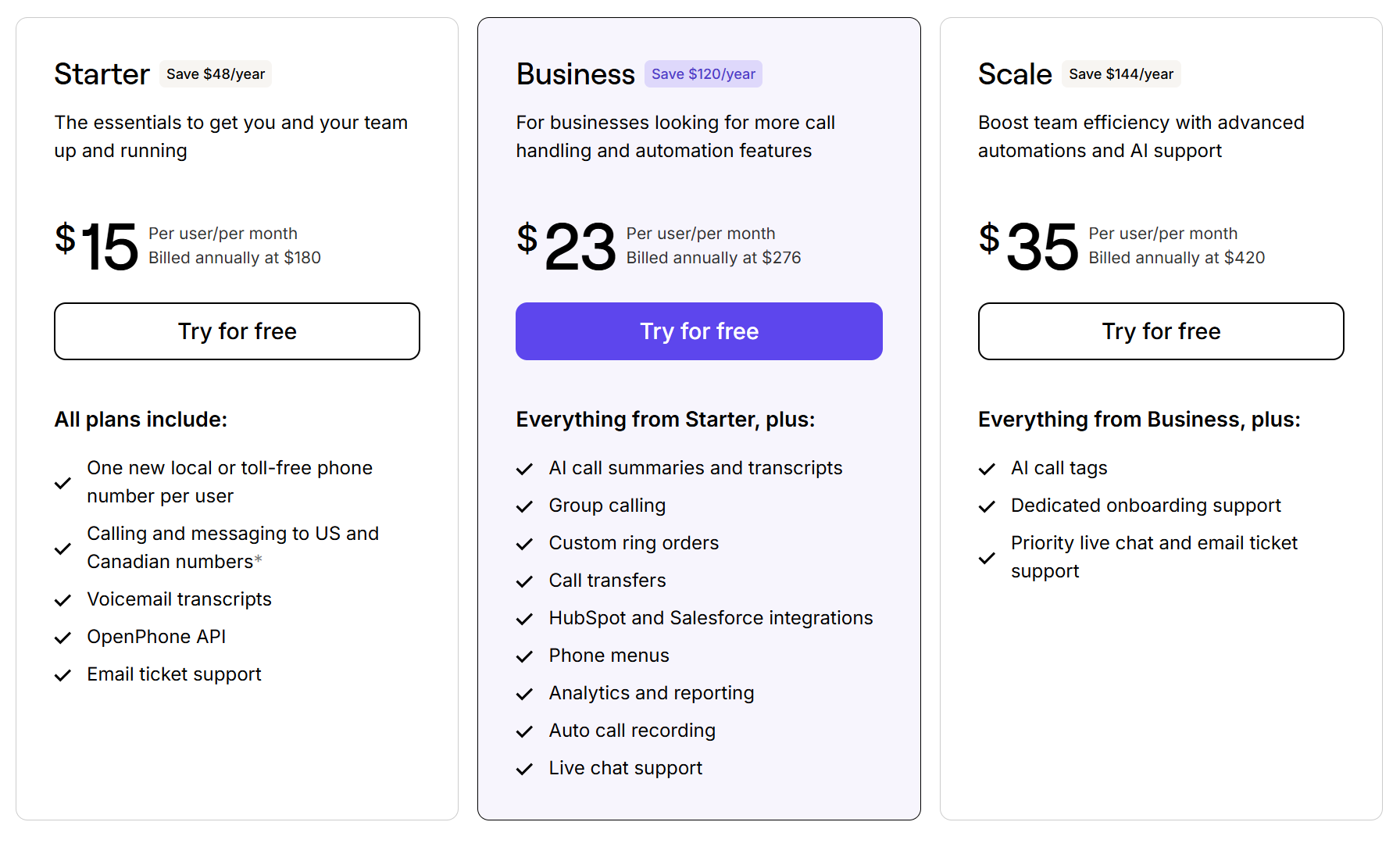
Quo offers transparent pricing you can view at any time. It’s easy to decide which plan makes sense for you and then scale up or down as your business evolves.
Not a fan of additional fees? You won’t find them here. Our pricing page is crystal clear about add-ons, additional numbers, and more.
Here’s an overview of what you get on each plan:
- Starter: $15 per user per month for shared phone numbers, internal threads, contact notes, voicemail transcriptions, scheduled messages, auto-replies, manual call recording, and more
- Business: $23 per user per month for automatic call recording, group calling, AI call summaries and transcripts, and phone integrations with HubSpot and Salesforce
- Scale: $35 per user per month for AI call tags, dedicated onboarding, and priority chat and email support
2. Teams can split responsibility to solve customer queries faster

Grasshopper’s call forwarding services might make sense for solopreneurs, but as your team grows, you’ll need features for collaboration more than just convenience. That’s where Quo’s shared numbers really shine — they’re the easiest way to split responsibility for incoming calls.
With shared phone numbers, multiple team members can share the same phone number and access all customer communications in one unified inbox. Everyone can see the same contacts, recordings, voicemails, texts, and call history. And then call or text to resolve customer issues as a team.
You don’t even have to pay extra to access shared phone numbers. With Quo, it’s an out-of-the-box feature included in every plan.
3. Easily get up to speed on any conversation
Unlike Grasshopper, all calls, texts, and call recordings in Quo live in a single contact thread. This allows you to follow up directly with customers, coach your team, and delegate tasks.
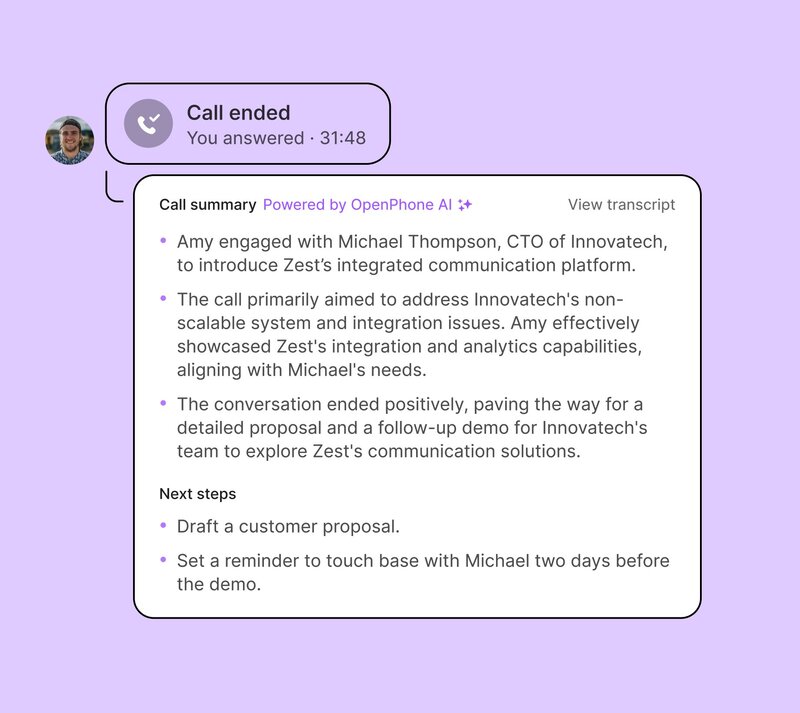
Don’t have time to listen to a call? Tap into our AI-generated call transcriptions and read them instead. No more worrying about taking notes during your calls or losing key context to share with your team.
You can also use our AI features to reduce your reps post-call workload. For example, you can generate a transcript of a recent call broken down by speaker and timestamps. Then use our call summaries tool to get an instant list of action items to help your reps figure out what steps to take next.
4. Set up call forwarding to miss fewer calls
Call forwarding in Grasshopper does at least one thing well: it pushes incoming calls to other business phone numbers. However, it doesn’t let you set different business hours or availability for each forwarding number. This makes it easy for customers to fall through the cracks.
Quo specializes in conditional call forwarding. This means calls are forwarded to a different number or team member if there’s no one available to pick up the phone. If you’re busy, unreachable, or out of the office, Quo sends your call to the next available rep. You also have the option to forward calls to an external number, such as an answering service or emergency number.
Don’t want to get calls once you’ve clocked out for the day? You can also forward calls to voicemail outside of working hours. This is a great way to set expectations for callers and let them know when you’ll be back without cutting into personal time.
5. Automations that let you connect with your customer at the right time
Grasshopper was designed to help you make and receive phone calls — not necessarily to automate your workflow. Quo has automations baked into every plan. You only need to upgrade when you need more.

We make it easy to:
- Schedule unlimited SMS messages. No need to wait for the perfect moment to press send. With scheduled messages, you can queue up a draft in the recipient’s time zone so it goes out at the right moment. If your customer responds before your text goes out, the message reverts to draft form so you don’t have to worry about awkward exchanges.
- Create message templates to respond to frequently asked questions. Also called snippets, message templates keep reps from wasting time by not having to type the same message to different customers. You also ensure everyone stays on the same page by using the same verbiage and sharing accurate information.
- Auto-replies for missed calls, texts, and voicemails. Grasshopper only sends automated text messages to brand-new customers who don’t get their first call answered. With Quo auto-replies, you can instantly respond to missed calls, texts, and voicemail messages to let customers know they’ve reached the right number and will quickly receive a reply.
Unlike Grasshopper, Quo integrates with more than 8,000 third-party apps. It takes minutes to connect the tools you’re already using, including HubSpot, Slack, and Salesforce.
Grasshopper pros and cons
Still weighing your options? Here’s a quick rundown of Grasshopper’s pros and cons to help you decide if it’s the right fit — or if switching to a provider like Quo makes more sense.
Pros
- Free domestic calls and text messages
- Toll-free and vanity numbers
- Unlimited extensions with upgrade
- Hold music
- Ability to set business hours
Cons
- Limited customization for business hours and ring groups
- No integrations
- No ability to text internationally
- No group texting abilities using Canadian phone numbers
- Plans are more expensive than other providers for fewer features
Quo: The best Grasshopper alternative

If you’re a solopreneur or a budding business owner, Grasshopper’s VoIP system could help you find your feet. But if your business is growing, it won’t have the bandwidth to help you scale.
That’s why hundreds of Grasshopper users port their business phone numbers to Quo.
Compared to Grasshopper, Quo offers more transparency and features to any growing team. You get access to unlimited inbound and outbound calls in the US and Canada, plus shared phone numbers that are custom-built for collaboration. With features like these, it’s easier to get work done as a team and build better relationships with your customers.
No need to take our word for it, though. See for yourself by signing up for a seven-day free trial.
FAQs
Grasshopper starts at $14 per month for one user, one phone number, and one extension. You have to upgrade to the Solo Plus plan to unlock unlimited members and three extensions, which costs $25 per user per month. If you want unlimited extensions, you’ll pay $55 per user per month for the Small Business plan. Additional phone numbers on Grasshopper cost $9 per month each.
Texting is included with Grasshopper plans, but you have to pay $1.50 per number per month. Keep in mind, this only gives you access to fewer than 6,000 texts per day. You also have to pay for two one-time fees:
1. The Campaign Registry, which costs $4.50
2. Carrier review, which costs $15
These fees are standard across most virtual number providers due to regulations large US cell carriers pushed for. A2P 10DLC registration fees go to The Campaign Registry, which reviews your registration, and other third-party entities that keep your registration active.
Domestic calls within the US and Canada are unlimited with no per-minute fees. However, international calls are charged per minute, with rates up to $0.95, depending on the destination.
You can try Grasshopper free for seven days. However, the trial ends early if you exceed its calling and texting limits, which only include 50 minutes of call time and 100 text messages.
By enabling WiFi calling on Grasshopper, you can forward calls and texts through your internet connection. However, it’s not strictly a Voice over Internet Protocol — you’re required to have a service provider so Grasshopper can forward incoming messages to your personal phone number.
You can automatically record calls with Grasshopper if you’re on their Solo Plus or Small Business plan. You can use a Grasshopper alternative like Quo to get manual and automatic call recording for your numbers. You’ll also get access to AI-generated call transcriptions and summaries so you can quickly review your conversations at a later time.
Grasshopper plans start at $14 per month, similar to Quo’s $15 per month starting price. But Quo includes more features, like integrations, IVR, auto-replies, and AI call summaries, giving you more value for nearly the same cost.
Grasshopper isn’t free. You can try it with a seven-day free trial, but after that, you need to choose a paid plan. Plans start at $14 per month for one user, one phone number, and one extension.
No, Grasshopper doesn’t offer an API. You won’t be able to build custom integrations to connect your business phone system with the tools you already use, like Jobber or Gong. If you need API access, you’ll need to consider an alternate provider like Quo.