Some days, it can feel like your phone won’t stop ringing. Your team’s playing phone tag to get callers to the right place, or worse, half the calls are spam or robocalls.
If that sounds familiar, there’s a solution. But it doesn’t come with traditional landlines or personal cell phones. It’s called hosted IVR, a cloud-based phone system that automatically routes your calls.
In this article, we explain everything you should know about hosted IVR. Plus, we cover the five top hosted IVR providers worth exploring for your business.
What is hosted IVR?
To understand how hosted IVR works, let’s break down the two parts: “hosted” and “IVR.”
A “hosted” system means a third-party provider manages all the phone system infrastructure for you in the cloud. This includes servers, software, and maintenance. You access everything through an internet connection, without needing any physical equipment at your location.
These hosted systems rely on Voice over Internet Protocol, or VoIP, to make calls and texts over the internet. If you’ve ever used Skype or Zoom, you’ve used VoIP.
“IVR” stands for interactive voice response. This is a system that sends callers to the right team members or departments based on their selections. For example, “Press one for sales or two for support.”
You may also know hosted IVR by other names, like:
- IVR menu
- Phone menu
- Auto-attendant
- Phone tree
- Voice menu
- Voice prompt system
5 ways growing businesses use hosted IVR
There are five common use cases for a hosted phone system with a phone menu:
- Basic support triage: Hosted IVR quickly sends callers where they need to go. That way, your team doesn’t need to manually answer or route every call.
- Self-service workflows: These help callers get answers on their own. For example, answering FAQs like business hours, paying an invoice, or checking their account balance.
- After-hours message handling: IVR routes after-hours calls to voicemail so customers can leave a message. You can also have IVR send calls to AI voice agents to take detailed messages and qualify leads.
- Multi-location routing: Hosted IVR platforms let you set up a phone menu with different options for each location. This lets callers route themselves to the right branch or location in a few seconds.
- Emergency routing: This lets service-based businesses separate routine customer calls from genuine emergencies. For example, “If you have a non-urgent request, please press one. If this is an emergency, please press two.”
How does hosted IVR work?

Here’s how a hosted IVR system works in real time:
- Someone calls your phone number.
- Your phone system checks your business hours. This will determine what greeting to play. During business hours, your system plays menu options for various departments or services. After hours, it can send callers somewhere else. This could be to an emergency number, your voicemail inbox, or an AI agent like Sona.
- Your greeting plays. The caller hears a prerecorded IVR greeting. For example, “Hi, and thanks for calling ABC Company! Press one to book a service, press two to speak with support, or press three to hear our business hours.”
- Your customer picks a menu option. Callers dial an extension by pressing zero through nine. Or they say a keyword like “support,” “booking,” or “hours.”
- Your phone system routes the call based on the caller’s selection. Based on the customer’s selection, the system offers more menu options or connects them to a department or rep. It can also play an audio message or send the call to voicemail. If you use Quo, formerly OpenPhone, you can send calls to Sona. Sona can take messages, answer FAQs, and qualify leads.
💡Read More: Conversational IVR: What it is, how it works, and key benefits
How does using hosted IVR help your business?
Like any tool, IVR only works if it’s designed with customers in mind. Here’s what to expect when it’s done well versus when it’s not:
Pros
Here’s how IVR can help you:
- Improved customer experience. McKinsey found that IVR systems lead to five times higher customer satisfaction scores. That’s because callers get to the right department on the first try without waiting on hold or over-explaining their issue. Using IVR, you can give customers a painless experience on the phone.
- Capture more leads. IVR menus help address bottlenecks so customers can speak to reps more quickly. You can also send callers through AI voice agents or straight to voicemail. Even when you’re busy or away from your phone, there’s a way to capture info so you can follow up later and close deals.
- Increased scalability. IVR automatically distributes calls between departments, so you won’t need as many manual transfers. It also means you won’t need to hire more human reps until you’re ready.
- Give customers self-service options. IVR automates basic call handling tasks. For example, answering questions about your hours or providing a list of locations. The same McKinsey study found IVR applications can reduce the number of calls that need live human help by over 10%.
- Better call routing efficiency. Add submenus as your business grows for more precise routing. For example, you can have separate selections for billing, technical issues, and account help under “support.”
- Reduce spam and robocalls. IVR is great for screening calls because robocalls can’t navigate phone menus. Reps can spend more time answering questions and less time fielding unwanted calls.
- Higher professionalism. The best IVR systems help small businesses appear more established. This also levels the playing field with bigger competitors.
Cons
If designed poorly, IVR may have drawbacks, like:
- Menu fatigue. Customers may get frustrated if there are too many options on multi-level menus. To prevent that, you can use a voice agent like Sona. Sona can answer common questions, take messages, and transfer calls using conversational AI.
- Lack of personal touch. Automated prompts can feel impersonal and frustrating. Be sure callers can quickly get in touch with a person if they need to. For example, “Press zero to talk to a human.”
- Maintenance requirements. IVR needs regular updates as you add services, change hours, and grow. Revisit your menu at least once every three months. If you’re a Quo user, you can use our call flow builder to easily adjust settings as your business needs change.
The rule of thumb is “Keep it super simple.” For more guidance on how to structure a good menu, read our phone tree templates guide.
How to know if your business needs a hosted IVR solution
Not sure if your business needs hosted IVR software? Use this checklist to decide:
✅ You’re overwhelmed by high call volumes. Simple questions eat up your team’s time, and juggling multiple calls is becoming routine.
✅ Your customers ask the same 5–10 questions repeatedly. Things like business hours, pricing, or directions could be handled with a quick prerecorded message.
✅ You’re missing calls or losing customers due to wait times. Calls roll to voicemail during busy hours, or customers complain they can’t get through.
✅ You need 24/7 availability, but can’t staff it. You want callers to reach the right person or get key info without someone on call 24/7.
✅ You have multiple departments or locations. It’s taking too long to route callers between locations.
✅ You’re scaling or have seasonal spikes. You’re overrun with calls during the busy season. But you don’t want to hire a full-time team member for just a few months.
✅ Your team wastes time routing calls manually. Your receptionists spend most of their day transferring calls. Or your callers get bounced around between departments.
5 top hosted IVR systems
If the checklist above sounds like you, here are five hosted IVR systems to explore based on what your business needs most.
| Provider | Best for | Starting price | IVR | Multi-level IVR | AI voice agent |
|---|---|---|---|---|---|
| Quo | Growing businesses | $23 per user per month | ✓ | ✓ | ✓ |
| Dialpad | Businesses with a multilingual customer base | $15 per user per month | ✓ | ✓ | Requires upgrade + Advanced or Premium plan |
| RingCentral | Desk phone rentals | $20 per user per month | ✓ | ✓ | Requires upgrade |
| Five9 | Contact centers | $119 per user per month | Voice IVR requires upgrade | Voice IVR requires upgrade | Requires add-on |
| Talkdesk | Larger businesses that need a lot of automation | $85 per user per month | Voice IVR requires upgrade | Voice IVR requires upgrade | Voice IVR requires upgrade |
Keep reading for an in-depth breakdown of each provider on the list.
1. Quo: The best hosted IVR solution for growing businesses
Pros
- Unlimited calls and texts to the US and Canada
- Shared phone numbers
- Visual call flow builder
- Multi-level IVR
- 24/7 AI voice agent
- Basic and advanced call forwarding
- Call holding
Cons
- No verification through two-factor authentication*
*Nearly all virtual phone numbers share this problem. For safety reasons, companies like Facebook, Uber, and Google rarely let you authenticate accounts through a virtual phone number.
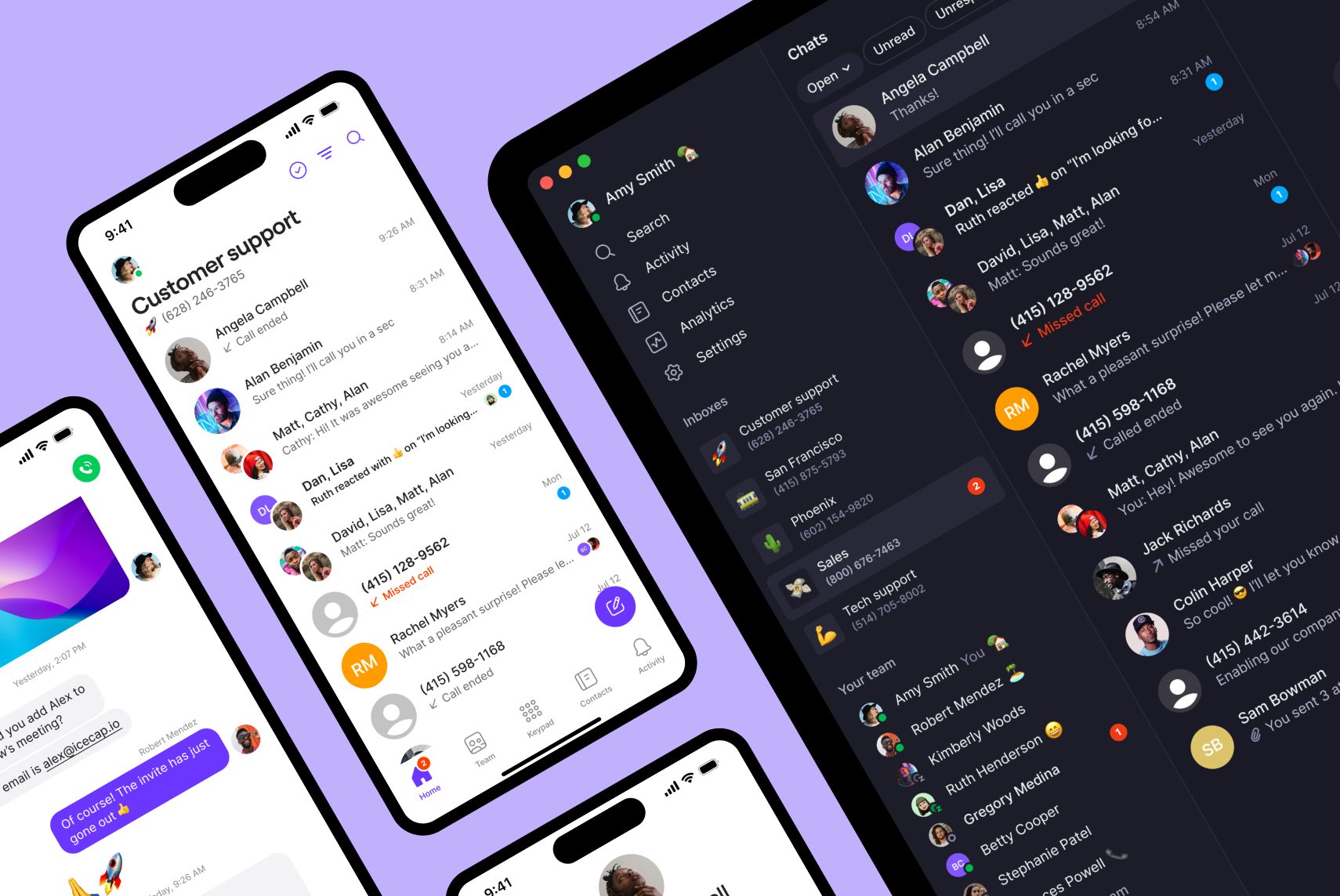
Trusted by 90,000+ businesses, Quo brings calls, texts, and customer information into one simple AI-powered platform.
Each Quo plan comes with unlimited calling and texting in the US and Canada. Plus, every team member gets one local US or Canadian or a toll-free number. Want to split responsibility for calls and texts? You can turn any number into a shared one.
Our IVR software is available on the Business and Scale plans. You can use our drag-and-drop IVR call flow builder to set it up in 10 minutes or less. You’ll also have control over how the menu handles calls during versus after hours. For example, if someone calls when you’re off for the day, you can choose to send them to an external number, voicemail, or Sona.

You can also create multi-level IVR, or menus within menus. This helps businesses with multiple departments or services stay organized. For example, callers might press one for “Customer service.” Then they can choose from options like billing, technical support, or account management.
You can add up to 10 IVR menu options with Quo that route calls to:
- Teammates
- Voicemail
- External numbers
- A submenu
- Audio messages
- Sona
You can set up Sona for after-hours calls so you’re covered 24/7 and don’t miss any calls. You can use it to answer common questions and take some of the pressure off your team.
But why tell you about Sona when you can see it instead? See Sona in action below:

Want to try Quo for yourself? Sign up for our seven-day free trial today.
Key features of Quo
- 24/7 AI voice agent
- Visual call flow builder
- Advanced call forwarding with an upgrade
- Custom ring order with an upgrade
- AI call transcripts and summaries
- SMS and MMS support
- 8,000+ integrations with third-party tools via Zapier and Make
Quo pricing

Choose from one of three Quo pricing plans that easily scale alongside your team:
- Starter: $15 per user per month for unlimited calls and texts in the US and Canada, on-demand call recording, voicemail-to-text, basic call forwarding, call hold, and more
- Business: $23 per user per month for phone menus, visual call flow builder, automatic call recording, call transfers, analytics, advanced call forwarding, ring order, CRM integrations like HubSpot, and more
- Scale: $35 per user per month for AI call tags, priority live chat and email support, and dedicated onboarding
2. Dialpad: Best for businesses with a multilingual customer base

Pros
- 11+ languages supported for IVR
- Unlimited domestic calls in your home country, plus the US and Canada
Cons
- User minimums can drive up costs
- IVR is only automatically available in the US, Canada, and Mexico
- An upgrade is required for additional numbers and international SMS
If you serve customers abroad, Dialpad lets you create international IVR flows. You can set up multi-level phone menus in over 11 languages. You also get unlimited calls in your home country, plus to the US and Canada.
The downside is that Dialpad’s IVR is only automatically available in North America. Outside the US, Canada, and Mexico, you’ll need to contact customer care to activate the feature. Plus, the base plan only offers three ring groups, which limits your options for forwarding calls.
Dialpad also has user minimums. The Pro plan requires at least three users, and the Enterprise plan jumps up to 100. So you might end up paying more than you need. If you want more flexible pricing and fewer limitations, check out some Dialpad alternatives.
Key features of Dialpad
- Multi-level IVR
- AI features like call transcripts
- Custom call routing
- Auto-attendants
- Call forwarding
- Number extensions with an upgrade
- Auto-attendants
Dialpad pricing

You have three Dialpad pricing plans to choose from:
- Standard: $15 per user per month for auto attendants, custom call routing, visual voicemail, call forwarding to external devices, and unlimited calling and texting in the US, Canada, and your home country
- Pro: $25 per user per month for additional numbers, international SMS, and hold queues with a three-user minimum
- Enterprise: Custom pricing for unlimited ring groups, unlimited office locations, and phone number extensions with a 100-user minimum
3. RingCentral: Best for desk phone rentals

Pros
- Multi-level auto-attendants
- Desk phone rentals are available
- Offers video conferencing with an upgrade
Cons
- Limited storage, texts, and toll-free minutes
- Automatic call recording is locked behind the Advanced plan
- Base plan only includes 25 texts per user per month
Prefer using desk phones, but still want hosted IVR? RingCentral offers desk phone rentals on top of its business phone system. Its IVR lets you create up to 250 multi-level phone menus. This way, customers can easily route themselves to every location, department, and team member.
But while RingCentral’s IVR for customer service is available on any plan, many of its features are limited. Texting, for example, is limited to just 25 texts per user per month on the base plan.
There’s also limited storage. For example, you can only store call recordings for 90 days. This can be a problem if you need to keep records for coaching or compliance purposes. You can upgrade to the most expensive plan for “unlimited” storage. But this just means you can store more data. Your call history and recordings still disappear after 90 days to 12 months.
One final note: RingCentral does offer an AI voice agent, but it’s only available as a paid add-on. RingCentral alternatives like Quo offer this feature on every plan.
Key features of RingCentral
- Multi-level IVR
- AI voice agent with an upgrade
- Local or toll-free numbers are available
- Basic integrations with Google and Microsoft apps
- On-demand call recording, automatic recording requires an upgrade
- Video meetings
- Unlimited domestic calls
- Limited SMS and MMS support
RingCentral pricing

You can access IVR on all of RingCentral’s pricing plans. Here’s a quick breakdown:
- Core: $20 per user per month for IVR, unlimited domestic calling, 25 texts, and basic integrations with Google and Microsoft apps
- Advanced: $25 per user per month for 100 text messages per user, automatic call recording, 300+ third-party integrations, and call monitoring functions like call whispering
- Ultra: $35 per user per month for “unlimited” storage for call recordings and team chat, device alerts and analytics, and the SMS AI assistant
4. Five9: Best for contact centers

Pros
- Visual IVR for accessibility
- Access to chat, email, SMS, and social messaging on the base plan
Cons
- Not all pricing is clearly listed online
- Call support is not included on the base plan
- CRM integrations require add-ons
Five9’s IVR helps contact centers manage channels like live chat, email, socials, and SMS. It also offers a visual IVR, which lets customers navigate your phone menu using visual prompts on their phones. First, the customer provides details about what they need. Then, a team member with the right skills for the job can call, email, or message them back.
Note that Five9’s base IVR is for digital channels only. Phone IVR is only available when upgrading to the Core plan.
You also have options to upgrade your phone IVR — although this pricing isn’t listed online. Speech recognition, for example, may require you to pay extra. And if you want to automatically log callers, you may need to purchase the CRM Connectors add-on.
Plus, Five9’s IVR interface is quite outdated and has a steep learning curve. You’ll need a good understanding of technology before getting started.
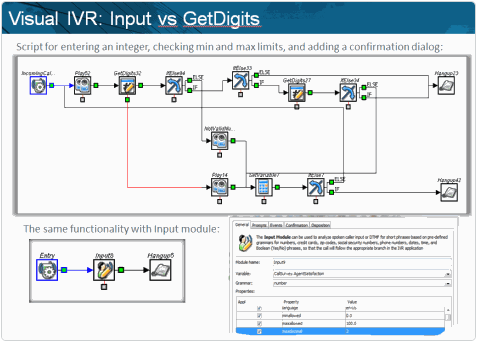
Because of this, small and growing brands may want to investigate Five9 alternatives.
Key features of Five9
- Connect with chat, email, SMS, and social messaging apps
- Visual IVR with an upgrade and add-on
- Speech recognition requires an add-on
- Inbound and outbound calling with an upgrade
- CRM integrations with an upgrade
Five9 pricing

There are five Five9 pricing plans to choose from, but only two have publicly listed prices:
- Digital: $119 per user per month for chat, SMS, email, and social messaging
- Core: $159 per user per month for IVR, voice calls, call recording, and a dialer
- Plus: Custom quote for AI Knowledge and AI Agent Assist
- Pro: Contact sales for a quote to access screen recording, agent portals that let you request time off, and analytics, but you’ll lose access to AI Agent Assist and AI Knowledge
- Enterprise: Custom quote for all features on Digital, Core, Plus, and Pro plans
💡FYI: Usage-based pricing may apply, with a minimum of 50 seats required.
5. Talkdesk: Best for larger businesses needing a lot of automation

Pros
- Build IVR flows for digital-only channels, like email
- Workflow automations are available
Cons
- Can be complex to set up
- Expensive for smaller teams
- No unlimited outbound calls, SMS, or MMS
You can also set up IVR for digital channels, like social media, email, and other messaging apps. Each plan comes with business intelligence dashboards, plus integrations with 170+ apps.
But Talkdesk doesn’t offer phone IVR unless you upgrade to the Cloud Voice Essentials plan. This starts at a steep $105 per user per month. Keep in mind this pricing is based on a three-year minimum contract. You also have to pay usage and telephony fees, plus extra for outbound calls or text messages.
Talkdesk also offers skills-based routing, but this can be tricky to set up. Setting up a single flow requires many steps, so it’s not very intuitive. This could be frustrating compared to drag-and-drop call flow builders, including the one offered by Quo.
Key features of Talkdesk
- Mobile app
- Business intelligence tools
- 170+ integrations with an upgrade
- Digital IVR on the base plan
- Phone IVR with an upgrade
Talkdesk pricing

Here’s what to expect from Talkdesk’s pricing based on a three-year minimum contract*:
- CX Cloud Digital Essentials: $85 per user per month for digital IVR, including SMS, chat, and email, real-time dashboards, and access to the API
- CX Cloud Voice Essentials: $105 per user per month for voice IVR, business hours, unlimited call recording storage, and call routing based on customer data
- CX Cloud Elite: $165 per user per month for custom reports and metrics dashboards, automated notifications, and screen recording
*Does not include telecom fees and taxes.
Quo: The best hosted IVR system for small and growing businesses
Running a business shouldn’t mean running yourself ragged answering calls. With hosted IVR systems, you can cut down on missed calls, offer 24/7 support, and provide a better customer experience.
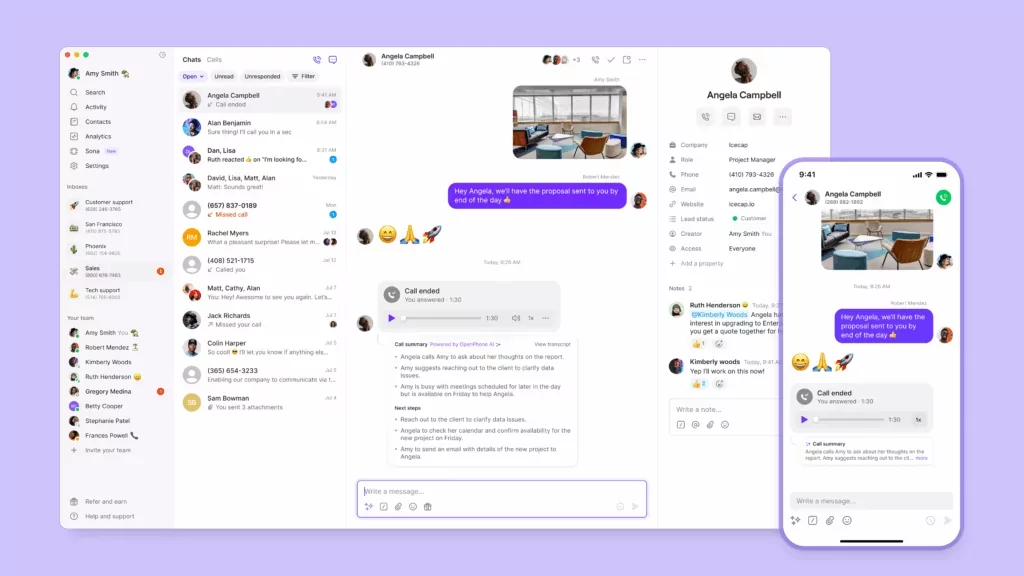
Quo’s hosted IVR software gives your team the structure it needs to handle growing call volumes. Plus, you can use AI-powered routing features, like our voice agent, to help save even more time.
Confirm Quo is the best hosted IVR system with a seven-day free trial. Then, try test-calling Sona in-app to see how we can help you scale.
FAQs
Hosted IVR systems cost anywhere between $23 and $100 per user per month. With Quo, you can set up phone menus on the Business plan, which costs $23 per user per month. You also get ring order and warm transfer tools to ensure every caller reaches the best person to help.
There’s no such thing as the “best” IVR — only a system that works best for your needs.
If you’re a small and growing business, Quo’s IVR system can help. Our visual, drag-and-drop call flow builder lets you get started in 15 minutes or less. You can also set up Sona so your IVR routes overflow or routine calls to our AI agent.
If you’re an enterprise brand, providers like Five9 and Talkdesk can help.
If you’re a small and growing business, IVR is the most cost-effective option. That’s because AI voice agents are usually usage-based, which means costs increase as call volume grows.
If pricing’s not an issue, you should use both to optimize your call flow. That way, you can easily handle calls after hours, answer simple questions, and take calls when reps are unavailable.
To create a great IVR experience, be sure to:
– Keep menus short. Stick with four to five options max per level. That way, you don’t accidentally overwhelm your callers.
– Put your most common options first. Your highest-volume need should be the first option on the menu. For example, “Press one for support.”
– Always offer an escape to human reps. For example, “Press zero to speak with a representative,” or “For all other questions, please stay on the line.”
– Test with real customers. Before going live, have a few customers test your flow. Ask for feedback about how easy it is to navigate and if they got confused anywhere.
– Use clear, natural language. Avoid jargon and acronyms in your voice prompts. For example, instead of saying, “Press one for IPM specialists,” say, “Press one to speak with a service professional.”
The main difference is where the system lives. Traditional IVR uses on-premises hardware that you maintain. Hosted IVR is managed remotely by a provider in the cloud — no physical equipment needed at your location.
The time it takes to set up hosted IVR varies by provider. Older legacy systems may require hours or days. With Quo, you can set up a phone menu in 15 minutes.
Voice over Internet Protocol, or VoIP, is technology that lets you send calls and texts through the internet. Hosted IVR is a phone system that uses VoIP and offers phone menu functionality to automatically route callers.
Yes. Some IVR systems are paired with AI agents that help customers manage payments on the call. You may need to connect with third-party integrations like Zapier and Access PaySuite.