That invoice has been sitting there for days, staring at you. It’s drumming its fingers, wondering why it hasn’t been paid yet. Meanwhile, your customer’s gone radio silent. So now it’s just you, an outstanding invoice, and an accounts receivable list that’s getting longer.
For what it’s worth, you’re not alone. According to QuickBooks, 56% of small businesses have unpaid invoices, averaging $17.5K per business.*
Luckily, a well-timed payment reminder message can go a long way in getting things moving again.Here are 21 email and text message reminders you can copy-paste. We’ll also share a strategy for when to send them and what to include. Finally, you’ll learn how to automate payment reminders so you spend less time chasing overdue invoices.
Disclaimer: This article is for informational purposes only and does not constitute legal, financial, or tax advice. Payment terms, late fee policies, and debt collection practices vary by jurisdiction. For guidance specific to your business or situation, please consult a qualified legal or financial professional.
14 Payment reminder text message templates
SMS and MMS are ideal for short or urgent reminders. That’s because they’re harder to pass over than emails. Think about your own habits. When was the last time you ignored a text? Emails sit unread for hours or get buried under promotions. But a text shows up immediately, and even lights up your lock screen when you’re not actively scrolling.
Use text messages when you need speed and visibility. For example, for sending day-of reminders or overdue nudges. Save email for when you need to include more detail, attach the original invoice, or outline payment terms and late fee policies.
💡Pay attention: Before you start sending reminders via text, make sure you’re following TCPA guidelines. Sending texts to customers who haven’t opted in can lead to message delivery issues. At worst, it gets your number flagged, filtered, or even blocked.
Here are 14 text message payment reminder examples you can use for your business.
💡 If you manage a property, check out our rent reminder templates guide.
1. Gentle payment reminder example
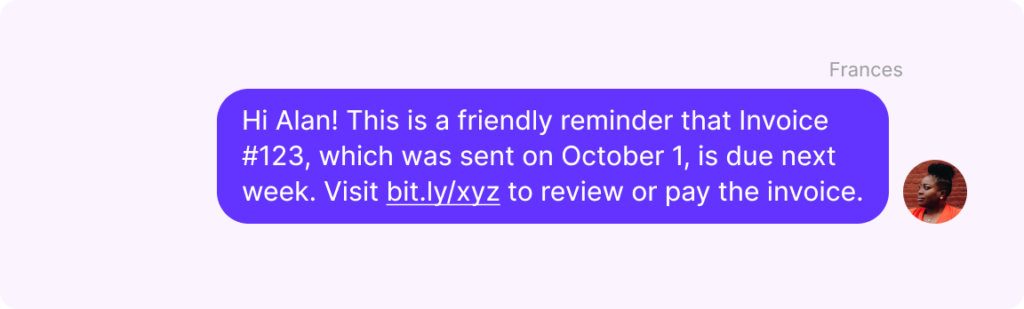
When sending a due date reminder for upcoming payments, keep the tone warm. This is a friendly nudge, not a demand. Your client isn’t late yet. You should also consider including brief instructions that make it easy for them to pay.
“Hi [client name], this is [your name] from [company name]! Just a friendly reminder that invoice [#] for [$ amount] is due next week on [date]. You can review and pay here: [payment link]. Thanks a bunch! Reply STOP to opt out.“
“Hi [client name], it’s [company name]. Just a gentle reminder that invoice [#] is coming up on [date]. Take care of it anytime by logging into your payment portal here: [URL]. Let us know if you have any questions! Reply STOP to opt out.“
💡Looking for more? Check out our guide on how to write a polite payment reminder message.
2. Due date payment reminder message
On the day the invoice is due, send your customers a reminder-for-payment message. It should politely let them know that it’s time to make the payment.
“Hi [client name], this is [your name] from [company name]. Just a reminder that your next payment of [amount] for invoice [#] is due today. Make your partial payment here: [URL]. Reply END to opt out.“
“Hi [client name], it’s [company name]. This is a quick reminder that invoice [#] is due today. Pay securely by credit card here: [URL]. Let us know if you need help. Reply STOP to opt out.”
💡Tired of typing the same message over and over again? Quo users can use snippets to speed things up. Write up and save a message template once, then re-use it with a click. Just fill in the information specific to each customer and hit send.

3. Late payment reminder message
At this point, the due date has passed — typically by a few days. Your tone should shift from friendly to professional while remaining warm. Be direct about the overdue status and make it easy to pay by mentioning available payment options.
“Hi [client name], this is [your name] from [company name]. Your payment of [$ amount] for invoice [#] is overdue by [X days]. You can pay by credit card, ACH, or eCheck here: [URL]. Reply STOP to opt out.“
“Hi [client name], it’s [company name]. Invoice [#] is now past due. We’d love to get this sorted. Pay today at [URL], and we’ll waive any late fees. Reply STOP to opt out.”
4. One week late reminder message
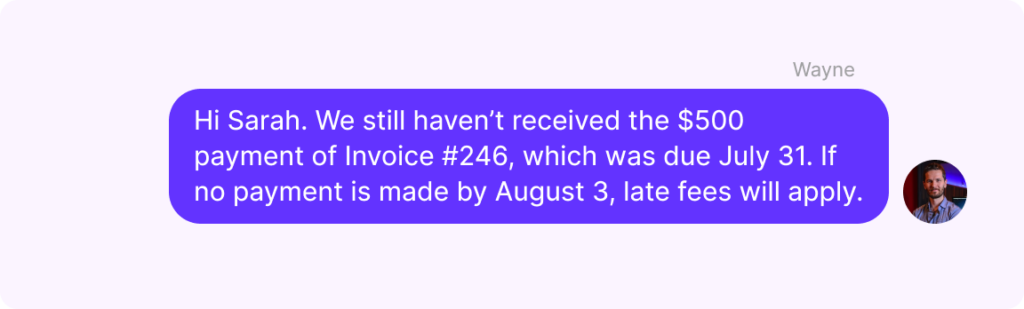
If your customer’s payment is a week late, it’s time to let them know about the late fees that may apply if they don’t make the payment soon.
“Hi [client name], this is [your name] from [company name]. We haven’t received the [$ amount] payment for invoice [#], which was due on [date]. If no payment is made by [date], a late fee of [amount or percentage] will apply. Pay here: [URL]. Reply END to opt out..“
“Hi [client name], it’s [company name]. Invoice [#] is still unpaid. Per our payment policy, late fees will be added after [date]. Pay at [URL] to avoid additional charges. Reply STOP to opt out.”
5. Two weeks late payment reminder message
Two weeks with an outstanding balance means it’s time to be more direct. Ask your client to take immediate action, but leave the door open for them to reach out if something’s wrong.
“Hi [client name], this is [your name] from [company name]. The [$ amount] payment for invoice [#] is now two weeks past due. We need to hear from you. Please pay at [URL] or reach out to discuss your options. Reply STOP to opt out.”
“Hi [client name], it’s [company name]. Invoice [#] has been overdue since [date]. If there’s an issue preventing payment, let us know. Otherwise, please settle your outstanding balance today at [URL] to avoid further action. Reply END to opt out.”
6. Three weeks late payment reminder SMS message
This reminder message for payment should acknowledge that gap in communication. It should also give your client one more chance to respond or pay before you move on to a formal final notice.
“Hi [client name], this is [your name] from [company name]. We’ve reached out several times about invoice [#] for [$ amount], but haven’t heard back. Please pay at [URL] or call us at [phone number] so we can resolve this before we take further steps. Reply STOP to opt out.”
“Hi [client name], it’s [company name]. This is our [X] attempt to reach you about invoice [#] for [$ amount]. Call [phone number] or pay at [URL]. We ask you to resolve this before further action is required. Reply STOP to opt out.”
7. Final notice: One month late payment reminder message
We hope you won’t have to use this template, but these situations happen. This will be the last message before you escalate. Be formal, be specific, and detail exactly what will happen next.
“Hi [client name], this is [your name] from [company name]. This is a final notice regarding invoice [#] for [amount], originally due on [date]. Payment is now 30+ days overdue. If we don’t receive payment by [date], we may need to refer this account to a collection agency or pursue further action. Pay now at [URL] or call [phone number]. Reply STOP to opt out.”
“Hi [client name], it’s [company name]. Invoice [#] for [$ amount] has been outstanding for over 30 days despite multiple attempts to reach you. We’re required to escalate unpaid accounts after [date]. To avoid this, pay at [URL] or contact us at [phone number] to discuss. Reply END to opt out.”
7 Payment reminder email templates
Using email, you can add context to your reminders. For example, you can attach:
- The original invoice
- A record of previous reminders
- A complete list of available payment methods
- Your payment terms and late fee policies
- A formal escalation notice or demand letter, if applicable
All of this can make it easier for clients to start the payment process. Here are seven professional payment reminder message examples you can use.
1. Gentle payment reminder email for upcoming amount owed
The first email you send should have a friendly tone. It needs to gently nudge your client, since they’re not at risk for an overdue invoice yet.
Subject line: Reminder: Upcoming payment due date
Body:
Hi [client name],
This is [name] from [business name]. Just wanted to give you a heads up that invoice [#] for [amount] is due next week on [date]. I’ve attached a copy so you don’t have to go digging through your inbox for the original.
You can pay by credit card, ACH, or bank transfer using the link below:
[payment link]
If paying in full right now isn’t feasible, we’re open to discussing payment options. Just reply to this email or reach out at [contact information].
Thanks as always,
[Company or sender name]
2. Due date payment reminder email
On the date your invoice is due, keep your email tone friendly but firm. Your customer isn’t technically late yet. But don’t be shy about stating the deadline clearly in your follow-up email and making it as easy as possible to pay right now. Here’s an effective payment reminder email you can use:
Subject line: Invoice [#] is due [due date]
Body:
Hi [client name],
This is a reminder that your payment for invoice [#], sent on [date], is due today. You can pay by credit card, ACH, or bank transfer using the payment link on the attached invoice.
If you have any questions or need help with your invoice payment, please don’t hesitate to reach out by replying to this email. You can also call us at [business phone number] during business hours, [date, e.g., Mon-Fri], from [working hours range, e.g., 9 a.m. to 5 p.m.].
Thank you,
[Company or sender name]
3. Late payment reminder email
This is your first overdue reminder. Make sure you strike a professional tone and are direct, without being accusatory. A good rule of thumb is to stick to facts and avoid “you” statements, like “you haven’t paid.” Let the details do the talking.
Subject line: Invoice [#] is now overdue
Body:
Hi [client name],
According to our records, the [payment amount] payment for invoice [#] is overdue by [X days]. The invoice was originally sent on [date] with a due date of [date]. We’ve attached a copy for your convenience.
You can pay by credit card, ACH, or bank transfer here:
[payment link]
If you’ve already sent payment, feel free to disregard this. Otherwise, please reply to this email or contact us at [contact information] if you have any questions or need help with the payment process.
Thank you,
[Company or sender name]
4. One week late reminder email
Still haven’t received a payment? Be firm and direct about the unpaid invoice and payment terms. Reiterate that the invoice is overdue and clarify if late payment fees will start to apply. Directly asking for a response is a good way to get your client to take action, even if it’s just to reach out for payment assistance.
Subject line: Invoice [#] is one week overdue
Body:
Hi [client name],
This is our [number of previous emails]communication regarding the [$ amount] payment for invoice [#], which was originally sent on [date] and due one week ago. If this invoice remains unpaid on [date], a late fee of [percentage] of [amount] will apply.
For your convenience, a copy of the outstanding invoice is attached. We’re here to answer any questions regarding the payment. Please respond to this email to confirm you’ve received the invoice and this reminder.
Thank you,
[Company or sender name]
5. Two weeks late payment reminder email
At two weeks overdue, it’s time to be more direct with your overdue payment reminder. But don’t assume the worst. There could be a legitimate reason behind the delay. Leave room for your client to explain while making the consequences, like late fees, clear.
Subject line: Invoice [#] is two weeks overdue
Body:
Hi [client name],
This is [name], the [business role] at [company name]. I’m following up on invoice [#] for [amount], originally sent on [date]. This payment is now two weeks past due.
Please be aware that if payment isn’t received by [date], we’ll be forced to apply a late fee of [percentage] to the outstanding balance, in accordance with our agreed-upon payment terms.
You can pay by credit card, ACH, or bank transfer here:
[payment link]
If something is preventing payment or there’s been a mix-up, please let us know as soon as possible. You can reply to this email or reach out at [contact information], and we’ll figure it out together.
Thank you,
[Sender name]
6. Three weeks late payment reminder message
At this stage, silence is as much of a problem as the unpaid invoice. Use this email to document your outreach history. This gives you a paper trail if things escalate. Then make it clear the window for an informal resolution is closing.
Subject line: Action needed: Invoice [#] is three weeks overdue
Body:
Hi [client name],
Over the past few weeks, we’ve reached out multiple times regarding invoice [#] for [amount], originally due on [date]. Here’s a summary of our previous reminders:
- [date]: Initial payment reminder sent
- [date]: Due date reminder sent
- [date]: First overdue notice sent
- [date]: Second overdue notice sent
We haven’t received a payment or a response, and we’d like to get this sorted before we need to take more formal steps. A copy of the original invoice is attached.
You can pay by credit card, ACH, or bank transfer here:
[payment link]
If there are circumstances affecting your ability to pay, we’re willing to discuss alternative payment options. But we do need to hear from you by [date]. Please reply to this email or call us directly at [phone number].
Thank you,
[Company or sender name]
7. Final notice: One month late payment reminder email
Since you’ve made repeated attempts to get your customer to pay the invoice, you can now send a final notice. It should be formal and clear, and you can mention taking legal action if they don’t make the payment by a certain date.
Subject line: Final notice: Invoice [#], Immediate payment required
Body:
Hi [client name],
This is our final reminder regarding invoice [#] for [amount], originally due on [date]. Despite multiple attempts to reach you over the past 30+ days, this invoice remains unpaid and unacknowledged.
If we do not receive payment by [date], we will begin our collections process. This may include referring your account to a collection agency, reporting the outstanding balance, or pursuing legal action.
A copy of the original invoice is attached. You can pay immediately here:
[payment link]
If you wish to discuss this before the deadline above, contact us at [phone number] or reply to this email.
Looking forward to a quick resolution,
[Company or sender name]
How do you write a payment reminder message?
An effective payment reminder gives your client everything they need to pay in one message. They shouldn’t have to search, guess, or go back and forth with you. Here are the payment details to include in an outstanding payment reminder message:
☑️ Customer name. This helps grab attention and keeps your message from looking like spam.
☑️ Your company name. This is especially important for SMS. Your client needs to immediately know who’s contacting them, or your message looks like spam.
☑️ Invoice number. This removes any ambiguity about which payment you’re talking about, especially if a customer has a few invoices with you. For emails, include this in the subject line as well.
☑️ Due date. Whether the payment is upcoming, due today, or overdue, put this front and center.
☑️ Amount due or outstanding balance. Don’t make your client look it up. Tell them exactly what they owe so they can act immediately.
☑️ Payment terms. Remind them of the agreed-upon terms, especially once a payment is overdue. This includes when late fees kick in, what percentage they are, and any escalation deadlines.
☑️ The original invoice. If you want a quick resolution, don’t make customers dig through their inbox to find your invoice. Attach it to every email, and for text messages, link directly to it. If you use a VoIP platform like Quo, you can attach the document via MMS.
☑️ Payment methods. Make it as easy as possible to pay by offering multiple payment options. Make sure to include a direct payment link or payment portal URL in every message.
When should you send customer payment reminder messages?
What you send is important, and so is when you send it. Here’s a schedule you can follow when you’re trying to politely remind someone to pay you:
| When to send | Why |
|---|---|
| Three to five days before the due date | A friendly heads-up that keeps your invoice top of mind. Most customers just need the nudge to pay on time. |
| On the due date | A clear, professional reminder that today is the deadline. This is your last touchpoint before the invoice becomes overdue. |
| One week after the due date | Your first overdue notice. Alerts the client that late fees may apply and creates urgency to pay before penalties kick in. |
| Two weeks after the due date | A more direct follow-up that asks for a response, not just a payment. If something’s wrong, this is where you find out. |
| Three weeks after the due date | Acknowledge the pattern of silence and document your outreach attempts. This reminder message for payment signals that informal resolution is running out. |
| Four weeks or 30 days after the due date | This final notice establishes the consequences, like legal action, and gives a hard deadline to pay. |
Why are your payment reminders not effective?
If your invoice reminders aren’t getting responses or aren’t being delivered at all, the problem might not be your clients. Here are some common mistakes that could be working against you:
- Avoid using link shorteners for URLs in texts. Carriers may filter out Bitly and other URL shortener services due to emerging texting regulations in the US.
- Don’t overwhelm your customers. It may be tempting to send endless follow-ups, especially if you’re a small business owner who relies heavily on each invoice to pay bills. But daily messages can be irritating, especially if your client was planning on making a timely payment in the first place. Try to space them out by a week.
- Personalize reminders. Eighty-one percent of consumers ignore messages that aren’t relevant to them. So personalize the message with their name so it’s more likely to get a response.
- Help prevent your outbound texts from being filtered. Do you send business texts to US phone numbers using a virtual phone solution like Quo? You’ll need to submit your business profile to The Campaign Registry. This third-party agency selected by major US cell carriers reviews the business information you supply to them.
- Don’t rely on one channel. If your emails aren’t getting responses, switch it up. Follow up on an ignored email with a text or a physical letter to their mailing address. Different clients respond to different channels. Using a mix of SMS, email, and phone calls makes it harder for customers to ignore you.
If you have a local business number through Quo, you must complete the US carrier registration form. When you register, include specific examples of texts you plan to send from your Quo number. The process is different for toll-free numbers. For more details, check out our step-by-step A2P 10DLC registration guide.
What do you do when customers ignore your payment reminders?
If a client has gone silent after multiple follow-ups, it’s time to move beyond emails and texts. Here are some steps you can take:
- Pick up the phone. A direct conversation can cut through what written messages can’t. Reference the specific invoice and ask if there’s something preventing payment. Make sure to keep it professional.
- Send a formal demand letter. Put the balance, a firm payment deadline, and the consequences of continued non-payment in writing. Even if it doesn’t prompt immediate payment, it creates the paper trail you’ll need if things escalate.
- Offer a payment plan. Not every late payment is intentional. Sometimes your client is dealing with their own cash flow problems. Proposing installments can recover the money while keeping the business relationship intact.
- Involve a collection agency. If 90+ days have passed with no payment or communication, it may be time to hand it off. Let your client know before you do. That heads-up alone might be enough to prompt payment.
- Consider legal action as a last resort. For significant outstanding balances, consult a legal professional.
No one wants things to get to this point, though. A great way to avoid it is by sending consistent, timely reminders from the start. With Quo, you can automate payment due reminder messages so they go out on schedule, every time.
How to speed up payment reminder texts with Quo
Sending payment reminder messages through text doesn’t have to be time-consuming. With a VoIP app like Quo, there are three ways to simplify sending SMS reminders.
1. Set up customized snippets for your payment reminders
When you create a snippet on Quo, sending a reminder or follow-up text is easy. Just tap on a pre-saved text message template and customize it with your customer’s invoice details. Hop on your Quo account from the web or desktop app and follow these steps to create a snippet:
1. Type /snippets into the message box of any text message thread, then press Enter.

2. Select Create snippet.
3. Name your snippet and type out your sample text message for a payment reminder.
4. Click Save when you’re done.
2. Schedule your payment reminders
Once you have your payment reminder snippets, you can schedule payment reminder texts in Quo. Here’s how:
1. Type /snippets and select the snippet you wish to send.
2. After you’ve tweaked your drafted message, click the clock icon.

3. Scheduled messages estimate your recipient’s time zone based on their phone number’s area code. You can change this to a different time zone from the drop-down menu.
4. Specify the date and time you wish your payment reminder message to go out.

By default, if your recipient messages you before your scheduled message goes out, it won’t send. This helps you avoid awkward conversations.
Instead, the message will be canceled and saved as a draft. You can update this setting to Even if they message first if you wish for your message to go out regardless.

3. Automate your payment reminder messages
Want to make your payment reminder messages hands-free? You can send automatic payment reminder messages with Quo’s integrations.
For example, with its Zapier and Make integrations, you can trigger an overdue payment text when a contact property in your CRM changes.
Let’s see how this would look using Quo’s Zapier integration.
If you’re an owner or admin user in Quo, you can set up the Zapier integration in six steps:
- Log in to your Zapier account or create a new account.
- Click App Connections.
- Select + Add connection.
- Search for Quo and click Add connection.
- Generate your Quo API key and paste it before continuing to authenticate.
- Follow the instructions on the page to connect your account.
Quo is now available as a trigger and action in Zaps. You can start automating. If you’re using HubSpot as your CRM, you can trigger an automated text by changing a specified contact property field in HubSpot:
You also have the option to send automated reminders and other text touchpoints using You also have the option to send automated reminders and other text touchpoints using the Quo API.
Quo: Faster follow-ups, faster payments

If you want to reach your customers faster and get more timely payments, outstanding email and SMS payment reminders can help.
With Quo, you can speed up and simplify the process of following up with your clients by using our modern text messaging features. Whether you’re creating snippets or automating texts, Quo can help you save time.
And with our AI voice agent, Sona, you’ll never miss an important call. It can answer calls, respond to FAQs, and take messages for your team when they’re unavailable to pick up.
*QuickBooks: Small business late payments report, 2025
FAQs
Late payments are one of the most common cash flow challenges small businesses face. Payment reminders help you collect payments faster and reduce the number of outstanding invoices piling up. They encourage timely payments without having to chase each client individually. They’re also a simple way to protect your customer relationships. A friendly reminder is a lot less awkward than a phone call three weeks after a missed deadline.
With a VoIP provider like Quo, you can automate payment reminders through integrations with tools like Zapier and Make. You can also use the Quo API for more customized automations.
A strong outstanding payment email should include information that makes it easy for your customers to make a payment. You can include the date, invoice number, amount due, and more.
Here’s an example:
Subject line: Invoice [#] is overdue, payment needed by [date]
Hi [client name],
Our records show that invoice [#] for [amount], originally due on [date], remains unpaid. We’ve attached a copy for your reference.
Please submit payment by [date] using the link below to avoid late fees:
[payment link]
If you have questions or need to discuss payment options, reply to this email or call us at [phone number].
Thank you, [company name]
Any business that invoices clients can benefit from payment reminder texts. They help improve cash flow, reduce late payments, and keep customer relationships healthy. For example, property owners can send rent payment reminder messages to make sure they collect rent on time each month from tenants. Freelancers use them to follow up on project invoices without awkward conversations. Service businesses like landscapers, cleaners, or contractors can use them to follow up on completed jobs.
Reasons for late payments can include:
– Cash flow problems
– Billing disputes
– Changes in contact information
– Not sure how to make the payment
– Technical issues
Some of these reasons are out of your control. But the ones that aren’t, like unclear payment instructions, are exactly what good communication solves. Quo makes that easier with snippets for fast replies and scheduled texts for consistent follow-ups. You also get auto-replies that can help guide customers to next steps when you miss a call or text.
At 90+ days, friendly reminders have run their course. It’s time to escalate. Send a formal demand letter with a hard deadline, and let your client know you’ll be involving a collection agency if you don’t hear back. For larger outstanding balances, consult a legal professional about pursuing legal action.
You can reduce late payments by setting clear terms upfront so customers know exactly when and how to pay. For example, you can ask for deposits or partial payments before starting work. Plus, sending reminders a few days before the due date keeps your invoice top of mind. That way, you make it easier for clients to pay on time.
Yes, it’s legal to send payment reminders by SMS if your customer has opted in to receive texts from your business. If not, you’ll risk your account being suspended.