SMS opt-in is getting explicit permission from customers before you text them. Confused about what actually counts as proof that a customer gave permission?
Maybe your 10DLC registration application was rejected, and you’re not sure why. Or perhaps you’ve read other SMS compliance guides and walked away more frustrated than informed.
We may not be qualified to give legal advice, but we’ve gathered some of the best SMS opt-in templates to steer you in the right direction. We also provide some use case-specific examples you can draw from.
Here’s a no-nonsense look at compliant SMS opt-in examples so your campaigns will be approved and you can get back to texting customers quickly.
Key terms to know for SMS compliance
Before we jump in, here are key terms you should know:
- Opt-in: Getting consent to message a recipient. For a list of contacts you intend to message, this is typically done through an opt-in form.
- Opt-out: A customer asks to be removed from your subscriber list. If they choose, they can opt back in later.
- Single opt-in: A user opts in to get texts through a web form, email, or checkbox.
- Double opt-in: A user opts into your message campaign, then opts in again to confirm, usually via text or email.
- Transactional texts: These are messages designed to inform rather than persuade, such as shipping updates or appointment confirmations. They’re typically triggered when customers take an action, like making a purchase on your website. Order confirmation, two-factor authentication, and password resets fall into this category. Since you’re not marketing anything to customers, you don’t need to get double opt-in.
- Promotional texts: These are marketing campaigns that include discounts, flash sales, promotions, coupons, and more. You need written SMS consent to avoid violating regulations that protect consumers from spam. Double opt-in is a good way to cover all your bases.
- Implied consent: If a customer initiates an SMS conversation, your business has implied consent and can respond to them as long as your message is relevant to the conversation.
- Express written consent: A customer agrees to receive texts for a specific purpose when they provide their mobile number. You can record consent via phone call, direct text, web form, or even a piece of paper.
- SHAFT regulations: SHAFT stands for ‘Sex, Hate, Alcohol, Firearms, and Tobacco/Vaping.’ These are highly regulated SMS categories — any message about these topics requires a shortcode. With Quo, formerly OpenPhone, you can’t send messages promoting SHAFT content.
- 10DLC: This stands for 10-digit long code, which allows you to send messages with better deliverability and compliance. We wrote a full guide to A2P 10DLC compliance, but if you just want the SparkNotes, it uses virtual local numbers to connect with individual recipients. As of August 31, 2023, unregistered numbers can’t text US phone numbers. Carrier registration is mandatory for all virtual phone number users.
- Campaign: A group of business messages designed to reach a specific goal. For SMS marketing, this could be something like customer satisfaction surveys or shipping updates.
- Call to action: The CTA section of 10DLC registration is where you describe how customers opt in to messaging campaigns. For promotional messages, this could be something like, “Customers check a box on a web form after entering their number to receive texts.”
- TCR: This stands for The Campaign Registry, which is the organization responsible for authorizing 10DLC campaigns. Quo can help you navigate this process and ensure message deliverability in the US and Canada.
How to prove SMS consent opt-in for A2P 10DLC registration
When you complete A2P 10DLC registration with your virtual phone provider, you need to indicate how your contacts opt in to receive texts.
For Quo customers, this is under “How do you collect consent to send text messages?” For other providers, this may be labeled under Call to Action.
Your options include:
- Verbal consent: Exactly what it sounds like. If you record calls for compliance reasons, you can ask them to confirm their consent to receive SMS messages.
- Physical form: Customers indicate their consent on physical paper. Be sure to keep a copy for your records. You can use a paper form for SMS opt-in after having an in-person conversation with a customer.
- Text: Customers initiate the first text to your business, sometimes with an SMS keyword. Just keep in mind all future messages must stay on topic. If your contact requests a quote, for example, you can’t start sending promotional messages without consent.
- Web form: A web form prompts users to enter their mobile phone number and opt in to text messages. Keep in mind that the checkbox for opting in should not be preselected.
- QR code: You can use a QR code to send customers to a form where they opt in to your marketing list. This is best paired with double opt-in.*
*Quo does not support mass texting marketing lists and does not have an option for using a QR code to show that a contact has opted in to your text messages.
5 must-have elements in the call to action form
Any method of obtaining consent — whether it’s a verbal consent script, physical form, or web form — must clearly explain the following details to ensure customers understand what they’re agreeing to:
- An overview of the product or service being promoted or discussed via text messaging
- The company name or representative initiating the communication in the first message
- Transparent opt-in language, including any applicable messaging or data fees the customer might incur
- A privacy policy that follows messaging regulations, explicitly stating that mobile data won’t be shared with third parties or affiliates for marketing or promotional purposes. Information may be shared with subcontractors only for operational support, such as customer service. Additionally, any opt-in data will be excluded from all unrelated use cases. If you need more help putting together a policy, check out our SMS privacy policy template.
- Relevant terms and info, such as how recipients can opt out and who to contact for customer support.
Not following these legal requirements could mean losing your privileges to send SMS in the future. Check out the example below of a compliant opt–in web form:

What about proving consent?
In addition to providing opt-in information, you may need to prove how you gather consent with a screenshot or script. If the way you collect consent can’t be verified, your registration may be rejected.
5 must-have elements in a compliant SMS opt-in text

After a contact subscribes to your campaign, you must send an opt-in text message that includes:
- The program name or product description
- Customer care contact information, like a toll-free number, 10-digit telephone number, or HELP command instructions
- How to opt out
- A disclosure that the messages are recurring and the frequency of messages
- Your “message and data rates may apply” disclosure
Let’s look at some templates you can start using today.
17 compliant SMS opt-in examples by use case
If you don’t want your 10DLC application to be rejected, you need to create compliant opt-in messages for every campaign. Fortunately, this doesn’t have to be complicated.
Here are 17 examples for four different departments.
Customer service SMS opt-in examples
You can use these templates in customer service scenarios, like tracking a ticket number or confirming a shipping date.
1. Verbal opt-in example
TCR and other third-party entities that review 10DLC registrations typically want to see the kinds of conversations that happen when a customer opts in with your business, like in the following example:
Customer service rep: “If it would be helpful, [business] can send SMS messages providing real-time updates on the status of your ticket. If you’re interested, say YES, and I’ll send a confirmation text.”
Customer: “Yes, sure.”
Customer service rep: “Great! We will send you a confirmation text shortly to confirm your enrollment.”
2. Web form opt-in example
If you’re using a web form message to collect opt-ins for appointment reminders and other conversational texts, here’s an example of complaint language:

“Check this box to receive SMS messages regarding your recent order. Read the terms and privacy policy here: [URL]. Up to 5 messages per month, msg and data fees may apply. Reply STOP to cancel and HELP for help.”
3. Paper form opt-in example

If you’re collecting opt-ins through a paper form, here’s sample language you can use for customer service-related texts:
“Would you like to receive customer service texts from [business]? We will not send you messages without your consent. Signing this confirmation form indicates you agree to receive [use case] text messages from [business]. You may reply STOP at any time to cancel or call us at [phone number]. You may request a copy of our privacy policy and terms at any time.”
4. Keyword campaign opt-in examples
A keyword campaign — sometimes called a text-to-join campaign — invites people to text your business first. You typically only need implied consent, meaning when they text you the keyword, you have permission to send texts. But if you’re sending marketing campaigns, you need double opt-in.
“Text [keyword] to [number] to receive updates on orders and shipping from [business].”
5. Mobile QR code opt-in example

Mobile QR code scans are a great way to get SMS opt-ins in person. You can use this example text on your flyer:
“Scan this QR code to register your product. First, open your phone’s camera app. Then click the generated link.”
Keep in mind that if the QR code leads to a web form, it needs to meet the requirements for the CTA form mentioned above.
Sales SMS opt-in examples
You can use these examples to help customers opt in to sales messages, such as getting a quote or requesting a demo.
1. Verbal opt-in example
This example is for when your team applies for A2P registration. The TCR and other third-party entities reviewing your application want to see an example of how a conversation goes when potential customers opt in to receiving texts from your company.
Sales rep: “Our sales team can put together a proposal and send it back to you ASAP. If you’re interested, we can send SMS messages with your quote, proposal, and other collateral. Say YES, and I’ll send the confirmation text.”
Customer: “Yes, please!”
Sales rep: “Excellent! Expect a confirmation text confirming your enrollment very soon.”
2. Web form opt-in example
You can use this opt-in language on a web form when offering product info, quotes, or other sales-related texts:
“Get a quote from [business] today. Check this box to receive messages from our sales team, and we can send a copy of your quote via text. Message frequency varies, and data rates may apply.”

Make a copy of this SMS-compliant opt-in form for your website so users can subscribe to SMS updates and notifications from your company.
If you’re a Quo customer, you can send an automatic text message after someone fills out a Jotform using the Zap below:
Check out our guide to the Quo Zapier integration for more information.
3. Paper form opt-in example
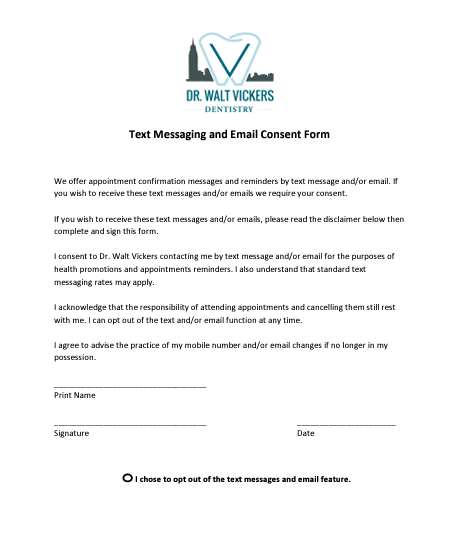
Use this example text on a paper form to collect opt-ins for promotional or sales-related messages:
“Signing this agreement authorizes [business] to send SMS messages to your number for sales purposes. Message frequency varies, and data rates may apply. Please sign and date the bottom of the form to indicate you’d like to hear from us. You may request a copy of our privacy policy and terms at any time. Replying to our messages with STOP will cancel your subscription. You may also call us directly at [number].”
4. Keyword campaign opt-in examples
Keyword campaigns are useful for larger companies with short codes. Here is an example from Twilio:

Like with other opt-in forms, you need to include the following language:
“Text [keyword] to [number] to [complete action]. Message and data rates may apply. Message frequency varies. Text STOP to [number] to cancel. Text HELP to [number] for help. Read full terms and privacy policy here: [URL].”
Marketing SMS opt-in examples
As mentioned, brands need express written consent before sending SMS marketing campaigns. The best way to do this is by having customers opt in — with a web form, verbally, or a QR code — and then confirm their consent via text.
1. Verbal opt-in example
Verbal opt-in is the most challenging method for verifying marketing messages. However, it’s still acceptable if you provide sufficient details for the TCR and its third-party reviewers about the opt-in process between your business and customers.
Try saying something like this:
Business support rep: “Thanks for calling us today. We’re enhancing our communication to keep you informed about special offers and discounts via text messages. Would you like to opt in to receive SMS notifications from us?”
Customer: “Yes, I do, sounds great.”
Business support rep: “Excellent choice! You’ll receive a confirmation text for your enrollment very soon.”
Confirmation text after verbal opt in
We suggest sending a confirmation text after a customer verbally opts in and then using the customer’s reply text as a confirmation.
Once they’ve consented over the phone, you can send a message like this:
“Thanks for signing up to receive text notifications about [topic] from [business]. Reply YES to confirm your preferences. Text STOP to cancel and HELP for help. Message and data rates may apply. Read our terms and privacy policy here: [URL].”
2. Web form opt-in example
Web forms make it easy to passively collect opt-in requests. This example from Sephora is a great way to start:


Sephora uses double-opt-in messages since the campaign is marketing-related:

3. Paper form opt-in example
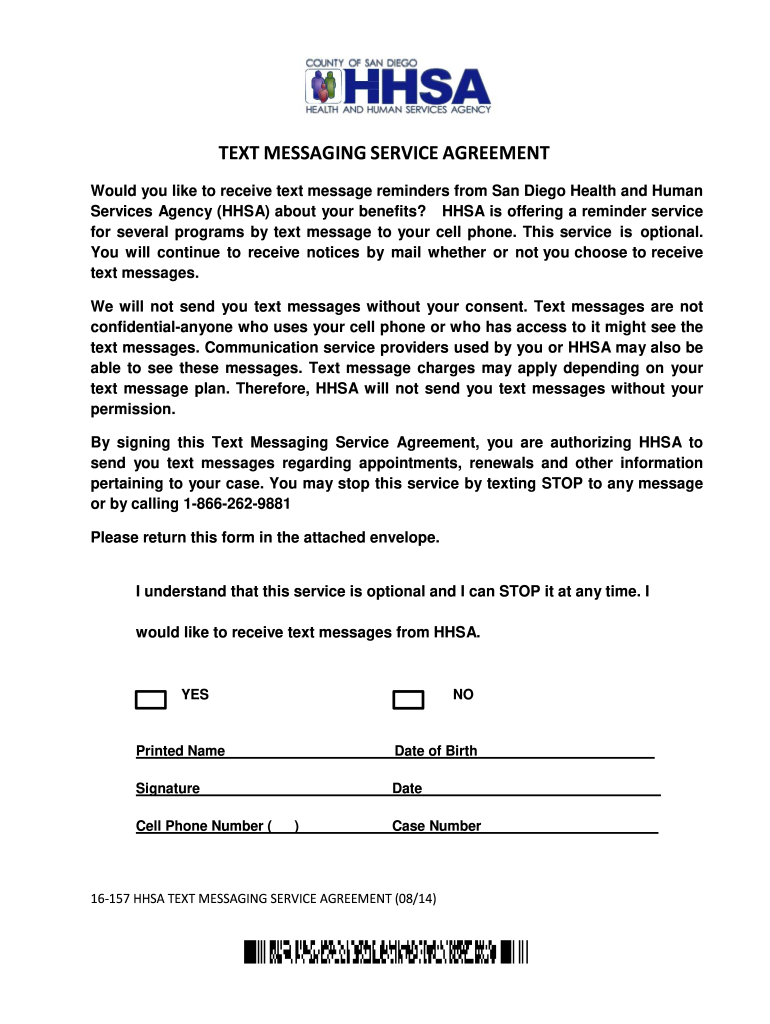
A visitor at your store can fill out a physical form, providing their phone number and consenting to your texting campaign.
Here’s a good example from the San Diego Health and Human Services Agency:
4. Keyword opt-in example
Customers can opt into marketing messages without a form with keywords. It’s also an easy way to confirm double opt-in, like in this example from Papa John’s:

Papa John’s also uses double opt-in messages to send promotional texts:

5. Mobile QR code opt-in example
You can use QR codes to link to an online form, initiate a text message, or open an opt-in webpage.
If you’re redirecting to an online form, it must be live before completing your 10DLC registration.
Here’s an example from Amazon’s Share a Smile Campaign:

Internal communication SMS opt-in examples
These examples are for situations where you’re texting employees for things like shift changes, company announcements, or internal alerts. Even if your audience is internal, you still need consent.
1. Verbal opt-in example
If you’re collecting opt-ins during a team meeting or onboarding session, here’s how ask permission:
Manager: “Would you like to receive text updates about shift changes, schedule reminders, or internal announcements?.”
Employee: “Yes, I do, thank you.”
Manager: “Great! You’ll receive a confirmation text for your enrollment within 24 hours.”
Then document the employee’s consent in writing, like in meeting notes.
2. Email opt-in example
You can use this when sending an internal email to request SMS permission:
Subject: Stay updated — opt in for company text alerts
“Want to get important updates like schedule changes or urgent alerts via text? Click the link below to opt in. Message and data rates may apply. You can reply STOP to unsubscribe at any time.”
[Opt-in URL here].
3. Google form example
You can use this wording in a Google Form that collects phone numbers for internal messaging:
“Would you like to receive internal communications via SMS? This may include schedule updates, shift alerts, or company-wide announcements. Message and data rates may apply. You can opt out at any time by replying STOP.”
☐ Yes, I consent to receiving internal SMS messages at the number provided.
7 Single opt-in example texts
Once you get opt-in consent with any of the above methods, you need to send a confirmation text. Single opt-in confirmation texts are perfectly acceptable for campaigns that don’t include marketing messages. Welcome texts, appointment reminders, and alerts fall under this category.
You can use any of these confirmation messages for SMS compliance:
[Business]: Welcome! Message and data rates may apply. MSG frequency is recurring and varies. Reply HELP for help, STOP to cancel. Read full terms and privacy policy here: [URL].
[Business]: Welcome [name]! You’ll receive (number) messages about (use case) per month. Message and data rates may apply. Read full terms and privacy policy here: [URL]. Reply STOP to unsubscribe.
You are now subscribed to [business] [use case] messages. Frequency varies. Msg and data rates may apply. Read full terms and privacy policy here: [URL]. To cancel, reply STOP. For help, reply HELP.
Welcome to [use case] messages from [business]. Frequency varies and msg/data rates may apply. You may cancel at any time by replying STOP. Read full terms and privacy policy here: [URL]. For help, call [number].
Confirmation messages after verbal opt-in
If your company asks for single opt-in consent during calls, you can send one of these texts to confirm next steps:
[Business]: You have verbally subscribed to our [use case] texts. Message and data rates may apply. To confirm, reply YES. To cancel, reply CANCEL. For help, reply HELP. You may view our terms and privacy policy here: [URL].
Hey, [name]! We spoke on the phone recently, and you indicated you’d like to receive SMS messages. Message and data rates may apply. To cancel, reply CANCEL. For help, reply HELP. You may view our terms and privacy policy here: [URL].
Hi [name], this is confirming your subscription to [business] SMS messages. You can read our terms and privacy policy here: [URL]. Message and data rates may apply. You can unsubscribe by replying STOP.
4 Double opt-in text message examples
Double opt-in is required if you’re sending SMS marketing texts, though it’s good practice in almost any situation. It also applies to digital subscriptions, like filling out a web form or a pop-up on your site.
You need to send two messages: one introducing your company and asking for permission to send marketing messages. Once the customer confirms, you send another with message frequency, instructions to opt-out or get help, and other required language.
Here are some examples with both steps to get you started:
Hi there! Text YES to confirm [business] can send recurring [use case] messages.
You’re in! Messages are recurring, and the frequency varies. Text STOP to cancel. HELP for help. Read full terms and privacy policy here: [URL]. Message and data rates may apply. Consent not required for purchase.
Hey [name], this is [name] from [business]. You filled out an online form and said we could text you at this number. Is that still okay with you?
Thanks for confirming! Msg frequency varies. Message and data rates may apply. Read full terms and privacy policy here: [URL]. Text STOP to cancel. HELP for help.
Almost there! Please confirm [business] can send you text messages about [use case]. Reply YES to accept or STOP to unsubscribe at any time.
You are now subscribed to [campaign] from [business]. Message frequency varies and msg/data rates may apply. You can read our full terms and privacy policy here: [URL].
[Name], you indicated interest in receiving SMS messages from [business]. To confirm, reply YES.
Thanks for confirming. You’ll now receive up to [number] [use case] messages per month. Msg/data rates may apply. Our privacy and terms can be found here: [URL].
3 HIPAA-compliant confirmations
If you’re a healthcare company working under HIPAA compliance requirements, you need to let patients know that SMS isn’t always secure.
Here are a couple of ways to make this clear:
Welcome to [practice name! Before we begin, please read this important information:
• This service lets you communicate with [practice name] staff for appointment reminders, scheduling, and general program updates.
• This is not therapy, crisis intervention, or a substitute for professional care.
• If you are in immediate danger or experiencing a crisis, call 911 or text/call 988.
• Do not share protected health information, or PHI, such as mental health diagnoses, therapy notes, test results, or insurance numbers.
• Text messages are not fully secure, and standard carrier rates may apply.
• Participation is voluntary, and you may withdraw consent at any time.
Reply YES to consent to receive non-emergency electronic communications from [practice name]. Reply STOP at any time.
[Practice name] would like to send you text messages and timely updates. Please note that text messaging is not entirely secure. To confirm, reply YES. Text HELP for help and STOP to cancel. Message and data rates may apply. Msg frequency varies. Read full terms and privacy policy here: [URL].
You have indicated your interest in receiving important messages from [practice name]. As a HIPAA-compliant organization, we must inform you that SMS is not a fully secure channel. To opt into messaging, reply YES. Msg/data rates may apply. Msg frequency varies. Read full terms and privacy policy here: [URL].
5 best practices for SMS consent and compliance
As tempting as it is to jump straight into your TCR application, you should double-check your opt-in process to avoid a surprise rejection.
Here are some SMS opt-in best practices to improve your customer experience:
1. Send an opt-in confirmation text
Once a customer opts in to your campaign, you should send a confirmation message to set their expectations.
If you don’t send an initial message within 24-48 hours, you’ll need to reconfirm their consent in the first message you send.
For example, you may want to say:
“Hey [name]! To confirm your subscription to [business] SMS messages, reply YES. To opt out, reply STOP. Message and data rates may apply. Read our terms and privacy policy here: [URL].”
As always, be sure to include opt-out language to keep your campaign compliant.
Other SMS opt-out examples
Here are a few other ways to explicitly provide opt-out instructions at the end of your confirmation text:
- Reply STOP to unsubscribe
- To opt out of receiving texts from us, reply STOP
- If you no longer wish to receive texts from us, reply STOP
If you’re a Quo customer and one of your contacts opts out, we automatically send them a message confirming they’ve successfully opted out.
2. Get consent for each campaign
Different campaigns require different SMS opt-in messages. If you send promotional and transactional text messages, you need to get consent for each campaign separately.
Also: customers consenting to one type of campaign doesn’t allow you to send messages from other brands or companies. For example, if you own a soap-making business and a dog-walking business, you can’t cross-promote marketing messages without express consent for each.
3. Avoid generic link shorteners
Trying to save space by shortening your links? Don’t use generic link generators. Spammers love using shared public URL shorteners, so most US carriers automatically block messages containing bit.ly or tiny.url links.
You can shorten links by:
- Removing https:// and www from the URL, like quo.com
- Signing up for a messaging service offering custom link shortening
- Shrinking the body copy to make space for the link
4. Be aware of forbidden messaging categories
We’ve already covered SHAFT messages, which refer to highly regulated subject matter. But we haven’t yet covered forbidden messaging, which includes even more sensitive content.
With Quo, you’re forbidden from sending texts that promote:
- Get-rich-quick schemes
- Illegal items and substances
- Debt forgiveness and collection
- Third-party lead generation services
- Risky financial services, like payday loans
Even if you have written consent, these are still forbidden messaging categories and not a fit for Quo.
5. Keep a record of SMS opt-ins
Unwanted text messaging has become a hot-button issue, which means even as a small business, the cost of noncompliance is steep. Class-action lawsuits can cost you thousands of dollars, inevitably impacting your brand image and reputation.
In case a dispute arises with new subscribers, you should keep proof of opt-in consent for each customer — even once they’ve opted out.

Quo workspace owners can easily bulk export all their message logs in case a dispute arises.
Make SMS compliance simple with Quo

SMS compliance can feel like navigating a minefield, and violating TCPA guidelines could jeopardize your SMS privileges.
Thankfully, most of the basics are common sense: get explicit consent from contacts, optimize your messages with disclosures, and build a solid opt-in/opt-out process so recipients know what to expect. If you’re sending promotional messages, use double opt-in to double-check recipient consent.
Keep in mind that SMS compliance may change at any time, so keep an eye out for major updates.
Read our guide on SMS compliance and learn best practices to ensure you can keep texting customers without interruption.
Frequently asked questions about SMS opt-in examples
Before you can send someone marketing or transactional texts, you need to get their permission. That means they need to know what they’re signing up for and say “yes” in a way that’s easy to track — like filling out a form, texting a keyword, or agreeing verbally.
Getting opt-in isn’t just a best practice — it’s legally required under laws like the Telephone Consumer Protection Act, or TCPA, and GDPR. It protects your business from fines, keeps your number from getting flagged by carriers, and builds trust with customers by showing you respect their privacy and preferences.
There are a few ways people can opt in to receive texts:
• Filling out a form on your website
• Signing up through email
• Giving verbal permission, like over the phone
• Filling out a paper form
• Texting a keyword to your number or short code
The best method depends on how you usually connect with your customers.
If you’re sending any promotional or marketing messages, you need to use a double opt-in process. This means after someone initially agrees to receive texts — on a web form, for example — you must send a follow-up text asking them to confirm their subscription, usually by replying “YES.”
No, SMS consent needs to be separate from email, since texting has different legal requirements. You can use your email list to encourage signups for your SMS list, but you can’t use the lists interchangeably.
Your opt-in call to action must clearly state that consenting to messages is not a condition of purchase. The confirmation text should also include all the standard disclosures: your business name, the recurring nature of the messages, “message and data rates may apply,” and clear instructions on how to opt out with “STOP” and get help with “HELP.”
You can offer a discount or coupon to encourage customers to opt into your SMS list. Because this is considered a promotional campaign, you must follow the rules for express written consent. This means using a double opt-in process.
An example of an opt-in text message looks like, “[Business name]: Reply Y to subscribe to recurring automated personalized marketing alerts like cart reminders from [business name].”
Once the customer replies Y, you can send a message like, “[Business name]: Welcome to [Business name]! Msg & data rates may apply. Msg frequency varies. Reply HELP for help, STOP to cancel.”