If you’re looking for a VoIP platform, Google Voice is likely to appear at the top of your search results.
Founded in 2009, it lets you make phone calls and send text messages directly through an internet connection. Like other VoIPs, you can reach callers on a cloud platform through multiple devices, including laptops and mobile phones.
Google Voice has some basic functions for users looking to make the switch to VoIP — but is it a one-stop-shop phone service that can grow with your business? Do the pros of Google Voice outweigh the cons?
After testing both the free and paid versions of Google Voice, we can share confidently about what you get, what’s missing, and why an alternative may work better for your business. Let’s explore Google Voice’s pros and cons and discover whether it’s the right VoIP service for your business.
Is Google Voice good for business?
Google Voice may be a good choice for businesses that don’t need advanced phone system tools. If you’re based in the US and just want to call and text from another number at a low cost, it’s a viable option.
But for many businesses, the disadvantages of Google Voice outweigh its advantages. There aren’t many collaboration features or workflow automations. Fortunately, there are better alternatives that still give you a virtual phone number you can access from almost anywhere.
How affordable is Google Voice’s pricing?

If you’re on the free plan for a personal number, you won’t pay anything for the basic service with calls and texts.
But Google Voice for business isn’t a free service. If you’re a small business owner, you should expect to pay double digits for everyone on your team:
- The Starter plan for individuals is $10 per month
- The Starter plan for up to 10 users is $10 per user per month*
- The Standard plan is $20 per user per month*
- The Premier plan is $30 per user per month*
*Besides the individual plan, to use a paid Google Voice plan you’ll need a Google Workspace subscription, which costs $7 per user per month. Unfortunately, these costs start to add up — especially considering that there are better small business phone system options.
Pros of Google Voice
The Google Voice app offers some basic features to those less familiar with internet-based cell phone services. There are five major benefits to keep in mind.
1. Offers free numbers
Phone numbers on Google Voice are free with a personal use plan. This includes numbers with local area codes, giving your business a more professional and trustworthy appearance.
But Google Voice’s free plan wasn’t built for business use — and it shows.
There’s no way to change your Google Voice caller ID, for starters. And if your number shows up as spam, Google Voice doesn’t make it easy to fix the issue.
The free plan is only available to users in the US and only for US phone numbers in the contiguous 48 states. This doesn’t include Hawaii, Guam, Alaska, and a few other locations. There’s also no customer support, so troubleshooting frequent issues might get tricky. And if you want multiple Google Voice numbers on the same account, paying for Google Voice for Business is your only option.
2. Make free calls to the US
Google Voice’s paid plans offer free calling to the US from any country, which helps businesses with clients in the States. However, this doesn’t work both ways. Free calling to Canada is only available to US and Google Voice Canada customers. And if you want to make calls to countries outside the US, you’ll be subject to Google Voice’s international call rates.
While most calls are free, they may not sound great — or always come through. Google Voice does have a 99.9% uptime guarantee, but reviews say call quality isn’t always the best.
3. Call and text internationally

As mentioned earlier, Google Voice provides ample opportunity to make international calls from your VoIP primary phone number. It lets you send free text messages to Canadian numbers, which can be valuable for US businesses that have customers in Canada.
The platform also supports calls and messaging to dozens of countries, including Spain, the UK, and Australia. Although you’ll have to add credits to your account to get started, Voice’s rates are cheaper than traditional carriers.
Keep in mind that you may be charged for international calls when ringing from outside the US. If you use paid minutes, you may be charged directly from your phone plan or get stuck with extra roaming fees if you go outside the carrier’s network.
Text messaging is also only available to US customers.
4. Share responsibility for incoming calls

One of the most notable pros of Google Voice for business is its support for ring groups, also called hunt groups. This function rings up to 50 members at the same time until someone in the assigned group picks up the call. You can also enable hunt groups to ring in a sequential order to connect callers with the right person at the right time.
Unfortunately, ring groups with Google Voice aren’t a cheap feature. Gaining access requires you to upgrade to the Google Voice Standard plan, which costs $20 per user per month. You also won’t be able to text on a Voice number with a ring group.
5. Ability to port in existing numbers
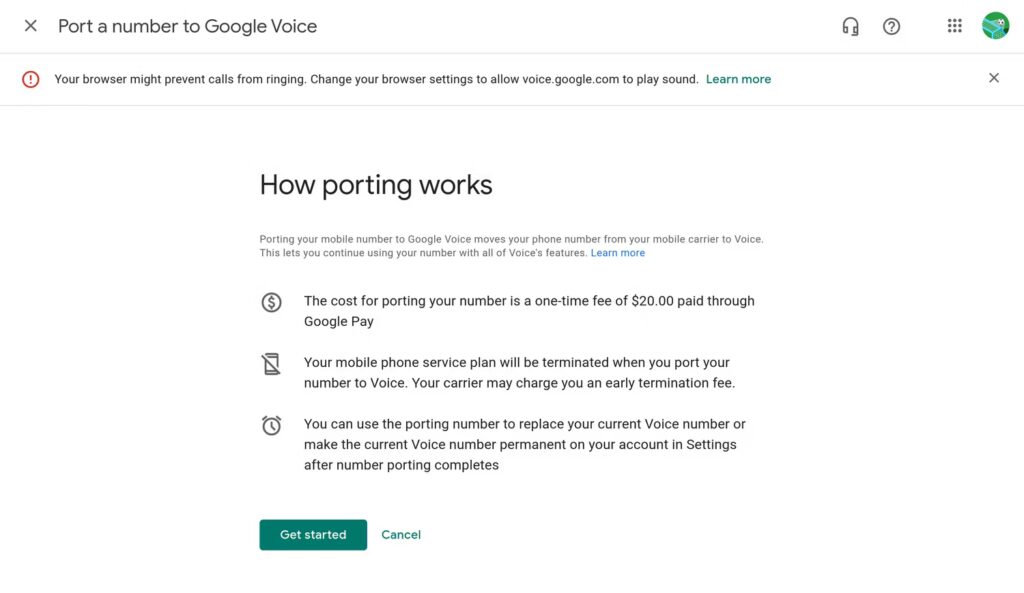
On the free plan, any existing phone number can be ported into Google Voice. You can port numbers housed on cell phones, desk phones, and even other VoIPs. Porting into the platform comes at a price — $20 USD per number. If you’re porting out your number from the free plan, expect to pay a $3 unlocking fee.
With Google Voice’s business plans, there are some strict porting limitations to keep in mind. You can’t move a number from one Google Workspace account to another. You can’t port numbers associated with consumer Gmail addresses, mobile numbers in the EU, or numbers outside the Google Voice coverage area — even within a supported country.
It can take 48 hours or longer to port over your existing number. Text messages can take up to three business days to transfer to your Voice account.
Cons of Google Voice
Even though Google Voice has some advantages, it’s far from perfect. Here are 14 drawbacks of Google Voice you’ll want to know before signing up.
1. Texting is limited and for US customers only
One of the biggest disadvantages to Google Voice? Even if you pay for Google Voice, texting is only available to US customers.
There’s also no way to register numbers for A2P 10DLC with Google Voice, which means your communication with customers could get interrupted at any time.
One more texting gap worth knowing: if you set up a Google Voice auto-attendant, that number can only route calls — it can’t send or receive texts. Clients will naturally text the number they just called, not realizing those messages won’t reach anyone on your team.
2. Limited integrations outside of Google apps

Voice does have a few integrations, but only within the Google ecosystem. By that, we mean Gmail, Google Drive, and Google Calendar.
While these systems have their place, they may not be as important to growing businesses. You won’t be able to connect with the platforms already in your tech stack, or you’ll have to find a workaround to keep your productivity up. Plus, you can’t integrate other Google apps with your phone system without buying access to Google Workspace.
Compare this to other VoIP providers that connect with Salesforce, HubSpot, Slack, Zapier, Make, and other tools. Integrations keep your data organized and help you automate workflows.
3. Limited number of users
If you have more than 10 employees on your team, Voice probably won’t be the solution for you. Google Voice caps teams at 10 users on the paid Starter plan. You’ll have to upgrade to the next highest tier for unlimited users, which doubles the cost per user to $20 per month.
Even if you upgrade, accessing KPIs about your team’s business phone usage will require you to invest even more. Advanced data analytics are locked behind Google Voice’s most expensive plan. You can’t track the metrics of individual team members unless you’re willing to pay $30 per user per month.
4. Collaboration is limited
There’s no shared number access on the free Google Voice plan, and its complicated workarounds for collaboration can be frustrating to growing businesses:
- You won’t be able to chat with team members without using Google Hangouts, which adds more bulk to your tech stack.
- There’s no support for collaboration within individual messages — unlike Google Docs, there are no comments or mentions.
- You won’t have access to ring groups on Google Voice’s free version. You’ll need to purchase at least the Standard plan.
Bottom line: Collaboration isn’t one of Google Voice’s strong points.
5. Getting the right context is time-consuming

In Google Voice, every voicemail message, text, or call you receive is organized in separate inboxes. This can get confusing fast. To see your entire conversation history with customers, you’ll need to look through each folder and put the details together piece by piece.
Sifting through separate inboxes can bottleneck your team and reduce your responsiveness.
6. No toll-free numbers
Not having access to toll-free numbers with Google Voice becomes a serious problem as your business grows. This is especially true if you want to give your business a larger appearance.
It’s also harder to serve customers from faraway places, limiting your expansion into specific markets. Plus, non-toll-free numbers force certain callers to pay long-distance fees, which won’t reflect well on your business.
Fortunately, many VoIP alternatives let you get toll-free, along with US and Canadian local numbers — no strings attached.
7. Limited international availability

Google may be a global brand, but not all its features are globally accessible. As mentioned earlier, Google’s free version is accessible only if you’re in the US.
Even the paid version of Google Voice has country-specific limitations. Google Voice’s business plan is available only to users in specific countries. According to its website, Google Voice provides support in:
- Belgium
- Canada
- Denmark
- France
- Germany
- Ireland
- Italy
- Netherlands
- Portugal
- Spain
- Sweden
- Switzerland
- UK
- US, excluding Alaska, Hawaii, the US territories of American Samoa, Guam, Northern Mariana Island, Puerto Rico, and the US Virgin Islands
If one of your teammates lives somewhere not listed above, they won’t be able to use Google Voice, even if an admin on your team does.
8. No desktop app available
This limitation is exactly what it sounds like. Although Google Voice works with web-based browsers and mobile apps for Android and iOS, the lack of a desktop app may drastically limit your team’s productivity. For example, it’s easy to miss incoming calls or messages when you have to constantly switch between browser tabs and windows.
9. Limited availability for call recordings

It’s possible to get call recordings through Google Voice — but you’ll need to manually activate recording on each call. The only way to get automatic call recordings is with the most expensive Premier plan, which costs $30 per user per month.
On the free Voice plan, you’ll need to manually activate recording on each call. Plus, all participants have to be on the call before you can begin recording. And once the session is over, your recordings will be pushed to an email account as an audio file. This isn’t the best way to access or store recordings.
10. Difficult to manage contacts

Contact management isn’t simple on Google Voice. If you opt for Voice’s free version, your business contacts will be stored with all other contacts associated with your current Google account. This mixes your personal and professional contacts — not a great idea. One reviewer summed it up this way:
“Calls are not separated from main phone calls, [I’m] unable to identify [the] caller prior to answering, [and there’s] no separate app to store contacts…” – G2 review
If any of your contacts’ information gets updated or changed, you won’t be able to share or sync it with the rest of your team. Depending on your workflow or company size, this could be a big problem.
Sharing access to Google Contacts requires even more legwork. You’ll need to enable contact sharing manually, and you can only delegate contacts to people who share the same domain as you. And don’t forget: there are separate inboxes for all incoming communications.
11. Three-way calls can expose your personal number
Google Voice for business now supports three-way calling across its mobile apps and web-based browsers. However, if you’re on the mobile app and your call routes through your carrier instead of WiFi or data, the second person you add to the call may still see your personal cell number rather than your Google Voice number.
To avoid exposing your personal number, you can have participants call your Google Voice number directly or use Google Meet instead.
Or you can factor in all the limitations mentioned here and go with another business phone solution.
12. No way to save time texting
Want to use Google Voice texting to automatically send appointment confirmations or schedule texts? You’re out of luck. This is because Google Voice doesn’t support automation, so you’ll need to spend time manually texting all of your customers.
For example, if you’re looking to set up an auto-response that lets callers know when you’re not available and when they can expect to hear back from you, Google Voice doesn’t offer this feature. Auto-replies with Google Voice aren’t available on its free or paid plans.
You also only get one automated option for forwarding texts in Google Voice: the option to forward messages to the email address associated with your account. If you want to automatically forward texts to multiple email addresses or other apps you use, you’ll need to use another business phone solution. Group texts are also limited to just eight participants, so you can’t send quick updates to a larger team or client list.
13. Not easy to send MMS messages
Google Voice comes with basic MMS capabilities that let you send and receive certain media file formats in messages, including:
- Pictures in .jpg and .png
- Moving pictures or GIFs
However, Voice doesn’t allow you to send other useful media formats, such as:
- Music files
- Videos
- Word documents
- PDFs
These file types are often essential for doing things like booking appointments and sending bills or invoices. If you want to include them in your messages, you’ll need to find a different business phone solution.
14. No free trial available
One of the biggest letdowns with Google Voice is the lack of a free trial. If you’re a small business trying to figure out whether Voice’s paid plans fit your needs, you’re out of luck.
Best Google Voice alternatives compared
If Google Voice’s limitations outweigh its benefits for your business, several alternatives offer better features for specific use cases. Here’s how the top Google Voice competitors compare:
| Provider | Starting price | Best for | Unlimited calling to US & Canada | SMS/MMS to US & Canada | Shared phone numbers | Additional phone numbers | Average G2 rating |
|---|---|---|---|---|---|---|---|
| Google Voice | $17 per user per month, including a Google Workspace subscription | Solopreneurs using Google Workspace | Unlimited calls to Canada from the US only | US customers only | Requires upgrade, ring groups only | X | 4.1 out of 5 |
| Quo | $15 per user per month | Collaboration and automation tools | ✅ | ✅ | ✅ | $5 per number per month | 4.7 out of 5 |
| RingCentral | $20 per user per month | Desk phone rental options | ✅, limited toll-free minutes | 25 texts per user per month | ✅, calls only | $4.99 per number per month | 4.1 out of 5 |
| Grasshopper | $14 per month | Multi-digit extensions | ✅ | MMS messaging for local numbers only | Requires upgrade | $9 per number per month | 3.9 out of 5 |
| Ooma | $19.95 per user per month | Legacy features like overhead paging | ✅ | Requires upgrade | ✅ | $9.95 per number per month | 4.6 out of 5 |
| Nextiva | $15 per user per month | Teams using Microsoft products | ✅ | 100 texts per user per month | ✅ | Undisclosed fee | 4.5 out of 5 |
| Dialpad | $15 per user per month | Call monitoring features | ✅ | US and Canadian customers only | ✅ | Requires upgrade, then $5 to $15 per month | 4.4 out of 5 |
For a detailed breakdown of each alternative, including pricing, features, and use cases, read our complete guide to Google Voice alternatives.
FAQs
Google Voice gives you a free phone number you can use to make calls, send texts, and get voicemail transcription from your smartphone or computer using WiFi or data. Business users can also access advanced features like ring groups and auto-attendants through Google Voice paid plans.
Yes, Google Voice is free for personal use within the US, but international calls and some business features come with additional costs.
Google Voice only allows one number per Google account, so to use multiple numbers on one phone, you’d need to manage them through separate Google accounts.
Some users report sound quality issues when using Google Voice, such as frequent dropped calls, echoes, and delays. When Google Voice is not working due to these issues and other limitations, many businesses look for another phone solution.
Google Voice doesn’t publish a texting limit, but if the system detects spam-like behavior — sending similar messages quickly, including URLs, or not getting frequent replies — your account gets locked for 24 hours.
You can’t text or make calls during the lockout. Multiple lockouts can result in permanent suspension, and there’s no guarantee you’ll get your account or number back. For businesses that regularly text clients to confirm appointments, follow up on quotes, or send updates, this is a real risk.
Google Voice’s free personal accounts don’t support emergency calling at all. Emergency calling is supported on Voice for business accounts, but it won’t work if you have an internet or power outage.
While Google Voice continues to function and receive basic updates, its pace of development is slower compared to other VoIP solutions. If you’re looking for more advanced features and regular improvements that can take more work off your team’s plate, you should go with another business phone option.
People get a Google Voice number to avoid using a personal phone for work. They may also get a Voice number to make free calls and send text messages within the US and Canada.