With your business receiving non-stop calls these days, you might be wondering if there’s a better way to handle customer conversations. You’re exploring Aircall’s AI features — or you’ve already signed up — hoping it’ll ease the pressure and help your sales or support team move faster.
But with all the add-ons and acronyms on Aircall’s pricing page, plus maybe a little AI FOMO, it’s hard to know what kind of “AI-driven features” you’re really getting for the price.
Thankfully, you can use this guide to see how Aircall AI works and decide if it’s a fit for your team. If it fails to impress, we also provide an alternative solution that offers AI features without user minimums or add-ons.
Does Aircall provide AI features?

Aircall (sometimes called Aircall.io) is a cloud-based phone system that provides AI-powered tools to call centers, help desks, and other large teams. The base plan comes with several enterprise features. These include unlimited calls worldwide and international numbers in over 100 countries — plus a few basic AI features like call and voicemail transcriptions.
Unfortunately, Aircall’s best AI features are locked behind add-ons and per-minute pricing. Since they’re not included in pre-built plans, it could be unnecessarily difficult to mix and match them to your liking.
Below is a comprehensive breakdown of what Aircall’s AI features include.
AI Assist (paid add-on)
Aircall’s AI Assist is a $9 per user per month add-on that lets you use AI to analyze your phone calls. It includes the following features:
- Call summaries and transcripts
- Sentiment analysis
- CRM logging
- Action items
- Key topic recognition
- Talk-to-listen ratios
- Trending topics
- AI and transcription API
- Call scoring
Notice that Aircall’s AI call summaries are only available through the paid AI Assist add-on. There’s no way to upgrade to a higher plan to unlock the feature, like you can on other phone systems.
Even call transcriptions come with limitations. For example, you can’t transcribe outbound calls unless they’re longer than 25 seconds. That means if a customer hangs up quickly or a rep gets cut off, there’s no written record of the conversation.
You also can’t access AI insights like sentiment analysis unless the call lasts longer than one minute. If you’re a supervisor, that means you could miss signs of a frustrated caller — or never know there was an issue in the first place.
For many business owners, including the reviewer below, this makes Aircall AI call summaries and transcripts extremely difficult to use.
“I also managed to pay for “AI convo summaries,” which I never was able to work with.” — Trustpilot
AI Voice Agent (paid add-on)
Aircall’s AI Voice Agent is a paid add-on that can help you answer calls before they reach your voicemail. With it, you can use AI to automatically:
- Handle inbound sales calls during and after business hours
- Answer FAQs
- Collect caller details
- Log calls to your CRM*
*Aircall’s AI voice agent doesn’t log full conversations. Only your pre-set intake questions and the caller’s answers.
You should know the AI Voice Agent costs $0.99 per minute, which can add up fast if callers need help solving complex issues or have long-winded conversations.
Plus, you’ll need extra add-ons to get the most out of Aircall’s AI Voice Agent. For example, if you want to transcribe AI-handled calls so you can review what was said or share insights with your team, you’ll need to pay for the AI Assist add-on.
You should also know that Aircall’s AI Voice Agent doesn’t fully integrate with AI Assist. If the AI Voice Agent answers a call, you won’t generate any post-call insights. Only calls handled by humans come with automatic call summaries, key topics, sentiment analysis, and talk-to-listen ratios.
Analytics+ (paid add-on)
Aircall’s Analytics+ is a $15 per user per month add-on. It helps customer support and sales managers get a better idea of their team’s performance.
Its features include:
- Unlimited history for all past call data
- Charts and heatmaps
- Customizable dashboards
- Advanced live monitoring
Don’t need every feature on Analytics+? You’ll still have to pay the full $15 per user per month price. This, added to your Aircall plan, will cost a minimum of $45 per user per month.
This can get expensive fast for many small business owners:
“The service is quite expensive, and you will be charged additional add-ons for further in-depth analytics.” — Trustpilot
Even with all three of Aircall’s AI add-ons, you’ll still miss out on basic features like AI contact suggestions and message responses. You’ll also have to set up each add-on separately, which can take hours and come with a steep learning curve.
All that is just the tip of the iceberg.
11 Other major Aircall limitations
Not sure Aircall AI is a fit for your business?
Here are 11 more limitations you should know about the platform:
1. You can’t sign up with just one user
Each Aircall plan has a user minimum: three users for the first tier, three users for the second tier, and 25 users for the Enterprise plan. This means the least you can pay for the base plan is $90 per month — even if you only need one seat for yourself.
This doesn’t even factor in Aircall’s AI add-ons, which range between $9 and $15 per user per month, or $0.99 per additional call. If you’re a smaller team wanting to get started without overspending, Aircall might not be the most cost-effective option.
Here’s what one user had to say:

2. Users say there’s inaccurate reporting
Even if you upgrade to unlock Aircall’s advanced reporting tools, you may not necessarily get accurate numbers. Users have reported potentially inaccurate analytics. Plus, a slow and clunky interface can make it difficult to navigate.
This reviewer summarizes their experience below:

3. Call recording storage is capped
Call recording is available with every Aircall plan, but how long you can access those recordings depends on the tier you choose. The Essentials plan only gives you six months of recordings in your dashboard. You can request up to one year, but only by contacting your account manager first.
Need more than that? You’ll have to upgrade to the Professional plan. This raises your monthly bill to a minimum of $150 per month for three users.
4. You don’t get unlimited texting with Aircall
Aircall lets you make unlimited calls, but not texts. All plans include just 250 SMS and 50 MMS messages per user per month.
Once you exceed your monthly limit, you’ll have to pay $0.010 per message for additional outbound texts. This is more expensive than other Aircall alternatives that offer unlimited text messaging in the US and Canada (more on this later).
5. Limited collaboration features for your team
You can use Aircall to set up shared call inboxes and make internal calls to team members. But this, unfortunately, is where most of its collaboration features end.
For example, there’s no way to edit or review text messages as a team before sending them back to customers. You also can’t tag coworkers in specific messages or threads to loop them in for help or gather more context.
Another drawback: there’s no way to add notes when transferring calls to another teammate. This might force your coworkers to “go in blind” to potentially heated conversations.
Speaking of transferred calls, they’re saved as two separate recordings. This makes it harder to review what was said and whether the handoff was smooth.
6. Aircall doesn’t offer basic SMS automation features
Even if you don’t mind Aircall’s strict messaging limits, you’ll still have to contend with its limited automation features. For example:
- There’s no way to schedule texts directly in the app. You’ll have to manually send texts during business hours to stay TCPA compliant.
- You can’t natively set up auto-replies that respond to missed calls, texts, and voicemails.
- Aircall’s text templates are only available through its WhatsApp integration (an extra $10 per user per month) or its Advanced Messaging add-on (an extra $20 per user per month).
You could try to set up automations via the Messaging API, but this is only available on the Professional plan. If you want to get creative, you might try setting up automations via Aircall’s HubSpot integration. But again, this requires additional setup and costs, which may not be feasible for small and growing brands.
7. Toll-free minutes aren’t included in your plan
Unlike other VoIP platforms, Aircall requires you to pay for toll-free minutes.
It doesn’t help that exact rates aren’t publicly listed. You’ll have to contact your account manager after you sign up to get Aircall’s pricing information.
8. Users report that Aircall’s new user interface is clunky
Aircall may be a newer VoIP platform, but some users say this isn’t reflected in its UI. Reviewers say it’s clunky, over-engineered, and a hassle to use. It may not necessarily be what you’d call “intuitive,” as evidenced by these user reviews:
“The new UI is not very good. It’s too clunky and too overblown – I preferred the old design – sleek and efficient.” — G2
“Texting is a hassle; the ui for sms sucks, honestly.” — G2
9. Texting internationally is limited
You can send international SMS messages with Aircall, but only in six countries: the US, Canada, the UK, France, Australia, and Germany.
MMS support is even more limited — it’s only available for US, Canadian, and Australian numbers.
10. Free trial comes with major limitations
Aircall does offer a seven-day free trial, but it won’t let you fully test how its platform works.
For example:
- You won’t have access to Analytics+. You can’t look at metrics like outbound activity or unanswered calls. This also makes it difficult to know if you’ll need Aircall’s analytics add-on in the future.
- You can only make one call at a time. The free trial limits you to a single simultaneous, active, or transferred call. This isn’t ideal if your team typically manages multiple calls at once.
- You can’t make calls longer than seven minutes long. Your total call time is restricted to 40 minutes. You’re also limited to seven minutes per call. This means you can make less than six calls during your trial.
- Some countries and destinations are blocked: Want to test calling or texting to international clients or teammates? You should know Aircall blocks certain countries and numbers during your free trial. You’ll have to contact Aircall support to find out which ones.
11. Setting things up takes more effort than it should

If you’re looking for an out-of-the-box business phone system, Aircall might not fit the bill.
Take, for example, Aircall’s new call flow builder, which lets you build workflows for incoming calls. You’ll need to learn how to set up widgets, branches, and more. They offer a free online course called the Aircall Learning Lab, which speaks to how much training you may need just to get comfortable with the basics.
But beyond this, reviewers have also complained it’s difficult to use even basic Aircall features like filters. See for yourself:
“Little bit of a learning curve to figure out filters and navigation.” — G2
“Has to be configured correctly to know if other team members have taken or resolved missed calls.” — G2
“The number configuration is sometimes confusing, especially IVR.” — G2
Quo: A better Aircall alternative for growing businesses

Aircall makes sense as a contact center platform for international or global brands. But if you’re a growing small business, its features may be a bit… excessive.
That’s one of the reasons why Aircall users switch to Quo: Our virtual phone system lets you make unlimited calls and texts in the US and Canada, share any phone number with everyone on your team, and easily tap into AI features that save your team time.
You can use Quo to:
Review calls without re-listening to entire recordings using AI call transcriptions. If you use shared numbers, everyone on your team will have access to the same recordings, which prevents important conversations from falling by the wayside.

Automatically capture key points in each conversation with AI call summaries. That way, you won’t have to read entire transcripts to understand what a call was about.

Automatically categorize calls with predefined labels. For example, you can use AI call tagging to sort calls with labels like “Positive” or “Negative”.

Add new contacts in a single click. Our AI-powered contact suggestions search for unknown names, numbers, and other details in call transcripts. That way, you can easily add new contacts.

Answer calls 24/7, 365 with Quo’s AI voice agent, Sona. Unlike Aircall’s AI agent, Sona charges per call, not per minute. You don’t need to pay extra for longer calls or worry about long-winded messages racking up your bill.
You can use Sona to respond to frequently asked questions and capture messages when you’re closed or out for the day. When the call is over, it’s marked “Handled by Sona” in your call views dashboard. You’ll also get a summary and transcript, giving you clear oversight of all conversations and without needing to pay for a second add-on to get transcripts.
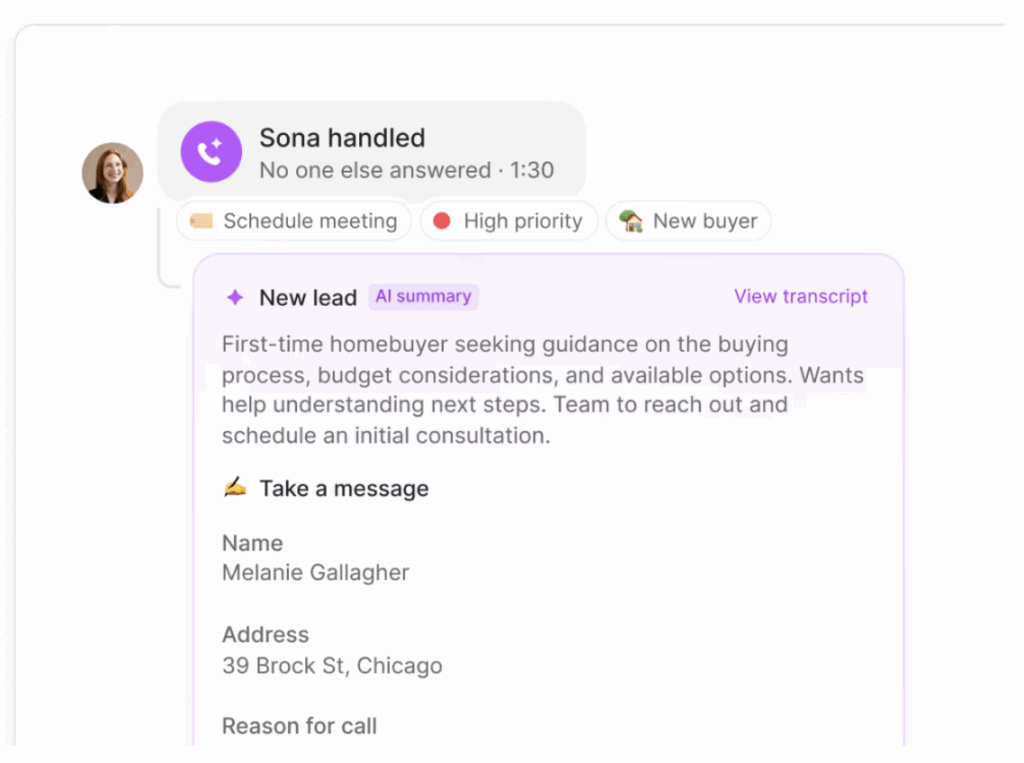
You can also automatically log Sona calls in tools like Salesforce, HubSpot, and Jobber so everyone on your team can access calls for prioritization and follow-up.
Quo offers much more than AI features, though. Unlike Aircall’s phone system, you’ll be able to:
- Keep every call on file indefinitely (i.e., unlimited storage). There’s no need to pay extra for longer retention periods or upgrade your plan for “extended” call histories.
- Upgrade or downgrade your plan at any time, even if you’re a team of one. There are no user minimums on any plan, so you’ll never pay extra for seats you don’t need.
- Call anyone in the US or Canada with unlimited toll-free calling. You’ll never need to budget extra for per-minute fees (something that requires a custom quote with Aircall).
- Send all the SMS and MMS messages you need in the US and Canada. If you need to send international texts, you’ll pay simple, pay-as-you-go pricing listed transparently on our website.
- Set up text automations directly in the Quo app. You can easily use built-in text scheduling, snippets, and auto-replies without setting up paid third-party integrations.

Quo: The best Aircall alternative

Aircall’s AI features might work for large teams with big budgets — but for most growing businesses, the cost (and complexity) may be more trouble than it’s worth. If you want a phone system that’s easy to use, affordable, and expressly built for teamwork, Quo’s VoIP platform is easily the better fit.
Quo gives you everything you need to manage customer conversations at scale, plus robust AI features that work right out of the box. We’re trusted by 60,000+ businesses to manage daily conversations and help fast-growing businesses build better relationships with their customers.
Try Quo free for seven days to see why it’s one of the best small business phone systems rated by G2.