Is your team spending most of their time keeping patients up to date about appointments — or chasing down people who don’t show up?
Appointment text messages solve both problems. They help reduce no-shows and make it easier to keep patients informed. Plus, your team can reduce the hours spent calling patients. This guide includes 38 text templates to copy, personalize, and use in your own practice. You’ll also learn how to send HIPAA-compliant text message reminders for different scenarios.
How appointment texts are a win-win for healthcare providers and patients
Sending appointment reminders via text benefits your practice and your patients by:
- Lowering no-show rates. Text message reminders can help reduce no-show rates. Plus, patients are more likely to see texts since they show up even on locked screens. iPhone and Android users can also tap on the appointment date to add it to their calendars.
- Reducing admin work. Staff spend less time making reminder calls and rescheduling appointments. The front desk is freed up to serve other patients who call with critical issues or arrive for appointments.
- Faster patient responses. SMS has an open rate of 98%, compared to 21% for email. Since patients are more likely to reply to texts, your clinic can confirm or fill slots sooner.
- Decreasing last-minute cancellations. Appointment reminders give patients the opportunity to reschedule if something comes up. That way, your team can reach out to patients on your waitlist to fill unused slots.
- Making schedules more predictable. More confirmations mean fewer gaps in the schedule and more consistent daily patient flow.
- Simplifying documentation and referencing. Phone call details disappear after the conversation ends. Texts create a record that patients can easily reference for important information.
Before you hit send: Is texting HIPAA-compliant?
Standard SMS isn’t encrypted, which creates privacy risks under HIPAA. However, you can still use SMS compliantly with explicit patient consent and texting protocols:
- Get appropriate patient authorization. Get explicit permission to text patients when they fill out their intake form. Keep records of their opt-in to receive texts in the event a dispute arises.
- Include clear opt-out information in every text. This includes even simple communications like practice updates.
- Document the decision to use SMS/MMS and its associated risks. Note how your organization uses SMS/MMS and manages the risks.
- Inform patients of the risks of texting. Examples include a lack of encryption that could lead to unintended PHI disclosure.
- Follow the minimum necessary standard and limit PHI transmitted via SMS/MMS. This rule requires covered entities to limit the health information they disclose. Send only what’s needed for the intended purpose. When texting, this means:
- Send only essential information, like appointment date and time. Include a secure portal link instead of sharing details about appointments or tests.
- Avoid including diagnoses, treatment details, or sensitive identifiers. Use general language instead. For example: “You have a new test result. Please log into your patient portal at [link] to view.”
Here are a few examples of what you can and can’t include in a HIPAA-compliant text message:
| ✅ HIPAA-COMPLIANT | ❌ NOT COMPLIANT |
|---|---|
| “Your appointment is tomorrow at 2 p.m.” | “Your diabetes checkup is tomorrow.” |
| “Please arrive 15 minutes early.” | “Bring your cancer treatment records.” |
| “Your test results are ready; you can view them in the portal.” | “Your cholesterol is 240.” |
| “Quick reminder to complete your intake forms.” | “Did you take your blood pressure medication?” |
| “We need to reschedule your appointment.” | “We need to reschedule your chemotherapy.” |
💡Further reading: Is texting HIPAA compliant?
38 Doctors appointment text message samples
Here are 38 text message appointment reminders for doctors to customize for their practices:
⚠️Important: Before texting patients, make sure you have explicit opt-in consent. This protects you from TCPA violations. Additionally, as of August 31, 2023, unregistered numbers cannot text US phone numbers. Carrier registration is mandatory for all virtual phone number users.
Finally, you need to give patients an easy way to opt out of texts using natural language. For example, offer the option to reply with STOP or END.
Appointment confirmation texts
Send these shortly after booking to confirm the appointment information is correct:
You have an appointment with [provider name] at [clinic name] on [date] at [time]. Reply CONFIRM, RESCHEDULE, or CANCEL to update your status. Reply STOP to opt out.
To confirm an upcoming test or procedure:
[Practice name]: You’re scheduled for a test on [date] at [time]. Reply CONFIRM to confirm. If you need to reschedule, please call our office at [phone number]. Thank you! Reply STOP to opt out.
Follow-up appointment confirmation texts
If a patient doesn’t respond to the first appointment confirmation text, you may need to send a follow-up.
To request confirmation within a given timeframe:
Hello, we’re following up to remind you of your appointment at [practice name] on [date] at [time]. Please reply YES to confirm, or call our office to reschedule at least [time] in advance. Reply END to opt out.
Use this template for final reminders:
Final reminder: Your appointment with [provider name] at [clinic name] is [date] at [time]. We haven’t received your confirmation. Reply YES to confirm your spot. If you can’t make it, please call our office as soon as possible at [number] to reschedule. Reply STOP to opt out.
Pre-appointment questionnaire and intake form reminders
You can use these pre-appointment texts to let patients complete forms or answer questions securely online. This streamlines the check-in process and can help prevent delays at the appointment.
To direct patients to online intake forms:
Your appointment with [provider name] is coming up on [date] at [time]. Please visit [URL] to fill out your intake forms before you arrive. Thank you! Reply END to stop receiving these reminders.
For practices that use an online patient portal:
[Practice name]: We’re looking forward to seeing you on [date] at [time]! Please visit [URL] to log in to your patient portal and complete your intake. Reply STOP to opt out of text messages.
Appointment reminder text messages
Use these appointment reminder texts to let patients know the time, date, and location of their next visit. Make sure to include your cancellation policy in your SMS reminders to improve patient attendance.
Here’s what an office visit reminder might look like:
Hello, this is a reminder from [practice name] about your appointment with [provider name] on [date] at [time]. If you need to cancel or reschedule, please call us at [office phone number]. Reply END to stop receiving texts from us.
Try this template to send patients to your appointment scheduling app or site to reschedule:
This is a reminder from [practice name] about your appointment on [date] at [time] at [location]. To cancel or reschedule, use this rebooking link: [link] Thank you! If you’d like to stop getting texts from us, reply with STOP.
When reminding patients about a procedure or test, keep the message general:
Your appointment with [practice name] is coming up on [date] at [time]. Please visit your secure portal for preparation instructions. If you have any questions, you can call the office at [phone number]. Reply STOP to opt out of text reminders.
If a patient is scheduled for a follow-up visit, use this template:
[Practice name]: This is a reminder of your follow-up appointment with [provider name] on [date] at [time]. If you have any questions or need to reschedule, please call our office at [phone number]. Thank you! Reply END to stop messages.
Day-of-appointment reminder messages
Getting a text reminder on the day of their appointment can be helpful for patients with busy schedules.
Here’s a basic day-of reminder:
You have an appointment with [provider name] today at [time]. If you’re unable to make it, please notify our office as soon as possible at [phone number]. Thank you! To opt out of reminders, reply with STOP.
Use this template if you need to include instructions and appointment details, such as advanced arrival:
A reminder that your appointment at [practice name] is today at [time]. Please arrive [minutes] early and use the [building/entrance] entrance. Reply END to opt out.
Appointment check-in process texts
These messages guide patients through check-in steps when they arrive. This helps reduce lobby crowding and keeps your staff organized. For example:
Just a reminder: When you arrive at your appointment tomorrow, please use the check-in kiosk in the lobby and have a seat there. We’ll call you when we’re ready. To opt out of messages, reply STOP.
Here’s a sample text for larger practices:
We’re looking forward to seeing you tomorrow at [practice name]! When you arrive, please go to [suite number] on [floor number] to check in. Have your ID and insurance card ready. Thank you! Reply with END to stop receiving texts.
Appointment cancellation confirmation messages
Send these to confirm an appointment cancellation and make rescheduling easy. You can use a basic template like this:
Your appointment with [provider name] has been canceled. To reschedule, please visit [URL] or call our office at [phone number], [extension number]. We look forward to seeing you soon. If you no longer wish to get reminders, reply with END.
Appointment reschedule texts
Use these templates when patients request to reschedule or when your practice needs to change an appointment time.
To ask patients to book a new appointment over the phone:
We’ve received your request to reschedule. Please call our office at [phone number] during normal business hours, [times], [days] to book a new appointment. We’ll get you on the calendar as soon as possible. Thank you! Reply STOP to opt out of messages.
For online rescheduling:
Need to reschedule? Please visit our patient portal at [URL] and [specific instructions] to book a new appointment. To stop receiving these messages, reply with STOP.
If you need to reschedule a patient’s appointment:
[Clinic name]: We have to change your appointment with [provider name] on [date] at [time]. Please call our office at [number] or visit our scheduling page at [URL] to reschedule for another time. We apologize for the inconvenience! Reply END to opt out.
Missed appointments text message sample
You’re likely to get some no-shows even if you’re consistent with reminders. Follow up promptly with these templates to ensure that patients can get a new appointment.
Send this message the same day as the missed appointment:
[Practice name]: We missed you at your appointment today. Please reschedule at your earliest convenience here: [link] or by calling [phone number]. Reply STOP to opt out.
If the patient doesn’t respond, follow up in 24–48 hours with a message like this:
Hello, this is a reminder from [practice name] to reschedule your appointment with [provider name]. Please call our office at [number] or visit the patient portal at [URL] to book a new time. Thank you! To opt out of texts from our office, reply with END.
Payment reminder SMS messages
Use these templates to remind patients about upcoming fees or outstanding balances.
For an unpaid balance:
You have a balance to review from your recent appointment at [practice name]. Please log in to your patient portal at [URL] for details and payment options. Reply STOP to opt out.
To alert a patient about a new balance statement:
Your statement from [practice name] is now available. Visit the patient portal to view details or make a payment. Reply END to stop receiving these reminders.
Virtual visit reminder texts
When a patient has an upcoming telehealth visit, try these text message templates. Remember to include instructions for confirming or rescheduling the appointment.
For initial appointment reminders and confirmations:
This is a reminder that you have a telehealth appointment with [doctor name] tomorrow at [time]. Reply with CONFIRM to confirm, or call our office at [number] to reschedule. To opt out of texts, reply with END.
On the day of the appointment:
Your telehealth appointment with [provider name] is today at [time]. Log in here [X] minutes early: [link]. Reply STOP to opt out.
Open-appointment and waitlist text templates
When appointment slots open up, use these templates to alert patients on your waitlist.
If a doctor’s availability changes:
[Provider name] has a new opening on [date] at [time]. Reply to this message or call [phone number] to book the appointment. To stop receiving these alerts, reply with STOP.
To remind patients that they were on a waitlist for an appointment:
You’re receiving this message because you’re on our waitlist for [provider name]. A new appointment is available on [date] at [time]. Please call [practice name] at [number] to book. Reply END to opt out.
When you have a last-minute cancellation:
This is [practice name]. [Doctor name] has an appointment available today at [time]. Please reply CONFIRM to claim, or call our office at [number] as soon as possible. Reply STOP to stop getting these reminders.
Annual checkup and follow-up scheduling texts
These templates help patients remember to schedule checkups or follow-ups.
When it’s time for an annual checkup:
Hi there! This is [practice name], reminding you it’s time for your annual checkup with [provider name]. Please call our office at [number] or visit [link] to book your appointment. Thank you! Reply with END to stop receiving texts from our practice.
For a follow-up after a previous visit or procedure:
Reminder from [practice name]: Please schedule your follow-up visit with [doctor name]. Visit your patient portal or call our office at [phone number] to set up an appointment. To opt out of text messages, reply with END.
Upcoming appointment preparation reminders
Use these text templates to help patients remember to bring important documents so they can check in quickly.
If you need a copy of the patient’s insurance card or other information:
This is a reminder that you have an upcoming appointment with [provider name] on [date] at [time]. Please have your insurance card and ID ready when you arrive. Remember to bring [other required documents]. Reply STOP to opt out.
If patients need to fill out forms in advance:
This is [practice name] with a friendly reminder to complete the forms for your upcoming appointment on [date] at [time]. Please log in to your patient portal at [link] and follow the intake instructions. Reply END to stop receiving messages.
Insurance and billing reminders
Help patients avoid unexpected fees by reminding them to review their billing and insurance details.
Use this template for insurance information:
Reminder from [practice name]: Please update your insurance information before your next visit. Go to [link] to review and make any necessary changes. To stop receiving texts from us, reply with END.
Send this text message to request billing updates:
Hello, this is [practice name]. We’re reviewing our records to make sure we have the correct billing information for you on file. Please visit [URL] to review or change your details. Thank you! If you no longer want text reminders, reply with END.
General practice updates
You can use text messages to share practice updates or changes.
Use this template for an unexpected closure:
Due to inclement weather, [medical facility name] will close at [time] today. If you have an appointment after that time, our receptionist will call you to reschedule. Reply END to opt out.
If you update your regular business hours:
Starting [date], [practice name] will be open [days] from [time] to [time]. View details: [link to website/portal]. Reply STOP to opt out.
For operational updates or temporary changes in availability:
Reminder from [practice name]: Our office will be closed on [day] for [holiday or event]. We will reopen with normal business hours at [time] on [date]. Reply STOP to stop receiving these updates.
Post-appointment survey requests
Sending a survey after an appointment helps you collect feedback and improve patient satisfaction. Use this template for a quick survey:
Thank you for visiting [practice name]. How was your experience today? Please take two minutes to share feedback about your visit: [survey link]. Reply STOP to opt out.
To gather more detailed feedback:
How was your appointment with [provider name]? Help us improve by completing this brief survey: [link]. Reply STOP to opt out.
How to send doctors appointment text messages with Quo
With Quo, formerly OpenPhone, as your medical office phone system, there are two ways to send appointment texts:
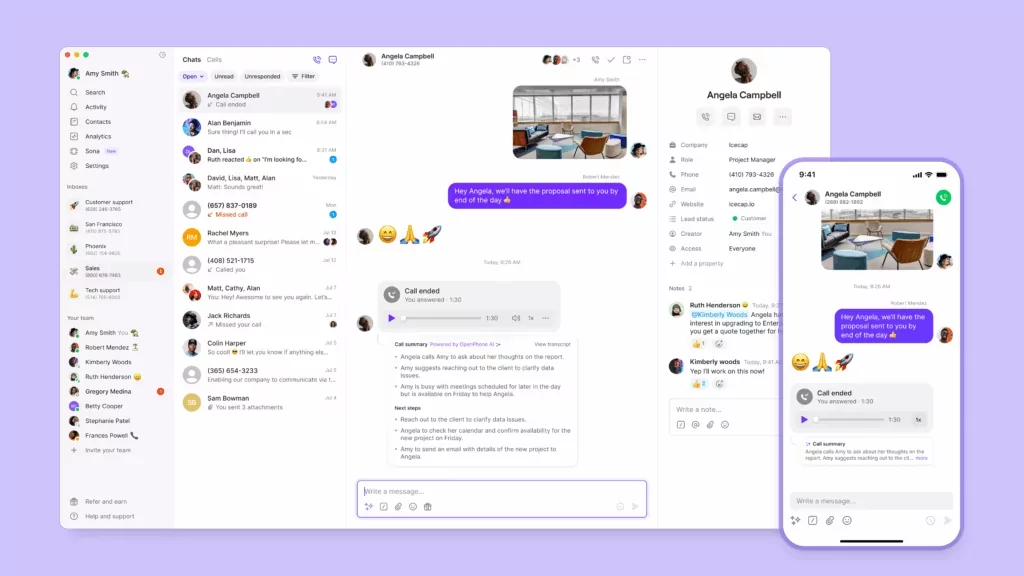
- Use templated texts for your healthcare team, or snippets. You can create text message snippets to send appointment reminders with a few clicks. Just save your customized message in Quo, using placeholders for fields like time and date. When it’s time to send a reminder, pull up the snippet you need, fill in the relevant details, and hit send.
You can send messages directly from your computer or phone with the Quo app:

- Schedule texts in advance. Scheduled texts make it easier to keep up with patient communications. You don’t have to remember to send individual messages every time a patient needs a reminder or update.

💡Pro tip: You can also use our AI voice agent, Sona, to help patients book appointments after hours. For patients who’ve already opted in to SMS communications through your intake process, Sona can text them a link to your scheduling page during the call.

10 best practices for sending patient appointment texts
These best practices will help you use texts safely and effectively in your practice:
- Train your staff in compliant texting methods. Make sure receptionists, front desk staff, and other team members understand what counts as PHI. Ensure that everyone understands what they can and can’t send via text.
- Stay compliant with A2P 10DLC carrier regulations. All SMS messages must comply with A2P 10DLC regulations in the US. This includes registering your numbers, getting opt-in, and including opt-out language in texts. These rules are designed to prevent spam and protect patients.
- Keep up-to-date authorization records. Save proof of opt-ins and document any changes to patient communication requests.
- Text from the same compliant number you use for phone calls. This keeps communication organized, and patients know it’s your team contacting them. It also reduces points of vulnerability to minimize the risk of PHI disclosure.
- Avoid promotional or prescription drug content. Carriers block messages that advertise or mention controlled substances.
- Obtain consent to send prescription refill alerts to existing patients. These alerts are allowed under HIPAA if patients opt in. Avoid mentioning sensitive prescription or health information.
- Focus your messages on coordination and care. Don’t use SMS for advertising or solicitation.
- Use a business communications platform with HIPAA-compliant security features. These include encryption for data in transit and storage, automatic user log-offs, and access controls.
- Make it easy to reschedule or cancel. Integrate appointment cancellation and rescheduling options directly into your texts.
- Use a clear and consistent tone. Use a friendly, professional tone that matches your practice, but avoid casual language that could confuse patients. Ensure the same tone is used across email, phone, and text.
Manage your appointment text messages securely with Quo
Doctors appointment text messages help you reduce no-shows and last-minute cancellations, building more revenue for your practice.
Quo helps healthcare professionals stay organized and save time by speeding up texting. Snippets keep common messages close at hand, and scheduled texts ensure that every patient gets timely reminders.
Here are several other ways that Quo can help you communicate with patients while staying HIPAA-compliant:
- Shared phone numbers. Your whole team can monitor patient interactions and work together to manage follow-ups.
- SMS auto-replies for missed calls and texts. If a patient calls or texts after hours, they’ll get an instant response confirming you received their message and sharing next steps.
- Business hours and away voicemail greetings. Automatically switch between in-office and after-hours greetings so patients know when to expect a response.
- Call recordings and recording notifications. Automatically alert patients that you’re recording calls for compliance or record-keeping. Consent to record is required under HIPAA.
Sign up for a free seven-day trial of Quo and see how much easier patient engagement can be today.
FAQs
It depends. By itself, a patient’s name doesn’t count as PHI. It will count as PHI if you include it with other individually identifiable information. Always consult your legal counsel to determine the information you can include in texts to stay compliant with HIPAA.
Texting patients 24 to 48 hours before their appointment gives them enough time to reschedule if needed. You can also send an additional same-day reminder if you struggle with a lot of patient no-shows.
Doctors appointment text messages should include:
-Name of the practice or provider
-Appointment date and time
-Rescheduling and cancellation instructions
-Clear opt-out option
Never mention sensitive information or PHI covered under the HIPAA privacy rule.
Here’s a basic medical appointment reminder text message sample:
Hello, this is a reminder from [practice name] about your appointment with [provider name] on [date] at [time]. If you need to cancel or reschedule, please call us at [office phone number].
Simple replies like “Yes,” “Confirm,” or “I need to reschedule” are generally fine. But if a patient texts back “I can’t come because my chest pain is worse,” that’s PHI, which could be problematic.
To avoid this, keep replies simple by asking yes/no questions or providing specific options like “Reply CONFIRM or RESCHEDULE.” If a patient does share medical details via text, don’t respond with medical advice. Call them directly or ask them to contact the office through secure channels.
No-shows and last-minute cancellations cost the US healthcare system more than $150 billion per year. Empty slots hurt revenue because you lose money from the appointment and spend extra time chasing down no-shows.
Missed appointments can also cause care gaps. Patients may miss critical tests or follow-ups and have to wait months for their provider to be available.Is your team spending most of their time keeping patients up to date about appointments — or chasing down people who don’t show up?
Appointment text messages solve both problems. They help reduce no-shows and make it easier to keep patients informed. Plus, your team can reduce the hours spent calling patients. This guide includes 38 text templates to copy, personalize, and use in your own practice. You’ll also learn how to send HIPAA-compliant text message reminders for different scenarios.