MightyCall is a VoIP platform that bills itself as a cloud call center for small to medium-sized businesses. It seems like a solid choice at first. However, it comes with limitations that can frustrate growing businesses. For example, its pricing plans and user requirements might get limiting if you’re on a budget.
If you’re looking for better VoIP phone service for your small business, we’ve got you covered. Here are 10 of the best MightyCall alternatives, along with pricing, features, and user reviews.
You’ll also find a guide on picking the best alternative and the features to look for.
What is MightyCall?

MightyCall is a call center platform designed for handling a high volume of calls and texts. It’s a solid option if you:
- Need a blended call center for inbound and outbound calls
- Experience high-volume outbound calling
- Require unlimited calling and texting to the US and Canada
That said, all of MightyCall’s plans come with a three-user minimum. So even if you only need one number, you’ll have to pay for three. For the base plan, that adds up to at least $45 per month just to access simple features.
Plus, all MightyCall plans only come with three local or toll-free numbers. Extra phone numbers cost $5 per number. In contrast, Quo offers a free local or toll-free number for each user. So you don’t have to pay for things that should be a given.
MightyCall key features
- Unlimited calling and texting
- International phone numbers are available at $15 per number
- Web and mobile app
- Voicemail-to-text and voicemail-to-email
- HIPAA compliance
- Ring groups
- Multi-level IVR
- Business hours
- Simultaneous ring
- Cold and warm transfer
- Call analytics, requires upgrade
- Limited integrations
MightyCall pricing

MightyCall’s pricing offers four different plans that you can pick from:
- Core: $15 per user per month for unlimited calling and texting in the US and Canada, multi-level IVR, and call routing
- Pro: $23 per user per month for the supervisor workspace, live call monitoring, AI call summaries upon request, and advanced reports
- Power: $30 per user per month for the preview dialer, progressive dialer, priority support, answering machine detection, and a dedicated account manager
Enterprise: Contact sales to get a quote for the predictive dialer with 10 lines per rep, SIP trunking support, and custom integrations
Why do businesses choose MightyCall alternatives?
Not every solution will be perfect for every business. And the same is true for MightyCall. Here’s why users look for MightyCall alternatives:
Texting limitations prevent you from delivering a great customer experience
MightyCall comes with texting limitations that can affect your customers’ experiences. You can’t schedule texts to send in your customers’ time zones. This means you might find it hard to stay compliant with the Telephone Consumer Protection Act, or TCPA. Not to toot our own horn, but scheduled messages come standard on every Quo plan.

Finally, MightyCall also doesn’t let you send texts to international phone numbers, which can cause issues if you have a global customer base.
Features are not small business friendly
MightyCall’s features are not small business friendly. For example, every plan has minimum user limits, which can mean paying for team members you don’t have just to access certain features. Plus, its free trial only includes 100 minutes, which isn’t a lot of time to determine if the platform is right for your business.
Reviewers cite dropped calls and poor call quality
MightyCall users have complained about the call quality they experienced while talking to customers. This includes glitches and frequently dropped calls. For example, one user who left a review on G2 writes: “Sometimes we can’t hear clients, or clients cannot hear us. It’s not an internet issue because it has happened during stable high-speed internet connections… This happens way too frequently. At least biweekly. So it’s just annoying.”
MightyCall competitors comparison: Visual side-by-side
| Provider | Starting price | Best for | Unlimited calling to US & Canada | SMS/MMS to US & Canada | Additional phone numbers |
|---|---|---|---|---|---|
| MightyCall | $15 per user per month, three-user minimum | Small and medium-sized call centers | ✓ | ✓ | $5 per number per month |
| OpenPhone | $15 per user per month | Small and growing businesses | ✓ | ✓ | $5 per number per month |
| Grasshopper | $14 per month | Multi-digit phone extensions | ✓ | Local numbers only | Requires upgrade |
| RingCentral | $20 per user per month | UCaaS needs | Limited toll-free minutes | 25 messages per user per month | $4.99 per number per month |
| CloudTalk | $19 per user per month | Global calling | Free intra-company and inbound calls | ❌ | $6 per number per month |
| Google Voice | $10 per user per month, plus $7 per month for Google Workspace | Google Workspace users | Unlimited calls to Canada from the US only | US customers only | ❌ |
| Nextiva | $15 per user per month | Omnichannel communication | ✓ | 100 texts per month on the base plan | Pricing not publicly available |
| JustCall | $29 per user per month | Contact centers | ❌ | 500 segments per user per month | Pricing not publicly available |
| 8x8 | Contact for a quote | Global calling | ✓ | ❌ | Pricing not publicly available |
| Dialpad | $15 per user per month | AI-based agent training | ✓ | For US & Canadian customers only | Requires an upgrade, pricing not publicly available |
| Aircall | $30 per user per month, three-user minimum | Outbound sales teams | ✓ | ✓ | $6 per number per month |
10 best MightyCall alternatives in detail
You don’t have to settle for a solution that doesn’t work for you. Here are 10 other virtual phone systems for you to consider:
1. Quo (formerly OpenPhone): Best MightyCall alternative for small businesses and growing teams

Pros
- Unlimited calls to the US and Canada
- One new local or toll-free number per user
- Team collaboration features like internal threads and shared numbers
- Auto-attendant functions, or IVR, for inbound calls
- Messaging automations, including auto-replies, templated messages, and scheduled texts
- AI features, like AI voice agent, call tags, and call transcripts and summaries
- Integrations with 7,000+ apps, including Slack, Salesforce, and HubSpot
Cons
- No verification through two-factor authentication*
*Nearly all virtual phone numbers share this problem. Companies like Facebook, Uber, and Google rarely let you authenticate accounts through a virtual phone number.
Quo is a modern business phone solution that can help you easily scale your phone system as your team grows. Each user comes with a free US local number, Canadian number, or toll-free number. You can also create shared numbers for entire departments.

With Quo (formerly OpenPhone), you’ll never have to meet user quotas to upgrade your business plan. You can access the features and integrations you want without paying more than you need.
We offer free calls and texts to anyone in the US or Canada. You can easily make these calls from any internet-enabled device, including laptops, tablets, and phones — Android and iOS.
And unlike MightyCall, you can make international calls with your Quo number at more affordable rates.
Need to record your calls for compliance, training, or quality assurance? Quo lets you record all business calls. You can even get instant AI call summaries and transcripts on the Business plan. Not ready to upgrade? You still get on-demand recording on the base plan.
Plus, all your call recordings, texts, and voice messages are in a single view with a contact. That way, you can save time responding to your customers.
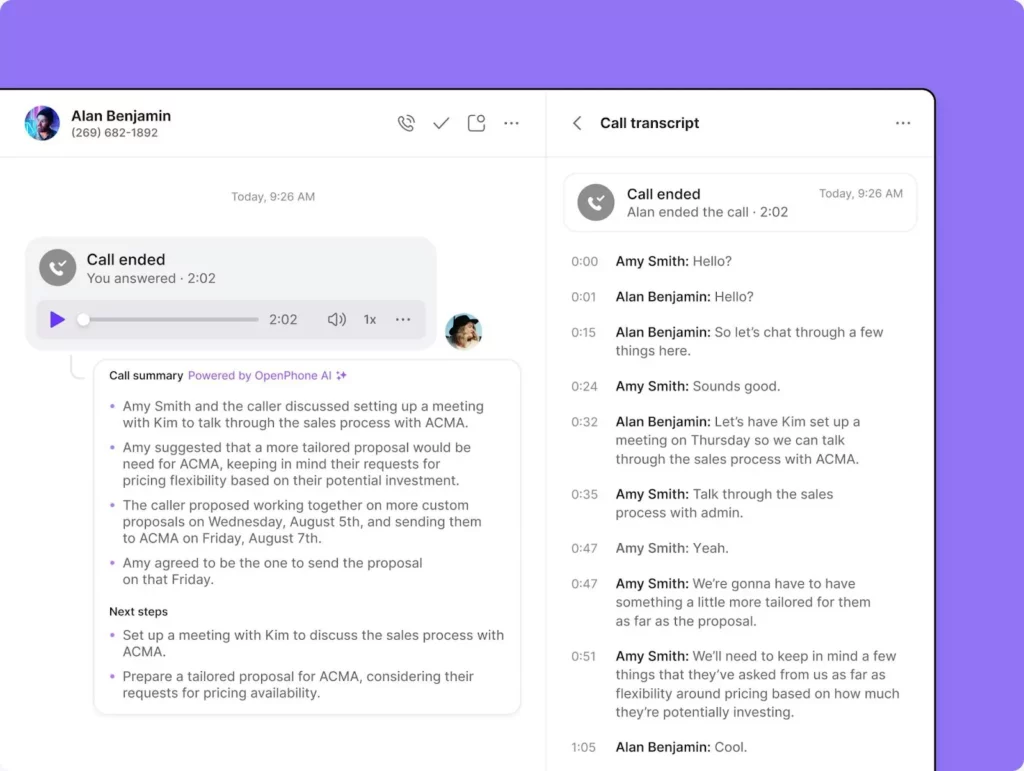
Need to collaborate with your team? With Quo (formerly OpenPhone), you can respond to your work contacts through internal threads and mentions. You can also save time texting your customers using automation features like auto-replies, snippets, or message templates, and scheduled text messages.

If you’re handling high call volume or just want some extra support, you can also use Sona, Quo’s AI voice agent. Sona handles calls 24/7 and answers FAQs, captures leads, and takes messages. So you can provide great service without stretching yourself thin.

“Sona ensures that no calls go completely unanswered. Having someone available to take their information — even after hours — gives customers a better impression of Nutiliti.” Kendall Carameros, Co-founder and COO of Nutiliti

How to get a virtual number with Quo: The best MightyCall alternative
Getting a new phone number from almost anywhere in the world is a simple process when you choose Quo as your virtual phone number provider.
Follow these three steps:
- Create an account with OpenPhone (when you sign up, you get a free, seven-day trial).
- During signup, choose your city or area code in the US to select your preferred phone number.
- Once the signup process is complete, you’re all set to use your new virtual phone number!
Key features of Quo
- One free local US or Canadian number or a North American toll-free number per user
- Free SMS and MMS support to the US and Canada
- Shared numbers
- Integrations with Slack, Zapier, Google Contacts, HubSpot, and Salesforce
- Free calls to the US and Canada
- Call recording, on-demand and automatic
- Call management features like IVR, or phone menus
- Voicemail-to-text transcriptions
- Text messaging automations, like snippets, auto-replies, and scheduled messages
- Call forwarding to phones and computers
- AI contact suggestions
Quo pricing

We like to keep things simple around here. We offer three transparent plans:
- Starter: $15 per user per month for voicemail transcriptions, free calls and texts in the US and Canada, one North American local or toll-free number per user on your account, and more
- Business: $23 per user per month for analytics, call transfers, phone menus, custom ring orders, and more
- Scale: $35 per user per month for AI call tags, dedicated onboarding, and priority chat and email support
How to port and switch your number from MightyCall
Looking to move your existing number from MightyCall (or another provider) to Quo? All you need to do to port over your number is:
- Sign up for a Quo account. During your free seven-day trial, select a temporary new number.
- Submit your porting request through the Quo app.
Questions? Just drop by our help center.
2. Grasshopper: Best MightyCall alternative with multi-digit phone extensions

Pros
- Auto-attendant, or phone menu, with extensions
- Unlimited calling to the US and Canada
- Desktop and mobile app
Cons
- No shared phone numbers
- No international text messaging
- Expensive international calling
- No native integrations
- Call recording requires an upgrade
Grasshopper is a legacy phone system offering a concise selection of call features, like call routing, call forwarding, and unlimited calling and texting.
It’s a solid choice for solopreneurs who want the basics, but it’s not meant for businesses that plan to grow. For example, you don’t get any integrations besides Google Voice. So you risk out-of-sync data across your tools.
Plus, Grasshopper makes it difficult for team members to collaborate to solve customer issues. They don’t offer shared numbers or internal threads.
Here’s what one reviewer had to say: “[The] downside was that we grew rather quickly and needed to switch to another company to meet our needs.”
If you need to make many international calls, Grasshopper might not be for you. Here’s why:
- You can’t enable international calling for accounts under 60 days old
- Grasshopper requires a deposit of $500 to activate international calling
- Alaska and Hawaii count as international locations, which can upset customers and incur unnecessary costs for you
Finally, the base plan only supports one user and one extension. You can upgrade your plan to get unlimited users, but you still only get one number per account. Additional numbers cost $9 per number.
Key features of Grasshopper
- Local and toll-free numbers, with additional numbers for $9 per month each
- Phone number extensions, and additional extensions for $3 per month each with an upgrade
- Call forwarding
- Call transfers with an upgrade
- Free unlimited calls and texts in the US and Canada
- Voicemail transcriptions
- 24/7 customer support
- Call recording with an upgrade
- Mobile and desktop apps
Grasshopper pricing

Grasshopper offers three pricing plans to customers:
- True Solo: $14 per month for one user, one phone number, and one extension
- Solo Plus: $25 per month for unlimited users, one number, and three extensions
- Small Business: $55 per month for unlimited users, four numbers, and unlimited extensions
3. RingCentral: Best UCaaS MightyCall alternative

Pros
- Unlimited calls to the US and Canada
- Limited internal collaboration tools, like document sharing and team messaging
- Offers video conferencing with an upgrade
- Offers desk phone rentals
Cons
- The base plan includes only 25 texts per user per month
- CRM integrations require an upgrade
- Call recording requires an upgrade
- Users report low-quality customer service
Enterprise users who need a video, text, and virtual call solution often turn to RingCentral as a potential fit. It’s also compatible with desk phones and PBX phone systems, which is good for companies that still use on-premises hardware.
But RingCentral comes with a few important limitations. For example, its Core plan only offers 25 texts per user per month, which will run out quickly if you text customers. Plus, you’ll only get 100 toll-free minutes per month unless you upgrade to the Advanced plan.
RingCentral also deletes all saved files, including call recordings, after 90 days. And you can only store up to 5,000 messages unless you upgrade to the most expensive plan for unlimited storage, at $35 per user per month.
Finally, some users report negative experiences with customer service and difficulty solving issues: “[I dislike the] customer service. I have opened 3 cases about the same issue in [the] past 8-9 days. I get canned responses, and nobody knows what they are talking about.”
Some even find RingCentral hard to cancel. “There are repeated online use cases where users cannot cancel. I have had the same experience. I ultimately reported to [the] State Attorney General and charged back after recording my online and phone events.” Something to keep in mind as you evaluate alternatives.
Key features of RingCentral
- Unlimited domestic calling
- SMS and MMS in the US and Canada
- Local and toll-free numbers
- Visual voicemail
- IVR
- On-demand call recording with limited storage
RingCentral pricing

RingCentral offers three plans for their business phone:
- Core: $20 per user per month for unlimited domestic calling, 25 texts per user per month, and 100 pooled toll-free minutes
- Advanced: $25 per user per month includes auto call recording, app integrations like Salesforce and Zendesk, 100 texts per user per month, and 1,000 pooled toll-free minutes
- Ultra: $35 per user per month includes unlimited file sharing for recordings, HD video whiteboards and messaging, 200 texts per user per month, and 10,000 pooled toll-free minutes
4. CloudTalk: Best MightyCall alternative for global calling

Pros
- Transfer calls to other team members
- Multi-level IVR
- International numbers in over 160 countries
Cons
- Unlimited call recording storage requires upgrade
- IVR is not available on the base plan
- Speech-to-text requires an upgrade
- Smart routing requires an add-on
CloudTalk provides international numbers in 160 countries, which is great for establishing a global presence. Plus, the app’s interface is available in eight languages, suitable for an international team.
CloudTalk offers unlimited domestic inbound and intracompany calling within the US and Canada. But if you’re wondering why outbound calls aren’t unlimited, it’s because they’re not free. Each call is priced per minute, and it can quickly get expensive for you. Get ready to pay up if you’re a business that relies on cold calls or dialing out to your customers.
You also have to pay for each text message you send to customers.
CloudTalk’s biggest claim to fame is its overwhelming variety of communication features. CloudTalk allows you to manage the call queue the way you want with features like Smart Dialer and VIP Queues, though that doesn’t come cheap, at $49 per user per month.
Finally, you’ll have to upgrade to integrate CloudTalk with your current tech stack so your team doesn’t have to spend time on admin tasks. And even then, some users report complications with CRM integration. One user even reported that “There’s no way to link it to the company’s CRM, and sometimes it takes a while to make contact for the same reason.”
Key features of CloudTalk
- Unlimited inbound calls
- International number support
- Multi-level IVR with an upgrade
- Ring groups for one group only
- Automatic call distribution with an upgrade
- Toll-free and international numbers
- Call recording with one month of storage
CloudTalk pricing

CloudTalk’s pricing offers four different plans for you to choose from:
- Lite: $19 per user per month for unlimited domestic calling within the US and Canada, one ring group, call flow designer with basic options, and international numbers
- Essential: $29 per user per month for IVR, automated call distribution, caller-based routing, and skill-based routing
- Expert: $49 per user per month for call whispering, VIP queues, and call tags
- Custom: Request a quote for HD video whiteboards and messaging and custom onboarding and priority support
5. Google Voice: Best MightyCall alternative for Google Workspace users

Pros
- Free VoIP calls to the US and Canada
- Comes with a local number
- Integrates with Google Workspace
Cons
- No integrations outside of Google Workspace
- No toll-free numbers, even if you already own them
- Texting is available in the US only
- Requires a Google Workspace subscription
- $20 fee to port in numbers
Google Voice is a popular VoIP software. It offers free calls to the US and Canada for US users, along with unlimited texting in the US. But beyond features like voicemail transcriptions and call forwarding, the offering is pretty bare-bones.
Looking to save time on repetitive tasks like logging conversations? You can’t integrate Google Voice with any tools outside of Google Workspace.. You’ll also need to purchase a Google Workspace subscription to run Google Voice, which costs an extra $7 a month.
Google Voice is also not a very collaborative platform. For example, there are no shared numbers. Team members can only see their own conversations and can’t get complete visibility into interactions.
Perhaps most frustrating, Google Voice isn’t available to users outside certain countries. If you have team members outside of the US and Canada, they might not be able to integrate with your Google Voice plan.
In the words of one G2 reviewer, “[It’s] unable to access from multiple phones or use more than one account on the app.”
Key features of Google Voice
- Local phone numbers for the US and Canada
- Free unlimited calling to the US
- Free unlimited calling to Canada for US customers only
- Free texting to US numbers for US customers only
- Google Calendar and Google Meet integrations
- Business call recordings with an upgrade
- Ring groups with an upgrade
- Phone menus with an upgrade
- Mobile apps for iOS and Android
- Call forwarding
Google Voice pricing

Google Voice’s pricing provides three different plans:
- Starter: $10 per user per month for 10 users max, text messaging in the US, unlimited calls to the US and Canada, and integrations with Google Workspace tools, like Google Calendar and Google Meet
- Standard: $20 per user per month for unlimited users, SIP link support, multi-level auto-attendants, ad-hoc call recording, and ring groups
- Premier: $30 per user per month for advanced reporting with BigQuery and automatic call recording
Keep in mind, you’ll also need to pay for a Google Workspace subscription, which costs $7 per user per month.
6. Nextiva: Best MightyCall alternative for contextual customer engagement

Pros
- Unlimited voice and video calls
- Social and review management features
- Offers an omnichannel shared inbox
Cons
- SMS is limited to 100 texts per month on the base plan
- Essential tools like integrations are only offered as add-ons
- Toll-free numbers don’t support texting
- Call recording requires an upgrade
Nextiva is a Unified Communications platform that offers calling, texting, and video conferencing. It also lets you bring messages from social media apps like WhatsApp and Instagram into one inbox so your team can manage them all in one place.
At first glance, Nextiva might look like a great VoIP option. Its large list of features and cloud-based access make it seem like a solid option for remote or distributed teams. But when you look a little closer at its pricing tiers, you’ll see some troubling flaws.
For example, the base plan, which is the most affordable for small businesses, has some noticeable limitations. For example:
- SMS is limited to 100 texts per user per month
- Toll-free numbers require an upgrade
- Toll-free minutes are limited
- Voice call recording requires an upgrade
- Video calling requires an upgrade
- Voice analytics is an add-on
- CRM integration is an add-on
Nextiva’s base plan is really only useful for basic calling and social media review management. Unless you plan to pay for the Power Suite CX plan at $75 per month per user, you’d be better off looking into Nextiva alternatives. As one G2 reviewer put it, “[It’s] complex for the average/small business.”
Key features of Nextiva
- Desk phone rentals
- Unlimited internet fax
- Unlimited calling in the US and Canada
- Limited texting
- Live chat and chatbot as add-ons
- Basic IVR
- Voicemail transcriptions
- Call recording with an upgrade
- Social media and review management
- Integrations with social media channels like Instagram
Nextiva pricing

The Nextiva pricing plans for small businesses include:
- Power Suite CX: $75 per user per month for process automation, more advanced reporting and analytics, AI transcripts and summaries, and skills-based call routing
- Core: $15 per user per month for basic IVR, unlimited voice and video calls, limited texting, and voicemail transcription
- Engage: $25 per user per month for 500 text messages per user per month, voice and video recording, a toll-free number, and up to 2,000 toll-free minutes
7. JustCall: Best MightyCall alternative for international numbers

Pros
- Toll-free numbers are available in the US, UK, and Canada
- Schedule text messages
- Bulk texting is available
- Available on Windows, Mac, iOS, and Android
Cons
- No free inbound toll-free minutes
- Limited texting, 500 per user per month
- Limited outbound calling, 1,000 minutes per user per month
- Only two numbers are included per account
JustCall is a business communications platform for customer service teams and contact centers. It lets you communicate with customers through multiple channels, like voice, WhatsApp, and SMS, so you can meet your customers where they are.
But there are some calling limitations to keep in mind. For example:
- You don’t get free inbound calls. Calls on certain higher-cost routes are priced at over $0.02 per minute.
- You don’t get free toll-free calls.
- You’ll be charged for shared service numbers, call forwards, and calls routed through JustCall’s Sales Dialer.
Finally, don’t expect easy onboarding with JustCall. According to one G2 reviewer, “The overall onboarding is slow and the demo is not really helpful, even after spending money, we have to set up and verify everything manually.”
Another reviewer says, “The onboarding process is quite challenging and requires improvement. It involves navigating through a lot of documentation to register as a business and to activate services such as calling and SMS, which was initially difficult. ”
Key features of JustCall
- Local number in 70+ countries
- Toll-free numbers
- Limited SMS segments
- SMS scheduling
- Call forwarding
- CRM and data integrations
- AI coaching with an upgrade
- Call and SMS analytics
JustCall pricing

JustCall’s pricing includes four different pricing plans:
- Team: $29 per user per month for access to local phone numbers, unlimited calling, 500 text segments per user, WhatsApp inbox, call transcription, analytics, and a two-user minimum
- Pro: $49 per user per month for 1,000 text messages per user, queue callback, intelligent call routing, the Salesforce CTI integration, and advanced analytics
- Pro Plus: $89 per user per month for advanced coaching features, SMS copilot, call tags, power dialer, and sentiment analysis
- Business: Custom price for a dedicated phone support line, personalized onboarding, HIPAA compliance, and unlimited SMS and calling
8. 8×8: Best MightyCall alternative for global calling

Pros
- Unlimited international calling on some licenses
- Video conferencing
- Global local number support
Cons
- Can be complex to set up
- Smaller integration library, with only 74 integrations
- Must contact sales for pricing and to trial
8×8 is ideal for call centers and larger companies that serve a lot of customers. It offers different plans based on business needs. For example, they have a plan dedicated to their communication APIs and a plan that includes video calling.
If your company uses Teams, there’s also a Microsoft Teams integration if you need to connect the two solutions.
8×8 lets you make calls and texts outside the US and Canada. It offers multiple licenses that let you reach between 14 and 48 countries included in your plan. Plus, they offer local phone numbers worldwide so you can pick a familiar area code for international markets.
However, 8×8’s pricing isn’t publicly available. So you’ll have to contact sales and jump through some hoops to find out if it fits in your budget. Plus, 8×8 doesn’t provide a free trial, so you can’t test it to see if it’s the one for you. For example, one of the top complaints about 8×8 is its hard-to-navigate UI. As one reviewer puts it, “[I dislike] the interface, takes a while to maneuver around and figure out where everything is.” You can’t test that without a free trial.
Key features of 8×8
- Calling and texting
- High-volume messaging
- Video meetings and AI meeting summaries
- Team chat
- Call recording
- Fax
- Receptionist console for exceptionally high call volumes
- Global coverage
8×8 pricing

8×8’s pricing isn’t listed publicly. You’ll have to reach out to their sales team and request a quote.
9. Dialpad: Best MightyCall alternative for AI-based agent training

Pros
- AI-powered CSAT, playbooks, and scorecards
- Unlimited calling in the US and Canada
Cons
- Additional numbers aren’t available on the base plan
- Minimum user requirements can hike up costs
- Slack and Zapier integrations require an upgrade
Dialpad is focused on serving larger enterprises with AI-powered tools. The basic plan comes with multiple AI-powered tools, including real-time call transcriptions and speech coaching for support teams.
All plans also offer unlimited calling in the US, Canada, and your home country. That way, your contact center can connect with customers without worrying about per-minute charges.
However, Dialpad’s essential features require businesses to upgrade to higher-tier plans.
For example, on Dialpad’s base plan, you can’t:
- Access integrations with popular business apps like Slack or Zapier
- Have more than one number if you’re working solo
- Text internationally unless you upgrade
The kicker? Dialpad doesn’t offer unlimited SMS/MMS messaging on any plan. You’re limited to 250 messages per month, after which you’re charged for every message sent and received.
At the end of the day, Dialpad is a solid, AI-heavy choice. That said, one of the top complaints on G2 is call issues and disconnections. One reviewer mentioned, “…Our sales team had plenty of issues with call delay, making it almost impossible to use.”
Key features of Dialpad
- Unlimited calls in the US and Canada
- Unlimited SMS and MMS to the US and Canada for US and Canadian customers
- Live speech coaching
- Real-time call transcriptions
- Voicemail transcriptions
- Team messaging
- CRM integrations, requires upgrade
- Call monitoring software
Dialpad pricing

Dialpad offers three pricing tiers to choose from:
- Standard: $15 per user per month for unlimited calling, multi-level IVR, toll-free number support, call recording, and call and voicemail transcription
- Pro: $25 per user per month for international texting support, additional numbers, third-party integrations, and 25 ring groups
- Enterprise: Custom quote for unlimited ring groups, more integrations, and a 100% uptime guarantee
10. Aircall: Best MightyCall alternative for sales calls

Pros
- Unlimited calls and SMS/MMS messaging to the US and Canada
Cons
- Three-user minimum for the base plan
- AI-generated call summaries require an expensive add-on
- Unlimited call recording storage requires an upgrade
Aircall is a VoIP provider that focuses on serving large enterprises. Its desktop and mobile apps let you make and receive calls directly from your PC, Mac, Android, and iPhone. Selling or expanding to countries outside the US? You can also get international numbers in more than 20 countries.
Features like call whispering, AI talk-to-listen ratios, and parallel calls also make it a useful solution for sales teams and call centers. Especially if you make a lot of outbound calls.
But if you’re not running a global call center, Aircall’s pricing may be prohibitive. There’s a three-user minimum for each of their plans, which means the cheapest you’ll pay is $90 per month — even if you’re a solopreneur.
Aircall also charges you more than comparable VoIP solutions. For example, if you need unlimited storage for AI call recordings and access to the Salesforce integration, you’d pay a minimum of $150 per month with Aircall.
According to one G2 reviewer, “The biggest issue is misleading pricing and features. The basic plan does not include the power dialer, and to access it, you’re forced into a 3-seat minimum plan that costs almost $250 per month after taxes. Customer support is very difficult to reach, refund requests are refused, and billing practices feel unfair — including charges after cancellation and unexplained add-ons.”
Key features of Aircall
- Call recording
- Call routing
- Auto-attendant
- Click-to-dial
- Unlimited simultaneous outbound calls
- Free inbound and outbound calls in the US and Canada
- SMS
- Desktop, Android, and iOS apps
- Toll-free numbers
- CRM phone integrations
Aircall pricing

You can choose from three Aircall pricing plans:
- Essentials: $30 per license for unlimited calls within the US and Canada, telephony features, including IVR, call recording, and click-to-dial, SMS, and a three-license minimum
- Professional: $50 per license for the Salesforce integration, mandatory call tagging, advanced analytics and call monitoring, and a three-license minimum
- Custom: Custom price for unlimited calls worldwide, custom analytics, custom onboarding, and a 25-license minimum
How we ranked MightyCall alternatives
How to know which MightyCall alternative is right for you
With so many alternatives available, choosing the right one depends on your specific business needs, team size, and growth plans.
Here are some factors to look for in a MightyCall alternative:
- Scalability: Choose a provider that makes it easy to add new users, numbers, or features as your business grows. Make sure it doesn’t force you into a higher-priced plan before you’re ready.
- Budget: If you’re an early-stage entrepreneur or a leader of a growing business, look for cost-effective providers that don’t cap the number of users or enforce user minimums.
- Free trials: Test the platform before committing to see if it fits your workflow.
- CRM and app integrations: Choosing a phone system that doesn’t integrate well will only make more work for you later. To stay efficient in the long run, pick software that easily connects with any tools you might need down the road.
- Reliability: Prioritize business phone providers that have a history of reliable uptime. Study user reviews and third-party sites to make sure users don’t report connectivity and call issues.
- Ease of use: Look for a user-friendly platform that makes your and your team’s jobs easier. Check out reviews on third-party sites, and try out the platform yourself to see.
- Features: Look for features that help you build better relationships with customers. This means that VoIPs offering little more than calling and voicemail aren’t enough to make the cut.
8 features to look for in a MightyCall alternative
Here are some features to look for in a MightyCall alternative. Some might be functions you need right now, while others will come in handy later:
- Unlimited calling and texting: Why pay extra charges for keeping in touch with customers when you don’t have to?
- Shared numbers for teams: Let multiple people handle calls and texts from one business number. This also creates more visibility around customer communications.
- Flexible pricing and lack of long-term contracts: Scale up or down as your needs change.
- Call management features: Route calls, use auto-attendants, and forward to the right person so customers aren’t left waiting.
- CRM and app integrations: Keep conversations and customer info synced so you always have full context in every tool.
- Messaging automations: Save time on repeat conversations with auto-replies, scheduled messages, or templated messages — called snippets in Quo.
- Call recording and transcriptions: Review details later for training, quality control, or follow-ups.
- Free trials: Test the platform before committing to see if it fits your workflow. What works for others might not work for you.
Quo: The best MightyCall alternative for growing businesses

For thousands of customers around the world, Quo is the one MightyCall alternative to rule them all.
Ready to streamline your phone communications? See how easy it is to save time using your phone system while still delivering the best experience possible to your contacts. You can try Quo free with a seven-day free trial.
FAQs
Quo is the best MightyCall alternative for small and growing businesses. It offers unlimited calling and texting, shared numbers, call management features, and collaboration tools on all plans. While not as scalable, other budget-friendly options include Grasshopper and Google Voice.
When it comes to MightyCall vs Quo (formerly OpenPhone), there’s not just one winner for every type of business.
MightyCall is best for teams that need a blended call center to handle both inbound and outbound calls at high volumes. It’s designed for businesses that prioritize call center-style operations and outbound dialing.
Quo is best for small and growing businesses that want a phone system with unlimited calling and texting, shared numbers for teamwork, call management features, and OpenPhone AI tools like call transcripts and Sona to save time.
Most phone providers, including Quo, support number porting from MightyCall. If you’re switching numbers to another VoIP provider, the process can take between 5-7 business days for US numbers and 10-12 business days for Canadian numbers.
To port to Quo specifically, sign up for a free trial first and select a temporary number. Once you’re ready to switch, submit your porting request through the Quo app with your MightyCall account details. Quo’s support teamwill handle the technical process and keep you updated on timing.
Grasshopper is the cheapest at $14 per user per month, though that’s only the price for a single-user plan.
Quo at $15 per user per month offers significantly more features, better reliability, and more scalability without requiring additional subscriptions. You get shared inboxes, team collaboration tools, unlimited US/Canada calling, international texting capabilities, and no user minimums. This makes Quo a better value overall for most businesses for only $1 difference.
Yes, virtually all business VoIP providers support number porting. But before you start the porting process, make sure your number is eligible for porting. For example, if you have a toll-free number, you can’t port it over to Google Voice.
Exceptions aside, most providers, including Quo, will guide you through the porting process and handle the technical details once you provide the necessary account information from your current provider.
Yes, VoIP requires a stable internet connection to make and receive calls since it transmits voice data over the internet rather than traditional phone lines.
You can use WiFi, wired internet, cellular data, or even a hotspot. But plugging your computer or desk phone into an Ethernet cable will give you the most stable connection.
The FCC requires internet speeds that have less than 0.5 Mbps download speed. You also need 100 Kbps of bandwidth per concurrent call.