Few things derail a conversation faster than intermittent phone echoing. It’s distracting and frustrating and can make your business sound unprofessional — especially when the customer hears it and you don’t.
The good news is that most echo problems are easy to fix once you find the root cause. This guide explains everything you should know about how to stop echo on phone calls and provides a more reliable phone system if you’re noticing a pattern with your existing service provider.
What is phone echoing?
Phone echoing is what happens when voices repeat during a call and have a noticeable delay — so they sound like they’re echoing. This disrupts conversations, makes it difficult to concentrate, and can lead to misunderstandings (like if the customer can’t hear you over the sound of their own voice).
In most cases, the person hearing the echo isn’t the one causing it — the problem typically comes from the other side of the call. It can also happen on any type of connection or device, whether you use cell phones for WiFi calling or landlines via cellular networks.
That said, some service providers struggle with phone echo more than others. That’s why echo issues can show up once and disappear or keep coming back.
The good news is, there are ways to address this.
Keep reading for a breakdown of troubleshooting echoing call audio.
💡Related: Why does my phone keep dropping calls?
4 causes of phone echoing (and the fixes)
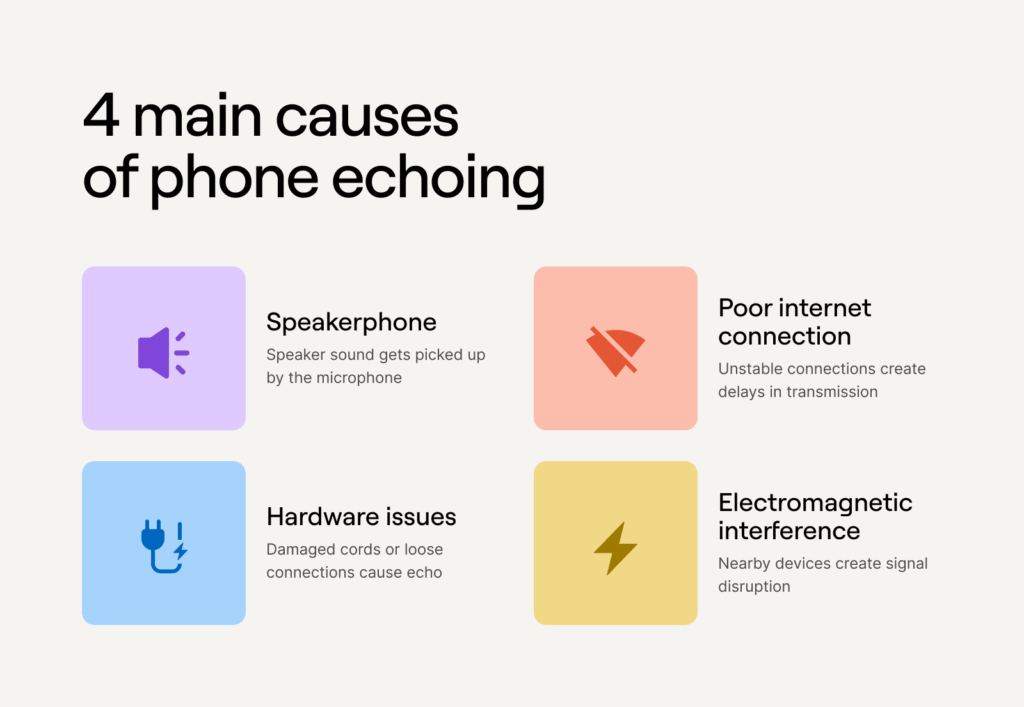
Here are four common causes of phone echo issues, along with four troubleshooting tips to solve them quickly.
1. Speakerphone picking up the caller’s voice
When a customer’s voice plays through your phone’s speaker, it might get picked up again by your microphone. If your speaker volume is loud, for example, this will create a feedback loop, which leads to phone echo on the customer’s side.
This can happen on any device, whether you’re using an Android like a Samsung Galaxy or Google Pixel, an iPhone, a deskphone, or a softphone (aka a call from a browser).
It might also be why customers keep hearing phone echoes even when you call from a different number.
How to fix
The obvious solution is turning off the speakerphone to stop your mic from picking up the caller’s voice. But if you don’t want to keep your phone pressed against your ear all day, you could try switching to headphones, an earpiece, or a Bluetooth headset.
You could also try lowering your speaker volume, especially in quiet environments where even small echoes are more noticeable. Your device might also have “noise cancellation” features, which you can usually find in your phone or app settings.
Top tip: You can test these fixes by calling a coworker and having them double-check your sound before hopping on a customer call.
2. Hardware issues
If you’re using a phone that’s connected to a damaged handset cord, a faulty Ethernet cable, or a loose wall jack, you might experience phone echoing during calls.
Even high-quality VoIP phones can give an echo if there are hardware issues.
How to fix
If you suspect hardware issues but don’t know where to start, try:
- Testing a different wall jack to see if there’s a loose connection
- Looking for obvious damage or fraying on cords and cables
- Replacing one part at a time (like the handset cord or Ethernet cable)
If you can’t find any obvious issues, it might be the quality of your hardware. Consider upgrading your audio gear or switching to a trusted device you already own (like your device) for a temporary fix.
3. Poor internet connection
If your internet connection isn’t strong or stable enough to support VoIP calls, it could cause delays in voice transmission (also called VoIP jitter). This is more likely to happen when your signal is weak or if you have multiple devices competing for bandwidth.
VoIP phones can technically run on 0.1 Mbps upload and download speed, but most devices should have at least 0.3 Mbps to avoid issues. You can check your network for connectivity issues by running an internet speed test with tools like Ookla.
How to fix
The most obvious solution is upgrading your internet plan. If this isn’t an option, you can reduce the number of devices using your bandwidth. For example, switch off phones and computers not in use or run fewer devices at the same time.
Keep in mind you don’t need WiFi — you could always use a wired Ethernet connection instead. This may provide a more stable internet connection since it’s plugged directly into your router.
Don’t want to pay extra or don’t have time to wait for an upgrade? You could temporarily take calls in places with more reliable internet, like a library, coffee shop, mall, or other places with public WiFi.
4. Interference from nearby electronics
If all else fails and you’re still trying to figure out how to stop echo on phone calls, electromagnetic interference (aka, big electronic fields near your phone) might be to blame. Some electronic devices, like monitors, routers, and computers create large electrical fields that can get picked up by and interfere with VoIP phones.
How to fix
Start by moving your device away from large electronics to reduce the chances of signal interference.
If you have a VoIP cell phone or landline, for example, don’t place it on a desktop computer, behind a monitor, or next to a power strip.
Start having more reliable calls with Quo (formerly OpenPhone)

Phone echo is a common and frustrating issue. But depending on your phone provider, you might be experiencing it more than you have to. If you’re tired of constantly troubleshooting calls, it’s time to choose a reliable VoIP platform like Quo.
Quo is a small business phone system that offers unlimited calls and texts to US and Canadian numbers. You’ll get all the flexibility of a traditional phone system (like the ability to answer calls on a desktop, mobile, or tablet) while avoiding the issues that come from low-quality or incompatible equipment.
Here’s how you can use Quo to make calling more efficient for your team:
- Solve customer problems as a team with shared numbers by allowing reps to make and receive calls and texts using the same phone number. No single person will feel like a bottleneck, and you can rest easy knowing there’s always someone around to pick up the phone when a customer calls.
- Store detailed records for quality assurance with automatic and on-demand call recordings. You can get context faster and respond to customers quicker with transcripts and AI call summaries since you won’t need to listen back on entire conversations.
- Never miss another call with our AI agent, Sona. It picks up the phone even when your company is closed, answers frequently asked questions, and captures customer information so you can follow up when you’re available.
- Instantly organize past conversations. You can use AI call tags to sort calls by different topics, like customer sentiment. That way, you can prioritize specific customer callbacks, delegate tasks more efficiently, and spot recurring issues to improve the customer experience (like adding more FAQs to your website).
- Connect the tools you’re already using so you can build automated workflows that complete after-call work. For example, you can connect with CRMs like HubSpot and Salesforce and 7,000+ other apps via Zapier, Make, and the Quo API.
- Text customers directly rather than just making voice calls. You’ll get unlimited SMS and MMS in the US and Canada, plus features that help you save time, like scheduled texts, auto-replies, and snippets.
For all these reasons and many more, Quo is the phone system for 60,000+ fast-growing businesses.
No need to take our word for it, though.
See for yourself what makes Quo the best virtual phone service for small business owners.
FAQs
You can stop echoing on your Android phone by:
– Turning off your phone’s speaker and using earphones
– Moving away from devices that might interfere with calls (sometimes including other phones)
– Checking for broken or incompatible hardware
– Using an Ethernet connection if you’re using the internet to make and receive calls; on older devices, you may need an adaptor to do this
You can troubleshoot phone echo on Apple devices by:
– Switching from speakerphone to earbuds or “regular” calling
– Upgrading your internet connection for more bandwidth
– Making calls from places without large electrical interference from electronic devices (think monitors and desktops)
– Replacing broken hardware or switching to a provider that doesn’t require extra hardware, including Quo