You’re up on an A-frame ripping out asphalt shingles when your phone buzzes for a second time. Maybe it’s an estimate request. Or maybe it’s an emergency request. Either way, you can’t climb down in time to take the call safely.
Does this scenario sound familiar? As a roofer, it might. You likely spend most of your day on job sites or in trucks, and not sitting at a desk answering phones. Traditional phone systems aren’t equipped to handle situations like this. But Voice over Internet Protocol, or VoIP, systems are. These can help roofers build better customer relationships even while their hands are full or they’re clocked out for the day.
Below, we break down the best roofing phone systems, then compare their features and pricing so you can make an informed decision.
Comparing the best phone systems for roofing businesses
Curious how the best platforms match up? Get a high-level breakdown of the best roofing phone systems in this comparison chart:
| Provider | Starting price | Unlimited calls to US & Canada | SMS/MMS to US & Canada | Shared phone numbers | Additional phone numbers |
|---|---|---|---|---|---|
| Quo | $15 per user per month | ✔️ | ✔️ | ✔️ | $5 per number per month |
| RingCentral | $20 per user per month | Limited toll-free minutes | 25 texts per user per month | Calls only, texting requires add-on | $4.99 per number per month |
| Grasshopper | $14 per month | ✔️ | MMS messaging for local numbers only | ✔️ | $9 per number per month |
| Nextiva | $15 per user per month | ✔️ | 100 texts per user per month | Calls only, texting requires upgrade | Undisclosed fee |
| Dialpad | $15 per user per month | ✔️ | For US and Canadian customers only | ✔️ | Requires upgrade |
| Zoom Phone | $10 per user per month | Requires upgrade | US, Canadian, and Australian numbers only | Calls only, texting requires add-on | $5 per number per month |
| Vonage | $13.99 per user per month for up to four users | ✔️ | Local US and Canadian numbers only | Requires upgrade | Cost varies |
| Ooma Office | $19.95 per user per month | ✔️ | Requires upgrade | Requires upgrade | $9.95 per number per month |
| Phone.com | $15 per user per month | ✔️ | Requires upgrade | X | $4.99 per number per month |
Now, let’s start with the #1 VoIP platform as rated on G2:
1. Quo
Best for: Growing roofing businesses that want to scale
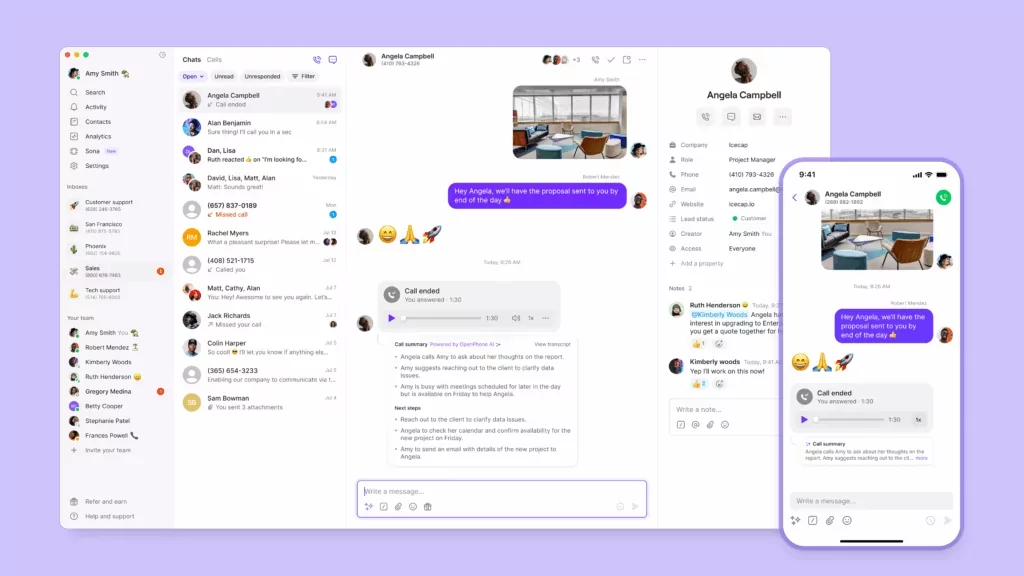
Quo, formerly OpenPhone, is a modern business phone system for roofing teams that take calls while on the go. You get unlimited calls and texts in the US and Canada on every plan, so you can handle estimates, follow-ups, and service calls without usage limits. Plus, you get one local US, Canadian, or North American toll-free number with every new user on your account. And everyone on your team can make and receive messages on the devices they already own, such as their smartphones, tablets, and laptops. They don’t need new hardware to get started. Plus, they can tell when incoming messages are for work versus personal conversations.
Quo brings all customer information together into one platform so your roofing team doesn’t have to switch between tools. Need more context on past conversations? Each team member can see every call, text, voicemail, and recording under the same contact thread. With Quo, your roofing company will always look professional with features like:
- Custom voicemail greetings. For example, you can have different voicemail greetings for during and after-hours calls, so you can set expectations when you’re unavailable.
- Auto-replies. Instantly respond to missed calls or texts. That way, roofing teams can respond faster and set expectations for when callers can expect a response.
- Scheduled texts. Set a specific date and time for a message to go out. This helps you plan communication in advance and avoid sending messages off the clock or outside normal business hours.
- Jobber integration. Automatically create communication records in Jobber when calls are made in Quo. Your call summaries and transcriptions will also sync to Jobber Requests, so your team doesn’t have to retype notes or switch between tools. You can also click-to-call within Jobber using your Quo number, making it easier to follow up with leads and customers.
Quo also connects with more than 8,000 third-party apps, so you can easily automate day-to-day tasks. For example, you can use Quo’s Zapier integration to automatically send a message when a new job is scheduled in Housecall Pro. Customers receive a confirmation notification without your team needing to follow up manually.
You can also use Quo’s Zapier integration to automatically send a message when a payment is received in ServiceTitan. Now you can quickly check if a customer has paid their invoice without tabbing between multiple tools.
What if you’re too busy to pick up the phone? Or if you’re out for the day? With Quo, you can use its AI roofing tools to route incoming calls to an answering service for your roofing business called Sona.
Sona automatically picks up the phone, takes messages, and answers common questions without a human present. This AI answering service can even send texts with booking links during live calls so you can automate in-person estimate visits.
Here’s an example summary of a call handled by Sona:

All these features, among many others, can help your roofing business scale and keep up with customers as you grow.
No need to take our word for it, though.
See how Pink’s Windows uses Quo to maintain customer communications across more than 75 franchises.

Key features of Quo
- User-friendly mobile, desktop, and web apps
- Shared numbers and inboxes
- Auto-replies
- Scheduled messages
- Call routing
- Roofing answering service
- CRM integrations
- Call recording
- Call transcriptions and summaries
Quo pricing

Quo’s pricing plans are uniquely designed to scale alongside your business needs:
- Starter: $15 per user per month for unlimited domestic calling, voicemail transcripts, Quo API, business hours, internal threads, and more
- Business: $23 per user per month for phone menus, AI call summaries and transcripts, group calling, custom ring orders, CRM integrations, analytics, automatic call recording, live chat support, and call transfers
- Scale: $35 per user per month for AI call tags, dedicated onboarding, inbound phone support, and priority chat and email support
How to get a business phone number with Quo
Getting a phone number for your roofing business is easy when using Quo as your virtual phone number provider. You can get a new number in three steps:
-
- Sign up for an account with Quo. When you sign up, you can try Quo for free for seven days.
-
- During signup, select your city or area code in the US or Canada to pick your phone number or a North American toll-free number.
-
- After choosing your preferred plan, you can start calling and customizing your phone settings.

You now have a virtual phone number for your roofing business. Have an existing US, Canadian, or North American toll-free business number? You can also move your number over to Quo for free once you’ve activated your account and co
2. RingCentral

Best for: Desk phone support
RingCentral is a VoIP service that lets you buy or rent desk phones on every plan. The platform also provides mobile and desktop apps, so you can send text messages and make video calls on all of your devices.
But while RingCentral offers unlimited domestic calls in the US and Canada, you don’t get unlimited SMS messages. You only get 25 messages per user per month on the base plan.
Keep in mind there’s no unlimited storage for files, messaging, or call recordings unless you upgrade to the Ultra plan. Even then, it’s subject to time-based deletion policies. For example, call recordings are automatically deleted after 90 days. Other business phone systems for roofing companies, like Quo, offer unlimited storage on every plan.
Key features of RingCentral
- Business SMS and MMS
- Unlimited domestic calls in the US and Canada
- Virtual receptionist, with an upgrade
- Phone menus
- Desk phones for rent or purchase
RingCentral pricing

There are four RingCentral pricing plans for business phone users:
- Core: $20 per user per month for calls in the US and Canada, 25 text messages, 100 toll-free minutes, phone menus, and 200-participant video meetings
- Advanced: $25 per user per month for advanced call monitoring, 100 text messages, 1,000 toll-free minutes, unlimited internet fax, and automatic call recording
- Ultra: $35 per user per month for 200 text messages, 10,000 toll-free minutes, device analytics, and alerts
- Customer Engagement Bundle: Must contact their sales team to get pricing for the Business SMS Booster add-on, which gives you access to tools like a shared SMS inbox, and the Call Queues Booster add-on, which lets you set up a callback option from queues
3. Grasshopper

Best for: Multi-digit phone extensions
Grasshopper’s legacy system launched in 2003 as a business phone number app for entrepreneurs. Today, it offers a suite of features, including virtual phone number extensions. That means you can route calls to specific people or departments from your main business number.
Despite Grasshopper’s 20+ year legacy, it still lacks features most roofing companies need. For example, the only third-party integration it offers is with Google Voice. This means you won’t be able to sync call activity into your CRM. Plus, call recording isn’t available on the base plan.
You should know that the base plan only supports one user. To use Grasshopper with your team, you’ll have to start with the Solo Plus plan for $25 per month.
Key features of Grasshopper
- Interactive voice response, or IVR, with an upgrade
- Custom greetings
- Call recording, with an upgrade
- Call forwarding
- Simultaneous call handling, with an upgrade
Grasshopper pricing

Grasshopper pricing plans offer three different options:
- True Solo: $14 per month for one user, one phone number, and one extension
- Solo Plus: $25 per month for unlimited users, one phone number, three extensions, call recording, and simultaneous call handling
- Small Business: $55 per month for unlimited users, four phone numbers, and unlimited extensions
4. Nextiva

Best for: Omnichannel messaging
Nextiva is a customer experience management platform. That means it routes conversations from multiple channels to a single platform. Nextiva currently supports voice, chat, SMS, email, social, and messaging apps. Roofers can use its review management tools to monitor and reply to reviews posted on multiple websites.
Nextiva offers several features that home service companies may find useful. For example, the voicemail with AI transcription feature is available on the base plan. But if you want AI transcription and summarization for calls, you’ll need to upgrade to the Power Suite CX plan. This costs $75 per user per month, which is five times the cost of the base plan.
Another consideration is limited SMS. You only get 100 text messages per user per month on the base plan, which may not be enough for fast-growing roofing companies. Nextiva alternatives like Quo offer unlimited SMS and MMS to the US and Canada on every plan. That way, you never have to pay extra for overages during high-volume months.
Key features of Nextiva
- Toll-free numbers and minutes, with an upgrade
- Shared SMS inbox, with an upgrade
- Video meetings
- Call routing
- Mobile app support
Nextiva pricing

You can choose from one of three Nextiva pricing plans:
- Core: $15 per user per month for simple IVR, inbound and outbound voice support, voicemail with AI transcriptions, video conferencing, and call routing
- Engage: $25 per user per month for digital fax, 2,000 toll-free minutes, voice call recording, and live chat and chatbot features
- Power Suite: $75 per user per month for omnichannel conversation history, usage-based AI transcription and summarization, and skills-based routing
5. Dialpad

Best for: Contact centers
Dialpad’s VoIP system is primarily designed for contact centers. For example, you can set up video meetings, make voice calls, and send SMS or MMS texts. Its video meetings also come with waiting rooms and in-meeting chat, so you’ll be able to keep your clients engaged.
Keep in mind, Dialpad only lets you buy additional phone numbers if you upgrade to the Pro plan. That’ll cost you $25 per user per month.
Some of Dialpad’s call routing features are limited. Ring groups, for example, are limited to three on the base plan. If you need more, you’ll need to upgrade to the Pro plan. But the Pro plan also requires a three-user limit. That means you’re technically paying at least $75 per month just to unlock additional ring groups.
Key features of Dialpad
- Unlimited domestic phone calls
- Call forwarding
- iOS and Android apps for mobile devices
- Voicemail-to-email transcription
- Salesforce phone integration, with an upgrade
Dialpad pricing

Here’s what you can expect from Dialpad’s pricing plans:
- Standard: $15 per user per month for custom call routing, multi-level auto-attendants, three-way calling, and automatic spam detection
- Pro: $25 per user per month with a three-user minimum for additional phone numbers, CRM integrations, up to 25 ring groups, hold queues, and up to 10 office locations
- Enterprise: Contact for pricing for a 100-user minimum, unlimited office locations, unlimited ring groups, extensions, and single-sign-on
6. Zoom Phone

Best for: Zoom users
You’re likely already familiar with Zoom’s cloud-based video platform. In 2019, it expanded to offer a VoIP add-on called Zoom Phone. It includes the basics most roofing businesses need, like call recording and auto-attendants.
You should know Zoom Phone’s base plan doesn’t offer unlimited outbound domestic calling. That means you’ll have to pay $0.0242 per minute for every outbound call you make in the US or Canada — unless you upgrade your plan. Not ideal for roofers who spend a lot of time on the phone.
Compare this to Quo’s base plan, which offers unlimited calls in the US and Canada.
Bottom line: If you’re not an existing Zoom user, Zoom Phone may not be the best business phone system for your roofing company.
Key features of Zoom Phone
- Desk phones and handsets, with an add-on
- Enhanced call queue metrics, with an add-on
- 15 GB of cloud storage, with the most expensive plan
- Auto-replies, with an add-on
- Call recording
Zoom Phone pricing

Here’s what you’ll pay and the features you’ll get with each Zoom Phone pricing plan:
- US & Canada Metered: $10 per user per month for metered domestic calling, texting in Canada and the US, Zoom video meetings, and an auto-attendant
- US & Canada Unlimited: $15 per user per month for unlimited domestic calling, and the option to purchase its international calling add-on to make unlimited international calls to 19 countries
- Pro Plus: $18.33 per user per month for access to Zoom Workplace Pro, which includes unlimited meetings for up to 100 participants and Zoom Docs
- Global Select: $20 per user per month for unlimited calling within more than 40 countries and a direct dial number
- Business Plus: $22.49 per user per month for access to Zoom Workspace Business, which offers features like unlimited online whiteboards
7. Vonage

Best for: Video conferencing
Vonage is a cloud-based VoIP solution that runs on both desktop and mobile apps. It also supports VoIP desk phones if you upgrade to the Premium plan, which costs $20.99 per user per month. Vonage also offers video meetings. These can help roofers better connect with their clients or subcontractors remotely.
But where Vonage falls short is with its calling and texting features. You do get unlimited domestic calls in the US and Canada. But basic features like on-demand call recording require the most expensive plan, at $27.99 per user per month. And even then, you only get 15 hours of recording per month.
What about sending scheduled texts? This requires setting up one of Vonage’s many APIs. Unless you’re already familiar with coding, you’ll likely need developer support. You also have to factor in API fees, plus ongoing monitoring and maintenance. If you’re looking for features similar to Vonage’s, including a turnkey phone system, explore Vonage alternatives.
Key features of Vonage
- SMS and MMS support
- Unlimited calls in the US and Canada
- Traditional voicemail support
- Call groups, with an upgrade
- On-demand call recording, with an upgrade
Vonage pricing

The exact cost of a Vonage pricing plan depends on the size of your team.
Here’s what you’ll pay for up to four users:
- Mobile: $13.99 per user per month for unlimited domestic calling, access to desktop and mobile apps, multi-level IVR, voicemail-to-email, and the VBC Admin Portal
- Premium: $20.99 per user per month for team messaging, video meetings, desk phone support, and access to the VBC App Center for third-party integrations
- Advanced: $27.99 per user per month for on-demand call recording for up to 15 hours, call groups, and visual voicemail
8. Ooma Office

Best for: Overhead paging and analog fax
Ooma Office is a VoIP service provider that lets you make unlimited calls in the US, Canada, Mexico, and Puerto Rico. It’s a solid choice for roofing contractors who manage a physical office, with features like analog fax and overhead paging. But keep in mind your roofing business might not need these, or may outgrow them altogether.
But there’s not much to write home about with Ooma’s base plan. Unfortunately, most of its best features require one or more upgrades. For example:
- If you want access to Ooma’s Microsoft Teams integration, you’ll need to upgrade to the most expensive plan. But there’s no public pricing available online. Instead, you’ll need to contact sales.
- Texting isn’t available on the base plan. If you need it, you’ll have to upgrade to the Pro plan. This starts at $24.95 per user per month and only gives you 250 messages per team member.
- Call recording requires you to upgrade to the Pro plan. But Ooma alternatives like Quo let you record calls on the base plan.
Key features of Ooma Office
- Unlimited calls in the US, Canada, Mexico, and Puerto Rico
- Virtual receptionist
- Digital fax
- Apps for Android and iOS smartphones
- Calling from the desktop app, with an upgrade
Ooma Office pricing

Ooma’s pricing has three tiers:
- Essentials: $19.95 per user per month for ring groups, virtual receptionist, call transfers, call forwarding, desk phone support, and access to a company directory
- Pro: $24.95 per user per month for 250 texts per month, call recording, enhanced call blocking, and the ability to make calls from the desktop app
- Pro Plus: $29.95 per user per month for 1,000 texts per month, team chat, hot desking, call queueing, and integrations with CRM systems
9. Phone.com

Best for: Buying global phone numbers
Phone.com is a communication solution that’s a popular choice for roofers expanding to international locations. Global phone numbers start at $4.99 per number per month for the following countries:
- The United States
- The United Kingdom
- Canada
- France
- Germany
- Israel
- The Netherlands
- The Czech Republic
But where Phone.com falls short is with tacked-on fees. Call recording, for example, costs an extra $8 per month — unless you upgrade to the most expensive plan, which costs $33.33 per user per month. That’s more than double the cost of the base plan.
There are other “premium features” that require add-on fees. Want to connect your desk phone to Phone.com? This costs an extra $4.99 per device per month on the base plan. What about setting up CRM integrations? You’ll have to upgrade to the highest tier.
Key features of Phone.com
- Video meetings
- Fax from phone
- Hold music
- AI-powered call routing and scheduling
- ProSIM second line with data, requires an add-on
Phone.com pricing

You can pick from one of three plans on Phone.com:
- Basic: $15 per user per month for unlimited domestic minutes, one number per account and user, video conferencing, and simple IVR
- Plus: $22.50 per user per month for support for IP desk phones, voicemail transcriptions, and text messaging
- Pro: $33.33 per user per month for call recording, call analytics, CRM integrations, and 10 years of data retention
Key features roofers should look for in a roofing phone system
In the roofing industry, you need a phone system that helps you avoid the hassle of outdated landlines. A business phone system can help you increase customer satisfaction and give your team the flexibility to work from anywhere.
With this in mind, here are the features to look for in a roofing phone system :
- After-hours coverage. Look for roofing business software that can help manage communications even when you’re off the clock. For example, time-of-day call routing lets you forward calls to an external emergency phone number after hours. Or, simply direct callers to your AI voice agent, like Sona, to answer routine questions and follow up the next day.
- Business texting. Look for unlimited texting support in the US and Canada. That way, you can send quotes and project updates from your business number via SMS. With MMS, you can also share photos and videos with customers.
- Text automations. Save your team time by automating routine business texts. First, use scheduled texts to automatically send confirmations, reminders, and follow-ups. Then set up auto-replies to instantly respond to missed calls and texts.
- Team collaboration tools. Split responsibility for incoming calls and texts by sharing the same number between multiple team members. With Quo, your team can also use internal threads and mentions. This lets them have private discussions behind the scenes without switching between apps.
- Third-party integrations. The best roofing phone systems connect to the platforms you already use. That way, you can keep all your information in the same place. Quo, for example, connects with tools like Jobber so you can sync AI call summaries and transcripts without leaving the app.
Quo: The best phone system for roofing

As a roofer, you can’t always be available to pick up the phone. But with a business phone system, you don’t need to. The right platform ensures customers can reach you easily — even after hours — so trust builds faster and jobs close sooner.
Quo helps roofing companies deliver that experience with call handling, shared numbers, and phone menus. You also get unlimited calls and texts in the US and Canada. Plus, Quo provides AI contractor features, like an AI agent, Sona, to take calls on your behalf. Then, you can set up call routing rules to keep communication organized even during busy or seasonal rushes.
Confirm that Quo is a fit for your roofing company by signing up today for a seven-day free trial.
FAQs
Roofing businesses work best with cloud-based phone systems that let them:
– Have more flexibility than traditional phone systems, such as using the best AI voice agents to automatically pick up the phone
– Handle support calls and texts from job sites without being tied to a desk phone
– Answer phones without having to pay for old-fashioned cell phone service business plans
– Share a business number and split responsibility for calls and texts
The most efficient phone system for roofers works with existing devices on job sites and while working in trucks. That’s why hundreds of roofing contractors use Quo’s business phone system to grow their businesses. Each plan comes with unlimited calls and texts, AI voice agents, and more.
To ensure scalability and streamline your growth, roofers need a business phone system that:
– Offers simultaneous calls to support the size of your team
– Automates the workflows and platforms you currently need
– Allows you to make and receive calls from wherever your team prefers
With Quo, you get all this and more for $15 per user per month.