


For current Verizon customers, Verizon One Talk may seem like a solid business phone solution. All phone numbers come with basic features you can bundle with your existing plan.
However, the One Talk app is far from a perfect phone service — and for thousands of small businesses, the features aren’t a good value for the price. Between contractual obligations and inconsistent service, most people end up looking elsewhere.
In this guide, we’ll share seven Verizon One Talk alternatives that might be what you’re looking for. But first, let’s look at everything you need to know about Verizon One Talk.
How we tested Verizon One Talk alternatives
We measured Verizon One Talk’s competitors based on seven factors:
- Call quality and reliability. We tested and reviewed user reports on uptime and audio clarity. We also looked at how each provider performed for teams splitting calls across mobile and desk phones, since that’s core to what One Talk offers.
- Setup and onboarding. We assessed how easy it was to create an account, port an existing number, and get a team calling within a day. We ruled out options with slow onboarding or tools you couldn’t set up without speaking to a customer support or sales rep.
- Overall value. We compared pricing tiers, per-number costs, and add-on fees. We looked for tools that offered the most value at an affordable price.
- Third-party integrations. We checked which providers connect with tools teams already use. This included CRMs, help desks, and field service management software.
- Design and ease of use. We evaluated how quickly a non-technical person could set up features like call routing without needing a rep on the phone.
- Customer support. We looked at what support channels each provider offers. We also checked how fast they responded and whether users report getting stuck without help — a recurring complaint with One Talk.
- Reviews from real users. We analyzed customer feedback across review platforms. Then, we synthesized it to find common strengths, recurring issues, and overall satisfaction.
7 Verizon One Talk alternatives
Verizon One Talk may not be everything you thought it was.
Fortunately, seven business phone service solutions may be a better option for your company.
| Provider | Best for | Starting price | Unlimited calling to US & Canada | Unlimited SMS/MMS to US & Canada | Additional phone numbers |
|---|---|---|---|---|---|
| Verizon One Talk | Verizon users | $20 per line | Depends on Verizon plan | Depends on Verizon plan | $15 per number per month |
| Quo | Small and growing businesses | $15 per user per month | ✓ | ✓ | $5 per number per month |
| Grasshopper | Phone extensions | $14 per user per month | ✓ | ✓ | $9 per number per month |
| RingCentral | Deskphone rentals | $20 per user per month | ✓, limited toll-free minutes | X, 25 messages per user per month | $4.99 per number per month |
| CloudTalk | Power dialers | $25 per user per month | US and Canadian customers only | Requires upgrade | $9 per number per month |
| Aircall | Call centers | $30 per user per month, three-user minimum | ✓ | X | $6 per number per month |
| Dialpad | Advanced AI needs | $15 per user per month | ✓ | X | Requires upgrade, then $5 to $15 per month |
| Nextiva | Omnichannel communication | $15 per user per month | X | X | Undisclosed fee |
1. Quo: Best Verizon One Talk alternative for growing teams

Pros
- Unlimited calls and texts in the US and Canada
- Local, toll-free, and vanity numbers are available
- Shared numbers to split responsibility for incoming calls and texts
- Texting automations
- On-demand and automatic call recording and transcription
- Integrations with 9,000+ third-party apps, including HubSpot and Salesforce
- AI features for call transcriptions, summaries, and action items
- Virtual receptionist to cover calls 24/7
- HIPAA compliance with a signed BAA
Cons
- No verification through two-factor authentication*
*Nearly all virtual phone numbers share this problem. For safety reasons, companies like Facebook, Uber, and Google rarely let you authenticate accounts through a virtual phone number.
Quo is a modern business phone system you can use on your computer, smartphone, or tablet. Each user gets a local or toll-free US or Canadian business phone number with unlimited calling and texting. This way, you can stay accessible and build better relationships without worrying about costs adding up.
All Quo numbers come with their own inbox. This keeps a record of all the phone activity on that number. You can easily see business call recordings, voice messages, and texts in a single view under individual contact threads.
Want your team to split responsibility for incoming calls? With shared numbers, everyone can call and text from the same number. Here’s what a shared inbox looks like on Quo:

Unlike Verizon One Talk, Quo doesn’t require you to be a tech genius to set up your call flow. Want calls to go to an emergency number after hours? Need calls to ring your team in a specific order during hours? What if you want to add a phone menu?
Use Quo’s drag-and-drop call flow builder to set up your routing in a way that fits you. Don’t try to make your business fit your phone.
For additional coverage, Quo offers a 24/7 AI voice agent, Sona. Once trained on your business, Sona can answer calls when your team is unavailable, qualify leads, take messages, and handle routine questions.
You can customize its responses and test it with demo calls before going live so it fits your workflow from day one.

Switching from Verizon One Talk because of its call unreliability? Quo has a high uptime history. But if you do ever struggle on a call, you can open Quo’s call quality metrics right in the middle of it and see exactly what’s going wrong. Instead of guessing why the connection is bad or letting the customer sit through it, you can spot the issue and fix it in real time.

Unlike One Talk, you can get started in just minutes using Quo, and if you have any questions, our support team is ready to answer.
When you sign up for Quo, you get clear pricing upfront. Plans start at just $15 per user per month. We make it easy to choose a plan that meets your needs right now, which makes it easier to upgrade whenever the time is right — no preloaded devices or long contracts are required.
Key features of Quo
- Free calls and texts, both SMS and MMS, to Canada and the US
- Phone menus or auto attendants
- Voicemail transcriptions that can be accessed from any device
- Automatic call recording for all phone numbers
- Integrations with dozens of apps, including Claude and CRMs like HubSpot, Salesforce, Jobber, Zoho CRM, and Pipedrive
- 9,000+ third-party integrations via Zapier and Make
- AI conversation analytics built in and also through connection to tools like Claude
- Auto-reply text options and saved text templates with snippets
- AI-generated message responses
- Call summaries and transcripts
- Mobile, desktop, and web apps across Mac, Windows, iPhone, Android, and a browser
- AI contact suggestions
Quo pricing
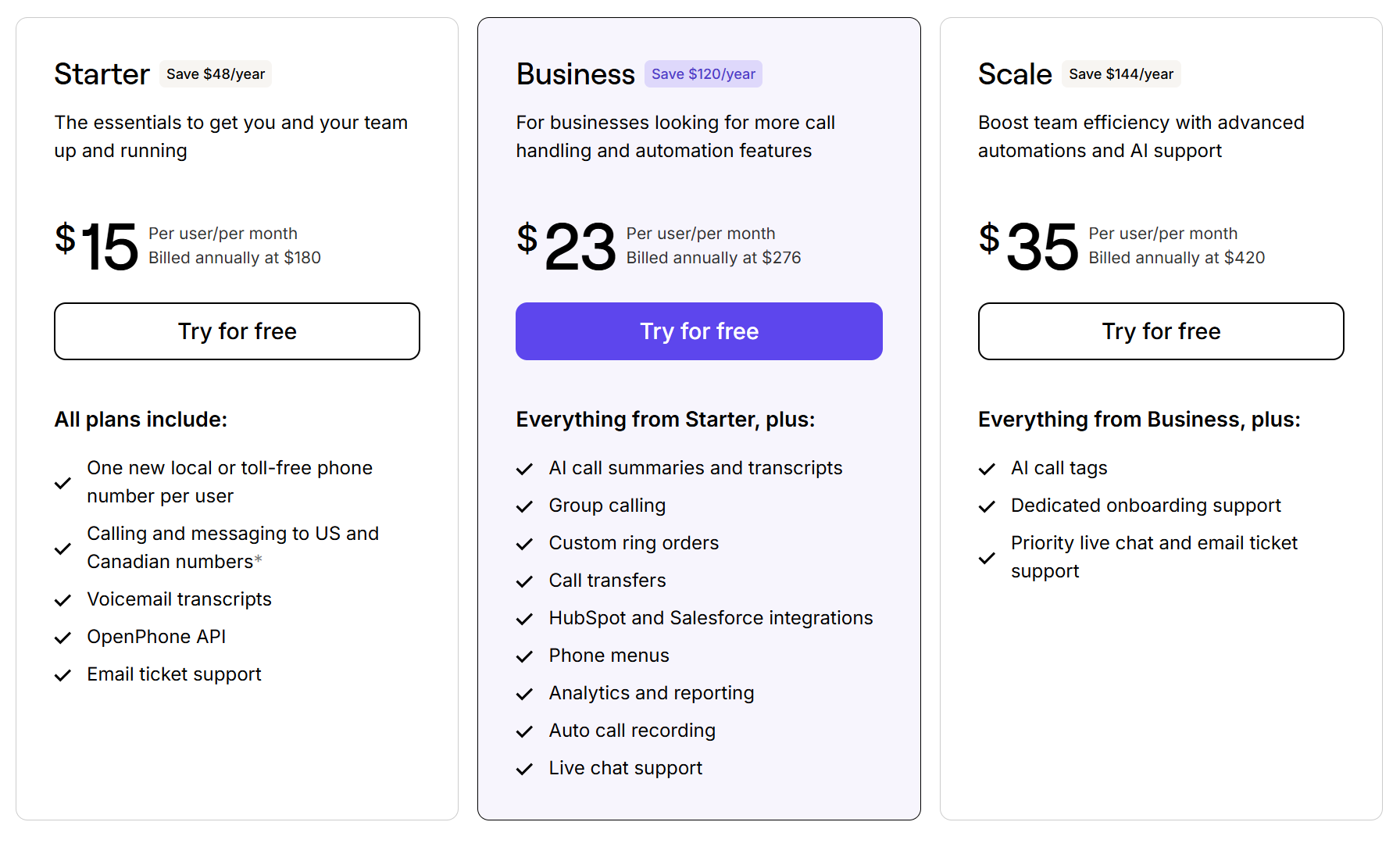
- Quo offers transparent pricing and some of the best rates in the industry for must-have business phone features:
- Starter: $15 per user per month for shared phone numbers, voicemail transcriptions, free calls and texts in the US and Canada, and dozens of ways to streamline your business’s phone communication
- Business: $23 per user per month for IVR auto-attendant, call transferring, CRM integrations, analytics, and more advanced features
- Scale: $35 per user per month for AI call tags, inbound phone support, dedicated onboarding, and priority chat and email support
How to switch and port your number from Verizon One Talk
Get a virtual phone number in minutes

Looking to move your existing phone number to Quo? Porting your number is free, easy, and a great way to keep using an existing number that customers already recognize.
- Set up a Quo account if you don’t already have one.
- Complete our two-minute porting form by logging into the Quo web or desktop app.
- Hang tight; the porting process to get a number from your existing carrier to our platform can take up to 10 business days.
2. Grasshopper: Best for phone extensions

Pros
- Affordable pricing
- Unlimited users, with an upgrade
- Unlimited extensions, with upgrades
Cons
- No integrations besides Google Voice
- Some standard features like call recording and simultaneous call handling require an upgrade
- Major texting limitations
Grasshopper is a fairly basic Verizon One Talk alternative. It has the baseline features you might need, like calling and texting, call forwarding, and voicemail transcription.
The base plan is suited for one user and gives you one phone number and a single extension. If you’re not a solopreneur, you can upgrade for more users and extensions.
But there are some limitations to know:
- There’s no way to purchase additional extensions without upgrading. Even then, you’ll have to pay $3 per extension and $9 per number. That’s nearly double the cost of some VoIP solutions.
- You can’t send international text messages. Keep in mind, with Grasshopper, US states Hawaii and Alaska count as international locations.
- You can’t send MMS through Grasshopper toll-free numbers.
- You can’t send group texts unless you’re using a local phone number.
This is why hundreds of former customers have switched to Grasshopper competitors.
Key features of Grasshopper
- Virtual fax
- Phone extensions
- MP3 voicemail transcriptions for email
- Call forwarding
- Reporting
Grasshopper pricing

Grasshopper’s pricing plans depend on how many phone numbers and extensions you need:
- True Solo: $14 per month for one user, one phone number, and one extension
- Solo Plus: $25 per month for unlimited users, one phone number, three extensions, call recording, IVR, and simultaneous ring
- Small Business: $55 per month for unlimited users, four phone numbers, and unlimited extensions
3. RingCentral: Best for deskphone rentals

Pros
- Built-in video conferencing
- Unlimited calls in the US and Canada
Cons
- Limited texts
- Limited toll-free minutes
- Limited storage space
If you’re still using deskphones but aren’t happy with the Verizon ones, you might consider RingCentral. This Verizon One Talk alternative offers desk phone rentals with their multi-year contracts. You can buy or rent them for as low as $4 per month, along with paying for a subscription to use RingCentral.
But you should be aware of some limitations with RingCentral’s features:
- Toll-free minutes are limited. For example, you only get 100 toll-free minutes on the base plan. That’s not even two hours of calling per month.
- Text messages are limited to 25 SMS per user per month. One conversation with slightly more back-and-forth, and you’re paying additional fees.
- You don’t get unlimited storage for your performance reports or call recordings on any plan. For example, your call history is deleted after 9–12 months.
Reviews for their customer support are also pretty mixed. While some report efficient service, many users across platforms like Reddit and G2 have complaints. Here’s how one user puts it:
“[I dislike the] customer service. I have opened 3 cases about the same issue in [the] past 8-9 days. I get canned responses, and nobody knows what they are talking about.” — G2
Key features of RingCentral
- Video meetings
- Team messaging
- File sharing
- Visual voicemail
- IVR
RingCentral pricing

RingCentral’s pricing offers four plans, which depend on how many users you have. For one to five users, the pricing is:
- Core: $20 per user per month for 100 toll-free minutes, 25 texts per user, and basic call recording
- Advanced: $25 per user per month for 1,000 toll-free minutes, 100 texts per user, advanced call recording, and advanced call queues
- Ultra: $35 per user per month for 10,000 toll-free minutes, 200 texts per user, more storage, and device analytics and alerts
- Customer Engagement Bundle: Custom pricing for shared SMS inbox, company reply templates, SMS compliance management, call back from queue, wait time and place alerts, and all AI virtual Assistant features
4. CloudTalk: Best Verizon One Talk alternative with a power dialer

Pros
- Numbers in 160+ countries
- Unlimited inbound and intracompany calls
- Call queues and queue callbacks
Cons
- Outbound calls cost extra
- International texts require an upgrade
- SMS requires an upgrade
- Integrations require an upgrade
CloudTalk is a solid Verizon One Talk competitor for mid-sized and large sales and customer support teams.
It gives you a second phone number in over 160 countries, and the app is available in eight languages. Plus, features like call queues and preferred agent routing help support teams stay organized at scale.
With an add-on or multiple upgrades, you can get CloudTalk’s power dialer feature. This lets reps automatically dial the next number on their list as soon as a call ends, so they get through their list more quickly.
But a bit of bad news if you’re a business that relies on cold calls or dialing out to your customers. Outbound calls are priced per minute, which quickly adds to your bill.
You also have to pay extra for SMS and MMS messaging, which is only available on the second most expensive plan.
Even caller ID requires an upgrade, which is something most phone services offer for free.
Planning to leave Verizon One Talk because of its high costs? Unless you really need some of CloudTalk’s unique features, it’s probably not the alternative for you.
Key features of CloudTalk
- Unlimited inbound calls
- International number support
- Unlimited callers in queues
- Parallel calling
- Click-to-call options
- International phone numbers
- Desktop, iOS, and Android apps
CloudTalk pricing

CloudTalk’s plans give you three tiers to choose from:
- Starter: $25 per user per month for unlimited inbound calling in the US and Canada, international numbers, call recording, ring groups, call queuing, and click-to-call from CRM
- Essential: $29 per user per month for SMS and MMS, business hours and time-based routing, IVR, and skill and condition-based routing
- Expert: $49 per user per month with a three-user minimum, power dialing, call monitoring, and Salesforce integration
5. Aircall: Best for call centers

Pros
- Unlimited inbound calls and texts in the US and Canada
- International numbers are available in over 100 countries
- Advanced call listening features
Cons
- Three-user minimum on the base plan
- Outbound texts are not unlimited
- AI-generated call summaries require an expensive add-on
- Unlimited call recording storage requires an upgrade
Aircall is a good Verizon One Talk alternative for larger teams that need call listening features. For example, with an upgrade, you get manager call coaching and call whispering. There’s also an AI Assist add-on that gives you talk-to-listen ratios, sentiment scoring, and call summaries.
Speaking of add-ons, you can also set up WhatsApp and Salesforce Voice integrations. This makes Aircall work inside these platforms to give you the most flexibility and convenience for your customers and your team.
Just know that Aircall’s pricing can be prohibitive. There’s a three-user minimum for most plans, which means the cheapest you’ll pay is $90 per month — even if you’re a solopreneur.
To add to your bill, outbound texts aren’t unlimited. Aircall only includes 250 outbound SMS and 50 outbound MMS per user per month before messaging rates apply.
To compare, Quo has no user minimums and gives you unlimited texting and calling in the US and Canada. You also get features like AI call summaries at a much more reasonable price point.
According to one G2 reviewer:
“The biggest issue is misleading pricing and features. The basic plan does not include the power dialer, and to access it, you’re forced into a 3-seat minimum plan that costs almost $250 per month after taxes. Customer support is very difficult to reach, refund requests are refused, and billing practices feel unfair — including charges after cancellation and unexplained add-ons.”
Aircall key features
- 250+ integrations and API access
- Softphone for desktop, Android, and iOS
- Simultaneous calling
- Smart routing, with an upgrade
- Queue callback, with an upgrade
Aircall pricing

You can choose from three Aircall pricing plans:
- Essentials: $30 per license for unlimited inbound calls within the US and Canada, IVR, call recording, click-to-dial, SMS and MMS, with a three-license minimum
- Professional: $50 per license for the Salesforce integration, mandatory call tagging, and advanced analytics and call monitoring, with a three-license minimum
- Custom: Custom price for unlimited calls worldwide, custom analytics, and custom onboarding, with a 25-license minimum
6. Dialpad: Best for advanced AI needs

Pros
- AI tools on every plan
- Video meetings on every plan
- Unlimited calling in the US and Canada
Cons
- Purchasing multiple numbers requires an upgrade
- Zapier integration requires an upgrade
- Higher-tier plans have user minimums
Dialpad is a Verizon One Talk competitor for large sales and support teams. Beyond standard VoIP calling, it has AI features like real-time transcription. Depending on your plan, you can also get live sentiment analysis, call scoring, AI call summaries, and more.
If you’re running a high-volume sales or support team, the AI features can meaningfully reduce post-call admin work. And the analytics give managers real visibility into what’s happening on calls.
But Dialpad gets expensive and restrictive fast, which is where other Verizon One Talk alternatives pull ahead. Each user gets one number, while purchasing multiple numbers requires an upgrade. Extra local numbers start at $5 per month, with more for toll-free or international numbers.
And you only get integrations with Google Workspace on the base plan. Even a simple Zapier integration requires an upgrade.
Speaking of upgrades, be prepared for user minimums. The mid-tier plan has a minimum of three users, and the most expensive plan has a minimum of 100 people.
Key features of Dialpad
- Multi-level auto-attendants
- Team messaging
- Voicemail transcriptions
- Video meetings
- Analytics and reporting
- AI recaps
Dialpad pricing

For their Connect module, you can choose from three different Dialpad pricing plans:
- Standard: $15 per user per month for unlimited calling, AI-powered call and voicemail transcriptions, Dialpad SMS, and Google Workspace integrations
- Pro: $25 per user per month for the option to have additional numbers, Quality of Service reports, auto-replies, and CRM integrations, with a minimum of three users
- Enterprise: Call for a quote for unlimited locations and ring groups, SSO integrations, and live agent support, with a minimum of 100 users
7. Nextiva: Best for omnichannel communication

Pros
- Omnichannel communication tools
- Digital service helpdesk tools
- Video meetings are available on the base plan
Cons
- Limited SMS and MMS
- Toll-free numbers require an upgrade
- Call recording requires an add-on or plan upgrade
Nextiva is cloud-based contact center software for managing customers across multiple digital touchpoints. The base plan gives you calling, texting, and video meetings. You can also connect up to three social media and online review channels.
But the caveat is the price. The starter plan may look affordable. But if you look more closely, Nextiva locks some basic features behind upgrades and add-ons, forcing you to upgrade and pay more anyway.
For example, you only get 100 texts per user per month on the base plan. Upgrading gets that number up to 500 texts. You also need to upgrade for toll-free numbers and call recording.
Key features of Nextiva
- Video meetings
- Social media and review software integrations
- Live chat widgets
- AI call notes and summaries
Nextiva pricing

You can choose from three different Nextiva pricing plans:
- Core: $15 per user per month to access inbound and outbound voice calls, SMS/MMS up to 100 messages per user, voicemail transcriptions, and a simple IVR
- Engage: $25 per user per month to access call recording, a toll-free number and 2,000 toll-free minutes, 500 SMS/MMS per user, video meeting recording, and Microsoft Teams integration
- Scale: $75 per user per month for the inbound sales and service call center, priority and skills-based routing, supervisor dashboard, unlimited texting, up to 10,000 toll-free minutes, and automatic call distribution callback
What you need to know about Verizon One Talk
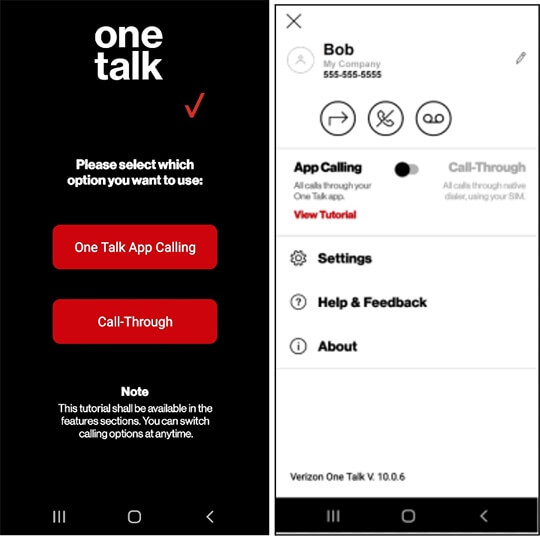
One Talk is a VoIP service you can add to Verizon’s traditional phone plans. You can use One Talk on your phone, tablet, desktop, or Verizon-approved desk phone.
Besides calling and texting, it gives you features like auto receptionists and hunt groups.
But it’s not clear which features you get on which plans or how much “extras” like phone menus might cost.
One Talk is only available to Verizon business customers in the domestic US. So if you’re located in any other country, One Talk won’t be available to you. If you want to get a US number outside the US, you can use Verizon One Talk alternatives like Quo.
Verizon One Talk pricing
Sadly, the heading title is a bit anti-climactic. The truth is that there’s no public information on Verizon One Talk pricing. The only clear thing is that it starts at between $15 and $20 per number. When reaching out to Verizon, we were informed, “A One Talk representative will work with you to customize a package that meets your needs.”
Why businesses turn to Verizon One Talk alternatives
Verizon One Talk lacks clear pricing, reliability, and other key phone features businesses need. While you can make phone calls and send messages in the domestic US, you’ll be hard-pressed to do so at scale — and you won’t be able to do it at all without a preexisting Verizon phone plan.
Here are a few more reasons One Talk customers switch to another provider:
Call reliability issues
Low call reliability is one of the most frequently cited issues for Verizon One Talk customers.
Take a look at these reviews:
“We switched 9 facilities from ATT to Verizon about a year ago. We run everything from restaurants to golf courses to fitness centers. We also run a very busy municipal building. We have been very disappointed. Overall, call quality is poor. Two of our facilities have broken calls constantly. We have tried EVERYTHING to solve the issues. The phones lose their 911 addressing info a lot, which renders them useless.” — VoIP Review
“I am currently using one talk for my single business line, and it’s absolutely horrible, and I have not found a better option… The call quality is horrendous though, even with just my one line using on my personal cell.” — Reddit
“…the service … is glitchy as heck. Calls are dropped repeatedly (always says “Reconnecting”), and notifications take forever to come through. Making calls out often says “you have limited connectivity” and therefore I … have to reach out on my SAME phone and call customers from my personal number…” — App Store
Poor customer service
If you run into trouble with your VoIP number, One Talk’s customer service team may not be much help. Poor customer service is a recurring issue, with hundreds of customers airing their frustrations about the not-so-user-friendly system as well as frequent dropped calls.
Take a look:
“So far, every single thing about my experience with this service has been horrible. All I needed was a second number for my business… Five hours on the phone with support and multiple more by myself troubleshooting…. Terrible, terrible, terrible. I can’t imagine a worse service.” — App Store
“I dropped AT&T business lines to go with One Talk because they pitched it so well. However, it’s been a nightmare. Calls are dropped, when you download the app for some reason it [hijacks] our text from our personal number, and some texts don’t come through.” — Gartner
“Each call to Verizon customer service could only contain one problem. Efforts to solve multiple problems in a single call (ticket) [that were] causing failures in the Verizon system, [required] multiple callbacks by me to clear the failed ticket before a new single-issue ticket could be initiated. The resolution of each problem required no less than 8 calls to Verizon customer service, involving a new person with each call [who had] no idea or interest other than reviewing the account in order to sell us additional services.” — VoIP Review
Desk phones have to be purchased from Verizon
One Talk’s desk phones are essentially business landlines. According to the latest available public information, desk phones have to be purchased directly from Verizon to be compatible with One Talk. You can’t use any preexisting hardware at all, making your upfront costs even higher.
Call routing limitations
Verizon’s simultaneous ring is a call routing feature that rings multiple devices at the same time when you receive an incoming call. In theory, this should help ensure that no call goes unanswered.
However, it comes with limitations. You can only have up to 10 devices ringing at once per number, which may not be enough for larger teams that have multiple people handling calls. Even more limiting, Verizon caps active calls at just three per number — so even if multiple reps are available, only three conversations can happen at the same time.
Lack of ways to save time on repetitive tasks
One Talk offers little to help teams cut down on repetitive, manual work. For example, it doesn’t offer SMs templates to speed up sending repetitive messages. It also doesn’t let you schedule texts to go out in advance.
Want to sync information between different tools so you’re not stuck manually entering the same information twice? The tool only connects with Google Workspace, Microsoft 365, or Salesforce. But there wasn’t enough information publicly available for us to confirm how many tools you can connect at the same time or what other integrations they have.
Verizon One Talk does have an AI feature. Emphasis on “an.” With One Talk, you get Verizon Business Assistant. This is an AI-powered texting tool that responds to customer questions automatically using a knowledge base you build. And it escalates to a live team member when it doesn’t know the answer.
But that’s where One Talk’s AI stops. Compared to modern alternatives like Quo, One Talk lacks AI built for a team’s own workflow. For example, you don’t get call transcription or AI-generated call summaries. This can hold your team back compared to competitors that do save more time with productivity features.
Quo: The best Verizon One Talk alternative

Finding a great VoIP doesn’t have to feel like a task that takes weeks or months. With Quo, we’ve made it easy to start calling and texting fast. Our pricing is business-friendly and transparent. There are zero contracts, and we offer a free trial so you’re sure you like Quo before committing.
Your team can automate routine tasks in your workflows and easily work together to respond to calls and texts. We offer affordable additional numbers and dozens of time-saving features so that as your team scales, Quo can grow alongside you.
See for yourself why thousands of businesses use Quo by starting a free trial today.
FAQs
Verizon One Talk is a mobile-first business phone solution. It lets you use one business number across multiple devices. This includes smartphones, tablets, computers, and supported desk phones.
The best alternative is Quo. With Quo, you get transparent pricing starting at $15 per user per month. Each user gets a local or toll-free number, and you have unlimited calling and texting in the US and Canada. Unlike One Talk, you don’t need an existing Verizon Wireless plan to sign up, and setup takes minutes rather than a conversation with a sales rep.
No, Verizon states One Talk is available to new or existing Verizon Business customers in the domestic US only.
Verizon One Talk alternatives like Quo let you sign up and start calling within 15 minutes to an hour. Just know that if you’re texting US customers, you have to complete carrier registration, which can take 2–7 days. If you’re porting a number to Quo, it can take 3–10 business days, depending on your carrier. These timeframes are common among VoIP providers and not specific to Quo.
Verizon claims to provide enterprise-grade security features. It also includes spam and fraud call filtering. But it doesn’t publish security certifications or compliance documentation for One Talk the way other providers do.
One Talk lets a business share one phone number across multiple devices. It runs on top of an existing Verizon Business Wireless plan and is managed through the One Talk portal. This is where you can configure features like call routing, hunt groups, and auto attendants.
Yes, in most cases. You can port an existing number when moving to a new provider, though the process and timeline vary depending on your new provider and number type.
Toll-free numbers aren’t a standard, self-serve part of the core One Talk feature set. Verizon offers toll-free service, think numbers starting with 8XX, as a separate business product. So you’d need to check with a Verizon rep on how it integrates with One Talk specifically. Alternatives like Quo, by contrast, include a toll-free number with every user on the plan.


