When it comes to business phone systems, there’s still a lot of confusion. Some popular VoIP providers, like Google Voice, don’t make their HIPAA compliance obvious.
In this guide, we’ll answer a common question: Is Google Voice HIPAA compliant? We’ll also cover where it falls short, and what those limitations mean for healthcare teams. And if you’re looking for a HIPAA-compliant phone system for patient-facing teams, we’ll walk you through an alternative to Google Voice.
Is Google Voice HIPAA compliant?
Short answer: yes. Google Voice is HIPAA compliant.
To access the HIPAA-compliant version of Google Voice for business, you need to be on a paid Google Workspace plan. The cost for a Google Workspace account starts at $7 per user per month. On top of that, you’ll also need to pay for a Google Voice subscription, which starts at $10 per user per month.
To become HIPAA-compliant, you need to review and accept Google’s Business Associate Amendment, or BAA. Keep in mind that only Google Workspace Admin accounts can review and accept the BAA. You’ll also need to answer three questions to confirm that you’re a HIPAA-covered entity.
Even though Google Voice follows HIPAA regulations, it isn’t necessarily a good option for healthcare teams. There are Google Voice cons that can impact patient communication, team collaboration, and real-time responsiveness.
6 limitations you should know about Google Voice
Even when configured properly, a Google Voice number isn’t designed for healthcare organizations. You need fast, organized, and team-friendly communication, and Google Voice isn’t any of those things.
Here’s what you should know before signing up for Google Voice.
1. No desktop app
Google Voice doesn’t offer a desktop app — only a web browser experience or the Google Voice app on a mobile device.
For busy healthcare professionals, this creates unnecessary friction. You may be toggling between EHRs, patient schedules, and insurance systems. When care coordinators and front-desk staff are juggling dozens of browser tabs, Google Voice can easily get buried.
If a business phone system isn’t front and center, it can waste healthcare workers’ time. “Click around fatigue” adds up quickly. A desktop phone app makes it much easier to find your business phone system when calls come in.
2. No shared phone numbers limit healthcare team collaboration
Healthcare communication is rarely a one-person job. Nurses, front-desk staff, and billing teams often need access to the same patient conversations.
While Google Voice offers shared phone numbers for calls, this isn’t the case for texting. Teammates can’t see the patient’s full texting history because each message only shows up on the individual staff member’s phone. As a result, responsibilities become siloed, and patient conversations can fall through the cracks even if you can text in a HIPAA-compliant way with Voice.
Shared phone numbers are essential for coordinated patient care. This is especially the case for high-volume clinics or any healthcare setting that handles triage calls.
3. Conversations are kept in separate folders
In Google Voice, phone calls, texts, and voicemails are stored in separate folders. You have to click between folders to piece together a complete history of patient interactions.

For healthcare providers, this is unnecessarily difficult and time-consuming. For example, providers would have to manually compare call history with text threads. You need a patient’s full communication history to get the proper context.
4. Call recording requires an upgrade
Call recording is a critical feature for healthcare organizations. With call recordings, you can review patient instructions or handle disputes. Teams also rely on recorded conversations with patients for internal training.
To record calls with Google Voice, you need the Standard Plan to access on-demand call recording, which is $20 per user per month. For many businesses, manual call recording isn’t a good option because staff may forget to record. Automatic call recording requires the Premier Plan, which is $30 per user per month.
When combined with the cost of Google Workspace, this pushes the cost to at least $37 per user per month. So while Google Voice pricing may seem inexpensive at first, the recording features can tack on costs.
5. No AI features to help teams work faster
As much as Google pushes its Gemini product, a Google Voice account has no AI capabilities at all. You can’t get an automatic call transcription or an AI-powered call summary. You also don’t have access to an AI voice agent to answer calls when your staff is unavailable.
In a healthcare environment, the lack of AI capabilities is a major drawback. Missed calls from people looking to book appointments, for example, impact your team’s bottom line. You’ll also miss important details, and your team loses insights into why patients call and what needs to happen next.
6. Limited texting capabilities for patient communication
Texting has become a core part of modern healthcare workflows. You can use texting to send basic reminders, follow-ups, intake instructions, and more.
There are several texting limits with Google Voice to keep in mind. For example, the platform is limited to US-based SMS messaging and doesn’t offer any international SMS features.
You can’t create any message templates in a Google Voice account either. This creates a lot of repetitive work for your team. Additionally, Google Voice doesn’t offer auto-replies for scenarios like after-hours inquiries. You also can’t schedule texts using Google Voice to ensure you stay TCPA-compliant.
These texting limitations make it harder to maintain consistent communication with patients. It’s also impossible to automate common texting workflows.
How healthcare organizations can stay HIPAA compliant with Quo
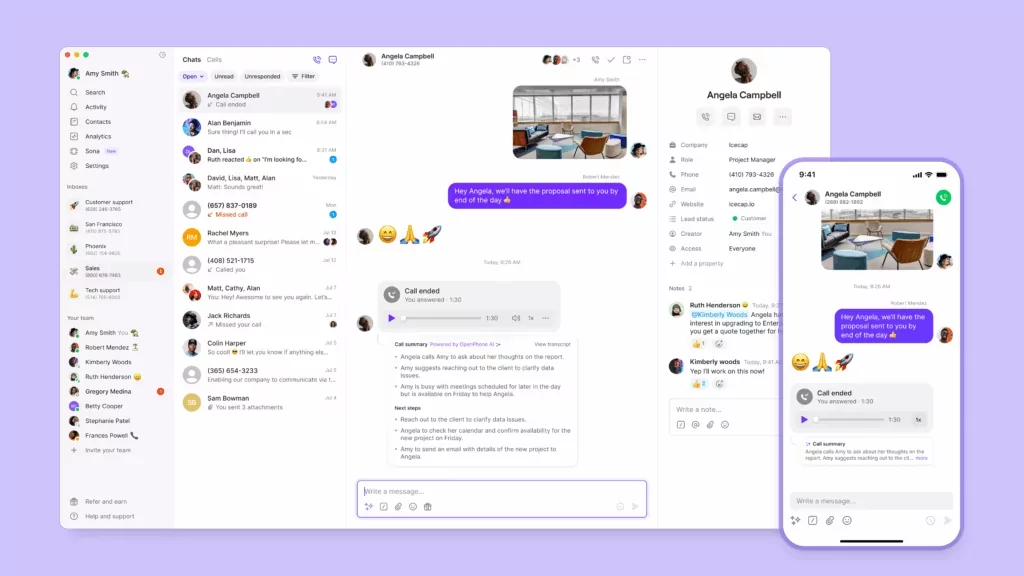
With all the limitations, you might wonder about Google Voice alternatives. Quo, formerly OpenPhone, gives healthcare providers an easier, compliant, and collaborative way to communicate with patients.
To meet HIPAA requirements, you’ll sign a Business Associate Agreement, or BAA, with Quo. The BAA is available on Business and Scale plans.
Quo supports HIPAA-compliant call recordings, voicemails, call transcriptions, voicemail transcriptions, and more. These help your team capture, document, and store patient interactions. You can handle patient calls and texts securely, and PHI remains within Quo’s infrastructure.
With call tags, Quo can automatically categorize calls based on criteria you set up. You might set up tags for “prescription request” or “appointment follow-up.” They can help your team prioritize patient calls and follow up faster.
Plus, Quo automatically logs users out after 15 days of inactivity. This prevents unauthorized access and keeps sensitive patient data secure.
Here are some more of Quo’s features that help healthcare teams provide a better patient experience:
- Shared phone numbers: Team members can use a shared phone number to receive calls and texts from the same phone number. This means fewer missed calls, easier call handoffs between team members, and faster patient response times.
- Unified inbox: All calls, texts, and voicemails appear in one thread. No more clicking through separate folders to reconstruct a patient’s communication history.
- Unlimited calling to the US and Canada: Quo provides you with unlimited calls to the US and Canada.
- Texting automations: Scheduled messages let you queue up texts in advance so patients receive them at the right time. Snippets: Save time with reusable text message templates that prevent your team from having to type the same message over and over. With Quo, you can also send auto-replies for missed calls, voicemails, or texts
- AI agent Sona: Quo’s AI voice agent, Sona, answers calls when your team can’t. Sona can answer FAQs based on the information you provide. It can also take messages, route calls to reps, and send texts during live calls.
Quo: A business phone system built for healthcare compliance

Google Voice can work for very small organizations. However, it wasn’t designed for the complexity or urgency of healthcare communication. It lacks shared numbers, organized patient communication, and modern texting tools. And once you stack all the required add-ons to make it functional, it’s no longer inexpensive.
As a phone service, Quo provides the HIPAA-compliant communication infrastructure healthcare teams need. AI-powered tools like call transcripts, call summaries, call tags, and AI voice agent Sona make it easy to stay on top of patient communication. Shared numbers and unified threads are built for team collaboration. And Quo gives you access to features like IVR, call forwarding, and ring groups that make streamlining call routing easier.
Your team deserves tools that make it easy to communicate with patients. If you’re evaluating HIPAA-compliant phone systems, you can sign up for a seven-day free trial of Quo to confirm it’s a good fit. Once you have an active account, you can fill out this form to receive the BAA.