If you’ve been thinking about getting a Google Voice account to manage your texts, we’ve got some bad news. There’s a Google Voice texting limit that applies to both volume and group chats — and it’s probably not what you’re looking for long term.
But don’t just take our word for it. Let’s take a closer look at the Google Voice texting limit for groups and character count, as well as a couple of ways to encourage a higher limit.
And if you’re tired of sifting through tons of material about how to make Google Voice work, we provide a way to send SMS messages hassle-free.
Can you text with Google Voice?
You can only send text messages with Google Voice if you’re based in the US. Using the Google Voice app, you can send text messages to US and Canadian numbers. Otherwise, you’ll need to text from a different number.
A few things to keep in mind, though:
- With Google Voice, group messages are limited to eight participants.
- Text message lengths are limited to 160 characters unless you’re texting another Google Voice number.
- You can’t send texts to “short code” phone numbers that are only five or six digits long.
- There’s no option to automate any texting touchpoints. Google Voice doesn’t offer integrations with apps like Zapier or provide a Google Voice API.
Can I text with Google Voice for free? How much does it cost?
Texting with a Google Voice number is free. According to the Google Voice website, text messages that you send to US, Puerto Rican, or Canadian numbers don’t use either Voice credits or your cell phone plan’s allotted text messages.
Instead, if you use Google Voice’s mobile app, they’re sent using WiFi or your phone’s data if you’re not connected to WiFi. So, as long as your phone has data, you can send text messages via the Google Voice mobile app or their browser app if you’re on a computer.
However, Google Voice’s personal plan is available in the US and isn’t built for business texting. In the rest of this guide, we’ll focus on how texting with Google Voice for business works.
💡Learn more about Google Voice’s pricing in our guide.
What is Google Voice’s sending limit per text message?
You can send a single message with up to 160 characters to any non-Google Voice number. Anything above that limit will go out as multiple messages. Texts sent to another Google Voice number won’t have a text cap.
There are a few other considerations to keep in mind about this VoIP phone system’s texting limits. You can send as many messages as you want from your Google Voice account, but be prepared to get blocked.
Any messages that look the same, regardless of content, will be flagged by spam prevention bots. Getting reported as spam by other users doesn’t help much, either.
If you go over Google Voice’s per-day texting limit, you’ll be temporarily blocked from texting or calling for 24 hours. Multiple infractions will result in suspension, which also prevents you from accessing your account. You can take things up with the folks behind the suspension notice. However, there’s no guarantee you can get your account back.
What are the group texting limits with Google Voice?
Short answer? It depends. Longer answer? Up to eight people, including yourself. Maybe.
According to support.google.com, Google Voice was never meant for anything bigger than one-on-one convos. Although the platform supports group messages, the limit is capped at eight users — including the original sender. Confusing, we know.
But the Google Voice texting limits don’t just stop here. Any messages you duplicate and send to a list of other people can get your account suspended. If you ever need to send a text to more than seven people at a time, just make a phone call instead — or better yet — switch to a Google Voice alternative. It’s not worth the headache.
As you might imagine, the Google Voice group text limit can be restrictive for growing businesses that rely solely on the Google Voice app. And if you need to text a lot of people at once, you might want a different solution.
What can cause your Google Voice account to have a lower sending limit?
So let’s clear the air. First: there’s no preset limit to the number of texts you can send. It might be 40 or 40,000. But there’s no way to know what Google Voice’s limit is on individual accounts.
According to the voice.google.com forums, Google Voice users might have a lower sending limit because of:
- Rapid-fire messages, every 1.5 seconds-ish
- Including links to URLs
- Not getting frequent replies
- Having a newer account
Some Google Voice users never have problems with their accounts getting locked. But others have been suspended after the first few instances. In either case, it pays to be cautious about the content and timing of your text messages.
How to encourage a higher sending limit
If you’d like to get a higher sending limit on Google Voice and not have issues when Google Voice isn’t working, your best bet is time. The older your account is, the more texts you’ll be able to send. But if you’re pressed for time you need other solutions, you can try a couple of tactics to get a higher limit.
- Stop putting links in your messages.
- Wait longer between text messages so they look less like spam.
- Try texting recipients in smaller groups, or calling rather than texting. Avoid bulk texting.
💡 Pro Tip: Quo, formerly OpenPhone, lets you send bulk texts. Simply integrate its Model Context Protocol, or MCP, with ChatGPT or Claude.
Can you send videos on Google Voice?
Google Voice doesn’t support sending MMS messages with attached files like documents and videos. If you want to attach and send videos, you’ll need to use an alternative to Google Voice.
What other Google Voice text messaging limits are there?
First and foremost, Google Voice requires that you upload photos and GIFs to Google Photos so you can send them. You won’t be able to copy, paste, and send, which is possible on other platforms.
Additionally, Google Voice doesn’t support auto-replies. This means your team can’t set expectations automatically when they’re unavailable to pick up the phone.
Keep in mind, Google Voice wasn’t built for international messaging. Unlimited SMS texting to the US and Canada is only available to US teams with Google Voice for Google Workspace accounts.
Texting to non-US and Canadian numbers also isn’t possible. In other words, Google Voice currently doesn’t support international SMS. Sorry, folks.
Is it possible to mass text with Google Voice?
The Google Voice text limit makes it almost impossible to mass text in any capacity. Not only are you limited in character count and group chat capabilities, but you run a high risk of getting reported as spam. If your account goes over its limit multiple times, you might be suspended for good — unless you want to take it up with the account monitors, of course.
Google Voice might be one of the most popular VoIPs out there. But when compared to the texting features of a standard cell phone plan, it really struggles to measure up. And if you need to send automated text messages with Google Voice, you’re better off sending voice calls from your existing phone number.
Plus, the number you assign to your Google Voice auto attendant can only route calls — it can’t send or receive texts. Clients may still try texting the number they just called, not realizing those messages won’t reach you. That can lead to missed updates or confusion when you follow up from a different number.
8 more reasons businesses move on from texting with Google Voice
While small businesses often like the fact that they can start small with Google Voice, it usually isn’t very long until they experience growing pains. Then they usually decide to move to another VoIP service.
Here are eight more Google Voice cons to keep in mind.
1. No ability to split responsibility for texting
Unfortunately, Google Voice doesn’t offer shared numbers.
You can split responsibility for incoming Google Voice calls using ring groups, but they still don’t let teams share responsibility for texting clients.
In contrast, a business phone platform like Quo allows team members to share responsibility for a shared phone number’s calls and texts. Within a shared number’s inbox, multiple users can review incoming texts and send responses.
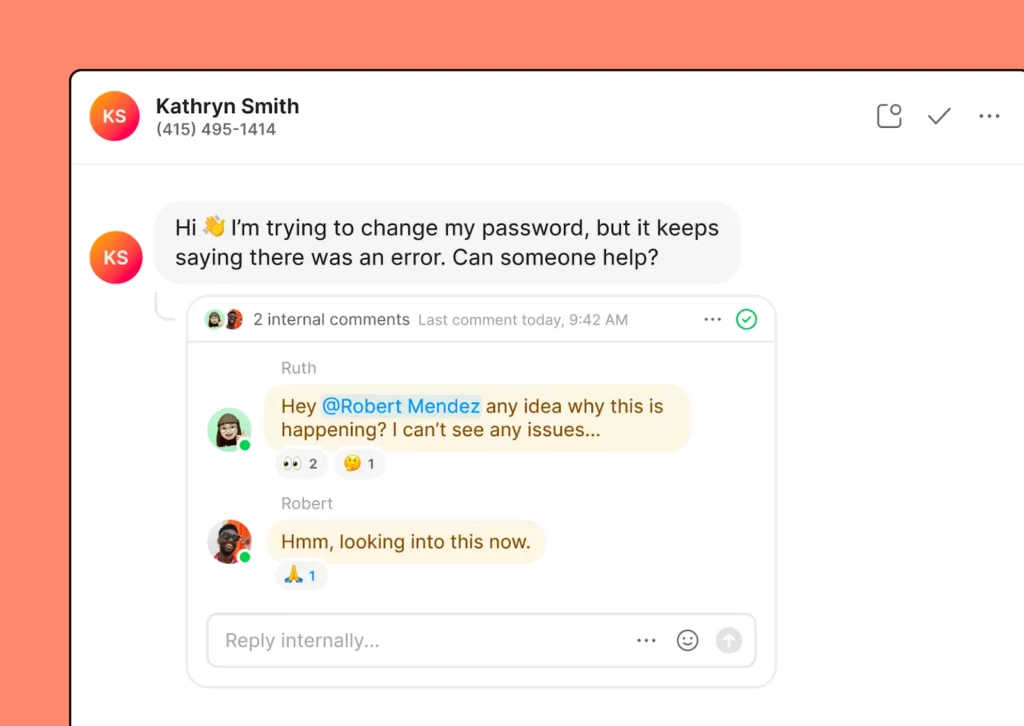
Team members can also use internal threads to solve problems together. They let you see who has sent which responses to customers — all while presenting a unified voice.
2. No options to save time texting
With Google Voice, you can compose basic, short text messages to customers in the US and Canada — but that’s the extent of it. And for businesses whose customer service relies on fast and efficient texting, that’s often not enough.
That’s why many companies eventually move to more efficient business phone solutions. They allow you to level up your texting using features like saved message templates and automated text touchpoints.
Again, keep in mind texting is also only available to US customers with Google Voice.
3. No ability to use a toll-free number
If you want to use a toll-free number for your business, then Google Voice is out of the picture, as Voice doesn’t offer 1-800 numbers.
4. No ways to easily review the conversation history

In the Google Voice app — available via browser, iPhone, or Android phones — calls, texts, and voicemails are stored in separate inboxes.
This separation can make it difficult for users to have a cohesive view of their conversation history with a specific customer. You need to dig through separate Google Voice voicemail, call, and text inboxes to find what you need.
As a business scales and multiple employees provide customer service, this type of setup can slow your team down. Important parts of past conversations can also slip through the cracks.

When using a Google Voice alternative like Quo, team members can see calls, recordings, texts, and voicemails in one thread. This makes it easy to stay up to date on a customer’s conversation history.
5. No means to queue up texts
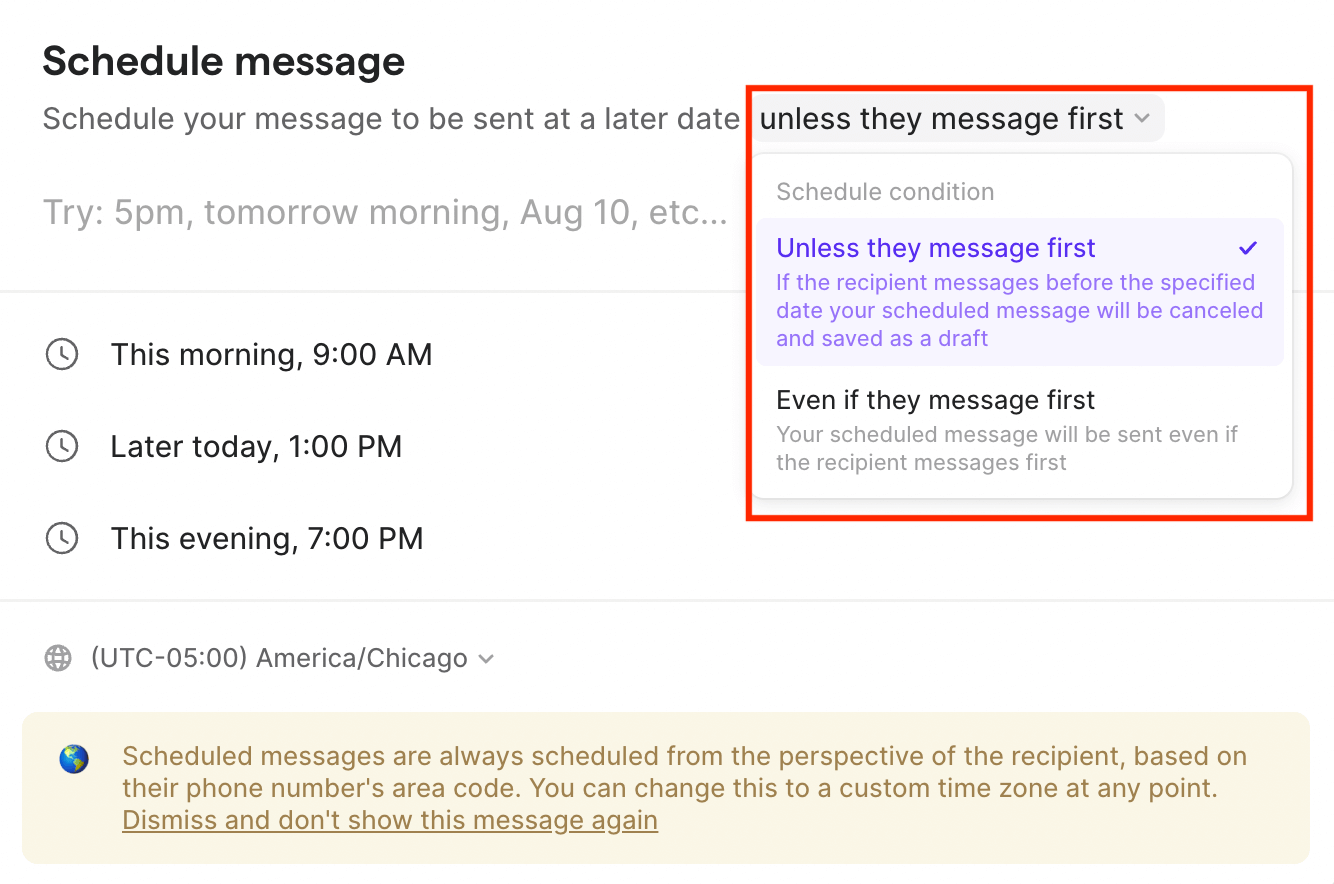
For many businesses, it’s crucial to schedule messages to be sent at a later time or date. Maybe you want your text to be the first message a client sees when they get into work at 9 AM or you simply want to abide by SMS compliance guidelines. Either way, scheduling texts with Google Voice isn’t a possibility.
Google Voice only allows users to type and send a text in the moment, rather than queuing it for later. If you want to schedule text messages, you’ll need to use a different phone service or messaging app. You can see how a platform like Quo lets you schedule texts below:
6. No easy methods to forward texts beyond your Gmail address
Hoping to loop team members in on customer conversations by forwarding texts to them? Unfortunately, that’s not an option when using Google Voice.
With Google Voice, you can only forward text messages to the single email address associated with your Google Voice account. You can’t automatically forward text messages from Google Voice to multiple email addresses or any other email address except the one Google Voice has on file.
7. You have to upgrade to the highest-tier plan to access automatic call recording
Need your team to automatically record calls in Google Voice? You have to upgrade to the Premier plan, which costs $30 per user per month. Keep in mind you’ll also have to pay at least $7 per user per month for a Google Workspace subscription. That brings your total to $37 per user each month just to automatically record calls. In contrast, Quo makes this easier by including call recording on its base plan, which only costs $23 per user per month.
8. No modern AI features to help your business scale
Google Voice includes basic AI features like spam call blocking and voicemail transcriptions. But it doesn’t offer advanced tools that help teams automate work, handle live calls, or understand what happened during a conversation. This can make it harder for growing businesses to save time or improve how they communicate with clients.
Here are some examples of the AI tools Google Voice doesn’t provide:
- AI call tags that automatically label conversations after the call ends. They can identify things like customer sentiment and the reasons people call.
- AI voice agents that automatically pick up the phone. They can also answer common questions and send texts with booking links while the call is happening.
- AI call transcriptions and summaries that give you a time-stamped transcription broken down by speaker and a short, actionable recap so your team can follow up faster.
These types of texting limitations can cause problems. That’s why we created a text messaging alternative for growing businesses. It lets you send SMS messages a lot more efficiently — and without worrying about suspensions.
Why Quo is the best texting alternative to Google Voice
At Quo, we think texting should work the way people expect. While we get that spam is a thing, we also know that users need to reach their friends, clients, and customers in a way that makes sense. That’s why we designed a system that makes texting easier and more convenient than ever.
Here’s how SMS messaging works with Quo:
- Unlike Google Voice, our platform lets you text any US or Canadian number for free, no matter where you are. We also offer international texting and toll-free North American numbers. All you need is WiFi to text from your computer or mobile phone. We support both iOS and Android devices.
- We provide plenty of support for the things you need, from MMS and shared inbox management to number porting. Or, if you need a new number, you can pick one based on any US or Canadian area code.
- Quo offers multiple ways to send group text messages at a glance, including desktop and mobile apps, as well as in Chrome and other web browsers.
- Connect your business phone to the other tools you use. With Zapier on your side, use more than 8,000+ tools to send texts based on specific touchpoints.
- Use a variety of features to help you save time texting. These include snippets, scheduled messages, auto-replies, and group texting capabilities.
- Use Sona, Quo’s AI voice agent, to support callers in real time. Sona can automatically pick up the phone, answer common questions, and send texts during live calls. This includes links to booking pages or forms — so callers can take the next step without waiting.
If you’re looking for a platform that supports text messaging in all the right ways, Quo is here to help. Try us free for a week to test texting through Quo. After a trial run, you can port your existing number from Google Voice or any other service.