Running a cleaning business means you’re rarely sitting at your desk when the phone rings. You’re on site, driving between jobs, managing staff, or answering client questions in real time. And when calls go unanswered, they often turn into missed bookings.
Many cleaning business owners start out using their personal phone numbers. It works at first, but as your business grows, that setup starts to break down. You might struggle to keep work and personal life separate, respond quickly to new leads, and coordinate calls and texts with a team.
A dedicated phone system for cleaning companies helps solve these problems. The right setup lets you automate follow-ups and keep client communication organized in one place.
In this guide, we’ll break down the best phone systems for cleaning businesses. We’ll compare pricing and features and help you choose the right option based on how your team works today — and how you plan to grow.
8 Best cleaning business phone systems
Not every phone system is built the same. The table below provides a quick side-by-side comparison of the best options for cleaning businesses so you can narrow your list quickly.
| Provider | Starting price | Best for | G2 rating | Free trial | Unlimited calls in the US and Canada | SMS and MMS support |
|---|---|---|---|---|---|---|
| Quo | $15 per user per month | Growing cleaning businesses | 4.7/5.0 | ✔️ | ✔️ | ✔️ |
| Nextiva | $15 per user per month | Cleaning teams needing omnichannel support | 4.5/5.0 | ❌ | ✔️ | 100 texts per user per month |
| RingCentral | $20 per user per month | Larger cleaning franchises | 4.0/5.0 | ✔️ | Limited toll-free minutes | 25 texts per user per month |
| Google Voice | $10 per month* | Small cleaning teams using Google tools | 4.1/5.0 | ❌ | ✔️ | US only |
| Dialpad | $15 per user per month | Cleaning businesses needing AI transcription | 4.4/5.0 | ✔️ | ✔️ | 250 texts per user per month |
| Grasshopper | $14 per month | Solo cleaners | 3.9/5.0 | ✔️ | ✔️ | ✔️ |
| Ooma Office | $19.95 per user per month | Cleaning companies needing desk phones | 4.6/5.0 | ❌ | ✔️ | Requires upgrade, then 250 text messages per user per month |
| Zoom Phone | $10 per user per month | Cleaning businesses already using Zoom | 4.6/5.0 | ❌ | Metered outbound minutes on base plan | ✔️ |
*Individual plan only
1. Quo: Best overall business phone system for cleaning businesses
Pros
- Unlimited calling in the US and Canada
- Unlimited SMS and MMS
- Local and toll-free numbers
- Shared numbers and inboxes
- Integrations with 8,000+ tools via Zapier
Cons
- Can’t verify accounts through two-factor authentication*
*Nearly all virtual phone numbers share this problem. For safety reasons, companies like Facebook, Uber, and Google rarely let you authenticate accounts through a virtual phone number.
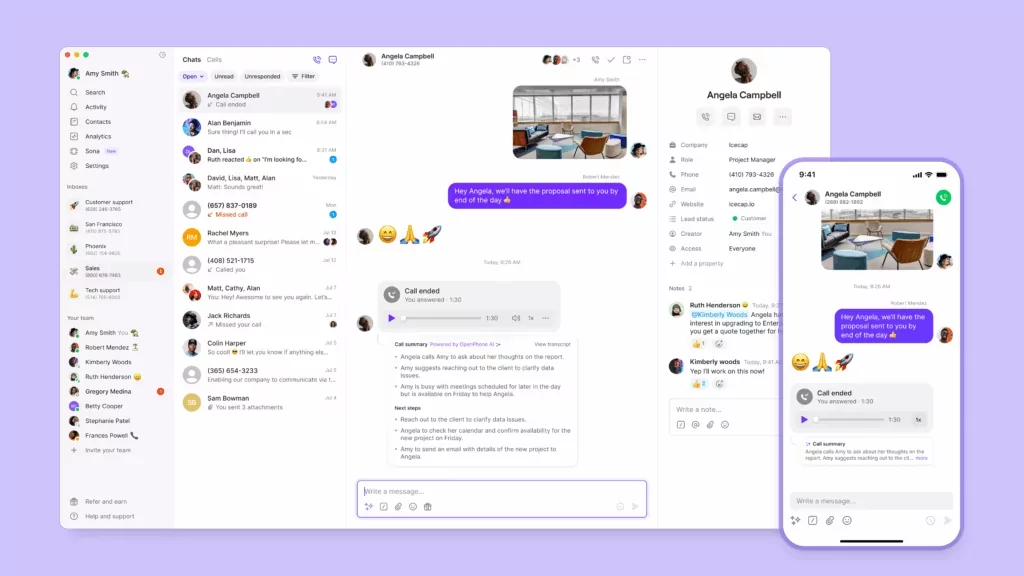
Quo, formerly OpenPhone, is a modern business phone service that works from any device — laptop, mobile phone, or tablet. This makes it a strong fit for cleaning businesses with teams in the field.
Here’s a look at how a real business uses Quo. Andrew Asher, founder and CEO of Lucid Bots, explains how Quo has supported their growth:

Setup takes minutes, and Quo connects with tools you may already use. This includes Zapier and Make, as well as direct CRM integrations with HubSpot and Salesforce. As one example, you can automatically sync data like call transcripts and summaries from Quo directly into Jobber.
Quo also helps you manage bookings around the clock. You can customize auto-replies for missed calls, texts, and voicemails. For example, you can send an automatic text with a booking link when a call is missed. This allows customers to self-schedule when booking is the main reason they’re calling. IVR call routing and call forwarding help you guide calls to the right place around the clock.
When you share phone numbers, it’s easier to divide responsibility for incoming calls across your team. Pre-written message templates, called snippets, help staff reply faster to common questions. These often include pricing, availability, or service areas.
Quo’s AI voice agent Sona can help answer phones after hours, capture messages, qualify leads, and more. After Sona handles a call, the transcript and summary are stored in the customer’s conversation history inbox for easy follow-up.
Here’s what other Quo users have to say:
- “Porting my two business numbers was super easy. I appreciate Quo’s straightforward interface and all the help I got setting up the service.” — Viktoria Olskaia, Classmaids
- “We’re so confident in saying, ‘Hey everybody, just get on Quo. Save yourself the time, save yourself the hassle.’” — Carter Smith, Pink’s Windows
Key features of Quo
- Unlimited calling and texting in the US and Canada
- Shared numbers and inboxes
- Call recording
- Call routing by time of day
- Auto-replies and scheduled messages
- AI receptionist Sona for after-hours calls
- CRM integrations with Jobber, HubSpot, and Salesforce
- Call transcriptions and summaries
- API for customizable automations
Quo pricing
Quo’s pricing includes three plans:

- Starter: $15 per user per month for unlimited domestic calling, voicemail transcripts, auto-replies, internal threads, business hours, and Sona AI agent credits
- Business: $23 per user per month for phone menus, automatic call recording, AI call summaries, CRM integrations, analytics, and call transfers
- Scale: $35 per user per month for AI call tags, dedicated onboarding, inbound phone support, and priority chat and email support
How to get a business phone number with Quo
Setting up a business phone number for your cleaning company is simple with Quo as your phone system provider. Follow these three steps:
- Sign up for an account with Quo — when you sign up, you can try out Quo for free for seven days.
- During signup, select your city or area code in the US or Canada to pick your phone number or a North American toll-free number.
- After finishing the signup process, including choosing your preferred plan, you can start calling and customizing your phone settings.
See how easy it is to set up a Quo account below:

You now have a virtual phone number for your cleaning business. If you run into any issues during the signup process, fill out this form to reach our support team.
2. Nextiva: Best for omnichannel support across voice, video, and messaging

Pros
- Video calling on every plan
- Mobile app for field staff
Cons
- Texting capped at 100 SMS per user per month
- Toll-free minutes require an upgrade
- Call recording requires an add-on
Nextiva is a VoIP provider that brings voice, video, and messaging into one app. With its IVR auto-attendant, you can route calls to the right person so you’re not interrupted during a job. Integrations with Google Reviews and Zendesk help you respond to feedback and manage client requests. You can also use Nextiva’s mobile app to call clients without sharing your personal number.
But Nextiva’s omnichannel support comes at a cost. To support customers across channels, you’ll pay for add-ons and upgrades. This includes:
- Texting is capped at 100 messages per user per month on the base plan
- Toll-free minutes require an upgrade to the third-highest tier and still max out at 2,000 minutes
- Voice call recording requires an add-on to Core or upgrading to Engage
Some integrations don’t come out of the box either. You have to request access. They may only be free if your account meets certain criteria. It’s worth taking a close look at their pricing before signing up.
Here are a couple of testimonials from users who have faced issues:
- “Nextiva was extremely confusing to use for us. It was impossible to know how we could use its features. Nothing was intuitive; even contacting customer support was challenging.” — Mike Schoen, Scenthound, switched from Nextiva to Quo
- “Nextiva faces soft-phone issues, which have load problems, with high delays. Call recording is something the software has highly ignored, restricting us from accessing previous content or data.” — Yunis Halsa, Naya Solutions on G2
Key features of Nextiva
- Voicemail transcriptions
- Multi-level auto attendant
- Mobile app for field staff
- Toll-free numbers with an upgrade
- 24/7 customer support
Nextiva pricing
Nextiva’s pricing includes three plans:
- Core: $15 per user per month for phone calls, AI voicemail transcription, and integrations with Outlook and Google Contacts
- Engage: $25 per user per month for Microsoft Teams integration, video recording, and 2,000 toll-free minutes
- Power Suite CX: $75 per user per month for intelligent routing based on team skills, plus web chat that can transfer to a live rep
3. RingCentral: Best for advanced call management features

Pros
- Multi-level auto-attendant
- Voicemail-to-text transcription
Cons
- Texting capped at 25 SMS per user per month
- Limited toll-free minutes
- Storage limits on recordings
RingCentral is a VoIP phone system with advanced call management features and desk phone support. Its IVR auto-attendant lets you set up multi-level phone menus so callers can reach the right person without manual transfers. You also get call queues to keep leads on the line during busy periods.
On the Advanced plan, RingCentral adds AI call summaries to help record booking details and special requests. If you want to track caller sentiment and follow-ups, you can add AI conversation intelligence as a separate add-on to your plan.
But RingCentral has some tight limits that can get in the way as you scale. Toll-free minutes start at just 100 pooled across your entire account. Texting is capped at 25 messages per user per month on the base plan. And there’s no shared texting inbox in the native app, so your team can’t see texts started by another team member on the same number unless you get the Advanced SMS Inbox add-on or use an integration.
This user reports issues with RingCentral:
- “Constantly crashes and has a delay when dialing. Also sometimes does double dialing.” — Riccardo Errol, Links Recruitment on G2
Key features of RingCentral
- IVR for call routing
- SMS and MMS support
- Voicemail transcripts
- Unlimited calls in the US and Canada
- Integrations with Zapier and Salesforce
RingCentral pricing
RingCentral’s pricing gives you three plans to choose from:
- Core: $20 per user per month for auto-attendant, call queues, and visual voicemail
- Advanced: $25 per user per month for AI call summaries, automatic call recording, and CRM integrations
- Ultra: $35 per user per month for unlimited storage and 10,000 toll-free minutes
4. Google Voice: Best for seamless integration with Google Workspace

Pros
- Voicemail transcription included
- Ring groups to share incoming calls
Cons
- Most paid plans require a Google Workspace subscription
- No integrations outside Google
- No auto-replies or text templates
Google Voice is a low-cost VoIP option if you already use Google Workspace. It’s also one of the more affordable options on this list, starting at $10 per user per month for an individual plan. You can use it to get a second phone number, text customers in the US, and take calls from your browser or mobile phone.
With Google Voice, you get ring groups once you upgrade to the Standard plan so calls can reach multiple people at once. You also get call recording and voicemail transcription to keep track of client requests.
But Google Voice is fairly basic compared to other providers. There are no integrations outside of Google apps, so you can’t connect it to tools like Jobber. There are also no auto-replies and no way to schedule texts.
Another consideration: Google Voice texting has some limitations. If you set up a ring group or Google Voice auto attendant on your main number, clients won’t be able to text you on it.
Here’s what two Google Voice users had to say:
- “Poor call quality and buggy app.” — Nicholas Bentley, Merus, switched from Google Voice to Quo
- “What I dislike about Google Voice are: You cannot personalize your IVR the way you want it… [and] no area code option for New York state location. Not even 1-800 number option to choose.” — Zephora Connelly, Connelly IT Solutions Inc. on G2
Key features of Google Voice
- Unlimited calling to the US and Canada
- SMS support for US numbers
- Mobile and web apps
- Google Calendar integration for scheduling
- Ring groups and auto-attendant with an upgrade
Google Voice pricing
Google Voice’s pricing gives you four options to choose from:
- Starter with Voice only: $10 per user per month for one user, free calls in the US and Canada, access to mobile and web apps, and voicemail transcriptions
- Starter: $10 per user per month for up to 10 users, voicemail transcription, and call forwarding
- Standard: $20 per user per month for ring groups, auto-attendants, and desk phone support
- Premier: $30 per user per month for automatic call recording and advanced reporting
Keep in mind you’ll also need a Google Workspace subscription, which starts at $7 per user per month, for every plan except the individual Starter plan.
5. Dialpad: Best for outbound sales

Pros
- Unlimited domestic calling
- AI call transcription and summaries
Cons
- Upgraded plan requires a three-user minimum
- International texting requires an upgrade
- CRM integrations are locked to the Pro plan
Dialpad is a VoIP provider offering real-time call transcription and AI call summaries. These features help you capture client details without manual note-taking. You can use call sentiment on Sales and Support plans to see if a call is going well or hitting objectives. Dialpad also integrates with Slack, Salesforce, and Microsoft Teams to log calls and sync your lead lists.
However, Dialpad has some limitations to be aware of. You don’t get unlimited texting — Dialpad SMS is capped at 250 outbound messages per user per month. You also have to upgrade your plan to add additional numbers, which isn’t the case for most other providers.
This Dialpad customer shares their experience:
- “Our other provider had problems, but oh boy, this one has PROBLEMS. The app constantly crashes, other parties can’t hear you when the call connects, texting is not always 100%, and sometimes the calls just drop for no reason.” — Joe Sabala, Vertikal6 on G2
Key features of Dialpad
- Real-time AI transcription
- Automatic post-call summaries
- Unlimited call recording
- Multi-level auto-attendant
- CRM integrations with Salesforce and HubSpot
Dialpad pricing
Dialpad’s pricing depends on your team size and needs:
- Standard: $15 per user per month for unlimited calling, SMS and MMS, and three ring groups
- Pro: $25 per user per month with a three-user minimum for CRM integrations, multi-level auto-attendant, and additional numbers
- Enterprise: Contact for pricing with a 100-user minimum for unlimited ring groups and 100% uptime guarantee
6. Grasshopper: Best for multi-digit extensions

Pros
- Auto-reply texts for missed calls
- No user minimums
Cons
- No call summaries
- No access to integrations
- Limited productivity features
Grasshopper is a virtual phone system founded in 2003 that lets you add a business line to your personal phone.
One standout feature is call blasting, a paid add-on that rings up to 15 numbers at once until someone picks up. This helps make sure you don’t miss a lead. You also get virtual fax for service contracts and unlimited extensions with an upgrade.
Compared to other providers in this post, Grasshopper is fairly bare-bones. The only integration is Google Voice, so you can’t connect to booking tools like Jobber.
These issues turned into real problems for users:
- “I tried a few different VOIP products, including Grasshopper, and found the software to feel very outdated – kind of like a webpage from the late 1990s or early 2000s.” – Kelly Saunders, Chargy, switched from Grasshopper to Quo
- “The software is terrible and hard to use, but what motivated me to leave a review is how difficult they make it to cancel their service. You can’t cancel through the website or the app. You have to call customer service and answer a bunch of questions.” — Justin B. on G2
Key features of Grasshopper
- Business SMS for appointment confirmations
- Voicemail-to-email transcription
- Call forwarding to field staff
- Custom greetings and a virtual receptionist
- Unlimited extensions with an upgrade
Grasshopper pricing
Grasshopper’s pricing breaks down into three plans:
- True Solo: $14 per month for one user, one number, and one extension
- Solo Plus: $25 per month for unlimited users, one number, three extensions, auto-attendant, simultaneous call handling, call transfers, and call recording
- Small Business: $55 per month for unlimited users, four numbers, and unlimited extensions
7. Ooma: Best for cleaning companies needing physical desk phones

Pros
- Support for desk phones
- Easy to set up
Cons
- Requires an upgrade for the desktop app
- Restrictive SMS limits
- CRM integrations are only available on the highest plan
Ooma is a VoIP phone system for cleaning companies that prefer desk phones. You can use the virtual receptionist to route callers to the right team member with an automated menu. There’s also music on hold to keep callers on the line. Ooma offers unlimited calling in the US, Canada, Mexico, and Puerto Rico.
But Ooma does have limits on some key features. For example, you need to upgrade to access calling on the desktop app. Plus, toll-free numbers are capped at 500 inbound minutes per month. Texting limits include:
- No texting on the base plan
- 250 texts per account per month on Pro
- 1,000 texts per account per month on Pro Plus
Keep in mind that these texts can run out quickly if you send a lot of appointment reminders.
Ooma users experienced some issues:
- “Ooma was costly, antiquated, and gave me zero visibility into my business.” — Shayne Jasper, Suplay Wrestling Co., switched from Ooma to Quo
- “The call quality was lacking. There was a lag time between when I would speak and when the other person would hear me. This caused issues of us seeming to talk over each other. I would hear my own voice echo.” — Michael Hewitt, EPCAMR on G2
Key features of Ooma
- Mobile app for field staff
- Virtual receptionist
- Ring groups
- Voicemail transcription with an upgrade
- Call recording with an upgrade
Ooma pricing
Ooma’s pricing gives you three plans to pick from:
- Essentials: $19.95 per user per month for virtual receptionist, mobile app, and music on hold
- Pro: $24.95 per user per month for up to 250 text messages, call recording, and voicemail transcription
- Pro Plus: $29.95 per user per month for up to 1,000 text messages, CRM integrations, and call queues
8. Zoom Phone: Best for seamless integration with Zoom tools

Pros
- Video conferencing included
- SMS for appointment confirmations
Cons
- Metered outbound calling on the base plan
- Shared inboxes require an add-on
- Users report complex setup
Zoom Phone is a cloud-based VoIP system for cleaning companies that already use Zoom for video calls. You can use call routing and auto-attendants to direct callers to the right team member. Zoom Phone also connects with CRMs like Salesforce and HubSpot to automatically log calls. It also supports desk phones on some plans.
Unfortunately, Zoom Phone keeps some features behind paywalls. You have to pay for the Power Pack add-on to access call queue analytics. These extras can add up if you want to track how your team handles calls.
Support is also limited on standalone plans. Unless you upgrade, you only get basic live chat and phone support. Outbound calls are also pay-as-you-go on the base plan, meaning you pay per minute for every call you make.
Here’s what a couple of Zoom users had to say:
- “When we used Zoom Phone, calls would frequently drop or wouldn’t get transferred, and texting was a pain.” — Arkulas Beyer, TechNuts, switched from Zoom Phone to Quo
- “I thought Zoom Phone would be a good option for me, but the customization was really clunky — simple tasks like setting after hours voicemails took me way more time than it should have.” — Matt Canzer, Butterfly Legal, switched from Zoom Phone to Quo
Key features of Zoom Phone
- Voicemail transcription
- Virtual receptionist for call routing
- SMS and MMS support
- Call recording for training and disputes
- After-hours routing
Zoom Phone pricing
Zoom Phone’s pricing isn’t the most straightforward. Here’s what each plan includes:
- US & Canada Metered: $10 per user per month for pay-as-you-go calling, SMS and MMS, and AI post-call summaries
- US & Canada Unlimited: $15 per user per month for unlimited domestic calling, SMS and MMS, and voicemail transcription
- Global Select: $20 per user per month for unlimited calling in 40+ countries and direct dial numbers
- Pro Plus: $18.32 per user per month for access to Zoom Workplace Pro and everything in the Unlimited plan
- Business Plus: $22.49 per user per month for access to Zoom Workspace Business, visitor management tools, real-time reporting dashboards, and access to international calling add-ons
Key features to look for in a cleaning business phone system
Not every phone system is built for cleaning services. Here’s what to look for when choosing one:
- After-hours coverage: Missed calls mean missed customers. Look for call routing by time of day, voicemail-to-text, auto-replies, and a mobile app, so on-call staff can respond from anywhere. An AI answering service like Quo’s Sona can also answer calls when your team is off the clock — a common use case for AI for cleaning services.
- Client communication tools: Meet clients where they are with unlimited calling minutes and SMS and MMS support. MMS is especially helpful for sending before-and-after photos of a cleaning for client records.
- Team collaboration tools: Look for shared inboxes and numbers so your team can coordinate on calls and texts. Call transfer and internal messaging help when you need to hand off a client or ask a teammate for input. Mobile apps for iOS and Android keep your crew connected in the field.
- Third-party integrations: Connect your booking system, CRM, and other cleaning business software to your phone system. This lets you automate tasks like sending appointment confirmation texts while keeping all your customer data in one place. Look for Zapier support to streamline even more workflows.
- Call intelligence: Know which calls are coming in and how your team is handling them. Call transcriptions, call tags, and an analytics dashboard help you track response times and spot trends. Missed call alerts let you follow up faster.
- Call recording: Keep a record of every conversation in case a dispute comes up with a customer about what they agreed to pay. This protects both you and your cleaning business.
Best practices for managing communication for a cleaning business
Here are a few habits that can help you communicate better with clients and your team.
- Use a dedicated business number. Keeping your personal and work calls separate makes it easier to maintain work-life balance. You’ll know right away if an incoming call is a new lead or a friend checking in. A dedicated business phone number looks more professional to clients. It also lets you share the number with your team so everyone can coordinate from the same inbox.
- Follow up after each interaction. The fastest response usually wins the job. Set up auto-replies to respond to missed calls or texts instantly, even when you’re on-site. After each cleaning, send a quick message asking how it went. This gives clients a chance to share feedback privately before posting a review.
- Track call patterns. Use analytics to monitor peak call hours, response times, and common reasons callers don’t book. From there, the best customer experience software will help you spot patterns to make long-term improvements across your customer journey.
- Set up automated reminders. No-shows and last-minute cancellations can throw off your whole schedule. Reduce them by sending automated text reminders 24–48 hours before each appointment. You can set this up through Quo’s Zapier integration. Sync it with your booking system to automatically send appointment confirmation texts.
- Create templated responses for common questions. Save time by building a library of pre-written replies. Cover FAQs about pricing, services, availability, and onboarding new clients. Templates keep your brand voice consistent and help your team respond quickly.
Quo: The only cleaning business phone service you need

For cleaning businesses, a phone system has to work wherever the job takes you. You need to answer calls on the go, respond quickly to new leads, and make it easy for your team to handle calls and texts together.
Quo is the best fit for growing cleaning businesses. It works on any device, lets teams share numbers and inboxes, and keeps all customer communication in one place. Features like auto-replies, call routing by time of day, and texting automations help you follow up faster without adding extra work.
Quo is also easy to get set up. You can keep your existing number through free porting, use existing devices, and add AI call handling as your business grows.
Try Quo free for seven days to see how it fits your cleaning business.
Frequently asked questions about phone systems for cleaning companies
The best phone system for your small business is one that works whether you’re in the office or out on a job. If you’re often on-site with clients, you’ll want an app that makes calling, texting, and checking voicemails easy from your phone.
Quo is a good fit for many businesses because it lets you share numbers with your team, send auto-replies when you miss a call, and use an AI voice agent to answer after hours. You can set up Quo in minutes without needing extra hardware like desk phones.
Small business phone system costs vary based on the number of users you need and the features you want. A VoIP phone system like Quo starts at $15 per user per month billed annually. Mid-range plans with more features run from $25 to $50 per user per month.
Start by routing calls to an AI answering service during after-hours or peak periods. That way, you’re not losing leads when you’re on a job or off the clock. Quo’s AI agent, Sona, can answer calls 24/7, respond to common questions about your services and pricing, and collect details for a callback.
You can also use shared numbers so your team can split responsibility for incoming calls. And with call transcripts and summaries, you can catch up on missed calls faster and follow up while the lead is still warm.
Yes, you can use your existing phone number with a new phone system. Porting, which lets you transfer your number to a new provider, is available on most providers, including Quo. With Quo, porting is free and typically takes 5–10 business days.