With pricing starting at $9.99, Unitel Voice is one of the cheapest VoIP providers on the market. But those lower prices come with tradeoffs,including limits on how much your team can call and text customers. At some point, those limits will make it harder to scale your business.
If you’re comparing providers or wondering whether it’s time to move on from Unitel, this guide can help. It breaks down 10 of the best Unitel Voice alternatives for small and growing businesses. Plus, learn some of the most common reasons users switch from Unitel to other providers.
Comparing the best Unitel Voice alternatives
Here’s how the top alternatives stack up side by side with Unitel Voice.
| Providers | Annual price | Unlimited calls US/CA | SMS and MMS | Shared phone numbers | Additional phone numbers |
|---|---|---|---|---|---|
| Quo | 15 per user per month | ✔ | ✔ | ✔ | $5 per number per month |
| Aircall | $30 | ✔ | ✔ | ✗ | $6 per number per month |
| RingCentral | $20 per user per month | ✔ | 25 messages per user per month | Calls only | $4.99 per number per month |
| Dialpad | $15 per user per month | ✔ | US & Canadian customers only | ✔ | Requires upgrade, then $5–$15 per month |
| JustCall | 0 | ✔ | 500 segments per user per month | ✔ | Cost varies |
| Five9 | $119 per user per month | Requires upgrade | ✔ | ✔ | Contact sales |
| CallHippo | Free plan | Requires upgrade | 100 SMS per user per month | ✔ | Cost varies |
| Ringly | $349 per month | ✗ | ✗ | ✗ | $5 per number per month |
| Talkdesk | $85 per user per month | Requires upgrade | ✔ | ✔ | Contact sales |
| CallPage | $31 per month | ✗ | ✗ | ✔ | $10 per number per month |
Now, here’s a more in-depth view of each provider:
1. Quo: Best for small and growing businesses

Pros
- Free calls and texts in the US and Canada
- On-demand and automatic call recordings
- Faster dialing with click-to-call
- AI call summaries and transcripts
- Native integrations with Salesforce, HubSpot, Jobber, Zoho, Zapier, Make, and Attio
- Shared numbers and inbox
- 24/7 AI answering service
- Support for desktop, browser, and mobile apps
Cons
- No verification through two-factor authentication*
*Nearly all virtual phone numbers share this problem. For safety reasons, companies like Facebook, Uber, and Google rarely let you authenticate accounts through a virtual phone number.
Quo, formerly OpenPhone, is a business phone system that helps you never lose customers due to missed calls. Each plan comes with one local US, Canadian, or North American toll-free number per user. Add as many as you need, with no user limits. Then, share numbers for different teams to call and text from the same number.
You also get unlimited calling and texting in the US and Canada. Compare that to Unitel Voice, which only includes 500 calling minutes on the base plan and 500 texts with a paid add-on. You’ll also get access to international calling — something Unitel Voice doesn’t support at all.
Every Quo plan gives teams access to desktop, mobile, and web apps without upgrades. That way, you can make and receive calls and texts from whatever device you prefer to use.
Quo also offers many modern features that fast-growing businesses need. For example:
- Quickly catch up on conversations without listening back to entire recordings, using AI call summaries and transcriptions. Then, you can pull out action items for follow-ups or delegating tasks.

- Automatically answer calls 24/7 with Quo’s AI voice agent, Sona. Sona can greet callers, take messages, transfer calls to reps, and send texts during live calls.
- Automatically respond to missed texts with auto-replies when your team is unavailable. This lets customers know their message was received and helps set expectations for when they can expect to hear back from your business. That way, they’re less likely to contact a competitor in the meantime.

- Create text message templates, or snippets, to instantly reply to callers instead of typing the same messages over and over.
- Queue up texts in your customers’ time zones using scheduled texts, helping you stay TCPA compliant.
Keep in mind, Unitel Voice doesn’t offer AI agents, texting automations, or call summaries and transcriptions at all.
The best part about Quo? You can try it for free.
Sign up today for a seven-day free trial. Once you confirm it’s a good fit, you can easily move an existing local US, Canadian, or North American toll-free number over for free.
Key features of Quo
- Shared numbers and inboxes
- Auto-replies
- Phone menus, or IVR
- Scheduled messages
- Call routing
- AI receptionist
- CRM integrations
- Call recording
- Call transcriptions and summaries
Quo pricing
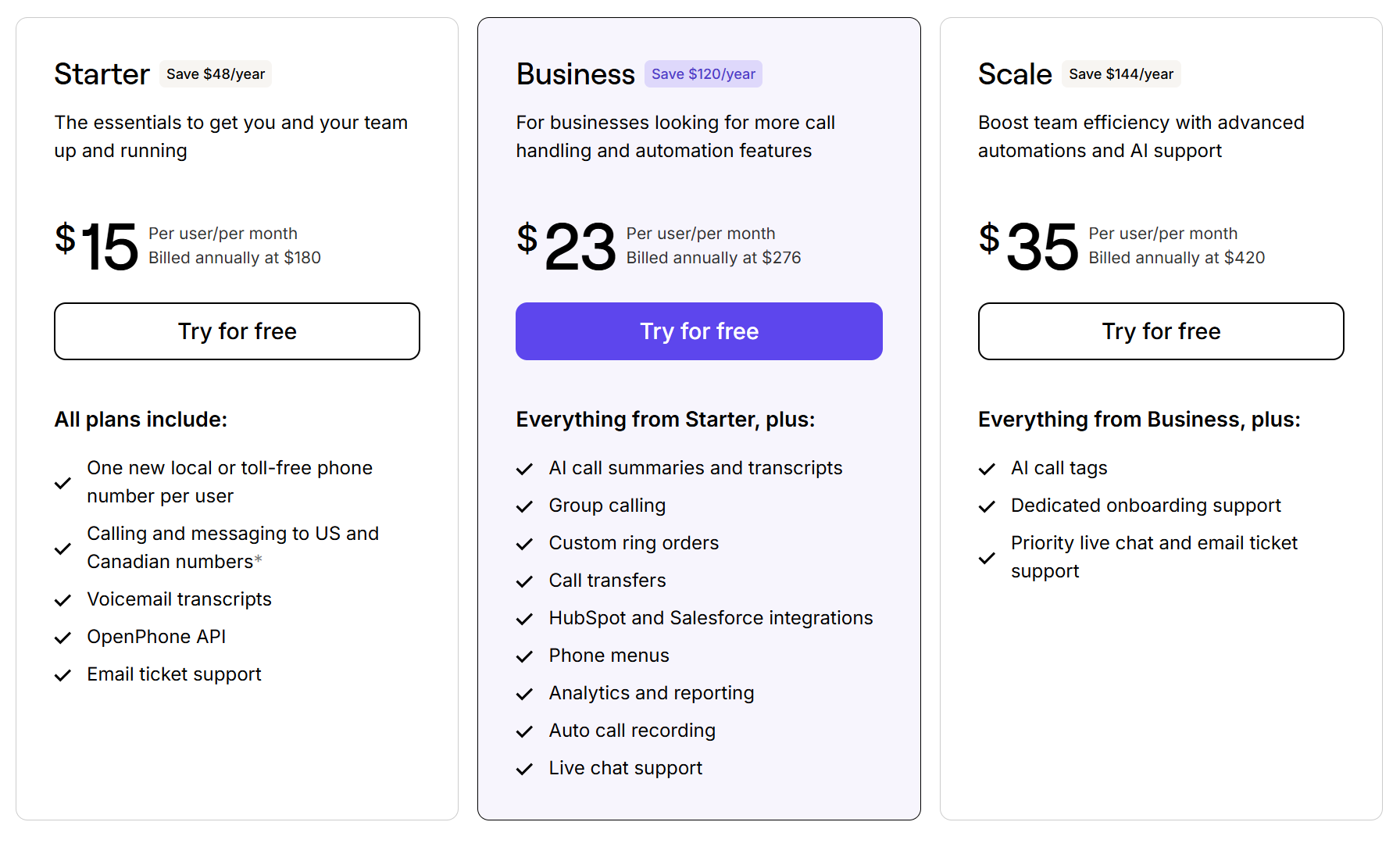
Quo’s pricing offers three plans that support businesses as they grow:
- Starter: $15 per user per month for unlimited calls in Canada and the US, business hours, internal threads and mentions, voicemail transcripts, and access to the Quo API
- Business: $23 per user per month for phone menus, AI call summaries and transcripts, group calling, custom ring orders, CRM integrations, analytics and reporting, automatic call recording, live chat support, and call transfers
- Scale: $35 per user per month for AI call tags, dedicated onboarding, inbound phone support, and priority chat and email support
2. RingCentral: Best for desk phones

Pros
- Support for traditional desk phones
- On-demand call recording on the base plan
- Support for video conferencing
Cons
- Limits on text messaging and toll-free minutes on every plan
- No unlimited storage without upgrading
RingCentral is a legacy VoIP provider that offers support for desk phones. If you work in a physical office and want to squeeze a few more years out of your equipment, it might be a cost-effective option. Each plan lets you make unlimited domestic calls in the US and Canada, and comes with call recording on the base plan. Unitel Voice requires an upgrade or add-on for these, making RingCentral a more cost-effective option.
That said, you’ll still face several limitations, starting with RingCentral’s SMS. You’ll be capped at 25 messages per user per month on the base plan and just 200 messages on the most expensive plan. Want access to text from the same number as a team? You’ll need to pay an extra $25 per user per month. Compared to Unitel Voice alternatives like Quo, which offers a shared SMS inbox on any plan, these extra fees can add up fast.
RingCentral also limits how long you can keep call recordings. No matter how much you upgrade, they will be deleted after 90 days.
Key features of RingCentral
- 500+ integrations with apps like Slack and Microsoft Teams
- Call log reports
- Unlimited storage, with an upgrade
- Video conferencing support
- AI call summaries and transcriptions
RingCentral pricing

Here’s a quick breakdown of RingCentral’s pricing plans:
- Core: $20 per user per month for unlimited calling in your domestic area, 100 pooled toll-free minutes, 25 text messages per user, on-demand call recording, and support for a Slack integration
- Advanced: $25 per user per month for 100 text messages per user, 1,000 pooled toll-free minutes, automatic call recording, call whispering, and CRM integrations like Zendesk
- Ultra: $35 per user per month for 10,000 pooled toll-free minutes, 200 text messages per user, custom analytics and alerts, and unlimited storage with retention periods
Keep in mind, you can also access RingCentral’s AI voice agent for an extra $39 per month, which includes 100 call minutes for the voice agent.
3. Grasshopper: Best for multi-digit phone extensions

Pros
- Virtual number extensions are available
- Unlimited calling and texting on every plan
- Known for its ease of use
Cons
- High cost to activate international calling
- No third-party integrations
Grasshopper is a cloud communication system that’s been around for 20 years. It’s popular with solopreneurs who want a second phone number app, since you can get two numbers on one phone. But its biggest claim to fame is multi-digit virtual phone number extensions. This means you can route calls to specific people or departments from your main business number.
Unlike Unitel Voice’s 500-minute cap, you’ll get unlimited calls and texts to the US and Canada with Grasshopper on the base plan. Just know its platform hasn’t kept up to date with modern features, even compared to platforms like Unitel.
For example:
- To activate international calling, your account must be 60 days old. You’ll also have to make a $500 deposit to activate the service.
- Grasshopper doesn’t offer scheduled texts to help your team respond at specific times. This could make it harder to stay TCPA compliant when texting customers.
- There’s zero support for third-party integrations. That means there’s no way to connect with CRMs, calendar apps, or any other tools your business needs, which can slow your team down.
Key features of Grasshopper
- Multiple extensions on a single number
- Virtual auto-attendants for automated call flows
- Call forwarding to external numbers
- Instant responses to existing customers’ missed messages
- Voicemail-to-email transcriptions
Grasshopper pricing

Grasshopper’s pricing depends on the number of phone numbers and extensions you want:
- True Solo: $14 per month for one user, one phone number, and one extension
- Solo Plus: $25 per month for unlimited users, one phone number, three extensions, IVR, simultaneous ring, and call recording
- Small Business: $55 per month for unlimited users, four phone numbers, and unlimited extensions
Need more phone numbers than your plan includes? You’ll need to pay $9 per number per month.
4. Nextiva: Best for omnichannel messaging

Pros
- Routes voice, video, and messaging apps into one dashboard
- Video calling on the base plan
- Team messaging is available on any plan
Cons
- Limited to 100 SMS messages per user per month on the base plan
- Must upgrade your plan or pay for an add-on to access toll-free minutes and numbers
Nextiva is a business phone system that supports omnichannel messaging. That means it routes channels like voice, video, and social media apps like Instagram into a single inbox. You can also access video calling and team messaging on the first tier.
That said, Nextiva comes with major SMS limitations. You only get 100 text messages per user per month on the base plan. Plus, Nextiva requires you to upgrade to the Engage plan, which costs $25 per user per month, to split responsibility for responding to incoming text messages with teammates.
A few other limitations to keep in mind:
- Toll-free numbers and minutes are only available on the Engage plan or as an add-on to the Core plan.
- Advanced call management tools such as intelligent call routing require the Scale plan, which starts at $75 per user per month.
- If you upgrade to the Scale plan, you won’t be able to use the app in your browser.
Key features of Nextiva
- Intelligent call routing for business hours and rep skills, with an upgrade
- Shared team email inbox
- Video calls
- Customer sentiment analysis, with an upgrade
- AI call transcriptions and summaries, with an upgrade
Nextiva pricing

You can pick from one of three Nextiva pricing plans:
- Core: $15 per user per month for 100 text messages per user, voice calls, voicemail transcriptions, mobile app access, and team chat
- Engage: $25 per user per month for 500 text messages per user, 2,000 pooled toll-free minutes, call recording, shared SMS inbox, and access to the Microsoft Teams integration
- Scale: $75 per user per month for unlimited text messages, 10,000 pooled toll-free minutes, AI call transcriptions and summaries, skills-based routing, and full conversation history across channels
5. Dialpad: Best for contact centers

Pros
- Texting automations like snippets and scheduled texts
- Unlimited automatic recordings
- Virtual backgrounds while on calls
Cons
- Additional numbers require an upgrade
- Limited SMS and international texting
Dialpad is a VoIP provider for large contact centers. With it, you can create a digital contact center that brings customer interactions into one place. It routes interactions from different channels, including messaging, web chat, and social media apps.

Unlike Unitel Voice, Dialpad offers texting automations like snippets and scheduled texts so your team can save time. You get unlimited automatic call recordings on the base plan, plus the ability to use virtual backgrounds while on video calls. For context, Unitel requires an add-on for call recordings and doesn’t offer video conferencing support at all.
But Dialpad’s features come with limits. For example, Dialpad SMS only includes 250 messages per user per month. Any messages beyond that cost $0.008 per outbound SMS and $0.024 per outbound MMS. For growing businesses, this will make it harder to scale.
Want to buy additional numbers? You’ll need to upgrade to the Pro plan at $25 per user per month. This is also the only way to get the option to text internationally.
Key features of Dialpad
- Team messaging
- Integrations with Google Workspace
- Internet fax, with an add-on
- Ring groups
- Real-time analytics
Dialpad pricing

Pick from one of three tiers of Dialpad pricing:
- Standard: $15 per user per month for unlimited calls, texts, and meetings for up to 150 participants, call recording, number forwarding, three ring groups, one office location, and integrations with Google Workspace
- Pro: $25 per user per month for a three-user minimum, international texting, 25 ring groups, 10 office locations, additional numbers, and hold queues
- Enterprise: Custom price for a 100-user minimum, dial-by-extension, unlimited office locations, and unlimited ring groups
6. Zoom Phone: Best for Zoom users

Pros
- Bundles with Zoom video meetings
- Can be used for unified communications, with call, text, and video support
- Offers call monitoring features, like barge, monitor, whisper, and takeover, on the base plan
Cons
- Shared inboxes require an add-on
- No unlimited outbound domestic calling without an upgrade
If you’re already part of the Zoom ecosystem, you can also use Zoom Phone to manage calls and texts in the same platform. It lets you make calls to over 150 countries and regions. Plus, you get access to native mobile apps for iOS and Android, which let you make and receive calls while on the go.
Zoom Phone offers more call monitoring features than Unitel Voice, like call barge, monitor, whisper, and takeover, on the base plan. This can help your reps improve how they handle conversations. For example, you can offer helpful coaching during live calls or take over if the situation calls for it.
But keep in mind, Zoom Phone’s base plan doesn’t offer unlimited outbound domestic calling. This can make it harder for your team to scale cost-effectively. You also don’t get shared inboxes on its plans. To split responsibility for incoming texts, you’ll need the Zoom Phone Customer Engagement Pack add-on at $25 per user per month.
Key features of Zoom Phone
- Mobile and desk phone support
- International calling, metered without an upgrade
- Shared numbers, for calling only
- Native mobile apps for iOS and Android
Zoom Phone pricing

Zoom Phone’s pricing is much less straightforward than what you’ll see from other Unitel Voice alternatives. Here’s how their plans break down:
- US & Canada Metered: $10.50 per user per month for metered international and domestic calling, toll-free numbers, domestic text messaging, and access to AI call summaries and voicemail transcriptions
- US & Canada Unlimited: $16 per user per month for unlimited domestic calling and texting, online fax, and call recording
- Pro Plus: $20.50 per user per month for the features in US & Canada Unlimited, access to Workplace Pro that includes instant messaging, 10 GB of cloud storage per user, and one personal booking page
- Global Select: $22 per user per month for unlimited domestic calling in 40+ countries and territories and a direct dial number for each license
- Business Plus: $24.50 per user per month for the features in Zoom Phone US and Canada Unlimited and access to Zoom Workplace Business, which includes unlimited booking pages, and 15 GB of cloud storage per user
7. Talkroute: Best for video meetings

Pros
- Video meetings for up to 100 participants on the base plan
- No equipment required
- Included users with each account
Cons
- Limited to 500 pooled SMS and MMS messages per month on the base plan
- Call routing rules and call recording require the Pro plan
Talkroute is a cloud-based communications platform that helps businesses manage calls and texts virtually. As long as you download its desktop or mobile app, you can communicate with customers without any extra equipment. It can also help keep your personal number private by showing your business number instead when you call customers.
One thing Talkroute does that Unitel Voice doesn’t: it offers the option to host video meetings for up to 100 people on the base plan. This is useful if you want to switch between calls, texts, and video conferencing without using separate tools.
But you’re limited to 500 pooled SMS and MMS messages per month on the base plan. Want different call routing rules for during and after business hours? This also requires the Plus plan. But beware: features you’d expect to be included, like call recording, will require yet another upgrade to the Pro plan, which costs $59 per month.
Key features of Talkroute
- Unlimited calling to the US and Canada
- Video meetings with up to 100 participants
- Desktop, mobile, and web apps
- Customized outgoing caller ID name
Talkroute pricing

There are four levels of Talkroute pricing:
- Basic: $19 per month for one phone number, one mailbox, 500 pooled text messages, and one included user
- Plus: $39 per month for two phone numbers, three mailboxes, 2,000 pooled text messages, and three users included
- Pro: $59 per month for three phone numbers, 10 mailboxes, 5,000 pooled text messages, call recording, phone extensions, and 10 users included
- Enterprise: Custom price for bulk user pricing, 10+ included numbers, 20+ mailboxes, bulk texting discounts, and a dedicated account manager
Each additional user costs $5 per user per month.
8. Ringover: Best for a global customer base

Pros
- Unlimited calls to 110 destinations, with an upgrade
- Buy local numbers from 65 countries
- Supports international texting
Cons
- Three-user minimum increases costs
- SMS messages always cost extra
Ringover is a business calling platform for outbound sales teams with a global customer base. It lets you buy local numbers in 65 countries and make unlimited calls to 110 destinations if you upgrade. You can also send international texts from your phone number. Just keep in mind, Ringover only supports local numbers from the European Economic Area, including:
- EU
- UK
- Denmark
- Norway
- Sweden
But bear in mind, Ringover’s base plan requires a minimum of three users. That means you’ll need to pay at least $45 per month to get up and running — not necessarily the $15 per user per month it advertises. You’ll also have to pay at least $0.01 per SMS message, even if you’re located in the US.
Want to send surveys to callers or integrate with your CRM? Be prepared to upgrade to the Business plan, which costs $47 per user per month.
While Ringover still offers more than Unitel Voice, it might get expensive quickly compared to other alternatives.
Key features of Ringover
- Set business hours
- Call logs
- Call recordings
- Power dialer, with an upgrade
Ringover pricing

Here’s a quick breakdown of Ringover’s annual pricing:
- Talk: $15 per user per month for unlimited calls, voicemail transcription, and access to the AI receptionist
- Business: $47 per user per month for a local number from one of 65 countries, advanced IVR, call coaching, and CRM integrations
- Advanced: Custom pricing for voicemail drop, local presence dialing, and call campaigns
Need more features? You can purchase some of the following add-ons:
- Empower: $39 per license per month for Conversational AI with sentiment analysis and transcriptions
- AI voice agent: $0.39 per minute for automated 24/7 call handling
- Omnichannel messaging: $29 per license per month for access to an all-in-one dashboard of WhatsApp, Messenger, Instagram, and email
- Team activity analytics: $6 per license per month for performance insights
9. Google Voice: Best for Google Workspace users

Pros
- Integrates directly with Google Workspace apps
- User-friendly interface
- Browser, iPhone, and Android support
Cons
- No support for toll-free numbers
- Automatic call recording is only available on the highest tier
Google Voice is a business phone system that natively integrates with Google Workspace apps. You can connect with Google Calendar and Google Meet to set up video conferences and coordinate work with your team. It’s also accessible on browsers, iPhones, and Android devices, which lets your team answer calls from the web.
The tradeoff is that Google Voice doesn’t offer toll-free numbers on any plan, even if you try to port an existing number. Plus, you’ll need to pay for both Google Voice and Google Workspace if you have more than one person on your team, which increases the cost by at least an extra $7 per user per month.
That said, Google Voice also doesn’t offer features that help you save time, like:
- An AI voice agent
- Texting automations like snippets and auto-replies
- Third-party integrations
It also forces you to upgrade to the highest tier for features like automatic call recording.
Luckily, a Unitel Voice alternative like Quo offers third-party integrations and toll-free number support on the base plan.
Key features of Google Voice
- Unlimited calling and texting in the US
- Voicemail transcriptions
- SMS and MMS support
- Ring groups, with an upgrade
- Multi-level auto-attendant, with an upgrade
Google Voice pricing

There are four tiers of Google Voice pricing:
- Starter with Voice only: $10 per user per month for one user, unlimited domestic texting, three-way calling, voicemail transcription, call recording, and call transfers
- Starter: $10 per user per month* for up to 10 users, unlimited calls to the US and Canada, voicemail transcriptions, and unlimited internal calling
- Standard: $20 per user per month* for ring groups, multi-level auto attendant, and unlimited regional and domestic locations
- Premier: $30 per user per month* for advanced reporting, automatic call recording, and unlimited international locations
*These require a Google Workspace subscription, starting at $7 per user per month.
10. Ooma: Best for unlimited calling in Mexico and Puerto Rico

Pros
- Unlimited calls outside the continental US and Canada, including Mexico and Puerto Rico
- Ring groups on the base plan
- Analog fax machine support
Cons
- No texting on the base plan
- Limited toll-free minutes
Ooma is a VoIP provider with unlimited calling in the US, Canada, Mexico, and Puerto Rico. Unlike Unitel Voice, it offers international calling support. This makes it easier to stay connected with customers overseas.
You can use the Ooma base plan to set up ring groups for your team. This makes it easier to manage high call volumes by splitting multiple calls between reps during busy times. Ooma also provides support for analog fax machines — useful for old-fashioned offices that still rely on physical faxing. Want AI call transcriptions to skim through past conversations? You’ll need to upgrade to the Pro Plus plan at $29.95 per user per month.
But keep in mind, Ooma Office doesn’t let you text on the base plan. Even if you upgrade to the Pro plan, you’re only given 250 pooled messages per month. The highest-tier plan caps you at 1,000 per month.
Key features of Ooma
- CRM integrations, with an upgrade
- Video conferencing, with an upgrade
- Call recording, with an upgrade
- Unlimited calls in Mexico, Puerto Rico, Canada, and the US
- Desktop app, unlock calling with an upgrade
Ooma pricing

Ooma’s pricing has three tiers:
- Essentials: $19.95 per user per month for unlimited calls in Mexico, Puerto Rico, Canada, and the US, access to the mobile app without calling, automated phone system, and conference calling with up to 10 participants
- Pro: $24.95 per user per month for access to the call-enabled desktop app, call recording, conference calling with up to 25 participants, and video conferencing
- Pro Plus: $29.95 per user per month for conference calling with up to 100 participants, team chat, and CRM integrations
Why people look for alternatives to Unitel Voice: What you need to know

Unitel Voice is a virtual phone system for solopreneurs and small teams. Each plan comes with basic features, like call forwarding, voicemail, and an auto-attendant. It also supports local, toll-free, and vanity phone numbers.
But as your team and call volume grow, Unitel Voice will become increasingly more limiting. When that happens, your phone system creates more work for your team and makes it harder for them to support customers.
For example:
1. Limited ways to save time
Unitel Voice offers basic calling features like forwarding, transfers, and caller ID. But it lacks tools that help growing teams save time and manage conversations more efficiently.
For example, it doesn’t offer texting automations that help teams respond quickly to incoming conversations, like:
- Auto-replies
- Snippets
- Scheduled texts
Unitel Voice also lacks AI features that can help you catch up on customer conversations faster. You won’t have access to:
- AI call transcriptions
- AI call summaries
- An AI voice agent
2. Limited calling and texting on the base plan
Many VoIP phone systems let you make unlimited calls and texts on the base plan. But with Unitel Voice, you’re limited to 500 calling minutes pooled between everyone on your account. Assuming you have all three seats filled, that’s 167 minutes, or two hours and 47 minutes per user per month. That’s likely not enough for growing support teams or call centers.
What happens if you exceed Unitel’s calling limits? You’ll need to pay an extra $0.039 per minute.
Plus, Unitel Voice doesn’t offer texting on its base plan. If you want to text customers, you’ll need to purchase a $2.50 per month add-on that only provides 500 pooled texts.
It’s much more cost-effective to sign up for a Unitel Voice alternative that offers unlimited calls and texts on the base plan — like Quo.
3. Lower-tier plans are limited to mobile devices
VoIP systems with a desktop app let you call and text customers directly from your laptop. That way, you can keep up with call management tasks from the office, at home, or anywhere else you work.
But with Unitel Voice, you won’t be able to call or text from a computer without the Office plan. The Startup and Unlimited plans are mobile-only. That means if the only upgrade you want is the ability to take calls on your desktop, you’ll have to pay $29.99 per month.
Keep in mind, Quo includes desktop, browser, iPhone, and Android apps, starting at $15 per user per month. This allows you to scale your business without feeling stuck on a single device.
4. International calling and texting aren’t supported
Unlike other VoIP platforms, Unitel doesn’t support international calling or texting at all.
This can be a problem if:
- Your business works with international clients or suppliers
- Your team travels frequently
- You hire remote employees overseas
- Customers need a way to contact your business while abroad
The good news is that Unitel Voice is the exception rather than the rule. Other Unitel Voice alternatives support international calling and texting on any plan. This includes Quo, which starts at $15 per user per month.
5. Limited to three users on the base plan
Unitel Voice’s base plan is limited to three users, with no way to add more unless you upgrade your plan. You’ll need the Unlimited tier, which starts at $24.99 per month. But if you upgrade again to the Office or Office-Max plans, you’ll have either three or 10 users included with your subscription. All additional users cost $9.99 per user per month.
6. Hidden fees and add-ons for standard features
Need access to conference calling or call recording? With Unitel Voice, those features cost extra. Its list of “premium” add-ons also includes voicemail transcriptions and text messaging. These are bare-bones features typically included in most providers’ base plans, including Quo’s.
Unitel Voice pricing

There are four tiers of Unitel Voice pricing:
- Start-Up: $9.99 per month for one phone number, three users, and 500 monthly minutes shared between everyone on your account
- Unlimited: $24.99 per month for one phone number, unlimited minutes, and unlimited users
- Office: $29.99 per month for three users, access to the mobile and desktop apps, desk phone support, team messaging, and a presence indicator
- Office-Max: $69.99 per month for all Office features, plus 10 users
Quo: The best Unitel Voice alternative

A great business phone platform should give your company room to grow. This includes features like unlimited users, a desktop app, and unlimited calling and texting in the US and Canada. Based on this list, Unitel Voice may not work as your business grows.
That’s one of the many reasons businesses switch to Quo .
Quo was voted the #1 business phone system in customer satisfaction on G2. Each plan offers unlimited calling and texting, no user minimums, and dozens of ways to save time on repetitive tasks so your team can focus on serving customers and preventing any money from being left on the table.
Ready to see why we’re the best Unitel Voice alternative? Test Quo today with a seven-day free trial.