


With the future of work going hybrid and remote, keeping your team aligned and empowered can be a challenge.
That’s where remote phone systems make all the difference. They are virtual phone systems your team can access anywhere they choose to work. These phone systems are one of the easiest ways to keep remote workers on track.
This article breaks down the best remote phone systems to consider for your business. It also covers the benefits and costs of a remote phone system, as well as how to choose one.
What are remote phone systems?
Remote phone systems are cloud-based tools that let businesses make calls over the internet. They don’t need any physical equipment or a connection to legacy telephone lines. Remote phone system providers manage calls and texts on their servers. This way, your team can use their existing devices to communicate with customers. All you need is an internet connection to get started. With most service providers, you can easily access your system using your computer, mobile phone, or laptop.
How do remote phone systems work?
Remote phone systems use Voice over Internet Protocol, or VoIP, technology to make and receive calls and texts. Here’s how it works:

- VoIP systems convert your voice data into digital signals known as data packets.
- The system compresses these packets and transmits them through a VoIP server.
- Once the voice signals reach your call’s recipient, the system converts them back into voice signals. The person on the other end of the call can hear your voice.
Virtual phones do this in a matter of milliseconds so that you can have natural conversations with your customers.
Benefits of using remote phone systems
Remote phone systems aren’t just a replacement for traditional phones. They’re a much better option because they help your business grow faster. Here’s how:
1. Communicate with customers anywhere in the world
Remote business phone systems give your team more flexibility and mobility. Your team isn’t limited to speaking to customers just at the office. They can work from home or on the go with a remote phone system.
Remote phones meet your team members where they are. Your reps can use different devices on the same remote system. For example, Quo offers both Mac and Windows desktop apps and iOS and Android mobile apps. With so many options, your team can use whichever device they prefer. The only requirement is that they’re connected to the internet. Calls and texts made on any device are automatically synced to your team’s workspace.
Remote phones are also well-suited to maintaining business communication while traveling. With a remote system like Quo, teams can make local US and Canadian calls from outside the US at no extra charge.
2. Collaborate more effectively as a team
Remote phone systems offer shared numbers and shared inboxes. That way, everyone on your team has access to customer calls and messages. In contrast, traditional phone systems assign numbers and extensions to each phone in the network. This approach siloes communication among your team.
Want to know how a specific deal is progressing? Just hop into that contact’s conversation thread with your team. Want to review a customer call you weren’t able to attend? You can review the transcript of the conversation and see where things could improve. With the right cloud-based phone system, everyone can get on the same page.

3. Save thousands of dollars every month
Remote phone systems are more affordable than traditional phone systems. The biggest reason: VoIP phone services don’t require custom hardware or equipment. Remote workers can use their own mobile devices and softphones to communicate with customers.

How much do remote phone systems cost?
Remote phone systems cost a fraction of traditional phone systems:
- A starting plan for VoIP phone systems costs as low as $15 to $25 per user per month. Mid-range VoIP phone systems cost between $25 to $50 per user per month.
- Older office phone systems, such as on-premises PBX systems, can cost up to $1,000 per user.
- Analog PBX phone systems cost up to $2,000 for a two-line desk phone setup.
Want a full breakdown of remote phone systems prices vs. landlines? Check out our business phone system costs article.
4. Help your team work more efficiently
Remote phone services help remote teams get more done in less time. Remote phones offer time-saving features like:
- AI call summaries and transcriptions. Your team doesn’t have to manually take notes or review calls. They can review AI-powered summaries to get up to speed on past conversations.
- Third-party CRM integrations. Teams often spend hours manually updating their CRM records after a call. With third-party integrations, your remote phone automatically updates your CRM.
- Automated text workflows. Your team might spend a lot of time following up with customers over text. VoIP phones can automatically send texts to customers using integrations with tools like Zapier and Make. For example, you can set up a Zapier workflow to text customers every time they submit an inquiry through your website form.
When your team can gather context on customer needs and address them faster, you can satisfy more of your customers in less time. That approach to customer satisfaction translates to faster growth for your business.
5. Never miss calls with an AI agent
Missed calls lead to missed opportunities. What if you could answer every call and make sure you don’t leave money on the table? With modern VoIP phone systems, you can. Answer incoming calls 24/7 with AI voice agents. These agents act as your remote team’s front office assistant, so you can say goodbye to your missed calls.

For example, take a look at Quo’s AI voice agent, Sona. It can answer incoming calls during and after your business hours. It can also answer frequently asked questions, take down messages, send texts, and even transfer calls to your team as needed.
Train Sona on your company documents and give it custom instructions based on your biggest call drivers. Sona records, transcribes, and summarizes every call, allowing your team to review its calls and follow up with your customers.
6. Maintain customer data security and privacy
Keep every conversation secure with a remote phone system. Cloud-based phone systems are a more resilient option compared to traditional providers. Providers like Quo invest in data encryption and security infrastructure to keep your customer data secure.
Quo is HIPAA compliant, GDPR compliant, and SOC II certified. Our platform also maintains 99.999% uptime with redundant systems and automatic failovers. Learn more about security at Quo.
8 Best remote phone systems for businesses
Best remote phone systems for businesses compared
| Provider | Starting price | Free calling to US & Canada | SMS/MMS to US & Canada | Shared phone numbers | Additional phone numbers | Call recording |
|---|---|---|---|---|---|---|
| Quo, formerly OpenPhone | $15 per user per month | ✓ | ✓ | ✓ | $5 per number per month | Available on all plans |
| Nextiva | $15 per user per month | ✓ | ✓ | ✓ | Undisclosed fee | Requires upgrade |
| Zoom Phone | $10 per user per month | Requires upgrade | US & Canadian customers only | ✓ | $5 per number per month | ✓ |
| Dialpad | $15 per user per month | ✓ | US & Canadian customers only | ✓ | Requires upgrade | ✓ |
| RingCentral | $20 per user per month | ✓ | 25 texts per user per month | Calls only without add-on fee | $4.99 per number per month | Requires upgrade |
| Ooma | $19.95 per user per month | ✓ | Requires upgrade | ✓ | $9.95 per number per month | Requires upgrade |
| Grasshopper | $14 per month | ✓ | MMS messaging for local numbers only | X | $9 per number per month | Requires upgrade |
| Google Voice | $17 per user per month, must have Google Workspace | Unlimited calls to Canada from the US only | US customers only | Requires upgrade, ring groups only | ✓, requires upgrade | ✓ |
1. Quo (formerly OpenPhone): The best remote phone system for small businesses

Pros
- Unlimited calling and messaging in the US and Canada
- Local and toll-free numbers
- Shared numbers to split responsibility for incoming calls and messages
- Call recording is available on every plan
- AI-generated call summaries and transcriptions
- 24/7 AI voice agent to answer calls automatically
- HIPAA compliance is available
- Mac, Windows, Android, iPhone, and web apps are available
Cons
- Can’t verify accounts through two-factor authentication*
*Nearly all virtual phone numbers share this problem. For safety reasons, companies like Facebook, Uber, and Google rarely let you authenticate accounts through a virtual phone number.
Quo, formerly OpenPhone, is the best remote automated phone system as voted by thousands of small business owners on G2. When you sign up for a Quo account, you can choose a local or toll-free US or Canadian number. Each user on your plan comes with one free phone number. You can assign numbers to individual team members or share numbers for different departments. . Additional numbers cost $5 per number per month.
You can use your Quo number to make business calls and send messages to any number in the US or Canada. Plus, your remote team can use Quo on any device they prefer. Quo offers Mac, Windows, iOS, and Android apps. You can even use Quo on your browser.
Four standout features set Quoapart from other communications platforms:
- Shared numbers: Share access to incoming calls and messages with Quo’s shared numbers. This is a great option when a team member is sick or on vacation. Your colleagues can take over and make progress without missing a beat.
- AI call summaries and transcriptions: Record calls on any Quo plan so everyone on your team has shared context about your customers. Instantly generate AI-powered call summaries and transcriptions after calls end. Your team can listen to customers more closely instead of spending time taking notes.
- 24/7 AI voice agent: Never miss a customer call during and after business hours with Sona, our AI virtual receptionist. You can customize Sona in your call flows and control how it interacts with your customers.
- Automated texts: Quo’s integration with Zapier makes it easy to automate texts to your customers. For example, if a prospective customer sends an inquiry through your website, you can trigger a message to set expectations and increase your conversion rate for booking new customers.
Quo also offers HIPAA compliance when you upgrade to our Business plan. For healthcare teams that want to have secure conversations with patients, Quo offers an easy solution. You can set it up quickly, with zero technical expertise.
Ready to take Quo for a spin? Sign up for a seven-day free trial.
Quo pricing

Quo offers three plans for you to choose from:
- Starter: $15 per user per month for free calling to US and Canadian numbers, one local or toll-free phone number per new user on your account, voicemail transcripts, and more
- Business: $23 per user per month to access group calling , call transfers, HIPAA compliance, HubSpot and Salesforce integrations, AI call transcripts, and more
- Scale: $35 per user per month for AI call tags, dedicated onboarding, inbound phone support, and priority chat and email support
2. Nextiva: Best option for omnichannel integration
Pros
- Unlimited calling within the US and Canada
Cons
- Integrations are only available as an add-on
- Texting has message limits
- Toll-free minutes are limited
- Call recording requires an upgrade
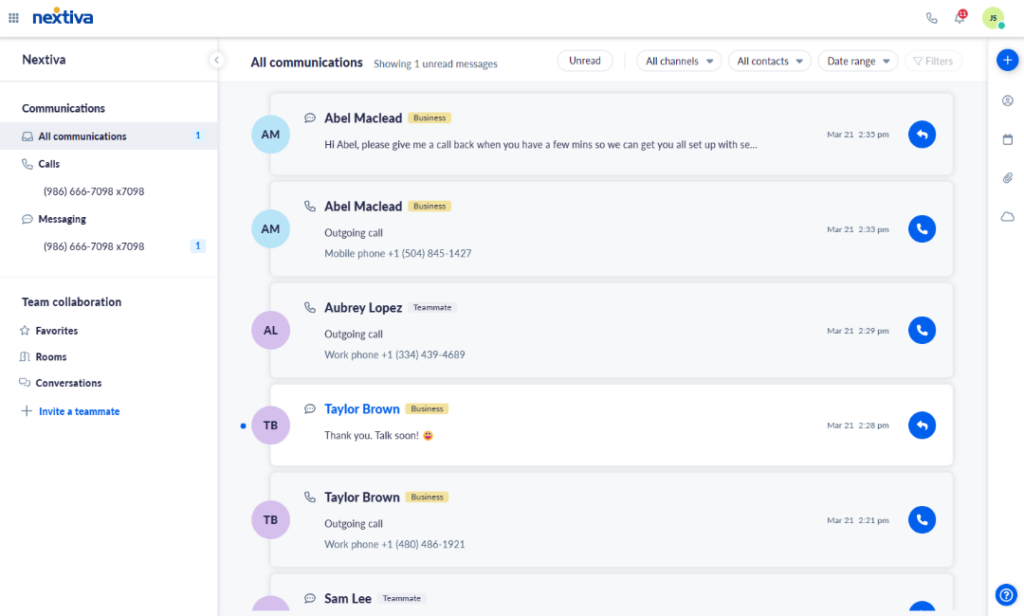
If you’re looking for an omnichannel customer management solution, Nextiva might be a good option for you. It offers voice calling, video calling, live web chat, and social media account management.
But if you’re a small business looking for a solid remote phone system, Nextiva may fall short. Here are a few drawbacks you should keep in mind:
- Texting is limited in each of its plans. You only get access to 100 texts per month on the base plan.
- Toll-free calling requires an upgrade. Even after you do so, you’re limited to 2,000 toll-free minutes per month.
- Call recording requires an upgrade. Call recording is only available as an add-on in the Nextiva base plan. You’ll have to upgrade to a higher-tier plan to record your calls.
- Third-party CRM integrations are only available as add-ons. If you use Salesforce or HubSpot, you have to pay extra to connect Nextiva to them.
With these core limitations, Nextiva might become too expensive for businesses that need a remote work phone system.
Nextiva pricing

Here’s what to expect from Nextiva’s pricing:
- Core: $15 per user per month for voice calls, 100 text messages, team chat, voicemail transcriptions, and access to the mobile app
- Engage: $25 per user per month for 500 SMS messages, 2,000 toll-free minutes, voice analytics, digital fax, call recording, and access to the Microsoft Teams integration
- Power Suite: $75 per user per month for IVR, skills-based routing, call transcriptions and summaries, and API integrations for up to 100 agents
3. Zoom Phone: Best remote phone for existing Zoom users

Pros
- Metered international calling
- AI companion for Zoom Phone
Cons
- Unlimited outbound calls require an upgrade
- Can only make four calls simultaneously
- No shared line texting
- Text automations require an upgrade
Zoom Phone is a business phone add-on to Zoom’s popular video conferencing software. It was designed to offer VoIP calling services alongside Zoom’s business communication tools. With it, you can tap into basic call management features like auto-attendants, real-time call analytics, and an AI companion.
It might look like a great option for businesses looking to consolidate their meeting and phone services in one place. However, Zoom Phone is a bare-bones phone system that’s difficult for small businesses to manage.
Basic features like free domestic outbound voice calls and scheduled texting require you to upgrade to a more expensive plan. Shared number texting, which enables your team to message customers from the same number, isn’t available in Zoom Phone. And text automations require you to purchase an add-on in addition to signing up for a Zoom Phone plan.
If you’re already on Zoom, you might consider adding Zoom Phone to your tech stack. But with all these drawbacks, you’re better off finding a Zoom Phone alternative.
Zoom Phone pricing

Adding a phone plan to your Zoom subscription could save some time and effort, but it might not save you money. There are five Zoom Phone price plans to choose from. Let’s take a look at the first two:
- US & Canada Metered: $10 per user per month for metered domestic US and Canadian calling, metered international calling, and toll-free numbers
- US & Canada Unlimited: $15 per user per month for unlimited metered domestic US and Canadian calling and an optional add-on: unlimited calling to 19 countries
The next two plans bundle the Zoom Phone US & Canada Unlimited plan with Zoom Workplace:
- Pro Plus: $18.33 per user per month to access 30 hours of meetings, local and 10 GB cloud recording, Zoom AI Companion, and access to Docs, Mail, and Calendar
- Business Plus: $22.49 per user per month to access 300 participants per meeting, unlimited whiteboards, SSO, and device management
If you’re expanding globally and are looking for a plan that offers local numbers in different territories, Zoom Phone has a plan for that:
- Global Select: $20 per user per month for unlimited domestic calling in 40+ countries and territories and a local number for those territories with each license
There are also a few add-ons to consider:
- Additional phone numbers: $5 per number per month for toll-free, local, or international premium numbers
- International calling: $10 per month to make unlimited international calls to more than 15 countries and regions. It can only be purchased with an unlimited calling plan.
- Zoom Phone Power Pack: $25 per month per license for enhanced call queue analytics and historical insights for call center teams
- Desk phones and headsets: Zoom Phone offers multiple desk phone and headset models for purchase, but they’re not available for rental
4. Dialpad: Best for large contact centers

Pros
- Offers unlimited calling and texting to the US and Canada with any plan
Cons
- More expensive plans require a three-seat minimum
- Additional numbers and international texting are not available on the base plan
- Toll-free numbers cost extra
- Porting multiple numbers costs extra
Dialpad was built for call centers that want to lean on AI to support their agent coaching. It has unlimited calling and texting to US and Canadian numbers with any plan and AI features like AI customer service scorecards and AI CSAT.
Unfortunately, Dialpad is less suited to remote teams that want to build deeper customer relationships. Former Dialpad customers have shared that it feels complex and is packed with unnecessary features. They also mention the platform is difficult and frustrating to navigate.
“We have tried a handful of other phone systems and had issues with all of them. Unfortunately, they are built for hundreds of people in a call center, not two people in different offices. This makes it so the most basic tasks are over-engineered, causing us more headaches. Quo has simplified our workflow since switching from Dialpad and MightyCall.”
Brandon Neff, Lead Technician at Quality Exterminators
Another thing you should know: Dialpad limits access to certain features behind its Pro plan.
This includes essential features like:
- Additional numbers
- International texting
- Toll-free numbers
- Porting multiple numbers
The kicker? Dialpad’s Pro plan requires a three-seat minimum. Prepare to pay $75 per month to access essential business phone features. The good news is Dialpad’s pricing is an exception rather than the rule. The best Dialpad competitors have far more scalable pricing plans.
Dialpad pricing

Dialpad offers three plans to businesses:
- Standard: $15 per user per month to access unlimited calling, unlimited AI Meetings, Dialpad SMS/MMS, and team messaging
- Pro: $25 per user per month to access 24/7 live agent support, CRM integrations with Salesforce, Zendesk, HubSpot, Zoho, and the Microsoft Teams integration, with a three-user minimum
- Enterprise: Contact for pricing to access 100% uptime, unlimited office locations, and unlimited ring groups
Curious about Dialpad’s other plans and how they stack up? Learn more about Dialpad’s pricing and plans.
5. RingCentral: Best option with desk phone rental options

Pros
- Unlimited calls to the US and Canada
- Local and toll-free phone numbers
Cons
- Major texting limits
- Only includes 100 toll-free minutes per month on the base plan
- Limited data storage on the base plan
- Porting out is a headache
If your business is hybrid and your team wants dedicated desk phones, you might want to explore RingCentral. This legacy remote phone system offers unlimited phone calls from local and toll-free numbers in the US and Canada.
Unfortunately, RingCentral isn’t a great option for growing small businesses. There are several serious drawbacks you should be aware of:
- Major texting and storage limits: RingCentral limits customers to 25 SMS messages per user per month on its base plan. RingCentral also limits call recording storage to 90 days, unless you upgrade to their Ultra plan. This makes it more difficult to track your customers’ conversation history.
- Toll-free calling limits: RingCentral limits your toll-free calling minutes. On the base plan, you’re limited to 100 minutes per month, but even if you upgrade, you’re limited to just 1,000 minutes per month.
- Porting out is difficult: Multiple former RingCentral customers have complained that porting out is a pain. Specifically, they cite the RingCentral team dragging its feet to port you out of the service, which can delay your migration to your next VoIP provider.
If all your enterprise needs is a desk phone rental, RingCentral may not be a bad fit for your team.
But it’s not a cost-effective system for any small business owner or team that works from home.
RingCentral pricing

Curious about RingCentral pricing plans? They offer three plans for you to choose from:
- Core: $20 per user per month for IVR, multilevel auto-attendant, and HD meetings up to 100 users
- Advanced: $25 per user per month to access voicemail transcriptions, 100 texts, automatic call recordings, and CRM integrations
- Ultra: $35 per user per month to access device analytics, unlimited storage, and 200 text messages
If you want to access features like shared texting, compliance, and company reply templates, you’ll need to purchase their Business SMS Booster at $25 per month. You can also access these features in its Customer Engagement Bundle. If you’re looking for an all-in-one solution, you might feel confused. The reason: there are five other service options outside of RingCentral’s business phone plans.
6. Ooma Office: Best option with fax and paging support

Pros
- Unlimited calls to the US and Canada
- Analog fax machine and overhead paging support available
Cons
- Business texting isn’t available on the base plan
- Call recording isn’t available on the base plan
- Desktop app isn’t available on the base plan
- No Zapier integration
There’s no school like old school. And there’s no better way to go old school than with Ooma Office. If your small business needs an office phone number that has analog fax machines and needs overhead paging support, then Ooma Office is for you.
Apart from those two features, Ooma is limited in what it can offer.
Here are two significant limitations you should keep in mind:
- Major base plan limits: Ooma’s base plan focuses on calling features for small businesses. However, it leaves out several essential features for remote teams to communicate with their customers. Business texting, call recording, and voicemail transcriptions require you to upgrade to Ooma’s Pro plan, which costs $24.95 per user per month. Want to use Ooma on your computer? You can’t use it with Ooma’s base plan. Calling on the desktop app is only available on the Pro plan and above.
- Limited integrations: If you want to integrate Ooma with the rest of your tech stack, you’re limited with what you can do. Ooma only offers a handful of third-party integrations. If you want to access them, you have to upgrade to its Pro Plus plan, which costs $29.95 per user per month.
With so many features missing on Ooma’s base plan, it’s hard to see how remote teams can manage their communications effectively.
Ooma Office pricing

Curious about Ooma pricing plans? Ooma offers three different plans for businesses to choose from:
- Essentials: $19.95 per user per month for unlimited domestic calling, 500 minutes of incoming toll-free calls, access to the mobile app, virtual receptionist, call forwarding, overhead paging, and IP phone paging
- Pro: $24.95 per user per month for dynamic caller ID, call recording, text messaging, and video conferencing
- Pro Plus: $29.95 per user per month for call queues, limited CRM integrations, and Ooma Meetings recording
You should also be prepared to pay for add-ons like:
- Toll-free minutes: Starts at $15.00 per month for 1000 additional incoming toll-free call minutes
- Additional business text messages: Starts at $20 per month for 3,000 extra messages
- IP phones: Traditional desk phones start at $59 per device
7. Grasshopper: Best option with multi-digit extensions

Pros
- Local and toll-free business phone numbers
- Easy-to-use desktop and mobile apps
Cons
- No call recordings on the base plan
- Limited integrations with third-party apps
- Limited texting capabilities
Grasshopper is a popular small business phone system founded in 2003. It’s a solid option for entrepreneurs looking for a second phone number app.
While Grasshopper might be serviceable as a second phone number app, it isn’t the best remote phone system. For starters, you can’t record calls on the base plan, which forces teams to upgrade. You also can’t integrate Grasshopper with third-party apps like Salesforce and HubSpot, which means your call and text data will remain siloed from your CRM.
Grasshopper also has major texting limitations you should know about. You can’t text international numbers, you can’t send MMS or group messages from toll-free numbers, and you can’t schedule messages. It also isn’t built for team collaboration. If you want to troubleshoot customer issues or assign follow-up tasks, you’ll have to do it outside Grasshopper’s platform. If you want a remote phone system that can scale with your business growth, check out these Grasshopper alternatives.
Grasshopper pricing

Unlike most other business phone providers, Grasshopper’s pricing model doesn’t charge based on the number of users you have. Instead, you pay based on how many phone numbers you need. You may end up paying more in many cases compared to other phone solutions.
- True Solo: $14 per month for one user, one phone number, and one extension
- Solo Plus: $25 per month for unlimited users, one phone number, and three extensions
- Small Business: $55 per month for unlimited users, four phone numbers, and unlimited extensions
Don’t forget to factor in add-on costs, including:
- Professional greetings: Up to 250 words at $75
Additional numbers: $9 per number per month
8. Google Voice: Best remote phone for Google Workspace users

Pros
- Simple to use for some features
- Integrates with other Google apps
Cons
- Texting is only available to US customers
- Team plans require an active Google Workspace subscription
- No third-party integrations
- No shared inboxes
- No advanced messaging features
If you’ve thought about a business phone system, you’ve heard of Google Voice. With integrations with other Google apps, it’s a good option for businesses getting started..
However, what you’ll find with Google Voice is that you’ll quickly run into texting limitations. Texting is available only to US customers. You also don’t get access to text automations like SMS auto-replies, scheduled messages, and automated texting. You also can’t integrate with third-party apps outside the Google ecosystem.
The worst part? You can’t share numbers with Google Voice. Team members have to use separate numbers in the same Google Voice account, which forces your team to work in silos.
Google Voice pricing

Here’s what you can expect from Google Voice pricing:
- Starter without Workspace: $10 per month, limited to one user, offers call recording, three-way calling, voicemail transcription, and mobile and web apps
- Starter: $10 per user per month, with a 10-user maximum, for calls and texts in the US, call forwarding, and SLAs
- Standard: $20 per user per month to access on-demand call recordings, ring groups, and phone menus
- Premier: $30 per user per month to access automatic call recordings and advanced reporting
For team plans, you’ll need to pay for a Google Workspace subscription, which starts at $7 per user per month.
How to choose a remote phone system
With dozens of remote phone systems available, it can be challenging to choose a remote phone system that’s right for you.
Here’s an evaluation framework you can use. We recommend evaluating systems for essential business communication features. Then, you can check whether they’re right for your business:
Essential features checklist
- Shared numbers and inboxes for team collaboration
- Free and unlimited calls and texts in the US and Canada
- Call recording, with AI call summaries and transcriptions
- Third-party integrations, including with CRMs like HubSpot and Salesforce
- Call routing features — ring order, phone menus, and warm transfers
- AI voice agents to handle incoming calls 24/7
- Advanced texting features like SMS auto-replies, scheduled texts, and texting templates
Evaluation checklist
- Test before committing: Look for free trials that let you experience the platform with real calls.
- Estimate your monthly costs: Match your business phone needs with a provider’s pricing model. Do they offer the features you need in their plans, or do you have to spend more to purchase add-ons?
- Understand the porting process: How easy is it to port your existing number and onboard your team?
- Read recent reviews: Focus on feedback about reliability and customer support response times.
Power your remote team with Quo

Many different phone systems serve remote teams, but Quo is hands-down the best remote phone system for small businesses.
Here’s why:
- Our Starter plan offers unlimited calling in the US and Canada, unlimited SMS/MMS messaging, call recording, and shared numbers.
- You get advanced messaging features at no additional charge. That includes scheduled messages, snippets, auto-replies, and automated texts with Zapier.
- Need to integrate with HubSpot or Salesforce? Choose our Business plan, which gives you access to AI call summaries, phone menus, group calling, and more.
- Answer incoming calls 24/7 with Sona, our AI voice agent. Train Sona on your company information. Give it custom instructions to answer questions and take down messages according to your business needs. Sona can even send texts or transfer calls to your team as needed.
Get a remote phone system your team will actually love. Try Quo free with our seven-day trial.
Frequently asked questions (FAQs)
Remote phone systems can operate with PBX hardware or VoIP technology. Some VoIP phone systems use physical IP phones, which is ideal for large enterprises with multiple physical locations. Other VoIP phone systems use existing cell phones and computers, which offers more flexibility to remote workers.
Yes, you can port your existing phone number to a remote phone system and continue using it. Find out how you can port your number to Quo .
Here are the steps to set up a remote phone system after you’ve chosen a provider:
1. Activate your account: Create an account with your remote phone system provider. Verify your identity and provide your payment information.
2. Invite your team: Add team members to your account. You can invite your team by entering their email in your workspace. They’ll get a login link they can use to create their account.
3. Import your contacts: Add your existing contacts to your phone system. You can import them directly by uploading a CSV or by syncing your Google Contacts.
4. Set up your call routing settings: Go to your phone number settings. Set up your business hours, ring order, phone menus, and backup inbound call routing options.
5. Register for A2P 10DLC: To start texting your contacts, you need to file your A2P 10DLC registration. This is a set of requirements pushed for by US telecom carriers to reduce spam texts from virtual phone providers. Registration can take 5–7 days on average, so it’s better to apply during your system setup.
The best remote office telephone system depends on your team size and business needs. For growing businesses, the best remote office phone system is Quo. It offers a user-friendly interface and extensive calling and texting features. You’ll also find collaboration and automation tools that help small teams grow fast.
You don’t need any equipment at all. Remote phone systems like Quo are designed to work with your existing smartphones and computers. Download Quo for your device, create an account, and get started.


