Spring is likely your money-making season. But the work doesn’t stop there — it’s critical for lawn care businesses to win and delight customers all year-round. And when a single job can bring in up to $6,000, missing a call isn’t just annoying — it can mean lost cash flow.
But outdated traditional phone systems don’t make it easy to manage conversations with leads.
To help you get started, this guide covers the 10 best lawn care phone systems on the market. We also compare their prices and features so you can make an informed decision.
Comparing the best 10 lawn care phone systems
Here’s a side-by-side comparison of the best lawn care phone systems:
| Provider | Starting price | Unlimited calls to US & Canada | SMS/MMS to US & Canada | Shared phone numbers | Additional phone numbers |
|---|---|---|---|---|---|
| Quo | $15 per user per month | ✔️ | ✔️ | ✔️ | $5 per number per month |
| RingCentral | $20 per user per month | ✔️ | 25 messages per user per month | Calls only without an add-on | $4.99 per number per month |
| Grasshopper | $14per month | ✔️ | MMS messaging for local numbers only | Requires upgrade | $9 per number per month |
| Nextiva | $15 per user per month | ✔️ | 100 messages per user per month | Requires upgrade | Undisclosed fee |
| Dialpad | $15 per user per month | ✔️ | For US and Canadian customers only | ✔️ | Requires upgrade |
| Zoom Phone | $10 per user per month | Requires upgrade | US, Canadian, and Australian numbers only | Requires add-on | Starts at $5 per number per month |
| Vonage | $13.99 per user per month, for up to four users | ✔️ | Local US and Canadian numbers only | Requires upgrade | Cost varies |
| Ooma Office | $19.95 per user per month | ✔️ | Requires upgrade | ✔️ | $9.95 per number per month |
| Google Voice | $17 per user per month, for more than one user | ✔️ | US customers only | Requires upgrade, calls only | Not disclosed |
| Podium | Contact sales | Requires upgrade | Requires upgrade | Requires upgrade | Not disclosed |
Let’s start with the highest-rated platform for customer satisfaction on G2:
1. Quo
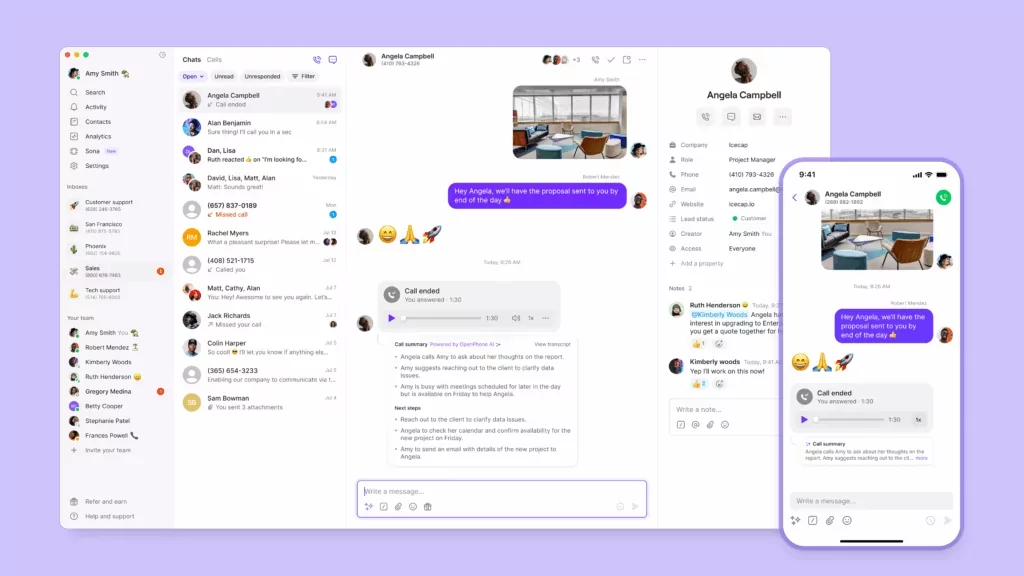
Best for: Small and growing lawn care businesses that want to scale
Quo, formerly OpenPhone, is a modern business phone system for teams looking to prevent lost revenue from missed calls. All you need is a WiFi connection and a computer or smartphone to start taking calls.
Quo offers unlimited calling and texting in the United States and Canada, so you don’t need to pay per-minute and per-message fees. You also get one free number for every user on your account. Add multiple team members to a single shared number so they can make and receive calls from the same number. Then easily add additional phone numbers to your account as needed, whether it’s direct lines for team members or if you expand to multiple cities.
Although Quo works on personal devices, you can have two numbers on one phone. This helps keep your personal contacts separate from business clients. You can text photos and videos of completed work to customers without giving out your personal number. You can even set up business hours, so you don’t get messages in the middle of the night. That way, you’ll always know whether you’re getting a work call or a personal call. It’s just one of the many reasons why Quo is rated #1 for customer satisfaction on G2.
What if a customer calls while you’re laying stripes on a lawn or after hours? Just set up Sona, Quo’s AI voice agent, which automatically picks up the phone. Sona can answer common questions, route callers to available team members, or send texts with booking links while on the phone. It can also take messages and contact details so someone else can follow up later. That way, when a potential customer calls in and you can’t pick up, they don’t just move on to a competitor.
Here’s what it looks like to have a call handled by Sona:

You could also assign a phone number to your Google Ads campaigns. Then, route those inbound calls to Sona. Sona will answer the phone, collect contact information, and generate an AI call summary that your team can review later. With this information, your reps can qualify which leads are worth following up on, then call the customer back when they have time.
Check out how Waterloo Turf, an artificial grass and turf company, uses Quo to qualify leads and use call transcripts for team training. They also easily moved their existing numbers over from their previous provider with the help of Quo’s support team:

Quo pricing

Quo has three pricing plans you can choose from:
- Starter: $15 per user per month for unlimited calls in the US and Canada, voicemail transcriptions, shared phone numbers, on-demand call recording, auto-replies, AI message responses, and more
- Business: $23 per user per month for Jobber integration, AI call transcriptions, phone menus, automatic call recording, and more
- Scale: $35 per user per month for AI call tags, dedicated onboarding support, inbound phone support, and priority chat and email ticket support
How to get a business phone number with Quo
Setting up a business phone number for your lawn care business is simple with Quo as your phone system provider. Follow these three steps:
- Sign up for an account with Quo — when you sign up, you can try Quo forfree for seven days.
- Select your city or area code in the US or Canada to pick your phone number or a North American toll-free number. If you have an existing number you can move it over to Quo once you’ve confirmed the platform is a great fit during your free trial.
- After finishing the signup process, including choosing your preferred plan, you can start calling and customizing your phone settings.

You now have a virtual phone number for your lawn care business. If you run into any issues during the signup process, fill out this form to reach our support team.
2. RingCentral

Best for: Desk phone support
RingCentral is a legacy VoIP provider that launched in 1999. It could be the best lawn care phone system for your business if you have a physical office that uses traditional desk phones. The platform lets you make unlimited domestic calls in the US and Canada via local numbers.
Keep in mind that RingCentral’s SMS is limited. For example, you’ll only get 25 messages per user per month on the base plan. Plus, if you want your team to have access to a shared SMS inbox, you’ll need to pay an extra $25 per month.
If you want a vanity phone number like 1-800-LAWNPRO, expect to pay a one-time setup fee of $30 plus $4.99 per month after that.
RingCentral pricing

RingCentral’s pricing lets you pick from three different plans:
- Core: $20 per user per month for 25 text messages, unlimited domestic calls, IVR, visual voicemail, and access to the API
- Advanced: $25 per user per month for 100 texts, core reporting and insights, CRM integrations, and automatic call recording
- Ultra: $35 per user per month for unlimited storage, 200 text messages, and device analytics
3. Grasshopper

Best for: Multi-digit phone extensions
Grasshopper is an older business phone system that launched in 2012. It specializes in virtual phone number extensions. These can help route calls to specific people or departments from your main business number via a phone menu. That way, it’s easier to manage dispatching and appointment scheduling. Just create extensions for specific lawn care groups, like mowing or seasonal cleanup, then route appointment requests to the correct extension as needed.
But Grasshopper only offers one third-party integration: Google Voice. This means you can’t connect other tools to your phone system. There’s no way to sync data between your customer relationship management platform, or CRM, for example. Plus, Grasshopper only stores call recordings for 30 days. This can make it harder to review details from peak seasons or get up to date on longer projects.
Grasshopper pricing

Grasshopper’s pricing lets you select from three different plans:
- True Solo: $14 per month for one user, one phone number, and one extension
- Solo Plus: $25 per month for unlimited users, one phone number, and three extensions
- Small Business: $55 per month for unlimited users, four phone numbers, and unlimited extensions
4. Nextiva

Best for: Omnichannel messaging
Nextiva is a customer experience management platform that pulls conversations from multiple channels into its app. Lawn care teams can connect with customers across voice, chat, SMS, email, social, and messaging from one place. On the base plan, you can even host video calls. This gives your team a simple way to have face-to-face conversations when something needs a bit more context than a traditional phone call.
But like RingCentral, Nextiva is a lawn care phone system that comes with many limitations. You only get 100 SMS per user per month on its base plan. A shared SMS inbox also requires upgrading to the Engage plan, which costs $25 per user per month. Many of its best features — like toll-free numbers and skills-based routing — also require upgrades. You can’t even access Nextiva’s AI transcriptions and summaries without paying for the most expensive plan, which costs $75 per user per month.
Nextiva pricing

Nextiva’s pricing lets you choose from three different plans:
- Core: $15 per user per month for video meetings, phone calls, call routing, and team chat
- Engage: $25 per user per month for shared SMS inbox, advanced reporting, and video meeting recording
- Power Suite CX: $75 per user per month for web chatbots with the option to transfer to a live rep and skills-based routing
5. Dialpad

Best for: Contact centers
Dialpad was designed for contact centers and includes a few tools that support lawn care businesses. Like the other providers mentioned in this article, it offers three-way calls so you can chat with staff members and clients at the same time. It also has a multi-level auto-attendant that lets you create nested menus. For example:
- Billing: Press one to speak with the billing team → Press one for invoice questions, press two to make a payment
- Estimates: Press one to speak to the estimates team → Press one for an in-person estimate, or press two for virtual consultations
- Customer service: Press one to speak with customer service → Press one to schedule an appointment, press two to report an issue
Keep in mind that you only get one number to start with Dialpad. If you want to buy additional numbers, you’ll need to upgrade to the Pro plan, which costs $25 per user per month. You also need the Pro plan to access Dialpad’s Zapier integration, unless you want to manually move call data between multiple tools. And if you want number extensions like Grasshopper, you’ll need to contact sales for a quote on the most expensive plan.
Dialpad pricing

Dialpad’s pricing provides three different plans:
- Standard: $15 per user per month for unlimited domestic calling, SMS and MMS, and multi-level auto attendant
- Pro: $25 per user per month with a three-user minimum for Zapier integration, phone support, and additional numbers
- Enterprise: Contact for pricing for a 100-user minimum for extensions, 99.9% uptime, and unlimited ring groups
6. Zoom Phone

Best for: Zoom users
If you already use Zoom video meetings for your business, you can purchase Zoom Phone as an add-on to make phone calls. It offers basic VoIP number features, like IVR, call recording, and text messaging support. But it doesn’t offer unlimited outbound domestic calling. For that, you’ll need to upgrade your plans — not ideal for fast-growing lawn care brands.
But like many other lawn care phone providers on this list, Zoom Phone’s best features require some add-ons. Shared inboxes cost $25 per user per month. And while the Pro Plus plan that costs $18.33 per user per month offers some “premium” integrations, they require fees after your first year. Keep in mind that the price for each is set by the individual app provider.
You may also give up a few must-have features. For example, Zoom Phone doesn’t provide scheduled texts.
Zoom Phone pricing

Zoom Phone’s prices are confusing. Here’s what you’ll get on each plan:
- US & Canada Metered: $10 per user per month for metered domestic and international calling, native Windows, macOS and Linux desktop apps, and a phone extension number
- US & Canada Unlimited: $15 per user per month for unlimited domestic calling and integration with Salesforce
- Pro Plus: $18.33 per user per month for all of Zoom Phone features plus access to Workplace Pro features like 10 GB of cloud storage and unlimited docs
- Global Select: $20 per user per month for domestic calling in 40 selected countries and territories
- Business Plus: $22.49 per user per month for Zoom Phone features and Workplace Pro features with 300 participants per meeting and unlimited whiteboards
7. Vonage

Best for: Video conferencing
Vonage is a cloud-based VoIP solution that lets you customize your lawn care phone solution using APIs. However, this means some of Vonage’s features require the API to be set up. Let’s say you want to send scheduled texts. Vonage’s APIs may be complex and difficult to use without proper developer support. But with other lawn care phone systems on this list, like Quo, you can get scheduled texts on the base plan.
Vonage does offer mobile apps on its base plan. That way, your lawn care crews can answer business calls using their smartphones even in the field. Keep in mind that call recording and call groups require upgrading to the most expensive plan, which costs $27.99 per user per month.
Vonage pricing

Vonage’s price depends on the number of users. Here’s what you can expect to pay for a team of one to four:
- Mobile: $13.99 per number per month for desktop and mobile apps, unlimited domestic calling, and SMS and MMS support
- Premium: $20.99 per number per month for access to third-party integrations, VoIP desk phone support, and team messaging
- Advanced: $27.99 per number per month for 15 hours of on-demand call recording and call groups
8. Ooma Office

Best for: Overhead paging and analog fax
Ooma Office is a cloud-based VoIP phone system that lets your team make unlimited calls in the US, Canada, Mexico, and Puerto Rico. You’ll also get tools like virtual receptionists and voicemail-to-email. Plans come with features like analog fax and overhead paging — which most Ooma alternatives don’t offer, but you may not need them anyway.
One major drawback of Ooma Office is that texting isn’t available on the base plan. Even if you upgrade, you’re limited to a max of 250 messages per user per month. Want to make calls from the desktop app or set up team chat? You’ll need the Pro plan, which costs $24.95 per user per month.
Ooma pricing

Ooma’s pricing lets you pick from three different plans:
- Essentials: $19.95 per user per month for the desktop app without calling enabled, overhead paging, and unlimited calls in the US, Canada, Mexico, and Puerto Rico
- Pro: $24.95 per user per month for SMS, call recording, and the desktop app with calling enabled
- Pro Plus: $29.95 per user per month for call queuing, hot desking, and advanced call flows
9. Google Voice

Best for: Google Workspace users
There are two different tiers of Google Voice: the free version and the paid business phone system. The free version of Google Voice is only available in the US and doesn’t offer multiple phone numbers. Google Voice for business offers three-way calling, call recording, and call transfers. You can also set up ring groups for different teams, like billing or managers.
But unlike other lawn care phone systems, Google Voice for business doesn’t offer many automations. There are no auto-replies or scheduled texts with Google Voice. Plus, it doesn’t integrate with apps outside of Google Workspace. You also have to purchase a Google Workspace subscription for every user if you have more than one team member. That means the least you would pay for Google Voice will likely be $17 per user per month.
Google Voice pricing

Google Voice requires you to pay an additional $7 per user per month for Google Workspace if you have more than one person on your team.
Here’s what you can expect to get on each of Google Voice’s pricing plans:
- Starter with voice only: $10 per user per month for one user, unlimited domestic calling in the US and Canada, and voicemail transcription
- Starter: $10 per user per month for calls to the US and Canada, three-way calling, and call recording
- Standard: $20 per user per month to connect existing phone numbers to Voice with SIP Link, and ring groups
- Premier: $30 per user per month to unlock automatic call recordings and advanced reporting
10. Podium

Best for: Collecting customer reviews
Podium is a customer interaction platform, which means it focuses on customer communication and online reviews. From a single dashboard, you can manage reviews, leads, payments, texts, web chat, and social media messages. It also provides an AI review response suggestion if you’re not sure how to respond to one-star write-ups.
But Podium’s pricing isn’t public, so you’ll need to contact the sales team to find out how much you’ll pay. Plus, Podium doesn’t offer its VoIP phone system on the base plan. Instead, you’ll need to pay an undisclosed fee for an add-on. Compare this to a Podium alternative like Quo, which offers all VoIP features on the base plan.
Podium pricing

Podium’s pricing isn’t public. However, here’s what you can expect to get on each plan:
- Core: AI review response suggestions, basic reporting, and the phone systems add-on available to purchase
- Pro: AI phone call summaries, text marketing with images and GIFs, and hosted surveys
- Signature: Discount on phone plans, discount on desk phones, and a proactive fraud alert system
What features to look for in a lawn care phone system
When choosing between multiple lawn care phone systems, look for a platform that offers:
- A business number that works anywhere. Take calls anywhere without confusing business contacts with personal calls. You should also be able to answer calls in between mowing, driving, and working from home.
- Phone menus, or IVR, to prevent calls from falling through the cracks. Callers should be able to route themselves to the right places so they don’t have to be transferred between reps. Plus, you can create self-service options to help reduce interruptions during busy workdays. This could be prerecorded messages that share your business hours and service areas.
- Call routing that saves time. Skills-based routing can help direct incoming calls to the most qualified person right away. Reps can also use warm transfers to streamline handoffs to help reduce phone tag. Like from your pest control tech to your invoicing department, for example.
- Business texting to easily stay in touch with customers. Quickly message customers with things like reschedule notices and before-and-after photos. Keep an eye out for automated texting features. This can include the ability to connect with tools like Zapier to set up texts confirming when your team will arrive for landscaping.
- After-hours call handling to never miss a lead. Capture leads in real time, even while you’re out, off, or busy. First, set business hours so new inquiries are routed to an AI agent after hours. Then train your AI voice agent on how to respond to specific questions.
Quo: The best lawn care phone system

As you’ve seen, lawn care is fast, seasonal, and competitive. You need the right business phone system to keep customers coming back season after season. That’s why many growing companies rely on Quo: the best lawn care phone system for growing teams.
You can use Quo to manage calls, texts, and voicemails from any device with a WiFi connection. It’s easy to route leads to the right team member or department, then split responsibility for calls and texts with shared numbers. Even if no one’s free to pick up the phone, Sona can handle calls on your behalf.
See how Quo can capture leads for your lawn care business by trialing the platform for free for seven days.
FAQs
The lawn care industry uses business phone systems to connect with customers through phone calls or text messages. This makes it easier to route incoming calls to the right place, follow up on missed calls, and send links by text to schedule appointments.
Lawn care business software can help you:
– Split responsibility for calls and texts with shared phone numbers
– Find key details faster without re-listening to calls using AI call summaries
– Identify recurring issues or customers you may need to follow up with by organizing each call using AI call tags
– Have a clear record of what customers agreed to over the phone in case a dispute comes up with AI call transcriptions
An AI answering service, sometimes called a virtual receptionist, can pick up the phone if no one else on your team can. That way, you can still answer calls, capture leads, and respond to common questions after hours or when your team is out for the day. Learn more about AI answering services for landscaping businesses.
You can use a phone system to help your lawn care business:
– Respond faster to estimate requests and service questions while on job sites
– Get calls to the right person or department during busy mowing and peak seasons without having to manually transfer calls
– Miss fewer calls while your team is working or driving between properties
– Update customers quickly regarding start times, weather delays, and reschedules
Lawn care phone systems store all calls, texts, and voicemails in the same place. That way, everyone on your team can stay coordinated in the field. You’re likely to miss fewer calls and schedule jobs faster.